Menu

Posts tagged “mobile”

[Sponsor] TextExpander touch 2.0

My thanks for TextExpander touch for sponsoring Elezea’s RSS feed this week! I use TextExpander extensively across all my devices, and I can highly recommend it.

Type faster on your iPhone or iPad using short abbreviations that expand into long snippets, such as email addresses, URLs, and standard replies. Tap in your abbreviation and it automatically expands to the full snippet. You can even insert today’s date automatically with the default abbreviation “ddate”! Use Dropbox to sync your snippets to all your iOS and Mac devices!

New in TextExpander 2.0: Make customized, boilerplate replies fast and easy using fill-ins. Compose messages and expand snippets in formatted text. Insert macros for date, time, date math, etc. easily when editing your snippets on iOS.

Please note that iOS does not allow TextExpander touch to work in the background (as it does in Mac OS X). But you can expand snippets directly in over 160 apps that have built-in TextExpander touch support including OmniFocus, Drafts, Things, iA Writer, DayOne, Byword, Notesy, Elements, and WriteRoom. See the complete list of supported apps.

TextExpander

Sponsorship by The Syndicate.

Breaking Development: Build on the present to develop for the future

Breaking Development is a conference about the future — as it should be. But as I reflect on the past couple of days of talks about going beyond the desktop, there’s one thought I can’t get out of my head:

We need to push the limits at both ends of the technology spectrum.

I’ll come back to that. First, I wanted to summarize the major themes that stood out for me at the San Diego conference on 22-23 July:

  • Forget about device classes like phone, tablet, laptop, and desktop. Instead, let ergonomics, input methods, and multiple-screen experiences guide design decisions.
    • We need to start thinking about designing for wrist devices (smart watch) and eye devices (Google Glass), as well as wall devices like TVs (think Xbox One) (see my notes on Luke Wroblewski’s talk).
    • The biggest development challenges are going to come from new input methods like voice control and gesture devices like Leap Motion (see the slides from Jason Grigsby’s talk).
    • The problem is that we can’t reliably detect screen sizes and input methods (keyboard, mouse, touch) to adapt content appropriately.
    • The good news is that we can look forward to advances in CSS3 that allow for full control over content layout (see the slides from Divya Manian’s talk).
  • So, how should we adapt to these changes?

These are important themes and I got a lot value out of the talks. We should absolutely explore the boundaries of new input methods like voice and gestures, and play around with experimental CSS features that let us take more control over content layout. This is how we move technology forward, and where we get to take advantage of the latest hardware and software standards.

But I’m a bit worried that we tend to push into the future so fast that we abandon fields of existing technology to whither and die before they’ve reached their full potential. It’s fine to experiment with the new and exciting, but innovation doesn’t happen only in the forward direction — lateral jumps often result in really innovative ideas.

I’m not sure if this is the best way to illustrate what I’m trying to say, but here’s what it looks like in my head. If we focus only on pushing the boundaries of the future, we end up with a pretty small “area of innovation”, for lack of a better word:
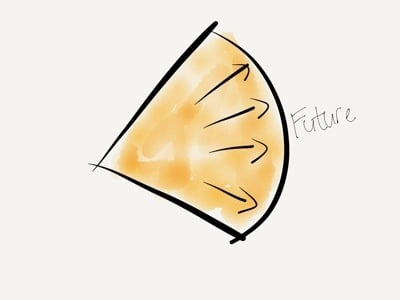
Pushing the future

But if we also work on pushing the boundaries of what we already have, we increase that area by a large amount:
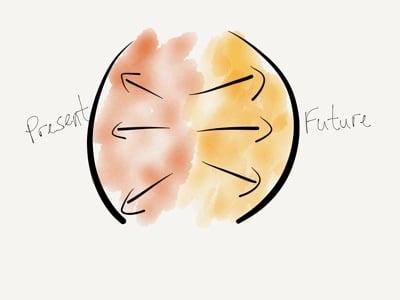
Pushing both ends

One example I keep coming back to is USSD. It’s a low-end mobile technology that got completely skipped over in the U.S., but is widely used all over Africa since it’s supported from the most basic feature phones all the way to the iPhone. Projects like MAMA (using mobile technologies to improve the health and lives of mothers in developing nations) and messaging platforms like Vumi already use USSD in really innovative ways. We’re not talking about these low-end product solutions enough, and that’s a shame.

There are really two sets of questions we have to explore when designing and developing beyond the desktop. First, what can we do at the far edge of technology? How can we push the boundaries of the future? How can we go further?

But we also have to ask, what can we do at the low end of technology? How can push the boundaries of the present? How can we do more with what we already have?

As much as what I learned at Breaking Development will help evolve our company’s processes for future-friendly development, the most surprising outcome for me is how much it got me thinking about the potential to use existing technologies to solve the problems we run into while we push into the future. This is why I got more out of Breaking Development than I expected, and why I can highly recommend it to anyone who designs and builds digital interfaces.


Breaking Development: Pitfalls and Triumphs of the Cross-Screen Experience

I’m attending the Breaking Development conference in San Diego this week, and will be posting my notes from a few of the talks here.

I really enjoyed Cameron Moll’s talk entitled “Pitfalls and Triumps of the Cross-Screen Experience”. One of the things that I appreciated is that it’s one of the first talks here I’ve seen that looked a bit more critically at Responsive Web Design. Not that Cameron isn’t a fan of responsive design, but he does bring up some interesting questions about its limitations. Here are my notes.

The need for multi-device experiences

  • “We don’t know what will be underneath Christmas trees two years from now, but that’s what we need to design for today” - Brad Frost
  • The best interface is the one that’s within reach.
  • Forget mobile. Think multiscreen.
  • At any time during the day, I may have 2-5 screens in use.
  • Would be more if you include screens in cars, other internet-enabled devices.

Five guidelines for multi-screen experiences

  • Discrete: an experience on one screen independent of, but ideally cohesive with, experiences on other screens
    • Twitter.com and NPR.com have great multi-screen experiences
  • Sequential: An experience capable of flowing from one screen to another
    • Amazon.com cart is available across multiple devices
    • 67% use multiple screens sequentially for online shopping
    • 90% use sequential for online activities in general
    • Up to 49% email themselves a link for continuing the activity on another device
  • Complementary: An experience complemented by a device’s unique capabilities
    • Day One and Google Maps apps utilize device capabilities of desktop browser and native apps
  • Extensional: An experience that controls, or is controlled by, another source
    • Instagram photos can be reposted to other networks, or pulled into apps like Flipboard
    • APIs essential for these types of experiences
  • Simultaneous: An experience involving multiples screens used simultaneously
    • Watching TV while going online with phones or tablets

Some do’s and don’ts for cross-screen experiences

Don’t:

  • Stereotype devices (or their owners, for that matter)
  • Fall prey to the convenience of device silos — we’re using multiple devices for multiple purposes
  • Unforgivingly force your app on users — let them use the web if they want to

Do:

  • Respect users’ mental models, aesthetically & functionally
    • Flipboard iPad and iPhone apps have different scrolling directions (left-right vs. up-down)
    • The iOS App Store “Update All” button is on opposite sides on iPhone and iPad
    • Simplenote has a “Done” button on iPhone, but not on iPad
  • Sequence tasks across screens (to the extent possible)
  • Make it vertically responsive, too
  • Leverage outside expertise

A closer look at Responsive Web Design

Don’t believe responsive design is a one-size-fits-all solution:

  • RWD is a must… for the browser, that is
  • How did native app development escape the same scrutiny?
  • Why don’t we have Media Query Snippets for native apps?
  • Amazon’s lack of RWD is not a concern — most of us rarely use their web site on mobile devices
  • You have to figure out the cross-screen experience for your product, because there’s not a single solution that applies to everyone
  • Remember, No One’s Forgotten How to Pinch and Zoom
  • What if pinch & zoom utilized media queries to render the layout differently (for those wanting denser content) vs. one size fits all? Demo: Gesture-Enabled RWD Proof-of-Concept

eBay CEO John Donahoe gets it:

We understand mobile to be just another screen…

It was a great talk with lots of food for thought.

Breaking Development: One Design to Rule Them All

I’m attending the Breaking Development conference in San Diego this week, and will be posting my notes from a few of the talks here.

Luke Wroblewski kicked off BD Conf 2013 with a talk entitled “One Design to Rule Them All”. It was a bit of a State of the Nation on what’s going on in the device landscape today. Here are my notes from the talk.

  • It’s impossible to determine what kind of experience we should design for by looking at standard device types (phone vs. tablet vs. laptop, etc.)
    • For example, smartphones now go up to 7” screens and even a bit above.
    • Tablet sizes are equally all over the map, and to make things worse, you now have devices that are basically giant desktops that can transform into tablets or even phones.
  • What is the difference between a phone and a tablet anyway?
    • Pixel densities are not that different any more
    • Can’t reliably determine how big the device is
    • Can’t rely on feature detection (like if it makes phone calls or not)
  • We can no longer rely on knowing what type of device it is to figure out what to build.
  • It’s not clear any more what a mobile device is, what the difference between a tablet and a laptop is, and whether it’s touch-enabled or not (see Leap Motion).
  • We have to stop thinking about designing for phones, tablets, and laptops (device-specific).
  • Instead, what makes more sense is to look at the ergonomics of each device:
    • You get eye-sized or wrist-side devices, palm-sized devices, lap-sized devices, desk-sized devices, and wall devices like big-screen TVs
    • Each of these types require subtle differences in the interfaces, which is where responsive design come in.
  • This brings us to the principles of multi-device design:
    • Work mobile first
    • Support a continuum of screens
    • Account for high resolutions
    • Optimize for touch (can’t use mouse/cursor easily for touch)
    • Support cursor & keyboard
  • Good news: you only need one web design.
  • Bad news: it’s a new and different way of doing web design.
  • But wait, do we compromise the large screen experience if we go mobile first?
    • No, we’re creating a good experience everywhere, and we enable people to do more things in more places.
    • Look at Currys, Skinny Ties, and O’Neill as good examples.
  • And what about “the mobile context”?
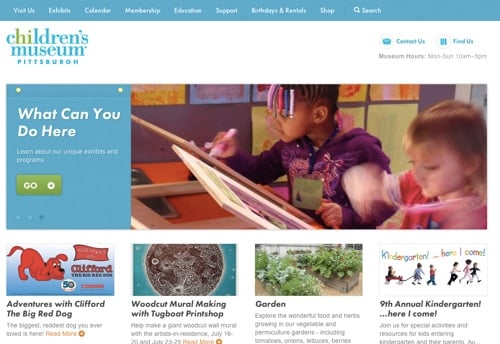
    • Children’s Museum of Pittsburgh: on mobile, they bubble up relevant content like how to get there, and they deprioritize that content on larger screens.
    • So you can still have one design, but use different priorities on mobile.

Smaller screens show important information about visiting like directions, hours, and contact details:

Museum mobile

On larger screens that information is deprioritized:

Museum desktop

It was a great high-level introduction to the conference, and I’m looking forward to the rest!

[Sponsor] Digg Reader: a Google Reader replacement

My thanks to Digg Reader for sponsoring Elezea’s RSS feed this week. If you haven’t settled on a Google Reader replacement (or even if you have), check it out!

Digg (yes, that Digg) has released a new RSS Reader for the web, iPhone, and iPad (Android coming soon). The design is sleek and clean, and the apps are speedy and efficient.

Whether you’re a hardcore RSS junky or simply want all your favorite online reading in one place, Digg Reader is for you. It’s free and available today!

Digg Reader

Sponsorship by The Syndicate.

On photography, constant moments, and memory

Clayton Cubitt starts his fascinating article on how photography is changing with a definition of what French photographer (and the father of modern photojournalism) Henri Cartier-Bresson called “The Decisive Moment”:

Cartier-Bresson believed that the photographer is like a hunter, going forth into the wild, armed with quick reflexes and a finely-honed eye, in search of that one moment that most distills the time before him. In this instant the photographer reacts, snatching truth from the timestream in the snare of his shutter. The Decisive Moment is Gestalt psychology married to reflexive performance art in the blink of a mechanical eye.

It is the creation of art through the curation of time.

Cubitt goes on to point out that we now live in the Constant Moment, where it’s possible to take endless photos of everything, and edit (“curate”) later. Yet, notably, he doesn’t believe that’s a bad thing:

The Constant Moment doesn’t end [what characterizes the Decisive Moment]. All it does is capture the billion missed Decisive Moments that previously slipped through our fingers, by expanding the available window of temporal curation from “here and now” to “anywhere and anytime.” The Constant Moment eliminates dumb luck from photography. It minimizes, as much as anything ever can, the Hawthorne Effect caused by a lifeless camera between our interactions. It continues the photographic tradition of artistic democratization by flattening limits of time, of geography, of access.

It’s very interesting to follow Cubitt’s article by reading Dave Pell’s excellent This is You on Smiles, which essentially argues that the Constant Moment is changing how we experience life and create memories:

During a presentation on happiness at the Ted Conference, Nobel laureate Daniel Kahneman makes a distinction between the experiencing self and the remembering self. Digital photography gives additional dominance to the remembering self. […]

The digital age gives a new (and almost opposite) meaning to having a photographic memory. The experience of the moment has become the experience of the photo. […]

Snapping and sharing photos from meaningful events is nothing new. But the frequency with which we take pictures and the immediacy with which we view them will clearly have a deep impact on the way we remember. And with cameras being inserted into more devices, our collective shutterspeed will only increase.

Both pieces are worth reading this weekend.

[Sponsor] Backblaze: online backup & data dackup software

1 in 2 computer users lose data every year. Back up all your data with Backblaze online backup. It’s unlimited, unthrottled, uncomplicated, and unexpensive.

Don’t risk losing your music, photos, movies, and whatever else you’re working on or editing. Backblaze continuously and securely backs up all the data on your computer and external hard drives.

Need to restore or access your files? Download a single file or all your data from any web browser or have Backblaze FedEx you a flash key or USB hard drive. Even quicker - access your files right from your iPhone.


Whether it’s a broken hard drive, lost external, or a stolen computer, data loss happens all the time. For less than a cup of coffee, just $5/month, Backblaze can back up all the data on your computer.

It’s easy. Stop putting it off. Start your free trial, and get your backup started today.

Backblaze

Sponsorship by The Syndicate.

My Google Reader replacement setup

There have been quite a few posts over the past few months about what to do once Google Reader shuts down this weekend. I’ve been sticking my head in the sand, hoping that Silvio Rizzi will come to the rescue at the last minute and let me keep using my current setup, which is to use Reeder across all my devices (Mac, iPhone, and iPad). But alas, it looks like that’s not going to happen. So after much weeping and gnashing of teeth, here’s the setup I’ll go with for now.

  • Feedbin as RSS sync backend. I tried Feed Wrangler, but the lack of tags/folder structure is a deal breaker for me. I also set up Feedly, and it works nicely, but I’m just a bit worried about the service in general. There doesn’t appear to be a business model, and there’s currently no way to get your feeds out of the service. So, for now, $2/month for Feedbin is what I’m settling on. I really hope they add the ability to reorder and edit tags soon (come on, give the feature request some love!), but that’s the only major problem I currently have with it.
  • ReadKit on Mac. ReadKit just got a major update to support Feedbin, and it also lets me see and read all my Instapaper and Pinboard links in one place. This will be my desktop replacement for Reeder.
  • Reeder on iPhone. I don’t know how much longer Reeder will be around, but the iPhone client does support Feedbin, and it’s still my favorite RSS client ever, so I’ll stick with it for now.
  • Mr. Reader on iPad. Mr. Reader also just got a major update to support Feedbin. I used Mr. Reader before, but switched to Reeder when the iPad app became available. But since the Reeder iPad app is now very old (and still only supports Google Reader sync), I’ll move to Mr. Reader for the time being.

This is obviously quite a disjointed setup, and I’m not going to give up hope that there will be One Client To Rule Them All in the coming months. But this setup will hold me over until then. Like having to listen to Owl City while you wait for a new Death Cab for Cutie album to come out.

But I do feel like I now know way too much about the RSS reader landscape than I every wanted to. Thanks, Google.

Thanks, Google

Kids and their fascination with phones

James Fallows interviewed Linda Stone on Maintaining Focus in a Maddeningly Distractive World. This part, in particular, reminded me how destructive our technology use can be:

We may think that kids have a natural fascination with phones. Really, children have a fascination with whatever Mom and Dad find fascinating. If Mom and Dad can’t put down the device with the screen, the child is going to think, That’s where it’s all at, that’s where I need to be! I interviewed kids between the ages of 7 and 12 about this. They said things like “My mom should make eye contact with me when she talks to me” and “I used to watch TV with my dad, but now he has his iPad, and I watch by myself.”

There are many reasons why it’s important for kids to grow up around technology, but we should never forget how important it is for our kids to have our undivided attention when we’re with them.

[Sponsor] Tokens: a Mac app for managing App Store promo codes

Thanks to Tokens for sponsoring Elezea’s RSS feed this week.

Tokens is a Mac app for managing App Store promo codes

Tokens gets promo codes from iTunes Connect, creates shareable URLs for each code and notifies you once they’re redeemed.

The first step to getting your app noticed is inviting bloggers to try it. Promo codes let you give away free copies of your app, but unfortunately they’re laborious to create, awkward to redeem and impossible to track.

With Tokens you create a code with one click and bloggers can redeem it just as easily. By naming the token you can tell who has tried your app and follow up with them. You can also reuse any unredeemed codes before they expire.

Tokens is available now at usetokens.com/syndicate. Elezea readers get a special 20% discount until July using this link.

Tokens

Sponsorship by The Syndicate.