Menu

Posts tagged “mobile”

Mobile applications that trick kids into buying stuff

I completely agree with Gabe Weatherhead’s views on apps made for kids in The Value Of App Reviews:

My number one reason to give a bad rating and review is when an app made for kids has both up-sell and review requests plastered all over the screen. They are trying to prey on small children tapping anything that pops on the screen. If you make a kids app, do not put links to your other apps in the game. Put them in the preferences. Put them in the app description. Hell, put them in some kind of app documentation. But when they are in the game, you are telling me that you’re shady and unscrupulous and I can’t trust your app.

This is a dark pattern, and I simply delete the app if I come across this kind of design. For some better patterns to follow when designing apps for kids, see Luke Wroblewski’s Touch-based App Design for Toddlers.

Apple's quarterly results and its focus on long-term strategy

Dan Frommer has a nice graphical overview of Apple’s September quarter results. As he points out in a follow-up post:

Weaker than anticipated iPhone sales last quarter forced Apple to miss earnings expectations tonight ”” a rare showing for the company. As a result, Apple shares are getting whacked right now, down about 7% in after-hours trading.

Here’s the thing about those “weaker” iPhone sales. If Apple released the iPhone 4S in September like most people expected, the 4 million units they sold last weekend would have happened in time to beat analyst expectations (note that Apple still beat its own guidance).

Instead of releasing something sub-standard to keep the analysts happy, Apple decided to wait until the hardware and software were both ready and up their own quality standards. That’s what long-term strategy looks like.

Windows Phone, iPhone 4S, and what the people want

I know I shouldn’t be surprised when corporate executives say silly things without the slightest sense of irony, but it still floors me every time. Here is Andy Lees, the head of Microsoft’s Windows Phone business, talking about the iPhone 4S in the Seattle Times Newspaper:

From a pure hardware perspective, I was surprised they’re not giving the consumer more choice. People want a variety of different things.

When you read that statement next to this Apple press release, you’re left scratching your head:

Apple today announced pre-orders of its iPhone 4S have topped one million in a single day, surpassing the previous single day pre-order record of 600,000 held by iPhone 4.

If you say something like “people want a variety of different things”, you should probably back that up with the number of Windows Phone phones (is that how you’re supposed to say it?) that have been pre-ordered or sold. I haven’t seen that press release from Microsoft.

Update (10/13): Looks like we now have those numbers. Horace Dediu reports that Windows Phone has sold just a few more units in 3 months as the iPhone 4S sold in 24 hours:

During the last quarter for which we have data (ending June) I have an estimate that Windows Phone sold only 1.4 million units (Gartner’s sell-through analysis suggests 1.7 million). That gives Microsoft a 1.3% share of units sold (Gartner 1.6%), a new low.

The other problem with Andy’s statement about people wanting more options is that it’s just, well, not true. Harry Marks aptly points to this TED talk on the paradox of choice, and quotes Barry Schwartz:

With so many options to choose from, people find it very difficult to choose at all.

You want an iPhone? Here it is. Choose your storage size and have fun. You want a Windows Phone phone? Here are a variety of models to choose from. Try to enjoy figuring out which one is best for you.

All of this reminds me of a classic answer on Quora to the question Why is Dropbox more popular than other programs with similar functionality? Michael Wolfe makes the point that Dropbox is so successful because it focuses on one thing, and doing that one thing really well. That one thing is a folder that syncs your stuff. That’s it.

“But,” you may ask, “so much more you could do! What about task management, calendaring, customized dashboards, virtual white boarding. More than just folders and files!”

No, shut up. People don’t use that crap. They just want a folder. A folder that syncs.

The root cause of the problem is the lingering fallacy that more features = a better product. For all the talk about the importance of simplicity, and the growing list of successful products that just do a few things well, we just can’t seem to get rid of this belief that more = better. Andy Lees also falls into this trap in the Seattle Times interview:

The more capabilities we add into our phone, the more delightful it becomes to use because you seem to have more at your fingertips without this clutter and confusion of the other platforms.

More capabilities = less clutter and confusion? Really? To bring this all the way back to Design and the problem with this type of thinking, here is Scrivs in Focus:

The best designs always have a singular focus. The prettiest designs might have multiple things you can focus on, but that doesn’t make them the best designs.

We live in a time where there is so much happening around us that when we are able to use anything that has a singular focus it makes it easy. When we don’t have to make a decision on how we are supposed to use a design it makes it easy. You can’t beat focus. More features don’t beat focus. More doesn’t beat less unless the less is crap.

Turns out that when it comes to technology, in most cases people don’t want a variety of different things. They want one thing that works really really well. And that’s why the iPhone 4S got more than one million pre-orders in a single day.

The implications of Amazon's Silk browser

The most interesting part of today’s Amazon announcement is not whether or not they have an “iPad killer” (ugh), but the news of the new Silk browser that will run on the Fire. The details are getting lost among all the “Is Apple dead?” talk, so I wanted to point you to a couple of important articles about the implications of Silk. Here’s a recap of what it does, from their blog:

Instead of a device-siloed software application, Amazon Silk deploys a split-architecture.  All of the browser subsystems are present on your Kindle Fire as well as on the AWS cloud computing platform.  Each time you load a web page, Silk makes a dynamic decision about which of these subsystems will run locally and which will execute remotely.

Silk will use Amazon’s EC2 service to pre-cache web browsing, and in the process return heavily compressed images to the browser. There are two things that might not be immediately clear from their announcement and accompanying video.

First, this is not a new idea (and it can have pretty negative effects on user experience). Here is Mark Wyner in Amazon Silk. Just Like AOL Used to Make:

This is quite exciting news for the laymen. But does anyone remember AOL and their promise of accelerated browsing? They, too, elected to compress images and run a proxy server to deliver websites faster.

The result was horrible. Professional web designers take great care to build websites which are optimized for speed while retaining as much quality and visual integrity as possible. When ther’s a middle man degrading our work, it causes problems.

Second, the data mining and aggregation implications are quite staggering. Here is Chris Espinosa in Fire:

But what this means is that Amazon will capture and control every Web transaction performed by Fire users. Every page they see, every link they follow, every click they make, every ad they see is going to be intermediated by one of the largest server farms on the planet. People who cringe at the data-mining implications of the Facebook Timeline ought to be just floored by the magnitude of Amazon’s opportunity here. Amazon now has what every storefront lusts for: the knowledge of what other stores your customers are shopping in and what prices they’re being offered there.

I’m sure we’ll hear more about these issues (and of course the privacy implications) in the days to come, but for now these are two very interesting posts on the implications of Silk - definitely read through them both.

Windows 8, Metro UI, and why most people buy Windows PCs

Marco Arment recently wrote an excellent post about the differences between Apple and Microsoft customers. It got me thinking about Windows 8, Metro UI, and a slightly different theory on what Microsoft is trying to accomplish with the next version of their operating system. Here’s Marco:

People who aren’t willing or able to compromise on their needs regularly are much more likely to be Windows customers. The Windows message is much more palatable to corporate buyers, committees, middlemen, and people who don’t like to be told what’s best for them: “You can do whatever you want, and w’ll attempt to glue it together. It won’t always work very well, and you might not like the results, but we will do exactly what you asked for.”

He leaves out one important group of people who are also more likely to be Windows customers: regular users who don’t care about computers at all, and just want something to perform their daily email / browsing tasks on. Matt Gemmel sums up this crucial market really well:

The biggest (and most lucrative) set of customers is ordinary people, without a computing degree or specialist knowledge. These are people with no interest in specific technologies, but only in how easily they can finish today’s tasks without reading the manual. Apple caters to that market; companies who loudly proclaim their device supports CSS3 and MPEG4 and SDHC don’t even understand that it exists.

I agree with Marco’s (and Matt’s) main point: one of the main reasons for Apple’s success is their ability to compromise in the way that designers use the word: saying no to the right things. And that the Microsoft team will need to learn to compromise like that if they want to compete seriously on the tablet front.

Still, most people buy Windows PC’s not because they care about extensibility or because they have moral objections to Apple’s supposed walled garden. Most people buy Windows PC’s because they are just plain indifferent. It’s what they know, it’s what they’ve always used, and they don’t care enough about computing to consider other alternatives. This isn’t a good or a bad thing in itself, it’s simply the way it is.

One OS to rule them all

Microsoft’s decision to combine the desktop and tablet UI (Metro) on PC’s and provide access to both from the same device is the most interesting part of the unfolding Windows 8 story - particularly because we don’t know how regular users will react. Gruber nails the main problem with this approach:

I’ve been thinking all along that I’d rather Microsoft have let Metro stand alone as a next-generation OS, separate from Windows. I’m hung up on the question of how any OS that lets you do everything Windows does could compete with the iPad, because the iPad’s appeal and success is largely forged by the advantages that come from not allowing you to do so many of the things Mac OS X can do.

Surely Microsoft knows that this might be problematic for developers and users alike. I have to believe that they’re not that short-sighted. So why would they go ahead with this awkward combination? We have to consider that combining the two UI’s is part of Microsoft’s response not just to the fact that herds of people are abandoning Windows PCs for Macs[1], but also to how these users are finding their way to a new Mac on their desks.

A story that got a lot of attention recently is how Mike Elgan, the editor of Windows Magazine, made the switch from Windows to Mac. He talks about the beginning of his… um”¦ “conversion” using the phrase “gateway drugs” to describe his experience with Apple’s non-Mac devices:

The perfect out-of-box experience with the iPhone, the elegance of the whole experience of using an iPhone, re-set my expectations for how consumer electronics and computers should function. I started looking at the out-of-box experience of buying a Windows PC with a new contempt. The crapware. The stickers. The anti-virus software problem where the cure is worse than the disease. The flimsy hardware. It’s not so much that I despised Windows PCs, but that it felt like Microsoft and the PC makers despised them, like they all have no respect for their own platform.

Be afraid, Microsoft

This, more than anything, should scare the crap out of Microsoft. Apple is using iPods, iPhones, and iPads - considered “non-threatening” devices by the masses - to get users to reconsider their computing worlds.

Suddenly regular users start doing something they’ve never done before: wonder if maybe, just maybe, the Mac experience can be as pleasant as that of an iDevice. So when their Dell crashes for the 10th time in a week and it’s time for a new computer, that iPod in their pocket serves as a not-so-silent reminder: why not just walk into an Apple store and see what all the fuss is about?

So maybe that’s what’s going on with Windows 8 and Metro. More than just their version of a tablet UI, Microsoft could be placing their bets that regular users will pick up a Metro style tablet, like it a lot, and remain comfortable on their Windows PC’s knowing that the Metro UI is available for them there as well.

Everyone is uncomfortable with change, so if Microsoft can promise a consistent experience across mobile and desktop devices, it could stop the hemorrhaging to Apple products that we’re currently seeing. I’m not saying that it will work, just that it’s an interesting strategy for which they should at least get some credit.

I’ll leave the final word to Marco, who wraps up his post articulating what a giant gamble it is to combine the very different metaphors of desktop and mobile UI’s:

But how will their customers react?

Will Metro be meaningfully adopted by PC users? Or will it be a layer that most users disable immediately or use briefly and then forget about, like Mac OS X’s Dashboard, in which case they’ll deride the Metro-only tablets as “useless” and keep using Windows like they always have?

Still, Metro is the first thing to come out of Microsoft that I’m interested in since the Xbox. It looks genuinely innovative in many areas, and I can’t wait to see how this all plays out.


  1. Be honest: when is the last time you heard a story about someone switching from a Mac to a Windows PC? ↩

My notes from Oliver Rippel's NetProphet talk on "The current state & future of e-commerce in Africa"

These are my notes from Oliver Rippel’s talk at NetProphet 2011. Oliver is the CEO of MIH, a group company overseeing African and Middle East online properties like Mocality and kalahari.net.

The state of e-commerce in Africa

  • As soon as e-commerce becomes more than 1% of retail sales, that’s when it becomes mainstream
  • US not the most successful e-commerce market - Korea is, with 9% of retail sales online. US is at 4%
  • E-commerce in Africa is still nascent:
    • Egypt - 22% Internet penetration, less than 0.01% online retail penetration
    • Nigeria - 29% Internet penetration, less than 0.01% online retail penetration
    • South Africa
      • 6 million Internet users, 12% penetration
      • 0.4% online retail penetration
      • 16.7% credit card penetration
      • 14 e-commerce sites in Top 100 SA sites

Positive e-commerce macro-indicators in Africa

  • Big average projected real GDP growth
  • There is a growing middle class of 320m Africans
  • High mobile penetration (World average: 60%; South Africa: 92%)
  • The promise of accessible and affordable broadband Internet is there

Lessons for building a winning e-commerce business in Africa

MIH’s focus is on the full e-commerce value chain The brands cover the whole purchase cycle: awareness, interest, decision, action, post sale, resale

  • Embrace mobile
  • Leverage offline
    • Go where the users are - online marketing on its own simply won’t work
    • Go to shopping malls and put up posters - whatever works
  • Cash is king
    • 50m million banks accounts in Africa, 95% of transactions are cash-based
    • The only mobile payment system that is scaling is M-Pesa in Kenya: P2P payments
    • They are converting a cash economy into a digital economy, so that can now also be used for e-commerce
  • Build trust
    • Open marketplace model is inadequate in low trust early stage environment - unlike eBay
    • Instead, MIH uses controlled marketplaces that reduce barriers for buyers by building a trusted brand

How long can BlackBerry hang on to its smartphone market in South Africa?

BlackBerry maker Research In Motion just cut their earnings guidance for Q1 2011, blaming slower sales. Even as the future of RIM looks bleak from a US perspective, you wouldn’t think so looking at the South African market. BlackBerries are simply everywhere. I’ve always wondered why BlackBerry has such a large portion of the SA smartphone market, and I can think of two four reasons:

  1. Most BlackBerry contracts come with unlimited free data, which (to my knowledge) no other smartphone handset does at a reasonable cost.
  2. When it comes to business users, it’s still the only phone trusted by corporate IT departments.
  3. A capable smartphone at a reasonable price (although an influx of cheaper Android and Nokia phones might make this a moot point). (Thanks Steyn for pointing this one out in the comments)
  4. The popularity and cost-effectiveness of BBM (although WhatsApp largely takes this away as a selling point). (Thanks Stafford for pointing this one out)

Now, here’s where it gets interesting. The latest earnings guidance cut clearly spells big trouble for RIM, and in a great blog post on Forbes, Eric Jackson lists 10 questions he would ask CEO Jim Balsillie based on that news, including the following:

Your bullish analysts used to say “yes, the US business is dying but International is going to keep growing.” You seemed to be saying last night that demand is drying up in Latin America too.  Does that mean the US was a sign of what is to come for your future International growth?

Now combine that with a recent IDC report that predicts Africa would become the first truly post-PC continent:

IDC estimates that in South Africa, 800,000 PCs were shipped in 2010 and the number is expected to decline by about four percent annually to reach 650,000 by 2015. Meanwhile, 1.3 million handsets were shipped in 2010 and that rate is expected to increase at a compound annual growth rate (CAGR) of nine percent to reach 2 million annually by 2015.

You have to ask yourself: how long can BlackBerry keep its apparent dominance in the smartphone market in South Africa? As mobile demand increases it appears that they will simply be unable to produce hardware that can keep up with consumers’ ever increasing smartphone requirements.

The “How Angry Birds would look on a BlackBerry” joke is funny, but there is certainly some truth behind the joke. As the line between work and life continues to blur, you don’t want a business phone that can also make calls. You want a personalised handset that can also be used for work. This is something RIM simply hasn’t figured out how to do, so they continue to double down on the “corporate security” angle. As Slate recently pointed out in a review of the PlayBook:

The incoherence, I think, is a sign of something deeper: Research in Motion doesn’t know what kind of company it wants to be. It made its fortune selling gadgets to chief information officers””IT guys who wanted to give their employees access to office e-mail on the go, but only in a way that accorded with corporate security policies. When they talk about RIM’s strengths, the company’s leaders like to point to their “CIO friendliness.”

The trouble is, being friendly with CIOs doesn’t matter as much as it used to. Nowadays people don’t ask the tech guy which mobile gadgets pass muster. Instead, tech guys look to employees to decide which gadgets to support. RIM’s strategy””to infiltrate companies as a first step to becoming a mass-market hit””has been eclipsed by the Apple approach, which is to infiltrate schools and homes, and then hope that regular people nag their IT guys to let them use iPads at work, too.

Meanwhile, Nokia appears to have given up on the US, but they’re coming for Africa in full force:

Nokia is already working with developers in several African countries and Peng feels that Nokia’s next big growth opportunity is to go beyond bringing affordable voice and SMS to delivering affordable web and applications.

“Rural populations live their lives largely outside of the reach of high quality services; through solutions like Nokia Data Gathering, we are already supporting field workers to collect, send and receive information quickly and securely via a mobile phone helping circumvent infrastructural challenges and speed up data collections needs in sectors such as health, agriculture, environmental conservation, population census and emergency services,” added Peng, in a press release sent after her speech.

It might not happen in the next few months, but I think there is a dangerous trend on the horizon for RIM. Between mobile handset growth in SA, trouble in the US market, and huge competition on the way, there’s a perfect storm brewing in BlackBerry land.

Little UI details: Twitter iPhone app's clever solution to Reply / Reply All

The Twitter iPhone app is getting a world of criticism right now, and I have to say I agree with most of it (for an excellent overview and analysis of one of the main issues, see Why the Quick Bar is still so offensive). But let’s also give credit where credit is due. As Little Big Details has shown us - sometimes small UI touches can take a user experience from “meh” to “awesome” pretty quickly. And I think the Twitter iPhone app’s implementation of replying to a tweet with multiple users in it does just that.

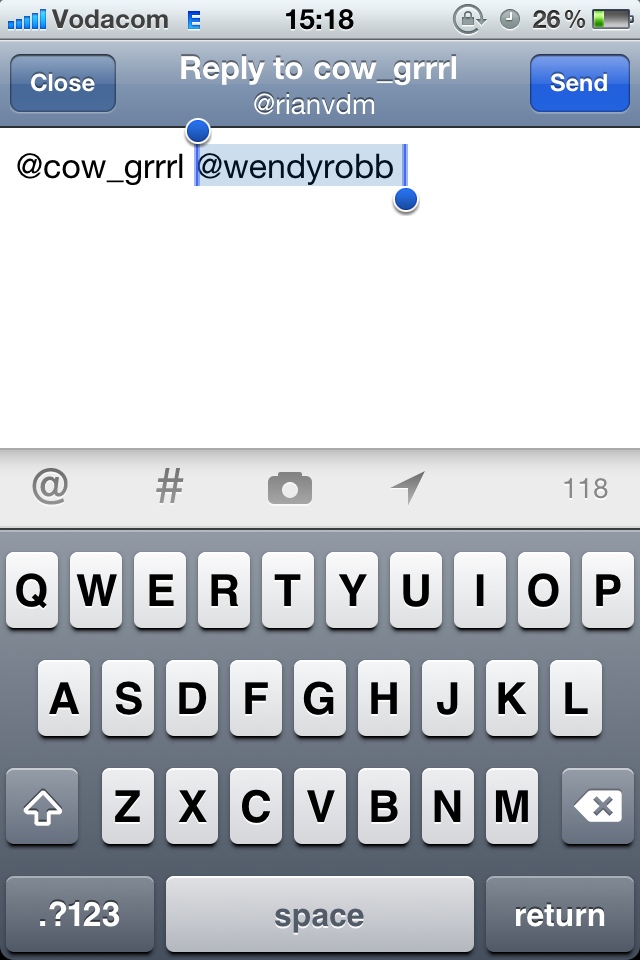
If you respond to a tweet with two or more usernames in it, you technically need two options: Reply (to reply just to the person who wrote the tweet) or Reply All (to mention everyone that’s mentioned in the tweet). So, two buttons needed, right? Not in the Twitter app. There is just one icon to reply to such a tweet, and the screen you get then looks like this:

The screen automatically selects all users that appear directly after the user who wrote the original tweet. So in essence the reply button gives you three options:

  • Just start typing if you want to erase other users from the tweet and just respond to the original user.
  • Place you your cursor after the original user if you want to /cc the other users.
  • Place your cursor after all users if you want to write a traditional “reply to all” tweet.

This is such a small thing, but I can guarantee the implementation was a deliberate design solution to a specific problem:

How can we reduce the need for a Reply button and a Reply All button while at the same time improving the user experience?

Little details like this should inspire all of us to sweat the details and not go “Ah, that part doesn’t matter, it works fine, right?”

Best practices for user onboarding on mobile touchscreen applications

As the UX field grows and more companies start taking user-centered design seriously, we need to start thinking about how we’re going to rescue all those stray sheep of the UX world — those areas that are getting left behind because we’re (understandably) focusing on the obvious, most important things. Two of these “stray sheep” issues come to mind immediately.

One is bad error messages, which is the subject of a whole other rant, so I won’t go into that now (I’ve started a Flickr group to collect examples - come join and contribute!). The second is user onboarding, which Whitney Hess defines as follows:

Onboarding is the process by which you can help users overcome the cold-start problem””a blank profile, an unfamiliar interface, a general feeling of “what the heck do I do next?”

And that’s what I’d like to address in this post.

The importance of user onboarding

When Jakob Nielsen wrote his 10 Heuristics for User Interface Design in 1990, he devoted one of his rules of thumb to user assistance and help documentation:

Even though it is better if the system can be used without documentation, it may be necessary to provide help and documentation. Any such information should be easy to search, focused on the user’s task, list concrete steps to be carried out, and not be too large.

Yes, first prize is to have a system that doesn’t require onboarding or documentation. But that’s not always possible, especially in the fairly new field of mobile design. So, if you need to provide onboarding help, what’s the best way to do it?  A List Apart recently published an excellent article (Good Help is Hard to Find) on how to write good Help content, with specific reference to the importance of context:

Help content can be rendered in many ways, but if possible, embedding it directly within the feature it serves is almost always the best choice. When help is offered in context, affordance is high: That is, the help is obvious to the user. Even better, context-based help is the least disruptive to workflow, as it doesn’t require the reader to view a separate page.

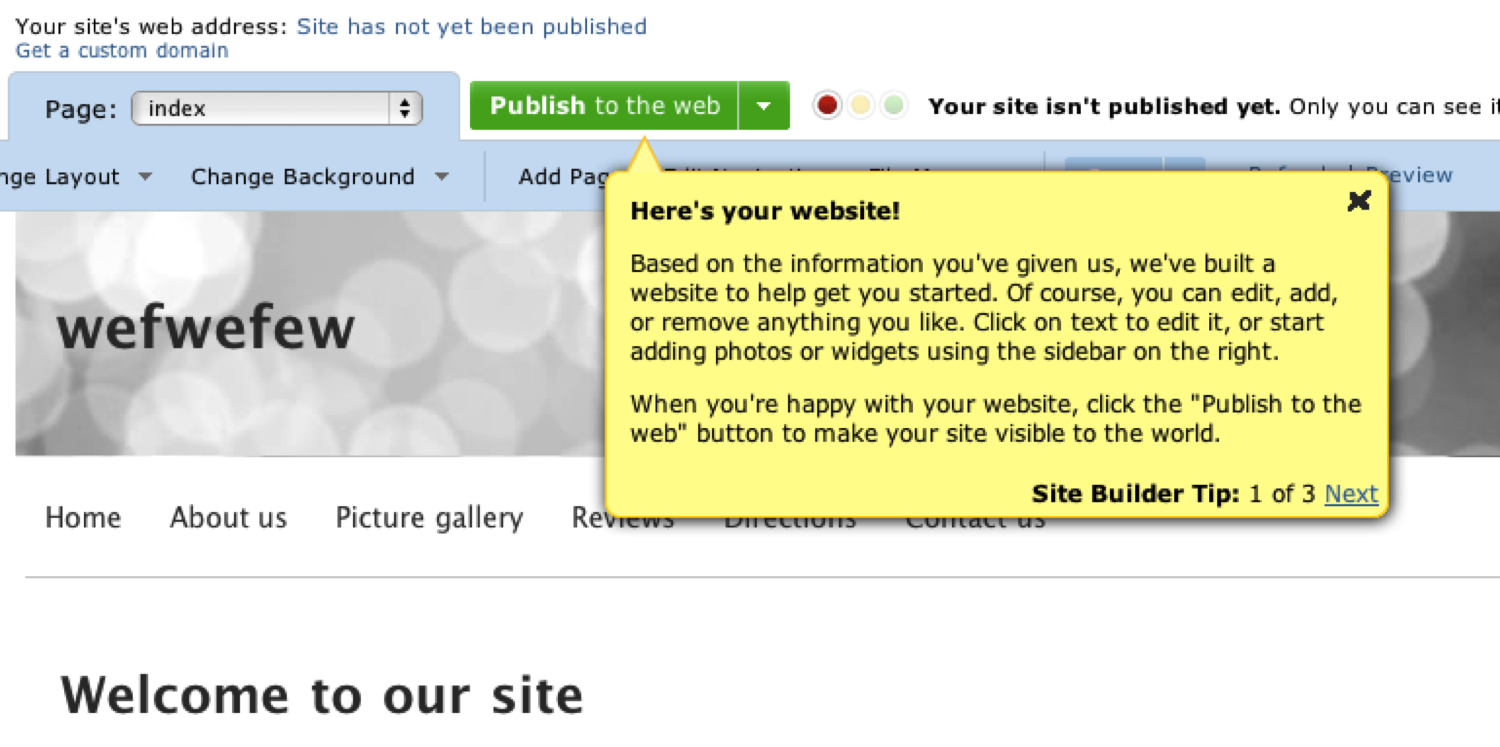
To name one example of contextual onboarding: when you first sign up for an account on website builder Yola.com, you see this screen, which provides tips on how to get started:
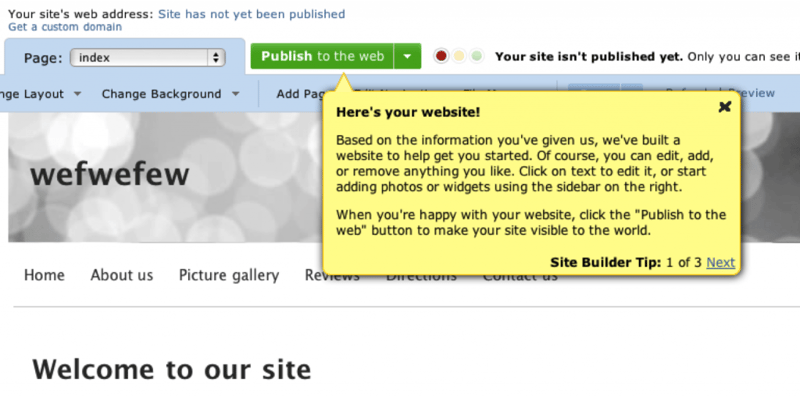
You can write whole books on good and bad implementations of user onboarding in web apps (The Baymard Institute recently posted 3 Examples of Inline Help, which is well worth reviewing). But I want to focus specifically on how user onboarding should be applied to mobile touchscreen applications, because we don’t yet have best practices for that.

Here are some best practice guidelines I’d like to propose for onboarding users on these devices:

1. Don’t show all the information at startup

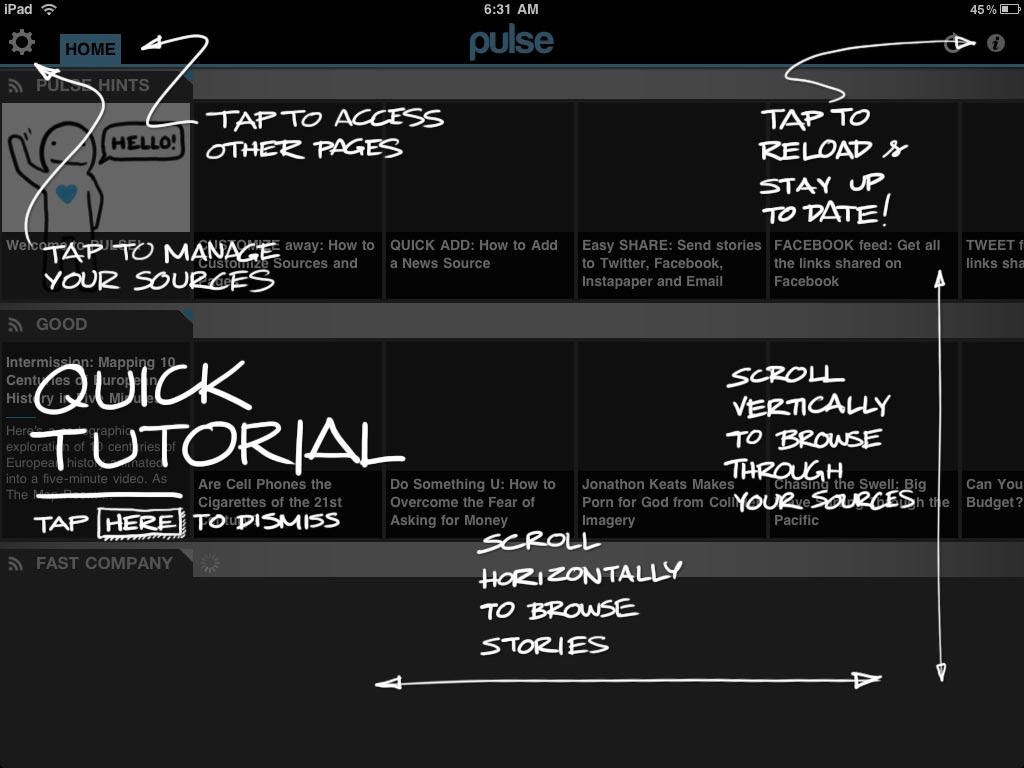
When you first start up the magazine app Pulse, you get this screen:
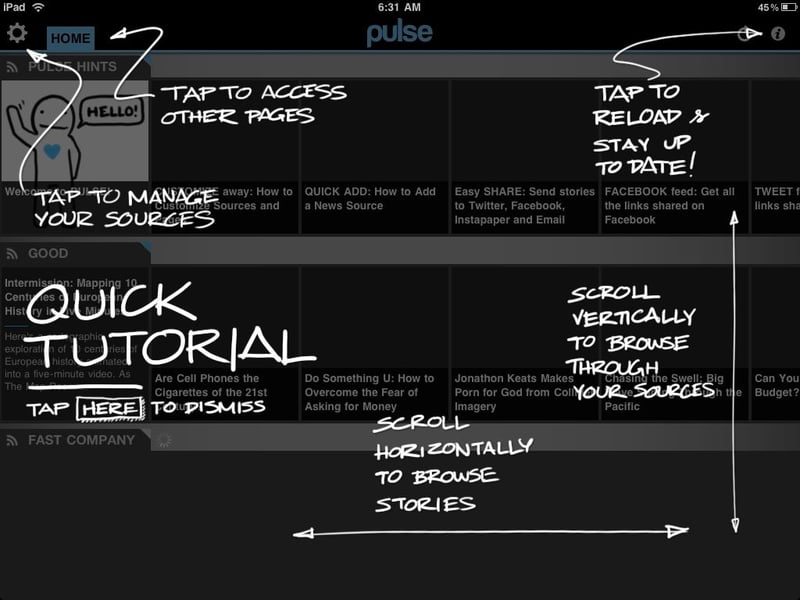
It’s certainly different - fun and quirky. But it’s also overwhelming and too much, too soon. I haven’t started using the app yet. In fact, when I installed it I wasn’t even sure what it does - is it an RSS reader or a news feed from predetermined sources? Or something completely different? I can’t do a tutorial on something I don’t understand yet.

So, guideline #1: make sure that users have familiarized themselves enough with your app to have the correct mental model before you start teaching them how to use it.

2. Show one (or only a few) tips at a time

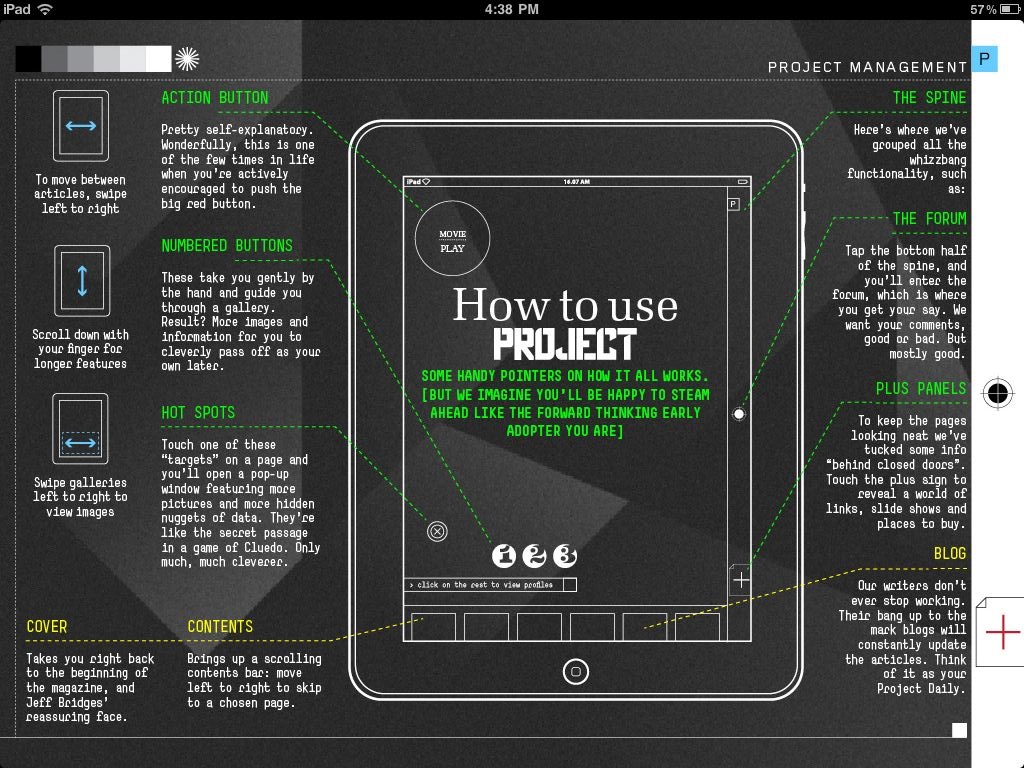
Project is another magazine app that’s getting a lot of press at the moment. Project adheres to rule #1 by getting you a few pages into the experience first before showing you the ins and outs of the app itself. But then you get to this page:
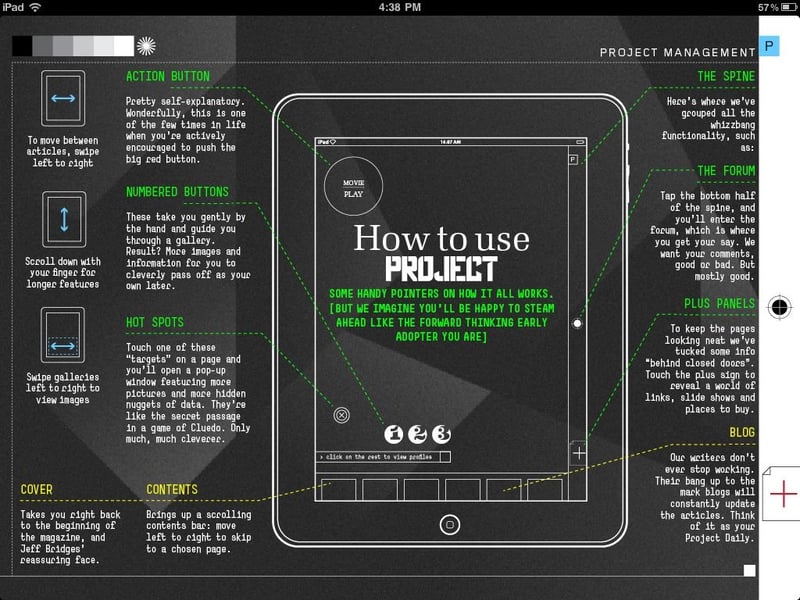
That is just way too overwhelming. Ignore, for the moment, the heavy visual design that makes this so hard to read. Even if this was designed in a clearer way, there is still too much information on the page, too many things to try to absorb and commit to memory. Speaking of Nielsen, remember this heuristic:

Recognition rather than recall: Minimize the user’s memory load by making objects, actions, and options visible. The user should not have to remember information from one part of the dialogue to another. Instructions for use of the system should be visible or easily retrievable whenever appropriate

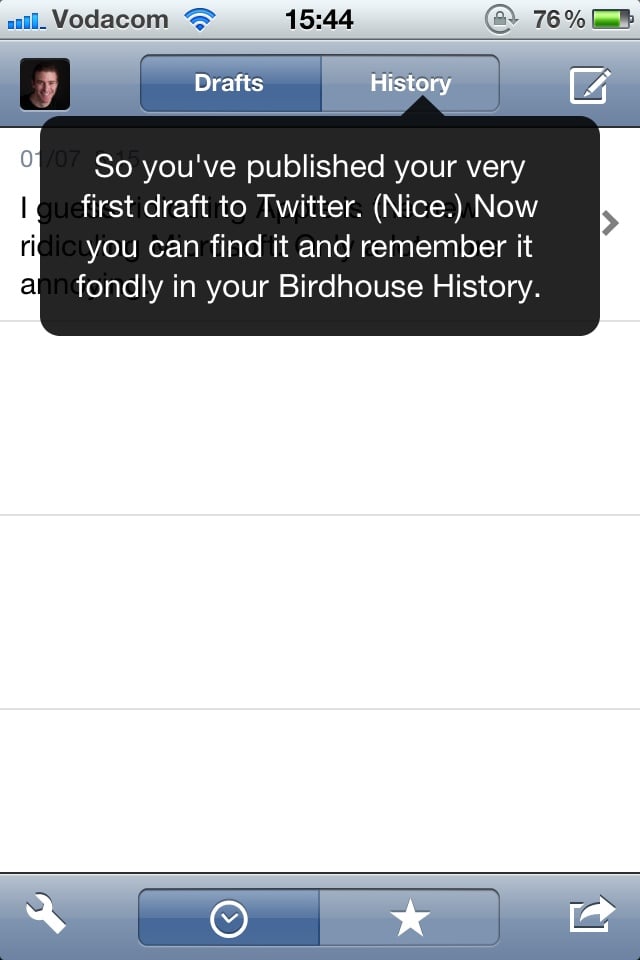
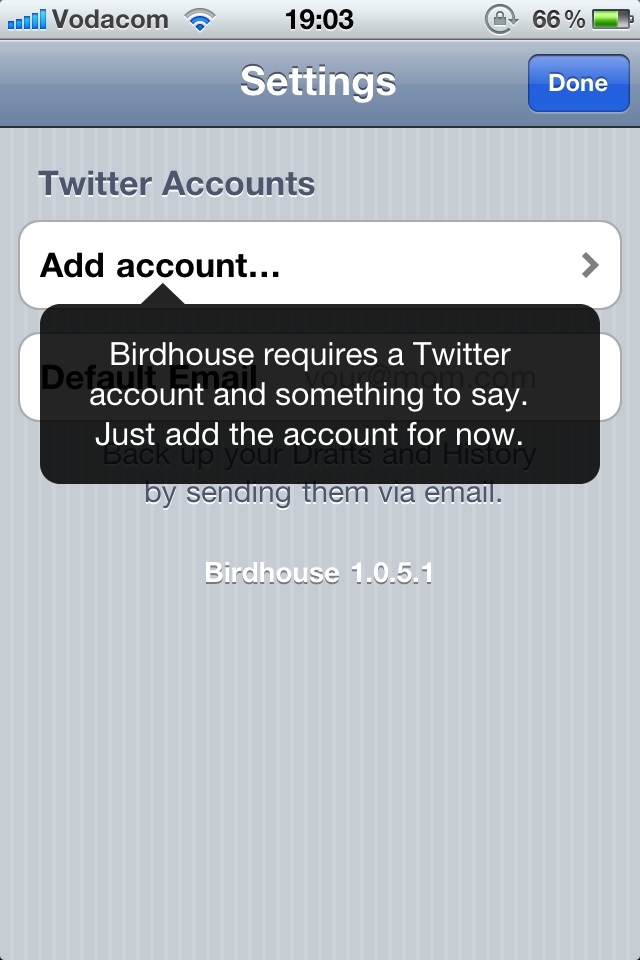
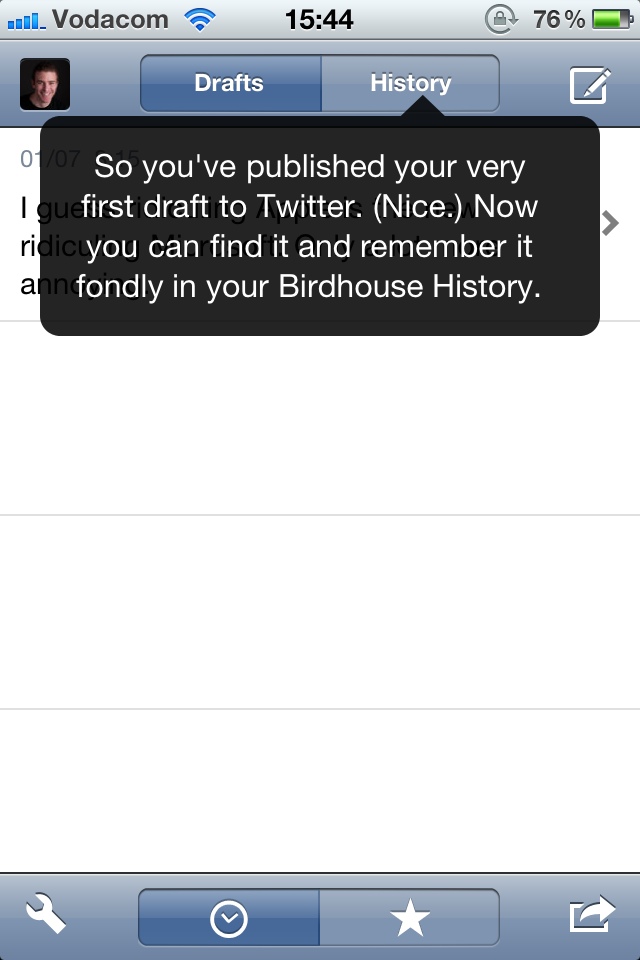
This page increases cognitive load significantly, and requires the user to remember too much. And this brings us to guideline #2: Show users only the information they need to take the immediate next step(s) for using the application. Consider, for example, two screens from the iPhone app Birdhouse:
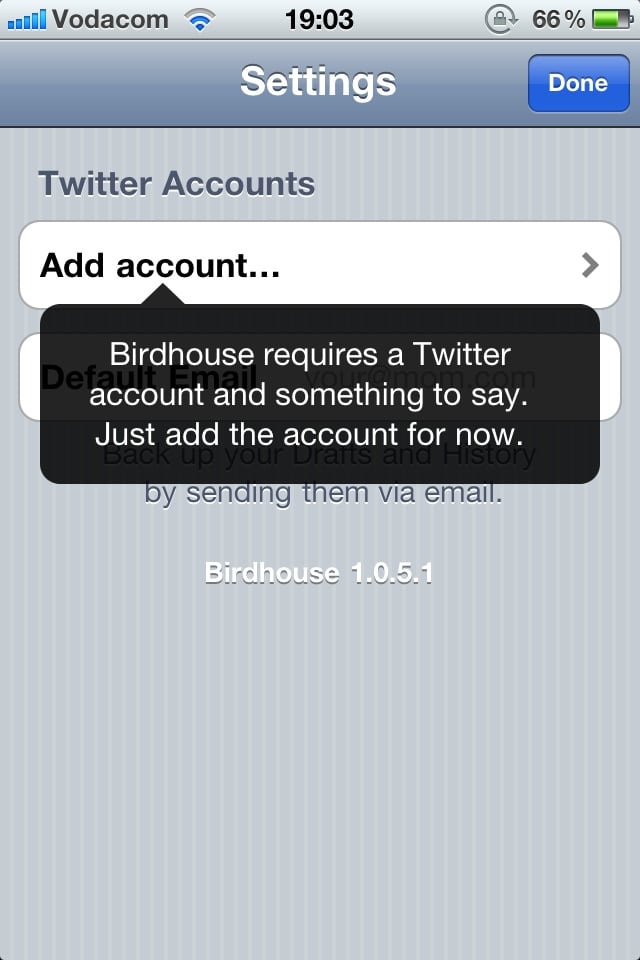
It follows guideline #1 by telling you what you’re going to use the app for, and it follows guideline #2 by telling you one thing you need to know to use the app, at the exact time you need it. The first screen lets you know what information is needed to use the app. The second screen tells you how the “History” function works, at the moment you might want to start using it (after you’ve published your first tweet).

3. Always keep the app’s context visible

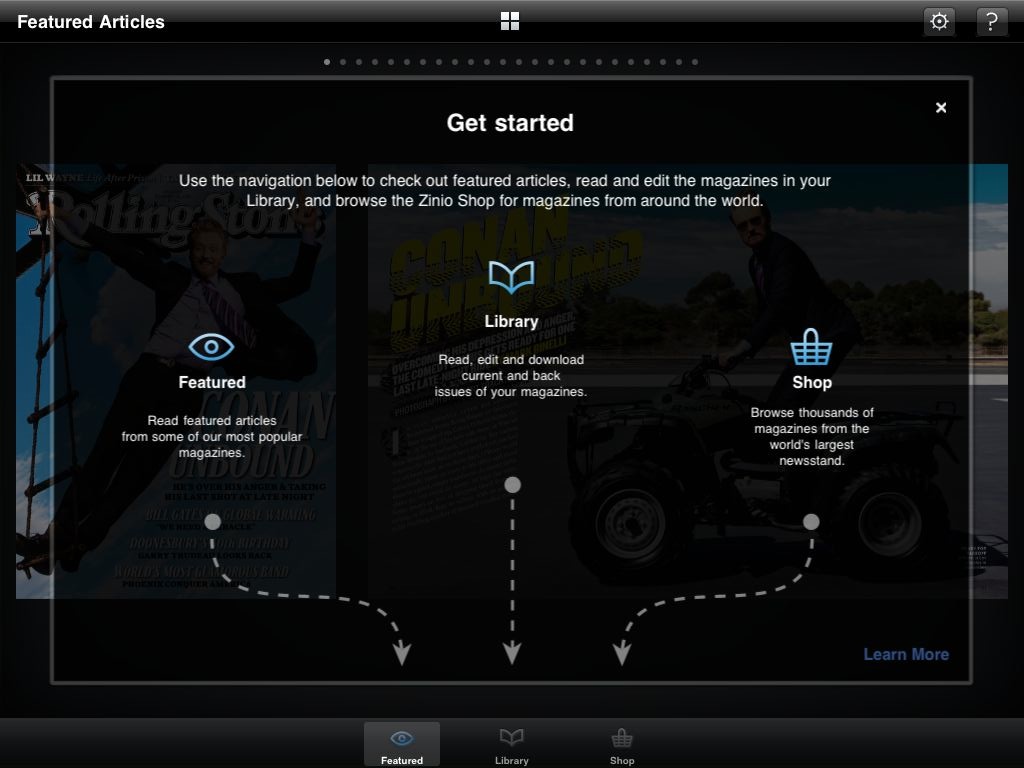
Yet another magazine app, Zinio, does their user onboarding this way:
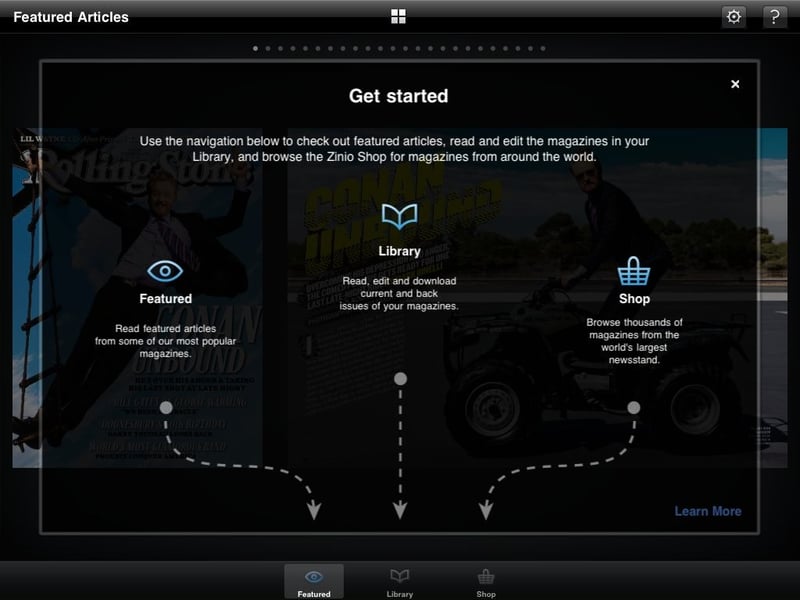
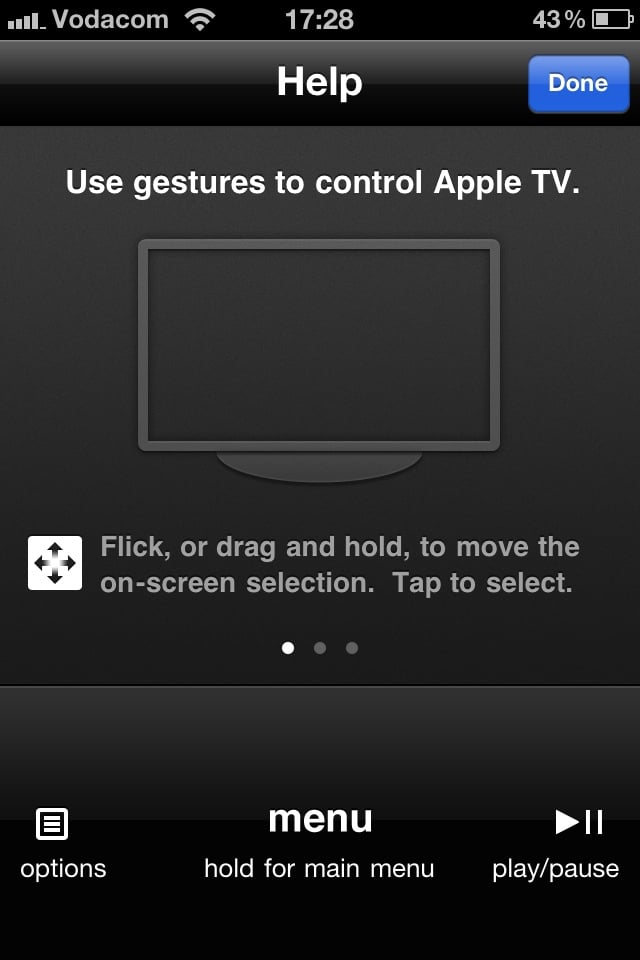
Even though it could be simplified, this is a pretty good way to get users started. It explains what each of the areas of the app are, and it uses arrows to keep the context of the app visible, so that you know where to find the areas you’re looking for. Guideline #3: Make sure users have a clear link between the information you give them and how to access/use that information in their everyday use of the app.

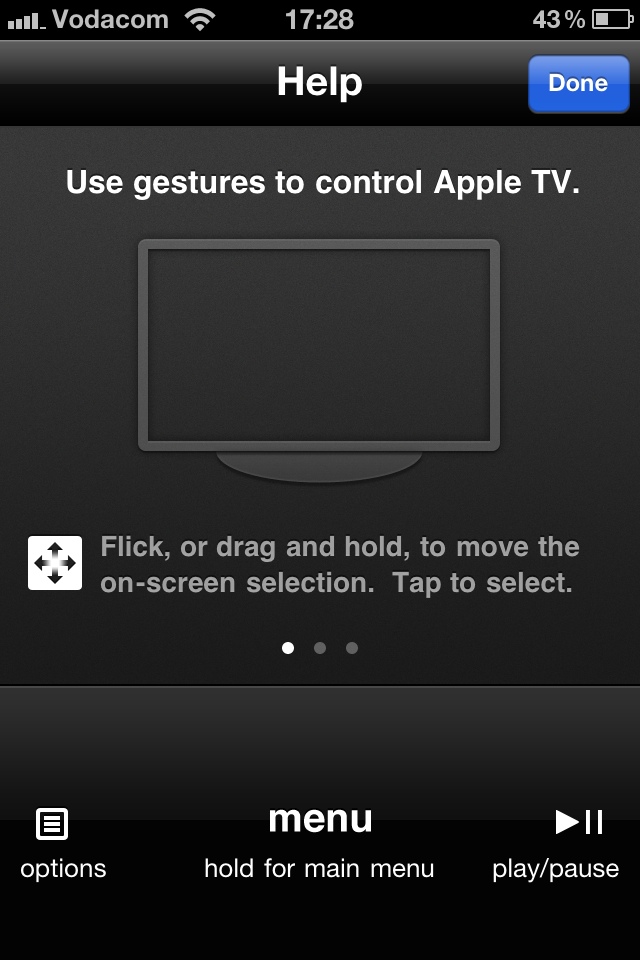
Another good example of this is the Apple remote app for the iPhone. When you tap the Help icon, the interface stays the same, but some additional information is overlayed across the screen to show you what each of the areas are for:
Summary

In this post I proposed some guidelines for onboarding users on apps for mobile touchscreen devices:

  1. Make sure that users have familiarized themselves enough with your app to have the correct mental model before you start teaching them how to use it.
  2. Show users only the information they need to take the immediate next step(s) for using the application.
  3. Make sure users have a clear link between the information you give them and how to access/use that information in their everyday use of the app.

This is certainly just a start, so I’d love to hear more suggestions — how can we quickly and effectively onboard users on mobile applications?
What MSN Mobile can teach us about good design

As designers and user experience practitioners, most of us can look at web interfaces and immediately tell the good ones from the bad ones.  The good ones are usually an indication of execution built on a collaborative and equal effort between different groups and stakeholders.  The bad ones usually point to one of two things:

  • The site was chopped up and different teams owned different parts of the same pages without a clear plan for holistic design; or
  • Somewhere along the line relationships turned sour, decisions got escalated, and one of the groups/stakeholders won a contentious argument about the design of the product.

I came across one such example of poor execution today while browsing the MSN Mobile web site on my iPhone.  Here is what I saw:

Notice that there are (or appears to be) four editable form fields on this screen:

  1. The Safari address bar
  2. The Safari Google search bar
  3. The small MSN search box
  4. The big Bing search box

There should be little confusion with the first two fields — they are part of the Safari browser and clearly not part of the mobile web content.  However, the other two search bars present several problems.  Notice how both have the little magnifying glass search icon, indicating that you should be able to use both to search.  The questions users will ask themselves are, which search box should I use?  Do I want to search MSN or Bing?  What’s the difference between these two search boxes?

I’m sure most of you have also figured out what’s actually going on here — the Bing search box is not a search box at all, it is a clickable advertisement (pre-filled with “Miley Cyrus” for some reason, but let’s leave that out of the discussion for now).  It’s also clear from what we know about affordance that the user is encouraged to use the Bing search box due to its prominence, size, and iconography that’s consistent with search behavior across the web.  I think we can all agree that this is just bad usability, plain and simple, but I also started thinking about how something like this could happen.  I can think of two scenarios:

  • Informational content and advertising are owned by different groups. It is very likely that the advertising team were given the top banner placement on this page, with not much oversight about what they put in there.  They likely have their own designers who design for the advertising team, with no need or desire to think about the context of the entire page.
  • Revenue goals trump good usability.  Another possibility is that the designers are fully aware of this issue, but that Bing, possibly a different business unit than MSN Mobile, has strong revenue goals that they have to meet for their advertising campaigns.

Or it could, of course, be a combination of these two scenarios.  I think we can learn some very important design lessons from this seemingly innocuous usability flaw:

  • Never design in isolation.  This is such a simple principle, but it is still so remarkably easy to guess a company’s organizational structure just by looking at their web site.  Siloed design is one of the easiest design problems to fix, but it does take some courage: strong product management, a sincere desire to collaborate across business units, and an executive mandate to make it happen. All the MSN team had to do was get the designers/PMs together and design a Bing ad that fits with the page structure and doesn’t cannibalize search queries that should go through the MSN search box.
  • Aggressive revenue goals are not an excuse for bad design. As a user experience product manager, I am a realist and completely in favor of feature prioritization and pushing for meeting aggressive revenue goals.  But revenue-generating features should never be implemented at the expense of the usability of your web site. Too often we see examples of poor implementation of an interface because the team couldn’t find a way to reconcile the business goals with proper user-centered design.  I believe the MSN Mobile example is such an occasion.

But wait, there’s more!  Unfortunately, the MSN Mobile example then goes from bad to worse.  Clicking anywhere in the Bing ad brings up this page:

There’s just not much you can say about that.  At this point you’ve lost customers who could have done their searches through MSN Mobile.  Game over, everybody loses…