The new generation of MailChimp adapts to your workflow, regardless of the device you’re using and size of your team. A cohesive experience across desktop and mobile devices means you can create, send, and track email campaigns in any context.

The new generation of MailChimp adapts to your workflow, regardless of the device you’re using and size of your team. A cohesive experience across desktop and mobile devices means you can create, send, and track email campaigns in any context.
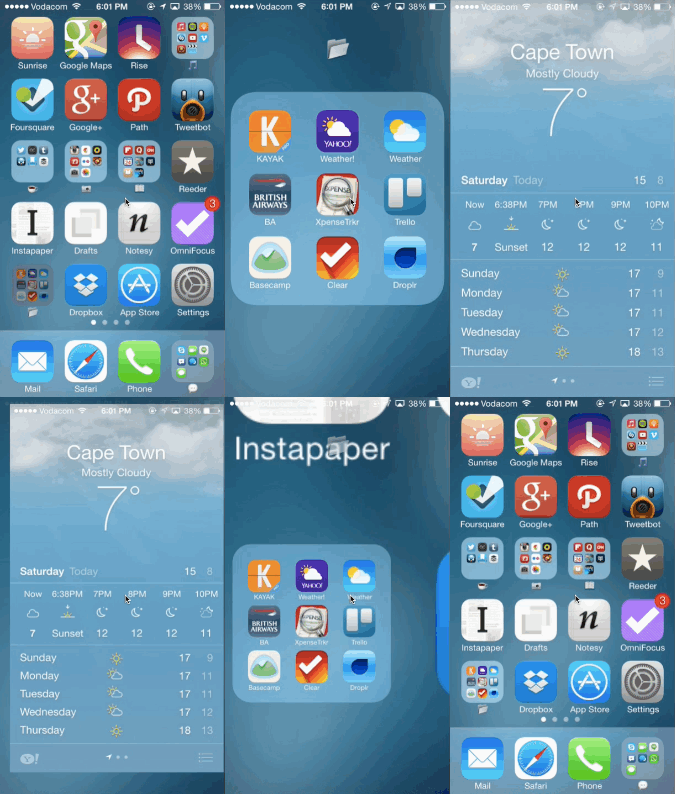
I’m mesmerised by the animations in iOS 7, and none more so than the experience of opening and exiting an app within a folder. To me, it feels like you’re doing Parkour through your apps, deftly using your surroundings to propel yourself forward and maintain as much momentum as possible.
It’s also a great example of iOS 7’s depth, and proof that the design is not as flat as most people would have us believe. Justin Williams sums this up really well in his post Layer Cake:
iOS 7 is designed to be a backlit experience that has each view stacked on top of the previous one based on its z-axis. […]
You’re seeing a lot more focus on transparency and blurs so that you can continue to see the content underneath your front-most view. Modal view controllers are no longer primarily taking over the screen entirely allowing you to maintain a sense of where you came from.
Calling iOS 7 non-innovative seems really short-sighted to me. I think it’s the start of a new, much more understandable metaphor in software design, and I can’t wait to see where it ends up.
We recently had an opportunity to work with one of my favorite companies, Praekelt Foundation. They do amazing work with projects like MAMA (using mobile technologies to improve the health and lives of mothers in developing nations) and TxtAlert (automated, personalized SMS reminders to patients on chronic medication).
One of their products is called Vumi — a conversation engine for the delivery of SMS, USSD (Star Menu), and chat messages to diverse audiences. Vumi is a custom development platform that usually requires Praekelt involvement to set up, but they also have a self-service portal called Vumi Go, which they wanted to improve and scale so that they can move more of their clients to self-service. And that’s where Flow comes in. Towards the end of last year we started working with the Praekelt team on a redesign of the Vumi Go interface (you should follow Simon and Ben, they’re great). The internal Flow team consisted of me and Philip.
This is one of the hardest interface problems we’ve ever encountered at Flow. Which means it’s exactly the kind of project we love working on. We were tasked with taking some very low-end mobile technologies (SMS and USSD), along with IM (Gchat in particular), and create an easy interface on top of that to allow people to not only understand how the technology works, but also to create complex conversations and surveys using these technologies.
So, we dug in. We started by working with the team to create Personas for the Vumi Go product, so that we could always keep top-of-mind who we’re designing for. Our first goal was to come up with dimension that accurately reflect the different types of people who use Vumi, and would be inclined to go self-service:
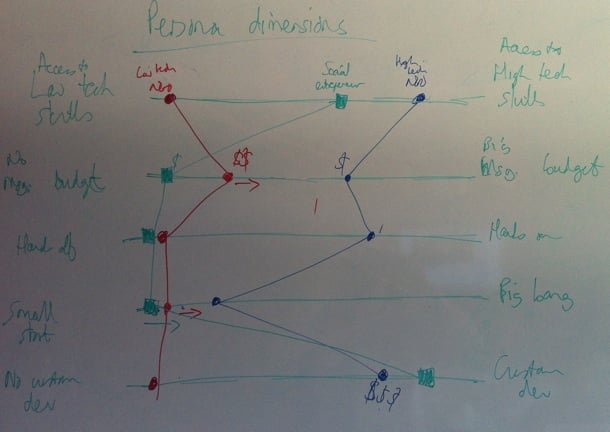
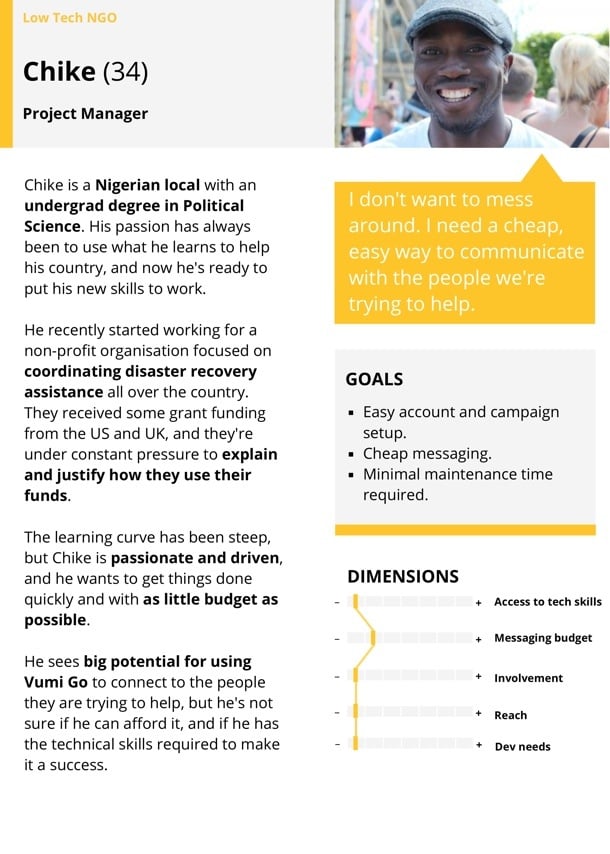
We ended up identifying and fleshing out three target Personas for Vumi Go: The NGO with very little technical knowledge, the NGO with significant technical knowledge, and the social entrepreneur. Here’s our Low-tech Persona:
Our next step was to create the ideal customer journey map for the Vumi Go experience. We wanted to outline how people find out about Vumi, and how we can guide them through this complex flow in the simplest possible way. We started with a lot of sticky notes on a whiteboard to define all the possible actions that users needed to perform to set up their conversations. We then proceeded to order those steps in a way that makes the most logical sense (and would allow us to progressively disclose the right information at the right time). This was an essential step because the process of setting up a campaign in Vumi Go can be quite overwhelming, so it was imperative to figure out the right order of steps. That’s why sticky notes were such a great initial approach, since we could move things around at will:
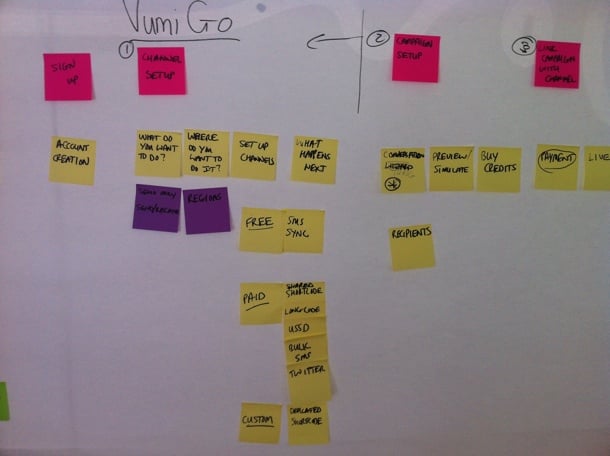
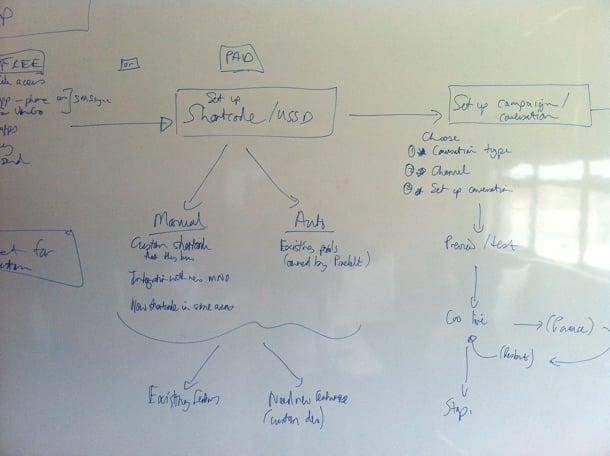
Those sticky notes eventually turned into a user journey sketch on the whiteboard, once we were getting sure about the best way forward:
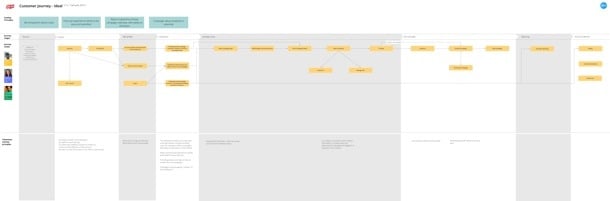
After quite a bit of discussion and refinement, we got to a journey map that we were happy with. This version is too small to give much detail, but it gives a general idea of what we were building for:
This also allowed us to start working on the Information Architecture. Since we used the journey map as the starting point for the IA, we were confident that we had a good handle on the screens we needed to design, and the order of those screens:
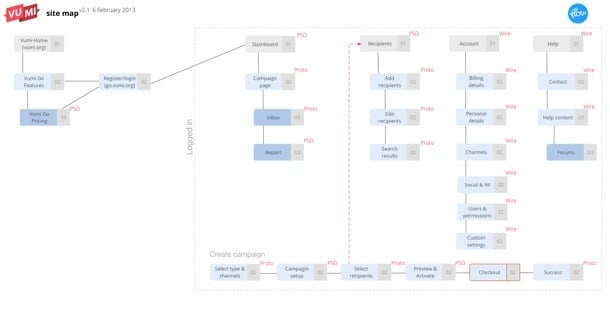
One detail I want to point out here is that we also defined what our deliverables will be for each screen — Sketch, Prototype, or PSD. We find this step really important to avoid miscommunication and surprises down the line.
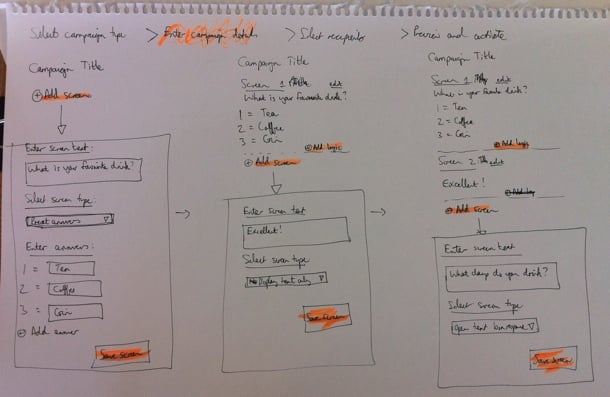
Armed with a solid user journey and Information Architecture, we were finally ready to start designing the interface. We really needed this upfront time to define the problem properly, otherwise we would’ve gotten stuck along the way and it probably would have resulted in tons of rework. We did our sketching with the team using a combination of white board and paper, so that we could quickly try out different solutions without feeling too bad about the many designs we erased/threw out:
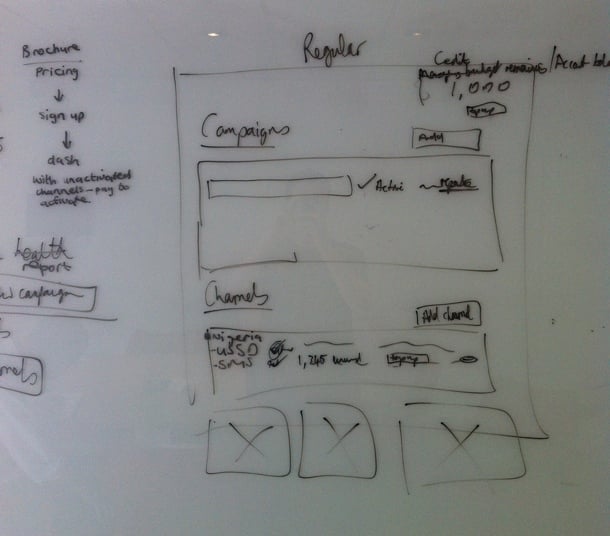
Once we eliminated the designs we believed wouldn’t work well for our target Personas, and settled on a concept we wanted to refine further, we started building an interactive prototype in Axure so that we could test it with real target users. We went through 22 iterations in total before settling on a direction we were confident about. Each of those iterations were based on either internal or user feedback.
The user testing phase was quite tricky. We could do some of it locally in our lab, but most of it had to be done remotely, since the target users reside in places like Kenya and Nigeria. We ended up using TeamViewer for the remote tests, but honestly, we won’t do that again. I’d much rather use Google Hangouts (or Skype screen sharing as a second prize). Teamviewer was just such a mission to set up, and it doesn’t deal well with less-than-perfect internet connections. Google Hangouts seem to be a lot more forgiving when Internet connections slow down (in low-bandwith situations it reduces video quality before it reduces voice quality).
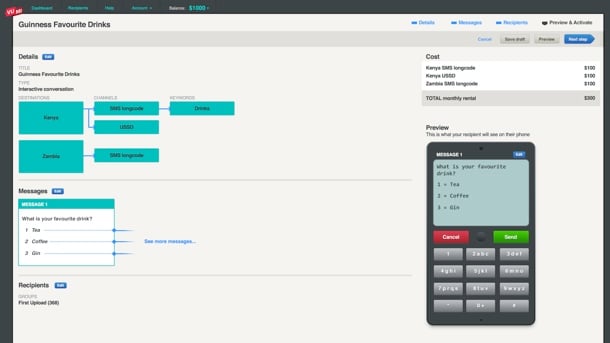
Below is a screenshot of one of the prototype screens. If you’d like to play around with one of the prototypes yourself, you can do so here.
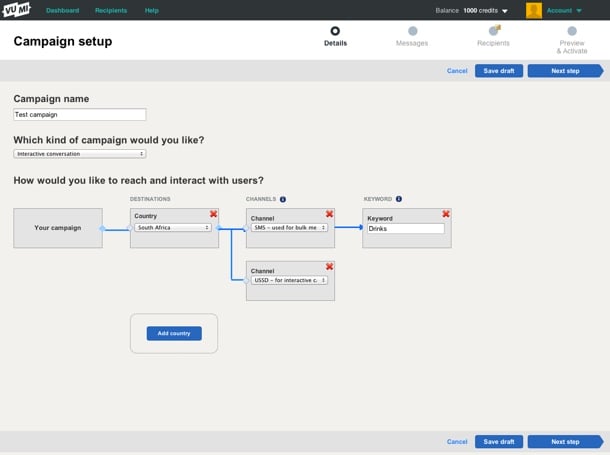
One thing we realized pretty early on is that this is utility, and it needs to be treated as such. Our research showed that people wanted to get through this process as quickly as possible. The complexity forced us to strip out any kind of ornamentation out of the interface. Not that we set out to make an ugly interface, but there were many decisions we had to make in the interest of utility and usability over “look and feel” (sorry, I hate that term too).
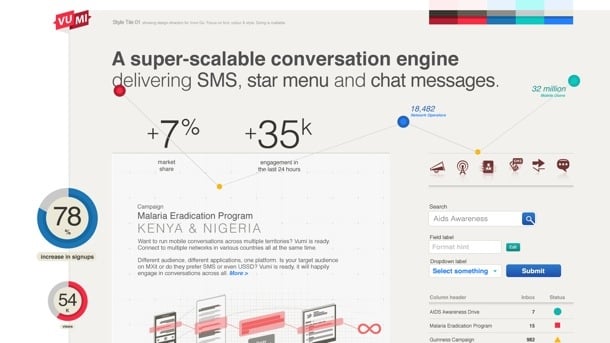
During the final stages of prototyping we started working on Style Tiles to get a sense of the graphic direction of the application. Style Tiles are a great way to discuss graphics without getting bogged down in UI details, since it’s not concerned with layout but exclusively with interface elements: typography, color palettes, button behavior, etc. Here’s an example of one of the Style Tiles that Philip created:
Once we had a refined prototype based on user testing, as well as Style Tiles to guide the graphic direction, it was fairly easy to go to the PSD stage. The prototype and strong style guide also allowed us to not have to create the entire site in Photoshop. We could just create a few key pages, and rely on the rest of it to be defined during development (yep, I admit we’re not quite Post-PSD). Here are a couple of examples of the graphic design:
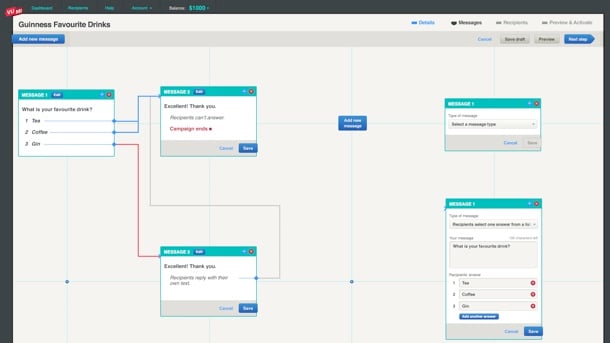
Again, as you can see, there’s nothing flashy here, and that’s by design. Based on our Personas and user journey, our conscious decision was to create this web application as an easy-to-use utility. It’s not a general consumer site, and it’s not an e-commerce site — it’s an essential cog in the larger machine of what businesses (and NGOs in particular) need to accomplish.
At this point the Praekelt developers (who were involved throughout) took over the process to get the application live. Ben talks about the development of the site more on the Vumi blog (see The inside scoop on our recent Vumi launch), so I won’t cover that here. I’ll just end by saying that this is one of the most gratifying projects I’ve ever worked on. We always talk about doing meaningful work in the design community, and this was one of those projects where we absolutely know that the product we helped build is going to affect people in a positive way. And the fact that it was such a hard problem to solve only made the experience better.
Congratulations to the Praekelt team on their relaunch. From everyone at Flow, we love you guys.
Horace Dediu makes an interesting point about some of the new iPhone 5s features in M is for Mystery:
Perhaps this is why Apple chose to describe the iPhone 5s as “forward-thinking”. The M7 and the Touch ID are like research projects whose actual value will be realized at some future time, in probably different contexts.
Sisir Koppaka takes this idea further in The Most Forward-Thinking Apple Yet. On going 64-bit:
I don’t believe Apple added 64-bit support to iOS 7 and all their apps just to prepare for an eventual transition to 4GB+ memory capacities in future iPhones. I think this was to do with something more impending. Do we know any product category that Apple would be interested in, that would require the use of both iOS and an A-series chip that is 64-bit capable in order to address 4GB+ memory? Apple TV (the one that is yet to come, not the one that exists).
And on the M7 processor:
The new CoreMotion Framework for iOS 7 adds a step counter and a motion activity detector (stationary, walking, running, vehicle or unknown). We know that Apple has been hiring experts in noninvasive blood component measurements. We know they have a patent on a wrist watch. The iWatch must not be far away.
This is a pretty daring thing for Apple to do. Instead of focusing on what is hot now, they are releasing a product that reveals their vision for the future without it having the capabilities needed to deliver fully on that future. It’s a long game, it’s a gamble, it’s gutsy, and it’s probably going to work once developers start experimenting.
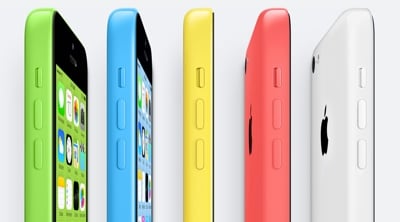
More than a few people seem to be confused about the pricing strategy for the iPhone 5C. There are probably only two articles you need to read about that: John Gruber’s Thoughts and Observations on Today’s iPhone 5C and 5S Introduction, and Ben Thompson’s The iPhone is Apple Doubling-Down On What It Does Best.
But even those articles don’t address a complaint that I’ve seen quite a bit of over the past couple of days: that Apple is trying (and failing) to expand into emerging markets. Here’s an example from a bizarre Memeburn article called Dear Apple, don’t try to be Nokia:
…the iPhone 5C — supposedly targeted at the emerging markets and presented as a low-cost device…
And tweets like this are everywhere:
@RianVDM @bokardo - and our customers can’t afford ( well the billion potential customers in emerging markets)
— Kirstin Horton (@KirstinHorton) September 11, 2013
It’s important to point out a few things here.
First, everything flows from the pricing strategy, and the only people calling the 5C a “cheap iPhone” are tech bloggers. It’s not a cheap iPhone. It’s an iPhone that replaces the previous strategy of selling last year’s model at a slightly cheaper price. As Gruber points out:
The prices of the iPhone tiers remain the same as last year. What changes with the 5C is that the middle tier is suddenly more appealing, and has a brand of its own that Apple can promote apart from the flagship 5S.
Second, the vast majority of mobile connections in emerging markets are pre-paid, not contract-based. For example, in Africa 96% of connections are pre-paid (source). This means that in emerging markets people buy phones that aren’t subsidized. The cheapest iPhone 5C costs $549 off-contract. This makes it a virtually unattainable phone in the pre-paid emerging market.
Here’s the thing though: does anyone think Apple doesn’t know this? Is the assumption that Apple is trying to break into the emerging market with a $549 phone? That would be insane, right? But that’s not what Apple is doing at all, and they never said that they are.
The iPhone 5C is not about expanding Apple’s share in emerging markets. It’s about increasing their share of the high-end phone market, while simultaneously increasing their profit margins on those phones because of cheaper manufacturing costs.
So, yes. The iPhone is still too expensive for most of the emerging market. But Apple doesn’t need the emerging market to be insanely successful. They just need to keep selling a ton of phones in subsidized markets at a healthy profit margin. And that’s exactly what the iPhone 5C will accomplish.
I’ve been thinking about workflows for Responsive Web Design quite a bit, particularly since it’s now become our default approach on every new project (similar to Cloud Four’s recent change of heart). I’ve been especially influenced by two recent articles on the topic, namely Dennis Kardys’s A More Flexible Workflow, and Viljami Salminen’s Responsive workflow.
I struggled a bit to make their approaches fit into how we worked, so I decided to expand on what they’ve done and draw something that reflects a bit more accurately how we are incorporating Responsive Web Design into a user-centered workflow within an agency model. It’s not perfect by any means, but here’s what I came up with:
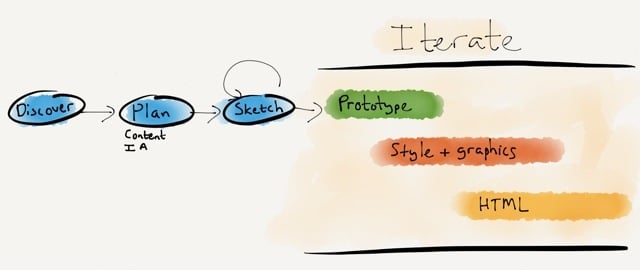
The goals of this approach is to stay grounded in two core principles:
I’ll briefly go through each step in the diagram and how it helps us to accomplish these goals.
During Discovery we do our research to uncover user needs, develop personas, and create the user journey map that becomes our product strategy (see my article Usable yet Useless: Why Every Business Needs Product Discovery in A List Apart).
In the Planning phase we evolve the user journey map into a content plan and Information Architecture document (see my post on this topic). Once we have our scaffolding in place, we start the design process.
We rarely do static wireframes any more (Cennydd Bowles explains why), but we do a lot of Sketching. The benefits of sketching have been proven time and time again (see, for example, How Diagrams Solve Problems and The importance of sketching in product design). What I like most about the sketching process is how it allows the team to try multiple solutions to a problem, before settling on one or two ideas to iterate further (see Jon Kolko’s Iteration and Variation). I like using Zurb’s responsive sketch sheets as templates because they keep us focused on a multi-device approach.
Once we’ve gone through the sketching phase with clients, and we know what approach we’d like to pursue, we start Prototyping. We mainly use Axure, but there are multiple solutions out there to suit a variety of approaches. Axure isn’t natively responsive (yet), so we’ve been building two prototypes on our projects: starting Mobile first, and then moving on to Desktop. This isn’t ideal, but it works for our current purposes. We have a strong focus on user testing, so we test these prototypes in our usability lab, and iterate the design based on the findings.
Towards the end of the Prototyping process we start working on Style Tiles so we can have a discussion about graphics with clients without focusing on layout and flow issues. We’ve seen huge success with this approach. Once clients are comfortable with the visual direction, the focus can return to discussing how the UI will help them meet their business goals and user needs. It also makes the move from prototype to graphic design much smoother.
Although I won’t say that we’re completely post-PSD, we definitely don’t create the entire site in Photoshop. Since we have an interactive prototype and strong style guides, we generally only create about 6 or so pages in Photoshop, so clients can get a good feel for the direction.
At this point we also start working on Front-end Development. We build the framework using the prototype and style tiles, and pick up speed as the graphic design gets finalized. We don’t use boilerplate frameworks like Foundation and Bootstrap for production code. On this point we stand with Aaron Gustafson:
I find Foundation, Bootstrap, and similar frameworks interesting from an educational standpoint, but I would never use one when building a production site. For prototyping a concept, sure, but to take one of these into production you need to be rigorous in your removal of unused CSS and JavaScript or you end up creating a heavy, slow experience for your users.
An important point on the last three phases: as the diagram points out, these are all very much iterative phases. We make changes all the time based on user feedback, and discussions between designers, developers, and the client. I think we can all agree that responsive design is messy, and we just need to get comfortable with a certain amount of ambiguity during design and development. That’s ok, as long as we’re prepared for it.
It’s been an enormous learning process — and we’re still figuring out the best ways to make Responsive Web Design our default approach. But we’re committed to it, because we believe in content parity, and we’re convinced that responsive design is the approach that will get us there. Some things we’ve learned along the way:
We have much maturing to do, but I’m excited about the progress we’ve made in shifting our entire process towards building responsive sites. Every project runs just a little bit smoother, and that’s encouraging. So my only advice to those standing on the edge of responsive design is this: jump in. The water is cold, but refreshing. And you’ll feel great when you get to the other side of the river.
Still encoding video with on-premise hardware? Encoding.com is the world’s fastest cloud encoding service. We’ve made proprietary optimizations for ingest, queue times, processing, and egress of your source content that rivals the fastest on-premise equipment, with infinite scalability.
We support nearly every video format imaginable, including a few that only we offer. We can accommodate a number of different transcoding workflows with an easy to use web interface, a flexible watch folder, a desktop uploader, or our robust and mature API. You can even automate basic editing tasks such as video overlays and concatenation programmatically using our API.
Vid.ly is a unique feature of our service that completely takes the guesswork out of your transcoding workflow, combining transcoding, device detection, delivery, and storage into a single short url.
Don’t take our word for it, try our forever free account today, complete with your own API key.

My thanks to PDFpen for iPad for sponsoring Elezea’s RSS feed this week.
Sign and return documents without printing or faxing, directly from your iPad. Fix typos and correct price lists immediately while an issue is foremost in your mind. Take PDF documents with you, and add notes, highlighting, and other markup during your mobile downtime. Sync with your Mac via iCloud or Dropbox. Retrieve and save documents via Evernote, Box, and Google Drive.
Edit your PDFs anywhere you are with the complete, feature rich, mobile editing power of PDFpen for iPad.
Get $5 off PDFpen for iPad, only $9.99 on the iTunes App Store, this week only.

I’m currently travelling in the U.S., which means I can finally drag some of my favorite apps from the graveyard screen on my iPhone to the home screen. I’m now happily exploring around in Yelp and Fandango, which I haven’t been able to do in a while. Even Foursquare — which I’m already a huge fan of — is suddenly on steroids.
At the same time, there’s one part of Don Norman’s The Paradox of Wearable Technologies that I keep coming back to:
I am fully dependent upon modern technologies because they make me more powerful, not less. By taking away the dreary, unessential parts of life, I can concentrate upon the important, human aspects.
I realize that when apps work well — really well — they do just that. It’s not that they get out of the way in an invisible UI sense. They are extremely visible, and they consume all your attention while you’re using them. But they take away the boring parts of life so you can focus on the exciting bits.
I apologize in advance to those of you who live in the U.S., but please allow me to gush a couple of examples to illustrate my point.
Buying movie tickets online is a mission in most cases. Even if you can figure out how to use the site, you’re not guaranteed that the payment gateway is going to work, and there’s often no way to save credit card details for future purchases. But before I came on this trip, I saved some movies I knew I wanted to see in the Fandango app. Once I got here, I just tapped on a movie, the app showed me nearby theatres and times, I bought a ticket using my PayPal account, and I showed my phone at the door to scan the ticket.
All the app does is take the mundane parts out of buying movie tickets — the search for a theatre, the payment, the ticketing process. It lets me focus on what I really want to be doing — watching a movie.
I expected Foursquare to be better in the U.S. than in South Africa, but I’m blown away by its usefulness. Here are some things that really helped along the way:
Again, this isn’t earth-shattering stuff. But it takes away just enough of the mundane parts of being in a new city to make your visit that much more enjoyable.
And that’s what good technology does. It’s not necessarily invisible, but it performs a disappearing act on the things you don’t want to do. There are certainly major, wicked problems to solve in the world. But there are also thousands of small, tedious tasks we deal with every day that we can solve with technology.
That’s what’s inspiring to me about these products, and why I’m going to pay much more attention to “small annoyances” as a way to get product ideas.
Ben Thompson’s stratēchery has become one of my favorite sites. His insight into the tech world gives me a new perspective with every post. Recently he discussed what makes the Facebook app so compelling in Mobile Makes Facebook Just an App; That’s Great News:
Brand advertising on Facebook’s app shares the screen with no one. Thanks to the constraints of mobile, Facebook may be cracking the display and brand advertising nut that has frustrated online advertisers for years. […]
[Facebook] is the most indispensable tech product in most people’s lives, and every time one of those billion people use the mobile app, they see an advertisement that completely owns their device’s screen, if only for a moment.
“Ads in users’ faces” is certainly a great sell to advertisers, but I do wonder how far they can push it before people feel like their entire feed is taken over by advertising, and there’s just not enough content from their friends any more.