Menu

Posts tagged “mobile”

[Sponsor] Filepicker.io Cloud Connect APIs

Develop Smarter, Simpler and Better Connected Apps with Javascript

Imagine connecting your app to everything with just 2 lines of code — files from all over the web, across cloud storage source, social networks and devices.

Filepicker.io provides a full file system API for your web and mobile applications that allows your app to upload, open, read, write, store, sync and convert files from over 17 sources including Dropbox, Google Docs, Facebook, Skydrive and Box. With the Filepicker.io Javascript API, request a file and receive a simplified URL. Then, upload the URL to your server or serve through your CDN.

Filepicker.io includes a customizable drop-in UI widget and an API library allowing you to send uploaded files directly to your S3. Sign up for Filepicker.io today!

Filepicker

Sponsorship by The Syndicate.

Responsive Web Design in Africa: why it's time to adapt

This post provides background and additional resources for my talk on Responsive Web Design in Africa. Last update: May 23, 2013.

I’ve seen a surprising amount of pushback on responsive design within the South African web community recently. The skepticism is mostly based on issues such as low smartphone share and high data costs in Africa, along with assumptions about “the mobile context” and how people supposedly have vastly different needs on mobile phones than they have on their desktops.

So, the purpose of this talk is to summarize the case for Responsive Web Design, and to argue that the reasons against using this approach in Africa don’t hold up. Smartphones and data access are exploding in Africa, so if we want to be Future Friendly, we don’t have a choice. We have to adapt.

The slides for the talk are below, although of course, some context gets lost without the voiceover. There are also embedded gifs and videos that obviously don’t play within Slideshare, so you’ll have to use your imagination on those…

View on Slideshare: Responsive Web Design in Africa - why it’s time to adapt


Resources

I cite the source for each quote, example, and data point on the applicable slide, but I thought it would be helpful to provide a brief list of Responsive Web Design resources here for easy reference.

For those who want to dig a little deeper on the data in Africa, here’s a list of the reports and presentations I found most useful:

Here’s an incomplete list of introductory articles to get you started on responsive design. These articles mainly touch on topics I bring up in the talk, like the reasons for adopting responsive design, performance issues, and RESS:

If you’re looking for responsive patterns, start here:

And here are some ideas for dealing with responsive images:

For more great resources on responsive design, see Jeremy Keith’s extensive list.


The point

My goal with this talk was not to say anything groundbreakingly new about Responsive Web Design. The goal was to urge designers and developers who work in developing regions to take responsive design seriously, and at the very least consider the approach for their next projects.

If you have any questions or comments (or are interested in having me come present this talk somewhere), please get in touch.

Responsive Web Design

Don't optimize for the fewest number of clicks

I liked Meng To’s Simplifying For The Wrong Reasons, but there’s one part that perpetuates one of the most enduring myths in user experience design:

The best user experience reduces the amount of clicks to as few as possible.

No one’s going to argue that we should add superfluous clicks in interfaces. But making “as few clicks as possible” an optimization goal is how interfaces become bloated and crammed with cruft. As Lukas Mathis points out in his explanation of the psychological behavior called “satisficing”:

A great user interface is not one where each goal can be reached with the smallest number of clicks possible, or where the user has to pick from only a small number of choices at each step, but one where each individual click is as obvious as possible. […] As long as users feel that they are getting closer to their goal with each step, they don’t mind drilling down into a deep hierarchy.

Josh Clark also addresses the myth that extra taps and clicks are evil in an interview with Forbes:

In mobile, tap quality is far more important than tap quantity. As long as each tap delivers satisfaction, extra taps are good. Taps invite conversation—give and take—that you can get at and explore. Building meaningful click sequences are a form of progressive disclosure that helps you uncomplicate complexity.

So, let’s get away from this idea that we should optimize for the fewest number of clicks and taps. Instead, we should optimize for an information architecture and visual hierarchy that makes the next step as obvious as possible. Joshua Porter summarizes this approach nicely:

Almost every screen we design can be improved by really focusing on the steps and sequences of steps a user goes through. In our haste we often speed up the process too much, get steps out of order, fail to present an appropriate next step, or otherwise break the sequence. By re-assessing your app or site in light of these potential errors, you can discover the sequence and timing that your users need to successfully make it to the next step.

Foursquare: not lame any more

Back in 2009, whenever an overly enthusiastic Foursquare user managed to capture the attention of an unsuspecting potential victim long enough to try to convince them to download the app, the conversation went something like this:

“It’s really cool. See? You ‘check in’ to the cafés and restaurants you visit.”

“Why?”

“Because if you check in enough times, you become the mayor of that place.”

“Why?”

“Because being the mayor is cool!”

“You keep using that word. I don’t think it means what you think it means. I think the word you’re looking for is lame.”

The discussion would usually dampen the Foursquare user’s enthusiasm a little bit, but only for a day or two. Then they’d be at it again, continuing their quest to spread the word about a service they don’t quite understand, but can’t help but be excited about.

Yesterday, Foursquare 6.0 was released for iOS and Android. And it continues a slow, steady move away from a focus on the ‘check-in’ to a way to discover great places to explore. If you squint and look at Foursquare just right, you’ll realize that they are becoming what Path wants to be: a social network for close friends and family.

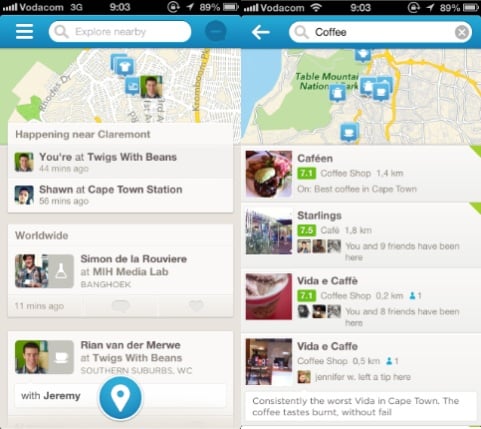
The new Foursquare home screen continues the trend to reduce the hierarchy of the check-in action in favor of telling you what’s happening in your network, and what places you might like to visit (see left side of the screen below). A tap inside the (much more prominent) search bar brings up the interface to show recommended places to visit within a specified category (see right side of screen below).

Foursquare 6.0

See, what Foursquare realized a while ago is that their real power is not in the mayorships and badges that defined them in 2009. The real power — as usual — is the data. It’s knowing what people like and don’t like. It’s knowing where to find good coffee, what restaurants to avoid, and where you should go when you’re in a new city. And they have been shifting towards that vision with steadfast tenacity. Dan Frommer discussed this when Foursquare 5.0 was launched in June 2012:

So: Foursquare has been evolving to a company that no longer simply answers “where are my friends?” but instead “where should I go right now?” This is smart: Everyone’s gotta eat. That’s why Explore is rapidly becoming Foursquare’s most important feature. This has always been part of the plan, I think. But it’s certainly carrying more emphasis in this new version of the app than ever before.

With Foursquare 6.0, the company’s move towards a discovery engine powered by people you like and trust appears to be almost complete. That said, it’s clear that they’re not done (watch out, Path). I’m sure they are thinking of more ways to make the experience better. So even though there are some design irregularities in version 6.0, those will be ironed out through constant iteration while they’re moving towards a clear vision for the future. Like Anil Dash said at the beginning of 2012 in Foursquare: Today’s best-executing startup:

Foursquare’s removed features from the core app a few times, constantly changes the design of its flagship iOS application, and in general asserts its authority over the experience that users have within the Foursquare application. Yet, unlike every single other major social application, they don’t inspire mass user revolts or negative press every time they iterate. […] Part of this is the small, well-paced timing of iteration on the application where there are always small things changing in ways that aren’t wildly disruptive, but do enough to set a tone that users know to expect the furniture might get rearranged once in a while.

So, with all of that said… If you’ve tried Foursquare before and found it lame, I think you should give it another go. It’s not lame any more. Any service that can help you avoid bad coffee makes the world a better place, right? Foursquare is such a service, and so much more.

Oh, one more thing. Posting your Foursquare check-ins to Facebook and Twitter? Still lame.

Responsive design vs. Separate mobile sites

Chris Ferdinandi wrote a good summary of the responsive site vs. separate mobile site debate in Content Parity on the Web:

The gentleman I was chatting with mentioned that for mobile users, he intended to share about 50 percent less content and reduce the steps in their checkout process to make it more efficient. I think that’s a great idea, but I don’t think it should be limited to the mobile site.

If 50 percent less information is the right amount of information people need to complete their tasks, then you should only provide that 50 percent on all devices. And if visitors on laptops could use that additional information, why wouldn’t someone on a smaller screen want access to it, too?

Whenever I chat to people about Responsive Web Design, there are always arguments about how users want different information on mobile devices than on desktops. This usually plays into the myth of mobile context, but in some cases, there are legitimately different use cases. In those cases I press on to argue that separate use cases are not proof that you need a separate mobile site, but proof that your Information Architecture needs some additional work to make the right information easily accessible regardless of the device being used.

But we’re still figuring this out, of course — no one has all the answers. Just reading through some of Luke Wroblewski’s notes from BD Conf got my head spinning again. So anyway, if you’re in Cape Town next Thursday and want to argue with me about this stuff in person, I’m doing a talk called Responsive Web Design in Africa — Why it’s time to adapt at the next SPIN gathering. It should be fun.

[Sponsor] Instatim — a social network for close friends and family

Thanks very much to Instatim for sponsoring Elezea’s RSS Feed this week.

Instatim is a more personal social network that helps you stay in touch with your closest friends, family and co-workers. Engineered for privacy, Instatim is unlike other social networks because we do not store information about our users’ past activities and locations. Your status is shared securely and only to people you have chosen.

Here’s what you can do with Instatim:

  • Status Updates: Keep in touch by posting status updates about what you’re doing (walking the dog, meeting a client, etc.) and reading your friends’ statuses.
  • Expiration Dates: Set an expiration for your status so your family knows how long you will be engaged in the activity.
  • Groups: Sort contacts into different groups. Share statuses with specific groups to keep the right people in the right loop.
  • Location: You can choose to include your location with your status so your friends and family know your whereabouts.

Download Instatim for free in the App Store.

Instatim

Sponsorship by The Syndicate.

Forget about ads and privacy, Facebook Home is about identity

There’s certainly a lot of hand-wringing going on about Facebook Home. And although there is some truth to articles like Facebook Home — My Personal Hell and Why Facebook Home bothers me: It destroys any notion of privacy, I feel like making this story’s headlines about how boring Facebook is and how it’s just another step towards evil corporations owning all our data is missing out on what’s really important about this announcement. The much more interesting question is this: How does Facebook Home impact identity?

Perhaps the best analysis I’ve seen about Facebook Home is a tweet written by Rebekah Cox back in January 2011:

The first company to fully execute on embedding your identity into your phone (making a truly first class experience) wins the next decade.

— R. Marie Cox (@artypapers) January 29, 2011

Rebekah expands on this in her post Mobile Identity, in which she concludes:

A mobile experience that truly represents your identity — in a way that both resembles and enhances an in-person conversation but still affords you control over how you portion out your attention and provides context — could tie the knot for the myriad communication channels available.

That certainly sounds like an accurate description of what Facebook is trying to do with this new product. Now add to that Dan Frommer’s analysis in Who’s Going To Buy The Facebook Phone?:

What about those millions of people who have bought Android phones who don’t really care that they’re Android phones, or even smartphones? […] My guess is that many — most? — of these people are Facebook users, and could easily see some utility in having Facebook features highlighted on their phones. And — bonus — Facebook’s software looks good. Much better than the junk that ships with typical low-end Android devices.

Put these two things together — identity and easy access — and Facebook’s strategy starts to become clear. For the majority of people life increasingly revolves around the Internet and their phones. This cartoon pretty much sums it up:
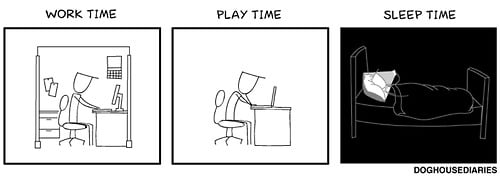
Work, play, sleep

Image source: DOGHOUSE

It’s also clear that many people’s identities are getting tied up in Facebook. And Facebook is really good at accelerating the pace at which that is happening. Much has been written about Edgerank — the algorithm Facebook uses to decide what stories to show in people’s News feeds — and how it ends up promoting confirmation bias by only showing users stories that they are likely to agree with. Facebook knows the truth behind Clay A. Johnson’s words in The Information Diet:

Just as food companies learned that if they want to sell a lot of cheap calories, they should pack them with salt, fat, and sugar — the stuff that people crave — media companies learned that affirmation sells a lot better than information. Who wants to hear the truth when they can hear that they’re right?

What’s even more interesting about this is that Facebook is in the process of reversing a media trend that started with telegraphy. Before the introduction of the telegraph all news was local, and had a high “information-action ratio” — meaning that you could do something about what you read or heard about. But as Neil Postman points out in Amusing Ourselves to Death:

The telegraph made a three-pronged attack on typography’s definition of discourse, introducing on a large scale irrelevance, impotence, and incoherence. These demons of discourse were aroused by the fact that telegraphy gave a form of legitimacy to the idea of context-free information; that is, to the idea that the value of information need not be tied to any function it might serve in social and political decision-making and action, but may attach merely to its novelty, interest, and curiosity. […] Most of our daily news is inert, consisting of information that gives us something to talk about but cannot lead to any meaningful action.

Television and the Internet kept this trend going. All I have to do is say the word “Kardashian” and you’ll know what I mean. But Facebook — and particularly Facebook Home — is a return to “news that’s relevant”. Because it’s news about the people you have let into your life, and therefore news you can do something with (even if it’s just liking a status). Whatever your thoughts are on the privacy and sociological implications of Facebook as a service, you have to admit that it increases “information-action ratio” by (1) giving you information that’s relevant and (2) reducing the effort required to take some kind of action on that information1. That’s pretty powerful stuff.

What Facebook Home is really about

So, let’s tie all of this together. What Home allows Facebook to do is put Edgerank and people’s “social graphs”2 on steroids by giving them easy access to their identities. A Facebook-centric phone that constantly tells you what you want to hear about yourself and your friends means that you’ll find less and less use for the rest of the Internet. And that’s very, very good for Facebook since engagement is everything for an ad-based business.

Where does this leave us? I’m trying to reserve judgment about where this road that Facebook is paving will lead us. All I know is that they are doing some very smart things from a strategic business perspective. They are making news relevant again. They are shaping people’s identities (with a lot of help from Edgerank). And now they have found a way to go beyond apps and do a complete takeover of the device that most people never leave out of their sight.

Tech journalists can write about privacy and the virtues of quitting Facebook all day long. The rest of the world won’t even hear about it, because they’ll be too busy getting immersed in the lives and identities of the friends they agree with.


  1. See Like, the Post-Literate Society 

  2. Just remember, The Social Graph is Neither 

[Sponsor] Shopster: a new groceries list app

Thanks to Shopster for sponsoring Elezea’s RSS feed this week — I’ve been looking for something like this for a while!

Shopster is a new kind of groceries list app that learns what you purchase and where, so it can remind you later on.

Whenever you check an item as purchased, Shopster learns the location where you got it. The next time you look for the same thing, a geofenced alarm will be triggered when you are near the location.

Features: - Autolearning of locations when checking items as purchased. - Geofenced reminders for your products, based on your prior buying history. - In-place editing table, for quick corrections and editions. - Unique ruler to quickly enter the number of items you need to buy. - Smart autocomplete, to assist you entering frequently purchased products, based on your previous history. - Reorder items with a simple tap and hold.

Check out Shopster on the AppStore, it’s only $0.99

Sponsorship by The Syndicate.

Giving users a way out of a responsive design

Jordan Moore wrote a very level-headed post about giving users the ability to switch off the breakpoints of a responsive design to show the “desktop” site1 instead. From Claustrophobia:

This is my overriding concern — there’s no way out. There’s no way out of a bad design, an incompatible plugin, a browser bug, missing content, the endless list of potential issues someone could potentially encounter with a website whether it is responsive or not.

That’s an excellent point, and providing a “way out” echoes one of Nielsen’s 10 Heuristics for User Interface Design, written in 1995:

User control and freedom. Users often choose system functions by mistake and will need a clearly marked “emergency exit” to leave the unwanted state without having to go through an extended dialogue. Support undo and redo.

Jordan argues that giving users that control and freedom on a responsive site might feel like a cop-out, but it could be necessary:

The last thing I want is to lead users into a mass exodus from a responsive design I have put so much thought and effort into. I just think if it helps the odd user out in doing something they happen to find more comfortable in a pinch and zoom environment for whatever reason then we should probably do it rather than prevent them from doing it.

That’s a very sane, user-centered approach. It’s also worth noting that if the mass exodus does occur, it’s a clear sign that something is wrong with the responsive site. That’s valuable data.

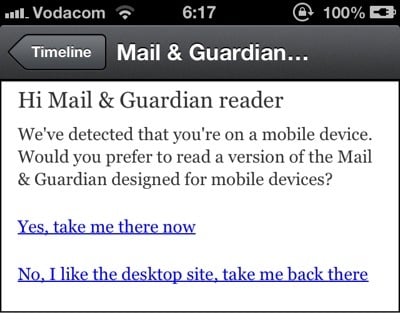
But it all comes down to execution, of course. Users shouldn’t be asked to choose between entering the building or going straight for the emergency exit the minute they arrive at the site. It’s ok to make the exit visible, but forcing a deliberate, upfront choice between the mobile/responsive site and the desktop site puts an unnecessary burden on users.

In short, this kind of placement is ok (although the “Full Site” language is problematic):

OK

This is not ok:

Not ok


  1. Whatever that means these days… 

Introducing two Flipboard magazines on UX and technology

Flipboard 2.0 was just released for iOS, and with it came a feature called Flipboard Magazines. From the blog post announcing the new version:

For the first time, you can collect and save articles, photos, audio and video by organizing them into beautiful magazines. These can be private, or if you want to connect with like-minded enthusiasts, you can make them public and share them on Flipboard and beyond. Now everyone can be a reader and an editor.

I’ve been playing around with this feature a bit, and I like it so far. It’s definitely an early release, so there are a few things missing. For example, you can’t edit the title of an article you’re adding to a Magazine, and you also can’t move articles around to be in a different order. But I’m sure those features will come. For now, it’s a great way to organize1 content — and the timing is particularly good with the impending demise of Google Reader.

I’ve created two magazines so far, which you’re welcome to follow on Flipboard. UX Design is all about design and related disciplines. Technology and us desperately needs a less cheesy name, but it’s a collection of articles about the various ways technology impacts our lives.

Flipboard magazine

Enjoy!


  1. We’re all so desperately trying to avoid using the word “curate” since Matt and Marco spoke out about it, but that’s really what this is. Anyway, I’ll stick with “organize” so as not to offend anyone’s Internet sensibilities.