Menu

Posts tagged “content strategy”

Are they users or people?

In Don’t Say ‘Cyclists,’ Say ‘People on Bikes’ Sarah Goodyear explains how some deliberate language changes turned a serious conflict in Seattle into a civil debate. Here’s what they did:

“Though the group made no secret of their biking advocacy, they didn’t brand themselves as biking advocates,” writes [PeopleForBikes blogger Michael Andersen]. “They branded themselves as neighborhood advocates.”

[Seattle Neighborhood Greenways] also developed a list of new ways to talk about their concerns and promoted it in handy chart form. Instead of “cyclists,” they suggest, use “people on bikes.” Instead of “drivers,” “people driving.” Instead of technical traffic-engineering terms such as “pedestrian/hybrid beacon,” say “safer ways to cross busy streets.” Replace “pedestrians” with “people walking.”

The result?

[Tom Fucoloro of Seattle Bike Blog] says that talking about streets in a way that emphasizes the common humanity of all users, rather than dividing them into tribes with warring interests, has made a real difference in the way Seattle’s planners discuss possible changes to streets with the community. As a result, he says, the discussion has become much more civil. And Seattle has been installing protected bike lanes (don’t say cycletracks!) at a steadily increasing pace.

I wonder if we need something similar in our industry. Instead of “users,” perhaps we should talk about “people who use websites.” After all, we’re supposed to be all about emphasizing humanity in our products.

Throwing the cards out with the bath water

Michael Andrews brings up some interesting concerns about cards in Are UI Cards good for content? However, I’m left thinking that most of the “cons” in the article are actually Information Architecture problems, not problems with the card metaphor:

UI cards can contribute to content usability problems that may not be immediately evident.  Users often like UI cards when they encounter them, and don’t notice their limitations.  They see tidy cards often with colorful thumbnail images.  The cards seem optimized to make good first impressions.  But often, the cards end up squashing the content that must go in them, or omitting content details that don’t fit the layout vision.

If content is squashed and truncated in cards, it’s not the card element’s fault, it’s the content’s fault. It happens when content isn’t written while keeping the context of use in mind.

Here’s another example:

Another issue with UI cards is their lack of hierarchy. When all cards are the same size, all cards look equally important, whether they have detailed information, time sensitive information, sparse information, or optional information.

Again, visual hierarchy is a larger design problem, and not the fault of cards.

I point this out because it reminded me of one of the big dangers in design that we have to watch out for. We often see a UI issue and immediately switch out the pattern instead of trying to understand what the the real problem is. It’s great if we can look at something we designed and say, “Hmm, that doesn’t work.” But we have to go further and also understand why it doesn’t work before we just take the easy why out and replace the UI element.

If content is squished on cards, is it because we used cards, or because we didn’t write the content concisely enough to be easily consumable in small spaces? If all cards look the same, should we stop using cards, or design different card types to address visual hierarchy better? I would argue that in both cases, the latter should at least be considered. Of course, if cards are wrong for the interface, then burn it with fire. But be sure.

Further reading on cards:

Content outlines as part of the prototyping process

Sophie Shepherd introduces some new deliverables in Rethinking Our Prototypical Process, including this one:

HTML prototypes have the potential to confuse some clients. In addressing feedback, I’ve answered questions like: Are we tied to this layout? (No.) Is this real content? (Ideally.) Is this what our website will look like? (Probably not.) The content outline strips any potentially distracting elements from the prototype: no layout, no typography, no links, no things remotely resembling design. It’s just a list of the content that will be on each page in order of its importance.

This deliverable, which she calls a “Content outline” or “Page description diagram”, seems like it fits well with my idea of Content slice diagrams. It’s great to see these new useful deliverables emerging — a sensible retreat from the “get out of the deliverables business” march of the past few years.

Content First design with Content Slice Diagrams

A while ago I wrote about expanded customer journey maps as a way to plan for device-agnostic design. But that document is only half the story. Expanded customer journey maps are great because they force us to plan what content will be needed before we move to page layout. That provides a great starting point, but crossing the chasm between knowing what content should go on a page, and how to design the best layout for that content can still be quite difficult.

What we need is an effective way to make content hierarchy decisions across all pages so as not to lose sight of the overall consistency of a site. Enter Content Slice Diagrams as a way to accomplish three fundamental tasks:

  • Get an overview of the content across a site to make sure nothing is missing and there is consistency in layout where appropriate.
  • Design the right size and hierarchy of each of the content chunks on a page, and see how it affects the page as a whole, as well as related pages.
  • Provide any guidelines that writers may need to keep in mind as they create the content for the site.

Once the content slice diagrams are completed, designers and writers should have the following information:

  • A clear understanding of the hierarchy of each page, which leads seamlessly into mobile first layout design.
  • What the structure and nature of the content in each chunk will be.

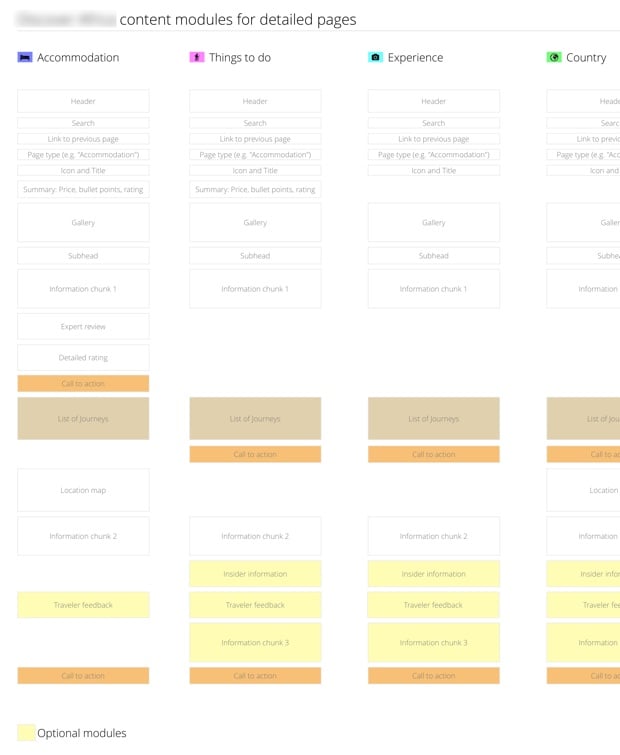
That’s everything you need to start working on layout. As an example, let’s say you’ve worked on the content plan (see my post on expanded customer journey maps for an example), so you know what type of content needs to be on a page — but you’re not sure how to lay it out. A Content Slice Diagram can help:

Content Slices

What we have in the image above is a list of pages that goes from left to right, with rectangles representing content chunks on the page. Calls to action and optional modules are given a different color so that they’re easy to differentiate. When we did this for a travel site we realized that we sometimes had the call to action in a different spot, so we were able to get consistency across pages. We also moved the content chunks around until we arrived at a hierarchy that made sense.

You’ll notice that this looks suspiciously like the layout for a mobile screen… That wasn’t the original intent, but it ends up being a welcome side effect of doing content slice diagrams: it’s a great blueprint for mobile first design.

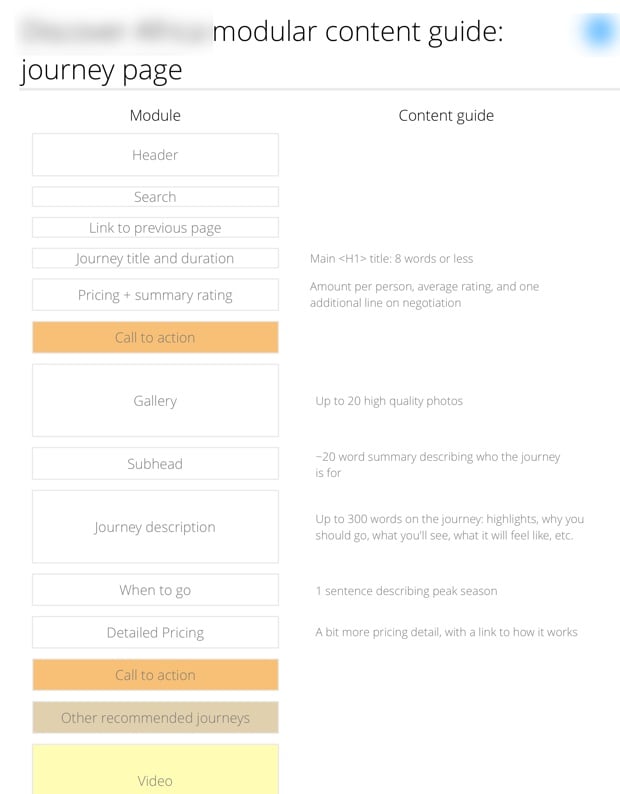
Once the hierarchy is set, you can create content guides for writers to give them the structural information they need to start writing:

Content Slices

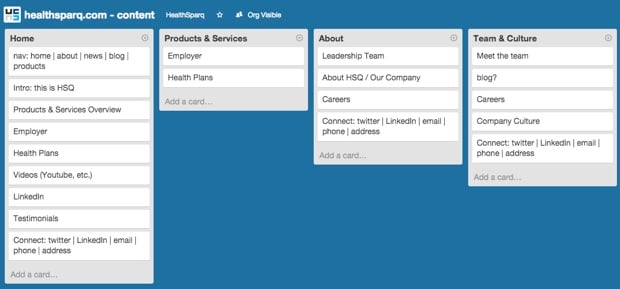
When I brought this technique to HealthSparq, my colleague Allan White had a great idea. He rightfully commented that OmniGraffle doesn’t make it particularly easy to drag content chunks around quickly. So he decided to use Trello instead. It allowed him to have collaborative meetings with the Marketing and Development teams as they discussed the hierarchy of each chunk:

Content Slices in Trello

As I’ve mentioned before, I hate needless deliverables as much as the next person, but I really like deliverables that help us design better products. And I think Content Slice Diagrams make for a great addition to the tools we have at our disposal to design device-agnostic, content-first experiences. Use at will, make it better, and let me know how it goes!

Human curation vs. algorithmic recommendations

Conor Friedersdorf talks about the differences between recommendations provided by people and algorithms in Would You Rather Get Tips from an Expert or an Algorithm?

The Amazon.com algorithm is very good at using what you’ve just bought to recommend things that you’ll want to buy, [David Weinberger, a senior researcher at the Berkman Center for Internet and Society] observed, but it can be hard to tell why. Perhaps you’ll be attracted to the content of the recommendation — or perhaps it’s the fact that the cover is also green, or that the print is in Helvetica font. 

In contrast, a skilled librarian is usually going to recommend a book solely because of its intellectual value, without any lurking, contentless variables. The librarian is therefore likelier to send a person in a direction they wouldn’t otherwise have gone in a way that will advance their thinking, education, or aesthetic taste, because they’re not just meeting needs that have already been expressed.

We’re seeing this divide come out in products as well, and some are starting to use their “humanness” as a differentiator. Whereas most music recommendation systems like Pandora, Spotify, and Rdio use algorithmic approaches, Beats touts the power of human curation on their product.

Go Book Yourself is a Tumblr site that publishes curated recommendations for books you might like based on other books you read and liked. Their tag line is Book recommendations by humans, because algorithms are so 1984.

The humans are coming.

Newsletters: not dead yet

David Carr in For Email Newsletters, a Death Greatly Exaggerated:

Email newsletters, an old-school artifact of the web that was supposed to die along with dial-up connections, are not only still around, but very much on the march. […]

And:

Email is a 40-year-old technology that is not going away for very good reasons — it’s the cockroach of the Internet.

Well, I confess that I have also succumbed to the lure of this particular cockroach, and have been experimenting with a revamped newsletter. If you’re keen, join in…

What happens when placeholder text doesn't get replaced

One of the many things I do that proves that I need to get out more is collect examples of placeholder text that ends up in a final interface. But I’ve also noticed that the issue happens more and more in the offline world as well. As I looked through my folder this morning I realized that, in the interest of science, I should post some of my favorites here. If you have any other good examples, please let me know!

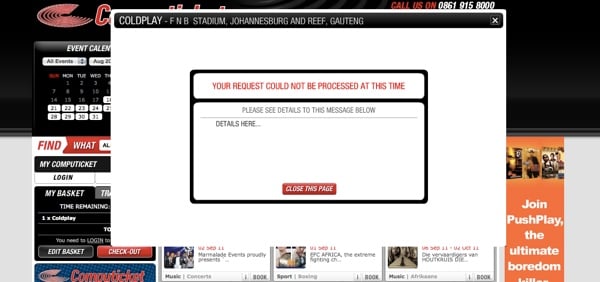
Let’s start with a very common one. Even though error messages are extremely important, they’re often forgotten about:

Computicket error message

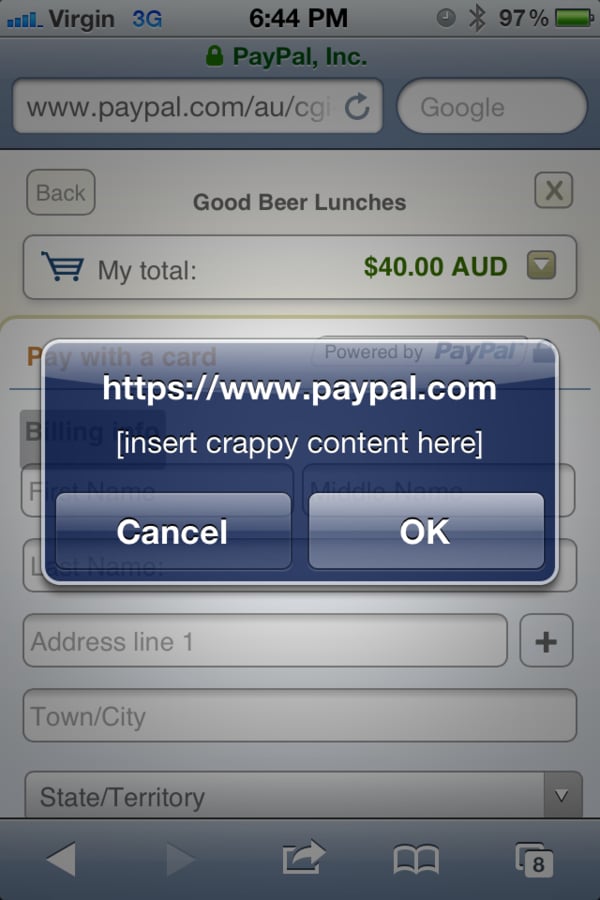
I have a feeling that this was done very late one night:

PayPal content

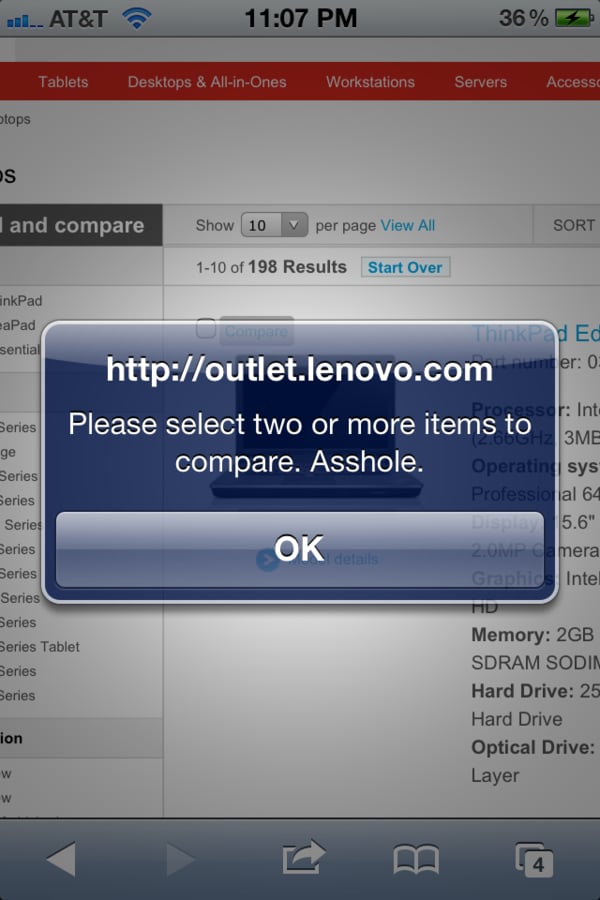
Speaking of disgruntled employees:

Lenovo

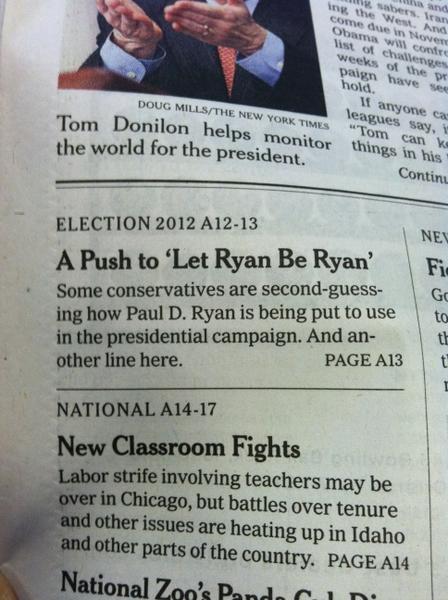
Placeholder text shows up surprisingly often in newspapers. And another line.

Another line here

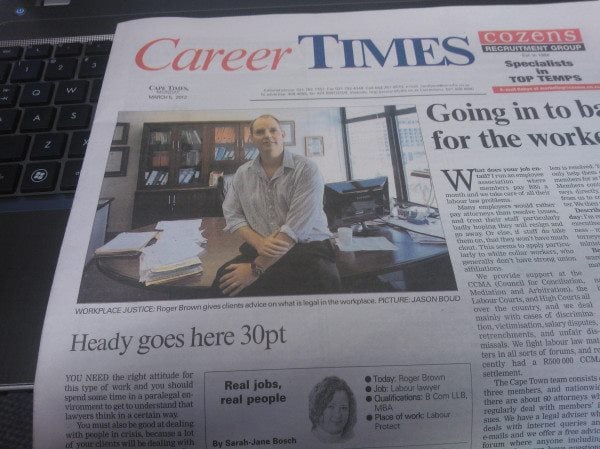
At least we know what the font size should be:

Cape Times headline

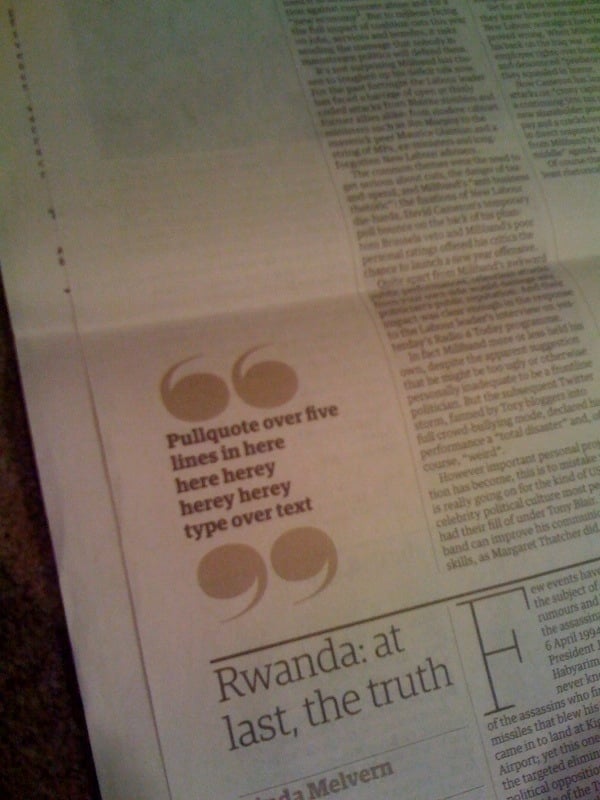
Pull quotes are optional:

Herey

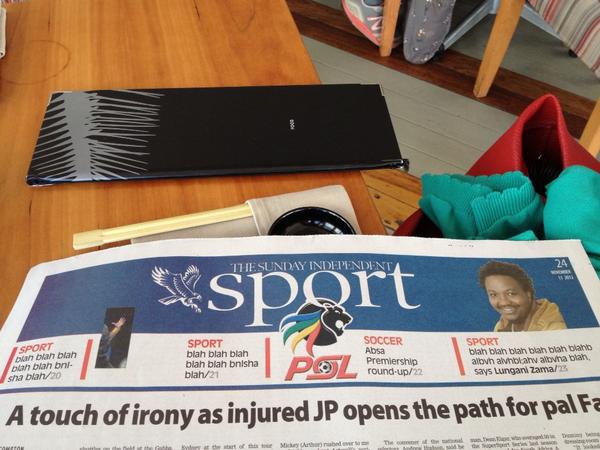
I often feel the same way about sportsball:

Sportsball

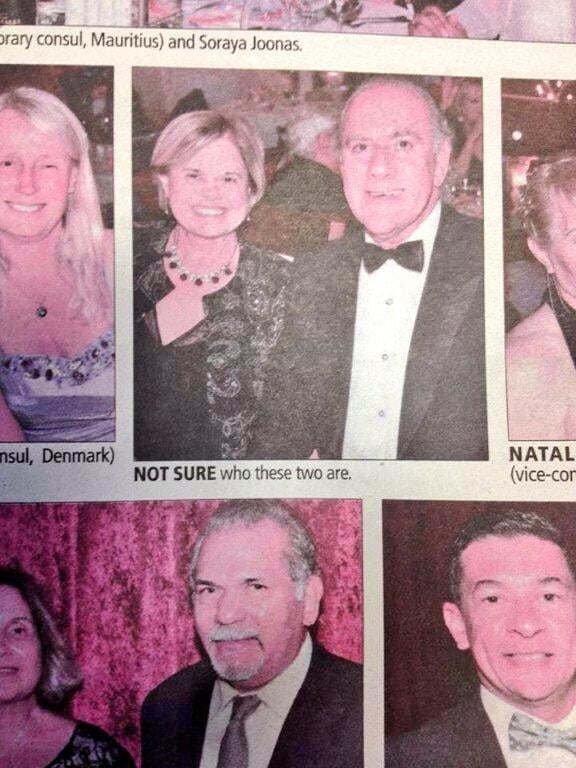
Who cares about these people:

Not sure

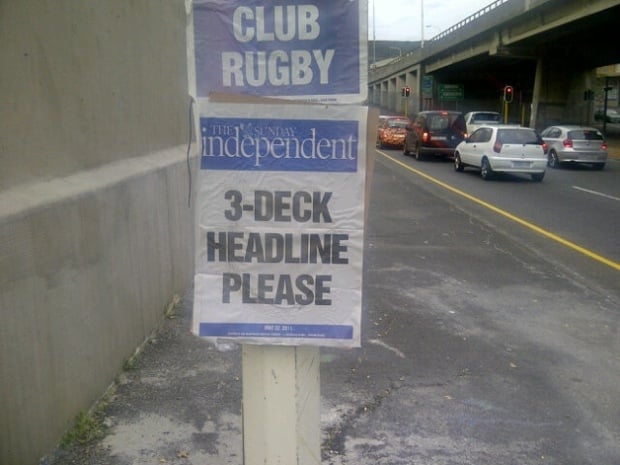
But I think my all-time favorite is still this teaser that went up all over Cape Town one morning:

3-deck headline

And finally: here you go, have a glass of Lorem Ipsum-inspired wine:

Lorem wine

Yes, it’s funny, but these examples also prove a very important point: the consequences of thinking about content after the design process is completed can be pretty embarrassing. Content-first design is where it’s at.

[Sponsor] Campaign Monitor: create and send beautiful emails

Designing emails that look beautiful, render perfectly and drive strong response is increasingly difficult. That’s why Campaign Monitor compiled the top 100 emails of 2013 into a free eBook, alongside tips on design and content. The Top 100 Email Marketing Campaigns eBook features brands like Fitbit, SmugMug, Panic and includes:

  • High performing newsletters with open rates of more than 50%.
  • Examples of great layouts & responsive designs.
  • Emails that go against best practices and still drive top results.
  • Campaigns that saw open rates improve by 20% after A/B testing, and more.

Check out the free eBook at campaignmonitor.com/top100.

Campaign Monitor makes software that lets you create and send beautiful emails. Today more than 800,000 designers, agencies, and amazing companies across the globe rely on Campaign Monitor to manage their email marketing.

The issue with @HistoryPics and lack of attribution

Internet

I rarely find myself in a position where I want to “engage” with the company who makes my toothpaste, so I generally don’t follow brands on Twitter (or any non-individual accounts, for that matter). But I recently indulged in a couple of guilty pleasure accounts. Faces in Things posts pictures of (wait for it) things that look like faces, and Behind the Scenes posts (wait for it) behind-the-scenes pictures from iconic movies.

I found the accounts interesting and funny for a while, but then I started noticing a few things that made me uncomfortable. Two things started bugging me:

  1. Photos are never attributed to their original sources, and
  2. These accounts (and several similar ones, most notably History In Pictures) seem to be run by the same people who just end up retweeting their own stuff to create some kind of snowball effect

I started suspecting that these accounts were created to amass hundreds of thousands of followers, only to then be sold to the highest bidder who wants to pimp their products to an unsuspecting audience. It’s a common practice on Facebook (I’ve written about that in The dirty world of Facebook EdgeRank Optimization), but I haven’t seen it on Twitter before.

Anyway, I unfollowed the accounts and didn’t think much more of it.

And then I read Wynken de Worde’s It’s history, not a viral feed1, in which he tears these Twitter accounts apart. He focuses quite a bit on the attribution issue, confirms that most of the accounts exist only for the bait-and-switch sale2, and then concludes:

Feeds like @HistoryinPics make it impossible for anyone interested in a picture to find out more about it, to better understand what it is showing, and to assess its accuracy. As a teacher and as someone who works in a cultural heritage institution, I am deeply invested in the value of studying the past and of recognizing that the past is never neutral or transparent. We see the past through our own perspective and often put it to use for our own purposes. We don’t always need to trace history’s contours in order to enjoy a letter or a photograph, but they are there to be traced. These accounts capitalize on a notion that history is nothing more than superficial glimpses of some vaguely defined time before ours, one that exists for us to look at and exclaim over and move on from without worrying about what it means and whether it happened. […]

And so @HistoryInPics makes me angry not for what it fails to do, but that it gets so many people to participate in it, including people who care about the same issues that I do. Attribution, citation, and accuracy are the basis of understanding history. @HistoryInPics might not care about those things, but I would like to think that you do. The next time you come across one of these pictures, ask yourself what it shows and what it doesn’t, and what message you’re conveying by spreading it.

The inaccuracy of these accounts (see, for example, 12 More Viral Photos That Are Totally Fake) is a huge deal, of course. But for some reason it’s still the lack of attribution that grates me the most. Back in 2009 I adopted Chris Messina’s use of slashtags on Twitter to attribute sources using the syntax “/via @name”. I’ve been using it ever since, and I saw many people who did the same. But it’s a practice that has slowly diminished over the past few years3.

Why is it a big deal to tell people where we found something? Isn’t the web free and open and we’re all one and blah blah blah? Sure, but the web is also fundamentally about hyperlinks. The ability to follow links back to their original sources — with plenty of pleasant detours along the way — is the core of what makes the internet such a wonderful place. Do you ever get happily lost on Wikipedia? Exactly. So if we stop caring about attribution, we rob others of the ability to find more people and topics that they might be interested in. I’ll say it again: It’s not about making the source feel important. It’s about helping others follow the breadcrumbs to places of interest.

So I guess the point of this post is to join in Wynken’s plea that we look at these new crop of Twitter accounts more critically, and call them what they are: get rich quick schemes. And to ask that we remember to take attribution seriously. It’s the right thing to do.


  1. Link via The Loop

  2. Also see Alexis Madrigal’s interesting reporting in The 2 Teenagers Who Run the Wildly Popular Twitter Feed @HistoryInPics

  3. There were other attempts at attribution syntax, of course — most notably the much-mocked curator’s ǝpoɔ

Industry Web Conference: information and discount code

Industry Conf

I’m excited to be part of Industry Web Conference in April this year, alongside some people I’ve admired for a long time. I’m going to be talking about a thing that’s fallen out of fashion a little bit over the past year or so: Deliverables. Yep — the business we’re supposed to be getting out of. So I’m a bit nervous about the talk, but I hope people will give it a chance.

The talk is called Getting back into the (right) deliverables business, and here’s a little more about it:

I feel a little bad for the static wireframe. It’s had a bad year. In fact, UX deliverables in general have had a bad couple of years. There’s a growing skepticism about the value of Personas and other traditional UX artefacts, as well as an onslaught of “get out of the deliverables business” refrains from Lean methodologies.

All of this led me to lots of introspection about deliverables, and if it’s actually possible to create deliverables that are useful to help create better products.

In this talk I’ll tell our story. How we stripped down all our deliverables to almost nothing, and then started building it all up again slowly by asking ourselves, “What is absolutely necessary for us to do a great job?” I’ll discuss some of the deliverables we’ve since created (such as Expanded Journey Maps and Content Slice Diagrams), how they’re useful to us, and how you might be able to use them in your design process as well.

We’ve come to realise that not all UX deliverables are bad. Only bad deliverables are bad.

I’m going all in on this — the day before the conference I’m also doing a full-day workshop called Using Customer Journey Maps for Effective Content-First Design. This will be a very practical day on what has become an essential deliverable for us:

More than just a journey with touchpoints, emotions, takeaways, etc., it’s also a representation of the Information Architecture and the content plan, with Personas (needs, goals, scenarios) serving as the starting point for everything — sort of like the glue that ties it all together.

You can think of this as the UX Strategy document. It incorporates Persona-based user needs and business goals with site structure and content planning in a way that really works. It also places content at the centre of the design process, which makes it easier to follow mobile first and responsive design strategies.

In this workshop we’ll discuss the value of this document and then go through a practical exercise to create an Expanded Customer User Map so you can apply it in your roles immediately.

So anyway, I’m really looking forward to it. And here’s the special bit. If you use the discount code rian, you can get conference tickets and/or workshop tickets for £40 off. That’s a pretty substantial discount. You can read more about the conference here, and register here. I hope to see you in Newcastle upon Tyne in April!