Menu

Posts tagged “content strategy”

How to measure the effectiveness of web content

Content strategy is starting to get its much-deserved time in the spotlight as part of the user experience design family.  As basic examples of confusing/bizarre content like this one and this one show, getting serious about content is way overdue.  But I’m a little worried that we haven’t seen much talk on how to measure the effectiveness of web content.  It is unfortunate that in some companies it is still a struggle to sell the benefits of UX design, but it is the reality, so we have to deal with it.

Selling content strategy to clients and stakeholders is, of course, not the only reason why measuring its effectiveness is important. It is also essential as part of the whole design process:

  • How do we select the best content if we have a variety of different alternatives, each with its own group of supporters who want to get it on the site right away?
  • Since the voice of a web site can be such an abstract, arbitrary decision sometimes, how can we apply methodologically robust research methods to help make these decisions?
  • How do we know that the content we wrote made a difference on the site?

So that is what this post is about — a proposal for how to measure the effectiveness of web content.

What makes content effective?

First, I would define “effectiveness” in this context as the optimization of the following three concepts:
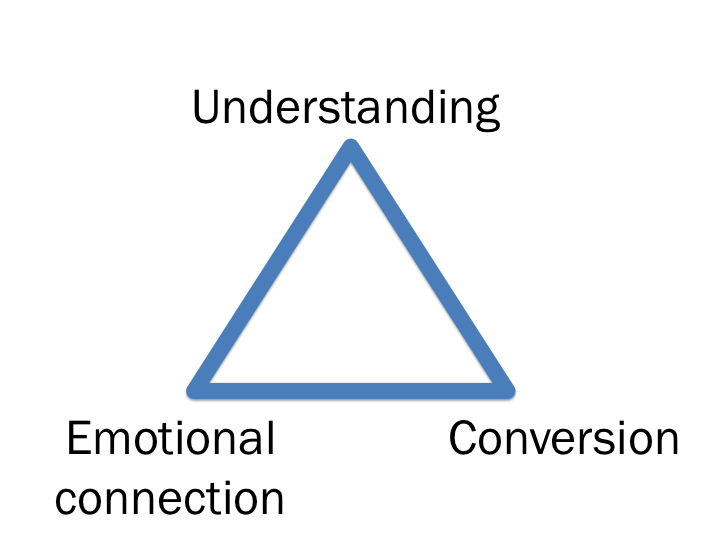
  • Do users understand what you are trying to tell them and what action they should take to be successful in their task?
  • Are you invoking the desired emotions with your content?
  • Does the proposed content result in higher conversion rates than other alternatives?

It’s so important to combine the user perception data (the first two concepts) with business metrics (the third concept).  From my experience the only way for user experience designers to affect change is if we can show the positive impact these changes have on engagement/revenue metrics.

Measuring content effectiveness

My proposal is to map each of the three concepts to a research methodology that is specifically designed to get the needed information:
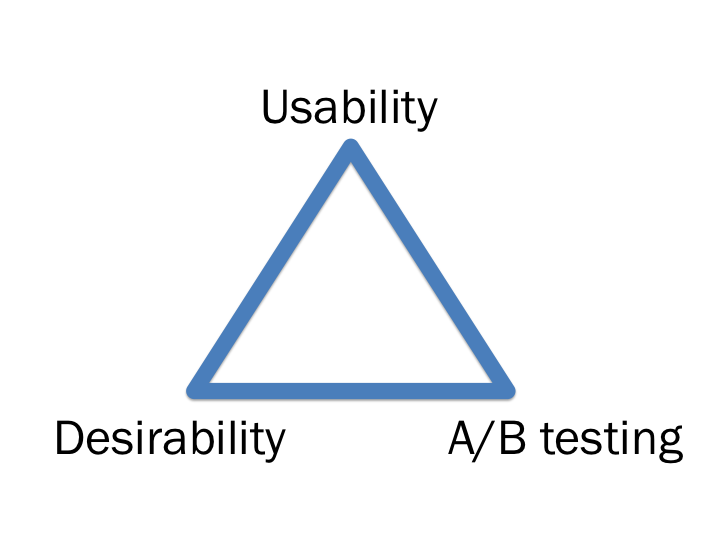
Each of the three methodologies can be used to measure the effectiveness of different versions of the same content before it goes live, as well as measure what difference it makes once it is live.  This is also a really nice way to progressively reduce the number of alternatives down to the best solution.

I’ve written about usability testing and A/B testing before so I’m not going to go into more detail on that, but I do want to spend a little time on Desirability testing since it’s a method I really like, and I think it’s not used enough to measure design/content effectiveness.

Desirability testing

In desirability testing, a survey is sent to a large number of users where they are asked to rate one of the proposed design/content alternatives using a semantic differential scale.  The survey is done as a between-subjects experiment, meaning each user sees only one of the proposed designs, so that they are not influenced but the other design alternatives.  The analysis then clearly shows differences in the emotional desirability of the proposed  alternatives.

So, for example, you could show one group a design and ask them how they feel about it:
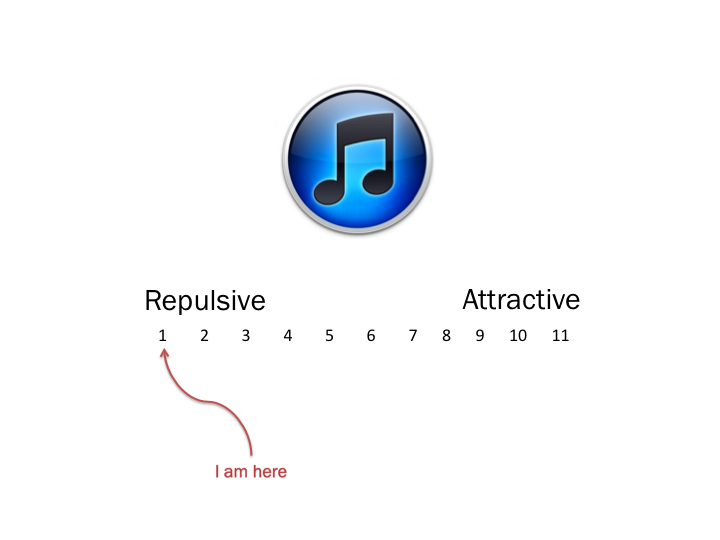
And then show a different group another image and ask them the same question:
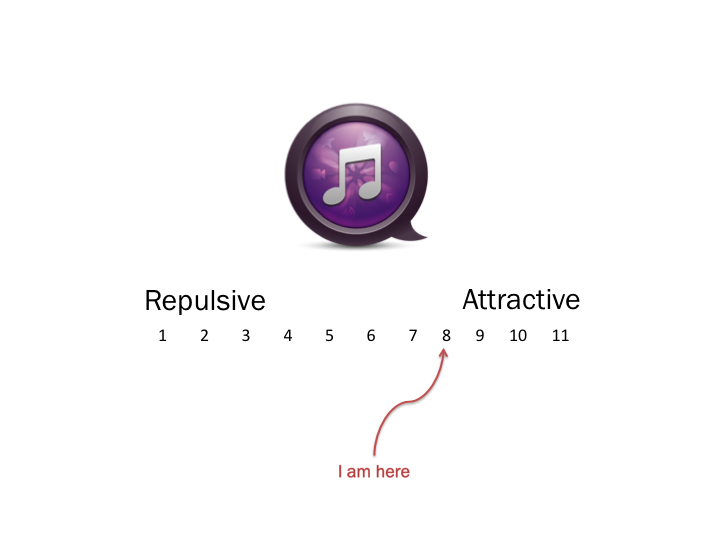
When you then compare the averages of the different groups, you’re able to make an accurate relative comparison between the two designs.

Putting it all together

In summary then, to apply all of this to measuring the effectiveness of content:

  • Usability testing. Start with several different version of the content (~10), along with the current version (if it exists).  Ask users in a lab setting what they understand the content to mean, and any other thoughts they have on the way it sounds.  This should help narrow down the alternatives to 4-6 possibilities.
  • Desirability testing.  Use the Desirability method in a large sample online survey as a between-subjects experimental design.  In the survey, ask users to rate the content on different brand and design attributes.  This way you can determine what emotional response the content elicits from users.  You’d also be able to ask users which version of the content they’d prefer, and why.  This method has the added benefit of large numbers to give you confidence in the statistical significance of the results.
  • A/B testing.  Once you’ve narrowed the alternatives down to two or three, live A/B testing can help you determine which of the alternatives perform better from a revenue or engagement perspective, by looking at differences that can be attributed purely to content changes.  This obviously works easiest when the content is directly related to a revenue-generating task, like the call to action on a checkout page, for example.  But it’s not just about revenue — there are great ways to measure metrics of engagement with the page, which is just as powerful.

Now, I can see a few issues that make this a pretty difficult task, and it’s the reason why the above three methods should not be used in isolation.  In combination, they help tell the whole story.

  • It is difficult to know what users really read on a page.  In the first two methods you pretty much have to show people what to read — that doesn’t happen when they visit your site organically with no one looking over their shoulder.  This is why A/B testing is so important as it gives you a sense of how behavior will change based on content.
  • It is difficult to isolate the effect of content changes from the other influencing factors on a page.  This is the really difficult part.  How do you know that conversion/engagement improved because of the content and not of some other factor on the page, like visual design changes?  That is why it is important to keep the rest of the page exactly the same, and also why usability and desirability testing is important to bring out the perceptual data from users.
  • [Update] This method doesn’t scale well. When you are doing a major redesign or re-write, you can’t do this for every single change (as Eric Reis points out in the comments of this post).  The method is mostly suited for microcopy and incremental improvements once the base content has been written.

And the biggest problem is of course that this is an idealistic approach.  Finding the resources/time/money to do this for every content change is obviously not feasible.  But for high-value landing pages, in-line help, etc. this approach could be well worth the investment.

This is also by no means the only way to measure content effectiveness, but I think it’s a good approach that balances methodological rigor with the dangers of not overdoing it.  I’d be curious if anyone has any thoughts or ideas on how to improve on this proposal.

PS. Last week I discussed this topic at the first Cape Town Content Strategy meetup.  I uploaded the slides here, and you should join the Cape Town group here.
Tech4Africa panel: How we redesigned Payfine.co.za

This week I was in Johannesburg for the debut of Tech4Africa, a conference about web technology in the African context. It was a fantastic experience, an opportunity to learn from and meet some great people, and I will most certainly be back next year (but hey, Gareth, let’s move it to Cape Town next year!). Yes, there were the usual small conference hiccups, but nothing that can overshadow the importance and significance of this event.

The mere fact that we were able to listen to speakers like Clay Shirky, Andy Budd, and John Resig, as well as some top South African thinkers & doers, and discuss with them the uniquely challenging opportunities that exist here in Africa, made this conference a winner. The content was mostly great, but the conference was more than that — it was about being inspired and energized about being in this industry, at this time, in Africa. You should follow Tech4Africa and its head organizer, Gareth Knight, for updates on the conference. And no matter where you live, you should attend next year. This event is here to stay.

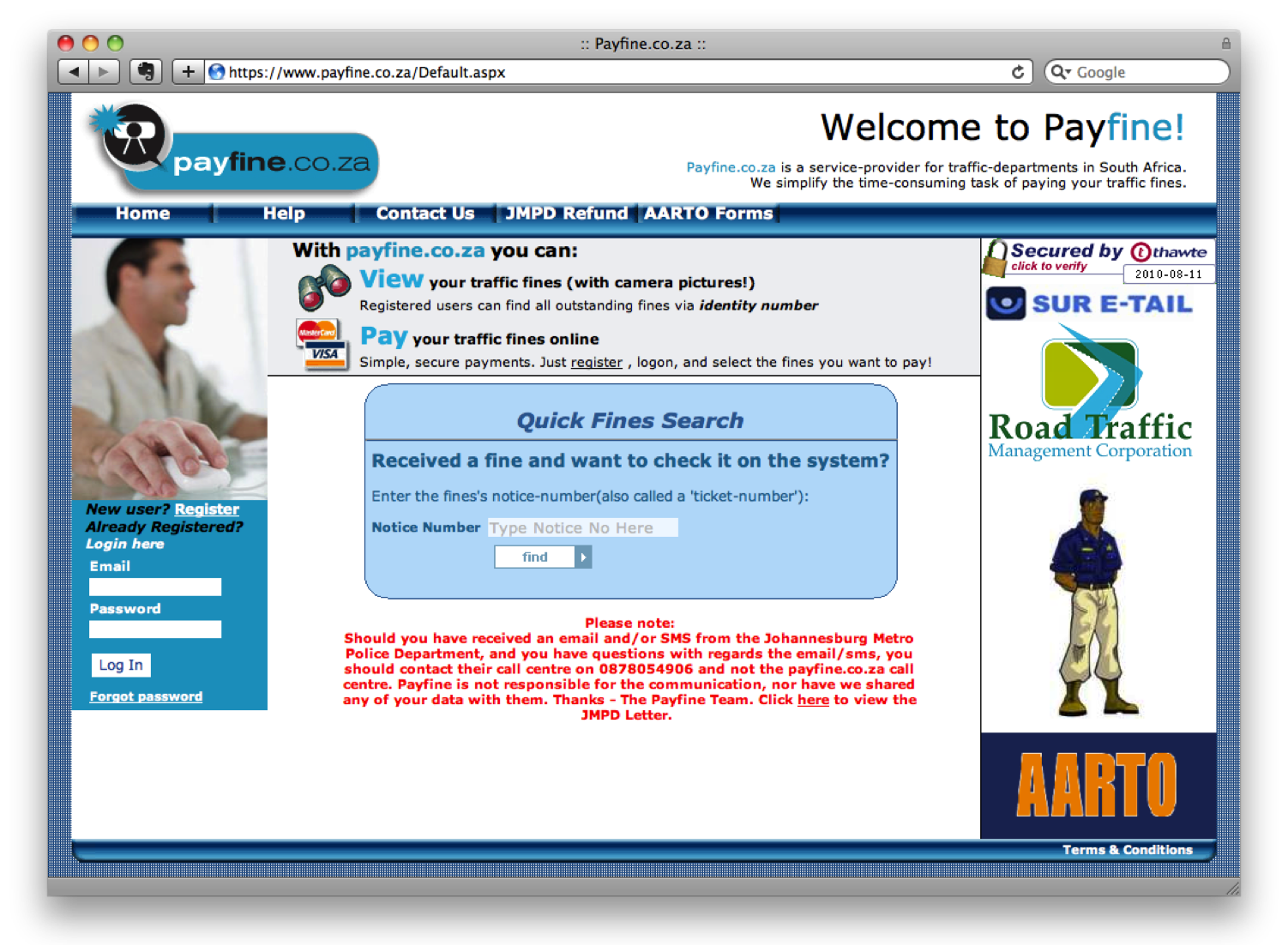
I also had the great opportunity to speak on a web design panel with Allan Kent, Basheera Khan, and Mike Lewis. We took a User-Centered Design (UCD) approach to redesigning Payfine.co.za, a web site that allows South Africans to pay the many traffic fines they get every… well… every month or so.

We’ve never met each other before the conference, and we were all in different locations. So, since we had to do this remotely and in our limited spare time, we broke the process up into three distinct user experience elements and each took responsibility for one of the tasks: content strategy (me), interaction design (Bash), and visual design (Mike). We collaborated a lot along the way, but we decided to each lead the creation of one piece of the puzzle, and then put it all together in a coherent story (this was Allan’s job!).

The end result? Well, you should judge for yourself. Here is what Payfine currently looks like:

And this is the proposed redesign:

The one thought I want to pull out above the rest about this process, is that UCD is not rocket science. It’s not easy, but it’s not rocket science. There is a process, and there are rules (they can be broken, but they help focus the design process).

But. It does require a mind shift (I hate that word — can anyone suggest something different?) in the African web space — a realization that the interfaces we currently have on our banking sites, our e-commerce sites — even our entertainment sites — are simply not good enough. And it requires a commitment by those companies to invest in the user experience of their sites, because it will have a positive effect on the business.

Below are the slides we went through during our session, which I amended to make it a little bit easier to read without the voice-over we provided. We’re all happy to answer any follow-up comments or questions on this, so please let us know if you have any. And I really want to thank the rest of the team — this has been a great experience — let’s do it again!

How we redesigned Payfine.co.za - Tech4Africa

GeekDinner Presentation: The highs and horrors of website redesigns

Last night I attended my first Cape Town GeekDinner, and I have to say that I will definitely be back next time.  Good food, good wine (thanks Delheim!), great atmosphere and discussions, and a few 10-minute geeky talks sprinkled in between… yes, this is an idea I can get behind.

I also got to do a short talk on 5 things I’ve learned about website redesigns from being involved in various projects at eBay and Yola.com.  The slides are posted below.  As I mentioned in my talk — since you can’t say a whole lot in 10 minutes, I went with breadth over depth here.  There are obviously a lot more that goes into redesign projects (and yes, I know Content Strategy is about more than not using Lorem Ipsum in your designs…).  But these are a some things I’ve learned going through the process a few times:

The highs and horrors of website redesigns

View more presentations from Rian van der Merwe.

There is no excuse for confusing site navigation

I am moving countries with my family in 3 weeks, so I have been doing a lot of account canceling over the past week or so.  For the most part, it’s a pretty smooth process.  But that changed when I encountered the labyrinth that is the Microsoft Billing department. Describing how I was eventually able to cancel my Xbox Live account would take way too long, so let me just focus on one part of the experience that is indicative of a company stuck in late 90s Information Architecture.

In order to get to my payment options for Xbox, I have to follow this sequence:

  1. Go to www.xbox.xom
  2. Click on “Marketplace” at the top (this automatically shows the “Xbox LIVE” link in the second tier navigation as selected)
  3. Hover over “My account”
  4. Click on “Manage payment options”

Here is the screen with the major areas called out:

There are a variety of issues with this navigation structure, including:

  • No connection (visual or otherwise) between the three navigation tiers. There are non-navigation elements between the tiers, so there’s no way to know how they are related.
  • No visual hierarchy.  What is the main navigation on the page, and what is sub-navigation?
  • Inconsistent “selected” link states.  The top tier doesn’t even show you what’s selected.  The middle tier uses black links that turn white.  And the third tier uses the tab metaphor.

The thing is that fixing this navigation isn’t that difficult.  It will take some time, but it requires a simple user-centered design strategy similar to what you would use to design any IA:

  1. Compile a site map of all the links and page names.
  2. Get a content strategist to write/edit link names so that they are understandable to users, and in line with the brand voice.
  3. Do a card sorting study to understand how users would group the site’s content and links together (adjust link names as necessary).
  4. Get a UX designer/engineering pair-up to design a single 3-tiered navigation structure.

I don’t understand why Microsoft can’t do this.  But there is simply no excuse for it.  It’s not like there aren’t plenty of resources and design guidelines for site navigation.  Here are just a few:

Using Twitter to value online information

I have recently noticed an interesting trend among the people I follow on Twitter. It appears that my network is dividing itself neatly into 2 camps: those who care deeply about the content they publish, and those who use it more casually. Let me explain…

Saying “good night” to everyone you know

Twitter users who casually update their status without thinking about it too much continuously say things like “Yep,” “Good night tweeple,” and “Banging my head against the desk.” Cryptic information that can be quite difficult to figure out. I’m not saying that this is necessarily a bad thing. It’s just clear that some people view Twitter as a broadcast medium mainly meant for people they know in the real world, and that’s fine (I tend to think that’s what Facebook is for, but let’s not split hairs about this).

I’m also not suggesting that all tweets should be serious — the odd random or exasperated update can be interesting, enlightening, and often very funny, and it also shows that there’s a real person at the other end. I do follow a lot of these casual users, but I know all of them personally so their updates are meaningful to me. And of course there is always the option to stop following someone, so you only have yourself to blame for the content you receive on Twitter.

But then there are those who care a lot about what they say…

Sharing content via Twitter

People who care see Twitter not just as an outlet for random thoughts, but also a valuable tool to learn and share and expand their knowledge about issues they care about. I follow a bunch of people who clearly care about the content they put on Twitter, and it adds enormous value to my work life and personal life (people like @jontyfisher, @adamnash, @SmithInAfrica, and @TheONECampain, just to name a small and diverse subset of folks).

Sharing interesting information on Twitter makes you a good citizen of the web for a very important reason. It allows the best content to rise to the top. What makes content sharing on Twitter powerful is that humans are involved, not just technology. The difference between going through your RSS feeds and learning about something through your Twitter network is that on Twitter, someone read the content and decided that it is good enough to share. And if you follow people with similar interests, chances are you will find it interesting too. As Justin Basini (@justinbasini) put it in a recent post: “Twitter users aggregate, edit, filter and share better than any technology.”

But what if the content isn’t interesting to anyone else? Well, then it will just die in the constant stream of tweets that go by every day. If the content is good, it will be retweeted, and spread rapidly not just through your own network but the networks of others.

In sociology the phenomenon of information spreading through multiple networks is known as The strength of weak ties. In a 1973 paper, Mark Granovetter developed his theory of weak ties. The theory states that because a person with strong ties in a network more or less knows what the other people in the network know (e.g. in close friendships or within your closely-guarded Facebook network), the effective spread of information relies on the weak ties between people in separate networks.

And this is of course one of the main strengths of Twitter — that not all connections have to be mutual (when you follow someone they don’t have to follow you back, like on Facebook). In other words, retweeting allows information to jump from one tightly-knit network to the next, allowing for the rapid spread of valuable information throughout the entire network, not just your own.

A new way to value information on the web

There are still a lot of people who feel that Twitter is a waste of time and adds no value. That might be true for them, but I think we are seeing a very interesting phenomenon here, and that is a new way to value information on the web and separate what’s worthy of reading from what’s not.

RSS feeds allow us to see content we might be interested in (but not every article will be good). Digg and similar services allow us to see what other people find interesting. But only Twitter puts those features together and lets us see content that people with similar interests than ours find valuable. And there is real power in that.

Oh, and you can follow me on Twitter if you’d like.