Menu

Posts tagged “user experience”

Breaking Development: Build on the present to develop for the future

Breaking Development is a conference about the future — as it should be. But as I reflect on the past couple of days of talks about going beyond the desktop, there’s one thought I can’t get out of my head:

We need to push the limits at both ends of the technology spectrum.

I’ll come back to that. First, I wanted to summarize the major themes that stood out for me at the San Diego conference on 22-23 July:

  • Forget about device classes like phone, tablet, laptop, and desktop. Instead, let ergonomics, input methods, and multiple-screen experiences guide design decisions.
    • We need to start thinking about designing for wrist devices (smart watch) and eye devices (Google Glass), as well as wall devices like TVs (think Xbox One) (see my notes on Luke Wroblewski’s talk).
    • The biggest development challenges are going to come from new input methods like voice control and gesture devices like Leap Motion (see the slides from Jason Grigsby’s talk).
    • The problem is that we can’t reliably detect screen sizes and input methods (keyboard, mouse, touch) to adapt content appropriately.
    • The good news is that we can look forward to advances in CSS3 that allow for full control over content layout (see the slides from Divya Manian’s talk).
  • So, how should we adapt to these changes?

These are important themes and I got a lot value out of the talks. We should absolutely explore the boundaries of new input methods like voice and gestures, and play around with experimental CSS features that let us take more control over content layout. This is how we move technology forward, and where we get to take advantage of the latest hardware and software standards.

But I’m a bit worried that we tend to push into the future so fast that we abandon fields of existing technology to whither and die before they’ve reached their full potential. It’s fine to experiment with the new and exciting, but innovation doesn’t happen only in the forward direction — lateral jumps often result in really innovative ideas.

I’m not sure if this is the best way to illustrate what I’m trying to say, but here’s what it looks like in my head. If we focus only on pushing the boundaries of the future, we end up with a pretty small “area of innovation”, for lack of a better word:
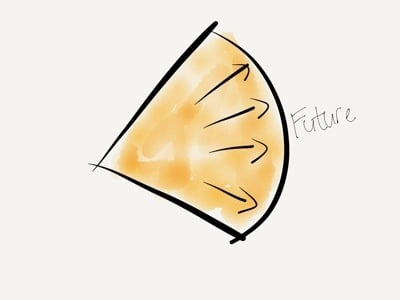
Pushing the future

But if we also work on pushing the boundaries of what we already have, we increase that area by a large amount:
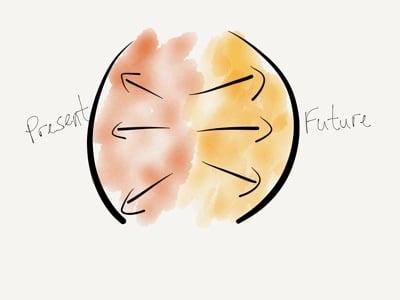
Pushing both ends

One example I keep coming back to is USSD. It’s a low-end mobile technology that got completely skipped over in the U.S., but is widely used all over Africa since it’s supported from the most basic feature phones all the way to the iPhone. Projects like MAMA (using mobile technologies to improve the health and lives of mothers in developing nations) and messaging platforms like Vumi already use USSD in really innovative ways. We’re not talking about these low-end product solutions enough, and that’s a shame.

There are really two sets of questions we have to explore when designing and developing beyond the desktop. First, what can we do at the far edge of technology? How can we push the boundaries of the future? How can we go further?

But we also have to ask, what can we do at the low end of technology? How can push the boundaries of the present? How can we do more with what we already have?

As much as what I learned at Breaking Development will help evolve our company’s processes for future-friendly development, the most surprising outcome for me is how much it got me thinking about the potential to use existing technologies to solve the problems we run into while we push into the future. This is why I got more out of Breaking Development than I expected, and why I can highly recommend it to anyone who designs and builds digital interfaces.
Breaking Development: Prototyping Style

I’m attending the Breaking Development conference in San Diego this week, and will be posting my notes from a few of the talks here.

Ben Callahan did a great talk on design workflows called Prototyping Style. He discussed the problems with linear workflows before giving some great tips on a new way of collaborative working specifically suited for responsive design.

  • We used to have a very linear workflow, which went something like this:
    • Content
    • UX
    • Design
    • Front-end development
    • Back-end development
    • Launch
  • The problem with linear workflows is that decisions are being made in each step, before we have all the data
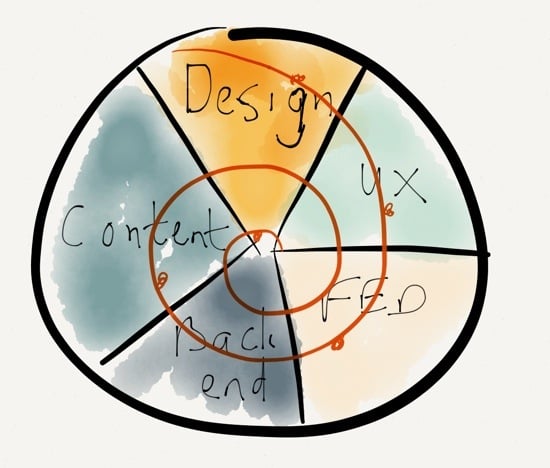
  • We need to invite others into the process, and work towards a “1 Deliverable” workflow

The “1 Deliverable” workflow looks like this (excuse my quick Paper drawing…):

1 Deliverable

The benefits of a “1 Deliverable” workflow:

  • It’s centered on iteration
  • It requires collaboration
  • It results in natural decisions (waiting for the last responsible moment to make decisions, once all the right data is available)
  • Watch out, it sometimes conflicts with organizational structure
  • It requires the right team — no room for superstar egos

So how do we advance the Design phase through a “1 Deliverable” workflow? 3 stages of design:

  • Establish the aesthetic
  • Solve the problem
  • Refine the solution

Establish the aesthetic

  • Do style comparisons with clients, to get a sense of what they’re looking for
    • Light vs. Dark
    • Flat vs. Textures
    • Illustration vs. Photography
  • Move from Style Tiles to Style Prototypes:
    • It shows more accurately what it will look like in the browser
    • It sparks conversations about browser support
    • It’s very easy to make quick changes with CSS
  • Use tools you are comfortable with to establish the aesthetic

Solve the problem

Refine the solution

  • Don’t use static design tools to refine the solution
  • Instead of static design handoffs, consider Design Pairing
  • Continuously get feedback and input on design direction
    • Set office up to create collaborative conversations
    • TVs with Apple TV connections so that anyone can throw up their designs onto any of the screens to discuss
  • Important: you need to be conscious of the switching point between solving and refining, so that design doesn’t continue ad in finitum

Ben ended his talk with a story about Miles Davis and the making of the album Kind of Blue, and what the album can teach us about collaboration. I really liked this because it’s something I’ve written about before as well, in A story about Miles Davis and the nature of true genius.

I really appreciated the practical nature of this talk. There were lots of ideas to take back and use in my everyday design work.

Breaking Development: Pitfalls and Triumphs of the Cross-Screen Experience

I’m attending the Breaking Development conference in San Diego this week, and will be posting my notes from a few of the talks here.

I really enjoyed Cameron Moll’s talk entitled “Pitfalls and Triumps of the Cross-Screen Experience”. One of the things that I appreciated is that it’s one of the first talks here I’ve seen that looked a bit more critically at Responsive Web Design. Not that Cameron isn’t a fan of responsive design, but he does bring up some interesting questions about its limitations. Here are my notes.

The need for multi-device experiences

  • “We don’t know what will be underneath Christmas trees two years from now, but that’s what we need to design for today” - Brad Frost
  • The best interface is the one that’s within reach.
  • Forget mobile. Think multiscreen.
  • At any time during the day, I may have 2-5 screens in use.
  • Would be more if you include screens in cars, other internet-enabled devices.

Five guidelines for multi-screen experiences

  • Discrete: an experience on one screen independent of, but ideally cohesive with, experiences on other screens
    • Twitter.com and NPR.com have great multi-screen experiences
  • Sequential: An experience capable of flowing from one screen to another
    • Amazon.com cart is available across multiple devices
    • 67% use multiple screens sequentially for online shopping
    • 90% use sequential for online activities in general
    • Up to 49% email themselves a link for continuing the activity on another device
  • Complementary: An experience complemented by a device’s unique capabilities
    • Day One and Google Maps apps utilize device capabilities of desktop browser and native apps
  • Extensional: An experience that controls, or is controlled by, another source
    • Instagram photos can be reposted to other networks, or pulled into apps like Flipboard
    • APIs essential for these types of experiences
  • Simultaneous: An experience involving multiples screens used simultaneously
    • Watching TV while going online with phones or tablets

Some do’s and don’ts for cross-screen experiences

Don’t:

  • Stereotype devices (or their owners, for that matter)
  • Fall prey to the convenience of device silos — we’re using multiple devices for multiple purposes
  • Unforgivingly force your app on users — let them use the web if they want to

Do:

  • Respect users’ mental models, aesthetically & functionally
    • Flipboard iPad and iPhone apps have different scrolling directions (left-right vs. up-down)
    • The iOS App Store “Update All” button is on opposite sides on iPhone and iPad
    • Simplenote has a “Done” button on iPhone, but not on iPad
  • Sequence tasks across screens (to the extent possible)
  • Make it vertically responsive, too
  • Leverage outside expertise

A closer look at Responsive Web Design

Don’t believe responsive design is a one-size-fits-all solution:

  • RWD is a must… for the browser, that is
  • How did native app development escape the same scrutiny?
  • Why don’t we have Media Query Snippets for native apps?
  • Amazon’s lack of RWD is not a concern — most of us rarely use their web site on mobile devices
  • You have to figure out the cross-screen experience for your product, because there’s not a single solution that applies to everyone
  • Remember, No One’s Forgotten How to Pinch and Zoom
  • What if pinch & zoom utilized media queries to render the layout differently (for those wanting denser content) vs. one size fits all? Demo: Gesture-Enabled RWD Proof-of-Concept

eBay CEO John Donahoe gets it:

We understand mobile to be just another screen…

It was a great talk with lots of food for thought.

Breaking Development: One Design to Rule Them All

I’m attending the Breaking Development conference in San Diego this week, and will be posting my notes from a few of the talks here.

Luke Wroblewski kicked off BD Conf 2013 with a talk entitled “One Design to Rule Them All”. It was a bit of a State of the Nation on what’s going on in the device landscape today. Here are my notes from the talk.

  • It’s impossible to determine what kind of experience we should design for by looking at standard device types (phone vs. tablet vs. laptop, etc.)
    • For example, smartphones now go up to 7” screens and even a bit above.
    • Tablet sizes are equally all over the map, and to make things worse, you now have devices that are basically giant desktops that can transform into tablets or even phones.
  • What is the difference between a phone and a tablet anyway?
    • Pixel densities are not that different any more
    • Can’t reliably determine how big the device is
    • Can’t rely on feature detection (like if it makes phone calls or not)
  • We can no longer rely on knowing what type of device it is to figure out what to build.
  • It’s not clear any more what a mobile device is, what the difference between a tablet and a laptop is, and whether it’s touch-enabled or not (see Leap Motion).
  • We have to stop thinking about designing for phones, tablets, and laptops (device-specific).
  • Instead, what makes more sense is to look at the ergonomics of each device:
    • You get eye-sized or wrist-side devices, palm-sized devices, lap-sized devices, desk-sized devices, and wall devices like big-screen TVs
    • Each of these types require subtle differences in the interfaces, which is where responsive design come in.
  • This brings us to the principles of multi-device design:
    • Work mobile first
    • Support a continuum of screens
    • Account for high resolutions
    • Optimize for touch (can’t use mouse/cursor easily for touch)
    • Support cursor & keyboard
  • Good news: you only need one web design.
  • Bad news: it’s a new and different way of doing web design.
  • But wait, do we compromise the large screen experience if we go mobile first?
    • No, we’re creating a good experience everywhere, and we enable people to do more things in more places.
    • Look at Currys, Skinny Ties, and O’Neill as good examples.
  • And what about “the mobile context”?
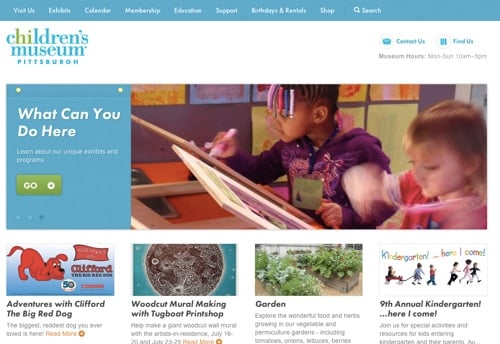
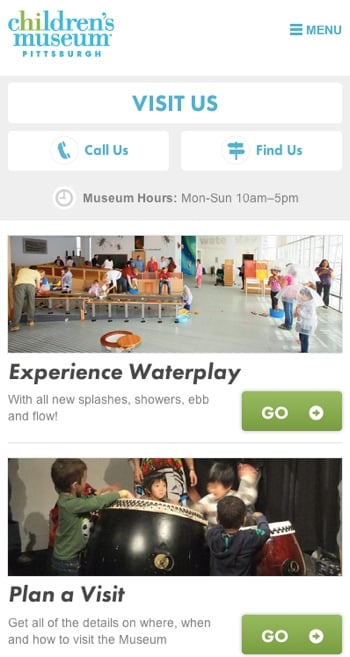
    • Children’s Museum of Pittsburgh: on mobile, they bubble up relevant content like how to get there, and they deprioritize that content on larger screens.
    • So you can still have one design, but use different priorities on mobile.

Smaller screens show important information about visiting like directions, hours, and contact details:

Museum mobile

On larger screens that information is deprioritized:

Museum desktop

It was a great high-level introduction to the conference, and I’m looking forward to the rest!

Pragmatism vs. idealism in design

From Mark Boulton’s great post I’m not a Craftsman:

I’m more often than not in a place where my own job, as a designer, is not to make something I love, but to make something appropriate. Something that does the job well. Something that responds to a hypothesis and serves a need. Not necessarily something loved and beautiful. And that’s ok.

In many cases, especially when it comes to client work, pragmatism beats idealism in design.

How to convince clients to think about content before they think about graphics

I recently had to convince a client to pause their redesign efforts and work on their content first. This is how I did it. I tried to stay away from UX jargon and overly technical arguments. There is obviously much more to say about Content Strategy and related disciplines, but this was an exercise in trying to make a succinct argument by only focusing on information that’s most relevant to the client. I’m posting it here in the event that it might be useful to those who have to make similar arguments to non-UX audiences.

Introduction

Since this is primarily an informational site with the goal of converting readers into customers, it is imperative that we start the design process by developing the core content first. This will ensure that we design a web site purposefully to help users find the information they need, and guide them towards desired actions, as opposed to designing the interface first without knowing what content will be displayed. For a more detailed overview of this strategy, see A Richer Canvas.

In this brief overview I will summarize the primary reasons for following this approach, and how I propose we go about it on a practical level.

What happens if we don’t follow a “content first” strategy?

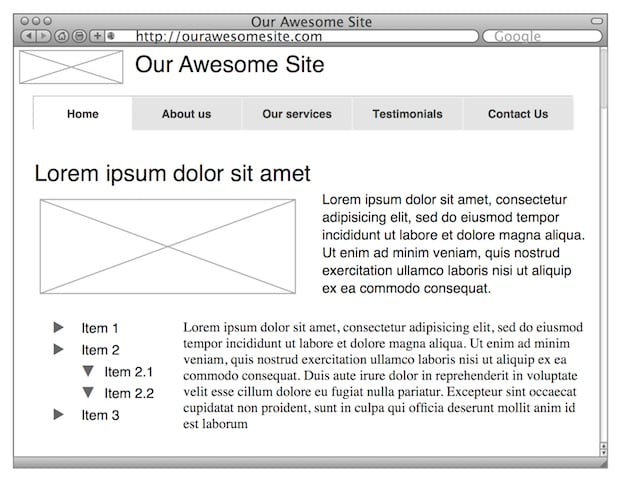
Let’s look at an example of starting the wireframe process before content is available. Let’s say we provide some wireframes of what the site might look like:

Content First

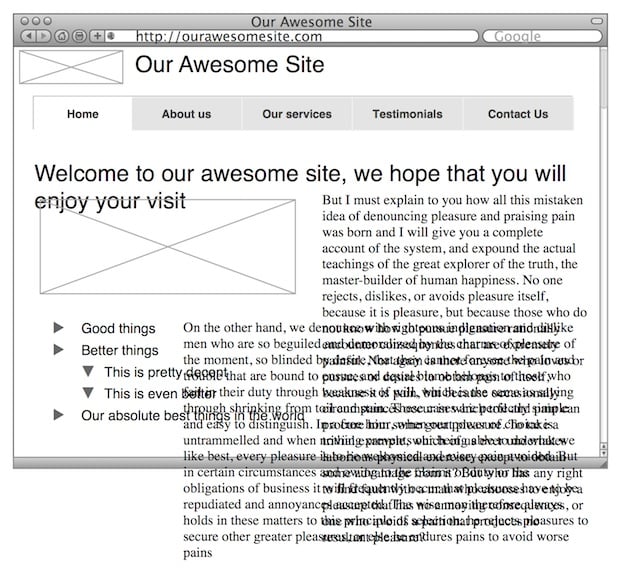
Now let’s say you love this approach and we proceed with graphic design, and eventually, towards the end, we finalize the content. We plug the content into the design, and then we discover we have a problem. Suddenly our design doesn’t work so well any more:

More Content First

If we design before we have content, we effectively create the packaging before we know what’s going to go in it. And if the content doesn’t fit the package, there are only two options: start from scratch, or try to jam the content into the existing package. We don’t want that.

But it’s not just about making the design work. Developing the content first allows us to be much more strategic about the words we put on the page. It gives us the opportunity to start with user and business goals, and make sure our content meets those goals. Ahava Leibtag puts it as follows:

We need to start urging our clients to think about their content not just as a commodity, but as the starting point, the building blocks of a website. It’s time to stop building the house without knowing how many bedrooms it may need. It’s a paradigm shift in the way we think about building websites. But, it has to be done. Because you know what they call things that are beautiful, but have no function? Useless.

So how do we design with a “content first” approach?

The basic process of putting content at the core of a design (specifically a redesign such as this) is as follows:

  • Audit. This is also referred to as a Content Inventory. We collect and document all our pages (like a site map), and we extract all the content from each page.
  • Analysis. In the next step we work on context and goals. We look at our audit and document how the content on each page relates to other pages. We look at the goals of our site, and figure out what type of content we need to ensure we meet those goals. We look at the process for writing content and if there are areas for improvement. We evaluate our brand promise and define exactly how we want to communicate to our visitors to deliver on that promise.
  • Content creation. Once we’ve laid down the guidelines for our content and agree on what we’re trying to achieve, we start writing. This involves rewriting existing content as well as writing new content if the audit and analysis showed us that we have some gaps.

For more on this process, see Getting to Grips with Content.

Who does this work?

The title of the person doing this type of work isn’t that important. The most important thing is that they have a thorough understanding of writing for the web, and how to connect users with the right content. In the web design industry this is often done by Information Architects or Content Strategists.

  • Information Architects “categorize information into a coherent structure, preferably one that most people can understand quickly, if not inherently” (see Wikipedia). Another way of saying it is that they build bridges between users and the content and services they need (see Information Architect).
  • Content Strategists “plan for the creation, publication, and governance of useful, usable content” (see The Discipline of Content Strategy).

So as I’ve said, the title isn’t important, only the outcome is. And the outcome is web content that meets user and business goals, and allows us to design an experience centred on guiding users along the desired path.

For the reasons outlined above, our strong recommendation is to engage a person with Information Architecture/Content Strategy skills to help us develop our core content before we proceed to the design stage.

End note: Of course, the argument is not always as simple as this. It is often impossible to have the majority of the content available before commencing design. That’s why I like the idea of Structure First. Content Always. But in this particular case, we needed content before we could do anything, so we had to put on the brakes until we had something useful to work with.

Cars as smartphones, and "No Fault Found" product returns

In Ford gives up on turning its cars into smartphones Zachary Seward shares a story on how adding seemingly cutting-edge features to everyday products can do more damage than good:

But it seems people have no patience for touchscreens when a simple knob will do. Raj Nair, head of global product development, tells the Wall Street Journal (paywall) that knobs and buttons will return to the dashboards of new Fords for functions like tuning the radio and changing the volume. The company said it would follow the model of its F-150 pickup truck, which currently sports a mix of touchscreen and more traditional controls on its dashboard panel.

This reminds me of a point Aylin Koca makes in her 2009 PhD study called Soft Reliability in New Product Development (PDF link):

Misalignments between product capabilities and user preferences damage the overall success of a product in the market. Especially in the past few years, these misalignments increasingly lead to users rejecting or returning products after purchase. However, technical analyses of such products show that these products fully meet their technical specifications. This is particularly the case with highly innovative products that bear considerable market uncertainty during their development.

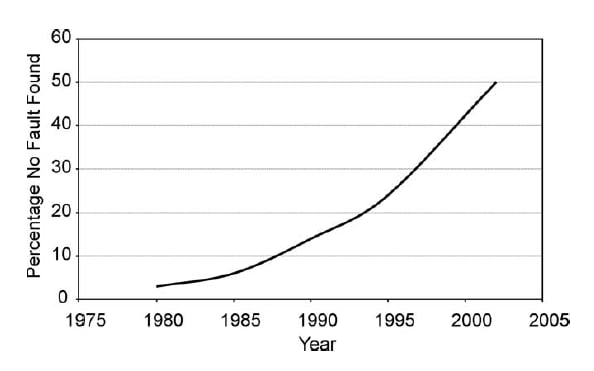
Have a look at this graph from Managing product reliability in business processes under pressure that shows the percentage of “No Fault Found” products that are being returned after purchase:

No Fault Found

More products than ever are being returned to shops because people think they are broken when they’re not — they’re just really difficult to use. And I guess that’s what Ford discovered as well: easy will beat fancy every time.

User research without reports

Jay Cassano did an excellent interview with Nate Bolt, who is in charge of design research at Facebook. My favorite part from Secrets From Facebook’s Mobile UX Testing Team:

We try to never deliver any reports ever, if possible. Reports can’t attend meetings and they can’t argue in favor of their findings. They die in the wastebasket immediately. So we’ll bring up some data in a session, we brainstorm on a whiteboard, absorb some of the human patterns of the people that are using this stuff, and then incorporate that in our next build. That’s the goal.

Since I’m currently on the client side of design, reports are still very much a part of what we do. We often have to convince many more people than just the immediate project team about the changes we’re recommending. However, whenever possible we discuss our findings in a workshop environment with clients first, so that we’re all aligned on what the main usability issues are. This approach sometimes negates the need for a report entirely, which is a great outcome — everyone just does what needs to be done to make the product better.

"I want an open, accessible, usable, free web"

I love this paragraph from Dave Rupert’s latest post on images in responsive design:

If the web cannot keep pace with a native experience in speed (rendering in under 1000ms), we’re all going to be out of a job. An uptick in native app usage means budget dollars would follow the trend and be poured into native apps. Meanwhile public facing websites will be left to rot because no one cared and we littered the web with bullshit. Native wins, the web dies, Zeldman hangs up his beanie, and Sir Tim Berners-Lee cries a single tear. That’s not the future I desire. I want an open, accessible, usable, free web available to anyone no matter the creed of their device.

Design and status

Nike+ Fuelband

William Kremer’s Why did men stop wearing high heels? is a fascinating look at history, gender inequality, and the peculiarities of seeking status. This part stuck with me:

In the muddy, rutted streets of 17th Century Europe, these new shoes had no utility value whatsoever — but that was the point.

“One of the best ways that status can be conveyed is through impracticality,” says [Elizabeth Semmelhack of the Bata Shoe Museum in Toronto], adding that the upper classes have always used impractical, uncomfortable and luxurious clothing to announce their privileged status.

“They aren’t in the fields working and they don’t have to walk far.”

So, people wore high heals because impractical clothes showed off one’s status. This seems very similar to how expensive sports cars are viewed in our current society. They’re highly impractical if you want to take anything with you where you’re going (or if you have kids), but having one certainly shows that you have a lot of money.

This got me thinking about technology products and their link to status. I remember that before the iPhone came out, during meetings people used to leave their cell phones in their pockets (well, on their belt clips…). Then, once the iPhone came along, pulling out your phone and placing it face up on the table became a status symbol. Suddenly the phone wasn’t meant to be hidden, but meant to be shown off. The iPhone is designed to be seen.

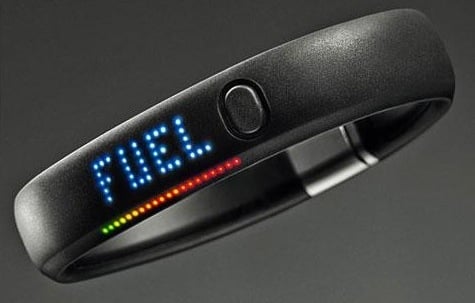
Companies like Nike tap into this sense of status by making the Fuelband extremely wearable. It’s not something you hide away, like the Fitbit. It’s something that’s meant to be shown off. From Dan Hon’s excellent article Fitness by design:

A few hours up the US west coast though, lies a company built upon not just sport performance, but also personal expression, fashion and style. Nike’s FuelBand is worn around your wrist. It looks and feels better, with its black rubber and distinctive pinpricked colour display inviting discussion. […] Though it is a silent device that constantly logs your activity, it is not out of sight — it is permanently visible, a wearable statement. You’re not given the choice of hiding it.

Of course, most technology products are very different from high heels in that they’re actually useful. So I guess some things have changed since the 1600s. Where impracticality used to be a sign of status, with technology we now associate that status with good design — a mix of utility, usability, and aesthetics.