Menu

Posts tagged “user experience”

Good design is (still) all about affordance

Granted, the skeuomorphism vs. flat design debate (a false dichotomy anyway) is getting a bit old. But it’s worth reading Matt Gemmell’s take in Tail wagging, because he makes some great points about what makes for good interface design. Like this one:

Our tastes, and capabilities, have moved a bit beyond screamingly-obvious knobs and dials. We don’t need drop-shadows to encourage us to poke at something. All we need is an invitation, in the form of icons or labels or animations which imply functionality, and a consistency of presentation which allows us to make a good guess about what we can interact with.

After all these years, proper affordance remains the bedrock of good design.

Agency and product-side designers: we're in this together

About a year ago Cennydd Bowles wrote a very good article called A changing tide, in which he thought out loud about the trend of high-profile agency designers joining internal product teams. One of his hypotheses was this:

A great agency is still a strong asset to the industry and its clients, just as a bad agency is still harmful – and there are undoubtedly counter-examples to my evidence. However, one thing is clear: the design industry’s focus is no longer on agencies. It is on products.

He goes further to conclude:

A lot’s been written about the alleged decline of client services, and plenty of people are now rushing to its defence. As always, “it depends” is the only reliable answer; context is the key factor in deciding whether to work for, or hire, external consultants. But I do wonder how the agency world will respond to this shifting community focus. How will they manage to stay an attractive option for designers and organisations who are increasingly internally-focused?

My reason for bringing this up is not to re-ignite the debate over the value of client services. I’ve worked on both sides of the fence. I’m currently on the agency side, but I don’t think I’ll do that for the rest of my career. I think agency-side and product-side design roles stretch one’s skills in different ways, so there’s huge value in both. There are also big downsides to each, of course (for example, product-side can become monotonous, while agency-side can become frustrating when work doesn’t go live).

What I’d like to talk about, instead, is why it suddenly feels like some product-side designers look down on agency designers, as if we’re the body boarders to their cool surfer personas. Here’s David Cole in The Rise of Product Design:

Increasingly the best designers of our time are not working for agencies, but for in-house teams at startups and tech companies. I think this is an important shift, not just for where the work is done, but how the work is done.

Looking back at the ideas espoused by the UX community, I find their relevance to my work winnowing by the year. Many of the practices seem forged in the fires of consultancy.

And here’s Tuhin Kumar in What kind of a designer are you?:

It is not the biggest surprise that some of the finest designers of products happen to work at tech companies and startups. I would argue that a startup or a larger tech company that cares deeply about design (I can definitely attest for Facebook being one) is a better place to bootstrap your career in design than any traditional design agency. There are lot of reasons for this but the biggest and most obvious ones in my head are the breadth of projects and the quick learning curve.

That last sentence is a head-scratcher. I don’t see how one can argue that a designer at an agency doesn’t get much variety. I come from an e-commerce background, but through my agency work I’ve had the privilege of gaining experience in financial services, mobile technologies, and a wide range of consumer products. Plenty of breadth there.

But again, that’s a side note. What I’m confused about is the tone. The subtext that agency designers are not the “best” or “finest” designers. I keep coming back to Cennydd’s article from a year ago, because I think he’s right: there’s been a shift from agency to products. That’s fine (I’ll say it again: I love the product-side and will probably end up there again some day). But we need to be careful about downplaying the role of agencies, and how agencies work.

The other subtext in all these recent posts is that deliverables are for amateurs — real designers create prototypes and ship products. That is absolutely true, and if you’ve found a company like that, more power to you. But it is simply not how the world works for everyone. I’ve said this before, but to make a blanket statement that deliverables are unnecessary ignores the mountain of organizational challenges that need to be overcome in some companies to build useful, usable products. And sure, I’m defending the agency side forcefully here, but I guarantee you that without real deliverables, we wouldn’t get anywhere in some organizations.

Does it make our role less desirable that we have to spend a bit of extra time on “non-design” activities? To those who have found their homes in design-centered companies, yes, definitely. But does it make us second-class citizens in the industry? Yeah, I don’t think so. I’m going to throw it out there that without agencies, we wouldn’t have been in a situation where tons of companies now get the value of design, and therefore fork out tons of cash to make sure they have kick-ass internal design teams. And it’s a pretty awesome feeling when you see that shift happening in an organization, knowing that you’ve had some small hand in it.

So all I’m saying is let’s recognize the inherent value in both sides of the industry, because we all have the same goal: to create great products that delight users and make businesses successful. We’re all in this together.
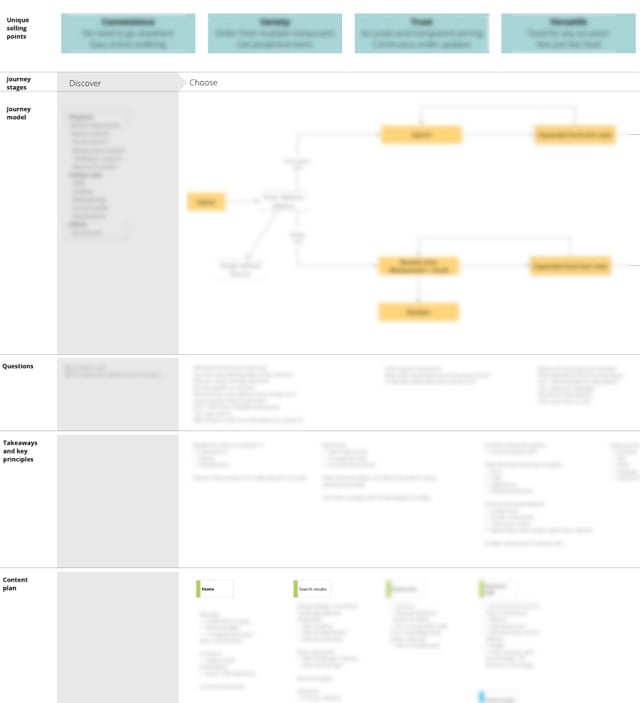

Expanded user journey maps: combining several UX deliverables into one useful document

UX deliverables had a rocky year so far. I feel particularly bad for the humble wireframe, which took some serious knocks over the past few months. There’s also a growing skepticism about the value of Personas. The Persona thing made me particularly uneasy because I’ve always been a huge fan, and we still start most of our projects with a workshop to define Personas and User Journeys.

That unease led me to introspection, which is a good thing, because it made me step back and revisit why we use Personas, and how we use them on a very practical level to design better products. The problem is, I came up short… I realized that though Personas are extremely useful to help clients figure out who their target market is, and understand those users better, they’re often not very useful once we go into the Interaction Design phase of the project1.

In contrast, the User Journey map that we create at the beginning of every project remains open in a tab until everything is done and dusted. I cannot overstate the usefulness of user journey mapping as a UX method. And then there’s the content plan — another essential part of the puzzle that we always create before the design phase starts. Once we’ve done a version of the Information Architecture, the content plan maps what kind of content needs to go on each page. But these are all separate documents, and you can only reference so many PDFs on any given day before it gets terribly distracting.

I realized that one of the problems with Personas is that it takes extra work to turn those user insights into artefacts that are useful for design. And that led me to the realization that there is probably a better way to group all these disparate UX deliverables together to help us create better products.

I decided to test my theory, so on a project we recently started, our User Journey map became more than just a journey with touchpoints, emotions, takeaways, etc. It also became a representation of the Information Architecture and the content plan, with our Personas (needs, goals, scenarios) serving as the starting point for everything — sort of like the glue that ties it all together.

The project is still very much in progress, so I can’t show the full end result yet, but here’s a slightly blurry snapshot of one section of the journey:

Journey and content plan

This document is a summary of everything we need to know to design the best possible product for users. It has the following elements:

  • Unique selling points to keep us focused on what the site needs to communicate at all times. This comes straight from the Persona needs and goals.
  • Journey stages and model to remind us how the product fit into people’s lives, and what the primary calls to action need to be throughout the site.
  • Questions that our target Personas are likely to ask in each phase of the journey, to focus the type of content we serve on each page. In an e-commerce context, these are questions like, “Can I trust this retailer?” or “When will my stuff arrive?”
  • Takeaways and key principles to summarise the above sections (which primarily act as problem definitions/requirements) and document how that translates into the design decisions and solutions we need to keep in mind throughout the design process.
  • Content plan that maps each phase of the journey with the questions our Personas will ask during that phase, and what it means for the specific content that needs to go on each page. We get very specific here — nothing gets on the page unless it’s in the content plan. And if we can’t identify a Persona that would find the content useful, it just doesn’t go on the list.

Even though the Personas aren’t explicitly referenced on this document, we extract the key points from each and turn those into information that is actually useful for design — namely the content they are most likely to be interested in. The Persona step is essential to help us get to this point, so we can’t skip it, but we don’t need to show faces and names and stories on the User Journey map to make that information useful.

So, in the spirit of “getting out of the deliverables business”, this expanded User Journey map becomes the only document we use to guide us throughout the design process. You can think of this as the UX Strategy document. It incorporates Persona-based user needs and business goals with site structure and content planning in a way that really works for us. It also places content at the centre of the design process, which makes it easier to follow mobile first and responsive design strategies.

I’m sure it’s not perfect, but so far this has been an extremely useful artefact for us.


  1. Des Traynor wrote a good article about this

Steampunk and the future of Interaction Design

Joshua Tanenbaum, Audrey Desjardins, and Karen Tanenbaum take an in-depth look at Steampunk sub-culture, and specifically what it means for the future of Interaction Design, in their article Steampunking interaction design. It’s a dense piece, but really interesting. They discuss design fiction as a form of envisioning the future, and how Interaction Design could adjust to that possible future:

Steampunks have imagined a whimsical neo-Victorian fiction to frame their design practice: an optimistic lost age of adventure where invention, individuality, and innovation reign supreme. This fictional world reflects a set of values and relationships with technology, but that is not the most interesting or relevant thing that Steampunk has to offer the HCI (Human-Computer Interaction) community. Instead, it is in the practices of Steampunk makers that we can observe a possible future for interaction design: a future in which design is driven by aesthetics, grounded in a sustainable ethos, and aimed at serving the needs and preferences of distributed communities of engaged expert users.

Also see How steampunk culture offers clues to building a better future for another interesting viewpoint on this movement.

Google Glass and driving our bodies around

John Pavlus in Your Body Does Not Want to Be an Interface:

The assumption driving these kinds of design speculations is that if you embed the interface — the control surface for a technology — into our own bodily envelope, that interface will “disappear”: the technology will cease to be a separate “thing” and simply become part of that envelope.

The trouble is that unlike technology, your body isn’t something you “interface” with in the first place. You’re not a little homunculus “in” your body, “driving” it around, looking out Terminator-style “through” your eyes. Your body isn’t a tool for delivering your experience: it is your experience. Merging the body with a technological control surface doesn’t magically transform the act of manipulating that surface into bodily experience. I’m not a cyborg (yet) so I can’t be sure, but I suspect the effect is more the opposite: alienating you from the direct bodily experiences you already have by turning them into technological interfaces to be manipulated. 

It’s an excellent essay. I especially like the distinction between Ready-at-hand and Present-at-hand technologies, and how our bodies shouldn’t become marionettes to technology.

More on the wireframe debate

In a recent interview with Intercom, Joshua Porter expands on his “Wireframes are dead, dead, dead!” tweet from a while ago:

I think you can capture almost everything you need to capture in a pretty detailed sketch. Not a high fidelity sketch by any means. Not the ones where you use five different kinds of markers and you shade everything or whatever. The purpose of sketching is to communicate the major ideas, like, “What’s going to be on the page? What are the objects on the page? What are the things you can do to those objects?” […]

On the other hand if you want to actually test something, you need a prototype that someone can test. So, I would actually say that the role of the product designer is working with stakeholders to come up with those sketches, and then going right from that sketch all the way through to prototyping. That usually means high fidelity mockups that can be clickable or lightweight HTML prototypes that are clickable and usable.

This is the workflow we’ve adopted at Flow as well. We sketch different interface ideas (variation), and then move to prototyping in Axure when it’s time to test and improve a specific idea (iteration). There’s not much room for static wireframes in that workflow. But it is an ideal workflow, and not every project is ideal. As I’ve mentioned before:

Lacking budget, flat wireframes for quick iteration is better than doing no iteration at all. We can’t be so idealistic that we’re not willing to scale down our processes when we need to.

So as long as we’re willing to admit that one size doesn’t fit all, I’m all for advocating an ideal approach that degrades gracefully under non-ideal circumstances.

Also see Wireframes: A good communication tool, a poor design tool by Dan Ritzenthaler.

Designer Matthew Smith on endless streams, and turning hobbies into careers

I always enjoy the interviews on The Great Discontent, and this one with designer Matthew Smith is no exception. Here he describes how he turned his hobby into a business:

At the time, my wife was pregnant, we had a one year old, and we were all living on about $26,000 a year—I knew I had to think bigger, so I went for it. I got the first $8,000 job and then another. Then people started asking me to build more things, like customer databases. I would nod in agreement as if to say, “Of course I can do that,” and then I’d get off the phone, crap my pants, and go do research on Google, ask questions on forums, and figure it out in order to deliver a product to a client and make them happy with the results. Done!

I can certainly relate to the get off the phonecrap pantsfigure it out workflow. I also like Matthew’s critical take on the concept of endless feeds on the Internet:

Who came up with the idea of endless content constantly streaming toward us? There’s this unlimitedness that concerns me because it is so unlike the rest of the human experience and I think it confuses the human mind and puts us into a space where we aren’t at our best. I want to make sure that no matter the project or company I’m involved with, I’m always asking if it’s serving the human best and helping us be at our best.

That last part reminds me of something Alex Griendling said recently:

Our work does not exist in a vacuum; it is given context and meaning and power by the places it appears and the people that benefit from its usage. When clients hire us, they’re doing so because they believe it will benefit them. With this in mind, it’s important to ask yourself the question “Is this client worth helping?”. If great work is made for those that exhibit repugnant practices, how does this benefit anyone other than the individual client?

Words to live by…

Responsive Web Design in Africa: why it's time to adapt

This post provides background and additional resources for my talk on Responsive Web Design in Africa. Last update: May 23, 2013.

I’ve seen a surprising amount of pushback on responsive design within the South African web community recently. The skepticism is mostly based on issues such as low smartphone share and high data costs in Africa, along with assumptions about “the mobile context” and how people supposedly have vastly different needs on mobile phones than they have on their desktops.

So, the purpose of this talk is to summarize the case for Responsive Web Design, and to argue that the reasons against using this approach in Africa don’t hold up. Smartphones and data access are exploding in Africa, so if we want to be Future Friendly, we don’t have a choice. We have to adapt.

The slides for the talk are below, although of course, some context gets lost without the voiceover. There are also embedded gifs and videos that obviously don’t play within Slideshare, so you’ll have to use your imagination on those…

View on Slideshare: Responsive Web Design in Africa - why it’s time to adapt


Resources

I cite the source for each quote, example, and data point on the applicable slide, but I thought it would be helpful to provide a brief list of Responsive Web Design resources here for easy reference.

For those who want to dig a little deeper on the data in Africa, here’s a list of the reports and presentations I found most useful:

Here’s an incomplete list of introductory articles to get you started on responsive design. These articles mainly touch on topics I bring up in the talk, like the reasons for adopting responsive design, performance issues, and RESS:

If you’re looking for responsive patterns, start here:

And here are some ideas for dealing with responsive images:

For more great resources on responsive design, see Jeremy Keith’s extensive list.


The point

My goal with this talk was not to say anything groundbreakingly new about Responsive Web Design. The goal was to urge designers and developers who work in developing regions to take responsive design seriously, and at the very least consider the approach for their next projects.

If you have any questions or comments (or are interested in having me come present this talk somewhere), please get in touch.

Responsive Web Design

Don't optimize for the fewest number of clicks

I liked Meng To’s Simplifying For The Wrong Reasons, but there’s one part that perpetuates one of the most enduring myths in user experience design:

The best user experience reduces the amount of clicks to as few as possible.

No one’s going to argue that we should add superfluous clicks in interfaces. But making “as few clicks as possible” an optimization goal is how interfaces become bloated and crammed with cruft. As Lukas Mathis points out in his explanation of the psychological behavior called “satisficing”:

A great user interface is not one where each goal can be reached with the smallest number of clicks possible, or where the user has to pick from only a small number of choices at each step, but one where each individual click is as obvious as possible. […] As long as users feel that they are getting closer to their goal with each step, they don’t mind drilling down into a deep hierarchy.

Josh Clark also addresses the myth that extra taps and clicks are evil in an interview with Forbes:

In mobile, tap quality is far more important than tap quantity. As long as each tap delivers satisfaction, extra taps are good. Taps invite conversation—give and take—that you can get at and explore. Building meaningful click sequences are a form of progressive disclosure that helps you uncomplicate complexity.

So, let’s get away from this idea that we should optimize for the fewest number of clicks and taps. Instead, we should optimize for an information architecture and visual hierarchy that makes the next step as obvious as possible. Joshua Porter summarizes this approach nicely:

Almost every screen we design can be improved by really focusing on the steps and sequences of steps a user goes through. In our haste we often speed up the process too much, get steps out of order, fail to present an appropriate next step, or otherwise break the sequence. By re-assessing your app or site in light of these potential errors, you can discover the sequence and timing that your users need to successfully make it to the next step.

Foursquare: not lame any more

Back in 2009, whenever an overly enthusiastic Foursquare user managed to capture the attention of an unsuspecting potential victim long enough to try to convince them to download the app, the conversation went something like this:

“It’s really cool. See? You ‘check in’ to the cafés and restaurants you visit.”

“Why?”

“Because if you check in enough times, you become the mayor of that place.”

“Why?”

“Because being the mayor is cool!”

“You keep using that word. I don’t think it means what you think it means. I think the word you’re looking for is lame.”

The discussion would usually dampen the Foursquare user’s enthusiasm a little bit, but only for a day or two. Then they’d be at it again, continuing their quest to spread the word about a service they don’t quite understand, but can’t help but be excited about.

Yesterday, Foursquare 6.0 was released for iOS and Android. And it continues a slow, steady move away from a focus on the ‘check-in’ to a way to discover great places to explore. If you squint and look at Foursquare just right, you’ll realize that they are becoming what Path wants to be: a social network for close friends and family.

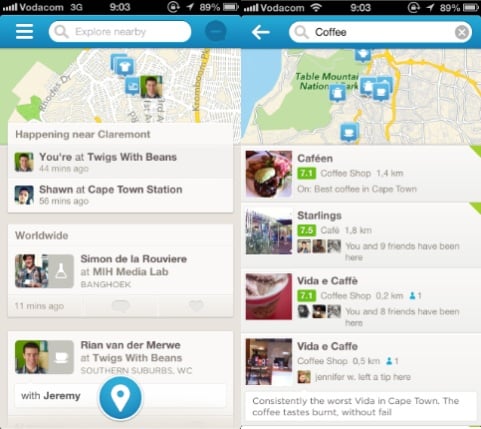
The new Foursquare home screen continues the trend to reduce the hierarchy of the check-in action in favor of telling you what’s happening in your network, and what places you might like to visit (see left side of the screen below). A tap inside the (much more prominent) search bar brings up the interface to show recommended places to visit within a specified category (see right side of screen below).

Foursquare 6.0

See, what Foursquare realized a while ago is that their real power is not in the mayorships and badges that defined them in 2009. The real power — as usual — is the data. It’s knowing what people like and don’t like. It’s knowing where to find good coffee, what restaurants to avoid, and where you should go when you’re in a new city. And they have been shifting towards that vision with steadfast tenacity. Dan Frommer discussed this when Foursquare 5.0 was launched in June 2012:

So: Foursquare has been evolving to a company that no longer simply answers “where are my friends?” but instead “where should I go right now?” This is smart: Everyone’s gotta eat. That’s why Explore is rapidly becoming Foursquare’s most important feature. This has always been part of the plan, I think. But it’s certainly carrying more emphasis in this new version of the app than ever before.

With Foursquare 6.0, the company’s move towards a discovery engine powered by people you like and trust appears to be almost complete. That said, it’s clear that they’re not done (watch out, Path). I’m sure they are thinking of more ways to make the experience better. So even though there are some design irregularities in version 6.0, those will be ironed out through constant iteration while they’re moving towards a clear vision for the future. Like Anil Dash said at the beginning of 2012 in Foursquare: Today’s best-executing startup:

Foursquare’s removed features from the core app a few times, constantly changes the design of its flagship iOS application, and in general asserts its authority over the experience that users have within the Foursquare application. Yet, unlike every single other major social application, they don’t inspire mass user revolts or negative press every time they iterate. […] Part of this is the small, well-paced timing of iteration on the application where there are always small things changing in ways that aren’t wildly disruptive, but do enough to set a tone that users know to expect the furniture might get rearranged once in a while.

So, with all of that said… If you’ve tried Foursquare before and found it lame, I think you should give it another go. It’s not lame any more. Any service that can help you avoid bad coffee makes the world a better place, right? Foursquare is such a service, and so much more.

Oh, one more thing. Posting your Foursquare check-ins to Facebook and Twitter? Still lame.