Menu

Posts tagged “user experience”

Design and style

Don Norman points out some of the misconceptions of style in a good piece called Great Design Always Means Great Style. He concludes:

There are many dimensions to great design, but great style is certainly among the most important. Style in appearance, style in behavior, style in the manner of interaction – style in every aspect of the product or service. Great style requires careful deliberate specification and then attention to all the details that result, for everything must be coherent, everything must be consistent with the chosen style. Call it personality, call it the voice of the product, call it the persona of the product, call it what you will: great design always means great style. Honest, coherent, and consistent.

An agency workflow for Responsive Web Design

I’ve been thinking about workflows for Responsive Web Design quite a bit, particularly since it’s now become our default approach on every new project (similar to Cloud Four’s recent change of heart). I’ve been especially influenced by two recent articles on the topic, namely Dennis Kardys’s A More Flexible Workflow, and Viljami Salminen’s Responsive workflow.

I struggled a bit to make their approaches fit into how we worked, so I decided to expand on what they’ve done and draw something that reflects a bit more accurately how we are incorporating Responsive Web Design into a user-centered workflow within an agency model. It’s not perfect by any means, but here’s what I came up with:
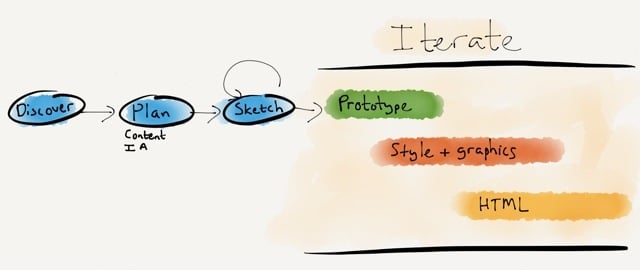
Responsive design workflow

The goals of this approach is to stay grounded in two core principles:

  • Content first. We need to stop thinking about content in terms of layout, and plan content independent of design.
  • Mobile first. We need to stop the focus on device thinking, and assume a multi-device world where we work on style direction independent of layout.

I’ll briefly go through each step in the diagram and how it helps us to accomplish these goals.

During Discovery we do our research to uncover user needs, develop personas, and create the user journey map that becomes our product strategy (see my article Usable yet Useless: Why Every Business Needs Product Discovery in A List Apart).

In the Planning phase we evolve the user journey map into a content plan and Information Architecture document (see my post on this topic). Once we have our scaffolding in place, we start the design process.

We rarely do static wireframes any more (Cennydd Bowles explains why), but we do a lot of Sketching. The benefits of sketching have been proven time and time again (see, for example, How Diagrams Solve Problems and The importance of sketching in product design). What I like most about the sketching process is how it allows the team to try multiple solutions to a problem, before settling on one or two ideas to iterate further (see Jon Kolko’s Iteration and Variation). I like using Zurb’s responsive sketch sheets as templates because they keep us focused on a multi-device approach.

Once we’ve gone through the sketching phase with clients, and we know what approach we’d like to pursue, we start Prototyping. We mainly use Axure, but there are multiple solutions out there to suit a variety of approaches. Axure isn’t natively responsive (yet), so we’ve been building two prototypes on our projects: starting Mobile first, and then moving on to Desktop. This isn’t ideal, but it works for our current purposes. We have a strong focus on user testing, so we test these prototypes in our usability lab, and iterate the design based on the findings.

Towards the end of the Prototyping process we start working on Style Tiles so we can have a discussion about graphics with clients without focusing on layout and flow issues. We’ve seen huge success with this approach. Once clients are comfortable with the visual direction, the focus can return to discussing how the UI will help them meet their business goals and user needs. It also makes the move from prototype to graphic design much smoother.

Although I won’t say that we’re completely post-PSD, we definitely don’t create the entire site in Photoshop. Since we have an interactive prototype and strong style guides, we generally only create about 6 or so pages in Photoshop, so clients can get a good feel for the direction.

At this point we also start working on Front-end Development. We build the framework using the prototype and style tiles, and pick up speed as the graphic design gets finalized. We don’t use boilerplate frameworks like Foundation and Bootstrap for production code. On this point we stand with Aaron Gustafson:

I find Foundation, Bootstrap, and similar frameworks interesting from an educational standpoint, but I would never use one when building a production site. For prototyping a concept, sure, but to take one of these into production you need to be rigorous in your removal of unused CSS and JavaScript or you end up creating a heavy, slow experience for your users.

An important point on the last three phases: as the diagram points out, these are all very much iterative phases. We make changes all the time based on user feedback, and discussions between designers, developers, and the client. I think we can all agree that responsive design is messy, and we just need to get comfortable with a certain amount of ambiguity during design and development. That’s ok, as long as we’re prepared for it.

It’s been an enormous learning process — and we’re still figuring out the best ways to make Responsive Web Design our default approach. But we’re committed to it, because we believe in content parity, and we’re convinced that responsive design is the approach that will get us there. Some things we’ve learned along the way:

  • You can’t wing content choreography. We can’t just make our front-end developers figure out what happens at each breakpoint. This is something we have to plan together to consider all the goals and constraints of the project. Breakpoint graphs are particularly helpful in this step (see Stephen Hay’s Responsive Design Workflow).
  • Optimize for touch, support keyboard actions. Josh Clark points out that “every desktop UI should be designed for touch now.” He’s right. The lines are getting blurrier and blurrier between what is considered “desktop” and “mobile”, so we should just assume everything is a touch screen, and make controls easy to discover and manipulate.
  • The benefits go beyond mobile. Going mobile first helps us create better desktop sites as well, because we remain focused on meeting core user needs and ensuring there is an easy and discoverable path through the flows. There is no room for cruft on smaller screens, and that makes our desktop designs better as well.
  • It’s hard, but it’s worth it. As Ben Callahan points out in The Responsive Dip, “The fact that we don’t know how to do something today doesn’t mean we shouldn’t strive to do it tomorrow.” This is an amazing time. We get to be part of shaping the future of the web, because no one has it all figured out at the moment. I don’t know about you, but I want to be part of that, no matter how hard it is.

We have much maturing to do, but I’m excited about the progress we’ve made in shifting our entire process towards building responsive sites. Every project runs just a little bit smoother, and that’s encouraging. So my only advice to those standing on the edge of responsive design is this: jump in. The water is cold, but refreshing. And you’ll feel great when you get to the other side of the river.
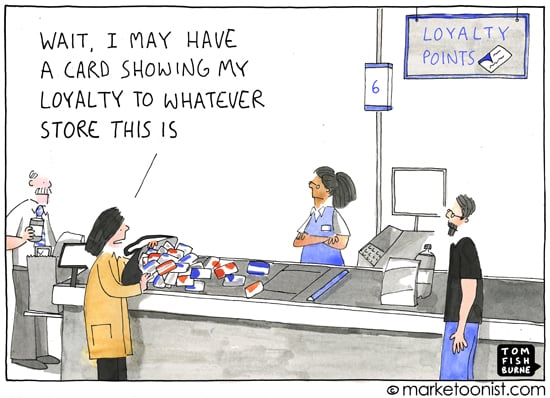
We're only loyal to ourselves

Kathy Sierra wrote a brilliant post about loyalty called Your customer won’t take a bullet for you. She makes the point that to understand loyalty, we have to realize that we aren’t loyal to products, we’re loyal to ourselves:

If you want to benefit from a customer’s loyalty to himself, you can’t bribe it, you must earn it. Deserve it. Focus not on upgrading your product but upgrading your user’s capabilities. If you can’t enhance your product, enhance the context in which your product is used. Provide better and more inspiring documentation. Make YouTube tutorials. Join forums and offer expert help where it’s most needed. Use every nanosecond of your social media time to help people become better at something for themselves. Relentlessly ask, “How are we helping our users kick ass? What can we inspire, amplify, teach, enable, empower?”

This reminds me of Tom Fishburne’s “loyalty fatigue” cartoon:

Loyalty fatique

Amazon: caught between a rock and a local maximum

Joshua Porter makes a good point about Amazon’s product pages:

The reality is that Amazon has designed themselves into a Local Maximum. They’ve tested and tweaked the same product page over and over and they’ve optimized it as much as possible. They can’t improve it significantly at this point without making a big change. But they can’t make a big change because the only changes they can make must increase revenue (or some closely related KPI). So any big change is a very, very scary thing when that page is driving billions of dollars in revenue. So it makes sense that Amazon only makes small changes to their product page design.

Amazon’s design is often held up as a gold standard in e-commerce, but at some point we have to realize that maybe the emperor has no clothes - and we need to start calling it out so clients can stop asking us to “just make it like Amazon”.

Without proper design, any technology can be terrifying

Cliff Kuang discusses wearable tech and ubiquitous computing in Why a New Golden Age for UI Design Is Around the Corner:

In the wrong hands, this is a dystopian prospect—technology’s unwanted intrusion into our every waking moment. But without the proper design, without considering how new products and services fit into people’s day-to-day lives, any new technology can be terrifying. That’s where the challenge comes in. The task of making this new world can’t be left up to engineers and technologists alone—otherwise we will find ourselves overrun with amazing capabilities that people refuse to take advantage of. Designers, who’ve always been adept at watching and responding to our needs, must bring to bear a better understanding of how people actually live. It’s up to them to make this new world feel like something we’ve always wanted and a natural extension of what we already have.

Products that remove small life annoyances

I’m currently travelling in the U.S., which means I can finally drag some of my favorite apps from the graveyard screen on my iPhone to the home screen. I’m now happily exploring around in Yelp and Fandango, which I haven’t been able to do in a while. Even Foursquare — which I’m already a huge fan of — is suddenly on steroids.

At the same time, there’s one part of Don Norman’s The Paradox of Wearable Technologies that I keep coming back to:

I am fully dependent upon modern technologies because they make me more powerful, not less. By taking away the dreary, unessential parts of life, I can concentrate upon the important, human aspects.

I realize that when apps work well — really well — they do just that. It’s not that they get out of the way in an invisible UI sense. They are extremely visible, and they consume all your attention while you’re using them. But they take away the boring parts of life so you can focus on the exciting bits.

I apologize in advance to those of you who live in the U.S., but please allow me to gush a couple of examples to illustrate my point.

Fandango

Buying movie tickets online is a mission in most cases. Even if you can figure out how to use the site, you’re not guaranteed that the payment gateway is going to work, and there’s often no way to save credit card details for future purchases. But before I came on this trip, I saved some movies I knew I wanted to see in the Fandango app. Once I got here, I just tapped on a movie, the app showed me nearby theatres and times, I bought a ticket using my PayPal account, and I showed my phone at the door to scan the ticket.

All the app does is take the mundane parts out of buying movie tickets — the search for a theatre, the payment, the ticketing process. It lets me focus on what I really want to be doing — watching a movie.

Foursquare

I expected Foursquare to be better in the U.S. than in South Africa, but I’m blown away by its usefulness. Here are some things that really helped along the way:

  • Foursquare knows I live in Cape Town and that I check into a lot of coffee places. So when I arrived in San Diego the app told me welcome, and recommended some coffee houses nearby (a friend, who checks into a lot of Mexican restaurants, got that as her recommendations).
  • After you check in somewhere, the app tells you where people are likely to go next.
  • Because the data set is so huge, I find that the ratings and recommendations work much better across the board.
  • For example, the time of day affects the recommendations — breakfast places in the morning, lunch places around noon, etc.

Again, this isn’t earth-shattering stuff. But it takes away just enough of the mundane parts of being in a new city to make your visit that much more enjoyable.

And that’s what good technology does. It’s not necessarily invisible, but it performs a disappearing act on the things you don’t want to do. There are certainly major, wicked problems to solve in the world. But there are also thousands of small, tedious tasks we deal with every day that we can solve with technology.

That’s what’s inspiring to me about these products, and why I’m going to pay much more attention to “small annoyances” as a way to get product ideas.

The problem with responsive frameworks

There’s so much good stuff in this responsive design interview with Brad Frost and others. I was especially interested in everyone’s thoughts on responsive frameworks. Here’s Aaron Gustafson’s answer:

I find Foundation, Bootstrap, and similar frameworks interesting from an educational standpoint, but I would never use one when building a production site. For prototyping a concept, sure, but to take one of these into production you need to be rigorous in your removal of unused CSS and JavaScript or you end up creating a heavy, slow experience for you users. I also think you need to work twice as hard to break out of the theme of the framework. There are a ton of Bootstrap sites out there that look like Bootstrap sites. Your design should be as unique as your product, not some off the shelf thing you just changed some colors on.

Agreed.

Hey Marketers, making a website is not about you

Seth Godin just published another very weird post1 called What works for websites today? He makes a couple of claims that, to me, show what the biggest problem with Marketing is today. I’ll get back to that, but first… Seth says:

[An] effective website is created by someone who knows what she wants the user to do.

No. An effective website is created by someone who knows what users want to do. And she uses that knowledge to build something useful that is also easy and enjoyable to use.

He continues:

The only reason to build a website is to change someone.

Wait, what? No! We have a name for that. It’s called persuasive design, or at the far end of the spectrum, dark patterns.

No, the only reason to build a website is to enable people to do what they want to do.

Good user experience has both good utility (it fills a customer need) and good usability (it’s easy to use). The problem with many Marketers today is that they too often make it all about the company, and not about user needs. I’m sorry, but it’s not about changing people, and it’s not about making them do stuff. That’s old school thinking from a time when brands could steamroll their way into the consciousness and wallets of people through clever advertising and sleight of hand. Those days are over. Now our job is not to make it about how awesome we are, but how well we help people accomplish their goals.

Let’s respect our users and their needs. Let’s not treat them like puppets that need to be controlled.


  1. Remember How to make a website: a tactical guide for marketers

Respect users' time

Your app makes me fat is such a great post about respecting users by Kathy Sierra:

That one new feature you added? That sparkly, Techcrunchable, awesome feature? What did it cost your user? If the result of your work consumes someone’s cognitive resources, they can’t use those resources for other things that truly, deeply matter. This is NOT about consuming their time and attention while they’re using your app. This is about draining their ability for logical thinking, problem-solving, and willpower after the clicking/swiping/gesturing is done. 

It reminds me of Paul Ford’s admonition in 10 Timeframes:

If we are going to ask people, in the form of our products, in the form of the things we make, to spend their heartbeats on us, on our ideas, how can we be sure, far more sure than we are now, that they spend those heartbeats wisely?

We are responsible — at least in part — for how people spend their time. We shouldn’t take that lightly.

The pros and cons of wearable technologies

Don Norman wrote a great piece on The Paradox of Wearable Technologies. He starts by covering some familiar ground on the dangers of these devices:

While the supplementary, just-in-time information provided by wearable computers seems wonderful, as we come to rely upon it more and more, we can lose engagement with the real world. Sure, it is nice to be reminded of people’s names and perhaps their son’s recent skiing accident, but while I am being reminded, I am no longer there—I am somewhere in ether space, being told what is happening.

We see this argument a lot, most recently in an article that came out on the same day as Don Norman’s, Wearable tech VCs pan Google Glass:

“It’s too big a change of behavior. It’s technology that sits between you and other people… it feels to me that it’s too impersonal,” said [John Frankel, a partner at ff Venture Capital]. “It feels more like the Segway than anything else, which is, ‘hey, this looks great on paper but I probably wouldn’t have one in the garage.’”

What I like about Norman’s piece, though, is that it refreshingly covers the positive aspects of wearable tech that don’t get as much press, like this:

I am fully dependent upon modern technologies because they make me more powerful, not less. By taking away the dreary, unessential parts of life, I can concentrate upon the important, human aspects. I can direct high-level activities and strategies and maintain friendships with people all over the world.

It’s a balanced view, well worth reading.