Menu

Posts tagged “user experience”

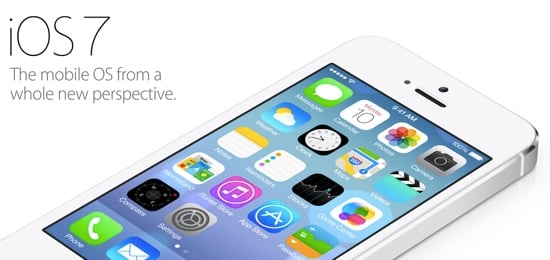
iOS 7: interface, not art

iOS 7

I’ve been watching the responses to iOS 7 with great interest. I’m most surprised (even though I shouldn’t be) by the extremely forceful and visceral negative reactions to the visual direction of the new OS. Most tweets about about it sound something like this:

First reaction: everything about iOS 7 feels… wrong.The typeface is hard to read, controls are totally inconsistent, and it’s flatly ugly.

— dustin curtis (@dcurtis) June 11, 2013

First, please let’s remember to give it five minutes before dismissing an entire operating system. iOS is an interface, not art. You can’t judge it without using it. You might think it’s ugly, and that’s fine. But you can’t go around quoting Steve Jobs’s “Design is how it works, not what it looks like” quote to everyone, and then get all worked up when Apple uses some colors and typography that you don’t like. If you truly believe that design is how it works, then you have to use iOS 7 to determine whether or not it works.

Also, why is it ok for startups to launch something unpolished, but when Apple redesigns their entire mobile operating system everything has to be perfect? Cap Watkins put it well in iOS 7. Unpolished By Design.:

And now we’re complaining that this completely revamped, new, version one interface isn’t perfect. Isn’t polished. Isn’t honed. We asked for a revolution and were delivered one which, all complexities considered, amounts to more than any one of our best first launches.

And then there are those who are calling this a copy of Windows Phone 8, and/or lamenting the fact that the design is flat as a board. No, it’s not. The icons might be flat, but as a design system, as John Gruber notes:

There is a profound reduction in the use of faux-3D visual effects and textures, but iOS 7 is anything but flat. It is three dimensional not just visually but logically. […] There’s a sense of place, depth, and spatiality in iOS 7 that makes it feel like hardware. A real thing, not pixels rendered on glass.

Finally, I agree with Jim Dalrymple’s assessment in Apple’s confidence:

One thing that became very clear to me early on in today’s keynote is that Apple was having fun again. They were really enjoying themselves.

And that’s a good thing. They’re finding their feet in the post-Jobs environment. So instead of tearing our clothes in despair, let’s celebrate the fact that Apple is moving forward with iOS, and that this new OS is a great new baseline for future improvements. Let’s give it five minutes.

Client collaboration in UX consulting

Baruch Sachs makes some good points in Part 1 of a series called Practicing Great UX Consulting:

You are not there to educate people. You are there to advise your client and guide the creation of an amazing user experience. You are the expert; that’s why they brought you in. Collaboration and openness are key here. People need to feel invested, not put upon.

I agree that collaboration is key — the problem comes when collaboration gets confused with consensus. Consensus cultures often produce watered down, unexciting products. Products where endless rounds of give-and-take have worn down the original idea to a shadow of what it once was. Consensus cultures also wear down the teams working on the product, because no one really gets what they want, they just get some of it.

Collaboration is different. In collaboration cultures people understand that even though everyone gets a voice, not everyone gets to decide. People are able to voice their opinions, argue passionately for how they believe things should be done, and try to negotiate compromises. But it certainly doesn’t mean that everyone has to agree with every decision. And that’s why the client/agency trust relationship is so crucial.

One great collaboration technique that works well with clients is called Design Studio. Jared Spool has a great write-up of how to conduct a Design Studio worskhop, and it’s also worth reading Paul Boag’s thoughts in Never wireframe alone.

Why you shouldn't use introductory tours in apps

Luke Wroblewski explains why those overlay introductory “tour” screens you often see in apps is such a bad idea in Designing for real world mobile use:

These issues stem from the fact that introductory tours show up before you ever get a chance to use an application. Most people are eager to jump right in and as a result, they skip reading the manual. The ones that do read haven’t seen the interface yet so they don’t have any sense of where and how the tips they’re learning will apply.

I completely agree, and have written about this before in Best practices for user onboarding on mobile touchscreen applications, where I give three guidelines for app onboarding:

  • Make sure that users have familiarized themselves enough with your app to have the correct mental model before you start teaching them how to use it.
  • Show users only the information they need to take the immediate next step(s) for using the application.
  • Make sure users have a clear link between the information you give them and how to access/use that information in their everyday use of the app.

Smart cities and wealth creation

Rick Robinson wrote a really interesting article on the huge differences in life expectancy between the wealthiest and poorest areas of a city, and how the move to Smart Cities is trying to combat that. From Death, life, and place in great digital cities:

At the heart of the Smarter Cities movement is the belief that the use of engineering and IT technologies, including social media and information marketplaces, can create more efficient and resilient city systems. Might that idea offer a way to address the challenges of supporting wealth creation in cities at a sustainable rate of resource usage; and of providing city services to enable wellbeing, social mobility and economic growth at a reduced level of cost?

Rick goes on to explain some counter-intuitive dangers of this approach, and concludes:

We are opening Pandora’s box. These tremendously powerful technologies could indeed create more efficient, resilient city systems. But unless they are applied with real care, they could exacerbate our challenges. If they act simply to speed up transactions and the consumption of resources in city systems, then they will add to the damage that has already been done to urban environments, and that is one of the causes of the social inequality and differences in life expectancy that cities are seeking to address.

It’s a long, dense article, but it provides a much-needed realistic view of the power of technology to transform cities and the people who live there. The article also taught me this really good principle of urbanism:

Consider urban life before urban space; consider urban space before buildings.

That immediately jumped out at me as a good principle in software development as well: Consider user needs before applications; consider applications before individual pages.

On the topic of Smart Cities, also see Smart cities and smart citizens, a very interesting write-up about this year’s FutureEverything summit. It makes a similar point about the importance of life over buildings:

Perhaps part of the problem in current dialogues around smart cities is the failure to understand what a city actually is. The smart city vision has tended to focus on buildings and infrastructure or traffic management and how technology can increase efficiency. Catherine Mulligan of Imperial College London says the reverential tones with which some smart-city speculators talk about technology is worrying: “They say these systems and computers can now make better decisions than human beings. But if you take the human beings out, it’s just a bunch of buildings talking to each other… and that’s not a city. The city is what it is because of the people.”

[Sponsor] Radium: a new way to listen to internet radio

Radium is a new way to listen to internet radio. It sits in your menu bar and stays out of your way. And it just works.

With its clean user interface and album cover display, you’re always just a click away from beautiful sounds. Add your favorite tracks to the wish list and check them out later on the iTunes Store. Take the sounds with you using Radium’s built-in AirPlay streaming support. It’s all there.

With the proliferation of services like Spotify and Pandora, why choose Radium? Because with Radium, you don’t have to build up playlists, constantly answer questions about your music preferences, or navigate a cumbersome user interface. Radium is all about the sounds. And these sounds come from over 6000 free stations, maintained and curated by real people like you.

Available for $10 on the Mac App Store. Check it out.

Radium

Sponsorship by The Syndicate.

How new features can hurt your product

Within a week, two articles came out about resisting the urge to add new features quickly after a product is launched. First, Julie Zhuo makes the case for slow, small launches with clear “sunset” criteria in The tax of new, because of the inherent cost of maintaining and improving new features:

The tax that comes with introducing any new feature into your product is high. I cannot stress this enough. Sure, maybe the new feature isn’t hard to build, maybe it only takes a couple days and a handful of people, maybe it can be shipped and delivered by next week. And maybe the additional cognitive load for a user isn’t high — it’s just an extra icon here, after all, or an extra slot in a menu there. But once your new feature is out there, it’s out there. A real thing used by real people.

Jared Spool then wrote Experience Rot, focusing more on the UX and technical debt issues introduced by new features:

The moment a new feature is added — one that wasn’t considered in the initial design — the rot starts to take hold. It’s at this moment that a rethinking of the design has to happen and the seeds of complexity are laid.

If that new feature is close in style and function to the original set of features, the experience rot may not be visible. Yet, because it needs to be retrofit into the original design, it starts down the inevitable road.

As more features are added, it becomes harder to make the overall design coherent and sensical. Soon features are crammed into corners that don’t make sense.

It’s interesting to hear the same conclusion drawn from different perspective, so it’s worth reading both articles.

Instead of "intuitive", aim for UIs that are familiar, legible, and evident

John Pavlus wrote a great piece about the phrase “intuitive interfaces”, and comes to the following conclusion in I’m Boycotting “Intuitive” Interfaces:

I think what we all want from technology are interfaces and interactions that feel familiar, legible, and evident. They should teach us in ways we would like to learn, and speak to us in a way we can understand. This doesn’t mean that technology ought never to surprise or challenge us. But desperately seeking “intuitive” feels, to me, like a kind of techno-animism. Interfaces aren’t magic, and we don’t really want them to be. To borrow from Timo Arnall: interfaces are culture. And like any pieces of culture, what they ought to do is simple: they ought to connect.

Designers and developers: collaboration and empathy required

Lucas Rocha talks about the importance of designers and developers working closely together in Mind the Gap:

Iterative design processes that engage designers and engineers very early tend to result in higher UI quality because it provides the necessary flexibility and agility to steer ideas as they are implemented. Sounds obvious but this is much easier said than done. Just see how rare is to find products with outstanding user interfaces.

This is very true, and the power of small, collaborative teams have been proven time and again. But it’s important to take this further. It’s not just about collaboration, it’s also about empathy. If designers and developers collaborate but they don’t understand each other, you’ll still get nowhere.

The main issue is that designers and developers approach their respective crafts from very different perspectives. Design is about composition — how to put things together so that the whole makes sense. Development is about deconstruction — how to break down the whole into pieces that can be implemented effectively. That creates a disconnect that is difficult to overcome if their isn’t empathy between the two groups.

Thomas Petersen describes the ideal situation really well in Developers are from Mars, Designers from Venus:

They are the developers who can design enough to appreciate what good design can do for their product even if it sometimes means having to deviate from the framework and put a little extra effort into customizing certain functionality. […]

And they are the designers who learn how to think like a programmer when they design and develop an aesthetic that is better suited for deconstruction rather than composition.

So, it’s not just about meeting more often. It’s also about meeting in the middle to accomplish a common goal together.

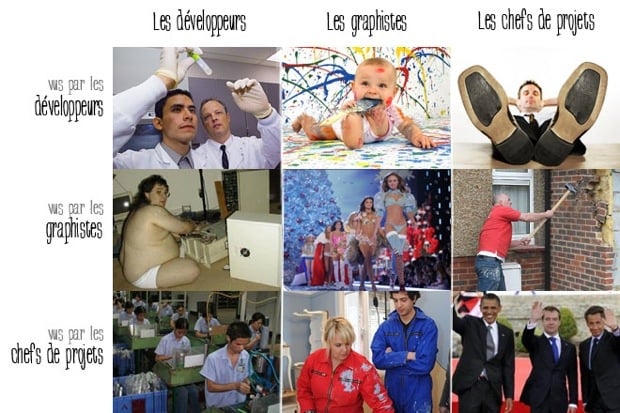
PS. All of this reminds me of this matrix on how designers, developers, and project managers see themselves and each other in most organizations:

How designers and developers see each other

Image source: Les développeurs, graphistes et chefs de projets

The current limited usefulness of connected products

Liat Ben-Zur wrote a great post for AllThingsD called Connecting Things to the Internet Does Not an Internet of Things Make. His main issue with the current crop of connected devices is lack of cross-platform integration:

Each specific device seems to connect to its particular cloud service. There isn’t really one cloud. Every manufacturer has their own cloud service, and often these clouds are closed, proprietary environments. Devices that live in their own siloed cloud cannot speak to one another, meaning they cannot benefit from the data, context or control of nearby IoT devices. That is why we currently need a separate app to control — and interface with — each connected thing we buy. This may be acceptable in the near term, but it cannot scale.

This made me think of Ian Bach’s article Designing Connected Products:

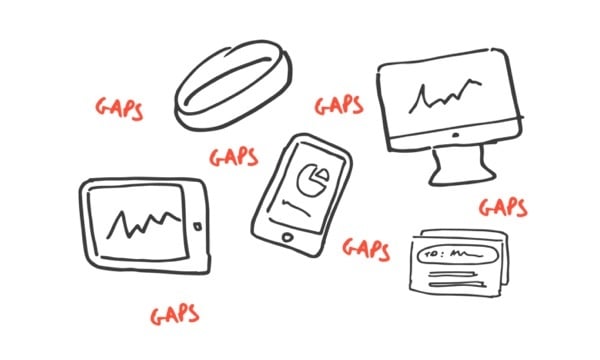
What’s more, when it comes to creating a smooth connected experience, focusing on the ‘things’ from the start can actually be somewhat of a decoy. Spend some time with any service or product that relies on data jumping from place to place and you’ll quickly realise it’s in the ‘gaps’ between things that design really matters. Problem is, gaps are easy to overlook, incredibly tough to design for and much less sexy than the ‘things’.

Gaps between things

Image source: Ian Bach

Ian comes from a different angle, but I think these points are related. Cloud services connect the ‘gaps’ between things, but it’s incredibly hard to fill the gaps well, so most companies keep their solutions proprietary since they see it as a competitive advantage. And that’s why we’re in the situation we’re in: great physical products with reasonably ok cloud services, but because the services don’t talk to each other the products aren’t nearly as useful as they could be.

(First link via @kbaxter)

[Sponsor] Mad Mimi Email Marketing

Mad Mimi is a design-oriented email newsletter service founded in 2008. Developed to provide a mobile-app-like feel, and with a drag-and-drop email composer, Mad Mimi offers a simple, elegant user experience that helps customers create, send, and track beautiful html email campaigns.

Mad Mimi also offers robust APIs, integrations, and add-on features. This makes it a perfect fit for today’s visionaries, artists, and entrepreneurs, including great digital brands like Fancy and StumbleUpon, who use Mad Mimi to communicate with their customers.

Best yet, Mad Mimi is free for up to 2,500 contacts. We hope you’ll give us a try or email us with questions.

Mad Mimi

Sponsorship by The Syndicate.