Menu

Posts tagged “mobile”

Why Google might just be right about responsive design in Africa

Phillip Kruger argues that responsive design shouldn’t be used in Africa in a Memeburn article called Why Google might just be wrong about responsive design in Africa. He lays out his argument in two parts. First:

Responsive design only works on smartphones. So by default you are already ignoring 80+% of users in Africa. You are also reaching the 20% of users that possibly have internet access at home or work.

This is an argument I see a lot, but it’s valid only in the context of target audience and use cases. If the target market for your service primarily uses low-end phones, then by all means don’t bother with responsive design. But let’s say you’re building a site to order take-out food and deliver in major cities, the situation changes dramatically. Now you’re most likely looking at a target market that sits squarely in the 20% of people who have smartphone access (and who don’t want to get off their couches and walk to their PCs to place an order).

This is why personas, scenarios, and use cases are so important. If you’re building a service for ALL THE PEOPLE (which isn’t advisable), then averages are appropriate. And those averages will rightly guide you to focusing on the 80% of people who do not have smartphones. But in most cases, the analytics that matter are not the averages of all users, but the specifics of the market you’re going after. Don’t dismiss responsive design in Africa because of averages. Dismiss it if it doesn’t make sense for your target market.

Phillip continues:

Responsive design is not lightweight. When using responsive design, the size of the download to the browser is still very big (in fact it’s very similar to what the webpage would be). All the HTML is still being downloaded (even parts that are hidden on a smartphone if you use media queries to set display:none in your CSS). Sure, you can have rules to download separate images for separate display sizes and that should help a bit.

Tim Lind wrote a comment on the article that addresses the problem with this logic:

Responsive design does not mean you can’t do server side optimisations. In fact it can help you to do these, and encourages a more efficient design process. You can design the content for the feature phones, and responsive media queries allows you to upgrade the design with a single stylesheet file for the smartphone or desktop (which server side optimisation could exclude).

One of the many good things about responsive design is that it forces designers and developers to spend a lot of time on optimisation to ensure light, fast pages. This is just good practice for web development in general — not just for mobile. Page bloat is a huge problem, with the average web page now being more than 1 MB big.

Page speed optimisation is just good web citizenship, and it should be a requirement regardless of whether or not a responsive design approach is taken. The other point to remember is that mobile networks already do a lot of compression on served images (see How should we handle responsive images?).

What worries me about this debate is that there appears to be no room for nuance. Responsive design is either the answer to all of Africa’s problems, or we shouldn’t do it at all. But as with most things, the appropriate approach is to say “it depends.” A mobile strategy shouldn’t be a decision between a native app or a separate mobile site. A mobile strategy should form part of a larger web strategy, and it needs to include a discussion about the appropriateness of responsive design. It might not be the right thing for your project, but it should be on the table.

I keep reminding myself of Ben Callahan’s statement in The Responsive Dip: “Just because you can’t, doesn’t mean you shouldn’t.” Just because this is a difficult problem that we haven’t quite figured out, doesn’t mean we should throw it away and go back to how we’ve always done things. What we need to do now is push through and find elegant ways to apply responsive design in Africa. Where it makes sense, of course.

Update 2012/11/26: Phillip responded to all the feedback on his Memeburn post. See Google might be wrong - part 2. It’s good to get additional clarification on the Google talk that formed the backdrop for his original post. This isn’t the last discussion we’ll have about RWD in Africa, and that’s a good thing. We need to figure this out…
Why mobile and desktop operating systems shouldn't be combined

Dmitry Fadeyev makes the best case so far for why it’s not a good idea to combine mobile and desktop operating systems into a unified experience, like Windows 8 has done. From Blurring of the Lines:

The road to a good OS is not a blurring of the lines between PCs and tablets, but rather an amplification of the differences through a strong focus on the uses that each category serves. The desktop OS should make use of large screen real estate and the precise targeting of the mouse cursor. The mobile OS should be optimized for the small screen and for the rough tap of the finger. The desktop OS should focus on power users and multi-tasking, the mobile OS should focus on content consumption. The environments they run on are different, the use cases are different, and the solutions should be different.

That’s exactly right. This “unified experience” sounds like a decision made from the viewpoint of devices and technology, not use cases. For example, if you make decisions based on devices and technology, you may decide to create an iPhone app before you know what kind of phones people will use your service on. If you make decisions based on real use cases, you may actually find that very few people would use your service on a mobile device, so a better solution would be to (gasp!) optimise for desktop use1.

The irony is that even though Microsoft made a huge deal about their “no compromise” design philosophy, the Windows 8 experience will have to make compromises if the same software needs to work on both mobile and desktop devices.


  1. Wait, don’t slaughter me. I love Mobile First. I’m just saying that some services or applications just don’t lend themselves to mobile use. I’d argue that tax return software falls into that category. 

Poster: a great iOS WordPress app

Back in May I posted my wish list for a mobile WordPress publishing platform. Since then nothing official has come out of Wordpress to help with that list. But I’ve been using Tom Witkin’s Poster app for a while now, and it’s close enough to what I need that it has significantly increased the amount of writing and publishing I do from my iPhone and iPad.

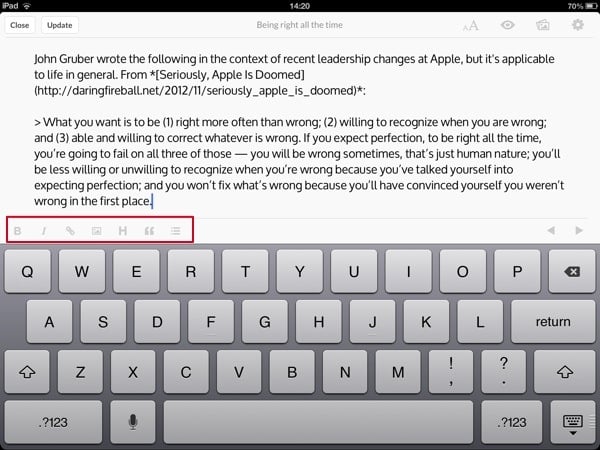
Poster’s interface is clean and focused on what’s most important: writing. It has full support for Markdown and TextExpander touch — including some custom keyboard commands to insert commonly used Markdown attributes:

Poster edit screen

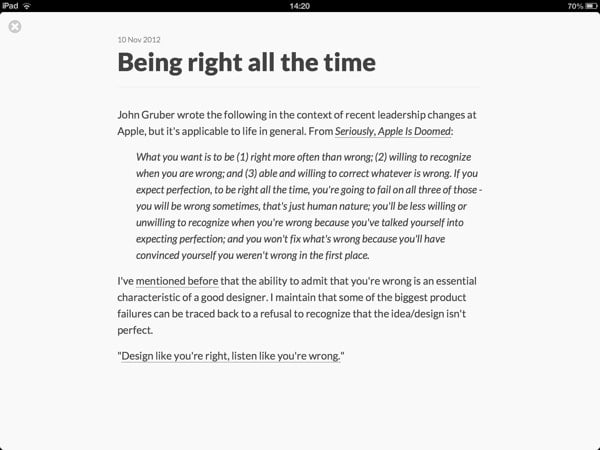
The built-in preview screen makes it easy to proofread and make sure you didn’t miss anything:

Poster preview screen

The only thing that is still missing for me is a mobile Safari bookmarklet that lets me send a piece of selected web page text — along with the page title and URL — to Poster as a new post that’s ready for editing. It would also be great to see Poster integration with apps like Instapaper and Reeder.

If you run WordPress and have stayed away from mobile blogging because it seemed like too much of a hassle, give Poster a try.

Links for Poster: Official site | On iTunes

An agency perspective on responsive design: tips, case studies, and challenges

Christopher Butler shares a long and interesting agency perspective on responsive design in What We’ve Learned About Responsive Design. He shares tips, case studies, and some unresolved issues — including how to deal with larger display sizes:

So, the parting question for me is this: What about upward responsiveness? If we’re heading toward bigger displays with much higher pixel density, how will our designs adapt to make use of them? We’re all excited and sold on the concept of responsive design, but so far that has been limited to responding to smaller conditions. If we’re up for that challenge, than I know we can do better on the “desktop,” too.

So far we’ve dealt with that issue either by setting a maximum width for websites, or to live with acres of white space. Christopher rightly points out that we need to experiment more with ways to take advantage of larger displays without overwhelming users with too much content.

(link via @smashingmag)

More on eBook pagination vs. scrolling

In a response to a series of posts on eBook pagination vs. scrolling (including mine), Dr. Drang presents the strongest argument against pagination that I’ve seen so far. From Scrolling or paging?:

Authors don’t write in pages, they write in sentences and paragraphs, neither of which are honored in a paged interface.

That’s a really good point. Pages artificially break up authors’ thoughts. Pagination is the hurdle-race to scrolling’s 400-meter dash. Everything is a trade-off though, so for the time being I will stubbornly stick to my preference for pagination, because as I said, I just find it easier to deal with.

I want to challenge Dr. Drang on one point, though. He says:

As for the sense of accomplishment, I am, if anything, even more dubious. Flipping a page, whether in a physical book or an ebook, has never charged me with a feeling of achievement. In fact, in paged ebooks I seldom have any sense of how far along I am—in physical books there is, at least, the thickness of what’s in your left hand compared to what’s in your right.

I don’t agree with that. Most eBook readers have sorted out the “sense of place” problem, and now provide both visual and text indicators to help you figure out how far along you are in the book you’re reading. Below are the interfaces for iBooks and Readmill:

iBooks pagination

Readmill pagination

Note the text-based information about the number of pages that have been read, and how many pages there are in total. The visual indicators, in turn, give you a sense of the “weight” of the number of pages you’ve already read — Readmill does a particularly good job of this. And iBooks even tells you how many pages you have left in any given chapter. Those indicators combined serve as a worthy replacement for “the thickness of what’s in your left hand compared to what’s in your right”.

The impact of a sudden lack of information

Jenna Wortham shares some fascinating stories in How New Yorkers Adjusted to Sudden Smartphone Withdrawal:

On the scale of hardships suffered in the storm and its aftermath, these were more like minor annoyances. But the experience of being suddenly smartphoneless caused some to realize just how dependent on the technology they had become. […]

“It’s strange, how in the end you feel like a prisoner to your device,” [Steve Juh] said. “It’s the one thing you wanted to work, more than anything.”

What most people find most disconcerting is the sudden lack (and unreliability) of information. As one person said, “You had to make plans and stick to them. It felt so old-school, like we were back in 1998.”

(link via The system that breaks is not the system that repairs)

Why Instagram is so popular

Spencer Beacock takes on those who criticize Instagram as “bad art” in Instagram, Emotional Metadata & Ubiquitous Sharing. He starts by redefining the purpose of the photo-sharing service:

Instagram is a tool and a model for easy, non-verbal sharing of experiential and emotional data. It is image-capturing for pseudo-ethnographic recording, rather than image-capturing for beauty or composition.

His take on the much-discussed filters is really interesting as well:

Like a regular photograph, the base data is visual data. However, unlike a traditional photograph, Instagram captures all of the regular metadata and then goes one step further, giving people the opportunity to assign emotional metadata about their experiences, in the form of its seventeen different filters.

The filters are visual representations of all of the other sensory and emotional data that gets connected with the images in our minds.

Spencer gives some great examples of what he means by this, and then closes the piece with a discussion of Instagram’s role in identity creation.

Read Instagram, Emotional Metadata & Ubiquitous Sharing.

eBook pagination: to scroll or not to scroll

Dmitri Fadeyev makes an argument in favor of continuous scrolling in eBooks (as opposed to traditional pagination) in The Return of the Scroll:

The scroll interface suits the variable nature of the digital content that it holds, but more so, it gives the user more fine-grained control over the reading experience. It feels more natural to scroll the page on a tablet because it creates the illusion of the physical medium, of a page sliding under your fingers. A scrolling interface also stops unwanted page turns if you happen to accidentally touch the screen. I’ve been trying out the new iBooks and while I think it’s too early to tell which mode is better, so far I really like it.

Even though his argument is solid, I still prefer the page metaphor when I’m reading an eBook, and I’m trying to figure out why. The closest I can get to a reason is the idea of “edges” that Craig Mod talks about in How magazines will be changed forever:

I miss the edges — physical and psychological. I miss the start of reading a print magazine, but mostly, I miss the finish. I miss the satisfaction of putting the bundle down, knowing I have gotten through it all. Nothing left. On to the next thing.

Scrolling is exhausting — it never ends. There is no sense of accomplishment. I once heard someone refer to infinite scrolling on websites as “a game you can never win.”

In contrast, pages allow us to hang on to some sense of beginning and end. They communicate a solid sense of progress. They serve as signposts to help us figure out where to stop reading until the next time. Where scrolling is an endless blob of text, pagination fits into the idea of memory chunking because it’s a more manageable unit to deal with cognitively.

In short, pagination lets you know that you’re getting somewhere, and not just running on a treadmill. Or maybe I’m just old and need to get with the times…

Update: @jbruwer pointed me to @simuari’s concept of flick scrolling as a possible solution. Video below, but also check out the post for more details.

Update 2: I wrote a quick follow-up to address some feedback on this post.

How to clarify confusing behaviors in apps like Twitter and Instagram

Most successful applications do a good job of onboarding users to teach them how the basics work. After that, good applications also make it easy to learn more advanced features simply through repeated use. You might make a wrong turn once, but if the application corrects your course, you never make that mistake again.

But sometimes there are features that fall between the cracks of onboarding and self-learning. It usually happens when there is some unique behavior in the app that is not only presumed to be commonly known by all users in the community, but is also small enough so that it’s not worth making a big deal out of during new user onboarding.

I recently thought of two such examples that I wanted to share, along with some suggestions for addressing the issue.

Twitter mentions

First, there is the issue of Twitter mentions. I still see people who I know have been on Twitter for years, who don’t know that if they start a tweet with ”@”, not all their followers will see it. This information is buried deep in Twitter’s Help section, where I’m guessing very few people venture to. From Types of Tweets and Where They Appear:

Users will see @replies in their Home timeline if they are following both the sender and recipient of the update. Otherwise, they won’t see the @reply unless they visit the sender’s Profile page. 

This is fairly clear, but if you don’t think about this as an issue, you won’t know to ask the question, so it’s not information you’re likely to seek out.

Instagram replies

Second, there is replying to comments in Instagram, which I’m sure trips up quite a few people. If you comment on one of my photos in Instagram, I will get a notification. But if I respond to your comment without including your @username, you won’t get a notification. This is not how it works on Facebook, where you get notified of five comments after the one you posted1. Instagram does have an easy way to reply to people with their usernames, but it’s a slide gesture I discovered by accident:

Instagram replies

So the easiest way to reply to someone is to slide from left to right on their comment, then tap on the arrow. Or you can start the comment with an @, which will then autocomplete the name as you type. But it’s not something they tell you about explicitly. It’s also, again, not information most people will seek out actively, since they’re getting notifications for each comment on their own photos, so why worry?

A proposal

My proposed solution for this type of situation is fairly simple. In the case of features that don’t behave as people expect them to, show a lightbox-type message to explain how it works just one time — the first time they perform the action. For example, the first time a user sends a tweet that starts with an @, show a message to explain who will see it. And the first time a user comments on one of their own photos in Instagram, show a message that explains when people get app notifications.

These are small but important details, especially for social services where understanding exactly what happens when you hit “Post” is essential to the enjoyment of the app.

Related post from the Elezea archive: Best practices for user onboarding on mobile touchscreen applications.


  1. I think it’s five. But I’m not 100% sure. Come to think of it, it’s probably a good example of this type of confusing behavior as well. 

Cell phone culture all over the world

Naomi Canton’s Cell phone culture: How cultural differences affect mobile use is a fascinating article by itself, but the videos and photo slide show really drive home how ubiquitous mobile phones have become all over the world. For example, here are some interviews with cell phone users in Kenya:

Direct link to video on CNN