Menu

Posts tagged “mobile”

The gaming industry's move to digital goods

Mitch Lasky wrote a very interesting analysis of the gaming industry’s move from packaged goods to digital goods. From EA and the Future:

In my experience, the incumbent packaged goods companies clearly see mobile, digital distribution and free-to-play models as inevitable. They know what’s coming and have known for some time. But within the senior management ranks of these companies there is still a lingering perception that digital doesn’t, in their words, “move the needle” sufficiently — meaning that the revenue generated from existing console franchises still far exceeds the revenue that can be generated, even in aggregate, on new platforms and through new business models.

Mitch goes on to show how this thinking is wrong, and then explains how being caught between the promise of new consoles and the possibilities of digital revenue puts game manufacturers in a situation where they’ll have to make some very tough strategic decisions.

(link via @hunterwalk)

More on kids and technology

I recently wrote about the value of exposing kids to technology, so I really enjoyed reading Hanna Rosin’s The touch-screen generation:

To date, no body of research has definitively proved that the iPad will make your preschooler smarter or teach her to speak Chinese, or alternatively that it will rust her neural circuitry—the device has been out for only three years, not much more than the time it takes some academics to find funding and gather research subjects. So what’s a parent to do?

Articles about how technology affects child development generally tend to take extreme views on the topic — it’s either horrible to let kids use iPads, or it doesn’t matter. In contrast, Hanna has a very thoughtful, measured approach to the topic. She discusses a bunch of research, looks at all the pros and cons, and ends with the conclusion that most parents have already realized: it depends, because no one knows your child as well as you do. It’s a long article, but well worth your time.

(link via Kottke)

The value of exposing kids to technology

About a year ago I wrote an article for Smashing Magazine called A Dad’s Plea To Developers Of iPad Apps For Children. It was generally well received, but some of the comments were inevitably judgemental about parents who let their kids use iPads.

With that as backdrop, I really enjoyed Gary Marshall’s post Don’t fear your kids’ tech tantrums. He starts by making this point:

Let’s start by separating the “lazy parent” argument from the “kids shouldn’t have devices” argument. You can be a good parent and let your kids play on the iPad, and you can be a bad parent with a house full of encyclopaedias.

Gary’s main point is that giving kids appropriate exposure to technology — as part of a wider mix of non-tech activities — is essential to help prepare them for the digitally-focused world they are growing up in:

These are all valuable skills, critical skills, and the older she gets and the more tech-saturated the world becomes the more important digital literacy will become. I want my daughter to be ready for that world, not to be afraid of it or to be manipulated by it.

So thank you, Gary. I feel a little bit better about those comments now.

My phone isn't better than your phone

I really enjoyed Michele Catalano’s Grimes, Pop Music, and Cultural Elitism, which starts with this quote from Clare Boucher (better known as Grimes):

I don’t see why we have to hate something just because it’s successful, or assume that because it is successful it has no substance.

It’s an article about our tendency to look down on pop music (and the people who like pop music), but it points to a much broader cultural phenomenon:

The elitism one shows when they dismiss pop music as vapid and those who like it equally vapid is a detriment to any open conversation. The defenders of pop – myself included – are often put on the defensive, made to offer up excuses as to why we like what we do. No one should have to defend their musical choices. No artist who worked hard to get where they are should be roundly dismissed because their music doesn’t fit some elitist standard.

This kind of elitism is something we all have to watch out for. I will probably never switch away from my iPhone, but that doesn’t mean that Android users are undiscerning losers. The best phone is the phone you like the best. That’s all there is to it. As hard as it can be sometimes, we have to decouple the things people like and don’t like from their value as human beings.

Gestural interfaces and generational transition

Francisco Inchauste did a great interview with MIT Technology Review about the user experience challenges of gestural interfaces. From Does Gestural Computing Break Fitts’ Law?:

I think there are a lot of usability/UX rules and laws that will come into question as we move forward into more of these experimental kinds of interfaces. I know many of them already have been retested/validated by other researchers.

A lot of newer interaction paradigms aren’t naturally intuitive as we like to think. Tapping and swiping at “pictures under glass” (or in this case, content) is always going to be a learned thing, like when we were introduced to the desktop metaphor or icons.

I think we’re in a period of generational transition when it comes to fully gestural interfaces1. Despite living on the Internet, I still struggle to remember some of the newer gestures that are popping up in iOS apps. On the other hand, my 3½-year old daughter has zero problems figuring out (and remembering) gestures, because this is the world she’s growing up in. There is no major shift in mental model needed — to her, this is just how technology works. It reminds me of something Chuck Skoda said a while ago in The touchscreens are coming:

While I fully expect the future to have keyboards and mice (or some precision pointing device), touch is already precluding the ubiquity of both in the minds of children. When the upcoming generation is running the show, we will find another absurd idea, that a computer built for human interaction will have a screen that doesn’t respond to touch.

And when that generational transition is complete, what we once thought of as “newer interaction paradigms” will simply be “the way things are”.2


  1. By the way, check out Rise, a fantastic, fully gestural alarm clock app by Francisco and the team at Simplebots. 

  2. I think I deserve a special Internet high five for not making a “the future is already here…” reference here. 

Snapchat, Poke, and the backlash of the real

Jenna Wortham makes an interesting observation about apps like Snapchat and Poke in Facebook Poke and the Tedium of Success Theater. She starts off by talking about something I’ve written about quite a bit as well — that who we pretend to be online is not even close to who we really are:

We’ve become better at choreographing ourselves and showing our best sides to the screen, capturing the most flattering angle of our faces, our homes, our evenings out, our loved ones and our trips.

It’s success theater, and we’ve mastered it. We’ve gotten better at it because it matters more. You never know who is looking or how it might affect your relationships and career down the road, and as a result, we have become more cautious about the version of ourselves that we present to each other and the world.

The example most people immediately jump to when talking about this is Instagram filters — something I’ve written about before as well. It’s fascinating to think about apps like Snapchat and Poke as deliberate backlash against fake online versions of ourselves. By encouraging ephemeral, intimate, #nofilter snapshots, these apps give a more accurate reflection of “the real you”. In Wortham’s words:

These applications are the opposite of groomed; they practically require imperfection, a sloppiness and a grittiness that conveys a sense of realness, something I’ve been craving in my communication. They transform the screen of your phone into a window into the life of your friend, wherever they are at that exact moment. […]

It is an acknowledgement that the version of ourselves we share through other social media is not the truest one, and has not been for a long time.

More on Android vs iOS mobile web browsing engagement

Anthony Wing Kosner wrote a very interesting analysis of Horace Dediu’s Android engagement paradox numbers, which show that although Android market share is surging, its share of mobile browsing is lagging way behind iOS. The Android vs iOS Engagement Paradox is full of insights like this:

In the U.S. and many other countries, inexpensive Android devices are the replacement for the feature phones most consumers have been using. A feature phone user carries their minimal expectations with them to their new device. It turns out that just giving someone a smartphone doesn’t make them a smartphone user. They need habits of use that take advantage of the new functionality they now possess. iOS users, in contrast, are much more interested from the get-go in what their device can do, though few of us really tap anything near the full computing capacity of what we carry in our pockets.

Read The Android vs iOS Engagement Paradox on Forbes.

The future of online publishing

It’s an exciting time for publishing. After what feels like years of magazines and newspapers ignoring the Internet in the hope that it will go away, a new wave of innovation is happening. I wanted to share some of the content that I think provides some good context and thinking around this topic.

In one of the most important articles of 2012, Craig Mod defines a new way to deliver content called Subcompact Publishing. He starts off with an important observation:

In product design, the simplest thought exercise is to make additions. It’s the easiest way to make an Old Thing feel like a New Thing. The more difficult exercise is to reconsider the product in the context of now. A now which may be very different from the then in which the product was originally conceived.

Craig continues with a Subcompact Manifesto. The gist is that this new type of publication is small (both in issue and file sizes), HTML(ish) based, and completely focused on portability and reader needs. But it’s important to hear Craig talk about this, so if you haven’t read his brilliant article yet, it’s a good idea to do that first before continuing.

Craig’s post prompted quite a few responses. Jason Kottke followed up with a bunch of examples of Subcompact Publishing, including three of my favourites: Evening Edition, NextDraft, and The Magazine.

Jim Ray wrote a good summary called 29th Street Publishing and the Next Wave of Digital Publishing, in which he also points to some of the challenges that exist on the publishing side to make this a reality:

Adobe’s Digital Publishing Suite, which is what many traditional publishers have been using to quickly put together iPad versions of their magazines, is trying to solve an impossible problem. Publishers don’t have the resources to build digital native versions of their print magazines (which still manage to be quite lucrative, btw) so they bolted some tools onto their existing workflow and shipped it. This has all happened before, of course, when these same publishers were trying to figure out how to make workflows built for printing presses talk to an FTP server.

By starting fresh, 29th Street (and other upstarts, like The Magazine) can build proper apps that readers actually enjoy, instead of just pushing out a bloated PDF of a magazine into the Newsstand app.

I linked to this a while ago, but I want to mention Ben Brown’s concept of Reader Aware Design again, because it’s very relevant to this discussion:

Enormous piles of data are being collected about our browsing habits. When do we visit? What have we visited recently? This information is squirreled away in the cloud in order to better sell us things. Instead of just handing all that data over to Google and Facebook and Twitter, sites should leverage some of it to enhance the reading experience. In addition to becoming device aware through responsive design techniques, our sites should also strive to become reader aware.

Ben did more than just write about this — he has since released Aware.js, a jQuery plugin that implements many of the features he talked about. It’s definitely worth checking out. I’m keen to play with it on this site as well.

I also like Frank Chimero’s reflections on another emerging form of publishing he calls anthologies:

I think the web is heading toward an age of anthologies, where users gain new ways to select, sequence, recontextualize, and publish the content they consume. Anthologies are distinct from remix culture, because the source material is not modified. Some of these tools will be automated like Flipboard or Facebook’s timeline, but I’m interested in the opportunities of manual tools which require our attention to pass over what we’ve saved, bookmarked, liked, hearted, and favorited on the web. The chosen material is sorted, arranged, and given edges. An anthology flies in the face of the web as it exists, simply in that one may “finish” because it “ends.” I hope we are finally admitting to ourselves that we can’t stomach as much as we thought. We’ve realized that the way to make sense of this meal is to step away from the table for a while and come back later.

Frank mentions Readability’s Readlists as an example of this. I haven’t tried Readlists because I’m still a little uncomfortable with taking other people’s work and packaging it in a way that sends very little traffic back to the original source, but maybe I’m just being old school.

Finally, on this week’s episode of 5by5’s The Crossover, Gina Trapani and Jason Snell discuss the evolution of publishing, and it’s the perfect companion to what’s been written on the topic over the past week or so.

In short, we’re about to see an influx of great ideas in the publishing industry, and for the first time in a long time, it looks like readers like us will be the real winners.

Responsive design is not an excuse for poor site performance

Tim Kadlec wrote a very timely post about performance and responsive design called Responsive Responsive Design. He starts off by driving home the importance of well-performing sites:

The reality is that high performance should be a requirement on any web project, not an afterthought. Poor performance has been tied to a decrease in revenue, traffic, conversions, and overall user satisfaction. Case study after case study shows that improving performance, even marginally, will impact the bottom line. The situation is no different on mobile where 71% of people say they expect sites to load as quickly or faster on their phone when compared to the desktop.

And then he breaks down one of the most prevailing and dangerous myths of responsive design:

I adamantly disagree with the belief that poor performance is inherent to responsive design. That’s not a rule – it’s a cop-out. It’s an example of blaming the technique when we should be blaming the implementation. This argument also falls flat because it ignores the fact that the trend of fat sites is increasing on the web in general. While some responsive sites are the worst offenders, it’s hardly an issue resigned to one technique.

Tim then shares some very good strategies and techniques for making sure responsive sites don’t become too bloated. Read Responsive Responsive Design.

Related post on Elezea: Why Google might just be right about responsive design in Africa.

Ok Twitter, I see where you're going with this

In December 2011 Twitter unveiled a new UI, along with updated iPhone, Android, and web clients. The response from tech circles was immediate and extremely negative. Twitter 4.0 for iPhone got slammed particularly hard. Here’s John Gruber with a pretty good representation of the views expressed by many:

Twitter 4.0 for iPhone lacks the surprise, delight, and attention to detail of a deserving successor to Tweetie, offering instead a least common denominator experience that no one deserves.

By the time Twitter 4.0 came out I was already using Tweetbot, but I updated and played around with the app anyway, as I’m sure many did. I had three main issues:

  • Severely limited functionality. Some things I do all the time in Tweetbot are either impossible or very difficult to do in Twitter for iPhone. This includes easily switching accounts, adding/removing people from lists, seeing someone’s @-reply stream, and quickly getting to saved searches.
  • Inability to interact with tweets in the main stream. You can’t click on a link or someone’s profile from the main Tweet stream. You have to tap through to the Tweet detail — in many ways an unnecessary tap. More on this later.
  • The Discover tab. Like most complainers I assumed Discover was just a thinly veiled attempt to start shoving ads in our faces. Back in Twitter 4.0 this was just a list of seemingly random tweets, probably based on some global trending topics. There was always talk of customization, but the initial incarnation of Discover didn’t have much of that.

So, like many others, I joked about it on Twitter1, and then moved back to Tweetbot without another thought.

Why didn’t they just come clean and call the “Discover” tab the “Monetization” tab? #NewNewTwitter

— Rian van der Merwe (@RianVDM) December 9, 2011

But that was not the end of the story. Slowly but surely, Twitter has been working on putting the pieces together of that consistent user experience they’ve been talking about for a long time.

The story unfolds

In June 2012, Twitter rolled out expanded Tweets, a way to see more information about a single Tweet (like an embedded photo or an article summary). They called the technology behind this feature Twitter Cards.

Then, in July, Twitter 4.3 for iPhone came out with support for expanded Tweets. This was followed by Twitter 5.0 in September, which included a redesigned iPad app (a topic for a different blog post, so let’s just leave that for now), as well as profile header images.

And then came Twitter 5.1 on November 16. It was a point release, sure, but I think this is the version that finally brings together two separate threads that Twitter has been working on for a while: Twitter Cards and the Discover tab. The release notes for Twitter 5.1 said this:

See what’s popular within your network on Discover.

— Tweets, tailored just for you, now appear right in the stream

— These Tweets show photo, video, and article previews so you can engage easily

This time something weird happened in my Twitter stream. I started seeing a few positive tweets about the new app. I even saw a few positive mentions about the Discover tab. Fred Wilson blogged about it just today.

I decided to take another look. I worked with Alex to implement Twitter cards on this site. I moved Tweetbot to another screen and committed to trying Twitter for iPhone as my primary app for a week. And now I think I finally see where Twitter is going with all of this. And that maybe we should have trusted them a year ago. Possibly even apologize to them. But I’m getting ahead of myself. Let’s back up.

Information consumption on Twitter

When it comes to information consumption on Twitter, I think there are two overriding user needs:

  • Get through as much content in as little time as possible.
  • Know as quickly as possible if a link is worth clicking on.

The first requirement is technically difficult, but conceptually easy to meet. Just make the app as fast as it possibly can be. The second requirement is more difficult though. In the context of Twitter (specifically on mobile) there are two pieces of information that is important to decide if a link is worth clicking on:

  • The source. This is easy to tell if you can see the URL, but since so many people still use URL-shorteners like bitly, the domain is often obscured, so you don’t know where the link is going to end up.
  • A summary of the article. This is not easy to do in 120 characters2, especially if the Tweet just says “This!! —> bitly.com/blahblah”.

Why not just click on a link to see if it’s worth reading? Well, because it messes with that speed principle. Loading a site takes time. Especially if you don’t know if the bitly link goes to Mashable and you then have to download a 2MB page with a gazillion HTTP requests. Clicking on a link is expensive, so you only want to do it if it’s worth it.

So this is where Twitter Cards come in. If someone tweets a link to sites that have implemented it, you can immediately see the source and a summary of the article to help you figure out if it’s really worth clicking through — even if a URL shortener is being used:

Twitter Cards

You also have to tap through to the tweet detail to click on the link; you can’t do it from the main stream. As I mentioned earlier, this extra tap used to annoy me, but I now think it’s a deliberate and important design decision. They are compromising immediate convenience for clarity of information. You might not agree with the decision, but it’s certainly not an oversight — I’m pretty sure it’s well thought through.

The implementation reminds me of the distinction between search results pages and product details pages on e-commerce sites. A search for “The Beatles” on Amazon doesn’t show you an “Add to cart” button on the search results page. You have to go to the product details page for that:
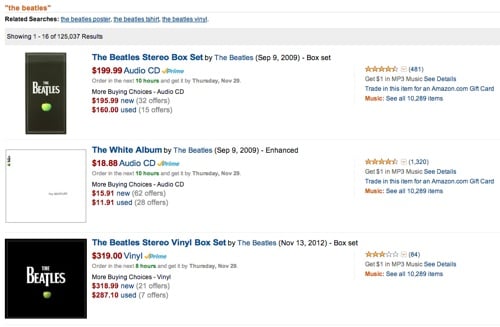
Amazon search

Twitter’s approach is similar. You have to view the summary before you can “commit”. The goal is to keep you inside the app until you’re absolutely sure you’re ready for the “purchase” — which in this case means clicking on a URL, emailing it to someone, sending it to Instapaper, etc. And now that the Discover tab is a much better customized version of photos and articles you might be interested in, the entire story is coming together really nicely.

There are still many features I miss in Twitter for iPhone. Having to poke around aimlessly for a while every time I’d like to see Tweets from a different list is probably the most frustrating issue at this point. But I have to say that Twitter Cards have made my experience so much more enjoyable and efficient that I’m going to stick with Twitter 5.1 for iPhone beyond my one-week experiment.

So what have we learned?

There are also some important product lessons to learn here. In his brilliant essay Subcompact Publishing Craig Mod sums it up nicely:

In product design, the simplest thought exercise is to make additions. It’s the easiest way to make an Old Thing feel like a New Thing. The more difficult exercise is to reconsider the product in the context of now. A now which may be very different from the then in which the product was originally conceived.

This is exactly what Twitter has done, starting with 4.0 almost a year ago. It was a gutsy move to rethink the entire experience — one they got a lot of ridicule for. And I’m sure the design team felt like this quite often:
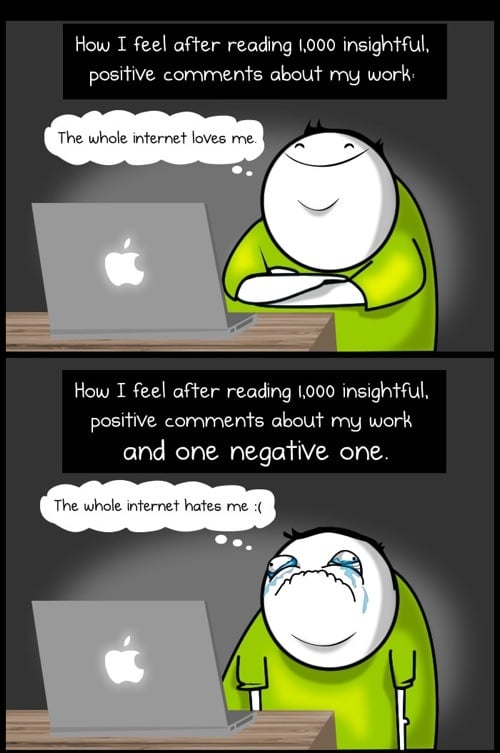
Comments on the web

(Source: The Oatmeal)

But to their credit, they stuck to their guns. They knew where they were going, and instead of surrendering to the extremely vocal complainers, they kept their eyes on the vision and went for it. That’s good product management. And now, almost a year later, I think they are finally seeing the tide turning as we’re getting a better sense of the end game.3

So, uh, I believe an apology is in order. I’m sorry, Twitter. I see where you’re going with this. And I like it.


  1. Oh, the irony. 

  2. Not a typo. You need to leave 20 characters for the URL, ok? 

  3. Yes, I know, there’s the API debacle as well, but I’m talking specifically about the Product design aspect here.