Menu

Posts tagged “technology”

Facebook Instant Articles and the web performance gap

The big news in our neck of the woods this week is the launch of Facebook’s Instant Articles. Although the handwringing about the open web and the future of publishing is important, there’s a tangential discussion going on in the web community that I find particularly interesting. It’s about the focus Facebook puts on the speed of the feature. It starts with the name Instant, and continues to play a big role in their marketing materials:

Articles load instantly, as much as 10 times faster than the standard mobile web.

Even the phrase “standard mobile web” is an interesting choice of words, and a subtle shot across the bow with a clear message: the web is sloooooooowwwwwww. Well, the web community took notice, and is gearing up for a fight. Here’s Jason Grigsby:

You can make your sites load faster or you can give complete ownership of your content to Facebook which doesn’t share your interests. Hmm…

— Jason Grigsby, ☁4 (@grigs) May 13, 2015

Tim Kadlec followed up with a great post called Choosing performance:

[The web is so slow at the moment] not because of any sort of technical limitations. No, if a website is slow it’s because performance was not prioritized. It’s because when push came to shove, time and resources were spent on other features of a site and not on making sure that site loads quickly.

This goes back to what many have been stating as of late: performance is a cultural problem.

I agree with them that this is the heart of the matter. Focusing on the instant aspect of the articles is a brilliant marketing move by Facebook. They looked at all the giant, slow, over-designed sites out there, saw an opportunity, and went for it. Let’s admit it: they won this round.

The big question now is: how are we going to respond? I think our best response is to fight fire with fire. Instead of trying to kill Instant Articles with the wrath of a righteous anger, let’s rather do something we should have done ages ago: prioritize performance. And Lara Hogan’s Designing for Performance is an excellent place to start.

The ethics of slot machine design

Andrew Thompson in Engineers of Addiction, a fascinating profile on the psychology of slot machines:

Game [slot machine] designers are charged with somehow summoning the ineffable allure of electronic spectacle — developing a system that is both simple and endlessly engaging, a machine to pull and trap players into a finely tuned cycle of risk and reward that keeps them glued to the seat for hours, their pockets slowly but inevitably emptying.

In other words, their job description is to make people win just enough so that they come back long enough to lose big. I just can’t wrap my head around that.

UI design and the abundance of choice

Aaron Shapiro makes some interesting observations in The Next Big Thing In Design? Less Choice:

Technology has revolutionized the way we live our lives and do business, but it has done a terrible job reducing the stress of so many decisions. Industry by industry, great digital design has eliminated middlemen from the economy and put users in control, making it fast and easy for us to determine what we want and purchase it directly, whether on a computer or over a phone. Now, with unlimited opportunities for decision-making, we have essentially made ourselves the middlemen in our own lives.

The enjoyment, and even fetishization, of the beautifully designed experiences we rely on to make these decisions has distracted us from our original goal of simplifying our lives. We’ve forgotten that the ultimate purpose of an interface is to make things simpler.

That last sentence is interesting. “We’ve forgotten that the ultimate purpose of an interface is to make things simpler.” I understand and agree with the sentiment, but the statement got me thinking about how I would define the purpose of a user interface.

In the context of modern UI design I would probably want to adjust that statement a little bit to say that, “The ultimate purpose of an interface is to enable users to accomplish their goals within a system easily, in a way that also fulfills pre-defined business goals.” I’m sure there’s lots to argue about and disagree with in that statement as well, but it’s an interesting thought process to go through.

The rest of the article goes a little too deep into #NoUI territory for me. I’m more with Cennydd on that one:

This is the world desired by some #NoUI adherents. It’s not a world I recommend.

— Cennydd Bowles (@Cennydd) April 21, 2015

But there are still some interesting examples. Well worth going through.

Placebo UI buttons

Chris Baraniuk looks at the futility of things like traffic signal buttons in Press me! The buttons that lie to you:

Some would call this a “placebo button”—a button which, objectively speaking, provides no control over a system, but which to the user at least is psychologically fulfilling to push. It turns out that there are plentiful examples of buttons which do nothing and indeed other technologies which are purposefully designed to deceive us. But here’s the really surprising thing. Many increasingly argue that we actually benefit from the illusion that we are in control of something—even when, from the observer’s point of view, we’re not.

Kids, technology, and nonverbal communication

I’m not usually one to freak out about kids and technology use, but Bruce Feiler makes some interesting points in Hey, Kids, Look at Me When We’re Talking:

Dr. [Clifford Nass, a communication professor at Stanford University] told me about research he was doing that suggested young people were spending so much time looking into screens that they were losing the ability to read nonverbal communications and learn other skills necessary for one-on-one interactions. As a dorm supervisor, he connected this development with a host of popular trends among young people, from increased social anxiety to group dating.

That’s pretty alarming.

Automation and the balance of power in workplaces

In The Machines Are Coming, Zeynep Tufekci talks about the kind of tasks that are being automated by machines:

Today, machines can process regular spoken language and not only recognize human faces, but also read their expressions. They can classify personality types, and have started being able to carry out conversations with appropriate emotional tenor.

Machines are getting better than humans at figuring out who to hire, who’s in a mood to pay a little more for that sweater, and who needs a coupon to nudge them toward a sale. In applications around the world, software is being used to predict whether people are lying, how they feel and whom they’ll vote for.

This is not a new topic. Back in 2012, Kevin Kelly proclaimed in Better Than Human: Why Robots Will — And Must — Take Our Jobs:

It may be hard to believe, but before the end of this century, 70 percent of today’s occupations will likewise be replaced by automation.

At the end of last year Claire Cain Miller wrote for the New York Times that As Robots Grow Smarter, American Workers Struggle to Keep Up:

Although fears that technology will displace jobs are at least as old as the Luddites, there are signs that this time may really be different. The technological breakthroughs of recent years — allowing machines to mimic the human mind — are enabling machines to do knowledge jobs and service jobs, in addition to factory and clerical work.

Who knows if this fear is going to turn into reality or not — there are lots of counter-arguments as well (For example, Nicholas Carr has a really interesting historical perspective in Should the Laborer Fear Machines?).

Still, I find the discussion fascinating — especially as it relates to the balance of power in workplaces. Tufekci continues:

Machines aren’t used because they perform some tasks that much better than humans, but because, in many cases, they do a “good enough” job while also being cheaper, more predictable and easier to control than quirky, pesky humans. Technology in the workplace is as much about power and control as it is about productivity and efficiency. […]

This is the way technology is being used in many workplaces: to reduce the power of humans, and employers’ dependency on them, whether by replacing, displacing or surveilling them.

Maybe that’s the real cause for concern here. Not that jobs might go away (although that’s certainly worrisome too), but that power will continue to shift to employers and away from employees.

Google's underlying strategy

Benedict Evans wrote a characteristically brilliant analysis in What does Google need on mobile? Here’s a taste of his conclusion about Google’s challenge going forward:

The key change in all of this, I think, is that Google has gone from a world of almost perfect clarity—a text search box, a web-link index, a middle-class family’s home—to one of perfect complexity—every possible kind of user, device, access and data type. It’s gone from a firehose to a rain storm. But on the other hand, no-one knows water like Google. No-one else has the same lead in building understanding of how to deal with this. Hence, I think, one should think of every app, service, drive and platform from Google not so much as channels that might conflict but as varying end-points to a unified underlying strategy, which one might characterize as ‘know a lot about how to know a lot’.

Don’t miss this article, the whole thing is great.

Blogging with Pinboard

I’m a long-time Pinboard fan, and from the moment I became a paid user I couldn’t shake the feeling that it is one of the most underrated services out there. It’s basically the center of my personal internet. I have years of articles tagged and cached, and available immediately whenever I need to remember something. For me, it represents the best of what technology has to offer as an “external brain”1.

But it’s even more powerful than that. I recently started wondering if Pinboard could become more central in my blogging workflow as well. My flow when I find an article I want to write about used to be two steps: (1) save to Pinboard, and then (2) start a new text file (with an excerpt from the article) and start writing.

Since I don’t always have time to write immediately after I read something, the disjointedness of these two steps means that I forget to post articles sometimes — or that I can’t remember which part I want to write about. So I needed a way to save Pinboard links for later, in a way that lets me pick up writing whenever I have time.

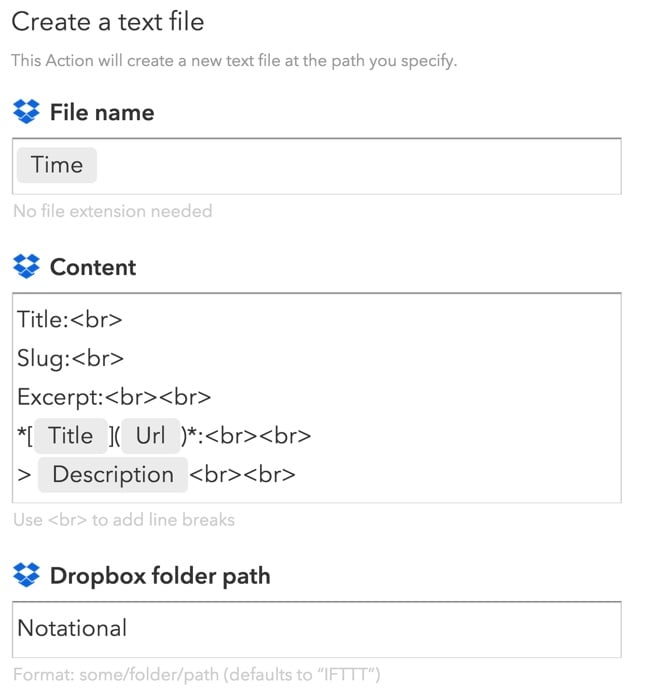
The solution I came up with isn’t rocket science, but it has made such a big difference to the way I write that I wanted to share it here. The key is a simple IFTTT recipe that takes any new link I save to Pinboard and creates a Markdown-formatted text file that I can use to start writing whenever I want to.

Here is a link to the IFTTT recipe: Post any new Pinboard link to a new text file in Dropbox.

And this is what it does:
Pinboard and IFTTT

I always put a pull quote in the “Description” field when I save a Pinboard link, so the recipe creates a text note with a Markdown-formatted URL, the pull quote, and space for me to add a title, slug, and excerpt once I’m ready to post to the site. Putting the note in a Dropbox folder means I can continue typing and editing on any device — I use Editorial on iOS and nvALT on Mac.

As for posting… I still haven’t found a mobile blogging platform that works for me, so even though I write many posts on my iPhone or iPad, I still post exclusively from MarsEdit. So I also went one step further and made a Keyboard Maestro macro (download here) that transfers the text from nvALT to MarsEdit as soon as I’m ready to post.

You know, the internet is pretty cool sometimes.


  1. Clive Thompson discusses the idea of external memory in detail in his excellent book Smarter Than You Think

Notifications everywhere, and not a drop to drink

Interesting thoughts from Steven Levy in What the Apple Watch Means for The Age of Notifications:

Done right, notifications are a wonderful Feed of Feeds, weeding out the stuff you really need to see from all the usual chaff in the stream.

But it’s hard to do this right when every single app wants to send you notifications. Even given that the system will limit itself to notices worthy of instant notice there are just too many notifications elbowing their way into what should be a narrow passage labeled, “Stuff I absolutely need to see.”

This decreases the value of all notifications.

Gmail has tried, but no one has really figured out the algorithms required to figure out what qualifies as “Stuff I absolutely need to see.” This is the holy grail of notifications at the moment.

The Watch and our attention

Jason Kottke wrote what I guess can be described as a review of Apple Watch reviews. He makes a particularly interesting point about the common assertion that we’ll start using our phones less because of the watch. From Apple Watch and the induced demand of communication:

In the entire history of the world, if you make it easier for people to do something compelling, people don’t do that thing less: they’ll do it more. If you give people more food, they eat it. If you make it easier to get credit, people will use it. If you add another two lanes to a traffic-clogged highway, you get a larger traffic-clogged highway. And if you put a device on their wrist that makes it easier to communicate with friends, guess what? They’re going to use the shit out of it, potentially way more than they ever used their phones.

He also quotes from the same article I had a visceral reaction to in The Apple Watch won’t save you time. In that article I made a similar point:

I’m not saying the Apple Watch won’t be wildly successful, or that I don’t want one — I definitely want one. I just don’t think we should fool ourselves into thinking it will somehow give us more time because we might look at our phones less. If history teaches us anything, it’s that we’ll find a way for the watch to fill up our “saved” time in other ways — and then some.