Menu

Posts tagged “mobile”

[Sponsor] Creative Labs Intelligent Wireless Sound System

A big thanks to Creative Labs for sponsoring Elezea’s RSS feed this week with their AXX 200 sound system!

We believe there’s so much more that your portable wireless speaker should do for you. That’s why we made the AXX 200.

The AXX 200 is a Bluetooth wireless speaker + Sound Blaster audio processor. This means a portable wireless speaker with power for real-time audio enhancement.

Intelligence. That’s what the AXX 200 brings to the table.

  • Make a call. Listen to music. AXX 200 intelligently adjusts the audio settings for you.
  • The Sound Blaster Central App for your iOS or Android device places the control in your hands.
  • Built-in quad array microphone - That’s FOUR microphones in a single wireless speaker for 360° of clear, unmatched audio pickup for voice calls and recording.
  • A wireless speaker that automatically cancels out noise during voice calls. For real.

It’s for work, it’s for play. It can be everything you need it to be.

The AXX 200 is now on sale for a limited time at Creative.com and Amazon.com.

Designing for Google Glass

The small screens are coming, and we’re going to have to adjust our design processes accordingly. Emily Schwartzman does a great job of exploring how they worked through some of this complexity in Cooper, Augmedix and Google Glass: No Real Estate? No Problem:

Designing for Google Glass made us rethink the way we do software design. Many of our projects devote a significant amount of time to defining the framework of an application and developing the detailed design of key screens. When designing for Glass, we discovered that these phases needed almost no time, given the restrictive framework and visual language defined by Google. For future projects we might devote more time to refining personas and scenarios. We might even name the project phases a little differently—instead of “detailed wireframes” it might be “detailed scenarios.”

In general, Glass design projects will be focused more on flows than screens, and spending time on scenarios will help crystallize the flows.

Why are we building this app?

Jeff Atwood wrote a glorious rant about the proliferation of unnecessary mobile apps called App-pocalypse Now1:

The more apps out there, the more the app stores are clogged with mediocre junk, the more the overall noise level keeps going up, which leads directly to this profligate nagging. Companies keep asking how can we get people to find and install our amazing app instead of the one question they really should have asked.

Why the hell are we building an app in the first place?

He makes some other really great points about the current state of the app ecosystem as well.


  1. I really struggle with puns. I don’t like them. So publishing this title is a big step forward in my ongoing therapy. 

Going responsive with large, established desktop-centric sites

Jeremy Keith writes about the challenges of turning large, established desktop-centric sites into responsive sites in Climbing Mount Responsive. This method remains my favorite:

Rebuild the mobile site, using it as a seed from which to grow a new responsive site. On the face of it, having a separate mobile subdomain might seem like a millstone around your neck if your trying to push for a responsive design. In practice though, it can be enormously useful. Mostly it’s a political issue: whereas ripping out the desktop site and starting from scratch is a huge task that would require everyone’s buy-in, nobody gives a shit about the mobile subdomain. Both the BBC news team and The Guardian are having great success with this approach, building mobile-first responsive sites bit-by-bit on the m. subdomain, with the plan to one day flip the switch and make the subdomain the main site.

I also really like Brad Frost’s illustrations of this approach in Planting the Seed for a Responsive Future.

The strangeness of the Flappy Bird phenomenon

Flappy Bird gif

Flappy Bird — that insufferable iOS game — has been in the news quite a bit recently. One of the more incensed “reviews” comes from Paul Tassi’s Winged Fury:

Flappy Bird is not a game. It’s an addictive collection of pixels you don’t win, you simply play until you’re frustrated enough to delete it. And yet, it’s tapped into some primal sense of accomplishment for this, the attention-deficit world we live in. Have nothing to do for more than a few moments? Whip out your phone and flap your way through some pipes. You’ll be dead in seconds with each attempt, and therefore the game can kill any span of time from half a minute to hours. […]

The time spent there is lost forever. The skill required to achieve high scores is wasted potential with no benefit whatsoever to the player. To brag about a score here is to boast to a friend how many times you managed to punch a brick wall before stopping.

Ian Bogost’s The Squalid Grace of Flappy Bird starts like this:

Games are grotesque.

And it he only gets angrier from there:

Flappy Bird is a perversely, oppressively difficult game. […] Flappy Bird is not difficult to challenge you, nor even to teach the institution of videogames a thing or two. Rather, Flappy Bird is difficult because that’s how it is. It is a game that is indifferent, like an iron gate rusted shut, like the ice that shuts down a city. It’s not hard for the sake of your experience; it’s just hard because that’s the way it is. Where masocore games want nothing more than to please their players with pain and humiliation (thus their appropriation of the term “masochism”), Flappy Bird just exists. It wants nothing and expects even less.

Look, way too much time has been wasted discussing how much time people are wasting on Flappy Bird. Still, it’s just so exactly like the internet to latch onto a phenomenon like this and then blow it completely out of proportion — and in the case of Forbes and The Atlantic, turn it into some highbrow existential reflection. It’s why I hate the internet, and it’s why I love the internet, all wrapped up into one silly little game.

But perhaps the last word should go to Bogost:

For no matter how stupid it is to be a game, it is no less stupid to be a man who plays one.

A service configuration to send Markdown-formatted excerpts from Mr. Reader to Notesy

I recently switched from Reeder to Mr. Reader as my default RSS app on my iPad1. The main reason is that I wanted an easier workflow to post article snippets to my text editor so that I can either post it to the site, or come back to it later and expand more before posting. Mr. Reader allows for the creation of custom workflows, which makes this possible.

The ultimate article on using Mr. Reader’s custom workflows is Federico Viticci’s characteristically insightful Mr. Reader And The Services Menu for iOS. He goes over several useful workflows, but the one he uses for Notesy doesn’t quite do what I want it to do, so I made my own and thought I might as well share in case anyone else is interested.

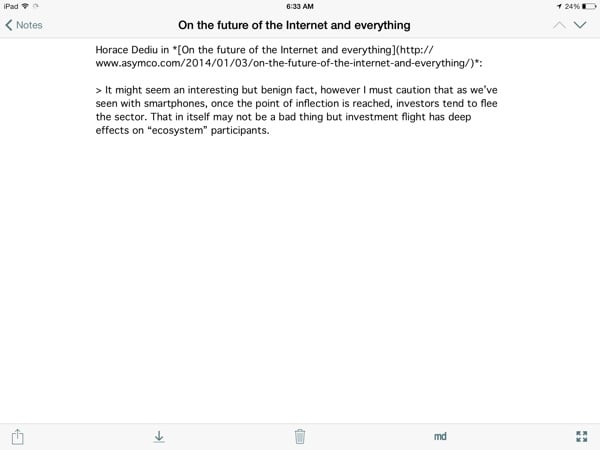
I want to have an action that lets me select some text in Mr. Reader, and then create a new note in Notesy with the article title as the note’s title, followed by a markdown-formatted excerpt that includes the author, the title/url, as well as the quoted text — like so:

Mr Reader Notesy

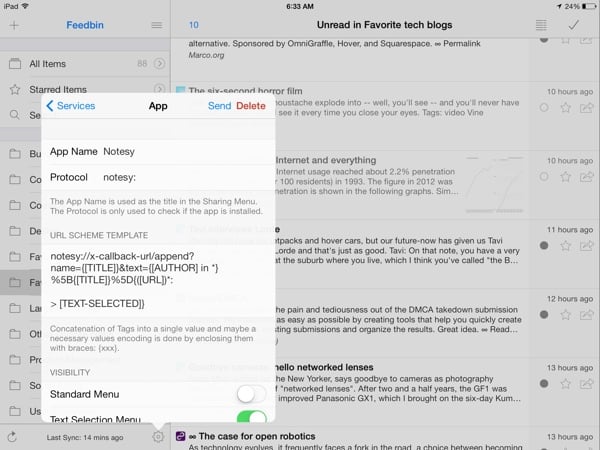
To set this up, go into the services menu in Mr. Reader, and configure it as follows:

Mr Reader Notesy

If you want to copy and paste the URL scheme text, here it is:

notesy://x-callback-url/append?name={[TITLE]}&text={[AUTHOR] in *}%5B{[TITLE]}%5D{([URL])*:

Make sure the “Text Selection Menu” toggle is on. Then, all you have to do is a select a piece of text, tap on “More actions”, and call the Notesy action. You can then either keep writing in Notesy, or come back to it later in nvALT on your Mac (see an overview of my plain text setup here).

And if you’re really lazy, just download this file on your iPad and select “Open In Mr. Reader” to set it up automatically: Notesy services configuration for Mr. Reader.


  1. The RSS Reader space is in dire need of an app name revolution 

The networked camera

Craig Mod’s Goodbye, Cameras kicked off an interesting discussion on the future of photography and connected devices:

As I’ve become a more network-focussed photographer, I’ve come to love using the smartphone as an editing surface; touch is perfect for photo manipulation. There’s a tactility that is lost when you edit with a mouse on a desktop computer. Perhaps touch feels natural because it’s a return to the chemical-filled days of manually poking and massaging liquid and paper to form an image I had seen in my head.

Yet if the advent of digital photography compressed the core processes of the medium, smartphones further squish the full spectrum of photographic storytelling: capture, edit, collate, share, and respond. I saw more and shot more, and returned from the forest with a record of both the small details — light and texture and snippets of life — and the conversations that floated around them on my social networks.

Also see Camera makers are desperately trying to stay a step ahead of smartphones—and failing and Connectedness for some interesting follow-up discussions.

The absurdity of "personal productivity"

Mark O’Connell wrote a very interesting article about a fairly unsettling iOS app called Days of Life — “a counter for the days you have left to live.” In Deathwatch he explores just how weird and absurd this app turns out to be:

Days of Life is one of those technologies that seems to incidentally satirize our relationship with technology more broadly. It sits in the “Productivity” folder on my iPhone’s home screen, along with my calendar and a to-do list app called Remember the Milk, but it would be as appropriately housed in a folder called “Existential Terror.”

So much of what we value in technology is its promise to upgrade the hardware of our lives, to make us more useful to ourselves — more productive, more profitable, more effective. Days of Life functions like a reductio ad absurdum of the logic of personal productivity. The pie chart becomes a special way of being afraid: an image of the self as a micro-economy of numbered days.

We sometimes have such a warped view of what it means to be “productive”, and this essay does a good job of shining a spotlight on that.

Mixing public and private moments on social networks

Megan Garber takes on Instagram Direct1 in Behold, Facetwitterest: The Standardized Future of Social, and makes this observation:

So one of the biggest challenges facing the major (and the trying-to-be-major) social networks is a structural one: How do you build yourself up and out in ways that balance users’ desire for intimacy with their desire for publicity? How do you merge the web’s ability to create communities with its ability to create universalities? 

You could read Direct as Instagram’s (and Facebook’s) latest attempt to navigate that tension. The service is, basically, attempting to add a layer of privacy to its existing, public-leaning architecture. But Instagram isn’t just Snapchatting itself. It’s offering its users a Snapchat-like functionality within the context of its much more public social network. It’s trying to have it both ways — cynically, but perhaps ingeniously — by offering a refuge of privateness within a very public service.

It reminds me of something Luke Wroblewski said recently:

Every mobile app attempts to expand until it includes chat. Those applications which do not are replaced by ones which can.

Direct appears to be a necessary defensive move by Instagram — private messaging is now a basic expectation for social networks. But it also looks like people are getting more savvy about their privacy and what happens to their data (Thanks, NSA!), so it will be interesting to see how this mixing of public and private plays out in 2014.


  1. The ability to send photos privately to people in your network 

The case for progressive enhancement

Alex Maughan gives some great front-end design and development tips in his article Mobile-first, semantic, and modular front-end design. If any part of your work touches front-end development, I highly recommend this piece. In addition to walking through the tools he uses (and his reasoning), Alex also makes a strong case for progressive enhancement:

Designs should be approached with a content-first and mobile-first mindset. Following this, CSS breakpoints should always be mobile-first. All JavaScript should be progressively enhanced and should be used at a conscientious minimum where possible. Therefore, the concept of progressive enhancement happens from all aspects, from design to development and back again.

All of this translates into websites that are much more future-friendly within a disruptive device and browser marketplace. It also has the added benefit of improving performance and guarding against fatal runtime errors that stop pages from working.

I haven’t yet linked to many pieces on progressive enhancement. As I went through my Pinboard links just now I realized that 2013 has been a big year for this topic. These are all the articles I know about that came out this year in strong defense of progressive enhancement:

I don’t know, it sounds like it’s not dead yet…