Menu

Posts tagged “mobile”

Content First design with Content Slice Diagrams

A while ago I wrote about expanded customer journey maps as a way to plan for device-agnostic design. But that document is only half the story. Expanded customer journey maps are great because they force us to plan what content will be needed before we move to page layout. That provides a great starting point, but crossing the chasm between knowing what content should go on a page, and how to design the best layout for that content can still be quite difficult.

What we need is an effective way to make content hierarchy decisions across all pages so as not to lose sight of the overall consistency of a site. Enter Content Slice Diagrams as a way to accomplish three fundamental tasks:

  • Get an overview of the content across a site to make sure nothing is missing and there is consistency in layout where appropriate.
  • Design the right size and hierarchy of each of the content chunks on a page, and see how it affects the page as a whole, as well as related pages.
  • Provide any guidelines that writers may need to keep in mind as they create the content for the site.

Once the content slice diagrams are completed, designers and writers should have the following information:

  • A clear understanding of the hierarchy of each page, which leads seamlessly into mobile first layout design.
  • What the structure and nature of the content in each chunk will be.

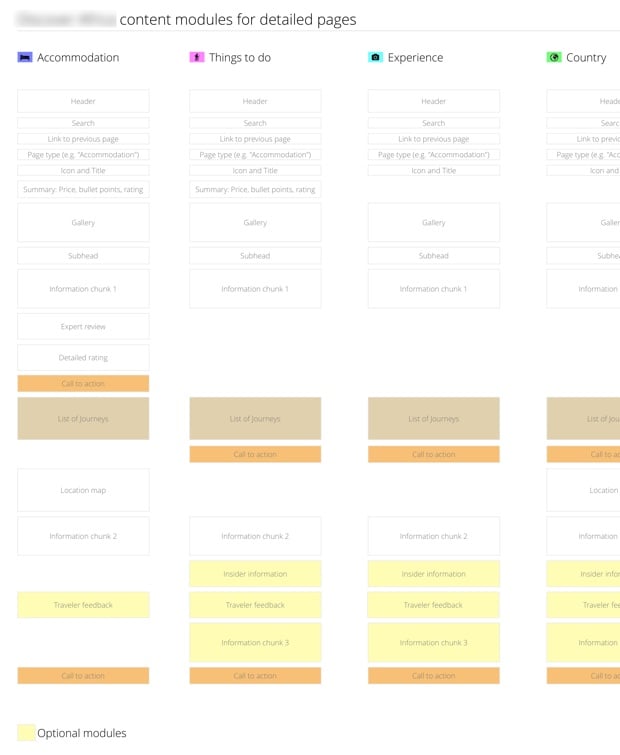
That’s everything you need to start working on layout. As an example, let’s say you’ve worked on the content plan (see my post on expanded customer journey maps for an example), so you know what type of content needs to be on a page — but you’re not sure how to lay it out. A Content Slice Diagram can help:
Content Slices

What we have in the image above is a list of pages that goes from left to right, with rectangles representing content chunks on the page. Calls to action and optional modules are given a different color so that they’re easy to differentiate. When we did this for a travel site we realized that we sometimes had the call to action in a different spot, so we were able to get consistency across pages. We also moved the content chunks around until we arrived at a hierarchy that made sense.

You’ll notice that this looks suspiciously like the layout for a mobile screen… That wasn’t the original intent, but it ends up being a welcome side effect of doing content slice diagrams: it’s a great blueprint for mobile first design.

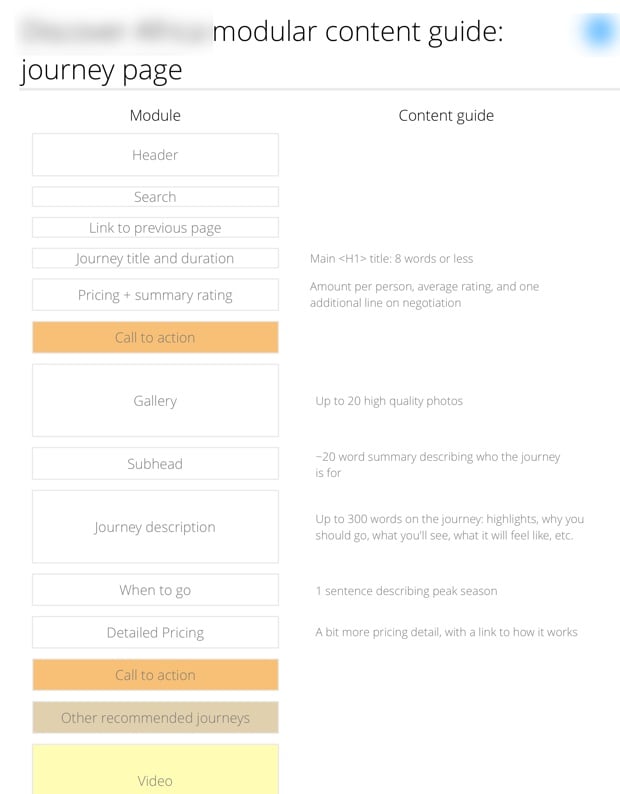
Once the hierarchy is set, you can create content guides for writers to give them the structural information they need to start writing:
Content Slices

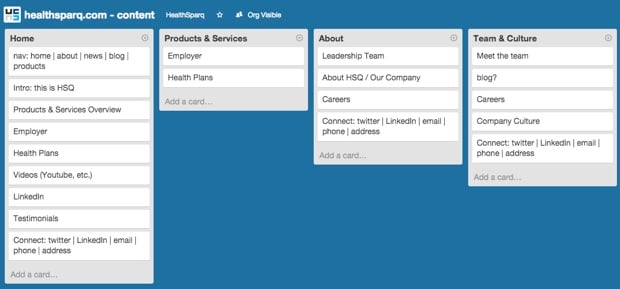
When I brought this technique to HealthSparq, my colleague Allan White had a great idea. He rightfully commented that OmniGraffle doesn’t make it particularly easy to drag content chunks around quickly. So he decided to use Trello instead. It allowed him to have collaborative meetings with the Marketing and Development teams as they discussed the hierarchy of each chunk:
Content Slices in Trello

As I’ve mentioned before, I hate needless deliverables as much as the next person, but I really like deliverables that help us design better products. And I think Content Slice Diagrams make for a great addition to the tools we have at our disposal to design device-agnostic, content-first experiences. Use at will, make it better, and let me know how it goes!
[Sponsored post] Wearable Tech Hits the Road, the Waves and your Wardrobe

This post is sponsored by Rackspace Digital, the digital marketing infrastructure specialists.

In recent months, wearable tech has shown signs of emerging maturity. Not only are wearable devices getting smarter and more powerful, they’re also becoming more practical and beautiful. As batteries and sensors continue to get smaller, and with Google releasing the Android Wear operating system back in March, a slew of new wearables will hit the market before the end of the year. Smart watches, glasses, shoes, shirts, even jewelry. According to ABI Research, 90 million wearable devices will ship before the end of 2014. Here are a few of the new arrivals.

Riding Big Waves and Big Data

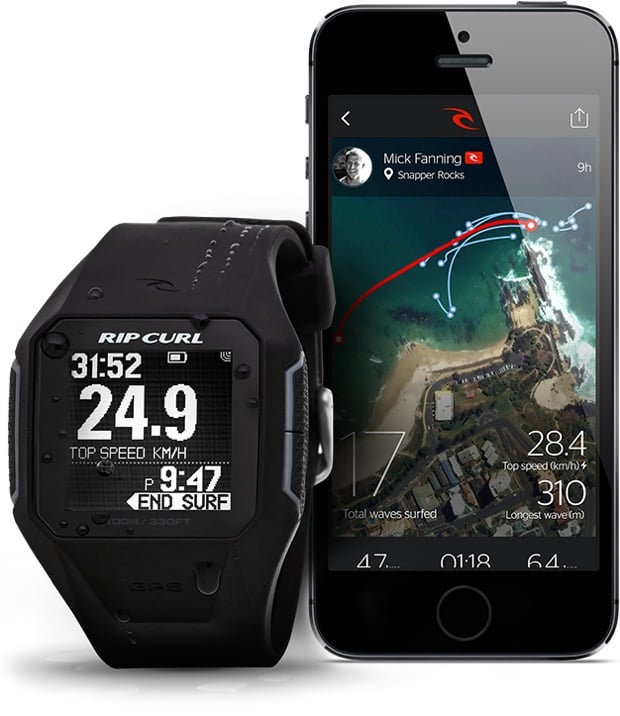
Rip Curl, an Australian company and an iconic brand in surf wear, is currently trialing its own smart watch with 200 surfers around the globe. Some surfers, like zealous runners, want to track all their stats—from the number of rides to top speeds, miles paddled and time spent in the water. Due to hit stores mid-September, the GPSSearch will be the world’s first GPS-powered surf watch. It uses satellite positioning and other sensors to obtain data and measurements that are then processed in the cloud using a cutting-edge database service. All the user information can be synced to an iPhone, iPad or desktop for visual analysis.

Google Maps in Your Shoes

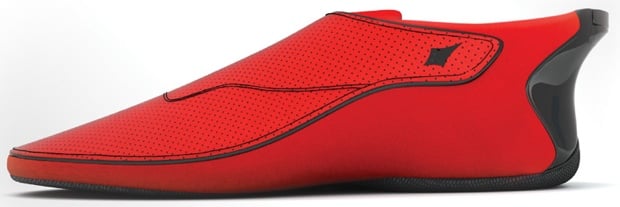
Indian startup Ducere Technologies is launching a pair of “smartshoes” known as Lechal shoes. The shoes connect to your smartphone with Bluetooth, using vibrations and Google maps to alert you when you need to make a turn. The left or right shoe vibrates depending on which way you need to turn. Not only is this a boon for runners or walkers in an unfamiliar city, it also has big payoffs for the visually impaired. Reportedly, Lechal shoes have already received 25,000 orders, even though the company won’t make them available until the end of the year. The shoes will cost between $100 and $150.

Making the Wearable More Wearable_

While Under Armour and Omsignal are leading the way with making smart shirts with built-in sensors for tracking workout data, there’s a new plan to take over the rest of your wardrobe. Ministry of Supply has launched a new line of men’s dress shirts using the same technology that NASA has implemented in its spacesuits for temperature regulation. The shirt absorbs heat when you’re hot and releases it back when the temperature dips. The good news is that it looks like a real shirt, not a space shirt.

Wearable Experiments, meanwhile, has released the Navigate Jacket for both men and women. A companion smartphone app stores destinations and feeds them to your jacket, turn by turn. LEDs and vibrations on the sleeves ensure you never make a wrong turn.

And finally, if vibrating jackets aren’t your style, consider the latest in wearable tech from Cuff, a manufacturer of smart jewelry. Now available for pre-order, the bracelets, necklaces and key chains come in a variety of styles and finishes that look more like accessories than tech hardware. Each piece of jewelry uses a small component called a CuffLinc that acts as an alert system. Using Bluetooth technology, the CuffLinc will sync up with a smartphone app to handle alerts and push notifications that can be customized for a personal network of friends and family.

Sponsored via Syndicate Ads

App circulation

I’ve done quite a bit of writing here on architecture and design (see this, for example), so I really enjoyed Melissa Mandelbaum ‘s Applying Architecture to Product Design: Lesson 1 - Circulation:

As an architect, I learned circulation systems including stairs, hallways and elevators are very important in helping people navigate buildings. Similarly, as a product designer, I’ve learned circulation systems such as list menus and tabs are necessary for helping people navigate products.

She goes over some really great examples of helping people “circulate” through an app. I’m looking forward to the rest of the series!

A history of autocorrect

Gideon Lewis-Kraus discusses The Fasinatng … Frustrating … Fascinating History of Autocorrect. Turns out there’s more to it than meets the eye:

A handful of factors are taken into account to weight the variables: keyboard proximity, phonetic similarity, linguistic context. But it’s essentially a big popularity contest. A Microsoft engineer showed me a slide where somebody was trying to search for the long-named Austrian action star who became governor of California. Schwarzenegger, he explained, “is about 10,000 times more popular in the world than its variants”—Shwaranegar or Scuzzynectar or what have you. Autocorrect has become an index of the most popular way to spell and order certain words.

This article also taught me that swear words are complicated. And I really like the cartoons of various autocorrect errors, especially this one:

Damn you autocorrect

[Sponsor] Photo Book Flip: your iPad photos in a beautiful book

My thanks again to Photo Book Flip for sponsoring the site again this week. Try it out!

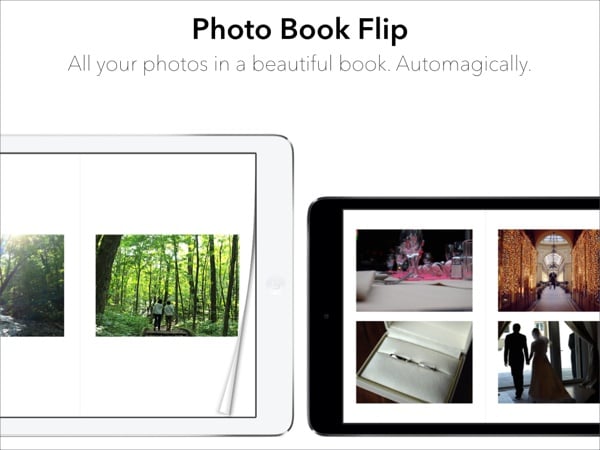
Photo Book Flip instantly turns the photos on your iPad into a beautiful photo book with a single tap. Unlike most photo apps that only let you browse photos one at a time, Photo Book Flip lets you flip through your photos in variety of layouts, so you can enjoy them in a delightful and different way.

How is Photo Book Flip different?

Photo Book Flip is not your ordinary photo book creator app. Every time you choose a set of photos, the app intelligently lays out photos into minimalist templates inspired by photo-centric magazines like Kinfolk. So every time you create a photo book, it’s going to be a different experience even with the same set of photos.

Photo Book Flip also works nicely with Apple’s Photo Stream. This means all the photos you take on your iPhone, you can use Photo Book Flip on your iPad to make them into a photo book with just a tap.

Lastly, we think the best part of Photo Book Flip is that it takes the hassle out of creating beautiful photo books for you to enjoy.

A sneak peak at what’s coming up.

We are hard at work polishing and making this app better. There are lots more features to come and here’s a preview:

  • Sharing features: Email, tweet, or post to Facebook individual photos as well as pages in your photo books.
  • Full screen photos: Tap on any photo to see it in full screen view.
  • More templates: We’re gradually adding more templates for more layout variations.
  • Flickr and Facebook Support: The feature we’re excited about the most! Create photo books from photos in your Facebook and Flickr account.

As you can see, lots of exciting features are coming to Photo Book Flip! Find it on the App Store and make sure to sign up for updates on our website.

Photo Book Flip

Sponsorship via Syndicate Ads

An excrutiating month with the Motorola Razr

Ashley Feinberg in Razr Burn — My Month With 2004’s Most Exciting Phone:

It may be hard to remember now—or to believe at all, if you’re under 20—but at the time of its release the Razr was the final word in mobile technology. For the first time, you got a sleek, powerful, and wildly expensive bit of metal to call not only your cellphone but your status symbol, too. A couple of years and a few slashes into the $700 price tag later, you could barely go outside without seeing someone flip open a Razr. In four years, Motorola sold 130 million of them, a record that wouldn’t be touched until well into the iPhone’s run.

This sounds like a terribly painful experience. Like she accurately points out in the beginning: don’t try this at home…

The future of car ownership

I’m not sure if I should really link to Kids Don’t Care About Cars because there are very few things more annoying than old people pontificating about what “youngsters” like and don’t like. Still, this part did get me thinking:

The basic premise is you’ve got to go. How you get there is irrelevant. Furthermore, the costs of car ownership… the insurance and the gas, never mind the maintenance, none of them appeal to a youngster who believes all costs should be baked in.

I’m not convinced the conclusion that car ownership is a thing of the past is accurate1, even though this is not the first time the argument has been made — see Zipcar, Uber And The Beginning Of Trouble For The Auto Industry. But as an old guy myself, I do see the product opportunities that are created by this idea that how you get places is irrelevant as long as you can get there.

One of my favorite examples of companies taking advantage of this right now is car2go. It’s a network of smart cars that you can pick up anywhere, drive anywhere, and leave anywhere when you’re done. And it’s all done through a smartphone app (or the web — if you’re old and lame of course). No matter how much I think about this, I can’t get over how magical this idea is. What a great way to fill an unmet user need.


  1. Try not having a car when you have kids… 

[Sponsor] Photo Book Flip for iPad

A big thanks to Photo Book Flip for sponsoring Elezea this week!

Six months ago I was reading Kinfolk, a culture and lifestyle magazine with lots of beautiful photos. Flipping through it was a really delightful experience. Then it came to me, what if I could flip through my own photos as if they were a beautiful photo magazine, say on my iPad? And even better, what if I didn’t have to organize and layout the photos?

And that was the beginning of Photo Book Flip. After five months of design and development, the app has finally come to life.

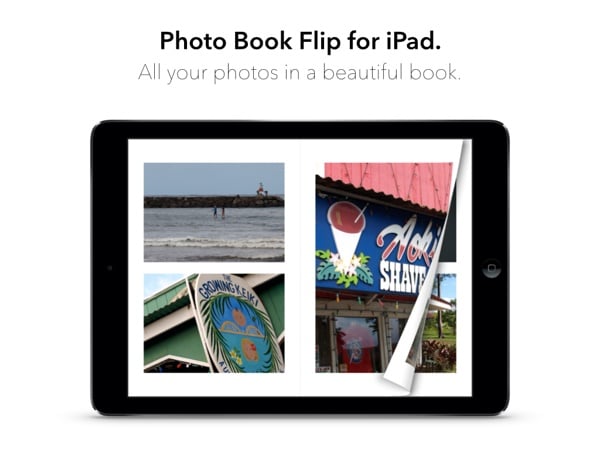
Photo Book Flip instantly turns the photos on your iPad into a beautiful digital photo book with a single tap. Inspired by photo-centric magazines like Kinfolk and beautiful cookbooks like Mast Brothers Chocolate and Blue Bottle Craft of Coffee, the page layout features a minimalist design to spotlight your moments. And just like the iBooks app, as you flip each page, you’ll also see what’s behind the page as if it was a real book.

We think Photo Book Flip lets you experience your photos in a delightful and different way. Like what physical photo albums do, we created this app to celebrate the wonderful memories and moments in everyone’s life.

Find it on the App Store at a limited-time introductory price of $0.99 and learn more on our website. We think you’re going to like it. Please check it out, and let us know how we can make it better.

Photo Book Flip

Sponsored via Syndicate Ads

The intent and design of messaging apps

Mills Baker wrote one of the best analyses I’ve seen on the the design of messaging apps in his comparison of Slingshot and Snapchat:

Snapchat seems eager to support naturalness in communication, which can be considered in terms of deformation. It wants to combat draining formalities, make it possible for all parties in an interaction to behave as they wish without anxiety, without fear of publicity or permanence, without the burden of modal moments. In other words: it wants the full range of technologies our smartphones enable to support honest, authentic, spontaneous interaction.

In contrast:

Slingshot makes demands of you for the sake of novelty, without having any organic justification for doing so, whereas Snapchat seeks to support your communicative intent without asking for justification, without even prioritizing things — like a social graph — that would be profitable for it to develop. Snapchat seems interested in helping you communicate; Slingshot seems interested in mandating engagement and experimenting with game-mechanics and arbitrary friction, in service not to your ends but to Facebook’s.

As I read this I kept thinking of Jared Spool’s view that design is the rendering of intent. Even though I don’t understand either of these apps because I’m old, it’s clear that Snapchat understands its intent and the design renders it effectively. Slingshot, on the other hand, appears to be a shot in the dark.

Screens don't have to melt our kids' brains

Melt

Mat Honan’s Are Touchscreens Melting Your Kid’s Brain?1 set off the latest in what has become a recurring tech theme over the past few years:

I’m perpetually distracted, staring into my hand, ignoring the people around me. Hit Refresh and get a reward, monkey. Feed the media and it will nourish you with @replies and Likes until you’re hungry and bleary and up way too late alone in bed, locked in the feedback loop. What will my daughter’s loop look like? I’m afraid to find out.

This has been a difficult topic for me for a long time. In 2012 I wrote an article for Smashing Magazine called A Dad’s Plea To Developers Of iPad Apps For Children, in which I aired some of my frustrations with apps for kids. That piece brought out a lot of anger, including a comment that I’ll never forget:

Wow really?? great parents here.. having a kid under 7 stare at a screen, really?? come on!! no kid under 7 should use an iPad for what?? play outside, play with your toys, your friends, read. People who have a 2yr old use an ipad/iphone, shouldn’t have kids in the first place! shame on you

I started writing a passionate reply, explaining our reasoning and the rules my wife and I have for screen time, but I ended up just dropping it. No one has ever changed their opinion based on a comment they read on a blog, so why bother.

Anyway, I digress. I tend to agree with Robert McGinley Myers’ response to Mat’s article. In Screens Aren’t Evil (which you should read in its entirety) he says:

But we need to get beyond worrying about whether “screens” are melting our kids’ brains. What we need to be conscious of is encouraging our kids, and ourselves, to engage in activities that enrich us. Sometimes that’s interacting with each other, sometimes that’s a hike in the forest, sometimes thats a great book, and sometimes that’s an incredible video game. It’s not the medium that matters, but what we take from it.

Now that’s a moderate stance I can get behind.


  1. Betteridge’s law alert!