Menu

Posts tagged “mobile”

New article on UX Booth: The future of 3D Touch

I just published my first article on UX Booth. For The Next Step for 3D Touch I did some digging on where we might be headed with the 3D Touch feature in the new iPhones. I got particularly fixated on the idea of reducing an app’s UI to only the icon on the home screen:

So what would happen if 3D Touch became an app’s main UI? What could happen if we created apps solely comprised of shortcut actions and dynamic actions—and nothing else?

Read on for more…

How to display threaded discussions on the web

I’ve been doing some work on threaded discussions and comment threads in our web and mobile apps, and I thought it might be useful to summarize some of my findings here. The particular issue we’re trying to address is how to deal with infinitely threaded discussions, like the kind you find on Hacker News and Reddit1:

Infinitely threaded comments on Reddit

The first thing I did was some research on the different approaches currently used on the web and mobile for discussions and comments. There are some weird outliers, but in general there are five major ways threads are handled:
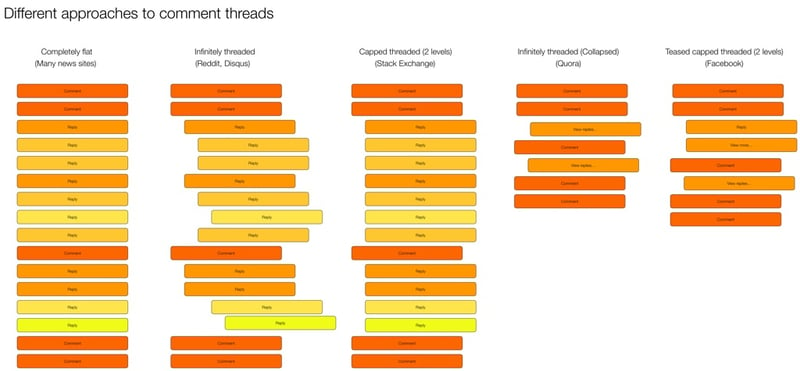
Threaded discussions on the web

I did some further digging and came up with the following list of pros and cons for each approach.

Completely flat

  • Example: New York Times
  • Pros:
    • Easy to navigate—just scroll down
    • Content not pushed off screen
  • Cons:
    • No context available
    • Difficult to follow conversation or see what a comment/reply refers to

Infinitely threaded

  • Example: Reddit
  • Pros:
    • Context always visible
    • Can have deep side conversations
  • Cons:
    • Difficult to navigate
    • Hard to find new replies on a thread
    • Pushes content off screen (as threading continues to reduce column width)
    • Doesn’t let you decide which tangents (reply threads) you want to dig into2

Capped threaded

  • Example: Stack Exchange
  • Pros:
    • Sets expectations that replies can’t go on forever
    • Keeps context visible (up to a point)
    • Content not being pushed off the screen
  • Cons:
    • Deeper levels of replies not possible

Infinitely threaded (collapsed)

  • Example: Quora
  • Pros:
    • Context available on demand
    • Easy to scroll and decide which tangents to go off on
    • Less cognitive load to scroll through
  • Cons:
    • An extra action needed to view context

Teased capped threaded3

  • Example: Facebook
  • Pros:
    • Context available on demand
    • Easy to scroll and decide which tangents to go off on
    • Less cognitive load to scroll through
    • Can highlight relevant content as teasers
  • Cons:
    • New comments in thread can be confusing without their context

Our approach

All design in a business is compromise. In our case, we need to figure out what we’re willing to gain, and what we’re willing to give up for it. In our case, our existing product uses infinitely threaded comments. So any change from that will obviously be… complicated. But considering that we want a single approach on mobile and web, it currently looks like we’re going to go with the Teased capped threaded approach:
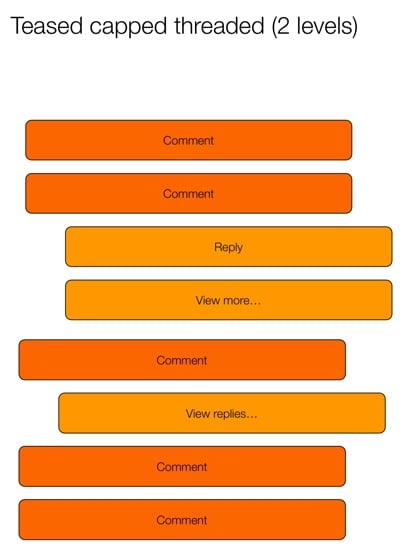
Teased capped threaded

This seems to strike the best compromise between easy scanning and the ability to drill into specific conversations. The “teaser reply” is particularly interesting, because it opens up some neat ways to provide relevant content to users. Perhaps you show the first unread reply, or the latest reply by someone you follow, or the most-liked reply. We’re still trying to figure out what would be most useful.

Another outstanding issue is if/how to deal with this approach differently on desktop and mobile. Some apps (like Quora and Facebook) split the view into two pages. The first page has the content and the first level of comments, and the second page has only the reply threads. In digging into it a bit more, it looks like this is mostly to make the app more performant. Here’s how Facebook does it:

Facebook comments

And here’s Quora:

Quora comments

Youtube, on the other hand, does it all on one page:

Youtube comments

We’ll need to dig into the performance issue, but my preference would be for a single page with truncated replies, like YouTube does it. Our current working hypothesis for a good solution is this:

  • Show entire comment thread on the same screen (replies not on a separate screen) to make the flow better (easier to scan and dig into individual threads)
  • Cap each individual comment at 5 lines (with a way to expand) (Mobile only)
  • Show first reply to a comment, with “View more replies” to load 5 more (“View more” on mobile only)
  • Show first 10 comments on a post, with “View more comments” to load the next 10 (“View more” on mobile only)

I like this hypothesis because it keeps the approach the same across devices, but still allows for differences in screen real estate available on mobile and desktop. We’re still in the middle of the debate, so if anyone has any recommendations or anything to add, please let me know!


  1. Yes, Reddit starts capping threaded replies at some point, but they’re the best example out there of threads that go on forever. 

  2. Jeff Atwood did a good deep-dive on these issues in his post Web Discussions: Flat by Design 

  3. Yeah, I know I’m not good at naming things… 

Mobile first: not the right answer, just an efficient one.

Here’s some solid pragmatism from James Archer in Why is it so Easy to Get “Mobile First” Wrong?:

Mobile-first design isn’t, in itself, the right answer. It’s just an efficient answer. If you can design for one device and then tweak it to more or less function on other devices, you shave a lot of time off the design process. With the cornucopia of possible devices you’d otherwise have to design for, that’s definitely a good thing.

Books on screens, and digital marginalia

Clive Thompson’s essay on the experience of reading War and Peace on his iPhone is just so, so good:

The phone’s extreme portability allowed me to fit Tolstoy’s book into my life, and thus to get swept up in it. And it was being swept up that, ironically, made the phone’s distractions melt away. Once you’re genuinely hankering to get back to a book, to delve into the folds of its plot and the clockwork machinations of its characters, you stop needing so much mindfulness to screen out digital diversions. The book becomes the diversion itself, the thing your brain is needling you to engage with. Stop checking your email and Twitter! You’ve got a book to read!

He seamlessly blends thoughts on the reading experience with impressions on the book and revelations on the differences between reading physical books vs. ebooks. (Spoiler: it turns out reading books on screens isn’t as bad as some might want us to believe…)

I especially liked this idea he mentions towards the end:

By the time I was done with War and Peace, I had amassed 12,322 words of highlights and marginalia. It was a terrific way to remind myself of the most resonant parts of Tolstoy. Indeed, I so enjoyed revisiting those notes that I wanted a paper copy of them. Using the Espresso print-on-demand machine at the McNally Jackson bookstore in New York, I had the notes printed up as a small 84-page paperback. It sits on my shelf, a little compilation of my reading and thinking — or, as I titled it, War in Pieces.

This is something I want to do for the books I read as well, so I took to Twitter to ask Clive how he did it.

In addition to his response (he exported text from Kindle Highlights into InDesign), the folks at Clippings.io chimed in to tell us about their service1. Clippings lets you import your Kindle highlights and notes, organize them, search them, and best of all: you can export to PDF if you want a nicely-printed version. I signed up immediately and I’m really liking it so far.


  1. This is one of the few times I’ve experienced a “brand” stepping into a conversation in a really helpful way. Social media people, take note! 

Facebook Instant Articles and the web performance gap

The big news in our neck of the woods this week is the launch of Facebook’s Instant Articles. Although the handwringing about the open web and the future of publishing is important, there’s a tangential discussion going on in the web community that I find particularly interesting. It’s about the focus Facebook puts on the speed of the feature. It starts with the name Instant, and continues to play a big role in their marketing materials:

Articles load instantly, as much as 10 times faster than the standard mobile web.

Even the phrase “standard mobile web” is an interesting choice of words, and a subtle shot across the bow with a clear message: the web is sloooooooowwwwwww. Well, the web community took notice, and is gearing up for a fight. Here’s Jason Grigsby:

You can make your sites load faster or you can give complete ownership of your content to Facebook which doesn’t share your interests. Hmm…

— Jason Grigsby, ☁4 (@grigs) May 13, 2015

Tim Kadlec followed up with a great post called Choosing performance:

[The web is so slow at the moment] not because of any sort of technical limitations. No, if a website is slow it’s because performance was not prioritized. It’s because when push came to shove, time and resources were spent on other features of a site and not on making sure that site loads quickly.

This goes back to what many have been stating as of late: performance is a cultural problem.

I agree with them that this is the heart of the matter. Focusing on the instant aspect of the articles is a brilliant marketing move by Facebook. They looked at all the giant, slow, over-designed sites out there, saw an opportunity, and went for it. Let’s admit it: they won this round.

The big question now is: how are we going to respond? I think our best response is to fight fire with fire. Instead of trying to kill Instant Articles with the wrath of a righteous anger, let’s rather do something we should have done ages ago: prioritize performance. And Lara Hogan’s Designing for Performance is an excellent place to start.

Mobile vs. Desktop in the enterprise software market

“Mobile first” is more about progressive enhancement and making important design hierarchy decisions than it is about thinking about small screens, so I don’t agree with the “outdated” bit in Paul Adams’s Why ‘mobile first’ may already be outdated. That said, he makes a good point about enterprise software:

Many businesses being advised to go all in on mobile screens, should consider how often they are accessed while people are at work. Software that people probably shouldn’t, but do, look at on their work computer: news, sports, social, messaging, personal email. The large screen matters.

Now imagine that you actually build software specifically for people to use at work. This may be software for getting work done, such as Google Docs, Intercom, Slack, Basecamp, Trello, etc. The likelihood now is that the larger screen is the most important one. The large screen app is more important than the mobile app. The mobile app plays a different role to the large screen app, and in many cases a supporting role.

I see this is in our user research all the time. If we do usability testing on our mobile apps, one of the first questions is always, “Will I be able to use this on my desktop”? For software that gets used mostly at work, focusing on desktop — as unsexy as it might sound — is still hugely important.

Guidelines for touchscreen design

Steven Hoober has some great guidelines for touchscreen design in Fingers, thumbs, and people:

Most of all, within what you can control: Always design for hands, fingers, and thumbs.

And remember: You don’t design for iPhone or Android, for cars or kiosks, for Web or apps, but for people. Have empathy for users and respect their choices, their ways of working. Account for the limits of their lives, their environments and their abilities.

Even when your implementation is constrained by technology, avoid designing for pixels or code; always consider what effects your work will have in the real world, when people look at, hold, and touch the screen.

Google's underlying strategy

Benedict Evans wrote a characteristically brilliant analysis in What does Google need on mobile? Here’s a taste of his conclusion about Google’s challenge going forward:

The key change in all of this, I think, is that Google has gone from a world of almost perfect clarity—a text search box, a web-link index, a middle-class family’s home—to one of perfect complexity—every possible kind of user, device, access and data type. It’s gone from a firehose to a rain storm. But on the other hand, no-one knows water like Google. No-one else has the same lead in building understanding of how to deal with this. Hence, I think, one should think of every app, service, drive and platform from Google not so much as channels that might conflict but as varying end-points to a unified underlying strategy, which one might characterize as ‘know a lot about how to know a lot’.

Don’t miss this article, the whole thing is great.

Notifications everywhere, and not a drop to drink

Interesting thoughts from Steven Levy in What the Apple Watch Means for The Age of Notifications:

Done right, notifications are a wonderful Feed of Feeds, weeding out the stuff you really need to see from all the usual chaff in the stream.

But it’s hard to do this right when every single app wants to send you notifications. Even given that the system will limit itself to notices worthy of instant notice there are just too many notifications elbowing their way into what should be a narrow passage labeled, “Stuff I absolutely need to see.”

This decreases the value of all notifications.

Gmail has tried, but no one has really figured out the algorithms required to figure out what qualifies as “Stuff I absolutely need to see.” This is the holy grail of notifications at the moment.

The Watch and our attention

Jason Kottke wrote what I guess can be described as a review of Apple Watch reviews. He makes a particularly interesting point about the common assertion that we’ll start using our phones less because of the watch. From Apple Watch and the induced demand of communication:

In the entire history of the world, if you make it easier for people to do something compelling, people don’t do that thing less: they’ll do it more. If you give people more food, they eat it. If you make it easier to get credit, people will use it. If you add another two lanes to a traffic-clogged highway, you get a larger traffic-clogged highway. And if you put a device on their wrist that makes it easier to communicate with friends, guess what? They’re going to use the shit out of it, potentially way more than they ever used their phones.

He also quotes from the same article I had a visceral reaction to in The Apple Watch won’t save you time. In that article I made a similar point:

I’m not saying the Apple Watch won’t be wildly successful, or that I don’t want one — I definitely want one. I just don’t think we should fool ourselves into thinking it will somehow give us more time because we might look at our phones less. If history teaches us anything, it’s that we’ll find a way for the watch to fill up our “saved” time in other ways — and then some.