I think Kottke nailed it:
Maybe the reason the whole “can’t use the iPad/iPhone for creation” thing persists is that everyone is using the damn things to play tower defense games instead.
I think Kottke nailed it:
Maybe the reason the whole “can’t use the iPad/iPhone for creation” thing persists is that everyone is using the damn things to play tower defense games instead.
Nat Ives quotes “an executive at a magazine company” in his piece Wired and The New Yorker Pull Back on Flipboard:
“Nobody will deny that Flipboard is a beautiful product, but the question is, is it too beautiful?” the executive said. “What people want out of a magazine is exactly what they’re delivering. So if people feel like they’re getting that already, even if it’s not the same depth of content that would be in a print or monthly publication, then are they less likely to want to find it in the magazine itself?”
Wait, what? The executive acknowledges that Flipboard gives people what they want out of a magazine, so he/she is advocating that they should respond by pulling their content from Flipboard instead of, I don’t know, giving people what they want out of a magazine.
(link via @iamFinch)
Despite the fact that we have no details on the price, the ship date, or the battery life, Dan Frommer takes a positive stance on the new Microsoft tablet. From Microsoft Finally Has A Tablet Business Model With Surface:
But give Microsoft credit for evolving with the times, both in terms of product design and business model. It may fail, but it’s at least learning to play the right game.
Ok — good on you, Microsoft. But there’s also a counter-argument. In the words of John Gruber talking about the Samsung Chromebook:
F*** that. This is the big leagues. There is no credit for trying.
Kyle Baxter has a very interesting viewpoint on yesterday’s WWDC announcements in Apple Bets it All On Siri and iCloud. He argues that this is all part of the continuing building blocks in Apple’s larger vision:
The new MacBook Pro really is the best notebook Appl’s ever shipped, but her’s the thing: their line-up as of 9:59 AM this morning was really, really good too. Appl’s hardware is getting to the point where it’s so good that it’s good enough for nearly everyone, so dramatic improvements like a retina display for Macs is a relatively minor improvement for users.
In the words of Clayton Christensen, these improvements are sustaining innovations, rather than disruptive. They’re filling in the holes in a very grand and mostly realized vision. iPhone, iPad and MacBook hardware are solid and so is iOS. What I think this tells us is that Siri and iCloud are integral to Appl’s future. If they don’t hit a grand slam with them, it’s going to be difficult to maintain their level of growth going into the future.
I fully agree with Kyle’s view on how important Siri and iCloud are to Apple (read the full post for his reasoning), but I would add a third product to that list: Passbook. Dan Frommer summed it up nicely:
On one hand, right now, it’s just an aggregation of your boarding passes, movie tickets, payment credentials, and loyalty cards. But it’s easy to see how Apple could go much deeper into payments and transactions in the future, if it wants to. With or without NFC.
I do have one semantic quibble with Kyle’s piece. He calls iCloud “disruptive technology”. I would argue that Dropbox is disruptive technology (“an innovation that helps create a new market and value network, and eventually goes on to disrupt an existing market and value network, displacing an earlier technology”), whereas iCloud builds on that as sustaining technology (“[it] does not create new markets or value networks but rather only evolves existing ones with better value, allowing the firms within to compete against each other’s sustaining improvements”).
But whatever you call it, the conclusion remains the same: iCloud, Siri, and Passbook are Apple’s bets to ensure a long and prosperous reign at the top of computing.
Dan Frommer in Exploring The New Foursquare:
Foursquare has been evolving to a company that no longer simply answers “where are my friends?” but instead “where should I go right now?” This is smart: Everyon’s gotta eat. That’s why Explore is rapidly becoming Foursquar’s most important feature. This has always been part of the plan, I think. But it’s certainly carrying more emphasis in this new version of the app than ever before.
I think Dan hits the nail on the head here. Foursquare strikes me as a company with vision that is slowly but deliberately evolving to become the Facebook competitor everyone has been looking for. They listen to customer feedback, they’re ambitious, and they’re still having fun. That’s a killer combination.
Towards the end of Android Fragmentation Visualized, an article by OpenSignalMaps that analyzes 3,997 (!) distinct Android devices across different dimensions, comes this attempt at setting the world record for Silver-Lining Hunting:
One of the joys of developing for Android is you have no idea who’ll end up using your app.
Pardon my lack of eloquence, but, LOL! First, there’s the obvious logical fallacy: no-one knows who will end up using their apps, no matter what phone/platform they develop for1. Second, not knowing who will end up using your app is a bad thing. Most apps fail because they are unable to reach product/market fit. And one of the major reasons for not reaching product/market fit is not understanding your market — the people who will end up using your app.
The variety of resolutions visualized in the OpenSignalMaps post is staggering, and trying to spin it as anything but a nightmare for developers is commendable but misguided.
The social media manager at my friend Paul Cartmel’s company needs to track 3 different Twitter accounts on Klout, so he sent an email to their support team to find out how to log out of their iPhone app. This was the response, which Paul kindly forwarded to me:
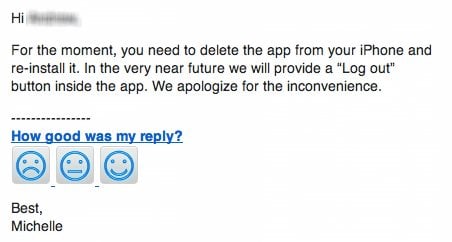
Yep. You have to delete the app to log out of it. This example reminds me of what Adaptive Path calls the cake model of product strategy. Watch this short video about it before you continue reading:
What Klout did with their iPhone app is a classic “Dry Cake” approach. Even though they probably have additional functionality planned to make the app tasty with filling and icing, the current iteration is dry and not very exciting since key functionality is missing. You can’t do anything except see the Klout scores of yourself and a few other people connected to you — there is no way to search for other users.
What they should have done is build a cupcake first — an iteration that feels complete, even if it doesn’t have an entire roadmap’s functionality built out yet. It should support basic actions like logging out and searching for other users. And despite not having all the features of the web site, it should be an app that can stand on its own, one that is engaging and desirable with the functionality it does have. It’s so much fun to go from cupcake to cake to wedding cake if that first iteration is something that users are excited about.
So when you think about building your own product, remember to make your minimum viable product a tasty cupcake, not a dry cake with some vague promise of filling and icing somewhere down the line.
John Moltz is quickly becoming one of my favorite writers with his very nice web site. And he just wrote a thing about Windows 8 for Macworld where he really outdid himself. It’s hard to pick just one section to quote, so please, just go read Coming Attractions: Windows 8. A small taste:
Microsoft has declared Windows 8 a tablet operating system “without compromises” because it runs on tablets and desktops and toaster-fridges and can run desktop applications on any Intel-based hardware. Surely any operating system that has a matrix to let you know what features are available in which version can’t be compromised, right?
But running Windows 8, it often seems that what’s been compromised is your sanity.
I have such a weakness for snarky tech reporting.
(via The Loop)
I was encouraged to read these words by Matt Mullenweg in his post Radically Simplified WordPress:
As John Borthwick put beautifully today, “A tablet is an incredible device that you can put in front of babies or 95-year-olds and they know how to use it.” How we democratize publishing on that sort of platform will not and should not work like WordPress’ current dashboard does. It’s not a matter of a responsive stylesheet or incremental UX improvements, it’s re-imagining and radically simplifying what we currently do, thinking outside the box of wp-admin.
This is great news, and I’d like to offer my 2 cents on what an ideal mobile WordPress platform might look like. Because despite several attempts I haven’t been able to figure out a good workflow for publishing to WordPress from my iPhone or iPad.
Let’s take this post as an example. I read Matt’s article in Instapaper. I used the awesome “Create Note in Simplenote” feature to send the above quote to my preferred writing app. I am writing these words in Simplenote for iOS using Markdown. Writing down the words is a breeze; geting those words to my blog is a mission (and usually results in a big time delay). I’m going to wait until I get home, open my laptop, and wait for nvALT to sync with the text I entered into Simplenote. Then I’ll copy the Markdown into MarsEdit, add some URL and keyword specifics, and hit Publish.
The WordPress iOS apps are not helpful to me, because they don’t allow you to add custom fields and URLs. For example, for link posts I have a custom field that turns the title of the RSS entry for that post into a link that takes the reader directly to the original article. I can’t do that in the iOS app.
But here’s the thing - I don’t want a better WordPress iOS app. I don’t even want a mobile-optimized WordPress Dashboard. Instead, I want all the apps I already use to integrate seamlessly with the WordPress backend. So my ideal mobile WordPress experience is this: make it dead easy for text editor apps to publish to WordPress.
Once I’m done writing this post in Simplenote I would like to tap a link that says “Publish to WordPress.” I would then like to see a customizable dialog that lets me add/edit all the fields I have chosen to include, hit Post, and be done. It could work similar to Tumblr integration on Instapaper, except with customizable fields:
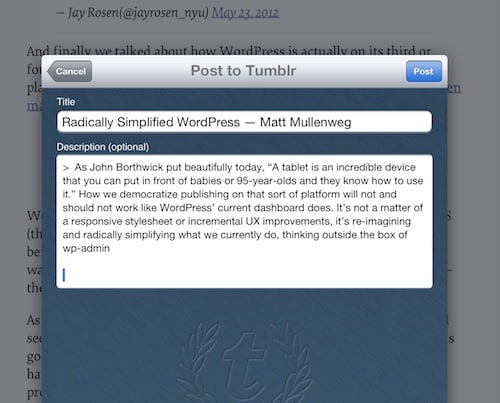
Maybe this is already what the WordPress team is thinking about - I certainly hope so. Either way, I know that this kind of seamless integration would truly free us to publish from anywhere, and will put a final nail in the coffin of the “iPad is only for consuming” argument.
It would be great to get more insight from the WordPress team on what they’re working on for mobile.
I just finished reading Frank Chimero’s The Shape of Design. My closing remark on Readmill:
Highly recommended to anyone who wants to step back and get a sense of the state of design beyond the tools that we use. It makes us think about the reasons why we design, and how to give our work purpose and meaning. I found part 1 to be the strongest, but it’s a quick, easy read throughout.
You can follow the link to see the highlights I made - there are some really great quotes in there, such as this one:
Design doesn’t need to be delightful for it to work, but that’s like saying food doesn’t need to be tasty to keep us alive. The pedigree of great design isn’t solely based on aesthetics or utility, but also the sensation it creates when it is seen or used. It’s a bit like food: plating a dish adds beauty to the experience, but the testament to the quality of the cooking is in its taste. It’s the same for design, in that the source of a delightful experience comes from the design’s use.
In related news, I thoroughly enjoyed reading this on the Readmill app for iPad. I will try to read books with this app whenever possible from now on, with the Kindle as a backup if I can’t find the book as DRM-free ePub. The reader itself needs a bit of work to get to the standard that iBooks set, but the social features are really great. I love seeing who else is reading the book I’m reading, what they’ve highlighted, etc. Readmill embraces the digital reading experience in the best way that I’ve seen so far.