Menu

Posts tagged “design”

Breaking Development: One Design to Rule Them All

I’m attending the Breaking Development conference in San Diego this week, and will be posting my notes from a few of the talks here.

Luke Wroblewski kicked off BD Conf 2013 with a talk entitled “One Design to Rule Them All”. It was a bit of a State of the Nation on what’s going on in the device landscape today. Here are my notes from the talk.

  • It’s impossible to determine what kind of experience we should design for by looking at standard device types (phone vs. tablet vs. laptop, etc.)
    • For example, smartphones now go up to 7” screens and even a bit above.
    • Tablet sizes are equally all over the map, and to make things worse, you now have devices that are basically giant desktops that can transform into tablets or even phones.
  • What is the difference between a phone and a tablet anyway?
    • Pixel densities are not that different any more
    • Can’t reliably determine how big the device is
    • Can’t rely on feature detection (like if it makes phone calls or not)
  • We can no longer rely on knowing what type of device it is to figure out what to build.
  • It’s not clear any more what a mobile device is, what the difference between a tablet and a laptop is, and whether it’s touch-enabled or not (see Leap Motion).
  • We have to stop thinking about designing for phones, tablets, and laptops (device-specific).
  • Instead, what makes more sense is to look at the ergonomics of each device:
    • You get eye-sized or wrist-side devices, palm-sized devices, lap-sized devices, desk-sized devices, and wall devices like big-screen TVs
    • Each of these types require subtle differences in the interfaces, which is where responsive design come in.
  • This brings us to the principles of multi-device design:
    • Work mobile first
    • Support a continuum of screens
    • Account for high resolutions
    • Optimize for touch (can’t use mouse/cursor easily for touch)
    • Support cursor & keyboard
  • Good news: you only need one web design.
  • Bad news: it’s a new and different way of doing web design.
  • But wait, do we compromise the large screen experience if we go mobile first?
    • No, we’re creating a good experience everywhere, and we enable people to do more things in more places.
    • Look at Currys, Skinny Ties, and O’Neill as good examples.
  • And what about “the mobile context”?
    • Children’s Museum of Pittsburgh: on mobile, they bubble up relevant content like how to get there, and they deprioritize that content on larger screens.
    • So you can still have one design, but use different priorities on mobile.

Smaller screens show important information about visiting like directions, hours, and contact details:

Museum mobile

On larger screens that information is deprioritized:

Museum desktop

It was a great high-level introduction to the conference, and I’m looking forward to the rest!
Pragmatism vs. idealism in design

From Mark Boulton’s great post I’m not a Craftsman:

I’m more often than not in a place where my own job, as a designer, is not to make something I love, but to make something appropriate. Something that does the job well. Something that responds to a hypothesis and serves a need. Not necessarily something loved and beautiful. And that’s ok.

In many cases, especially when it comes to client work, pragmatism beats idealism in design.

How to convince clients to think about content before they think about graphics

I recently had to convince a client to pause their redesign efforts and work on their content first. This is how I did it. I tried to stay away from UX jargon and overly technical arguments. There is obviously much more to say about Content Strategy and related disciplines, but this was an exercise in trying to make a succinct argument by only focusing on information that’s most relevant to the client. I’m posting it here in the event that it might be useful to those who have to make similar arguments to non-UX audiences.

Introduction

Since this is primarily an informational site with the goal of converting readers into customers, it is imperative that we start the design process by developing the core content first. This will ensure that we design a web site purposefully to help users find the information they need, and guide them towards desired actions, as opposed to designing the interface first without knowing what content will be displayed. For a more detailed overview of this strategy, see A Richer Canvas.

In this brief overview I will summarize the primary reasons for following this approach, and how I propose we go about it on a practical level.

What happens if we don’t follow a “content first” strategy?

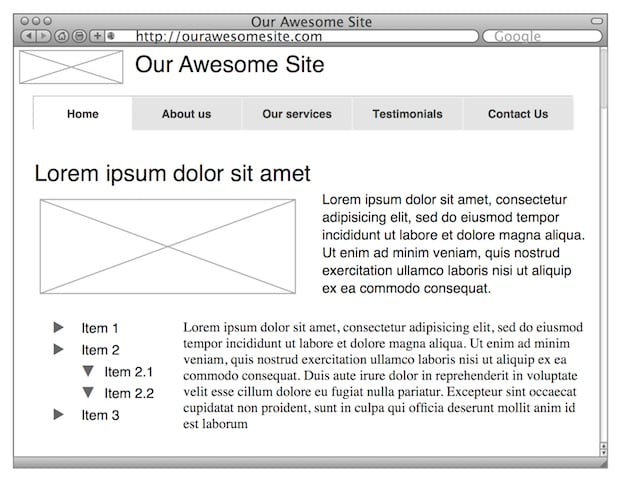
Let’s look at an example of starting the wireframe process before content is available. Let’s say we provide some wireframes of what the site might look like:

Content First

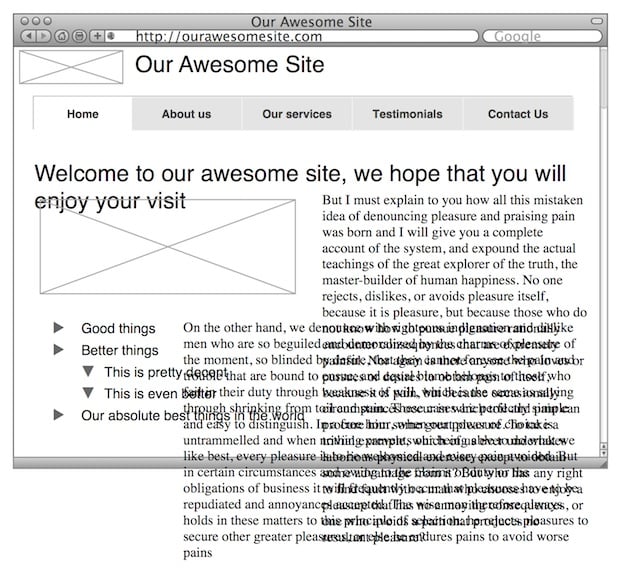
Now let’s say you love this approach and we proceed with graphic design, and eventually, towards the end, we finalize the content. We plug the content into the design, and then we discover we have a problem. Suddenly our design doesn’t work so well any more:

More Content First

If we design before we have content, we effectively create the packaging before we know what’s going to go in it. And if the content doesn’t fit the package, there are only two options: start from scratch, or try to jam the content into the existing package. We don’t want that.

But it’s not just about making the design work. Developing the content first allows us to be much more strategic about the words we put on the page. It gives us the opportunity to start with user and business goals, and make sure our content meets those goals. Ahava Leibtag puts it as follows:

We need to start urging our clients to think about their content not just as a commodity, but as the starting point, the building blocks of a website. It’s time to stop building the house without knowing how many bedrooms it may need. It’s a paradigm shift in the way we think about building websites. But, it has to be done. Because you know what they call things that are beautiful, but have no function? Useless.

So how do we design with a “content first” approach?

The basic process of putting content at the core of a design (specifically a redesign such as this) is as follows:

  • Audit. This is also referred to as a Content Inventory. We collect and document all our pages (like a site map), and we extract all the content from each page.
  • Analysis. In the next step we work on context and goals. We look at our audit and document how the content on each page relates to other pages. We look at the goals of our site, and figure out what type of content we need to ensure we meet those goals. We look at the process for writing content and if there are areas for improvement. We evaluate our brand promise and define exactly how we want to communicate to our visitors to deliver on that promise.
  • Content creation. Once we’ve laid down the guidelines for our content and agree on what we’re trying to achieve, we start writing. This involves rewriting existing content as well as writing new content if the audit and analysis showed us that we have some gaps.

For more on this process, see Getting to Grips with Content.

Who does this work?

The title of the person doing this type of work isn’t that important. The most important thing is that they have a thorough understanding of writing for the web, and how to connect users with the right content. In the web design industry this is often done by Information Architects or Content Strategists.

  • Information Architects “categorize information into a coherent structure, preferably one that most people can understand quickly, if not inherently” (see Wikipedia). Another way of saying it is that they build bridges between users and the content and services they need (see Information Architect).
  • Content Strategists “plan for the creation, publication, and governance of useful, usable content” (see The Discipline of Content Strategy).

So as I’ve said, the title isn’t important, only the outcome is. And the outcome is web content that meets user and business goals, and allows us to design an experience centred on guiding users along the desired path.

For the reasons outlined above, our strong recommendation is to engage a person with Information Architecture/Content Strategy skills to help us develop our core content before we proceed to the design stage.

End note: Of course, the argument is not always as simple as this. It is often impossible to have the majority of the content available before commencing design. That’s why I like the idea of Structure First. Content Always. But in this particular case, we needed content before we could do anything, so we had to put on the brakes until we had something useful to work with.

Why the Steampunk movement is important

I’ve long been fascinated by the Steampunk movement, and Nick Harkaway’s The Steampunk Movement Is Good And Important is another great essay on the topic. Nick starts by explaining why Steampunk appeals to people (“it is premised on a technology which is visible and pleasing to the naked eye, and whose moving parts are comprehensible on a human scale,” and “it is an ethos of design and creativity which acknowledges the humanly physical, that which we can understand with our fingers”). He then goes on to explain how different this is from modern technologies like cell phones:

The ethos admits of failure: Steampunk devices almost are not working properly if they don’t have leaks, if they don’t require maintenance and the occasional thump. That’s where they get character and animation, identities of their own which reflect their owners, while every iPhone can be seen as Apple’s endlessly replicated identity given passage into your every waking moment, a tiny and instantly replaceable cloned shopfront: what role is conferred or imposed by such a device on the person carrying it? It’s not that Jonathan Ive’s designs are poor, it’s that they are profoundly truthful: an iPhone is a vector, not an object, valued by its creator for its purpose and interchangeability, not individuality.

Steampunk, on the other hand, repurposes, scavenges, remakes and embellishes in an arena where embellishment is seen as decadence, never mind the inherent decadence of creating the sheer amount of computing power our society now possesses in order that most of it should sit idle or be used for email and occasional games of Plants vs Zombies.

Steampunk appeals to the idea of uniqueness, to the one-off item, while every mainstream consumer technology of recent years is about putting human beings into ever more granular, packageable and mass-produced identities so that they can be sold or sold to, perfectly mapped and understood.

Cars as smartphones, and "No Fault Found" product returns

In Ford gives up on turning its cars into smartphones Zachary Seward shares a story on how adding seemingly cutting-edge features to everyday products can do more damage than good:

But it seems people have no patience for touchscreens when a simple knob will do. Raj Nair, head of global product development, tells the Wall Street Journal (paywall) that knobs and buttons will return to the dashboards of new Fords for functions like tuning the radio and changing the volume. The company said it would follow the model of its F-150 pickup truck, which currently sports a mix of touchscreen and more traditional controls on its dashboard panel.

This reminds me of a point Aylin Koca makes in her 2009 PhD study called Soft Reliability in New Product Development (PDF link):

Misalignments between product capabilities and user preferences damage the overall success of a product in the market. Especially in the past few years, these misalignments increasingly lead to users rejecting or returning products after purchase. However, technical analyses of such products show that these products fully meet their technical specifications. This is particularly the case with highly innovative products that bear considerable market uncertainty during their development.

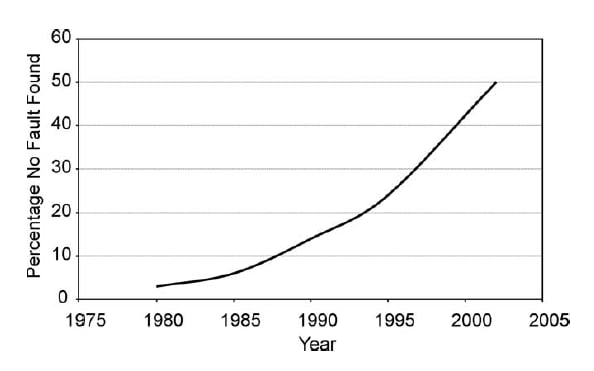
Have a look at this graph from Managing product reliability in business processes under pressure that shows the percentage of “No Fault Found” products that are being returned after purchase:

No Fault Found

More products than ever are being returned to shops because people think they are broken when they’re not — they’re just really difficult to use. And I guess that’s what Ford discovered as well: easy will beat fancy every time.

User research without reports

Jay Cassano did an excellent interview with Nate Bolt, who is in charge of design research at Facebook. My favorite part from Secrets From Facebook’s Mobile UX Testing Team:

We try to never deliver any reports ever, if possible. Reports can’t attend meetings and they can’t argue in favor of their findings. They die in the wastebasket immediately. So we’ll bring up some data in a session, we brainstorm on a whiteboard, absorb some of the human patterns of the people that are using this stuff, and then incorporate that in our next build. That’s the goal.

Since I’m currently on the client side of design, reports are still very much a part of what we do. We often have to convince many more people than just the immediate project team about the changes we’re recommending. However, whenever possible we discuss our findings in a workshop environment with clients first, so that we’re all aligned on what the main usability issues are. This approach sometimes negates the need for a report entirely, which is a great outcome — everyone just does what needs to be done to make the product better.

[Sponsor] MightyDeals.com: exclusive deals for web professionals

Ask anyone who’s ever tried to knock in a nail with a screwdriver: having the wrong tools is a major hindrance. Access to the right tools saves time, increases the quality of your work and adds to the pleasure of doing a job well.

The trouble for designers & developers is that there are so many tools out there, it’s hard to know what’s worthwhile, let alone being able to afford half of the resources we want.

That’s where MightyDeals.com comes in. We negotiate promotional deals with suppliers and often manage to agree up to 97% off regular pricing.

And what’s more, these aren’t just any tools, some of the best companies on the web promote their products through MightyDeals.com.

So if you’re looking for great deals, or just want to stay in touch with the latest fonts, applications, themes and resources, visit MightyDeals.com or sign up for our newsletter today.

Might Deals

Sponsorship by The Syndicate.

"I want an open, accessible, usable, free web"

I love this paragraph from Dave Rupert’s latest post on images in responsive design:

If the web cannot keep pace with a native experience in speed (rendering in under 1000ms), we’re all going to be out of a job. An uptick in native app usage means budget dollars would follow the trend and be poured into native apps. Meanwhile public facing websites will be left to rot because no one cared and we littered the web with bullshit. Native wins, the web dies, Zeldman hangs up his beanie, and Sir Tim Berners-Lee cries a single tear. That’s not the future I desire. I want an open, accessible, usable, free web available to anyone no matter the creed of their device.

Design and status

Nike+ Fuelband

William Kremer’s Why did men stop wearing high heels? is a fascinating look at history, gender inequality, and the peculiarities of seeking status. This part stuck with me:

In the muddy, rutted streets of 17th Century Europe, these new shoes had no utility value whatsoever — but that was the point.

“One of the best ways that status can be conveyed is through impracticality,” says [Elizabeth Semmelhack of the Bata Shoe Museum in Toronto], adding that the upper classes have always used impractical, uncomfortable and luxurious clothing to announce their privileged status.

“They aren’t in the fields working and they don’t have to walk far.”

So, people wore high heals because impractical clothes showed off one’s status. This seems very similar to how expensive sports cars are viewed in our current society. They’re highly impractical if you want to take anything with you where you’re going (or if you have kids), but having one certainly shows that you have a lot of money.

This got me thinking about technology products and their link to status. I remember that before the iPhone came out, during meetings people used to leave their cell phones in their pockets (well, on their belt clips…). Then, once the iPhone came along, pulling out your phone and placing it face up on the table became a status symbol. Suddenly the phone wasn’t meant to be hidden, but meant to be shown off. The iPhone is designed to be seen.

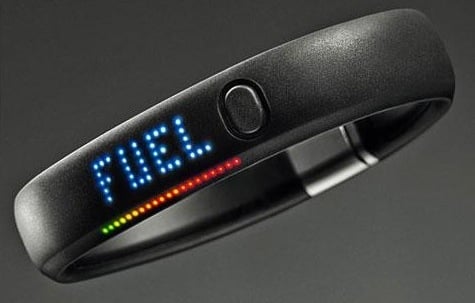
Companies like Nike tap into this sense of status by making the Fuelband extremely wearable. It’s not something you hide away, like the Fitbit. It’s something that’s meant to be shown off. From Dan Hon’s excellent article Fitness by design:

A few hours up the US west coast though, lies a company built upon not just sport performance, but also personal expression, fashion and style. Nike’s FuelBand is worn around your wrist. It looks and feels better, with its black rubber and distinctive pinpricked colour display inviting discussion. […] Though it is a silent device that constantly logs your activity, it is not out of sight — it is permanently visible, a wearable statement. You’re not given the choice of hiding it.

Of course, most technology products are very different from high heels in that they’re actually useful. So I guess some things have changed since the 1600s. Where impracticality used to be a sign of status, with technology we now associate that status with good design — a mix of utility, usability, and aesthetics.

iOS 7: interface, not art

iOS 7

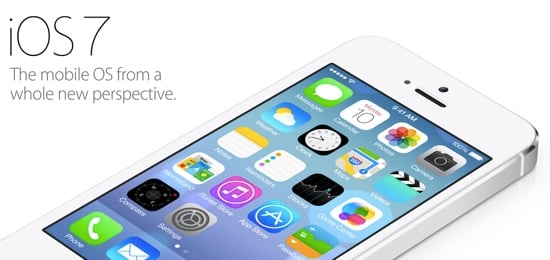
I’ve been watching the responses to iOS 7 with great interest. I’m most surprised (even though I shouldn’t be) by the extremely forceful and visceral negative reactions to the visual direction of the new OS. Most tweets about about it sound something like this:

First reaction: everything about iOS 7 feels… wrong.The typeface is hard to read, controls are totally inconsistent, and it’s flatly ugly.

— dustin curtis (@dcurtis) June 11, 2013

First, please let’s remember to give it five minutes before dismissing an entire operating system. iOS is an interface, not art. You can’t judge it without using it. You might think it’s ugly, and that’s fine. But you can’t go around quoting Steve Jobs’s “Design is how it works, not what it looks like” quote to everyone, and then get all worked up when Apple uses some colors and typography that you don’t like. If you truly believe that design is how it works, then you have to use iOS 7 to determine whether or not it works.

Also, why is it ok for startups to launch something unpolished, but when Apple redesigns their entire mobile operating system everything has to be perfect? Cap Watkins put it well in iOS 7. Unpolished By Design.:

And now we’re complaining that this completely revamped, new, version one interface isn’t perfect. Isn’t polished. Isn’t honed. We asked for a revolution and were delivered one which, all complexities considered, amounts to more than any one of our best first launches.

And then there are those who are calling this a copy of Windows Phone 8, and/or lamenting the fact that the design is flat as a board. No, it’s not. The icons might be flat, but as a design system, as John Gruber notes:

There is a profound reduction in the use of faux-3D visual effects and textures, but iOS 7 is anything but flat. It is three dimensional not just visually but logically. […] There’s a sense of place, depth, and spatiality in iOS 7 that makes it feel like hardware. A real thing, not pixels rendered on glass.

Finally, I agree with Jim Dalrymple’s assessment in Apple’s confidence:

One thing that became very clear to me early on in today’s keynote is that Apple was having fun again. They were really enjoying themselves.

And that’s a good thing. They’re finding their feet in the post-Jobs environment. So instead of tearing our clothes in despair, let’s celebrate the fact that Apple is moving forward with iOS, and that this new OS is a great new baseline for future improvements. Let’s give it five minutes.