Menu

Posts tagged “design”

[Sponsor] The Theme Foundry

Thanks to The Theme Foundry for sponsoring Elezea’s RSS feed this week! As a reminder, I am traveling this week so there won’t be much activity, but all should be back to normal on Monday.

The Theme Foundry has been building premium WordPress themes since 2008. They recently released Collections — a unique and beautiful WordPress theme for sharing, designed by Veerle Pieters. Visit the live demo of Collections to see it in action, or purchase it now for $79.

What makes The Theme Foundry special?

  • A focus on quality over quantity. You won’t find a huge assortment on their site — they keep a small, curated collection of premium WordPress themes.
  • Exclusive partner with WordPress.com (the official hosted WordPress provider). Each and every theme goes through a stringent audit process from some of the best WordPress coders in the world.
  • Whole team support. You get fast and friendly support from the team that actually built your theme, not a part time support rep.

Sponsorship by The Syndicate.

[Announcement] A quieter week

Today I’m going on what is sure to be one of the most interesting trips of my career. I’m going to do a week of UX and Product Management training and consulting for an e-commerce company in Tehran, Iran. It also includes a public event where I’ll be chatting with the broader Tehran UX community about responsive design and product management.

It’s going to be a busy trip with 6 days of solid work, so this is a heads-up that Elezea will probably be very quiet next week. That said, I’ll definitely do a big write-up of the experience once I’m back. I’m really interested to see what life in Tehran is like, and what challenges and opportunities the web community there are dealing with.

Since I feel bad about not writing much over the next week or so, here is a gif of a giraffe that’s not impressed:

Gif

See you on the other side!

Design is never done, and that's ok

I really enjoyed this interview with Flipboard’s Marcos Weskamp about the ephemeral nature of digital design. From David Zax’s write-up, How Flipboard’s Head Designer Grapples With The Web’s Manic Pace Of Change:

Graphic design today, says Weskamp, is something like making mandalas, the ritual symbols sometimes designed by monks. Mandalas are occasionally made of soaps, sands, or powders, rendering them inherently ephemeral. Many artists do their work in the hopes of creating something lasting. The makers of mandalas, by contrast, devote hours to meticulous works of artistry that might easily be dispensed with by a gust of wind.

And so it is with web design, where the gusts of ever-changing user demand blow especially fiercely. “I don’t think it’s tragic,” says Weskamp. “It’s something you learn over the years. It’s more a way of being.”

iOS 7 Parkour

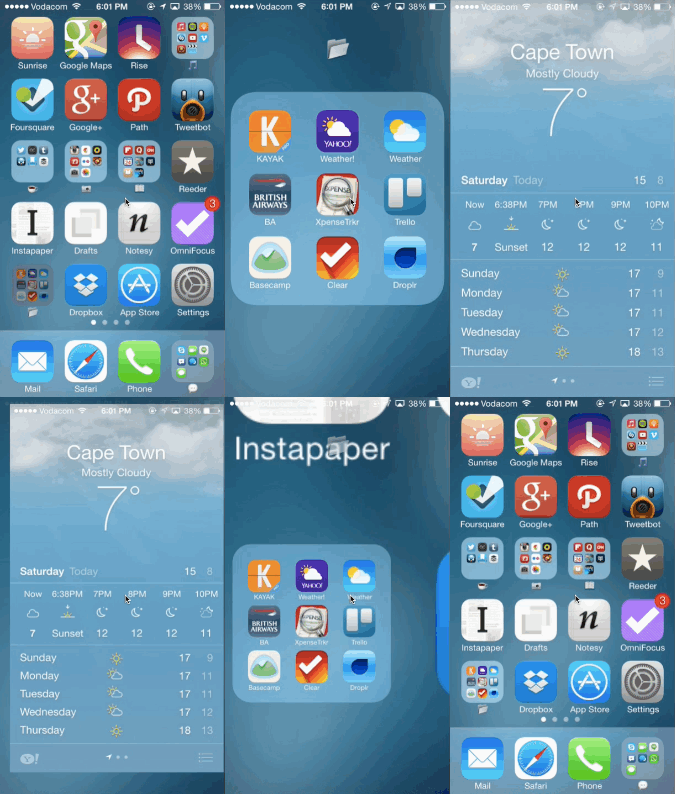
iOS 7 parkour

I’m mesmerised by the animations in iOS 7, and none more so than the experience of opening and exiting an app within a folder. To me, it feels like you’re doing Parkour through your apps, deftly using your surroundings to propel yourself forward and maintain as much momentum as possible.

It’s also a great example of iOS 7’s depth, and proof that the design is not as flat as most people would have us believe. Justin Williams sums this up really well in his post Layer Cake:

iOS 7 is designed to be a backlit experience that has each view stacked on top of the previous one based on its z-axis. […]

You’re seeing a lot more focus on transparency and blurs so that you can continue to see the content underneath your front-most view. Modal view controllers are no longer primarily taking over the screen entirely allowing you to maintain a sense of where you came from.

Calling iOS 7 non-innovative seems really short-sighted to me. I think it’s the start of a new, much more understandable metaphor in software design, and I can’t wait to see where it ends up.

Case study: redesigning Vumi Go

We recently had an opportunity to work with one of my favorite companies, Praekelt Foundation. They do amazing work with projects like MAMA (using mobile technologies to improve the health and lives of mothers in developing nations) and TxtAlert (automated, personalized SMS reminders to patients on chronic medication).

One of their products is called Vumi — a conversation engine for the delivery of SMS, USSD (Star Menu), and chat messages to diverse audiences. Vumi is a custom development platform that usually requires Praekelt involvement to set up, but they also have a self-service portal called Vumi Go, which they wanted to improve and scale so that they can move more of their clients to self-service. And that’s where Flow comes in. Towards the end of last year we started working with the Praekelt team on a redesign of the Vumi Go interface (you should follow Simon and Ben, they’re great). The internal Flow team consisted of me and Philip.

This is one of the hardest interface problems we’ve ever encountered at Flow. Which means it’s exactly the kind of project we love working on. We were tasked with taking some very low-end mobile technologies (SMS and USSD), along with IM (Gchat in particular), and create an easy interface on top of that to allow people to not only understand how the technology works, but also to create complex conversations and surveys using these technologies.

So, we dug in. We started by working with the team to create Personas for the Vumi Go product, so that we could always keep top-of-mind who we’re designing for. Our first goal was to come up with dimension that accurately reflect the different types of people who use Vumi, and would be inclined to go self-service:
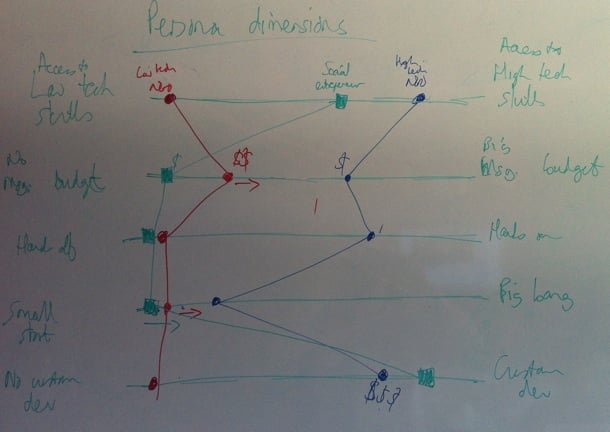
Vumi Go personas

We ended up identifying and fleshing out three target Personas for Vumi Go: The NGO with very little technical knowledge, the NGO with significant technical knowledge, and the social entrepreneur. Here’s our Low-tech Persona:
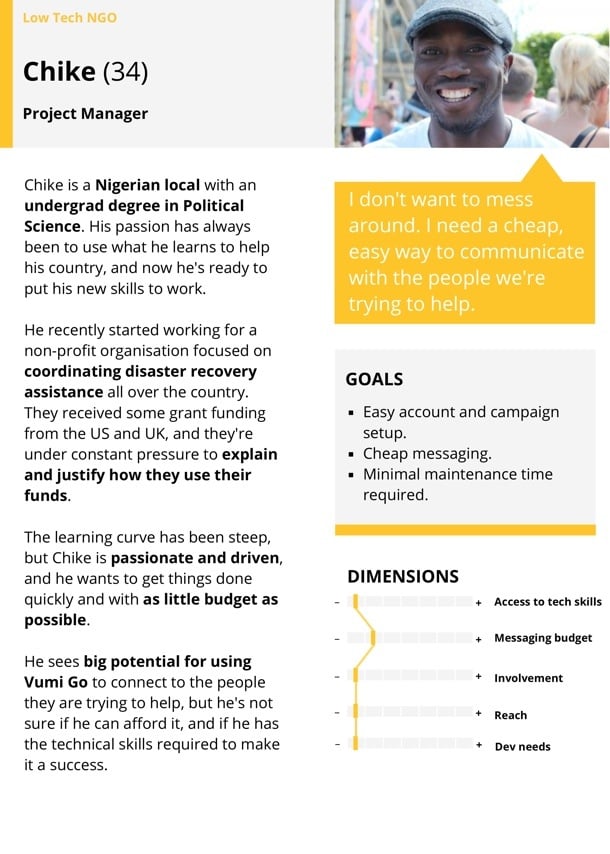
Vumi Go Personas

Our next step was to create the ideal customer journey map for the Vumi Go experience. We wanted to outline how people find out about Vumi, and how we can guide them through this complex flow in the simplest possible way. We started with a lot of sticky notes on a whiteboard to define all the possible actions that users needed to perform to set up their conversations. We then proceeded to order those steps in a way that makes the most logical sense (and would allow us to progressively disclose the right information at the right time). This was an essential step because the process of setting up a campaign in Vumi Go can be quite overwhelming, so it was imperative to figure out the right order of steps. That’s why sticky notes were such a great initial approach, since we could move things around at will:
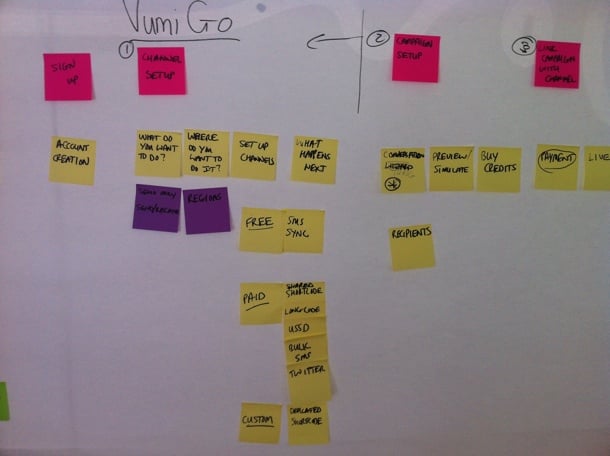
Vumi Go Journey

Those sticky notes eventually turned into a user journey sketch on the whiteboard, once we were getting sure about the best way forward:
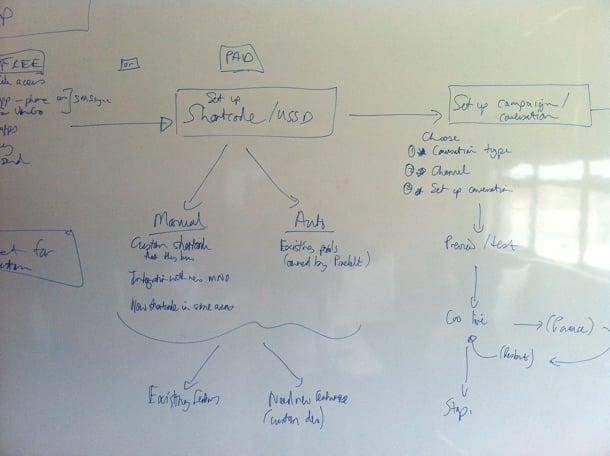
Vumi Go journey

After quite a bit of discussion and refinement, we got to a journey map that we were happy with. This version is too small to give much detail, but it gives a general idea of what we were building for:
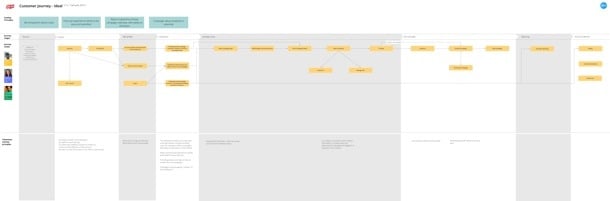
Vumi Go journey

This also allowed us to start working on the Information Architecture. Since we used the journey map as the starting point for the IA, we were confident that we had a good handle on the screens we needed to design, and the order of those screens:
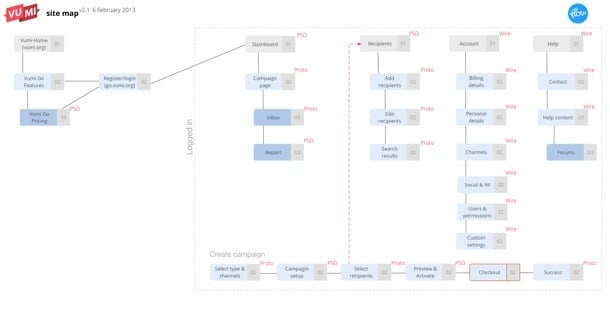
Vumi Go site map

One detail I want to point out here is that we also defined what our deliverables will be for each screen — Sketch, Prototype, or PSD. We find this step really important to avoid miscommunication and surprises down the line.

Armed with a solid user journey and Information Architecture, we were finally ready to start designing the interface. We really needed this upfront time to define the problem properly, otherwise we would’ve gotten stuck along the way and it probably would have resulted in tons of rework. We did our sketching with the team using a combination of white board and paper, so that we could quickly try out different solutions without feeling too bad about the many designs we erased/threw out:
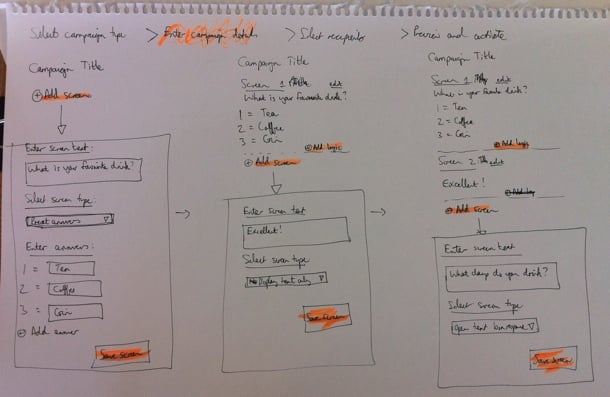
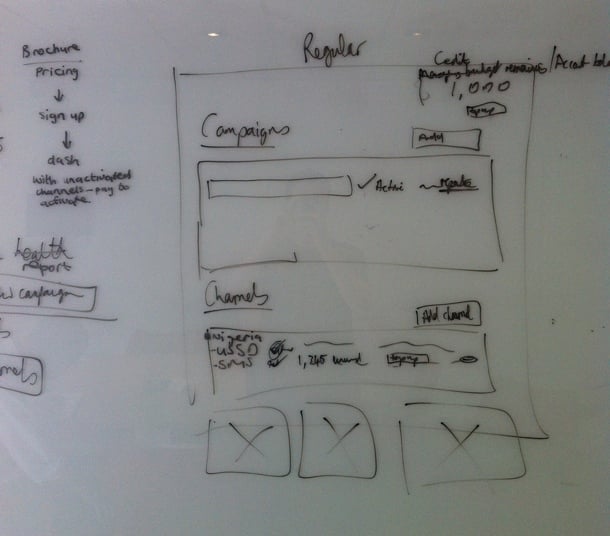
Vumi Go sketching

Vumi Go sketching

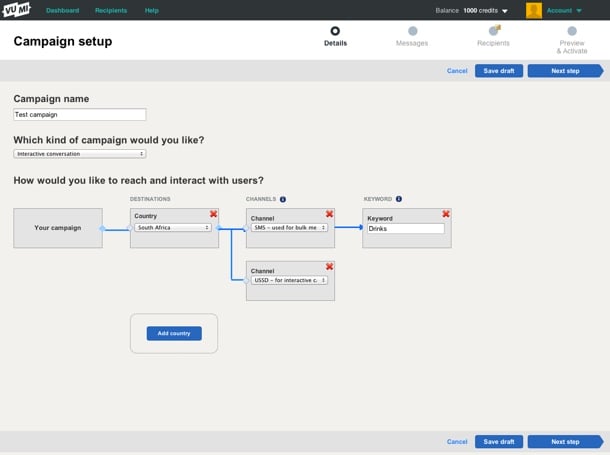
Once we eliminated the designs we believed wouldn’t work well for our target Personas, and settled on a concept we wanted to refine further, we started building an interactive prototype in Axure so that we could test it with real target users. We went through 22 iterations in total before settling on a direction we were confident about. Each of those iterations were based on either internal or user feedback.

The user testing phase was quite tricky. We could do some of it locally in our lab, but most of it had to be done remotely, since the target users reside in places like Kenya and Nigeria. We ended up using TeamViewer for the remote tests, but honestly, we won’t do that again. I’d much rather use Google Hangouts (or Skype screen sharing as a second prize). Teamviewer was just such a mission to set up, and it doesn’t deal well with less-than-perfect internet connections. Google Hangouts seem to be a lot more forgiving when Internet connections slow down (in low-bandwith situations it reduces video quality before it reduces voice quality).

Below is a screenshot of one of the prototype screens. If you’d like to play around with one of the prototypes yourself, you can do so here.
Vumi Go prototype

One thing we realized pretty early on is that this is utility, and it needs to be treated as such. Our research showed that people wanted to get through this process as quickly as possible. The complexity forced us to strip out any kind of ornamentation out of the interface. Not that we set out to make an ugly interface, but there were many decisions we had to make in the interest of utility and usability over “look and feel” (sorry, I hate that term too).

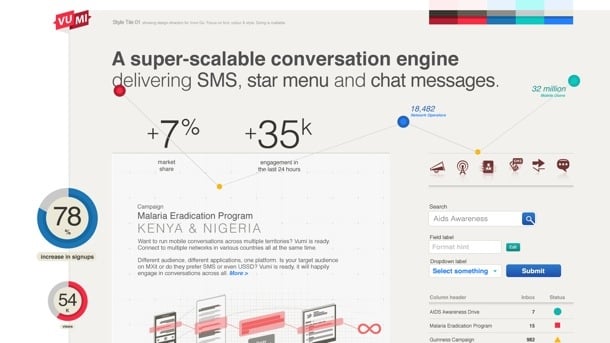
During the final stages of prototyping we started working on Style Tiles to get a sense of the graphic direction of the application. Style Tiles are a great way to discuss graphics without getting bogged down in UI details, since it’s not concerned with layout but exclusively with interface elements: typography, color palettes, button behavior, etc. Here’s an example of one of the Style Tiles that Philip created:
Vumi Go style tile

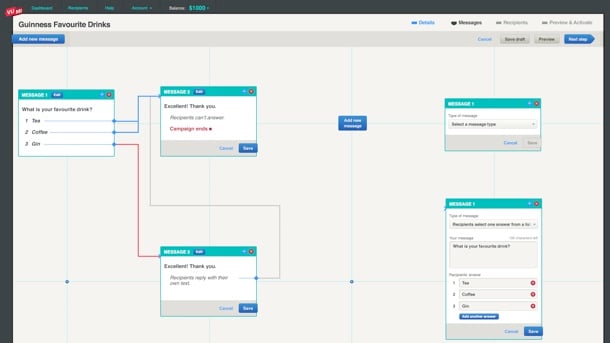
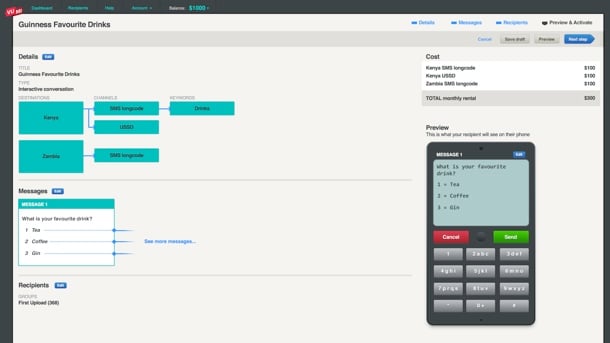
Once we had a refined prototype based on user testing, as well as Style Tiles to guide the graphic direction, it was fairly easy to go to the PSD stage. The prototype and strong style guide also allowed us to not have to create the entire site in Photoshop. We could just create a few key pages, and rely on the rest of it to be defined during development (yep, I admit we’re not quite Post-PSD). Here are a couple of examples of the graphic design:
Vumi Go graphics

Vumi Go graphics

Again, as you can see, there’s nothing flashy here, and that’s by design. Based on our Personas and user journey, our conscious decision was to create this web application as an easy-to-use utility. It’s not a general consumer site, and it’s not an e-commerce site — it’s an essential cog in the larger machine of what businesses (and NGOs in particular) need to accomplish.

At this point the Praekelt developers (who were involved throughout) took over the process to get the application live. Ben talks about the development of the site more on the Vumi blog (see The inside scoop on our recent Vumi launch), so I won’t cover that here. I’ll just end by saying that this is one of the most gratifying projects I’ve ever worked on. We always talk about doing meaningful work in the design community, and this was one of those projects where we absolutely know that the product we helped build is going to affect people in a positive way. And the fact that it was such a hard problem to solve only made the experience better.

Congratulations to the Praekelt team on their relaunch. From everyone at Flow, we love you guys.

[Sponsor] What Designers say about life at Booking.com

My thanks to Booking.com for sponsoring Elezea’s RSS Feed again this week to promote their career opportunities.

Forgive the cliche, but coming to work for Booking.com has been one of the best decisions. Within a week of arriving to the Netherlands, I had already created two UI experiments and pushed code to the live site. It was intimidating and thrilling at the same time. Those feelings haven’t left. I’m constantly humbled by the more than 300 super intelligent colleagues of 51+ nationalities! I learn every day. If there’s a day I don’t? It means I wasn’t in the office.

The warmth and acceptance of new hires is brilliant. I was invited for chess, football, drinks, and even knitting, within a fortnight. Friday after work drinks can easily evolve into an adventure anytime. There’s always something to do in this city. And at Booking.com, there’s always someone who’s willing to join in. The many parties are just something that has to be experienced. Come join and I’ll show you around!

Booking.com careers

Sponsorship by The Syndicate.

Why research is essential in product design

I agree with every glorious word in Erika Hall’s How the ‘Failure’ Culture of Startups Is Killing Innovation. It’s a brilliant and impassioned defense of making design research part of every product development process:

Somewhere along the way, it got to be uncool to reduce one’s risk of failure.

Part of this may be because the risk of failure is dramatically lower than it used to be. But another reason is that many people don’t actually understand what research is, and have somehow conflated concepts like “rapid prototyping,” “lean startup,” “minimal viable product,” and “[insert] other smart-sounding thing to do” with avoiding research.

It’s really hard to not just go ahead and quote the whole article, because it’s so good. I’ll leave you with just one more bit and an enthusiastic recommendation to read the whole thing:

Maybe knocking out a prototype or building a company is the fastest, cheapest way to learn. But often it’s not. Sure, a prototype can tell us if the user understands the potential solution — but if it’s solving a problem no one has, why bother building it in the first place?

Ok, I lied. One more bit:

It becomes immediately apparent, when we try to understand our fellow humans through research, that we are not rational creatures. But when it comes to making business decisions, research helps address that irrationality and increases our chances to succeed. And make no mistake: in a world where design makes or breaks success, all product design decisions are business decisions. Asking the right questions will lead to useful insights.

[Sponsor] Careers at Booking.com

The front-end team at Booking.com continues to grow and we are looking for talented UX Designers, Web Designers, Product Owners, and Front End Developers to come help us create the world’s best accommodation platform.

You’ll work at our head office in central Amsterdam which is sandwiched in-between canals, museums and the occasional statue of an old Dutch master (good evening, Mr. Rembrandt). We’ll pay to move you and your family from anywhere in the world; USA, Portugal, New Zealand, Brazil, Japan, just to name a few! We’ll provide short-term accommodation and help you adjust to your new home in Amsterdam. You’ll be given the freedom to make impactful improvements to a website and collection of apps used by millions of people. We also have unique company perks like bicycle reimbursement, on site lunch, monthly parties, and our world class year end party complete with live performances!

Apply today.

Booking.com

Sponsorship by The Syndicate.

Design and style

Don Norman points out some of the misconceptions of style in a good piece called Great Design Always Means Great Style. He concludes:

There are many dimensions to great design, but great style is certainly among the most important. Style in appearance, style in behavior, style in the manner of interaction – style in every aspect of the product or service. Great style requires careful deliberate specification and then attention to all the details that result, for everything must be coherent, everything must be consistent with the chosen style. Call it personality, call it the voice of the product, call it the persona of the product, call it what you will: great design always means great style. Honest, coherent, and consistent.

An agency workflow for Responsive Web Design

I’ve been thinking about workflows for Responsive Web Design quite a bit, particularly since it’s now become our default approach on every new project (similar to Cloud Four’s recent change of heart). I’ve been especially influenced by two recent articles on the topic, namely Dennis Kardys’s A More Flexible Workflow, and Viljami Salminen’s Responsive workflow.

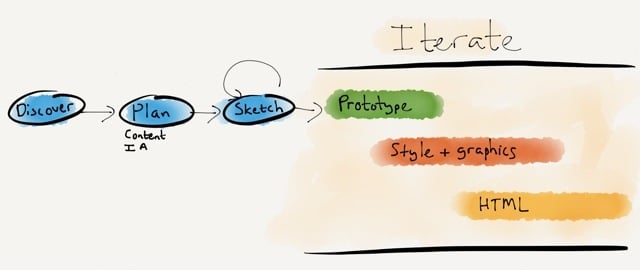
I struggled a bit to make their approaches fit into how we worked, so I decided to expand on what they’ve done and draw something that reflects a bit more accurately how we are incorporating Responsive Web Design into a user-centered workflow within an agency model. It’s not perfect by any means, but here’s what I came up with:

Responsive design workflow

The goals of this approach is to stay grounded in two core principles:

  • Content first. We need to stop thinking about content in terms of layout, and plan content independent of design.
  • Mobile first. We need to stop the focus on device thinking, and assume a multi-device world where we work on style direction independent of layout.

I’ll briefly go through each step in the diagram and how it helps us to accomplish these goals.

During Discovery we do our research to uncover user needs, develop personas, and create the user journey map that becomes our product strategy (see my article Usable yet Useless: Why Every Business Needs Product Discovery in A List Apart).

In the Planning phase we evolve the user journey map into a content plan and Information Architecture document (see my post on this topic). Once we have our scaffolding in place, we start the design process.

We rarely do static wireframes any more (Cennydd Bowles explains why), but we do a lot of Sketching. The benefits of sketching have been proven time and time again (see, for example, How Diagrams Solve Problems and The importance of sketching in product design). What I like most about the sketching process is how it allows the team to try multiple solutions to a problem, before settling on one or two ideas to iterate further (see Jon Kolko’s Iteration and Variation). I like using Zurb’s responsive sketch sheets as templates because they keep us focused on a multi-device approach.

Once we’ve gone through the sketching phase with clients, and we know what approach we’d like to pursue, we start Prototyping. We mainly use Axure, but there are multiple solutions out there to suit a variety of approaches. Axure isn’t natively responsive (yet), so we’ve been building two prototypes on our projects: starting Mobile first, and then moving on to Desktop. This isn’t ideal, but it works for our current purposes. We have a strong focus on user testing, so we test these prototypes in our usability lab, and iterate the design based on the findings.

Towards the end of the Prototyping process we start working on Style Tiles so we can have a discussion about graphics with clients without focusing on layout and flow issues. We’ve seen huge success with this approach. Once clients are comfortable with the visual direction, the focus can return to discussing how the UI will help them meet their business goals and user needs. It also makes the move from prototype to graphic design much smoother.

Although I won’t say that we’re completely post-PSD, we definitely don’t create the entire site in Photoshop. Since we have an interactive prototype and strong style guides, we generally only create about 6 or so pages in Photoshop, so clients can get a good feel for the direction.

At this point we also start working on Front-end Development. We build the framework using the prototype and style tiles, and pick up speed as the graphic design gets finalized. We don’t use boilerplate frameworks like Foundation and Bootstrap for production code. On this point we stand with Aaron Gustafson:

I find Foundation, Bootstrap, and similar frameworks interesting from an educational standpoint, but I would never use one when building a production site. For prototyping a concept, sure, but to take one of these into production you need to be rigorous in your removal of unused CSS and JavaScript or you end up creating a heavy, slow experience for your users.

An important point on the last three phases: as the diagram points out, these are all very much iterative phases. We make changes all the time based on user feedback, and discussions between designers, developers, and the client. I think we can all agree that responsive design is messy, and we just need to get comfortable with a certain amount of ambiguity during design and development. That’s ok, as long as we’re prepared for it.

It’s been an enormous learning process — and we’re still figuring out the best ways to make Responsive Web Design our default approach. But we’re committed to it, because we believe in content parity, and we’re convinced that responsive design is the approach that will get us there. Some things we’ve learned along the way:

  • You can’t wing content choreography. We can’t just make our front-end developers figure out what happens at each breakpoint. This is something we have to plan together to consider all the goals and constraints of the project. Breakpoint graphs are particularly helpful in this step (see Stephen Hay’s Responsive Design Workflow).
  • Optimize for touch, support keyboard actions. Josh Clark points out that “every desktop UI should be designed for touch now.” He’s right. The lines are getting blurrier and blurrier between what is considered “desktop” and “mobile”, so we should just assume everything is a touch screen, and make controls easy to discover and manipulate.
  • The benefits go beyond mobile. Going mobile first helps us create better desktop sites as well, because we remain focused on meeting core user needs and ensuring there is an easy and discoverable path through the flows. There is no room for cruft on smaller screens, and that makes our desktop designs better as well.
  • It’s hard, but it’s worth it. As Ben Callahan points out in The Responsive Dip, “The fact that we don’t know how to do something today doesn’t mean we shouldn’t strive to do it tomorrow.” This is an amazing time. We get to be part of shaping the future of the web, because no one has it all figured out at the moment. I don’t know about you, but I want to be part of that, no matter how hard it is.

We have much maturing to do, but I’m excited about the progress we’ve made in shifting our entire process towards building responsive sites. Every project runs just a little bit smoother, and that’s encouraging. So my only advice to those standing on the edge of responsive design is this: jump in. The water is cold, but refreshing. And you’ll feel great when you get to the other side of the river.