Menu

Posts tagged “design”

Amazon: caught between a rock and a local maximum

Joshua Porter makes a good point about Amazon’s product pages:

The reality is that Amazon has designed themselves into a Local Maximum. They’ve tested and tweaked the same product page over and over and they’ve optimized it as much as possible. They can’t improve it significantly at this point without making a big change. But they can’t make a big change because the only changes they can make must increase revenue (or some closely related KPI). So any big change is a very, very scary thing when that page is driving billions of dollars in revenue. So it makes sense that Amazon only makes small changes to their product page design.

Amazon’s design is often held up as a gold standard in e-commerce, but at some point we have to realize that maybe the emperor has no clothes - and we need to start calling it out so clients can stop asking us to “just make it like Amazon”.

Figure out where you can make real impact

Ainsley Wagoner shares a story from architecture school in How We Measure Success. She describes a lecture in which their architecture professor first painted a picture of what it’s like to chase the best internships straight out of school, and work oneself to death. And then the professor contrasted that option with this one:

Or you can stop right now and ask yourself what kind of life you want to have. Look around you and figure out where you can make a real impact as designers and architects. Become developers, change the zoning laws, get involved in your communities to affect real change, you can do so many things besides being a cog in the starchitecture mega-firm machine. But whatever you do, you need to ask yourself what your priorities are. What do you want your life to look like in ten years? And allow the answers to that question influence your picture of success.

I don’t think this is a question you ever stop asking yourself…

Without proper design, any technology can be terrifying

Cliff Kuang discusses wearable tech and ubiquitous computing in Why a New Golden Age for UI Design Is Around the Corner:

In the wrong hands, this is a dystopian prospect—technology’s unwanted intrusion into our every waking moment. But without the proper design, without considering how new products and services fit into people’s day-to-day lives, any new technology can be terrifying. That’s where the challenge comes in. The task of making this new world can’t be left up to engineers and technologists alone—otherwise we will find ourselves overrun with amazing capabilities that people refuse to take advantage of. Designers, who’ve always been adept at watching and responding to our needs, must bring to bear a better understanding of how people actually live. It’s up to them to make this new world feel like something we’ve always wanted and a natural extension of what we already have.

The problem with responsive frameworks

There’s so much good stuff in this responsive design interview with Brad Frost and others. I was especially interested in everyone’s thoughts on responsive frameworks. Here’s Aaron Gustafson’s answer:

I find Foundation, Bootstrap, and similar frameworks interesting from an educational standpoint, but I would never use one when building a production site. For prototyping a concept, sure, but to take one of these into production you need to be rigorous in your removal of unused CSS and JavaScript or you end up creating a heavy, slow experience for you users. I also think you need to work twice as hard to break out of the theme of the framework. There are a ton of Bootstrap sites out there that look like Bootstrap sites. Your design should be as unique as your product, not some off the shelf thing you just changed some colors on.

Agreed.

Hey Marketers, making a website is not about you

Seth Godin just published another very weird post1 called What works for websites today? He makes a couple of claims that, to me, show what the biggest problem with Marketing is today. I’ll get back to that, but first… Seth says:

[An] effective website is created by someone who knows what she wants the user to do.

No. An effective website is created by someone who knows what users want to do. And she uses that knowledge to build something useful that is also easy and enjoyable to use.

He continues:

The only reason to build a website is to change someone.

Wait, what? No! We have a name for that. It’s called persuasive design, or at the far end of the spectrum, dark patterns.

No, the only reason to build a website is to enable people to do what they want to do.

Good user experience has both good utility (it fills a customer need) and good usability (it’s easy to use). The problem with many Marketers today is that they too often make it all about the company, and not about user needs. I’m sorry, but it’s not about changing people, and it’s not about making them do stuff. That’s old school thinking from a time when brands could steamroll their way into the consciousness and wallets of people through clever advertising and sleight of hand. Those days are over. Now our job is not to make it about how awesome we are, but how well we help people accomplish their goals.

Let’s respect our users and their needs. Let’s not treat them like puppets that need to be controlled.


  1. Remember How to make a website: a tactical guide for marketers

Respect users' time

Your app makes me fat is such a great post about respecting users by Kathy Sierra:

That one new feature you added? That sparkly, Techcrunchable, awesome feature? What did it cost your user? If the result of your work consumes someone’s cognitive resources, they can’t use those resources for other things that truly, deeply matter. This is NOT about consuming their time and attention while they’re using your app. This is about draining their ability for logical thinking, problem-solving, and willpower after the clicking/swiping/gesturing is done. 

It reminds me of Paul Ford’s admonition in 10 Timeframes:

If we are going to ask people, in the form of our products, in the form of the things we make, to spend their heartbeats on us, on our ideas, how can we be sure, far more sure than we are now, that they spend those heartbeats wisely?

We are responsible — at least in part — for how people spend their time. We shouldn’t take that lightly.

The pros and cons of wearable technologies

Don Norman wrote a great piece on The Paradox of Wearable Technologies. He starts by covering some familiar ground on the dangers of these devices:

While the supplementary, just-in-time information provided by wearable computers seems wonderful, as we come to rely upon it more and more, we can lose engagement with the real world. Sure, it is nice to be reminded of people’s names and perhaps their son’s recent skiing accident, but while I am being reminded, I am no longer there—I am somewhere in ether space, being told what is happening.

We see this argument a lot, most recently in an article that came out on the same day as Don Norman’s, Wearable tech VCs pan Google Glass:

“It’s too big a change of behavior. It’s technology that sits between you and other people… it feels to me that it’s too impersonal,” said [John Frankel, a partner at ff Venture Capital]. “It feels more like the Segway than anything else, which is, ‘hey, this looks great on paper but I probably wouldn’t have one in the garage.’”

What I like about Norman’s piece, though, is that it refreshingly covers the positive aspects of wearable tech that don’t get as much press, like this:

I am fully dependent upon modern technologies because they make me more powerful, not less. By taking away the dreary, unessential parts of life, I can concentrate upon the important, human aspects. I can direct high-level activities and strategies and maintain friendships with people all over the world.

It’s a balanced view, well worth reading.

Breaking Development: Build on the present to develop for the future

Breaking Development is a conference about the future — as it should be. But as I reflect on the past couple of days of talks about going beyond the desktop, there’s one thought I can’t get out of my head:

We need to push the limits at both ends of the technology spectrum.

I’ll come back to that. First, I wanted to summarize the major themes that stood out for me at the San Diego conference on 22-23 July:

  • Forget about device classes like phone, tablet, laptop, and desktop. Instead, let ergonomics, input methods, and multiple-screen experiences guide design decisions.
    • We need to start thinking about designing for wrist devices (smart watch) and eye devices (Google Glass), as well as wall devices like TVs (think Xbox One) (see my notes on Luke Wroblewski’s talk).
    • The biggest development challenges are going to come from new input methods like voice control and gesture devices like Leap Motion (see the slides from Jason Grigsby’s talk).
    • The problem is that we can’t reliably detect screen sizes and input methods (keyboard, mouse, touch) to adapt content appropriately.
    • The good news is that we can look forward to advances in CSS3 that allow for full control over content layout (see the slides from Divya Manian’s talk).
  • So, how should we adapt to these changes?

These are important themes and I got a lot value out of the talks. We should absolutely explore the boundaries of new input methods like voice and gestures, and play around with experimental CSS features that let us take more control over content layout. This is how we move technology forward, and where we get to take advantage of the latest hardware and software standards.

But I’m a bit worried that we tend to push into the future so fast that we abandon fields of existing technology to whither and die before they’ve reached their full potential. It’s fine to experiment with the new and exciting, but innovation doesn’t happen only in the forward direction — lateral jumps often result in really innovative ideas.

I’m not sure if this is the best way to illustrate what I’m trying to say, but here’s what it looks like in my head. If we focus only on pushing the boundaries of the future, we end up with a pretty small “area of innovation”, for lack of a better word:
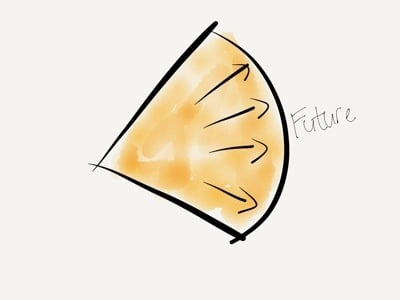
Pushing the future

But if we also work on pushing the boundaries of what we already have, we increase that area by a large amount:
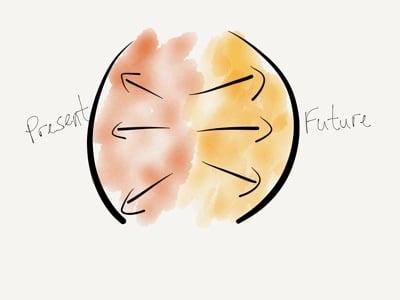
Pushing both ends

One example I keep coming back to is USSD. It’s a low-end mobile technology that got completely skipped over in the U.S., but is widely used all over Africa since it’s supported from the most basic feature phones all the way to the iPhone. Projects like MAMA (using mobile technologies to improve the health and lives of mothers in developing nations) and messaging platforms like Vumi already use USSD in really innovative ways. We’re not talking about these low-end product solutions enough, and that’s a shame.

There are really two sets of questions we have to explore when designing and developing beyond the desktop. First, what can we do at the far edge of technology? How can we push the boundaries of the future? How can we go further?

But we also have to ask, what can we do at the low end of technology? How can push the boundaries of the present? How can we do more with what we already have?

As much as what I learned at Breaking Development will help evolve our company’s processes for future-friendly development, the most surprising outcome for me is how much it got me thinking about the potential to use existing technologies to solve the problems we run into while we push into the future. This is why I got more out of Breaking Development than I expected, and why I can highly recommend it to anyone who designs and builds digital interfaces.
Breaking Development: Prototyping Style

I’m attending the Breaking Development conference in San Diego this week, and will be posting my notes from a few of the talks here.

Ben Callahan did a great talk on design workflows called Prototyping Style. He discussed the problems with linear workflows before giving some great tips on a new way of collaborative working specifically suited for responsive design.

  • We used to have a very linear workflow, which went something like this:
    • Content
    • UX
    • Design
    • Front-end development
    • Back-end development
    • Launch
  • The problem with linear workflows is that decisions are being made in each step, before we have all the data
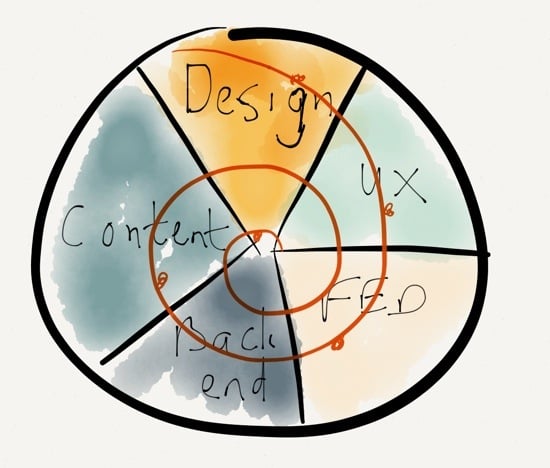
  • We need to invite others into the process, and work towards a “1 Deliverable” workflow

The “1 Deliverable” workflow looks like this (excuse my quick Paper drawing…):

1 Deliverable

The benefits of a “1 Deliverable” workflow:

  • It’s centered on iteration
  • It requires collaboration
  • It results in natural decisions (waiting for the last responsible moment to make decisions, once all the right data is available)
  • Watch out, it sometimes conflicts with organizational structure
  • It requires the right team — no room for superstar egos

So how do we advance the Design phase through a “1 Deliverable” workflow? 3 stages of design:

  • Establish the aesthetic
  • Solve the problem
  • Refine the solution

Establish the aesthetic

  • Do style comparisons with clients, to get a sense of what they’re looking for
    • Light vs. Dark
    • Flat vs. Textures
    • Illustration vs. Photography
  • Move from Style Tiles to Style Prototypes:
    • It shows more accurately what it will look like in the browser
    • It sparks conversations about browser support
    • It’s very easy to make quick changes with CSS
  • Use tools you are comfortable with to establish the aesthetic

Solve the problem

Refine the solution

  • Don’t use static design tools to refine the solution
  • Instead of static design handoffs, consider Design Pairing
  • Continuously get feedback and input on design direction
    • Set office up to create collaborative conversations
    • TVs with Apple TV connections so that anyone can throw up their designs onto any of the screens to discuss
  • Important: you need to be conscious of the switching point between solving and refining, so that design doesn’t continue ad in finitum

Ben ended his talk with a story about Miles Davis and the making of the album Kind of Blue, and what the album can teach us about collaboration. I really liked this because it’s something I’ve written about before as well, in A story about Miles Davis and the nature of true genius.

I really appreciated the practical nature of this talk. There were lots of ideas to take back and use in my everyday design work.

Breaking Development: Pitfalls and Triumphs of the Cross-Screen Experience

I’m attending the Breaking Development conference in San Diego this week, and will be posting my notes from a few of the talks here.

I really enjoyed Cameron Moll’s talk entitled “Pitfalls and Triumps of the Cross-Screen Experience”. One of the things that I appreciated is that it’s one of the first talks here I’ve seen that looked a bit more critically at Responsive Web Design. Not that Cameron isn’t a fan of responsive design, but he does bring up some interesting questions about its limitations. Here are my notes.

The need for multi-device experiences

  • “We don’t know what will be underneath Christmas trees two years from now, but that’s what we need to design for today” - Brad Frost
  • The best interface is the one that’s within reach.
  • Forget mobile. Think multiscreen.
  • At any time during the day, I may have 2-5 screens in use.
  • Would be more if you include screens in cars, other internet-enabled devices.

Five guidelines for multi-screen experiences

  • Discrete: an experience on one screen independent of, but ideally cohesive with, experiences on other screens
    • Twitter.com and NPR.com have great multi-screen experiences
  • Sequential: An experience capable of flowing from one screen to another
    • Amazon.com cart is available across multiple devices
    • 67% use multiple screens sequentially for online shopping
    • 90% use sequential for online activities in general
    • Up to 49% email themselves a link for continuing the activity on another device
  • Complementary: An experience complemented by a device’s unique capabilities
    • Day One and Google Maps apps utilize device capabilities of desktop browser and native apps
  • Extensional: An experience that controls, or is controlled by, another source
    • Instagram photos can be reposted to other networks, or pulled into apps like Flipboard
    • APIs essential for these types of experiences
  • Simultaneous: An experience involving multiples screens used simultaneously
    • Watching TV while going online with phones or tablets

Some do’s and don’ts for cross-screen experiences

Don’t:

  • Stereotype devices (or their owners, for that matter)
  • Fall prey to the convenience of device silos — we’re using multiple devices for multiple purposes
  • Unforgivingly force your app on users — let them use the web if they want to

Do:

  • Respect users’ mental models, aesthetically & functionally
    • Flipboard iPad and iPhone apps have different scrolling directions (left-right vs. up-down)
    • The iOS App Store “Update All” button is on opposite sides on iPhone and iPad
    • Simplenote has a “Done” button on iPhone, but not on iPad
  • Sequence tasks across screens (to the extent possible)
  • Make it vertically responsive, too
  • Leverage outside expertise

A closer look at Responsive Web Design

Don’t believe responsive design is a one-size-fits-all solution:

  • RWD is a must… for the browser, that is
  • How did native app development escape the same scrutiny?
  • Why don’t we have Media Query Snippets for native apps?
  • Amazon’s lack of RWD is not a concern — most of us rarely use their web site on mobile devices
  • You have to figure out the cross-screen experience for your product, because there’s not a single solution that applies to everyone
  • Remember, No One’s Forgotten How to Pinch and Zoom
  • What if pinch & zoom utilized media queries to render the layout differently (for those wanting denser content) vs. one size fits all? Demo: Gesture-Enabled RWD Proof-of-Concept

eBay CEO John Donahoe gets it:

We understand mobile to be just another screen…

It was a great talk with lots of food for thought.