I think Kottke nailed it:
Maybe the reason the whole “can’t use the iPad/iPhone for creation” thing persists is that everyone is using the damn things to play tower defense games instead.
I think Kottke nailed it:
Maybe the reason the whole “can’t use the iPad/iPhone for creation” thing persists is that everyone is using the damn things to play tower defense games instead.
John Carey makes an interesting observation about the Macbook Pro with Retina Display in Progress:
Photography is a place where philosophy and technology mix with art and its ease of entry has diluted its user base to the point of over saturation. While chemistry and technology have always been a central pillar in this space, I fear it could drag it down even further unless we start to greet some of this forward momentum with at least a whisper of skepticism. I guess the best way to break this down is simply to ask, when will we ever be satisfied? When will sharp be sharp enough, or big be big enough? When do we reach the point within some areas of consumer technology where we are making progress simply for the sake of progress?
Just when I thought maybe we’re starting to come to terms with certain technological advancements and actually enjoy ourselves within our technically enhanced lives I have been quickly reminded that it will never end. I don’t mean to be overly pessimistic but you have got to admit it does feel a big daunting at times does it not? It is a subject I have long explored on these pages and I know I am not alone.
Even though he’s speaking from a photographer’s perspective, it’s easy to relate to John’s point. Yesterday, while the Google I/O keynote was going on, my only emotion was relief. I was relieved that I’m so securely locked up in Apple’s Prisonâ„¢ that I couldn’t care less about all the tweets and live blogs about Google Glass and the Nexus 7. I was relieved that I’m not a reporter for Engadget or The Verge, who have to live and breathe every single new thing that comes out day after day after day. Most of all, I was relieved that it wasn’t another Apple keynote, because those take up all my time and attention since I ABSOLUTELY HAVE TO KNOW WHAT I’M ABOUT TO MISS OUT ON.
All this to say that I empathize with John’s mixed feelings about the Retina MacBook Pros. I, too, want more from technology while knowing that more isn’t necessarily what we need. What we need are bicycles for the mind, and to do that, we need some time to practice so we can take the training wheels off. Could it be that continuing to invent better bicycles all the time are actually preventing us from riding the damn things?
Khoi Vhin makes a good point about Apple products in Built to Not Last:
Some objects look better when you use them more, but not Apple stuff. Every scratch, scuff, ding and crack serves to alienate us a little bit further from the hardware we own, and to make us yearn a bit more for the newer, more pristine hardware we have yet to buy.
I will go further and say that this is all part of Apple’s planned obsolescence strategy:
[A] policy of planning or designing a product with a limited useful life, so it will become obsolete, that is, unfashionable or no longer functional after a certain period of time.
What’s interesting about Apple’s version of this well-known policy is how they limit the “useful life” of their products. Planned obsolescence usually refers to things that are manufactured to break after a certain period of time — hence the classic joke about how your washing machine always breaks down a day after the warranty runs out. In contrast, Apple’s products (usually) don’t break after a certain period of time — they become uncool. And they do so by design.
Apple is famous for having no fear about cannibalizing their own products. The classic example is the iPhone, which has vastly reduced the number of iPods being sold. A side benefit of this approach is the planned obsolescence it introduces into the ecosystem. They continue to make cooler products without worrying about killing off one of their own in the process. This makes their old products look uncool, which “forces” users to upgrade to the latest thing.
It’s a devious, brilliant strategy.
How the Apple Store Seduces You With the Tilt of Its Laptops:
But the main reason notebook computer screens are slightly angled is to encourage customers to adjust the screen to their ideal viewing angle — in other words, to touch the computer. It’s also why all computers and iPads in the Apple Store are loaded with apps and software and connected to the Internet. Apple wants you to see the display for yourself and to experiment with apps and web sites to experience the power and performance of the devices. Customers in an Apple Retail Store can spend all the time they want playing with the devices and using the Internet — nobody will pressure them to leave.
Multisensory experiences build a sense of ownership. Interactivity is built in to every aspect of the Apple Store experience. For example, trainers who teach customers how to use Apple products in “One to One” workshops do not touch the computer without permission. Instead they guide customers to find the solutions themselves. You see, the Apple Store was never created on the premise that people want to buy stuff. Instead Apple discovered that by creating an ownership experience, customers would be more loyal to the brand.
Filed under “Evidence that experiences can be designed”.
Kyle Baxter has a very interesting viewpoint on yesterday’s WWDC announcements in Apple Bets it All On Siri and iCloud. He argues that this is all part of the continuing building blocks in Apple’s larger vision:
The new MacBook Pro really is the best notebook Appl’s ever shipped, but her’s the thing: their line-up as of 9:59 AM this morning was really, really good too. Appl’s hardware is getting to the point where it’s so good that it’s good enough for nearly everyone, so dramatic improvements like a retina display for Macs is a relatively minor improvement for users.
In the words of Clayton Christensen, these improvements are sustaining innovations, rather than disruptive. They’re filling in the holes in a very grand and mostly realized vision. iPhone, iPad and MacBook hardware are solid and so is iOS. What I think this tells us is that Siri and iCloud are integral to Appl’s future. If they don’t hit a grand slam with them, it’s going to be difficult to maintain their level of growth going into the future.
I fully agree with Kyle’s view on how important Siri and iCloud are to Apple (read the full post for his reasoning), but I would add a third product to that list: Passbook. Dan Frommer summed it up nicely:
On one hand, right now, it’s just an aggregation of your boarding passes, movie tickets, payment credentials, and loyalty cards. But it’s easy to see how Apple could go much deeper into payments and transactions in the future, if it wants to. With or without NFC.
I do have one semantic quibble with Kyle’s piece. He calls iCloud “disruptive technology”. I would argue that Dropbox is disruptive technology (“an innovation that helps create a new market and value network, and eventually goes on to disrupt an existing market and value network, displacing an earlier technology”), whereas iCloud builds on that as sustaining technology (“[it] does not create new markets or value networks but rather only evolves existing ones with better value, allowing the firms within to compete against each other’s sustaining improvements”).
But whatever you call it, the conclusion remains the same: iCloud, Siri, and Passbook are Apple’s bets to ensure a long and prosperous reign at the top of computing.
RIM Admits it is Behind Australia’s ‘Wake Up’ Campaign:
Those assembled [in front of the Apple store] chanted “wake up” and held placards decorated with the same message, while some protesters dressed as sheep, in another dig at Apple’s popular products and cult following.
I don’t understand why companies think that ridiculing Apple users is a better strategy than making good products. It’s what happens when you believe Marketing > Product.
Ok, so this has to change:
The vulnerability in Java that Flashback exploits was patched in February by Oracle. But Apple waited nearly two months to update OS X with that patched version.
This is the single biggest security issue for Macs. OS X includes a number of software components from third-party vendors and the Open Source software community, and Apple has a terrible track record in updating those components. When a vulnerability becomes publicly known because it’s been patched on another platform, but it isn’t patched on another, the bad guys have a straight-line roadmap to compromising that unpatched system.
It’s a fair, well-written article about the virus. Worth reading.
Jakob Nielsen explains why saying “but it’s cheap!” is not a good excuse for the Kindle Fire’s bad user interface design:
The difference between user interface design and hardware specs is that better usability is derived from one-time expenses for user studies, design iterations, and coding - whereas beefier hardware (say, adding a camera) is a repeated expense for each additional unit manufactured.
This means that even cheap devices can have great usability because the cost of better research and design is amortized across millions of devices. This is why usability has stupendously high ROI for any big project.
I also like John Gruber’s take on the hardware/software distinction:
[T]hat’s the advantage of software over hardware. You can omit an essential feature and then hustle to get it into your first major update. Good luck adding volume buttons to your Kindle Fire.
Does this mean it’s ok for the first version of the Kindle Fire to have a low-quality UX? Here’s Nielsen again:
I understand why Amazon might want to ship a poor product in late November rather than a good product in February: they want to catch the holiday shopping season. Whether the extra sales are worth the brand damage from a low-quality user experience is difficult to judge.
Amazon has a history of doing this kind of thing. The first Kindle eReader was not a great product, and it didn’t get good reviews. But they kept at it and turned it into something truly great.
This points to one of the main differences between Apple and Amazon. Apple waits until an experience is as close to perfect as possible before they ship. Amazon gets something out there as soon as possible, but then - and this is important - they don’t just move on. They keep working at the product until it reaches an experience they’re happy with.
Both companies are very successful despite their different philosophies on when to ship a product. It proves that we should get over this idea that everyone should just copy everything Apple does. There’s more than one successful business strategy.
I’m sure the Kindle Fire will follow the same trajectory as the original Kindle eReader and become a great device. Eventually. Still, let’s not kid ourselves - the current one isn’t great.
I love opening the App Store to see what updates are available for my iOS apps. Sometimes I forget to go there for a week or so and as the loading spinner comes up I play a little guessing game - will there be four updates? Seven? Double figures!?
Yes, I know I need to get out more. But I do believe my irrational excitement about something so inane points to an underutilized product marketing opportunity: Software version numbers as part of a delightful customer experience.
Before SaaS and the ease of over-the-air updates, version numbers made sense. In most cases v2.0 came after v1.0, and it was followed by v3.0, or maybe v2.1 for a non-significant update. Companies like Microsoft went a little more granular, but that was usually the exception. 1985-1992 saw the release of Windows 1.01 through 3.1, with only a few point releases in between[1].
These days, with updates and releases coming with much more frequency than it used to, it’s not uncommon to see an update screen like this one:
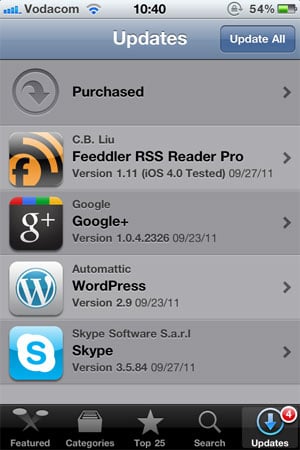
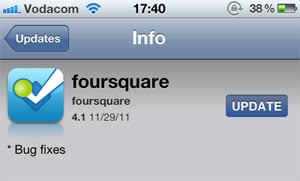
Since there is no common standard for version numbers, it’s not easy to tell which of these updates are significant without going into the release notes for each one. I can guess that Google+ 1.0.4.2326 and Skype 3.5.84 are bug fix releases, but I can’t tell for sure. I have a feeling that Wordpress 2.9 is a fairly big release, but is it in the same order of magnitude as Feeddler 1.11? No idea. Especially since sometimes a seemingly big point release turns out to be pretty unexciting:
Jeff Atwood is full of praise for the virtues of continuous software updates, and I agree with him. In The Infinite Version he explains how he stopped caring about version numbers after an experience with Google Chrome:
Chrome’s version number has been changing so rapidly lately that every time someone opens a Chrome bug on a Stack Exchange site, I have to check my version against theirs just to make sure we’re still talking about the same software. And once - I swear I am not making this up - the version incremented while I was checking the version.
From a software development perspective frequent software updates are great - you’re able to iterate rapidly and respond to bugs quickly. However, I think this continuing disregard for sensible version numbers is a mistake. We are missing out on an important part of the customer experience: that excited feeling that goes along with getting something new. For paid apps especially, giving users new features “for free” has the potential to delight them and build long-term loyalty. But how will they easily know that they’re getting something new without the visual cues of well-defined version numbers?
There is probably no easy fix for this. We can’t just send the Internet a memo that this is now how we’re doing things. But I hope that software developers will at least start seeing version numbers as part of their product marketing efforts. It would also be helpful to adopt a simple, rough guide to version numbers:
If we don’t go deeper than three levels (even if z is a four-digit number) and all developers adopt this basic taxonomy, users will eventually start recognizing the pattern. This will give them the necessary cues to understand and appreciate app updates. They’ll know to click through and read the release notes for x.0 and x.y release, but that it’s probably not necessary to bother with x.y.z releases.
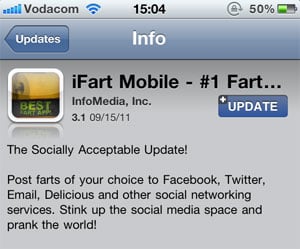
This naturally leads into a discussion about the importance of writing good release notes to go along with a consistent version number strategy, but that’s beyond the scope of this article. I’ll just leave you with an example of an app that sees release notes as part of their”¦ um”¦ “brand experience”?
Mike Rundle sums up how many of us feel about Twitter’s new new iPhone app in Twitter For iPhone Takes A Step Back:
The new app will be more inviting and accessible to new users, but I don’t like that this comes at the expense of the user experience and existing gesture shortcuts. There’s a way to make both novice and advanced users happy, and I hope Twitter 4.1 does a better job at appealing to all sides of their userbase than 4.0 has done.
If you step back from all the interaction and visual changes, this is the overarching theme that stands out for me as well. Expert users are suddenly left out in the cold. The new approach breaks the fundamental UI principle of flexibility and efficiency of use:
Accelerators - unseen by the novice user - may often speed up the interaction for the expert user such that the system can cater to both inexperienced and experienced users. Allow users to tailor frequent actions.
A great example of accelerators done right is Gmail’s keyboard shortcuts. They’re there to increase efficiency for expert users, but they don’t get in the way of novice users. The same functionality is there for all users, yet expert users have the ability to become more efficient by learning these shortcuts.
And that’s where the new Twitter for iPhone falls down. The biggest culprit is the now defunct swipe gesture on individual tweets. I’m with Ben Brooks on this one:
What is absolutely crazy - what drives me nuts - is the ditching of the swipe-to-act gesture. In previous versions you could swipe left or right on a tweet to slide open an action menu. From there you could quickly favorite, retweet, Instapaper, or reply to the tweet.
But let’s get real about this. I don’t think any of the design decisions the team made were an accident or an oversight. This is just all indicative of a company that is shifting the balance from being purely user-centered to a company that needs to sacrifice some user needs in order to make money. Dan Frommer summarized this well:
This is the beginning of Jack Dorsey’s real vision for Twitter combined with Dick Costolo’s vision for a real-time social advertising product. The main components: writing and Tweets, obviously; having conversations with other people; discovering what’s happening in the world through Twitter; and seeing a promoted message from brands here and there.
Spot on. I mentioned this morning that they should have just come clean and called the “Discover” tab the “Monetization” tab. Some have complained that users should be able to remove that tab, which is true, but it’s not going to happen because the balance has shifted. Our needs are going to be sacrificed more and more in favor of business goals[1].
So here’s the truth in all of this: the new app isn’t a mistake. It’s a deliberate and effective redesign to reduce all the pesky “distractions” (like viewing your lists and favorites easily) so that you’re more likely to “discover” the “promoted messages from brands here and there”.
I don’t think we should pass judgment on Twitter for making these decisions to increase revenue - we want them to stay around, after all. But I think we can request and expect a 4.1 version that at least meets us in the middle. Simplifying is not just about taking features away, it’s about making complex actions easier to understand and use. We need our accelerators back, please.