Menu

Posts tagged “apple”

The implications of Amazon's Silk browser

The most interesting part of today’s Amazon announcement is not whether or not they have an “iPad killer” (ugh), but the news of the new Silk browser that will run on the Fire. The details are getting lost among all the “Is Apple dead?” talk, so I wanted to point you to a couple of important articles about the implications of Silk. Here’s a recap of what it does, from their blog:

Instead of a device-siloed software application, Amazon Silk deploys a split-architecture.  All of the browser subsystems are present on your Kindle Fire as well as on the AWS cloud computing platform.  Each time you load a web page, Silk makes a dynamic decision about which of these subsystems will run locally and which will execute remotely.

Silk will use Amazon’s EC2 service to pre-cache web browsing, and in the process return heavily compressed images to the browser. There are two things that might not be immediately clear from their announcement and accompanying video.

First, this is not a new idea (and it can have pretty negative effects on user experience). Here is Mark Wyner in Amazon Silk. Just Like AOL Used to Make:

This is quite exciting news for the laymen. But does anyone remember AOL and their promise of accelerated browsing? They, too, elected to compress images and run a proxy server to deliver websites faster.

The result was horrible. Professional web designers take great care to build websites which are optimized for speed while retaining as much quality and visual integrity as possible. When ther’s a middle man degrading our work, it causes problems.

Second, the data mining and aggregation implications are quite staggering. Here is Chris Espinosa in Fire:

But what this means is that Amazon will capture and control every Web transaction performed by Fire users. Every page they see, every link they follow, every click they make, every ad they see is going to be intermediated by one of the largest server farms on the planet. People who cringe at the data-mining implications of the Facebook Timeline ought to be just floored by the magnitude of Amazon’s opportunity here. Amazon now has what every storefront lusts for: the knowledge of what other stores your customers are shopping in and what prices they’re being offered there.

I’m sure we’ll hear more about these issues (and of course the privacy implications) in the days to come, but for now these are two very interesting posts on the implications of Silk - definitely read through them both.

Apple and Faster Horses

The Harvard Business Review says they have proof that Henry Ford never said “If I had asked people what they wanted, they would have said faster horses.” It’s an interesting piece, but it’s the conclusion I want to quote here:

The real lesson learned was not that Ford’s failure was one of not listening to his customers, but of his refusal to continuously test his vision against reality, which led to the Ford Motor Company’s failure of continuous innovation, resulting in a catastrophic loss of market share from which it never recovered.

Translation: regardless of where your innovative ideas come from, make sure you test those ideas with users and learn from their feedback.

The iPhone might have been one man’s vision, but the way users interacted with the first generation iPhone paved the way for the iPad and the iPhone 4. They tested their vision with a real product, and then learned from it.

UI Conventions and Inverted Scrolling in Mac OS X Lion

My favorite sentence from John Siracusa’s epic review of Mac OS X Lion is this one:

Apple appears tired of dragging people kicking and screaming into the future; with Lion, it has simply decided to leave without us.

And nowhere in Lion is this more apparent than what appears to be everyone’s least favorite feature: inverted scrolling on the trackpad. As I’m sure you know, what this means is that scrolling now mirrors how it works on iOS devices: you essentially drag the content up and down the screen, as opposed to moving the viewport of the application like we’re used to.
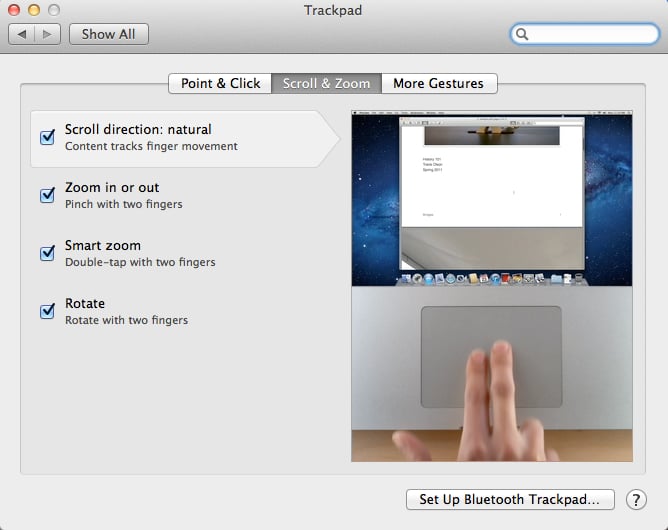
Natural scrolling in Mac OS X Lion

I love this change - it took me about 5 minutes to get used to it. But I appear to be in the minority with this opinion. It sounds like the first thing most people do once Lion is installed is head over to Settings and change it back to the old way of scrolling. So I’d like to step back a little and use this change to talk about UI conventions and when it’s ok to change them. To do that, let’s first look at what we know about Apple’s direction for their operation systems.

Data Is The Future

We got our first glimpse into Apple’s future at WWDC, where John Gruber summed up the keynote as follows:

Googl’s frame is the browser window. Appl’s frame is the screen. That’s what w’ll remember about today’s keynote ten years from now.

Robert X. Cringely touched on the implications of this in an article about Facebook where he says this:

The trend is clear from “the computer is the computer” through “the network is the computer” to what’s next, which I believe is “the data is the computer.”

The point is this. Up to now the metaphor we’ve had about computers is that data = files, and we view this data through windows (with a small “w”). We then manipulate these windows around to get things done. With the introduction of iOS, Apple noticed that the metaphor is not only unnecessary, it’s also not the most effective way to do things.

Instead, Apple wants us to remove the current abstraction from our data (the file system and the “window”), and instead focus on and interact with the data itself. Our data no longer has to be served to us through a middleman - we can go straight to the source. In this context, inverting scrolling behavior makes total sense. Why would you move a window around to see data that sits somewhere behind it, when you can manipulate that data directly? If the data is the computer, scrolling down should move your words down the page, not up.

Inverted scrolling is only one piece of the puzzle. Full-screen mode, disappearing scroll bars, auto-save - these are all new features in Lion that build on this fundamental shift away from file-based computing to data-based computing[1].

But there is a problem with this shift, as we’ve seen from the outcry. People are used to doing things a certain way, and you can’t just go ahead and change that without asking permission. So how do you deal with a change like this?

Floppy Disks And UI Conventions

Another example of this kind of conundrum is the trusted old “save” icon - the floppy disk. My 2-year old daughter will probably never see a floppy disk in her entire life, yet she will learn that the floppy disk icon = save action. Some have tried to change this - recently David Friedman proposed a baseball home plate as replacement icon.

But getting every software developer (and user) in the world to adopt a new standard like this seems nearly impossible. So, we’re stuck with the floppy disk for now[2], even though it is an outdated metaphor, similar to how scrolling currently works.

So this is where we need to go back to the theory. In essence, reversing scrolling behavior lines up with one of the fundamental heuristics of UI design: there has to be a match between the system and the real world:

The system should speak the users’ language, with words, phrases and concepts familiar to the user, rather than system-oriented terms. Follow real-world conventions, making information appear in a natural and logical order.

There is a tension here. Users are familiar with the current concept of scrolling. Yet, I’ve tried to argue above that the new way is actually more natural and logical. Apple is essentially caught in the middle of this UI heuristic, and they had to make a choice. So the question becomes, when is it ok to change what’s familiar to something that’s different but more natural and logical?

You’ve Got To Leave It Behind

The answer is that you make such a change when you believe it’s part of a much bigger trend in computing, and you’re willing to take the negative backlash because you know you’re doing it for the greater good. Ok, stop rolling your eyes. Yes, I’ve been accused of drinking the Apple Kool-Aid just a little bit too much lately. But hear me out, and re-read that Seracusa quote in the beginning of this post.

Apple is undeniable moving iOS and Mac OS X closer to each other. And in their future, direct manipulation of the data (primarily through touch) is at the center of a larger computing shift first introduced by the iPad. So they are making this tough call now, saying, “this is where we’re going, don’t get left behind.”

In short, I implore you to take John Gruber’s advice on this:

My number one Lion tip: No matter how wrong it feels, stick with the new trackpad scrolling direction. Give it a week.

Six months from now I think we’ll look back at Lion and iOS 5 as the operating systems that ushered us into the era of the data as the computer. And we’ll be better for it.


  1. Apps like Notational Velocity have been going this route for a while, where the file system is completely hidden. You don’t interact with it at all, unless you really want to.↩
  2. At least until all developers follow Apple and Google Docs (to a certain extent) and replace save icons with auto-save options.↩

Apple as "the third who benefits", or why developers shouldn't be upset

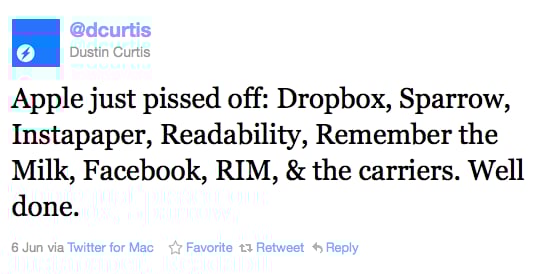
Perhaps the most succinct summary of Monday’s Apple WWDC keynote is this tweet by Dustin Curtis:

Screen shot 2011 06 08 at 9 57 47 AM

I understand the sentiment, and a lot of the post-keynote blog posts echoed this general statement. The most measured response, in my view, came from Marco Arment, the creator of Instapaper:

If Reading List gets widely adopted and millions of people start saving pages for later reading, a portion of those people will be interested in upgrading to a dedicated, deluxe app and service to serve their needs better. And they’ll quickly find Instapaper in the App Store.

I’m certainly not going to stop using Instapaper. I’m deeply invested in the service and can’t see myself moving to Safari any time soon. But that’s beside the point. Here’s the point.

I find it strange that people are freaking out about how Apple is going after successful apps and integrating them deeply into Lion and iOS. Here’s Rich Mulholland (well, censored a little bit):

Screen shot 2011 06 08 at 10 03 12 AM

For my part, I agree much more with Justin Williams when he says:

Some people grow frustrated by Apple continually making inroads in existing developer’s territory, but it comes with being a part of the platform. The key is to ensure your product lineup is diverse enough that you can survive taking the blow Apple may offer at the next keynote.

The Theory

And this is where we have to start talking about Sociology theory (No, don’t go away, this is going to be great!). One of the key concepts in Social Network Theory is Ronald Burt’s theory of ‘structural holes’. This theory aims to explain how competition works, and argues that networks provide two types of benefits: information benefits and control benefits.

  • Information benefits refer to who knows about relevant information and how fast they find out about it. People with strong networks will generally know more about relevant subjects, and they will also know about it faster.
  • Control benefits refer to the advantages of being an important player in a well-connected network. In a large network, central players have more bargaining power than other players, which also means that they can, to a large extent, control many of the information flows within the network.

Burt’s theory of structural holes aims to enhance these benefits to their full potential. A structural hole is “a separation between non-redundant contacts” (Burt, 1992). The holes between non-redundant contacts provide entrepreneurial opportunities that can enhance both the control benefits and the information benefits of networks.

To understand the role of structural holes in this regard, it is necessary to understand the concept of tertius gaudens. Taken from the work of George Simmel, the tertius gaudens is defined as “the third who benefits” (Simmel, 1923). It describes the person who benefits from the disunion of two others. For example, when two people want to buy the same product, the seller can play their bids against one another to get a higher price for the particular product.

Structural holes are the setting in which the tertius gaudens operates. An entrepreneur stepping into a structural hole at the right time will have the power and the control to negotiate the relationship between the two actors divided by the hole, most often by playing their demands against one another.

Apple’s Strategy

This is exactly what Apple is doing, and have been doing from the start when the first iPhone came out (maybe even before). They saw the structural hole between 3rd party developers and consumers, and walked right into it. Through the app store, they built an enormous network (information benefits) where they broker the relationship between developers and users (control benefits). By providing developers with a massive audience, they became “the third who benefits.”

I also don’t think they’ve been particularly secretive about this strategy, so it shouldn’t come as a surprise to developers that if they have a one-platform strategy, and that platform is iOS, they might get disintermediated at some point.

Which brings us back to Marco Arment and Instapaper, and why I don’t think he’s in trouble. Instapaper is an ecosystem that’s intimately part of my workflow. It’s integrated with Firefox, iPhone, iPad, Twitter, Google Reader, Flipboard, Zite, … the list goes on. I’m not going to switch away, because I don’t see Instapaper as an iOS app. I see it as a solution to my reading needs.

So should developers still make iOS apps? Of course. But it’s important to realize that the product shouldn’t be the app. The product should be the problem you solve for users, on multiple platforms and in a simple, integrated way. Those are the apps that will survive (and even thrive) despite any changes that occur on Apple or another platform.