Menu

Posts tagged “writing”

Letting books talk to each other

I love this bit from Austin Kleon’s Letting books talk to each other:

If you read books on different topics and different genres and different formats at the same time, your brain can’t help but find weird connections between them.

This is one of my favorite things—not just with books, but with articles too. It’s such a good feeling when your brain makes those connections. I’ll add that I think this is what makes blogs like Kottke so effective and compelling. When you are able to find and share the connections between things, you have something special going on.

How to communicate effectively as a developer

Via Chris Coyier I found this great post by Karl Sutt on How to communicate effectively as a developer. I especially appreciate him pointing out the importance of communicating clearly in short-form writing like Slack messages. His example of “low-resolution” vs. “high-resolution” writing in that context is a useful reminder for all of us:

In both cases, the example on the left is what I call “low-resolution writing”. There is very little context, too much reliance on pronouns and unclear references. The writing is not emphatic—the reader has to spend extra energy to work out what is being said. The examples on the right, on the other hand, try to make the reader do less work, even though it is more effort for the writer. The writer clearly has thought about how the message will be read.

This idea is similar to what Erin Meyer refers to as “high-context” vs. “low-context” communication in her (excellent) book The Culture Map: Breaking Through the Invisible Boundaries of Global Business. She explains in this HBR article:

I compare cultures along the Communicating scale by measuring the degree to which they are high- or low-context, a metric developed by the American anthropologist Edward Hall. In low-context cultures, good communication is precise, simple, explicit, and clear. Messages are understood at face value. Repetition is appreciated for purposes of clarification, as is putting messages in writing. In high-context cultures, communication is sophisticated, nuanced, and layered. Messages are often implied but not plainly stated. Less is put in writing, more is left open to interpretation, and understanding may depend on reading between the lines.

Choosing the right communication style for the right context is an important skill for everyone, but especially product (and other) leaders. If we assume too much context is known, people will misinterpret what we mean with our words.

So where should we post now?

I’m sure I am not the only one who is currently re-evaluating where I spend my time online. Two tangentially related articles gave me lots of food for thought on this topic over the past couple of weeks. First, Dave Rupert makes this point in It takes one person to knock down a silo:

Wherever you end up I want to offer an idea; you are the value. Your ideas, your insights, your compassion, your ability to help someone in need, your dumb puns and dank memes; that’s what’s valuable. This situation has me thinking hard about where I’m distributing my contributions, where I’m adding value (modest as it may be), and who is benefitting.

Second, Jamie Zawinski asks that we Do Not Use Services That Hate The Internet (please read the whole thing, it’s great):

If posts in a social media app do not have URLs that can be linked to and viewed in an unauthenticated browser, or if there is no way to make a new post from a browser, then that program is not a part of the World Wide Web in any meaningful way.

I like how these posts urge us to consider how, before Facebook and modern social media, the “social web” was pretty much just labors of hypertext love, loosely held together by the online equivalent of duct tape—RSS, trackback links, blogrolls, IRC, etc. I’m not saying we should go back to those old tools specifically (although ooh.directory—”A collection of 951 blogs about every topic”—is pretty sweet). But maybe it’s worth going back to why we invented those awkward solutions in the first place. We saw an opportunity to connect with like-minded people online, to form communities around niche interests, and to make our worlds bigger. Those are worthy outcomes, even if the solutions we had at the time might not be ideal any more.

So where should we post now? I’m going back-and-forth on that a lot. Depending on the day/time/mood, I either want to go all-in on this blog again, or revive Tumblr, or give Mastadon a solid try, or just double down on the newsletter… In short: I have no idea at the moment, but I know I want to keep writing, so I’m trying a bunch of things and hoping at some point I find something that works and that doesn’t make me feel gross. Wherever I end up, I hope that it’s a place like the one Dave describes in the post above:

I hope you’re somewhere that values your value. Somewhere where the stars, hearts, and thumbs up feel like authentic relationships. Give your contributions to someone or some place that appreciates them. In Biblical agrarian parlance, “Cast not your pearls before swine.”

Use asynchronous standups to improve team communication

Ted Bauer and Michael Boykin take on daily, synchronous standups in their article The Daily Standup is Broken, What Should You Do Now?

Asynchronous daily standups or check-ins help to put an end to boundless, traditional standup meetings and get the whole team on the same page with fewer meetings. And corresponding written status updates within a team coordination tool or platform — something that allows every team member to share and review updates from today, yesterday, or even last week — allow everyone to consume updates easily and on their own time.

We landed in a similar (asynchronous) place with our standups, and I wrote about it a while back in Useful daily standup meetings for remote teams:

The issue is always the same: How do we have standups that are useful and that don’t feel like busywork that just takes us away from the jobs we’re supposed to be doing? By using an asynchronous bot and adapting the questions to our needs, we accomplished a few important things:

  • Every member on the team takes a few minutes every morning to plan out their day, and troubleshoot anything that might have gone wrong the previous day.
  • Instead of weekly meetings of an hour long where we discuss what everyone’s working on, we now have focused 30-minute meetings every Monday where we solve problems and discuss issues that came up during the week.
  • I am much more equipped to fulfill my role as Product Manager because our updates are more frequent and the signal to noise ratio is extremely high.

🎉 Elezea turns 10! Introducing memberships and a revamped newsletter.

The first article I published on Elezea was called The dangers of “test and learn”. It was about A/B testing, it was badly written, and it went live on August 3rd, 2009. Since then I’ve posted 1,282 links and articles on this site (that’s an average of 2-3 posts per week).

It’s ridiculous to think that Elezea is coming up on being 10 years old. It is not an exaggeration to say that it sparked most of my career development and helped me meet countless people who I now consider friends. Starting this site was one of the best decisions I ever made. I wish I could go back in time and choose a less impossible-to-remember URL, but such is life.

So what do I do now, after all this time? On reflection I realized all I really want to do is keep writing. I took a couple of breaks over the years, but for the most part, this has been one of the few constants in my life. And I’d like to keep that going in a sustainable way.

So today I’m announcing two things to help set this in motion.

The Elezea Newsletter

For the past few years, the Elezea Newsletter has been simply a list of the articles that went on the site that week. That’s useful as a Twitter/RSS replacement, but not much else. Since my interests extend beyond the product management world into the broader impact of technology on our work and our lives, I am relaunching the Newsletter this Friday to include a wider variety of topics:

  • Useful articles and resources about product management and software development.
  • Resources for leading teams, and working better together.
  • Industry-wide product and technology news you should know about.
  • Book and tool recommendations.

If that sounds interesting to you, please sign up!

Monthly memberships

On the “sustainability” side of things, I decided to launch memberships to help cover the ongoing costs of running a site (and newsletter) like this. I have no ambitions for this to become my main job — I like my job! But I would very much like for the site to at least pay for itself in terms of domain, hosting, and subscription costs.

So if you’ve been reading Elezea for a while and have found it valuable, please consider becoming a member. It costs $4/month, and will help keep Elezea independent and free from advertising.


Whether you’ve been with me from the start, or if this is the second post you’ve ever read, I want to say thank you, thank you, thank you. Elezea is a small part of the internet, but it’s a big part of my life. And it’s your encouragement and support over the years that make it so.

Here’s to the next decade 🤘

(Now go become a member!)

The value of product-specific internal wikis

I am intrigued by the idea of product-specific wikis, as outlined in North Star Product Management. The idea is to have a living document that explains how each product component works, why it exists, why certain decisions were made, and what the future looks like:

The purpose of North Star Docs is not (at least, not necessarily) to minimize changes — changing the North Star Docs is just fine, and is of course actually encouraged, if we can find a better way to do something.

The purpose is, instead, to help map complexity for systems-level, rather than localized, problem solving. They are comprehensive and detailed specs like a Waterfall, yes, but they serve a very different purpose.

This can then be paired with project-specific specs as and when needed. But separating those from the main “this is the overall vision of the product/component” document provides a clear decision-making framework and builds organizational memory.

On making the web with a text editor and a few hours

This essay about the building blocks of the web by Rachel Andrew is really important. From HTML, CSS and our vanishing industry entry points:

There is something remarkable about the fact that, with everything we have created in the past 20 years or so, I can still take a complete beginner and teach them to build a simple webpage with HTML and CSS, in a day. We don’t need to talk about tools or frameworks, learn how to make a pull request or drag vast amounts of code onto our computer via npm to make that start. We just need a text editor and a few hours. This is how we make things show up on a webpage.

The future of books is how they’re created, not what they are

In The ‘Future Book’ Is Here, but It’s Not What We Expected, Craig Mod writes that after years of believing books will fundamentally change in the digital age, it’s simply not happening:

I think we can agree that, in an age of infinite distraction, one of the strongest assets of a “book” as a book is its singular, sustained, distraction-free, blissfully immutable voice.

What has changed, instead, is how books are created:

Instead, technology changed everything that enables a book, fomenting a quiet revolution. Funding, printing, fulfillment, community-building—everything leading up to and supporting a book has shifted meaningfully, even if the containers haven’t. Perhaps the form and interactivity of what we consider a “standard book” will change in the future, as screens become as cheap and durable as paper. But the books made today, held in our hands, digital or print, are Future Books, unfuturistic and inert may they seem.

Or, more succinctly:

Our Future Book is composed of email, tweets, YouTube videos, mailing lists, crowdfunding campaigns, PDF to .mobi converters, Amazon warehouses, and a surge of hyper-affordable offset printers in places like Hong Kong.

Easier blog post image management with Dropshare and Amazon S3

I’m always on the lookout for faster ways to upload and insert images into blog posts. It’s the part of the blogging workflow that I dislike the most. Up to now I’ve used a pretty convoluted combination of Amazon S3 buckets and Transmit. But over the weekend, while moving hosting providers1, I finally came up with a really simple image upload workflow that I thought I’d share in case it helps anyone else.

This workflow lets you drag and drop an image to a menu bar icon on your Mac, and then immediately paste a secure, custom domain URL for that image wherever you need it.


Step 1 - Create S3 bucket

Create an Amazon S3 bucket for your image uploads. It doesn’t matter what you name the bucket, but do not add a . to the name. This creates some weird SSL certificate errors later in the process that you don’t want to deal with.

Also make sure you set the bucket to be publicly accessible via the Permissions tab, otherwise you’ll get read errors for your files.

Step 2 - Create CloudFront distribution

Create an Amazon CloudFront distribution for the S3 bucket you just created, so that you can use a custom URL for your images, and make use of Amazon’s Content Delivery Network (CDN) capabilities.

When you go through the flow of adding a distribution for your S3 bucket, leave the “Distribution Settings” section blank at first — we’ll come back to that.
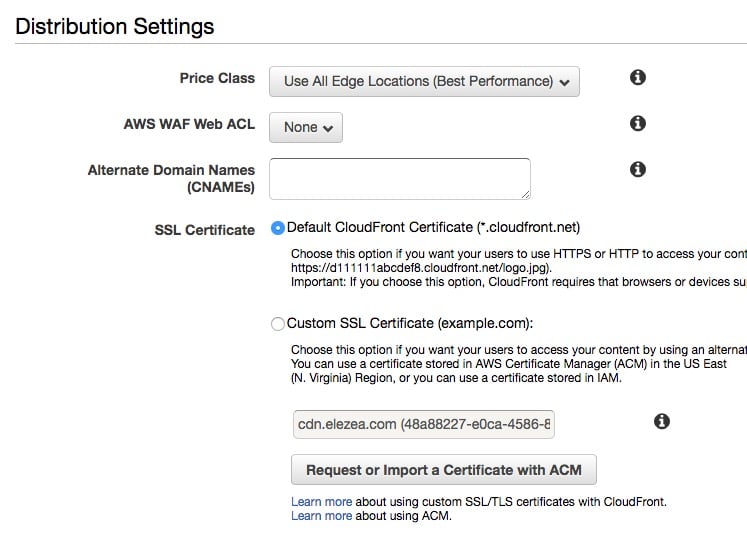
CloudFront settings

Step 3 - Add custom domain for your images

Back on the main Distributions screen, note the CloudFront domain name that was created for your bucket. It’s going to be in the format ***************.cloudfront.net. Go to your DNS provider and add a CNAME for the custom domain you want to use for your images.

In my case, cdn.elezea.com points to my CloudFront distribution at d26fqxuc6*****.cloudfront.net, which in turn links to the S3 bucket I set up earlier.

Step 4 - Add SSL certificate to CloudFront distribution

Now go back to your Distribution Settings in CloudFront. Add your CNAME information, and then click the button to “Request or Import a Certificate with ACM”.

This will take you through the process of generating a free SSL cert to be used with your CloudFront distribution. This is essential if you serve your site over https. If you don’t do this, your images will be served over http and you will get “mixed content” warnings when you embed images in your site.

Change your settings to “Custom SSL Certificate”, and you’re good to go.
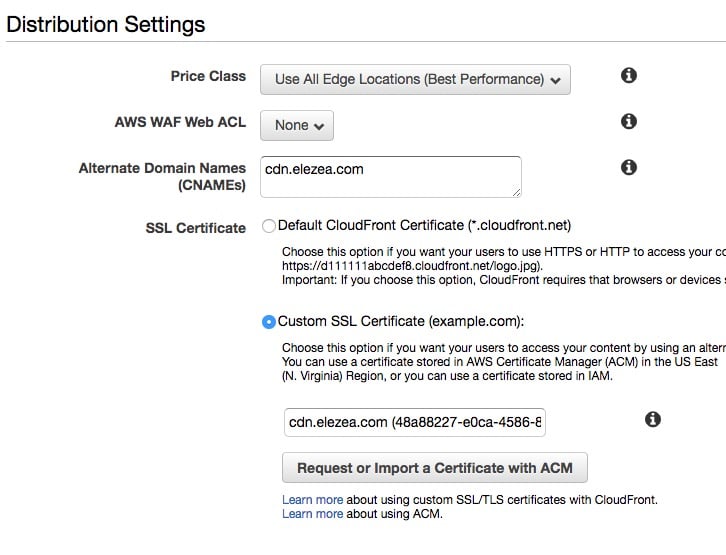
CloudFront settings

Interlude - take a breath

If you’ve successfully completed these steps, here’s where you’ll be. Whenever you upload an image to your S3 bucket, you will be able to serve that image via your custom URL over https, and as an added bonus, you’ll be using Amazon’s CDN for super fast delivery.

Now we need to figure out the fastest way to get images into that bucket of yours.


Step 5 - Download and set up Dropshare

There are many sophisticated ways to manage your S3 buckets. But when it comes to uploading an image and getting a URL for it, I haven’t found anything that’s simpler than Dropshare.

In short, Dropshare allows you to establish connections to all your S3 buckets. It lets you upload files by dragging them to the Dropshare menu bar icon, and then the URL for that image is automatically copied to your clipboard. So to add an image to this blog post, for example, I just drag the image to the menu bar icon, then come back to where I’m writing and ⌘-V to insert the link. It couldn’t be easier.

I have a bunch of S3 buckets linked up in Dropshare:
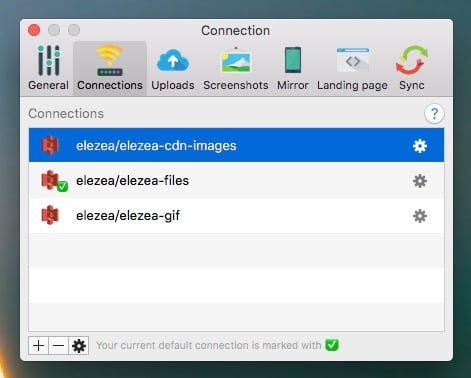
Dropshare

In the case of the bucket I use for this site, note that I entered the bucket name, the domain alias (the CNAME you added earlier), and that I have the “Use SSL” box checked:
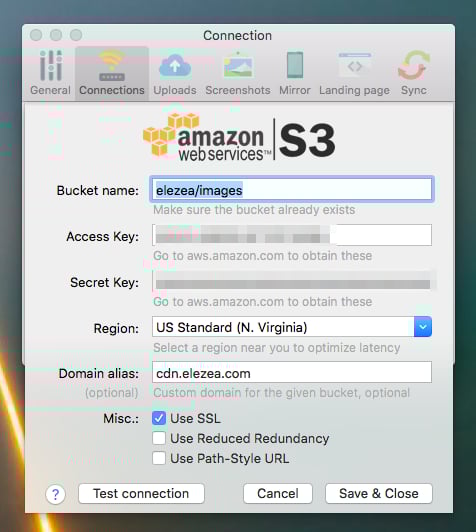
Drophsare

This makes the workflow for adding images an absolute breeze. Drag and paste. That’s it.

When you upload an image, Dropshare lets you choose the bucket you want to upload to, as well as if you want to add a landing page and/or use a URL shortener (which I usually don’t, but it’s nice to have the option).
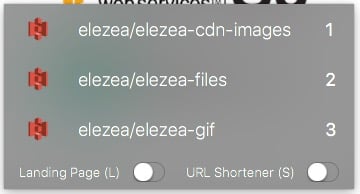
Drophsare

Dropshare is useful for other things too. I have a keyboard shortcut that takes a screen shot, automatically uploads it to an S3 bucket, and copies the URL to the clipboard. That’s great for sharing screen shots in Slack, for example.


I’m not sure how many people have this need to shave a few minutes off their image workflow. But I hope this post is useful for the few of you who do obsess about things like this, like I do. And please let me know if you think this flow can be improved even more!


  1. I’m now with DreamHost and much happier. 

Craig Mod on the revival of print and why it’s important to go offline

Oh boy, where to begin with Craig Mod’s interview with Offscreen Magazine. I’ve been following Craig’s work for a long time, so I have an undeniable bias towards everything he does. But some of the things he says in this interview touched a deep nerve for me, as it relates to a lot of what I’ve been thinking about lately.

It’s a long interview, and you should absolutely take the time to read it all. I’ll just post a couple of my favorite quotes here.


On the revival of print and other analog technologies:

I think books are the perfect disconnected objects. They require no energy. They offer a fully immersive, quiet experience for hours or days. The medium dissolves but never becomes translucent. It’s quiet, but present. An exceptional technology.

When you sit down with a book, you understand the parameters of engagement. You know how long the book is. The book isn’t changing as you read it. It’s a solid, immutable thing. You and the book are on equal terms in many ways, as least from a physics point of view. You know what’s going to happen, and the book abides by its implicit contract, which is to be a book.

However, in digital-land many spaces (apps, games) quickly turn into slithering creatures beneath your feet. You never know where you stand. Their worlds are optimized to pull you back in for one more minute, one more click. Over and over. Cascades of chemical reactions in your noggin’ tell you to keep going, just one more hit; I feel this persona of the addict very strongly when I am online or using certain apps or devices.


On your life’s work and what moves you:

Does affecting one hundred lives turn you on? A thousand? A million? A billion? Why? What does it mean to have a positive impact on a life? How intimate does that connection need to be? Understanding your scale — the scale that moves you — is critical to understanding with whom and how you should work, how you should live.


On always being online:

The default expectation today is “always available.” The systems we created are so frictionless that we haven’t noticed how insidiously over-engaged we are. Step by step we’re optimizing ourselves to “maximum” productivity without defining or thinking about “productivity” on a human scale. The digital world abstracts. One could argue most problems contemporary society faces are problems of over-abstraction. As an employer with a global workforce, you have no idea where your employees might be or what they might be doing, so you expect them to answer immediately. The concept of downtime is elusive.


And finally, on “edges”, a topic he’s written about a lot:

Edges ground us. Without clear edges we don’t feel like we’re in control.

Craig Mod - Offscreen Magazine Interview