Menu

Posts tagged “user research”

User testing and long-term product planning

Steve Barnett makes some great points on long-term planning in Plans, Details, Dates, and The Future1. I especially like the point about how user research fits into planning:

Before development starts on a new bit of work, you should be building prototypes and doing user testing with them. This always results in some changes to the plan, and often results in rather large charges. You can’t plan what these changes will be: you don’t know until you’ve done your user testing.


  1. And bless his heart for using an Oxford comma. 

The problem with surveys

Erika Hall speaks so much truth in her post On Surveys:

If you are treating a survey like a quantitative input, you can only ask questions that the respondents can be relied on to count. You must be honest about the type of data you are able to collect, or don’t bother.

My first role at eBay, years ago, was as a quantitative user researcher1. We ran surveys to measure satisfaction with different areas of the product over time. If that period taught me anything, it’s that surveys are extremely useful when combined with analytics as well as qualitative user research (triangulation), and pretty useless when looked at in isolation. There just isn’t enough context by itself.


  1. One of my early experiences at eBay was getting to work one morning and discovering that Peter Merholz wrote a scathing blog post about a survey I was running. This was my second month on the job, so I was pretty sure I was going to get fired. The worst part of it was that he didn’t have the full context, so his criticism wasn’t even valid. We were doing a controlled experiment where each group saw only one of the images in the survey, and the “likelihood to purchase” question was just a decoy as an introduction. We weren’t trying to get absolute numbers of likelihood to purchase (that would be ridiculous) — we were comparing responses to different pages to figure out what iconography would be best for ratings (stars, bars, or check marks). Subsequent questions were more specific about the ratings aspect. It went all the way up to our VP of Product and my manager had to write an explanation. I was mortified. I still sometimes wake up in the middle of the night in a cold sweat, screaming “survey!!!!!!!!!” 

The problem with dogfooding

Dogfooding

Another possible origin is the president of Kal Kan Pet Food, who was said to eat a can of his dog food at shareholders’ meetings.

Eating your own dog food on Wikipedia

In software circles dogfooding is usually encouraged — and for good reason. When companies force themselves to use their own products extensively it can have some great benefits. Since internal users visit even the darkest, most neglected corners of a product, bugs tend to be found and fixed much faster than waiting for reports from end users. Employees are also often the most critical users of their own products, so they are driven to make it better and will often have some fantastic ideas.

However, I’ve started to see a dangerous side effect of dogfooding that can sneak up and do huge damage to a product if we’re not careful. Here’s the problem. If we use our own products all the time we become such overly advanced users that we’re eventually unable to separate our own needs for the product from those of our target market.

Most users of our products don’t eat, sleep, and drink the ins and outs of the features we slave over every day. They dip in and out to buy something, or upload something, or quickly edit a photo. So in a really unfair and ironic turn of events, the more we use our own products the less we’re able to think like our users. It sucks, but it’s unfortunately the way it is.

We all repeat the mantra “I am not the user” to each other, but we tend to forget that the way to solve that particular problem is not to morph into advanced users, but to spend more time with actual users. It’s already so hard for us to put ourselves in the minds and shoes of our users. Dogfooding makes this even harder by lulling us into a false sense of security that maybe — just maybe — we are the user after all.

So, be careful. By all means use the crap out of your product — you wouldn’t be pouring your life into it if you didn’t love it. But once you start demanding features that would make your life easier, stop yourself. Be critical of your own motivations. Look at analytics and figure out if yours is a common use case or something reserved for the 1%. Contact your friendly neighborhood user researcher and ask them if they’ve validated the need for said feature. Hold on to your demand with open hands, and let it go if you realize it’s not something that would improve the product for target users.

In short, keep dogfooding — but don’t assume that all dogs will like the new flavors you’re proposing.

Are they users or people?

In Don’t Say ‘Cyclists,’ Say ‘People on Bikes’ Sarah Goodyear explains how some deliberate language changes turned a serious conflict in Seattle into a civil debate. Here’s what they did:

“Though the group made no secret of their biking advocacy, they didn’t brand themselves as biking advocates,” writes [PeopleForBikes blogger Michael Andersen]. “They branded themselves as neighborhood advocates.”

[Seattle Neighborhood Greenways] also developed a list of new ways to talk about their concerns and promoted it in handy chart form. Instead of “cyclists,” they suggest, use “people on bikes.” Instead of “drivers,” “people driving.” Instead of technical traffic-engineering terms such as “pedestrian/hybrid beacon,” say “safer ways to cross busy streets.” Replace “pedestrians” with “people walking.”

The result?

[Tom Fucoloro of Seattle Bike Blog] says that talking about streets in a way that emphasizes the common humanity of all users, rather than dividing them into tribes with warring interests, has made a real difference in the way Seattle’s planners discuss possible changes to streets with the community. As a result, he says, the discussion has become much more civil. And Seattle has been installing protected bike lanes (don’t say cycletracks!) at a steadily increasing pace.

I wonder if we need something similar in our industry. Instead of “users,” perhaps we should talk about “people who use websites.” After all, we’re supposed to be all about emphasizing humanity in our products.

Follow the user

I’m as fascinated with Slack’s rise to prominence as most people, so I really enjoyed From 0 to $1B - Slack’s Founder Shares Their Epic Launch Strategy (no byline). It’s full of fantastic product strategy advice, including on the importance of user feedback:

As much information as Slack put out to customers, they learned even more themselves. Butterfield and his cofounders are voracious readers of user feedback, and they attribute much of the company’s rapid traction to this skill. From the get-go, Slack made sure that users could respond to every email they received, and approached every help ticket as an opportunity to solidify loyalty and improve the service. As they listened to their ever-growing flock of users, the Slack team iterated accordingly.

And also remember that sometimes people are going to use a product differently than what you had in mind:

“Sometimes you will get feedback that is contrary to your vision,” Butterfield says. “You may be trying to drive in a particular direction that people don’t necessarily understand at first. In our case, we knew the users we had in mind for this product. So in the early days, we looked at our customers, really just testers at that point, and we paid extra attention to the teams we knew should be using Slack successfully.”

It’s worth reminding ourselves that @-mentions and hashtags on Twitter were user inventions, not something the company came up with themselves. Always follow your loyal users…

The logistics of usability testing on mobile devices

I’m currently working on the design of a native app for Jive Software, and we really wanted to do some usability testing on a prototype before development starts. There are, of course, a multitude of reasons to do usability testing on prototypes, but we had some very specific issues we wanted to address:

  • We are a distributed team. Product Management is in Palo Alto, Product Design is in Portland, and Development will happen in our Tel Aviv office. So we knew from the beginning that a functional prototype would be essential to communicate within the team. Flat wireframes / PSDs just weren’t going to cut it.
  • We’re working on something in a fairly new market, so we need to do quite a bit of validation to make sure we get the utility of the app right.
  • And of course, our designs are never as good as we think they are, so we wanted to make sure we correct the majority of the usability issues before development starts.

I read a lot about prototyping native apps and mobile usability testing, and since everyone’s process is different, I wanted to give an overview of the process we settled on, since we’re really happy with it so far. It was very important to me that all our offices would be able to observe the usability tests, so that guided a lot of the decision-making. Here’s how we’re doing it…

Prototyping

After reviewing and trying out every prototyping tool known to man, I settled on Proto.io for this project. There are so many great options out there that it’s hard to go wrong on a choice of tool. Proto.io was the best for me because of a few key features:

  • I needed full interactivity — since we used the prototype for usability testing it needed to feel as real as possible.
  • I needed lots of flexibility in the animations/transitions supported, since we’re in new territory and need to try out lots of different things. Proto.io supports any interaction I threw at it.
  • I needed to use a mix of built-in components and my own assets, and Proto.io handles that pretty well.

Of course, I can’t show what the prototype looks like at the moment, but as soon as the app launches I’ll update the post and embed it here.

Mobile usability testing rig

I got lost in mobile usability testing guides for days — there are so many good ways to do it. At first we considered remote testing, but it just wasn’t a good option for us because we were going to do part IDI (in-depth interview) and part usability testing, so we needed a way to be in the room with users and dig deep into certain areas.

I’ve seen some crazy setups — my favorite and weirdest is probably MailChimp’s “hug your laptop” idea. It’s a brilliant hack, but I was worried our non-tech savvy users would have trouble with this, so I needed another solution.

I ended up going with Bowmast’s Mr. Tappy kit, and I attached a Logitech HD Pro Webcam C920 to it. We played around with it in the office first to make sure it’s going to work:
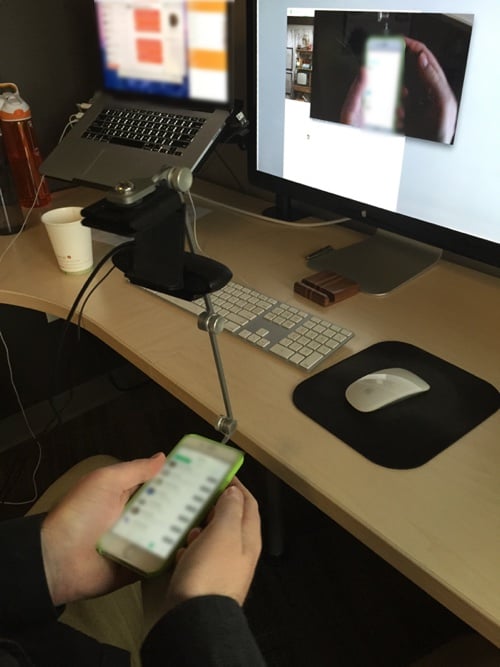
With that out of the way, it was on to the next challenge — how to stream it everywhere.

Streaming to observation rooms

This part was much easier than I thought, simply because we already use Vidyo for videoconferencing in all our offices. So every time I started a usability test I would start my meeting in Vidyo, and then people from our other offices could dial into my meeting from their observation rooms. They could see the room on one screen, and the participant’s phone on another. It worked like magic:
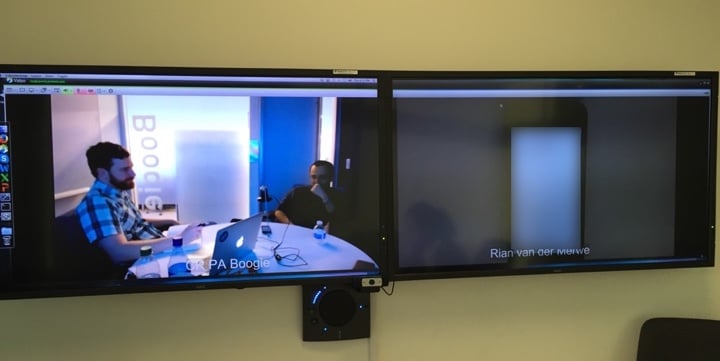
What we ended up with is a setup where I can do usability testing in person on mobile devices, record the sessions, and have people observe these sessions from anywhere in the world. It was an incredibly productive few days, and I’m now working my way through fixing all the usability issues we picked up. Can’t wait to show this to you when it goes live!

Further reading:

Big data and human intervention

In Netflix’s Secret Special Algorithm Is a Human Tim Wu writes about the importance of human intervention in data-driven decision making:

Of course, there is a big difference between using data in combination with intuition and relying entirely on an algorithm—the decision-making equivalent of Siri finding gas stations near you. I don’t think anyone—Netflix, Mitt Romney—makes big decisions that way. As Chris Kelly, the C.E.O. of Fandor, an indie-film Internet channel told me, “It just isn’t true that you can rely on data completely.” Even Google, the champion of algorithms, employs substantial human adjustments to make its search engines perform just right. (It cares so much about this that Google claims First Amendment protection for its tweaks.) I do not doubt that companies rely more on data every day, but the best human curators still maintain their supremacy.

It’s a good reminder that following data blindly is a pretty bad idea. Joshua Porter’s Metrics Driven Design is stil the best presentation I’ve seen on this topic and how it relates to design.

The importance of design diversity

Laura Sydell tells a great story in At 90, She’s Designing Tech For Aging Boomers (but when did NPR decide to go all Upworthy-like with their headlines?):

Addi says when Beskind is in a room, young designers do think differently. For example, Addi says IDEO is working with a Japanese company on glasses to replace bifocals. With a simple hand gesture, the glasses will turn from the farsighted prescription to the nearsighted one.

Initially, the designers wanted to put small changeable batteries in the new glasses. Beskind pointed out to them that old fingers are not that nimble.

“It really caused the design team to reflect,” Addi says. They realized they could design the glasses in a way that avoided the battery problem. “Maybe it’s just a USB connection. Are there ways that we can think about this differently?”

We need so much more diversity in the design community — not just in terms of gender and race, but age as well. Here’s a story that proves how valuable design diversity really is.

Expanding our technology worldviews

A couple of weeks ago Andrew Watts published A Teenager’s View on Social Media, and the post got a lot of attention. Most of the tech world linked to it. Today, danah boyd (whose work researching teen use of social media I highly admire) published a response called An Old Fogey’s Analysis of a Teenager’s View on Social Media. She makes some excellent points about how the story was reported, particularly the narrative that was built around one person’s experiences:

I don’t for a second fault Andrew for not having a perspective beyond his peer group. But I do fault both the tech elite and journalists for not thinking critically through what he posted and presuming that a single person’s experience can speak on behalf of an entire generation. There’s a reason why researchers and organizations like Pew Research are doing the work that they do — they do so to make sure that we don’t forget about the populations that aren’t already in our networks. The fact that professionals prefer anecdotes from people like us over concerted efforts to understand a demographic as a whole is shameful. More importantly, it’s downright dangerous. It shapes what the tech industry builds and invests in, what gets promoted by journalists, and what gets legitimized by institutions of power. This is precisely why and how the tech industry is complicit in the increasing structural inequality that is plaguing our society.

Our church is doing a series on social justice at the moment, leading up to MLK day. Yesterday the amazing Michelle Jones read a section of Maya Angelou’s eulogy to Coretta Scott King, and those words seem to fit well with danah’s piece and the conversations we’ve been having in the US recently:

Many times on those late evenings she would say to me, “Sister, it shouldn’t be an ‘either-or’, should it? Peace and justice should belong to all people, everywhere, all the time. Isn’t that right?” And I said then and I say now, “Coretta Scott King, you’re absolutely right. I do believe that peace and justice should belong to every person, everywhere, all the time.”

And those of us who gather here, principalities, presidents, senators, those of us who run great companies, who know something about being parents, who know something about being preachers and teachers — those of us, we owe something from this minute on; so that this gathering is not just another footnote on the pages of history. We owe something.

I pledge to you, my sister, I will never cease.

I mean to say I want to see a better world.

I mean to say I want to see some peace somewhere.

I mean to say I want to see some honesty, some fair play.

I want to see kindness and justice. This is what I want to see and I want to see it through my eyes and through your eyes, Coretta Scott King.

If we’re going to see justice, honesty, and fair play, we’re going to have to step out of what we know and what we’re comfortable with, and speak up (and do up) to do our parts to bring others along with us. And that means, at the very least, to change our perceptions of the tech world and the people who use the things we make. I’ve written before about the digital usability divide (what danah calls “increasing structural inequality”), and I only see it getting worse unless we — who make the web — get a better understanding of all demographics.

Building a case for qualitative research

Bill Selman wrote a great post on the importance of research triangulation. If you have trouble making the case for qualitative research in a company smitten with “big data”, show them Why Do We Conduct Qualitative User Research? (emphasis mine):

There is no one research method that satisfies answering all of our questions. If the questions we are asking about user behavior, attitudes, and beliefs are based solely on assumptions formed in our homophilic bubble, we will not generate accurate insights about our users no matter how large the dataset. In other words, we only know what we know and can only ask questions framed about what we know. If we are measuring, we can only measure what we know to ask. Quantitative user research needs qualitative user research methods in order to know what we should be measuring and to provide examples, theories, and explanations. Likewise, qualitative research needs quantitative research to measure and validate our work as well as to uncover larger patterns we cannot see.