Menu

Posts tagged “user research”

Hiding stories on Facebook: intent vs. usage

From Will Oremus’s insightful story How Facebook’s news feed algorithm works:

Facebook’s data scientists were aware that a small proportion of users—5 percent—were doing 85 percent of the hiding. When Facebook dug deeper, it found that a small subset of those 5 percent were hiding almost every story they saw—even ones they had liked and commented on. For these “superhiders,” it turned out, hiding a story didn’t mean they disliked it; it was simply their way of marking the post “read,” like archiving a message in Gmail.

This reminds me of a story I read a while back about how tons of people flagged and reported news stories about Lance Armstrong for “drug abuse”. This is why qualitative research is so incredibly important. Analytics can never tell us the whole story.

What they say vs. what they do

If you invest in growth before you have retention, you’re renting users, not acquiring them.

— Gillian Morris in a great post about what users say vs. what they do.

Empathy in enterprise software

In Design Thinking Comes of Age Jon Kolko describes one of the biggest (and most important) shifts we’re starting to see in enterprise software:

To build empathy with users, a design-centric organization empowers employees to observe behavior and draw conclusions about what people want and need. Those conclusions are tremendously hard to express in quantitative language. Instead, organizations that “get” design use emotional language (words that concern desires, aspirations, engagement, and experience) to describe products and users. Team members discuss the emotional resonance of a value proposition as much as they discuss utility and product requirements.

How to get user feedback on designs

Jessica Harllee’s Sharing Our Work: Testing and Feedback in Design is a great article on different ways to get user feedback on designs:

To help choose our path, we create low-fidelity mockups and do concept testing with Etsy users who fit the target audience for the project. Rather than invest a lot of engineering time up front on building something we might not use, we often test clickable prototypes, which, while clunky, are cheap to create and involve zero engineering time. They’re mockups of an unbuilt interface, which also means we’re able to throw in blue sky features. Focusing on the best-case scenario of the feature lets us test whether sellers grasp the concept—realism and constraints can come later.

User-centered design in the enterprise: A case study of Jive Circle

We just announced Jive Circle, a new corporate directory app for iOS and Android that we’ve been working on since the beginning of the year. I’m really excited about this app, because we were able to follow a user-centered design process to ensure we’re launching a product that is both useful and usable. In this post I’d like to talk a bit about the process we followed, and some of the lessons we learned as a team.

So let’s start where every product should start: user needs.

Start at the beginning: user needs

Jive Circle is the 3rd product in what we’re calling our Workstyle apps. The first (Jive Daily) and second (Jive Chime) were released earlier this year. During the market research for these products the research team discovered a new pain point that was just waiting to be solved: corporate directories.

Accessing the corporate directory is something people do multiple times a day. The problem is that it’s a terrible experience. There are usually HR systems or intranets that try to give easy access, but the research showed that people rarely used these systems (for reasons ranging from “it sucks!” to “I forgot my password and can’t be bothered to reset it”). Instead, they do something that’s accessible but a really bad experience: they use Microsoft Outlook.

The most common way to look someone up in a corporate directory is this:

  1. Compose a new email message in Outlook
  2. Type in the person’s email address
  3. Right click on their name
  4. Go to their profile
  5. Copy the needed information
  6. Close out the (unsent) email

Not exactly an ideal process. We saw an opportunity to fix this. Enter Jive Circle.

Iteration is better than words: prototyping solutions

From the very beginning, we wanted the design process to be right. We agreed as a team that we want to get user feedback early and often, and that we’ll get a working prototype as quickly as possible so that we can iterate from there.

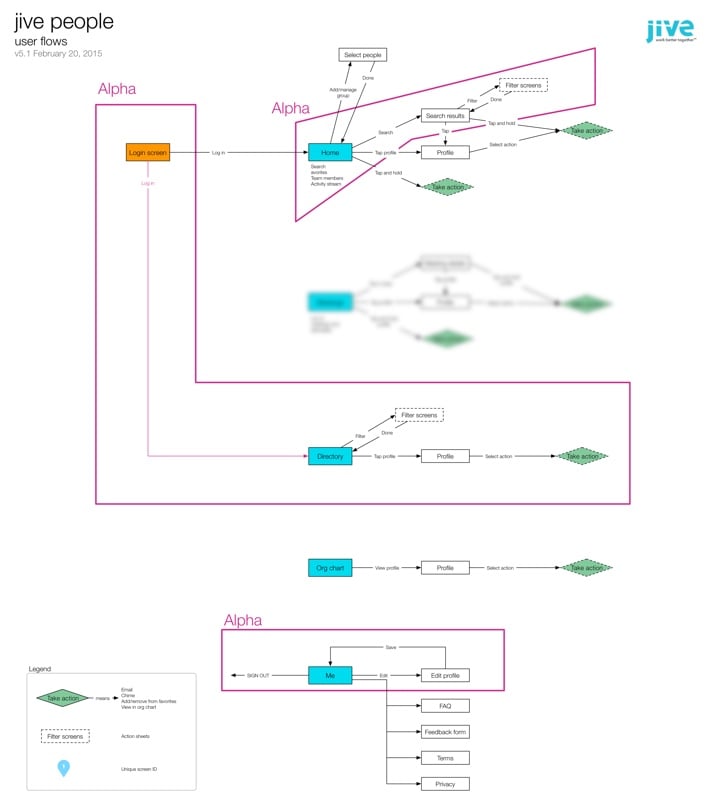
The first thing I wanted us to agree on—before starting any design work—was the basic user flows and information architecture. This took a couple of weeks to get right, but eventually v5.1 was the one we settled on (apologies for the blurring—there’s an upcoming feature I can’t tell you about yet…):
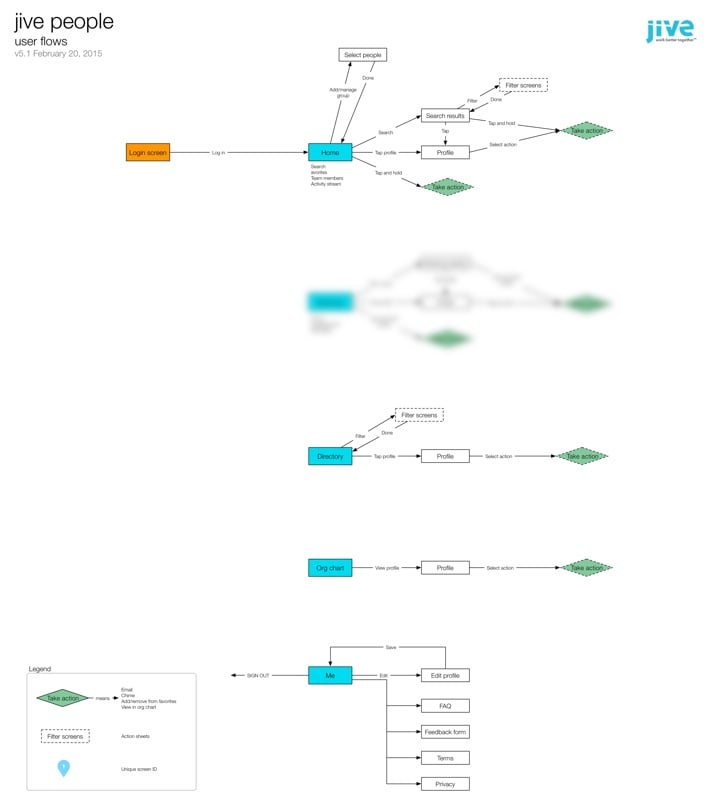
The flows have stayed mostly unchanged from this version. It was immensely helpful to start with user flows, as opposed to just making screens and hoping for the best. We came across a bunch of questions and issues as we worked through the IA, and it was much more efficient to work through them in this phase than it would have been once design had already started.

With the basic flows settled it was time to move on to design. I chose to use Proto.io for the initial prototypes. There are lots of alternatives, of course, but this is the one that came closest to what I needed (including a “long tap” gesture that none of the other tools had at the time).

Looking back over it now, it’s amazing to see the evolution of the app from the first prototype to our first Alpha dev build. Some things changed a lot, others remained largely the same. Here’s for example, is the Home screen from the very first prototype, compared to what is in the Beta version today:
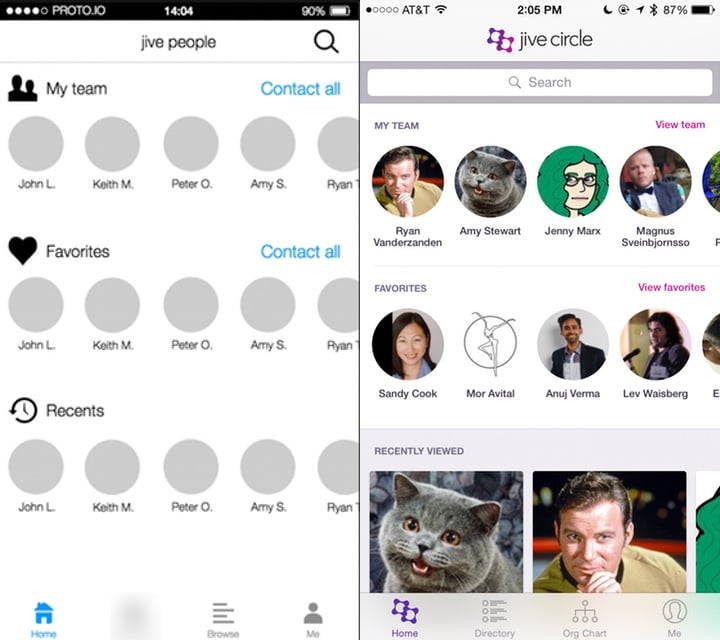
The more prominent search bar, dedicated “team” views, and card-based information at the bottom were all changes made as a direct result of usability testing—but more on that later.

Every couple of days I would publish a new version of the prototype based on team feedback, along with a list of what changed:
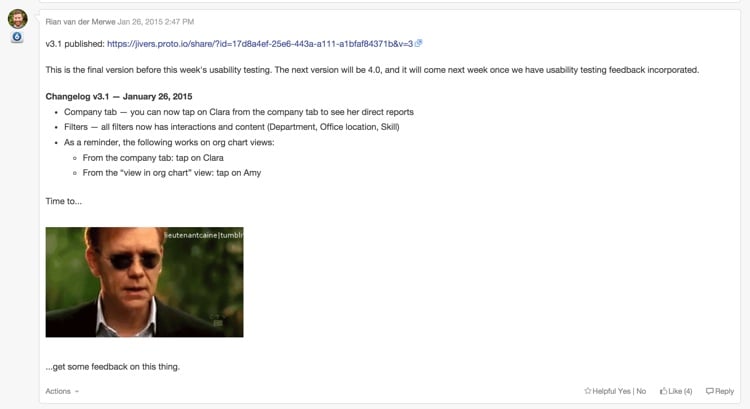
As you can see from the image above, by the time we hit v3.1, we realized it was time to get this thing in front of users before we went any further…

Save time and pain: usability testing

It was always really important to us to do at least two rounds of usability testing on this product: one round on a prototype, and one round on the first Alpha build. So with v3.1 of the prototype in hand I ran some usability tests to better understand how people currently use their corporate directories, and how well our proposed solution is working.

It was, as usual, incredibly insightful, and the changes we made based on that early feedback had a big impact on the utility and usability of the app. If we waited until we released the app to market to find that out… Well, that would have been an expensive mistake.

Two of the biggest insights we uncovered were:

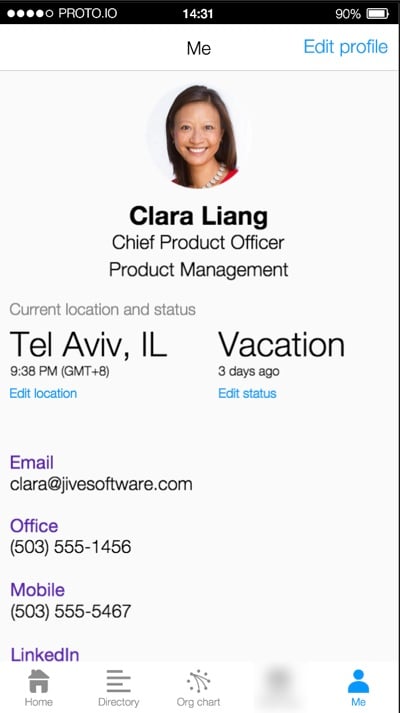
  • Knowing someone’s location, time zone, and availability is incredibly important, and the starting point for almost every interaction with that person. So this has to be a central component of the app.
  • It’s surprising how often people want to look others up in an org chart—especially in large organizations. This meant that instead of having an org chart as a sub-set of a directory, we needed to make it another core aspect.

With our insights in hand we continued to make improvements to the prototype, until we arrived at v5.1. It was time to start visual design and development…
Making it real: From prototype to visual design and development

Early on in the development process we did something that I think is important to note. We decided to develop the first iteration of the app using a vertical as opposed to a horizontal approach. Here’s what I mean by that… With a horizontal approach you add all the features the app will have in the first iteration, and then start perfecting them. The problem with this is that you end up with a bunch of half-baked features, and if you run out of time before the release date, you’re screwed.

If you take a vertical approach you pick the features you want to work on first, and complete them front to back. You make sure they work well. You might have fewer features in the first release, but they’ll be fully baked, so you’ll have a useful app. And then you get to add some great stuff in upcoming releases. This is sometimes referred to as the cupcake theory of product development. For us, this meant focusing on a very specific feature-set that the entire team agreed on:
At this point our visual designers started working on the main screens and animations for the Alpha release, and the dev team started to build the back-end. We followed a very collaborative approach to development. It was challenging at times, since our dev team is in Tel Aviv, and the product and design teams are all on the US West Coast. But thanks to our internal collaboration software, lots of video calls, and a few weeks of in-person time, we made it work.

By the time the team published Alpha, we were all quite beside ourselves with excitement. The Alpha was already an amazing app, and we couldn’t wait to get it into the hands of users. So we moved on to the next phase…

Polishing a turd diamond in the rough: more usability testing

We did two things with the Alpha version:

  • We released it as an internal Alpha to a subset of users in our own company, so that they could try to break it and help us fix bugs.
  • We did another round of usability testing to do a few last course corrections if needed (and yes, we did need to!).

At this point we also started working on the fun parts of the app—those extra little animations and interactions that just make the app special. Our visual designers and developers did a fantastic job on the details here. Below are a couple of my favorite animations in the app:

Long press on an avatar:

Org chart animation:

These animations are subtle and not overbearing, but really help to bring some personality to the app.

Ship it already: knowing when you’re done

We probably could’ve kept going for forever, but the market waits for no person, so it was time to work towards our announcement date.

This is where our decision to follow a vertical approach really paid off. We were halfway through a feature when we ran out of time. In a horizontal approach that would have been a disaster. But because we completed each feature before starting on the next one, this wasn’t a problem. We just cut that feature out of the initial release, and we’ll add it as an update in coming months.

So now we wait for August 31st, our official release date! The app was submitted to the app stores today, so we’ll see how that part goes. All in all this is one of my favorite projects I’ve ever worked on. The team is amazing, the process was fantastic, and I can’t wait to get it out there and start adding even more useful things to it.

Most of all, I’m excited that we were able to make prototyping, usability testing, and rapid iteration part of the design process. It helped us focus on staying user-centered, and I’m convinced it saved us months of development time.

Lessons learned

There are a couple of important takeaways from the project that I want to note.

  • Remote teams are hard. We all know this, but it sometimes feel like we pretend it’s going to be easier than it is. There are only two things I’ve found that make working in remote teams easier: (1) overcommunicate, and (2) travel to spend time together as much as possible.
  • Prototyping really is the best way to go. I’m not going to say wireframes are dead—in fact, I would say quite the opposite. But if time and budget allows for it, nothing beats an interactive prototype for team communication and user feedback.
  • Enterprise software CAN be designed and developed in a modern way. The whole team was on board with our user-centered design approach, and that made all the difference. Don’t think that just because you work in a large organization, you have to continue to work in BDUF, slow, waterfall environments.

As with all things design-related, this app is far from perfect. But I have confidence in our process. I have confidence in the utility of it. And I know that we’ll keep making improvements as the feedback from users come in, because that’s been a cornerstone of the project since the beginning. What more can a product designer ask for?
How = What + Why

I wrote an article on analytics and usability testing for the UserVoice blog, so I wanted to share it here as well. From How = What + Why (Or, Where to Start Improving Your User Experience):

The first thing to clear up is this: in order to know where to start to improve the user experience of your product, you’re going to need more than a single data source. No single method can tell you the whole story you need to make good decisions. Usability testing will show you where there are interaction problems, but it won’t show you the magnitude of those problems. Web analytics will show you lots of numbers, but it can’t tell you how to fix issues you encounter. Even worse, it’s not always clear how to interpret analytics in isolation, so you might not even be able to tell if some things really are issues in the first place.

There is hope, though. It’s in the combination of these two methods that we find the elusive answer to our question. Combining usability testing with web analytics gives us the insight we need to make the right UX decisions about our products.

Ethnography and humanizing design

I love Hal Phillips’s story of how ethnographic research changed the culture at Benjamin Moore1. From Escaping a Strategic Cul de Sac: Using Ethnographic Insights to Challenge Organizational Bias:

They no longer saw homeowners simply as property owners who were protecting their investments – they were also people whose homes were reflections of their changing selves.

They no longer saw painting contractors simply as skilled applicators who would always choose the best paint for the job – they were also businesspeople facing market pressures from all sides, and who needed a helping hand.

And they no longer saw designers simply as indoctrinated advocates for Benjamin Moore – they were also project managers who still wanted mentorship.

Equipped with their newfound intuition, Benjamin Moore set out to reconnect authentically with their customers at all levels. We provided a road out of their strategic cul de sac – a human heartbeat in all of the hard data, and a way to truly internalize the emotions motivating stakeholder behavior.

There is, in my experience, no better way to humanize a company’s design process than doing ethnographic research.


  1. Insert “watching paint dry” joke here. 

Feature prioritization with remote teams using Mural.ly and the Kano model

As if feature prioritization isn’t hard enough, many companies are starting to introduce another tricky variable into the mix: remote teams. If you’re a product manager who spends a lot of time on video calls with team members in different parts of the world, you’ll be forgiven for feeling like involving the team in prioritization is too much to deal with. But don’t give up on the dream yet. One of the teams on a project I’m working on is very much distributed, and I think we may have found a reasonably painless way to do prioritization together.

Here are the ingredients you’ll need:

Let’s discuss the recipe in detail…

On Mural.ly

Mural.ly is virtual whiteboard software. Before you scream “BLASPHEMY!”, I want to assure you that I still enjoy physical sticky notes as much as the next person. Nothing compares to the feeling of ripping a bad idea off the board and rage-throwing it into the closest trash can1. That said, physical sticky notes have two major drawbacks:

  • It’s hard to get remote teams involved in the process.
  • Transcribing them is such a chore.2

And that’s where Mural.ly comes in. It lets you create virtual sticky notes on a whiteboard, move them around, change their color, and best of all: the whole team can play along. You can do voting sessions, multiple people can edit at the same time, etc. This tool has really done wonders for our collaboration efforts across offices.

On the Kano model

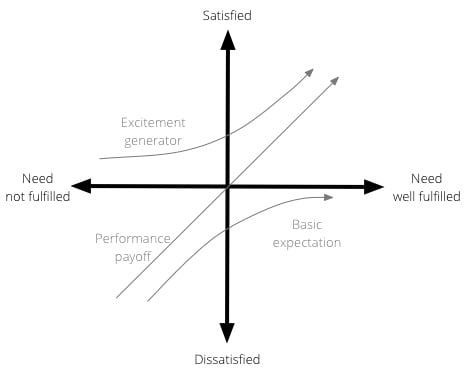
The Kano model isn’t new, and it’s been fairly widely used in software product development for a while. Developed in the 1980s by Professor Noriaki Kano for the Japanese automotive industry, the model is a helpful method to prioritise product features by plotting them on the following 2-dimensional scale:

  • How well a particular user need is being fulfilled by a feature
  • What level of satisfaction the feature will give users

The model is generally used to classify features into three groups:

  • Excitement generators. Delightful, unexpected features that make a product both useful and usable.
  • Performance payoffs. Features that continue to increase satisfaction as improvements are made.
  • Basic expectations. Features that users expect as a given — if these aren’t available in a product, you’re in trouble.

Here is a visual representation of the Kano model:

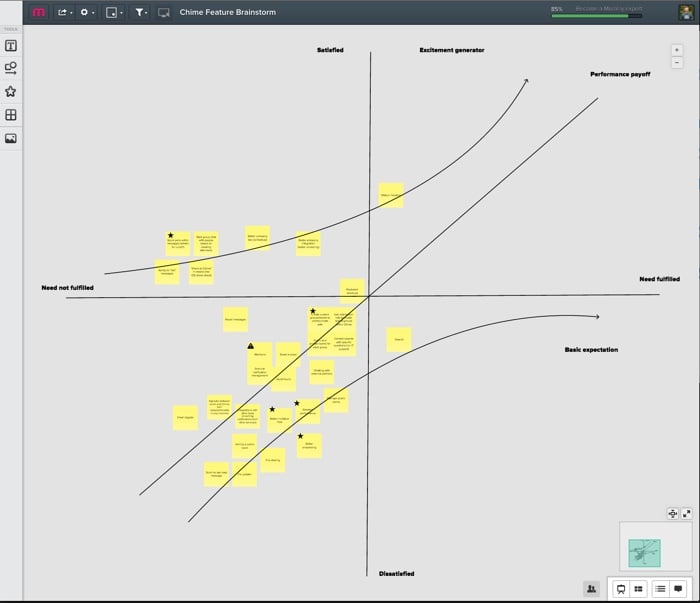
So, as we started our prioritization exercise, I drew the x and y axes on a new mural. We then listed out all the features that we’re thinking about for the next few months—one feature per sticky note. We proceeded to go through each sticky note, and discuss where it fits on the Kano model—how far are we in meeting the need currently, and how satisfied do we believe users will be once we’ve met the need better?

We ended up with something like this:

(Yes, it’s small—unfortunately I can’t show the feature details. Maybe once they’re live…)

This now becomes a great tool for prioritization and release planning. There are couple of rules of thumb I like to stick to when doing sprint/release planning:

  • Make sure there is a balance between the 3 different types of features. Don’t overemphasize one type over the other.
  • Start with the features with the biggest upside. For Basic expectations, that means features on the far left, where a little work would result in a big increase in satisfaction. For Excitement generators that shifts to features closer to the y-axis, since the real benefits start to kick in exponentially once you go the extra mile on fulfilling the need. For Performance payoff features the story is a little less clear since the relationship is linear, but I would still argue for starting on the far left. The sooner you can get users on the “satisfied” side of the scale, the better.

We’re still learning our way through this, but so far I’m happy with the process. It’s a model that everyone understands and can rally around, and with Mural.ly at our side we get to involve the whole team. I believe marketers call that a win-win.


  1. Why do rage-throws always miss the basket? Such a let-down. 

  2. Funny how you never see photos of the lone product designer sitting in a room, tearfully writing down every sticky note in an Evernote document as everyone else leaves the room high-fiving each other. 

Mobile vs. Desktop in the enterprise software market

“Mobile first” is more about progressive enhancement and making important design hierarchy decisions than it is about thinking about small screens, so I don’t agree with the “outdated” bit in Paul Adams’s Why ‘mobile first’ may already be outdated. That said, he makes a good point about enterprise software:

Many businesses being advised to go all in on mobile screens, should consider how often they are accessed while people are at work. Software that people probably shouldn’t, but do, look at on their work computer: news, sports, social, messaging, personal email. The large screen matters.

Now imagine that you actually build software specifically for people to use at work. This may be software for getting work done, such as Google Docs, Intercom, Slack, Basecamp, Trello, etc. The likelihood now is that the larger screen is the most important one. The large screen app is more important than the mobile app. The mobile app plays a different role to the large screen app, and in many cases a supporting role.

I see this is in our user research all the time. If we do usability testing on our mobile apps, one of the first questions is always, “Will I be able to use this on my desktop”? For software that gets used mostly at work, focusing on desktop — as unsexy as it might sound — is still hugely important.

The business of design

Christina Wodtke writes about the intersection of design and business in Why Design Needs Entrepreneurship (and Entrepreneurship Needs Design). This is a particularly nice summary of the three major startup handbooks in high circulation these days:

Steve Blank said you should talk to your customers as you develop your offering. He said there were no answers in the building, you must go out into the world if you want to make something people want.

Eric Reis said you should build small things, test them, learn, then build the next thing until you find successes.

Alex Osterwalder said you should look at all aspects of the business and design them collectively to assure a successful ecosystem. While all three hold a distinctly user-centered design approach, Osterwalder is the first to state it unambiguously, using design tools and innovation games throughout his book and calling them that. It is a designed book, in every sense of the world, and it was written in collaboration with a group of beta readers.

All three, at their hearts, are user-centered designers. They just happen to design business.

This is a great call for designers to care more about the business of design.