Menu

Posts tagged “user experience”

A framework for empathy in design

The Paradox of Empathy is such a great post by Scott Jenson that I pretty much want to quote the whole thing. But I’ll stick with just this one gem, and encourage you to read it in full. It is a fantastic exploration of empathy in design, and includes a framework for making empathy part of our everyday work in a very practical way:

Designers will be the first to admit that not every empathic observation leads to a miraculous insight. However, it’s called “Design Thinking” for a reason: it’s how we process and explore, taking a complex problem and breaking it down before we build it back up. Product managers seem to expect a designer to walk up to a product, say something brilliant, and drop the mic. Experienced designers deeply understand a simple fact: design isn’t a deliverable, it’s a process. A process paved with dozens of small empathic observations that lead you, slowly, iteratively to a better product.

The problem for us designers is that our fellow teammates don’t always think this way and unfortunately, we as a community don’t reflect on this difference. It’s ironic that designers are passionate about how a product interacts with people but not how they themselves interact with their team.

Twitter text shots, and what design wants

I’ve been spending a lot of time thinking about how product design decisions aren’t neutral. The way we design a product has a direct effect on how people use it. This is obvious, but I think we often forget the real implication: Design wants something from its users. And we are the architects of those wants. We have a direct impact on user behavior, and we need to recognize the weight of that responsibility.

Let’s look at some recent product changes on Twitter as an example.

In October 2013, Twitter introduced more visual tweets, with photo previews within the timeline. It’s almost hard to imagine now, but before they introduced this you had to click on a link before you could see a photo.

This change had an immediate effect on how people used the product. I’m sure some of it was intentional — people began to tweet a lot more photos. Some of it was probably not intentional but still made sense: social media marketers caught on to the fact that if they attach a photo to an article tweet, they’ll get more attention since the tweet will take up more screen real estate. A little annoying, but ok, so far so good.

But then there was what must have been a fairly unexpected behavior change. People started to use screen shots of text to bypass Twitter’s 140 character limit. At first, only a few people did it. But then publishers and marketers started to notice, and it took off:

Yes, it’s crazy to share text as images on Twitter. But, look at the engagement increase: https://t.co/VRVglh6Bei https://t.co/ePo3pGtep0

— Chris Dixon (@cdixon) November 20, 2014

Some have even come up with guidelines for the best way to stand out in these “textshots”:

Following an exchange with MG Siegler a while back, I settled on a specific textshot style: sans-serif text with a sepia background pulled from Pocket. The idea of using the app’s sepia theme for these came from MG, who noticed that yellow screenshots had more contrast in Twitter’s native apps.

I’ll admit, the temptation to do this is strong. Earlier this week I used a textshot and it became my most retweeted tweet ever:

This post by @scottjenson on empathy in design is so good: “The Paradox of Empathy” - http://t.co/9mYXqWEVP0 pic.twitter.com/J3lekmt5DW

— Rian van der Merwe (@RianVDM) February 24, 2015

Nice, right? Win!

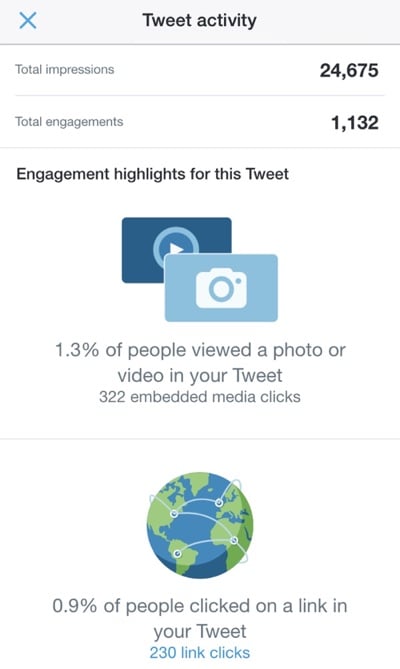
But wait… Let’s step back for a moment and have a look at the metrics on that tweet of mine:
Tweet activity

Almost 25,000 impressions, with a 0.9% click-through rate. That’s worse than a crappy banner ad, and it’s the sum-total of the amount of traffic I sent to Scott’s excellent post. As Derek Thompson points out in The Unbearable Lightness of Tweeting:

Is the social web just a matrix of empty shares, of hollow generosity? As Chartbeat CEO Tony Haile once said, there is “effectively no correlation between social shares and people actually reading.” People read without sharing, but just as often, perhaps, they share without reading. […]

There used to be a vague sense that Twitter drives traffic, and traffic drives renown (or fame, or pride, or whatever word defines the psychic benefit of public recognition). Instead, the truth is that Twitter can drive one sort of renown (there are some people who are Twitter-famous), and traffic affords a different psychic currency. But they are nearly independent variables.

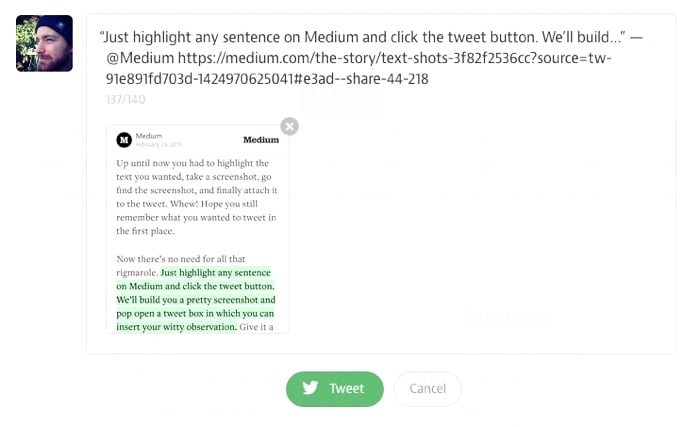
All of this culminated in Medium’s Text Shots announcement yesterday:
Text shots

So there you have it. There is now a very real chance that most of our Twitter timelines will become nothing but screenshots of Medium articles that no one reads. That doesn’t help Medium, it doesn’t help authors, and it frankly doesn’t help us to experience and learn, which is kind of the point of reading. This trend does help Twitter, though. Quoting from The Unbearable Lightness of Tweeting again:

In the last month, I’ve created nearly 2 million impressions for Twitter. Whether that is good for my Twitter persona and my pride is a qualitative question whose answer resides outside the bounds of an analytics dashboard. But it is quantitatively not a good deal for The Atlantic. Something I already suspected has now been made crystal clear: 99 percent of my work on Twitter belongs to Twitter.

Twitter is a business, and impressions are how they make money, so this isn’t inherently evil or wrong. But Twitter is, if nothing else, not what we think it is. Not to get too curmudgeonly about “early Twitter”, but there was something amazing about the 140 character limit. Something about the constraint that brought out people’s creativity. And because it was all text, timelines were easy to scan. Now, all of that is different.

Putting all my personal feelings about this trend (and its implications on traffic and reading) aside, it’s time I get to the point. This fundamental change in the way Twitter is used can all be traced back to a single, fairly simple design decision back in 2013: expanding photos natively in the timeline. Without that change, none of this would have happened.

As designers we can’t possibly know how all the ways our decisions will affect behavior in a product. But we have to, at the very least, recognize that design has an opinion, and that it wants people to behave a certain way. I like the way Jared Spool phrases this:

Over the last year, we’ve started explaining design as “the rendering of intent.” The designer imagines an outcome and puts forth activities to make that outcome real.

We have a responsibility to do our best to ensure design wants things that are good for users as well as the business. We have to think ahead as much as possible, because what design wants is up to us. And once it wants the wrong things, it might be too late to change.
Are they users or people?

In Don’t Say ‘Cyclists,’ Say ‘People on Bikes’ Sarah Goodyear explains how some deliberate language changes turned a serious conflict in Seattle into a civil debate. Here’s what they did:

“Though the group made no secret of their biking advocacy, they didn’t brand themselves as biking advocates,” writes [PeopleForBikes blogger Michael Andersen]. “They branded themselves as neighborhood advocates.”

[Seattle Neighborhood Greenways] also developed a list of new ways to talk about their concerns and promoted it in handy chart form. Instead of “cyclists,” they suggest, use “people on bikes.” Instead of “drivers,” “people driving.” Instead of technical traffic-engineering terms such as “pedestrian/hybrid beacon,” say “safer ways to cross busy streets.” Replace “pedestrians” with “people walking.”

The result?

[Tom Fucoloro of Seattle Bike Blog] says that talking about streets in a way that emphasizes the common humanity of all users, rather than dividing them into tribes with warring interests, has made a real difference in the way Seattle’s planners discuss possible changes to streets with the community. As a result, he says, the discussion has become much more civil. And Seattle has been installing protected bike lanes (don’t say cycletracks!) at a steadily increasing pace.

I wonder if we need something similar in our industry. Instead of “users,” perhaps we should talk about “people who use websites.” After all, we’re supposed to be all about emphasizing humanity in our products.

Delight in the details

Buzz Usborne’s “God is in the details” is a great reminder that spending just a little time thinking things through a bit more that usual can have a big impact on user experience:

But it’s those little things, the tiny minutia of detail, that ultimately make beautiful products, and beautiful houses.

Unfortunately, when I refer to the “details” in product design, I’m not talking about obvious design things; like colours, drop-shadows or placement. Instead I’m referring to something harder to define; experience and subconscious patterns that help the user feel more at-ease with an interaction. That detail might come in the form of a change in cursor, a “down” style for a button, or a helpful animation.

Whatever form that detail takes, I’ll bet that it wasn’t designed in Photoshop, or included in even the most detailed spec document. It’s the details that fall outside of titles like UX, or UI. It’s interaction detail that can only be found after using a product for real, then dedicating solid design and engineering time to building.

I definitely agree with that last bit as well. I’m working on a prototype for a new app at the moment, and it’s only after we did usability testing with real target users that we discovered some interactions that would make the app a lot easier (and more useful) for users.

Throwing the cards out with the bath water

Michael Andrews brings up some interesting concerns about cards in Are UI Cards good for content? However, I’m left thinking that most of the “cons” in the article are actually Information Architecture problems, not problems with the card metaphor:

UI cards can contribute to content usability problems that may not be immediately evident.  Users often like UI cards when they encounter them, and don’t notice their limitations.  They see tidy cards often with colorful thumbnail images.  The cards seem optimized to make good first impressions.  But often, the cards end up squashing the content that must go in them, or omitting content details that don’t fit the layout vision.

If content is squashed and truncated in cards, it’s not the card element’s fault, it’s the content’s fault. It happens when content isn’t written while keeping the context of use in mind.

Here’s another example:

Another issue with UI cards is their lack of hierarchy. When all cards are the same size, all cards look equally important, whether they have detailed information, time sensitive information, sparse information, or optional information.

Again, visual hierarchy is a larger design problem, and not the fault of cards.

I point this out because it reminded me of one of the big dangers in design that we have to watch out for. We often see a UI issue and immediately switch out the pattern instead of trying to understand what the the real problem is. It’s great if we can look at something we designed and say, “Hmm, that doesn’t work.” But we have to go further and also understand why it doesn’t work before we just take the easy why out and replace the UI element.

If content is squished on cards, is it because we used cards, or because we didn’t write the content concisely enough to be easily consumable in small spaces? If all cards look the same, should we stop using cards, or design different card types to address visual hierarchy better? I would argue that in both cases, the latter should at least be considered. Of course, if cards are wrong for the interface, then burn it with fire. But be sure.

Further reading on cards:

The logistics of usability testing on mobile devices

I’m currently working on the design of a native app for Jive Software, and we really wanted to do some usability testing on a prototype before development starts. There are, of course, a multitude of reasons to do usability testing on prototypes, but we had some very specific issues we wanted to address:

  • We are a distributed team. Product Management is in Palo Alto, Product Design is in Portland, and Development will happen in our Tel Aviv office. So we knew from the beginning that a functional prototype would be essential to communicate within the team. Flat wireframes / PSDs just weren’t going to cut it.
  • We’re working on something in a fairly new market, so we need to do quite a bit of validation to make sure we get the utility of the app right.
  • And of course, our designs are never as good as we think they are, so we wanted to make sure we correct the majority of the usability issues before development starts.

I read a lot about prototyping native apps and mobile usability testing, and since everyone’s process is different, I wanted to give an overview of the process we settled on, since we’re really happy with it so far. It was very important to me that all our offices would be able to observe the usability tests, so that guided a lot of the decision-making. Here’s how we’re doing it…

Prototyping

After reviewing and trying out every prototyping tool known to man, I settled on Proto.io for this project. There are so many great options out there that it’s hard to go wrong on a choice of tool. Proto.io was the best for me because of a few key features:

  • I needed full interactivity — since we used the prototype for usability testing it needed to feel as real as possible.
  • I needed lots of flexibility in the animations/transitions supported, since we’re in new territory and need to try out lots of different things. Proto.io supports any interaction I threw at it.
  • I needed to use a mix of built-in components and my own assets, and Proto.io handles that pretty well.

Of course, I can’t show what the prototype looks like at the moment, but as soon as the app launches I’ll update the post and embed it here.

Mobile usability testing rig

I got lost in mobile usability testing guides for days — there are so many good ways to do it. At first we considered remote testing, but it just wasn’t a good option for us because we were going to do part IDI (in-depth interview) and part usability testing, so we needed a way to be in the room with users and dig deep into certain areas.

I’ve seen some crazy setups — my favorite and weirdest is probably MailChimp’s “hug your laptop” idea. It’s a brilliant hack, but I was worried our non-tech savvy users would have trouble with this, so I needed another solution.

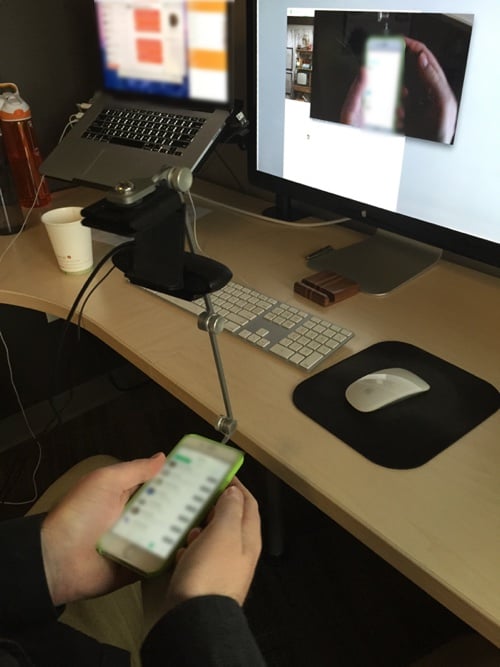
I ended up going with Bowmast’s Mr. Tappy kit, and I attached a Logitech HD Pro Webcam C920 to it. We played around with it in the office first to make sure it’s going to work:

With that out of the way, it was on to the next challenge — how to stream it everywhere.

Streaming to observation rooms

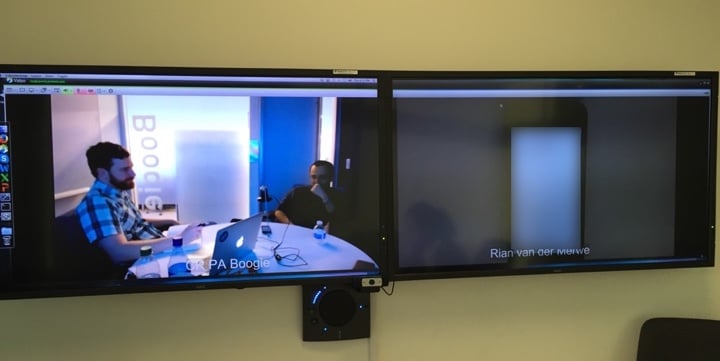
This part was much easier than I thought, simply because we already use Vidyo for videoconferencing in all our offices. So every time I started a usability test I would start my meeting in Vidyo, and then people from our other offices could dial into my meeting from their observation rooms. They could see the room on one screen, and the participant’s phone on another. It worked like magic:

What we ended up with is a setup where I can do usability testing in person on mobile devices, record the sessions, and have people observe these sessions from anywhere in the world. It was an incredibly productive few days, and I’m now working my way through fixing all the usability issues we picked up. Can’t wait to show this to you when it goes live!

Further reading:

The importance of design diversity

Laura Sydell tells a great story in At 90, She’s Designing Tech For Aging Boomers (but when did NPR decide to go all Upworthy-like with their headlines?):

Addi says when Beskind is in a room, young designers do think differently. For example, Addi says IDEO is working with a Japanese company on glasses to replace bifocals. With a simple hand gesture, the glasses will turn from the farsighted prescription to the nearsighted one.

Initially, the designers wanted to put small changeable batteries in the new glasses. Beskind pointed out to them that old fingers are not that nimble.

“It really caused the design team to reflect,” Addi says. They realized they could design the glasses in a way that avoided the battery problem. “Maybe it’s just a USB connection. Are there ways that we can think about this differently?”

We need so much more diversity in the design community — not just in terms of gender and race, but age as well. Here’s a story that proves how valuable design diversity really is.

Left Behind: Designers Who Don't Code Edition

So I guess it’s quarterly “Designers should learn to code” day on Twitter. This appears to be the crux:

Good discussion today w/ friends who are “designers that code.” It’s no longer even a question of “Should designers learn to code?”

— Nathan Smith (@nathansmith) January 20, 2015

Because that ship has sailed. It’s more like… If you’re a designer that doesn’t code, you’ll just be left behind. Not even a debate anymore.

— Nathan Smith (@nathansmith) January 20, 2015

I have two questions.

1. What is a “designer”?

I don’t mean that in the metaphorical sense. I mean literally, how do you define design in this context? Is it visual design? User experience design? Product design? Content strategy, or any or all of the other things that make up well-rounded design?

Because here are the things I’m currently trying to get better at by reading books and practicing and writing and working it into projects:

  • Usability testing and ethnography
  • Information architecture across multi-platform experiences
  • iOS native app design

I’m a little busy right now, so I’d like to know: which of these things should I drop to learn to code?

2. What does “left behind” mean?

Does it mean designers who don’t code won’t get hired in The Future? I don’t know about that. I spend a lot of time with designers. Some of them code, some don’t. Those who don’t specialize in something else that those who code aren’t good at, and that makes for stronger teams where work can be distributed more evenly and more effectively.

Let me put this another way: once every designer can code (since it’s “not even a debate any more”), who’s going to make sure we build the right things? Who’s going to discover user needs, create IAs that work for target personas, and design scalable holistic systems that work across devices and contexts?

What I mean to say is this:

  • Heaven help us if we become a community of executors at the expense of all the planners out there. We need both.
  • It’s really, really dangerous to tell people they’ll be “left behind” if they don’t become part of a homogenous group of people all focused on the same thing. That has never worked out well for anyone, in the history of mankind.

So go forth, follow the design thing you’re most interested in. If that’s coding, awesome. If it’s how to best understand user needs and translate that into design systems, go do that. As long as you do it well, you won’t be left behind.

Smart cities and dumb technologies

Adam Greenfield reminds us that the “smartness” of technologies comes from the people who use it, not the technology itself. From The smartest cities rely on citizen cunning and unglamorous technology:

It’s simply that in both these cases, the sustaining interactivity was for the most part founded on the use of mature technologies, long deglamorised and long settled into what the technology-consulting practice Gartner refers to as the “trough of disillusionment”.

The true enablers of participation turn out to be nothing more exciting than cheap commodity devices, reliable access to sufficiently high-bandwidth connectivity, and generic cloud services. These implications should be carefully mulled over by developers, those responsible for crafting municipal and national policy, and funding bodies in the philanthropic sector.

I like the term “deglamorised” very much. It’s a reminder that our goal as designers isn’t to make cool stuff—it’s to help people do great things with the stuff me make.

Why Apple has a successful design culture

I’m not a big fan of these types of articles, but I did like Mark Kawano’s point about what makes Apple a successful design organization in 4 Myths About Apple Design, From An Ex-Apple Designer:

It’s actually the engineering culture, and the way the organization is structured to appreciate and support design. Everybody there is thinking about UX and design, not just the designers. And that’s what makes everything about the product so much better … much more than any individual designer or design team.

If everyone cares about design, the usual mantra that “UX is 50% design, 50% politics” turns into a much more manageable ratio.