Menu

Posts tagged “user experience”

The politics of sunlight

Emily Badger wrote a very interesting article on the politics of sunlight and shade in urban design. From In the shadows of booming cities, a tension between sunlight and prosperity:

For cities, shadows present both a technical challenge — one that can be modeled in 3-D and measured in “theoretical annual sunlight hours” lost — and an ethereal one. They change the feel of space and the value of property in ways that are hard to define. They’re a stark reminder that the new growth needed in healthy cities can come at the expense of people already living there. And in some ways, shadows even turn light into another medium of inequality — a resource that can be bought by the wealthy, eclipsed from the poor.

The ethics of slot machine design

Andrew Thompson in Engineers of Addiction, a fascinating profile on the psychology of slot machines:

Game [slot machine] designers are charged with somehow summoning the ineffable allure of electronic spectacle — developing a system that is both simple and endlessly engaging, a machine to pull and trap players into a finely tuned cycle of risk and reward that keeps them glued to the seat for hours, their pockets slowly but inevitably emptying.

In other words, their job description is to make people win just enough so that they come back long enough to lose big. I just can’t wrap my head around that.

Guidelines for touchscreen design

Steven Hoober has some great guidelines for touchscreen design in Fingers, thumbs, and people:

Most of all, within what you can control: Always design for hands, fingers, and thumbs.

And remember: You don’t design for iPhone or Android, for cars or kiosks, for Web or apps, but for people. Have empathy for users and respect their choices, their ways of working. Account for the limits of their lives, their environments and their abilities.

Even when your implementation is constrained by technology, avoid designing for pixels or code; always consider what effects your work will have in the real world, when people look at, hold, and touch the screen.

Easy with the onboarding

Some interesting perspectives from Dharmesh Shah in Why Your Startup Should Ignore Your Onboarding Experience (For Now):

Great user onboarding makes users say, “WOW, this is awesome,” and recognize that your product is a must have experience. But these WOW moments don’t come easy. And the mechanics by which you onboard users is just a small part of whether or not they fall in love with your product.

The more substantial part of the equation is the value your product delivers to your user: something in their life that must get easier, faster, cheaper, more productive, more fun, etc. because of using your product. Otherwise, why would they switch?

And that’s the difficult part to create. That’s the part that requires customer development and experimentation. It requires you to test your assumptions, to pivot, to try new things.

His recommendation is to do completely manual onboarding at first—contact every new user to find out why they starting using the product, email users who become inactive, etc. It might not scale, but it provides invaluable feedback at the inception of a product. Once you get to about 100 active users, Shah believes you know enough to create a great in-app onboarding experience. Food for thought!

Usability testing note-taking and analysis

David Travis has a good overview of collecting and analyzing usability testing data in How to record and analyze user research observations. This definition of an observation is particularly important:

Here’s the golden rule: an observation is a record of something you see or hear. Novice researchers often treat their opinions on what they like or dislike as observations. But your opinions aren’t observations — and neither are suggestions for new features or insights on how to fix usability issues. Don’t try to interpret the things you observe or fit things into a solution. That comes later.

The best observations come from watching real users do real tasks, and being as true as possible to the concrete details of what you see. You can either do this in the wild (with a field visit) or simulate actual use in a lab environment (with a usability test).

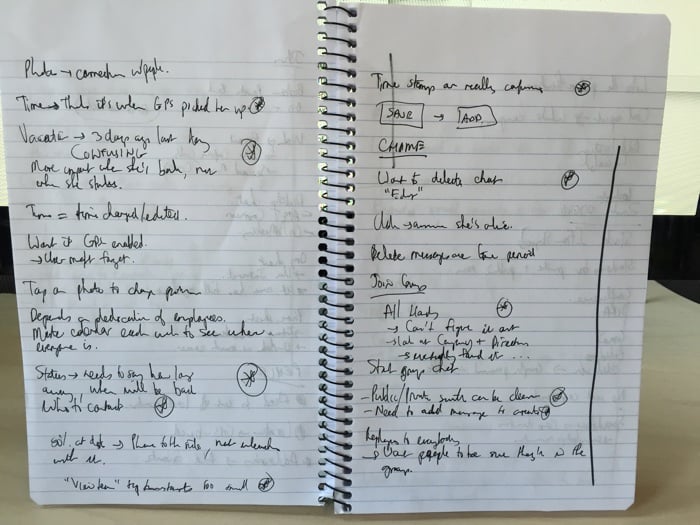
When making notes, just jot down observations, don’t try to solve the problem right there. The only thing I would add to David’s advice is that I try to mark important observations as I start to notice trends throughout the day, like so:

Usability notes

Now, if I could only figure out how to read my own handwriting, that would really help.

How to get more into Lean UX

Ben Melbourne’s UX Designers: Why are we Wasting Time? is a great post on lean methodologies and Lean UX in particular. Of course, I especially like this point:

No amount of text or slides will ever replace the richness of observing your target audience first-hand. Take your client/team out in the field with you, or you’re greatly reducing the value of your research. Seeing a user point out the flaws in your product is the quickest way to convince a CEO to drop his pet feature.

UI design and the abundance of choice

Aaron Shapiro makes some interesting observations in The Next Big Thing In Design? Less Choice:

Technology has revolutionized the way we live our lives and do business, but it has done a terrible job reducing the stress of so many decisions. Industry by industry, great digital design has eliminated middlemen from the economy and put users in control, making it fast and easy for us to determine what we want and purchase it directly, whether on a computer or over a phone. Now, with unlimited opportunities for decision-making, we have essentially made ourselves the middlemen in our own lives.

The enjoyment, and even fetishization, of the beautifully designed experiences we rely on to make these decisions has distracted us from our original goal of simplifying our lives. We’ve forgotten that the ultimate purpose of an interface is to make things simpler.

That last sentence is interesting. “We’ve forgotten that the ultimate purpose of an interface is to make things simpler.” I understand and agree with the sentiment, but the statement got me thinking about how I would define the purpose of a user interface.

In the context of modern UI design I would probably want to adjust that statement a little bit to say that, “The ultimate purpose of an interface is to enable users to accomplish their goals within a system easily, in a way that also fulfills pre-defined business goals.” I’m sure there’s lots to argue about and disagree with in that statement as well, but it’s an interesting thought process to go through.

The rest of the article goes a little too deep into #NoUI territory for me. I’m more with Cennydd on that one:

This is the world desired by some #NoUI adherents. It’s not a world I recommend.

— Cennydd Bowles (@Cennydd) April 21, 2015

But there are still some interesting examples. Well worth going through.
Placebo UI buttons

Chris Baraniuk looks at the futility of things like traffic signal buttons in Press me! The buttons that lie to you:

Some would call this a “placebo button”—a button which, objectively speaking, provides no control over a system, but which to the user at least is psychologically fulfilling to push. It turns out that there are plentiful examples of buttons which do nothing and indeed other technologies which are purposefully designed to deceive us. But here’s the really surprising thing. Many increasingly argue that we actually benefit from the illusion that we are in control of something—even when, from the observer’s point of view, we’re not.

Notifications everywhere, and not a drop to drink

Interesting thoughts from Steven Levy in What the Apple Watch Means for The Age of Notifications:

Done right, notifications are a wonderful Feed of Feeds, weeding out the stuff you really need to see from all the usual chaff in the stream.

But it’s hard to do this right when every single app wants to send you notifications. Even given that the system will limit itself to notices worthy of instant notice there are just too many notifications elbowing their way into what should be a narrow passage labeled, “Stuff I absolutely need to see.”

This decreases the value of all notifications.

Gmail has tried, but no one has really figured out the algorithms required to figure out what qualifies as “Stuff I absolutely need to see.” This is the holy grail of notifications at the moment.

Games for all genders: an interview with Toca Boca

My daughters love the Toca Boca apps—especially Robot Lab. Ingrid Simone’s article on their approach to gender is great. From Gender in Play: How Toca Boca Creates Apps for All Kids:

Toys have a large impact on how kids play together and relate to other kids. But kids of today are fostered into watching different shows and playing with different toys according to their gender.

We know that when a toy reaches a child a choice has already been made for them, someone has picked a blue or pink toy, an action figure or a doll. We believe this is limiting to kids, not to be able to decide on your own what your interests are, and that gender-targeted toys create an unnecessary barrier between girls and boys. And we believe that girls and boys, brothers and sisters want to play together!

And on the redesign of Robot Lab specifically:

Since the robot theme has historically been so targeted towards boys, we felt like we, as many before us, had somehow fallen in the trap of using conventional “boyish” colors, shapes and attributes. And we really wanted to see if we could make the app more appealing to both boys and girls.