Menu

Posts tagged “user experience”

What happens when connected homes disconnect

Nick Bilton quit his Nest Thermostat because a software malfunction left him unable to heat his house for a while. In Nest Thermostat Glitch Leaves Users in the Cold he extrapolates to concerns about what happens when connected devices stop working as they should:

We’ve seen this before, with wireless fobs for keyless cars. They are supposed to make life easier by letting us do away with car keys, but they also make it easier for thieves to break in (by using a simple radio amplifier).

It also happened recently with Fitbit, the maker of wearable activity trackers. The company was hit with a class-action lawsuit in San Francisco asserting that the wristbands failed to “consistently and accurately record wearers’ heart rates,” which is vital for those with certain medical conditions.

I’ve heard dozens of other stories from people with connected homes who were locked out by malfunctioning door touch pads, or about newfangled security alarms going off in the middle of the night because a bug (one with wings, not a digital one) flew by.

This reminds me of Daniel Rivero’s Robots are starting to break the law and nobody knows what to do about it. Since companies are starting to require customers to sign agreements that prohibit them from filing law suits in the event of a malfunction, there is no one to hold responsible. Combine this with last week’s The internet of all the things, and I’m suddenly not so keen on this “connected home” thing any more.

The significance of gif culture

I was lucky enough to see Sha Hwang’s brilliant closing keynote at UX Burlington 2015 about his work on Healthcare.gov. So I was excited to see that Sha just posted a recent talk he did called Digital Materiality, a short reflection on gifs and gif culture:

gifs are a dumb, limited file format, and in the end this is why they are  important: they do not belong to anyone. because of their constraints they become a design material, to be played with, challenged, and explored.

Needless to say, there are some really good gifs in that talk…

Entity-relationship modeling as a starting point for product design

It’s been roughly 15 years since I made an entity–relationship model, so it is with great surprise that I sat in a meeting the other day and thought to myself “This project needs an ER model before we can do anything else.” I almost asked out loud, “WHO SAID THAT!?” But once I got over the initial shock I realized that my subconscious isn’t completely full of crap (this time).

But let’s back up. I’m working on a project to combine a variety of different back-end services into a single product. As we were talking about it and the discussion shifted to design, I realized that before we could create user journeys and get started on the interaction design we first needed to understand the relationships between the different entities in those services. I worried that without that model, we’d get ourselves tangled up really quickly.

So I brushed up on my theory1 and got to it. First, the obligatory definition:

[An] entity–relationship model (ER model) is a data model for describing the data or information aspects of a business domain or its process requirements, in an abstract way that lends itself to ultimately being implemented in a database such as a relational database. The main components of ER models are entities (things) and the relationships that can exist among them.

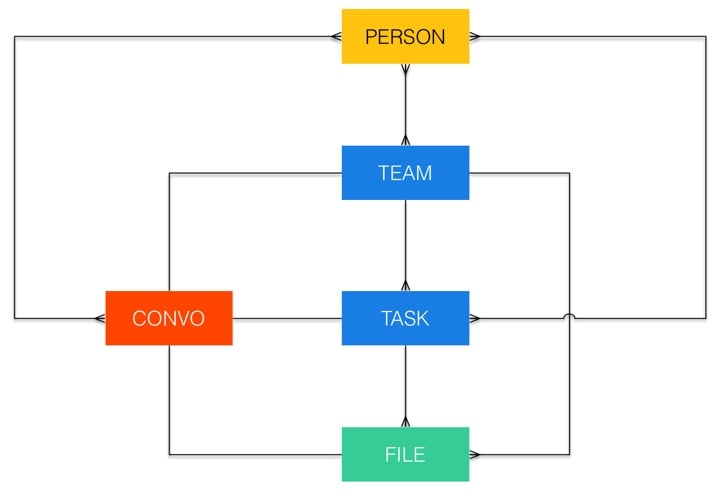
This is a tool that’s primarily used as the first step in relational database design. But I found it really useful for us to define the constraints within which we could create user flows. Let me explain with an example. Here’s a simplified version of the ER model we came up with for this project (using Crow’s foot notation):

Entity-relationship model

Each color represents a different back-end service. Here’s a subset of what the diagram tells us:

  • A team can have multiple tasks, but each task can only be assigned to one team.
  • A task can have multiple files associated with it, but each file can belong to only one task (or team).
  • A person can be part of multiple teams, and a team is made of multiple people.
  • There is a 1:1 relationship between teams, tasks, files, and the conversations about those entities.
  • Outside of those relationships, a person can be part of multiple conversations, and a conversation can consist of multiple people.

If all this sounds a little bit boring, I hear you, but here’s the power of this diagram: it ensures that whatever UI we come up with serves the underlying entity relationships, and not the other way around. This is huge. For example, if we started with the UI we might say that users can attach files to a task or project within the product’s main interface. But since a 1:1 relationship exists between Conversation and File, it means we can also attach a file to a task by dropping it into the Conversation view of that task. The relationships help us to come up with the most useful and robust UI.

What essentially happens if you start UI design with an ER model is that you create the boundaries of what’s “allowed” in the UI. It pushes you to think up useful ideas without the danger of coming up with something that wouldn’t work in the final implementation.

I don’t think ER models should be the starting point of every project. But in certain specific cases where many disparate products or services need to come together it’s proved to be really useful.

And now, on to journey mapping…


  1. Ok fine, I read the Wikipedia article. 

The internet of all the things

In Why Every Gadget You Own Suddenly Wants To Talk To You Mark Wilson imagines a scenario where every single thing in your home is always connected, always listening:

As consumers, we’re caught in the middle of the convenience. Do we choose to side with Siri, Alexa, or Cortana, and talk only to her, despite looming bias and the risk of growing dependent on a single voice—a voice that could take advantage of us? Or do we side with a free market that gives a voice to every stupid overzealous object in our lives, however confusing that may be, in a world where ordering milk becomes a bidding war on a commodities training floor?

Which future do you root for? They both sound horrible.

This is the current situation we are in—The Internet of Way Too Many Things. We’ll eventually figure it out and make useful connected products, but right now it’s just a race to be first, although no one really seems to know first at what.

The web/app pendulum swing

It’s interesting to see the web vs apps pendulum swing back to the web in recent months. From Larry Seltzer’s Can Web standards make mobile apps obsolete?:

What’s the alternative? Well, perhaps the best answer is to go back to the future and do what we do on desktop computers: use the Web and the Web browser. Updates to HTML apps happen entirely on the server, so users get them immediately. There’s no window of vulnerability between the release of a security fix and the user applying the update. So with a capable, HTML-based platform and a well-designed program that makes good use of CSS, one site could support phones, tablets, PCs, and just about anything else with one site.

The primary issue with moving back to the web is mainly what the web has become in recent years. As Maciej Cegłowski points out, we have a website obesity crisis. The talk (which you shoud definitely read) starts like this:

What do I mean by a website obesity crisis?

Here’s an article on GigaOm from 2012 titled “The Growing Epidemic of Page Bloat”. It warns that the average web page is over a megabyte in size.

The article itself is 1.8 megabytes long.

We can’t have it both ways, unfortunately. The only way that the web can become a better mobile platform than apps is if we take the obesity/performance crisis seriously. Otherwise the “it’s too slow!” argument will always win.

For an example of how this idea could work sensibly, see Addy Osmani’s excellent Getting started with Progressive Web Apps.

New article on UX Booth: The future of 3D Touch

I just published my first article on UX Booth. For The Next Step for 3D Touch I did some digging on where we might be headed with the 3D Touch feature in the new iPhones. I got particularly fixated on the idea of reducing an app’s UI to only the icon on the home screen:

So what would happen if 3D Touch became an app’s main UI? What could happen if we created apps solely comprised of shortcut actions and dynamic actions—and nothing else?

Read on for more…

How to display threaded discussions on the web

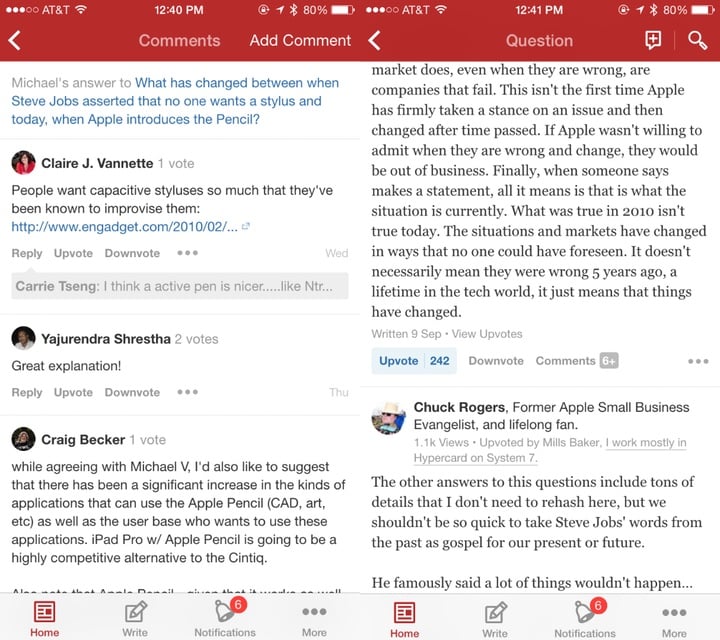
I’ve been doing some work on threaded discussions and comment threads in our web and mobile apps, and I thought it might be useful to summarize some of my findings here. The particular issue we’re trying to address is how to deal with infinitely threaded discussions, like the kind you find on Hacker News and Reddit1:

Infinitely threaded comments on Reddit

The first thing I did was some research on the different approaches currently used on the web and mobile for discussions and comments. There are some weird outliers, but in general there are five major ways threads are handled:
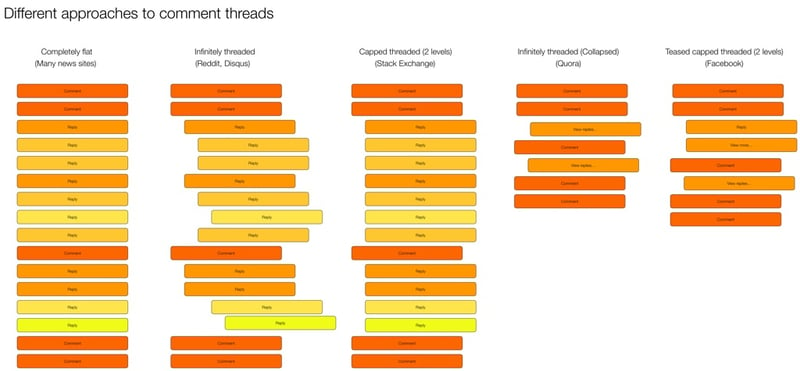
Threaded discussions on the web

I did some further digging and came up with the following list of pros and cons for each approach.

Completely flat

  • Example: New York Times
  • Pros:
    • Easy to navigate—just scroll down
    • Content not pushed off screen
  • Cons:
    • No context available
    • Difficult to follow conversation or see what a comment/reply refers to

Infinitely threaded

  • Example: Reddit
  • Pros:
    • Context always visible
    • Can have deep side conversations
  • Cons:
    • Difficult to navigate
    • Hard to find new replies on a thread
    • Pushes content off screen (as threading continues to reduce column width)
    • Doesn’t let you decide which tangents (reply threads) you want to dig into2

Capped threaded

  • Example: Stack Exchange
  • Pros:
    • Sets expectations that replies can’t go on forever
    • Keeps context visible (up to a point)
    • Content not being pushed off the screen
  • Cons:
    • Deeper levels of replies not possible

Infinitely threaded (collapsed)

  • Example: Quora
  • Pros:
    • Context available on demand
    • Easy to scroll and decide which tangents to go off on
    • Less cognitive load to scroll through
  • Cons:
    • An extra action needed to view context

Teased capped threaded3

  • Example: Facebook
  • Pros:
    • Context available on demand
    • Easy to scroll and decide which tangents to go off on
    • Less cognitive load to scroll through
    • Can highlight relevant content as teasers
  • Cons:
    • New comments in thread can be confusing without their context

Our approach

All design in a business is compromise. In our case, we need to figure out what we’re willing to gain, and what we’re willing to give up for it. In our case, our existing product uses infinitely threaded comments. So any change from that will obviously be… complicated. But considering that we want a single approach on mobile and web, it currently looks like we’re going to go with the Teased capped threaded approach:
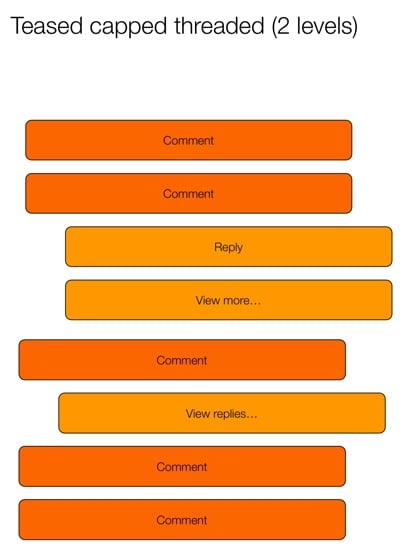
Teased capped threaded

This seems to strike the best compromise between easy scanning and the ability to drill into specific conversations. The “teaser reply” is particularly interesting, because it opens up some neat ways to provide relevant content to users. Perhaps you show the first unread reply, or the latest reply by someone you follow, or the most-liked reply. We’re still trying to figure out what would be most useful.

Another outstanding issue is if/how to deal with this approach differently on desktop and mobile. Some apps (like Quora and Facebook) split the view into two pages. The first page has the content and the first level of comments, and the second page has only the reply threads. In digging into it a bit more, it looks like this is mostly to make the app more performant. Here’s how Facebook does it:

Facebook comments

And here’s Quora:

Quora comments

Youtube, on the other hand, does it all on one page:

Youtube comments

We’ll need to dig into the performance issue, but my preference would be for a single page with truncated replies, like YouTube does it. Our current working hypothesis for a good solution is this:

  • Show entire comment thread on the same screen (replies not on a separate screen) to make the flow better (easier to scan and dig into individual threads)
  • Cap each individual comment at 5 lines (with a way to expand) (Mobile only)
  • Show first reply to a comment, with “View more replies” to load 5 more (“View more” on mobile only)
  • Show first 10 comments on a post, with “View more comments” to load the next 10 (“View more” on mobile only)

I like this hypothesis because it keeps the approach the same across devices, but still allows for differences in screen real estate available on mobile and desktop. We’re still in the middle of the debate, so if anyone has any recommendations or anything to add, please let me know!


  1. Yes, Reddit starts capping threaded replies at some point, but they’re the best example out there of threads that go on forever. 

  2. Jeff Atwood did a good deep-dive on these issues in his post Web Discussions: Flat by Design 

  3. Yeah, I know I’m not good at naming things… 

Mobile first: not the right answer, just an efficient one.

Here’s some solid pragmatism from James Archer in Why is it so Easy to Get “Mobile First” Wrong?:

Mobile-first design isn’t, in itself, the right answer. It’s just an efficient answer. If you can design for one device and then tweak it to more or less function on other devices, you shave a lot of time off the design process. With the cornucopia of possible devices you’d otherwise have to design for, that’s definitely a good thing.

Empathy in enterprise software

In Design Thinking Comes of Age Jon Kolko describes one of the biggest (and most important) shifts we’re starting to see in enterprise software:

To build empathy with users, a design-centric organization empowers employees to observe behavior and draw conclusions about what people want and need. Those conclusions are tremendously hard to express in quantitative language. Instead, organizations that “get” design use emotional language (words that concern desires, aspirations, engagement, and experience) to describe products and users. Team members discuss the emotional resonance of a value proposition as much as they discuss utility and product requirements.

How to get user feedback on designs

Jessica Harllee’s Sharing Our Work: Testing and Feedback in Design is a great article on different ways to get user feedback on designs:

To help choose our path, we create low-fidelity mockups and do concept testing with Etsy users who fit the target audience for the project. Rather than invest a lot of engineering time up front on building something we might not use, we often test clickable prototypes, which, while clunky, are cheap to create and involve zero engineering time. They’re mockups of an unbuilt interface, which also means we’re able to throw in blue sky features. Focusing on the best-case scenario of the feature lets us test whether sellers grasp the concept—realism and constraints can come later.