Menu

Posts tagged “technology”

Designing for behavior change

Dan Lockton’s As we may understand is unnecessarily long and rambling at times, but it’s still worth it for the very interesting views on the Internet of Things and designing for behavior change:

Many of the issues with the ‘behaviour change’ phenomenon can be characterised as deficiencies in inclusion: the extent to which people who are the ‘targets’ of the behaviour change are included in the design process for those ‘interventions’ (this terminology itself is inappropriate), and the extent to which the diversity and complexity of real people’s lives is reflected and accommodated in the measures proposed and implemented. This suggests that a more participatory process, one in which people co-create whatever it is that is intended to help them change behaviour, is preferable to a top-down approach. Designing with people, rather than for people.

Again, it comes down to understanding people and their needs before embarking on a design. I wonder if we’ll ever fully learn this lesson.

Also see:

Using Mail.app as a replacement for Outlook for Mac

The biggest problem that many Mac users struggle with is that we work for organizations that use Exchange for email and calendar management. This means that, in most cases, we have to use Outlook for Mac if we want the majority of basic tasks to work. It’s an application that is so ugly and bug-ridden that most people look like this every time they open it:

Outlook

The problem is that traditionally it’s been pretty difficult to make OS X’s Mail.app play well enough with Exchange to be a viable replacement. For my personal use case there were a few things that always held me back:

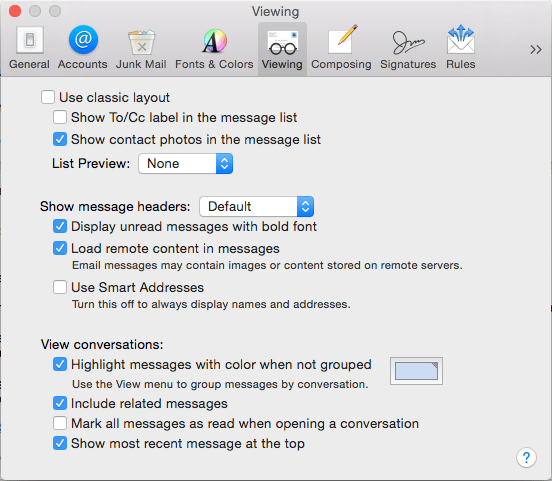
  • The default view settings are not conducive to effectively manage a lot of email.
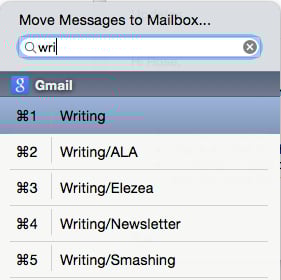
  • No keyboard shortcuts to move messages into folders.
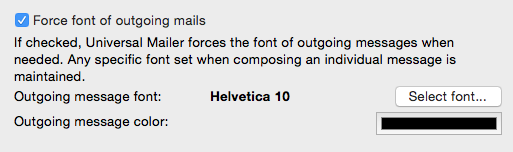
  • All other email programs display the default system font when it receives an email generated in Mail.app — in Office for Windows this is Times New Roman.

I think I’ve finally addressed these issues enough to make Mail.app my primary mail application and ditch the horrors of Outlook. But you’ll need a few settings and plugins to get that done.

View options

I like the simple, friendly list view that these options give me. Try it out:

View options

Shortcuts for moving messages

Mail Act-On 3 is an essential extension. It does a bunch of different things, but for the best feature is that you can map a key to moving messages to a different folder (I use “v” to match Gmail’s shortcuts), and then use type-ahead to pick the right folder:

Move messages

Changing the default font

Universal Mailer is another powerful plugin that just makes Mail.app work better, but its best features is that you can set a system font that is respected by other email programs:

Force font

Unexpected bonus features

Switching to mail brings a bunch of great things with it that you don’t get in Outlook:

  • Smart folders that can bring a bunch of different emails together based on specific criteria you set.
  • Great integration with iOS, since it takes advantage of handoff.
  • Fast email that’s not ugly.

All I’m saying is, give it a try. Your eyes will thank you.

The new obsession: daily news apps

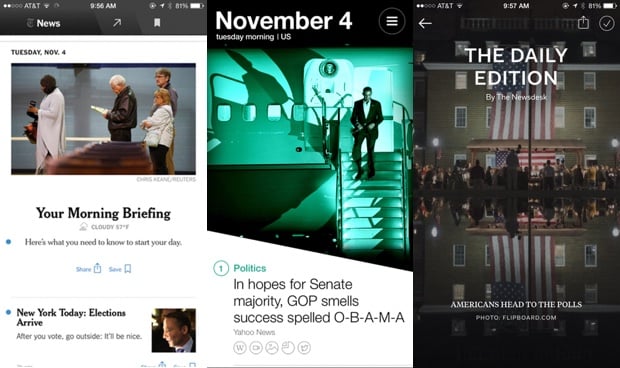
Daily

Apps that provide daily news summaries are the current rage. It appears that we’ve moved on from our Weather app and Messaging app obsessions. It’s a worthy goal, though. We’ve created so much noise on the Internet, we owe it to people to build tools to help them navigate all the noise we made. It’s the only viable solution.

Cynicism aside, though, I download all these apps and try them out. Sometimes they rotate on to my home screen for a while. Yahoo News Digest lasted a while. Everyone loves Circa so I tried that for a while, but it was still too much for me. The problem with the news is that it never ends — there are no edges — which is the reason these apps exist in the first place.

The one that I keep coming back to is NYT Now. I really, really love this app. The morning and afternoon briefings are succinct, and give me the sense that I got the day’s most important news. And I can dig deeper if I want to. It’s on my home screen and will probably stay there.

The latest entry to this market is Flipboard’s The Daily Edition. I use Flipboard every day (hey, you should subscribe to my Flipboard Magazine!), so it’s a natural extension and one less app to follow. My only problem with it so far is that I can’t remove sections I’m not interested in (Sports, ugh).

Anyway, the reason I write about this is that there’s something I don’t understand about this space. All these apps were built from the ground up to do some kind of human curation and give people a sense of the most important news of the day. But the two companies that have all the data in the world to make this happen — Facebook and Twitter — haven’t jumped in. I guess you could argue that Paper is Facebook’s attempt at this, but not really because they hedged their bets by making it a full-featured Facebook client anyway.

I don’t know if this is Innovator’s Dilllemma or what, but it seems like these two companies could make kick-ass daily news apps with data they already have at their disposal. Why haven’t they done this?

[Sponsor] Mandrill: the fastest way to deliver email

Thank you to Mandrill for sponsoring Elezea this week! I’m a big MailChimp fan, and this is another great product of theirs.

Integrate, deliver, track, and analyze with email infrastructure from Mandrill.

Mandrill is a scalable, reliable, and secure email infrastructure service trusted by more than 300,000 customers. It’s easy to set up and integrate with existing apps. And it’s really fast, too. With servers all over the world, Mandrill can deliver your email in milliseconds. Detailed delivery reports, advanced analytics, and a friendly interface mean your entire team—from developers to marketers—can easily monitor and evaluate email performance.

Get started with Mandrill today.

Mandrill

Sponsored via Syndicate Ads

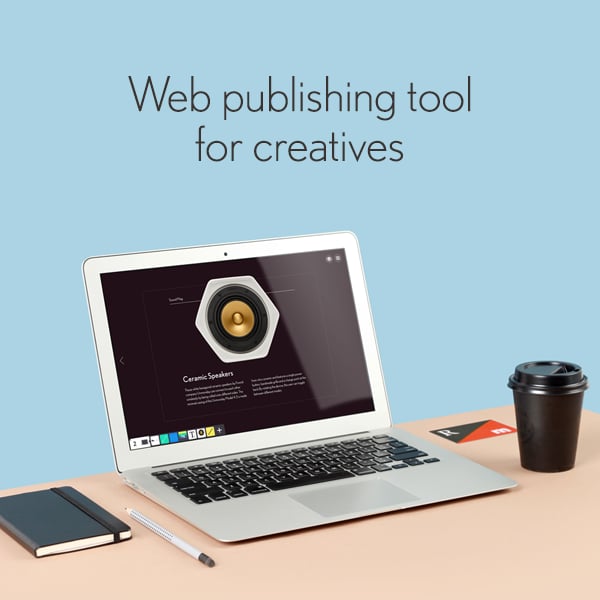
[Sponsor] Readymag: Web Publishing Tool for Creative People

Usually we use a bunch of different software for creating such things as websites, presentations, photo stories and online magazines. The truth is — it all can be done easier and with one tool.

Do design, forget about coding.

Readymag provides a simple online tool for designing and publishing all forms of content, helping to focus on the creative process, rather than interface complexity and code. Among the main Readymag’s features:

  • Viewport: Easily create responsive layouts for mobile deviсes.
  • 1500+ free web fonts: From Typekit, Webtype and Google Fonts.
  • Password protection: Create private publications and share with specific audience.
  • PDF-export: Save and view your work offline.
  • Ready-to-use templates: Made by talented designers from around the world.
  • Plus: Free hosting, custom domain and analytics.

Stay creative. Try Readymag now for free.

Readymag

Sponsored via Syndicate Ads

Software is sometimes done

In the midst of the recent brouhaha about Markdown1, Craig Mod posted an interesting tweet about the nature of software. In response to John Gruber’s assertion that the original version of Markdown doesn’t need a significant amount of work, he said this:

@gruber @waxpancake I think your point about it being ok for software to be “done” is very strong. We need more “done” software.

— Craig Mod (@craigmod) September 5, 2014

This gave me pause, because it flies in the face of a very common mantra in the design world. Sure enough, it didn’t take long for another big name in Design to throw down the words many of us have said over and over:

@craigmod @gruber @waxpancake Software is never done.

— iA Inc. (@iA) September 5, 2014

This happened a while ago, but I can’t stop thinking about it. Craig is one of my favorite thinker-writers (hey, if singer-songwriter is a real word, this is totally a real word as well), so I didn’t want to treat it as just another easily-refuted throwaway comment.

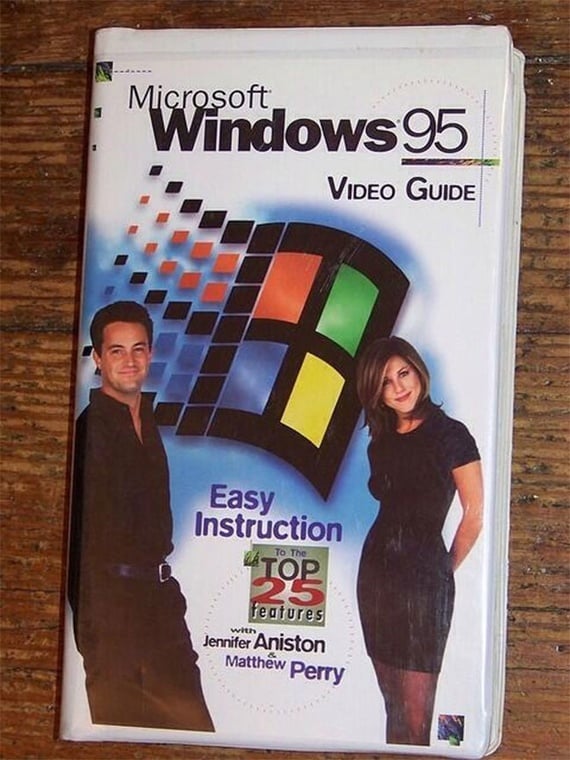
The fact is that it isn’t that long ago that software was actually done when it came out. It’s only a couple of decades ago that software showed up on a CD-ROM and we made videos about how to use it:

Windows 95 video

When Windows 95 came out, it was done. Yes, there were some patches to it, but they were few and far between, and in general quite difficult to come by. But of course, then the Internet and App Stores happened in full force, and suddenly we decided that “Software is never done”. In some sense this is certainly true. There are always bugs to fix, things to improve, more features to add, unused features to remove — and of course, the SaaS model makes it all so easy. But I wonder if we’ve taken this a bit too far.

A fairly recent example that comes to mind is email software Sparrow’s acquisition by Google. Man, did we freak out about that one. The thing is though, the software didn’t suddenly stop working just because it was “done.” It was still there, it was still great, and it still works to this day. But that’s not good enough for us any more. Things have to keep getting better and better. And that’s fine — I’m not arguing against progress. In fact, I deliberately turn off automatic app updates on my phone because I love updates and release notes so much.

But I also wonder if our obsession with the never-doneness of software — the inherent throw-awayness of our MVP and test-and-learn culture — is having a negative effect on the quality and lasting meaning of the software we make. I’m reminded of Jennifer Fraser’s words in her article What I Bring to UX From … Architecture:

As an architect, the implicit permanence of designing a building carries with it a sense of responsibility… I can’t help but wonder if we would have better designed products if some of that responsibility and sense of permanence of architecture found its way into what we do as user experience designers.

And here’s Tony Fadell, talking about the creation of the Nest thermostat:

Fadell looks out at the Manhattan skyline and says that he always wanted to be an architect; that buildings stay beautiful forever but digital devices are quickly obsolete. “You look at hardware or software five years later? They’re crap. You would never use them again. People use architecture all the time.”

His voice rises. “What is our form of architecture? What is the thing that lasts of beauty?”

Or consider Dmitri Fadeyev’s words in a discussion about Russian architecture:

What’s interesting about this type of architecture is that its aim goes far beyond that of creating a functional underground system. Its aim is to promote a political ideal, and it does it through beauty by enriching lives of the people who get to experience it. The question here isn’t: how do we solve the problem of creating a metro station in an efficient manner – instead the question is: how do we create a station that elevates people’s mood and inspires their lives. This architecture isn’t there just to help you live – it makes life worth living.

I do wonder what would happen if we felt the weight of responsibility a little more when we’re designing software. What if we go into a project as if the design we come up with might not only be done at some point, but might be around for 100 years or more? Would we make it fit into the web environment better, give it a timeless aesthetic, and spend more time considering the consequences of our design decisions?

Coming back to Craig Mod’s tweet, I have to say that on reflection I agree with him. We need more software that’s done — not all of it, just more of it. Just like we’re always going to have prefab buildings to serve a particular function at a particular time, software that continues to change and improve pushes us forward and is absolutely necessary. But maybe it’s ok for Markdown to be done. Or Sparrow. Or that app you’re working on. And by going into it with a realization that this is going to be done some day, you might even make something that lasts for decades.


  1. The details of the Markdown argument between John Gruber and Jeff Atwood isn’t the point of this article, so don’t worry if you missed it. 

A View from a Different Valley

A couple of months ago I got an email from the wonderful people at A List Apart, asking if I’d be interested in starting a regular column on ALA. I believe my response was something to the effect of “1,000 times yes!!” How could it not be? I’ve been reading ALA for such a long time, and I really enjoyed the one time we’d worked together before, on an article called Usable yet Useless: Why Every Business Needs Product Discovery.

In an effort to figure out where to take the column, my editor asked me what kind of topics I’m interested in. I sent back a response that I was pretty sure would make her delete the email and step away from her computer very slowly. Here’s what I wrote:

  • My background is in sociology. My PhD dissertation was about social network theory — the real, mathematical kind, not what the phrase “social network” has since come to mean. So I like thinking about how our networked society is changing us. I’m much less interested in the “Google is making us stupid” view, and much more interested in the positive side. Clive Thompson’s Smarter Than You Think comes to mind immediately. (When I grow up, I want to write like Clive)
  • Following on from that, I like thinking about what parenting means in this new era. As I’ve been thinking about what my next side project should be after the book, I’ve toyed with a site for tech-oriented dads with young kids. What are the products they should be interested in, how do we teach our kids about technology and that it is not to be feared, but also not to be abused, because it is not neutral (see What Technology Wants. When I grow up I want to write like Kevin).
  • And again, following on from that (at least in my weird head), how does Sci-Fi culture play into all of this? (I know, weird, but stick with me). Our science fiction has become increasingly dystopian. The last positive science fiction series was probably Star Trek TNG. So what do our visions of the future tell us about living (and designing) today?

To my surprise, my editor didn’t freak out, and instead encouraged these topics. So we came up with the column name A View from a Different Valley. A column about technology, but from a perspective we don’t always expect. My first article for the column is called Work Life Imbalance, and it came out last week. It’s about the blurring lines between work and life:

There is a blending of work and life that woos us with its promise of barbecues at work and daytime team celebrations at movie theaters, but we’re paying for it in another way: a complete eradication of the line between home life and work life. “Love what you do,” we say. “Get a job you don’t want to take a vacation from,” we say—and we sit back and watch the retweets stream in.

I don’t like it.

I don’t like it for two reasons.

And this is, of course, where I ask you to read the rest if you’d like to find out why I don’t like it…

I’m really excited about this column, and hope to keep it going for quite a while. Thanks again to ALA — they’re awesome people. I like them a lot.

What 11 technology books tell us about our moment

Monica Guzman spent the summer on a tech book binge. She read 11 technology books to get a sense of our current technological moment. In the short article How my summer tech book binge changed the way I think about tech she explains some of the things she learned:

Tech serves us best when we create rather than consume. Where [Nicholas] Carr saw the worst of tech’s impact, Clive Thompson, in “Smarter Than You Think,” saw the best. One difference was that Carr — in arguing, for example, that the rise of short, fast media makes our contemplative muscles weak — all but ignored how tech boosts creation. It’s a common oversight: We’re transitioning from a world where public creation was difficult to one where it’s a cinch.

The same goes for public collaboration. Great things happen when we swirl together and build. Think Wikipedia. Blogs. The Internet itself.

This is, if nothing else, a great reading list.

[Sponsored post] Wearable Tech Hits the Road, the Waves and your Wardrobe

This post is sponsored by Rackspace Digital, the digital marketing infrastructure specialists.

In recent months, wearable tech has shown signs of emerging maturity. Not only are wearable devices getting smarter and more powerful, they’re also becoming more practical and beautiful. As batteries and sensors continue to get smaller, and with Google releasing the Android Wear operating system back in March, a slew of new wearables will hit the market before the end of the year. Smart watches, glasses, shoes, shirts, even jewelry. According to ABI Research, 90 million wearable devices will ship before the end of 2014. Here are a few of the new arrivals.

Riding Big Waves and Big Data

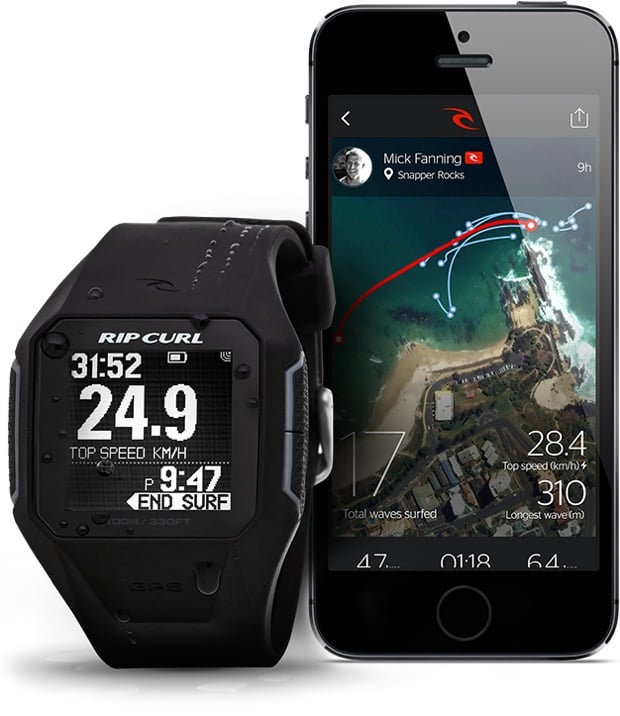
Rip Curl, an Australian company and an iconic brand in surf wear, is currently trialing its own smart watch with 200 surfers around the globe. Some surfers, like zealous runners, want to track all their stats—from the number of rides to top speeds, miles paddled and time spent in the water. Due to hit stores mid-September, the GPSSearch will be the world’s first GPS-powered surf watch. It uses satellite positioning and other sensors to obtain data and measurements that are then processed in the cloud using a cutting-edge database service. All the user information can be synced to an iPhone, iPad or desktop for visual analysis.

Google Maps in Your Shoes

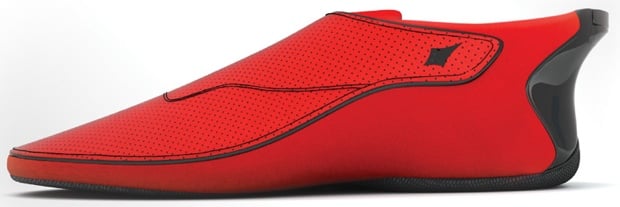
Indian startup Ducere Technologies is launching a pair of “smartshoes” known as Lechal shoes. The shoes connect to your smartphone with Bluetooth, using vibrations and Google maps to alert you when you need to make a turn. The left or right shoe vibrates depending on which way you need to turn. Not only is this a boon for runners or walkers in an unfamiliar city, it also has big payoffs for the visually impaired. Reportedly, Lechal shoes have already received 25,000 orders, even though the company won’t make them available until the end of the year. The shoes will cost between $100 and $150.

Making the Wearable More Wearable_

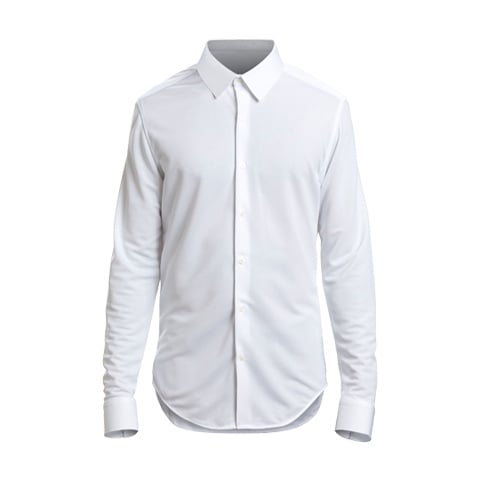
While Under Armour and Omsignal are leading the way with making smart shirts with built-in sensors for tracking workout data, there’s a new plan to take over the rest of your wardrobe. Ministry of Supply has launched a new line of men’s dress shirts using the same technology that NASA has implemented in its spacesuits for temperature regulation. The shirt absorbs heat when you’re hot and releases it back when the temperature dips. The good news is that it looks like a real shirt, not a space shirt.

Wearable Experiments, meanwhile, has released the Navigate Jacket for both men and women. A companion smartphone app stores destinations and feeds them to your jacket, turn by turn. LEDs and vibrations on the sleeves ensure you never make a wrong turn.

And finally, if vibrating jackets aren’t your style, consider the latest in wearable tech from Cuff, a manufacturer of smart jewelry. Now available for pre-order, the bracelets, necklaces and key chains come in a variety of styles and finishes that look more like accessories than tech hardware. Each piece of jewelry uses a small component called a CuffLinc that acts as an alert system. Using Bluetooth technology, the CuffLinc will sync up with a smartphone app to handle alerts and push notifications that can be customized for a personal network of friends and family.

Sponsored via Syndicate Ads

[Sponsor] Tower 2: the Git client for your Mac

Huge thanks to Tower 2 for sponsoring the site this week!

Version Control is an essential tool in today’s web and software world and a fundamental part of the workflow in teams large and small.

We believe that version control with Git should be easy. And why not beautiful?

It’s not about the command line or a Gui. It’s about how to be more productive, avoid mistakes and make your life easier.

With Tower 2, we’ve worked hard to make the best Git client even better. Completely redesigned and reengineered, Tower 2 comes with more than 50 additional features, a brand new design and an outstanding performance.

We believe we’ve made a tool that helps you to become a better professional.

Download the free trial today and see for yourself.

Tower 2

Sponsored via Syndicate Ads