Menu

Posts tagged “productivity”

[Sponsor] Igloo, an intranet you'll actually like

My thanks to Igloo Software for sponsoring Elezea’s RSS feed this week. Please check them out!

Igloo is now free to use with up to ten people, making it easier to work with your whole team, your customers or your partners.

Your Igloo is built around apps you already know and love: blogs, calendars, file sharing, forums, microblog and wikis.

Start building your Igloo instantly (no credit card required), or check out their awesome Sandwich Videos.

Igloo

Sponsorship by The Syndicate.

Focus and littered menu bars

The idea that we allow too many distractions to take our focus off the work we’re supposed to be doing is not new. And the solution — just turn things off! — is not rocket science either. But I find it interesting just how many blog posts we’ve seen about this topic over the past couple of years. Working in the Shed by Matt Gemmell is another really good one:

We act as if we take concentration for granted, yet everyone has had trouble keeping their mind on the task at hand. We litter our menubars with icons, keep notifications enabled, and run our email programs, chat apps and social media clients all day. Something’s got to give, and invariably it’s our creative output.

[Sponsor] TextExpander touch 2.0

My thanks for TextExpander touch for sponsoring Elezea’s RSS feed this week! I use TextExpander extensively across all my devices, and I can highly recommend it.

Type faster on your iPhone or iPad using short abbreviations that expand into long snippets, such as email addresses, URLs, and standard replies. Tap in your abbreviation and it automatically expands to the full snippet. You can even insert today’s date automatically with the default abbreviation “ddate”! Use Dropbox to sync your snippets to all your iOS and Mac devices!

New in TextExpander 2.0: Make customized, boilerplate replies fast and easy using fill-ins. Compose messages and expand snippets in formatted text. Insert macros for date, time, date math, etc. easily when editing your snippets on iOS.

Please note that iOS does not allow TextExpander touch to work in the background (as it does in Mac OS X). But you can expand snippets directly in over 160 apps that have built-in TextExpander touch support including OmniFocus, Drafts, Things, iA Writer, DayOne, Byword, Notesy, Elements, and WriteRoom. See the complete list of supported apps.

TextExpander

Sponsorship by The Syndicate.

[Sponsor] Backblaze: online backup & data dackup software

1 in 2 computer users lose data every year. Back up all your data with Backblaze online backup. It’s unlimited, unthrottled, uncomplicated, and unexpensive.

Don’t risk losing your music, photos, movies, and whatever else you’re working on or editing. Backblaze continuously and securely backs up all the data on your computer and external hard drives.

Need to restore or access your files? Download a single file or all your data from any web browser or have Backblaze FedEx you a flash key or USB hard drive. Even quicker - access your files right from your iPhone.


Whether it’s a broken hard drive, lost external, or a stolen computer, data loss happens all the time. For less than a cup of coffee, just $5/month, Backblaze can back up all the data on your computer.

It’s easy. Stop putting it off. Start your free trial, and get your backup started today.

Backblaze

Sponsorship by The Syndicate.

My Google Reader replacement setup

There have been quite a few posts over the past few months about what to do once Google Reader shuts down this weekend. I’ve been sticking my head in the sand, hoping that Silvio Rizzi will come to the rescue at the last minute and let me keep using my current setup, which is to use Reeder across all my devices (Mac, iPhone, and iPad). But alas, it looks like that’s not going to happen. So after much weeping and gnashing of teeth, here’s the setup I’ll go with for now.

  • Feedbin as RSS sync backend. I tried Feed Wrangler, but the lack of tags/folder structure is a deal breaker for me. I also set up Feedly, and it works nicely, but I’m just a bit worried about the service in general. There doesn’t appear to be a business model, and there’s currently no way to get your feeds out of the service. So, for now, $2/month for Feedbin is what I’m settling on. I really hope they add the ability to reorder and edit tags soon (come on, give the feature request some love!), but that’s the only major problem I currently have with it.
  • ReadKit on Mac. ReadKit just got a major update to support Feedbin, and it also lets me see and read all my Instapaper and Pinboard links in one place. This will be my desktop replacement for Reeder.
  • Reeder on iPhone. I don’t know how much longer Reeder will be around, but the iPhone client does support Feedbin, and it’s still my favorite RSS client ever, so I’ll stick with it for now.
  • Mr. Reader on iPad. Mr. Reader also just got a major update to support Feedbin. I used Mr. Reader before, but switched to Reeder when the iPad app became available. But since the Reeder iPad app is now very old (and still only supports Google Reader sync), I’ll move to Mr. Reader for the time being.

This is obviously quite a disjointed setup, and I’m not going to give up hope that there will be One Client To Rule Them All in the coming months. But this setup will hold me over until then. Like having to listen to Owl City while you wait for a new Death Cab for Cutie album to come out.

But I do feel like I now know way too much about the RSS reader landscape than I every wanted to. Thanks, Google.

Thanks, Google

[Sponsor] MightyDeals.com: exclusive deals for web professionals

Ask anyone who’s ever tried to knock in a nail with a screwdriver: having the wrong tools is a major hindrance. Access to the right tools saves time, increases the quality of your work and adds to the pleasure of doing a job well.

The trouble for designers & developers is that there are so many tools out there, it’s hard to know what’s worthwhile, let alone being able to afford half of the resources we want.

That’s where MightyDeals.com comes in. We negotiate promotional deals with suppliers and often manage to agree up to 97% off regular pricing.

And what’s more, these aren’t just any tools, some of the best companies on the web promote their products through MightyDeals.com.

So if you’re looking for great deals, or just want to stay in touch with the latest fonts, applications, themes and resources, visit MightyDeals.com or sign up for our newsletter today.

Might Deals

Sponsorship by The Syndicate.

The problem with letting algorithms make most of our decisions

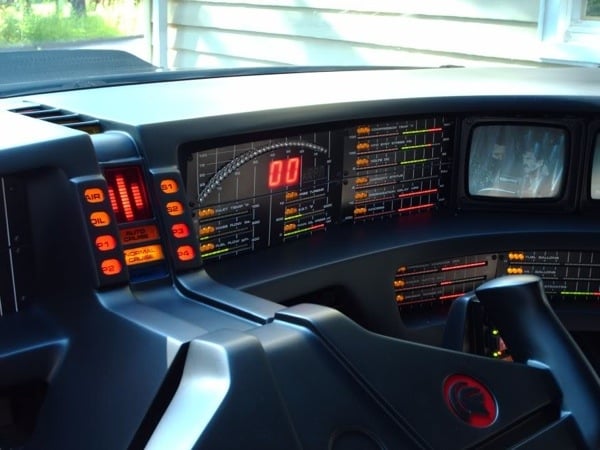
Knight Rider Kitt

Image source: Knight Rider’s KITT - My finished replica!

Nicholas Carr asks some serious questions about things like self-driving cars and our increased reliance on algorithms for decision-making in Moral code:

As we begin to have computer-controlled cars, robots, and other machines operating autonomously out in the chaotic human world, situations will inevitably arise in which the software has to choose between a set of bad, even horrible, alternatives. How do you program a computer to choose the lesser of two evils? What are the criteria, and how do you weigh them?

Clive Thompson picks up the thread in a very interesting Wired article called Relying on Algorithms and Bots Can Be Really, Really Dangerous:

The truth is, our tools increasingly guide and shape our behavior or even make decisions on our behalf. A small but growing chorus of writers and scholars think we’re going too far. By taking human decision-making out of the equation, we’re slowly stripping away deliberation—moments where we reflect on the morality of our actions.

But even stepping away from the morality issues, there are some other undesirable side-effects to algorithmic decision-making:

Or as Evan Selinger, a philosopher at Rochester Institute of Technology, puts it, tools that make hard things easy can make us less likely to tolerate things that are hard. Outsourcing our self-control to “digital willpower” has consequences: Use Siri constantly to get instant information and you can erode your ability to be patient in the face of incomplete answers, a crucial civic virtue.

The argument is that smart technology has the potential to strip us of our grit. And that’s a big problem, particularly if you subscribe to what author Paul Tough calls “the character hypothesis”: the notion that noncognitive skills, like persistence, self-control, curiosity, conscientiousness, grit and self-confidence, are more crucial than sheer brainpower to achieving success.

The hypothesis is that character is created by encountering and overcoming difficult situations. Therefore one of the big dangers of algorithms making our decisions for us is that if it removes challenges from our lives, it reduces our ability to develop grit and build character. It’s like an Axiom for our brains.

Update: I came across a couple more articles about these issues. See More on algorithmic decision-making.

[Sponsor] Igloo: an intranet you'll actually like

My thanks to Igloo for sponsoring Elezea’s RSS feed this week.

Igloo has some funny new Sandwich videos to lighten your day (and maybe convince your boss and/or IT to upgrade your intranet to something more human). Check them out:

(You can also get a free 30-day trial and bring back Cake Fridays here.)

Igloo

Sponsorship by The Syndicate.

How to create a culture of High Performance Happiness

In Where the Happy Talk About Corporate Culture Is Wrong Cliff Oxford makes the case that there is big difference between Human Resources Happy and High Performance Happy in organizations:

Here’s how I define H.R. Happy: Bosses are at least superficially nice and periodically pretend to be interested in employees as people. These employees can count on birthday-cake celebrations and shallow conversations about what their hobbies are outside of work. This approach allows H.R. people to do the job they love — compliance and regulations — instead of the job they should be doing — finding and recruiting the best available talent.

And the flipside:

High Performance Happy is an attitude with a skill set that says we are on a mission that is bigger than any one of us. We find our happiness in being on a world class team that is making a difference.

I don’t agree with all of Cliff’s advice on how to foster cultures of High Performance Happiness, but the distinction is certainly spot-on. As for how to get to a culture like that, I still think Jocelyn Glei has one of the best summaries in her article What Motivates Us To Do Great Work?:

For creative thinkers, [author Daniel Pink] identifies three key motivators: autonomy (self-directed work), mastery (getting better at stuff), and purpose (serving a greater vision). […]

As creative thinkers, we want to make progress, and we want to move big ideas forward. So, it’s no surprise that the best motivator is being empowered to take action. […] In short, give your team members what they need to thrive, and then get out of the way.

(link via Marcelo Somers)

[Sponsor] PDFpenPro 6 from Smile

PDFpenPro is the advanced version of PDFpen. PDFpenPro does everything that PDFpen does, such as add signatures, edit text and images, perform OCR on scanned documents and export Microsoft Word documents. It also has the ability to create a PDF form, build a table of contents, and convert HTML files to PDF.

The new PDFpenPro 6 adds document permission settings. When you share a PDF, you can restrict printing, copying, and editing of your PDFs. You can also use the new automatic form field creation tool to convert a non-interactive form into an interactive PDF form with text fields and checkboxes automatically added.

PDFpenPro 6 is available on the Smile Store and the Mac App Store for $100. A free demo can be downloaded on the Smile site. Find out why Macworld calls PDFpenPro “the crème de la crème of PDF editing and annotating applications.”

PDFpenPro 6

Thanks to Smile for sponsoring Elezea’s RSS feed this week! Sponsorship by The Syndicate.