PDFpenPro is the advanced version of PDFpen. PDFpenPro does everything that PDFpen does, such as add signatures, edit text and images, perform OCR on scanned documents and export Microsoft Word documents. It also has the ability to create a PDF form, build a table of contents, and convert HTML files to PDF.
The new PDFpenPro 6 adds document permission settings. When you share a PDF, you can restrict printing, copying, and editing of your PDFs. You can also use the new automatic form field creation tool to convert a non-interactive form into an interactive PDF form with text fields and checkboxes automatically added.
PDFpenPro 6 is available on the Smile Store and the Mac App Store for $100. A free demo can be downloaded on the Smile site. Find out why Macworld calls PDFpenPro “the crème de la crème of PDF editing and annotating applications.”
I’d like to thank PDFpen 6 for sponsoring Elezea’s RSS Feed this week.
If you need to do anything with PDFs, you need PDFpen. Add a signature, make changes, correct a typo, fill out forms, and more. Got a scanned document? PDFpen includes OCR to convert that scan into text that you can search or edit. Want to remove sensitive info such as tax ID numbers from your PDF? Use PDFpen to redact your private data.
The latest version, PDFpen 6, has improved interface and tools. And now you can export your PDFs to Microsoft Word format for sharing or editing. See the new features in action in this video by David Sparks.
Buy PDFpen for $60 in the Mac App Store or directly from Smile. Or buy PDFpenPro for $100 and you’ll get advanced features like form creation tools and document permission settings. Download the free demo!
Even though the mere thought of giving up coffee and switching to tea makes me break out in a cold sweat, I really enjoyed Teresa Brazen’s The tea, leadership, loyalty axis. It’s a good reminder about the importance of being mindful and present:
These days, people who aren’t checking their phones, email, or doing some other kind of work in their head while in conversation with others really stand out. Have you noticed how good it feels to be around these anomalies? How often are your colleagues really giving you their undivided attention (and vice versa)? Make no mistake: inattention is noticed, no matter how sly we are at texting under the table.
It reminds me of this classic tweet from Scott Simpson:
My new standard of cool: when I’m hanging out with you, I never see your phone ever ever ever.
Thanks to Shopster for sponsoring Elezea’s RSS feed this week — I’ve been looking for something like this for a while!
Shopster is a new kind of groceries list app that learns what you purchase and where, so it can remind you later on.
Whenever you check an item as purchased, Shopster learns the location where you got it. The next time you look for the same thing, a geofenced alarm will be triggered when you are near the location.
Features: - Autolearning of locations when checking items as purchased. - Geofenced reminders for your products, based on your prior buying history. - In-place editing table, for quick corrections and editions. - Unique ruler to quickly enter the number of items you need to buy. - Smart autocomplete, to assist you entering frequently purchased products, based on your previous history. - Reorder items with a simple tap and hold.
Now that I’ve started using Twitter for feeds, I’m unlikely to ever go back. The ease of sharing, Favoriting, Retweeting, sending to Instapaper, etc. not only match, but at times surpass even Reeder in terms of ease and simplicity. One less app to deal with is a win, not to mention that the links are ordered exactly as I like them (and holy crap, Tweetbot iCloud sync. So good).
Cap goes over the pros and cons of his decision, but I think there’s one major con that he left out: Twitter is a river, RSS is a filing cabinet. Ok, I apologize for the mixed metaphor, but hear me out.
Twitter updates flow by you in a never-ending stream of links. This means that if you choose to follow RSS feeds in this way, all the separate article feeds flow into that one river, and there’s no stopping it. If you happen to be offline for a day or two, it’s extremely likely that you’ll miss an update from an infrequently-updated website you love.
With RSS, that problem doesn’t exist. Since article feeds are separate, there isn’t one giant river (you can choose to view “All feeds” in most readers, but that’s optional). So, I just open the filing cabinet whenever I want, and I can immediately see how many updates my favourite sites have received. I can decide to nuke the unread counts on a site with 50 new items. I can seek out the content I really want. I don’t have to worry that the river will keep flowing and I’ll miss the boat completely (ok, now I’ve really killed this metaphor).
So, although I agree with the pros Cap highlights in his post, and I’m glad he found a reading flow that works for him, I’m not ready to give up RSS. It’s still my favorite way to discover good content.
I’d like to thank Xero for sponsoring Elezea’s RSS feed this week.
Xero is online accounting software that’s simple, beautiful and smart. With Xero, your financial data is displayed visually on the dashboard so you get a clear picture of your finances — anywhere, anytime, on any device.
It connects to your bank, and with over a hundred apps such as Harvest, Batchbook & Quoteroller, to give you all the information you need to run your business — without any manual data entry.
Xero’s online so you can start using it right away, no need for installation or updates — you’re always using the latest version.
We’ve been led into a culture that has been engineered to leave us tired, hungry for indulgence, willing to pay a lot for convenience and entertainment, and most importantly, vaguely dissatisfied with our lives so that we continue wanting things we don’t have. We buy so much because it always seems like something is still missing.
Feeling indignant that he would insinuate that you of all people have been indoctrinated by a consumerist culture? Before you close your laptop in disgust, hear the man out. Haters gonna make some good points sometimes…
Here’s some great advice from Joshua Porter: when you’re in a design meeting (or any other meeting, for that matter), Always be capturing:
“Always be capturing” is about the habit of continuously recording the value from your conversation. For example: If you’re talking about a new concept, you should be sketching it as you talk so your team has a shared understanding and an artifact of the conversation.
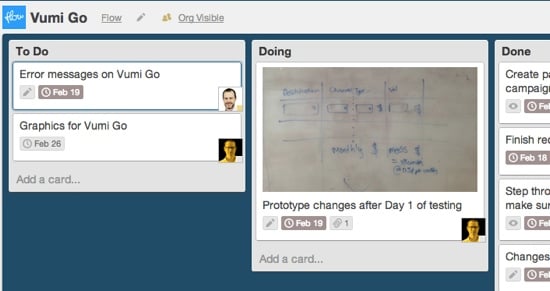
Joshua gives some great tips, including taking photos of your sketches and uploading them to Dropbox immediately. We do this as well, except instead of Dropbox, we add the photos directly to a Trello card related to the project at hand (using the iOS/Android app). Those photos are then immediately accessible to everyone who works on the project:
We’re increasingly using Trello not just to schedule our work, but also to make our thoughts and sketches immediately available to the team within the context of the task at hand. That’s something Dropbox can’t do.
In The Redemption of Distraction James Shelly goes into the etymology of the word “distraction”. He points out that the original meaning implies being “pulled away” from something, so the word doesn’t always deserve its bad reputation. Being pulled away from less valuable activities to focus on something with more value could be quite useful to increase productivity:
Perhaps we ought to get over our cultish demonization of distractions so that we can effectively utilize them. Perhaps we would benefit from instituting better distractions — not necessarily less of them. Perhaps the spreadsheet, artwork, or document before us needs its own interval or chime. Perhaps eliminating so-called ‘negative’ distractions is only half the story: a monastery is designed to eliminate interruptions, and yet sights, sounds, and smells are still employed to ‘pull away’ one’s focus from intruding, wandering thoughts. Such a place does not provide the absence of distraction, it utilizes distraction. Intentional distractions ‘pull away’ our thoughts from useless tangents, in order to ‘contract’ our focus back where we want it.
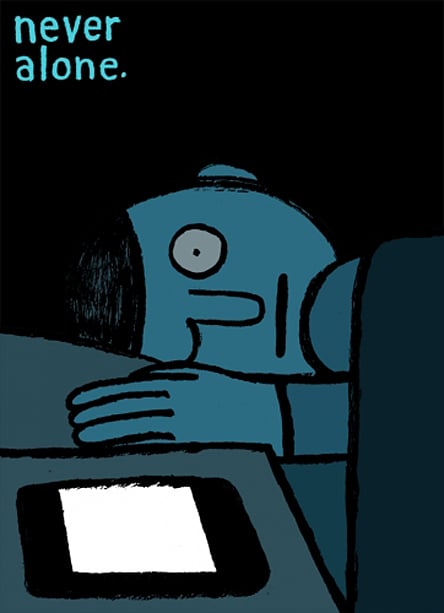
Of course, these days, most of our distractions are more destructive than they are productive. Jean Jullien sums it up nicely:
Good design takes time—more time than most of us are allowed. […] Sadly we see too many potentially amazing designers stuck by the glass ceiling of time. So they settle on the first solution that looks viable and are never allowed to sweat the details. They are forced to rely on 1% of inspiration without the benefit of perspiration.
So this is the dirty little secret in our industry. The best designers and developers rarely have more talent. They simply have more time.
This rings true, but I’d like to expand on that and say that it’s not just a problem in our industry. Things have become very, very fast all around us, and our impatience has reached remarkable levels. We pirate movies because we can’t wait 1 minute for the anti-piracy warnings on DVDs to play through (oh, the irony). We microwave pop tarts for 3 seconds because we can’t wait for them to finish toasting. Brian Regan has a pretty funny standup bit about this (the microwave thing starts at 2:35):
The essence of my case is this: given the fast pace of modern life, most of us tend to react too quickly. We don’t, or can’t, take enough time to think about the increasingly complex timing challenges we face. Technology surrounds us, speeding us up. We feel its crush every day, both at work and at home.
Yet the best time managers are comfortable pausing for as long as necessary before they act, even in the face of the most pressing decisions. Some seem to slow down time. For good decision-makers, time is more flexible than a metronome or atomic clock. As we will see over and over, in most situations we should take more time than we do.
We should take more time than we do, yes. But we don’t. Because business doesn’t work that way. Technology doesn’t work that way. And, most of all, release schedules don’t work that way.
We all know the saying Fast, good, and cheap — pick two. We live in an environment where everything has to be “fast”, so we’re inevitably left with choosing between “good” or “cheap”. And guess which one we end up having to choose most of the time…