Menu

Posts tagged “productivity”

Switch Design

Anthony Colangelo explains how he uses a technique called Switch Programming to help solve coding problems:

We gave each other 30 seconds to explain our intended results, and nothing else. Then, we traded computers and got to work.

I was working on a fairly new project with a codebase that Mark really hadn’t been in, and Mark was working on an old project that I hadn’t touched for over a year and a half (long story). Point is, neither of us were intimately familiar with the project we were debugging. It didn’t matter—we knew what had to happen, and we dug in.

Within five minutes, our issues were solved. We explained to each other what we did to fix the problems, we learned a little something, and we got back to work.

This sounds like a great approach to solve design challenges as well. If you’re not sure how to get past a particular design problem, explain the intended result to someone, and give them 5 minutes to try to sketch a few solutions. It will probably not be perfect, but it’s a great way to get some fresh thinking to bump you back on track.

The problem with "do what you love"

Bored

I’ve been thinking about Miya Tokumitsu’s In the Name of Love for days now. Miya argues that the mantra “Do what you love” devalues work and hurts workers:

There’s little doubt that “do what you love” (DWYL) is now the unofficial work mantra for our time. The problem with DWYL, however, is that it leads not to salvation but to the devaluation of actual work—and more importantly, the dehumanization of the vast majority of laborers. […]

“Do what you love” disguises the fact that being able to choose a career primarily for personal reward is a privilege, a sign of socioeconomic class. Even if a self-employed graphic designer had parents who could pay for art school and co-sign a lease for a slick Brooklyn apartment, she can bestow DWYL as career advice upon those covetous of her success.

If we believe that working as a Silicon Valley entrepreneur or a museum publicist or a think-tank acolyte is essential to being true to ourselves, what do we believe about the inner lives and hopes of those who clean hotel rooms and stock shelves at big-box stores? The answer is: nothing.

It’s a tough critique, and at first I was looking for reasons to dismiss the argument. But the more I think about it, the more sense it makes to me. The “do what you love” idea is related to another theme I often see on social networks. It’s some variation of the message “If you don’t want to go back to work after vacation, you should find a job that doesn’t make you want to go on vacation all the time.” This has always felt wrong to me. I love my job — I really do. But that doesn’t mean I can’t also enjoy spending several days with my family, hiking, climbing, and hopefully with my nose buried in a zombie book.

This doesn’t mean I’m lazy, it doesn’t mean my job isn’t meaningful, it doesn’t mean I don’t like the people I work with. I will just always find a different kind of enjoyment in actively doing nothing than I do when I work. And it turns out that leisure time — and in particular, being bored — is really good for us. Nicholas Carr says this in The web expands to fill all boredom:

We don’t like being bored because boredom is the absence of engaging stimulus, but boredom is valuable because it requires us to fill that absence out of our own resources, which is process of discovery, of doors opening. The pain of boredom is a spur to action, but because it’s pain we’re happy to avoid it. Gadgetry means never having to feel that pain, or that spur. The web expands to fill all boredom.1

So I just think that it’s ok to split up work and leisure. If we’re lucky we get to have jobs that we love doing — and we should absolutely work hard to accomplish that goal. But spending time away from work (or working on side projects) is important and healthy, and we shouldn’t be afraid to acknowledge that. It doesn’t diminish your job satisfaction or dedication if you enjoy being on vacation.

Anyway, I’ll have Miya have the last word:

Do what you love and you’ll never work a day in your life! Before succumbing to the intoxicating warmth of that promise, it’s critical to ask, “Who, exactly, benefits from making work feel like nonwork?” “Why should workers feel as if they aren’t working when they are?” In masking the very exploitative mechanisms of labor that it fuels, DWYL is, in fact, the most perfect ideological tool of capitalism. If we acknowledged all of our work as work, we could set appropriate limits for it, demanding fair compensation and humane schedules that allow for family and leisure time.

And if we did that, more of us could get around to doing what it is we really love.


  1. Also see Joseph Epstein’s excellent essay on boredom called Duh, Bor-ing

If you don't like it, unfollow it

In The Joy of Unfollowing Maureen O’Connor takes on the idea that it’s possible to “do social networks wrong”. Here’s her take on whether it’s possible to “share too much” on Facebook or Twitter:

No. There is no such thing as TMI on the Internet. We are living in a post-TMI age, and everyone needs to deal with it. Preferably by using the “unfollow” button.

There is such a thing as too much information for you. There is such a thing as information the speaker will later regret. But if an audience is willingly and pleasurably consuming the information, then by definition, that is the right amount of information for them. Assuming the information in question is yours to share — your life, your ideas, your stories, your pictures, your theories about elf genealogy in Lord of the Rings — you cannot share too much of it. There are no captive audiences on the Internet. […]

If you follow someone on Twitter and you find that her tweets are too much for you, then you may unfollow her. If you continually recoil at TMI, it’s because you lack the willpower to stop consuming (or foresight to avoid) the information in question. That’s your fault.

We are responsible for the information we take in. We can’t blame other people for that. The hardest (and most important) thing to do, is to realise that it’s ok to let the vast majority of information pass us by.

(link via The Loop)

A service configuration to send Markdown-formatted excerpts from Mr. Reader to Notesy

I recently switched from Reeder to Mr. Reader as my default RSS app on my iPad1. The main reason is that I wanted an easier workflow to post article snippets to my text editor so that I can either post it to the site, or come back to it later and expand more before posting. Mr. Reader allows for the creation of custom workflows, which makes this possible.

The ultimate article on using Mr. Reader’s custom workflows is Federico Viticci’s characteristically insightful Mr. Reader And The Services Menu for iOS. He goes over several useful workflows, but the one he uses for Notesy doesn’t quite do what I want it to do, so I made my own and thought I might as well share in case anyone else is interested.

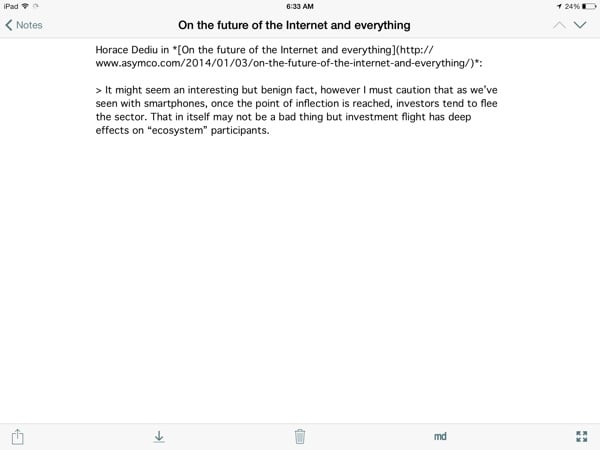
I want to have an action that lets me select some text in Mr. Reader, and then create a new note in Notesy with the article title as the note’s title, followed by a markdown-formatted excerpt that includes the author, the title/url, as well as the quoted text — like so:

Mr Reader Notesy

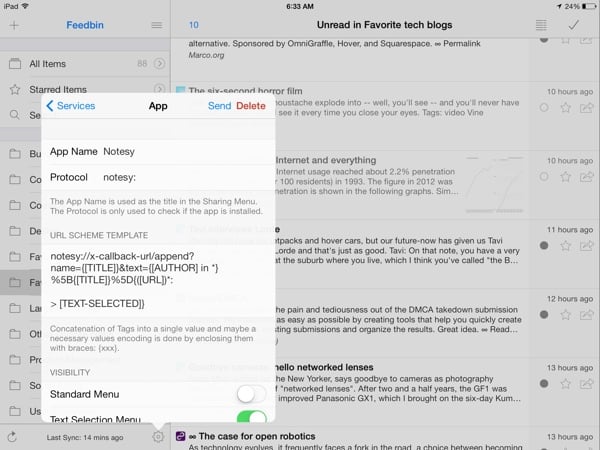
To set this up, go into the services menu in Mr. Reader, and configure it as follows:

Mr Reader Notesy

If you want to copy and paste the URL scheme text, here it is:

notesy://x-callback-url/append?name={[TITLE]}&text={[AUTHOR] in *}%5B{[TITLE]}%5D{([URL])*:

Make sure the “Text Selection Menu” toggle is on. Then, all you have to do is a select a piece of text, tap on “More actions”, and call the Notesy action. You can then either keep writing in Notesy, or come back to it later in nvALT on your Mac (see an overview of my plain text setup here).

And if you’re really lazy, just download this file on your iPad and select “Open In Mr. Reader” to set it up automatically: Notesy services configuration for Mr. Reader.


  1. The RSS Reader space is in dire need of an app name revolution 

The absurdity of "personal productivity"

Mark O’Connell wrote a very interesting article about a fairly unsettling iOS app called Days of Life — “a counter for the days you have left to live.” In Deathwatch he explores just how weird and absurd this app turns out to be:

Days of Life is one of those technologies that seems to incidentally satirize our relationship with technology more broadly. It sits in the “Productivity” folder on my iPhone’s home screen, along with my calendar and a to-do list app called Remember the Milk, but it would be as appropriately housed in a folder called “Existential Terror.”

So much of what we value in technology is its promise to upgrade the hardware of our lives, to make us more useful to ourselves — more productive, more profitable, more effective. Days of Life functions like a reductio ad absurdum of the logic of personal productivity. The pie chart becomes a special way of being afraid: an image of the self as a micro-economy of numbered days.

We sometimes have such a warped view of what it means to be “productive”, and this essay does a good job of shining a spotlight on that.

Patience

Impatient

Small human beings learn by mimicking and so they learn patience by mimicking patience. Perhaps this means that a larger human being somewhere many thousands of generations back took a long and patient breath as the smaller human being in his or her arms squirmed. Perhaps the smaller human being saw this long and patient breath and internalized it and began to understand. Perhaps all of the patience in the world is a copy of one sigh.

— Paul Ford, What I’ve learned from fatherhood

I’m most aware of my shortcomings when I lose patience with my daughters. Of the many things I know I need to improve on, it’s the one that I wish the most I could fix with the flip of a switch.

“Oh, I see the problem, sir — your patience switch was turned off. It happens sometimes… There you go, that should do it.”

But of course, it doesn’t work like that. Yesterday I was watching a mother trying to get her 3-year old son to stop screaming at her. After a few minutes they were both yelling — which isn’t a very effective way to diffuse a situation like that. The thing is, I’m sure she knows that. And before I had kids I probably would have judged her. Not any more. I’ve made enough bad decisions in the heat of the moment that it would be hypocritical of me to judge anyone for their parenting techniques1. In fact, I’m pretty sure that no matter what decision I make at any given time (should I give her the cookie, or is this a teachable moment?), there’s about a 50% chance that it will be the wrong decision.

But that doesn’t mean I shouldn’t strive to do better — to be better. I’ve already made most of the mistakes I didn’t want to make with my daughters. However, that doesn’t stop my desire to be a better dad. I’m painfully aware of how cheesy that sounds, but hey — it’s the truth.

I often ask my wife if she thinks we’re doing it wrong. It just seems like other parents have it all together, all the time. Yet, every once in a while I see cracks in the veneer — an honest moment on Twitter, a knowing look of camaraderie in a coffee shop — and I know I’m not alone. We all love our children very much. We’re also all human and selfish. And patience — like money — doesn’t grow on trees.

So maybe I need to stop trying to be “a better dad”. That’s just too vague (how will I know when I’m “better” enough?). Instead, I need to focus on that one sigh. The one breath that could be the difference between letting a difficult moment pass, or letting it get the best of me.

One moment of patience. That will be my focus in 2014 — in parenting, but also online, and in my work.

Will you join me?


  1. Well, except for leashes. Seriously, don’t put your kid on a leash. Unless you have twins. Then do whatever you need to do to stay alive. 

Create a dedicated project news feed with Trello and Hipchat

I’m always looking for ways to make our workflows more efficient, often to the frustration of my colleagues. I admittedly make them test out way too many tools. But I think I finally found a winning integration that everyone can get behind. First, a bit of background.

We use HipChat as our group chat and IM tool. We have a general room where we all hang out (but I’ll be honest with you, it mostly contains gifs), and then we also set up dedicated project rooms where we discuss project-specific issues. We use Trello to track our tasks and progress on projects. I love Trello, but I wanted to find a way to turn HipChat into the canonical record of what happens on our projects. For that, I turned to a service called Zapier.

Zapier is a tool that connects the web apps you use on a daily basis, and move data between them. Think of it as If This Then That for business use. We have quite a few Zapier automations set up, but my favorites are the ones that post a message to HipChat whenever something specific happens in Trello.

The first step is to set up the connection between Trello and HipChat. To do that, start with this Zapier automation: Create HipChat Alert from new Trello Activity.

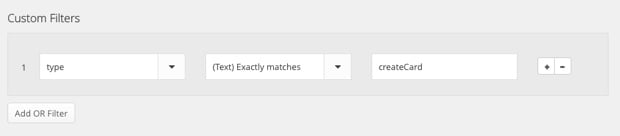
Now, the problem is that this default integration posts a message whenever anything happens in Trello, so it gets overwhelming really quickly. I only want to post a message to HipChat when (1) someone creates a new Trello card, or (2) when someone moves a card from one column (like To Do) to another (like Doing). Trello’s API documentation isn’t very clear, so it took quite a bit of playing around, but I eventually figured out how to make it work. The trick is that you have to create some custom filters to weed out the non-essential stuff. So, once you’ve set up the basic automation, here’s what to do.

To send a message to HipChat when a new card is created in Trello, add the following custom filter:

Zapier Hipchat Trello

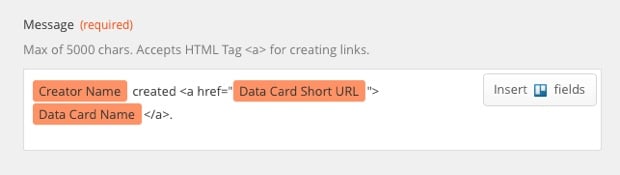
And then use the following variables for the HipChat message:

Zapier Hipchat Trello

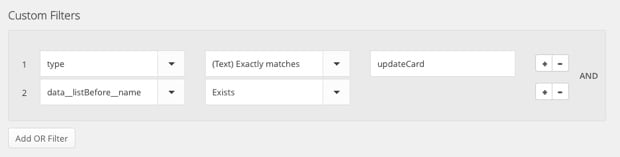
To send a message to HipChat when a card is moved from one column to another, create the following custom filter:

Zapier Hipchat Trello

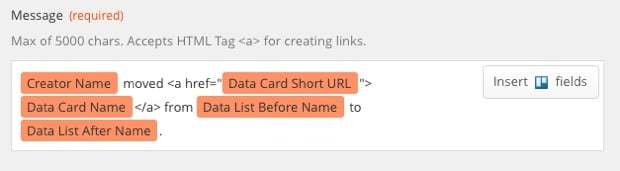
And use the following variables for the HipChat message:

Zapier Hipchat Trello

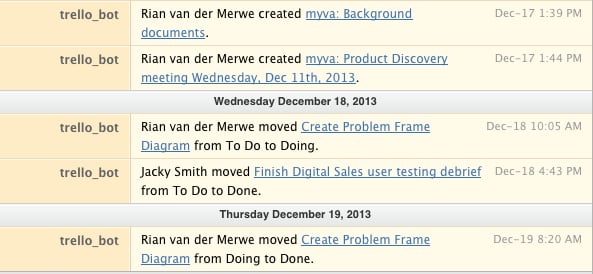
The result looks like this in HipChat:

Zapier Hipchat Trello

I like this message format because it lets you know who did what, and it also links directly to the Trello card if you’d like add a comment or look at other activity.

This integration basically turned HipChat into a dedicated project news feed, which I find extremely useful. If you only work on one project at a time this whole thing might seem like overkill, but we often have 3 or more projects on the go, so it’s great to enter a HipChat room and immediately be able to get a sense of what’s going on.

So, give Zapier a try. Even if you don’t use HipChat and Trello, I’m sure you’ll have fun playing around with the services you do use.

[Sponsor] Atlassian's agile guide

Thanks to Atlassian for sponsoring Elezea’s RSS feed this week!

What’s the point of an agile standup meeting?

Gone are the days of 30-minute status meetings where most people are half-asleep or pecking away on their laptops, oblivious to what’s being said. Agile standups are the leaner, more efficient cousin of status meetings where attendees actually stand up. On our feet, we’re more focused, attentive, and concise. It’s science!

Whether you need robust tools for planning and tracking projects, communicating with coworkers, deploying products, or just some general tips on how to run an agile shop (and how to run them Rong?), Atlassian is here to offer you the tools and advice you need to get the most out of your agile practice.

Sponsorship by The Syndicate.

Removing the Word shackles: getting started with plain text

Escape

I hate Microsoft Word. I want Microsoft Word to die. I hate Microsoft Word with a burning, fiery passion. I hate Microsoft Word the way Winston Smith hated Big Brother.

Charlie Stross

There is a growing uprising against word processors and WYSIWYG editors of late. This is partly because of how bad most of those products are, and partly because other alternatives — particularly plain text — have become so intriguing. In fact, please allow me a moment to declare my undying love for plain text.

I love that with plain text the focus is on the words, not the formatting. I love that it’s portable and can be used anywhere and everywhere, in any piece of software that edits or displays words. I love how easy it is to create beautifully formatted documents when needed. Most of all, I love how fast it is. I simply work more efficiently since switching to plain text.

And yet I haven’t been able to convince many people to join me in uninstalling Microsoft Word and moving most (if not all) of their writing to plain text. You wouldn’t believe how hard it is to find people at a party who are willing to listen to me rant about word processors. So, you know. To the internet!

This is a short post about the tools I use to do the vast majority of my writing (business as well as personal). I hope that it will convince at least some of you to take the plunge with me.

To move your note-taking and writing to plain text you need three things:

  • A format to write in
  • A place to write in
  • A central place to store it all

With those three things in place you’ll be all set to free yourself from the shackles of word processors and WYSIWYG editors. If you want more efficiency and clarity in your writing, this is the way to do it1.

A format to write in

I cannot sing the praises of Markdown enough. Markdown is an easy-to-learn, inconspicuous syntax that lets you focus on what you’re writing without getting bogged down in what it’s going to look like once you’re done. At the same time, it’s a powerful system for formatting documents automatically when you need to print them out, or send something to a colleague or client. The syntax remains easily readable without getting in the way of your words.

I write pretty much everything in Markdown now, and as more and more applications start to support it natively, I only see its popularity growing. The latest email app to take the Mac world by storm, Airmail, has native Markdown support. So does MarsEdit, the software I use to write and publish to this site. The PHP Markdown WordPress plugin further allows any WordPress site to publish with Markdown.

Trust me, it’s really easy to learn. Here’s another Markdown syntax guide to get you going.

A place to write in

Once you’ve settle on the Markdown format, you’re ready for the most difficult stage of the switch: figuring out which of the hundreds of great applications to write and edit plain text files works best for you. On the Mac I’ve tried iA Writer and Byword, but I now spend most of my time in Brett Terpstra’s nvALT. It is a fork of the original Notational Velocity text editor that adds some really great features. What makes it great? Nothing beats nvALT when it comes to speed and efficiency:

  • Modeless operation in which searching for notes and creating new notes happen in the same part of the interface. It’s highly efficient and there’s zero lag.
  • Powerful keyboard shortcuts for mouseless operation, which further speeds up your writing.
  • Native Markdown support, of course.

Even though nvALT has preview functionality built in, I prefer Marked 2 to view formatted text files. Yet another Brett Terpstra project, it’s a powerful previewer for Markdown files, and it works with any text editor. So even if you use something other than nvALT, or open a text file in another app, you can still use Marked. You can add custom CSS and export to a variety of file formats. So when you’re ready to move from words to formatting, this is the app to do it in.

On iOS I’ve gone through tons of text editor apps, but I currently use Notesy, and I’m really happy with it. It’s incredibly fast, which is, as I keep mentioning, one of the main reasons to switch to plain text. There are a few additional things about Notesy that make it one of the apps I use most on my iOS devices:

  • You can use it to quickly jot down some thoughts you don’t want to forget, and the file will be waiting for you on nvALT when you get back to your desk. So you can just keep going where you left off.
  • It has a URL structure and good support from other apps you may already be using. For example, if you read something in Instapaper that you want to reference in a blog post or an email, you can easily create a note with the selected text.

Send to Notesy

If you need a more comprehensive overview of iOS text editors, check out this extensive comparison (by — who else — Brett Terpstra).

A central place to store it all.

The last thing to figure out is how to make it all work together so your files are always synced and always available for use on any device. Of course, this is where Dropbox comes in. You’ll need to make a couple of simple settings changes in nvALT to accomplish this. In the Notes preference pane, do the following:

  • Change the “Read notes from folder” destination to a folder in Dropbox.
  • Change the “Store and read notes on disk as:” setting to Plain Text Files

nvALT storage

And just like that, you’re all set. Now you can access your text files from any computer that has internet access and an application that can read text files. Notesy on iOS works directly off Dropbox, so you just have to point it to the folder you set up for your plain text files in nvALT.

“But wait,” I hear you say, “what about folders and things?” Well, that’s what’s so great about using nvALT and Notesy. Everything is search-based. I’ve never had a problem finding a file/note I’m looking for. And since these applications are built for speed, even on a vast amount of text files, it’s much faster than trolling through folders looking for the right file. Getting out of the folders mindset is a bit uncomfortable at first, but it really does start to feel natural after a while.

If you really struggle with the idea, nvALT does support tagging (similar to Gmail’s tags), so you can use that as a crutch for a while. But a better option is to come up with a file naming system, and stick with it. See, for example, Michael Schechter’s excellent overview of the system he uses.

“But wait,” I hear you say again (you’re nothing if not persistent), “what about collaborating on documents?” Don’t worry, there’s an app for that. Once you’re at a point where you need to get feedback or collaborate on a document, you can just import your text file into the brilliant new service Editorially, and keep going from there. It supports Markdown (of course it does), version control, tracked changes, and comments. No sweat.

I won’t deny that there are still some circumstances where word processors are useful. I’m writing a book at the moment, and I’m using Pages for that (mainly because Editorially didn’t exist when I started writing it). But for the majority of everyday writing — meeting notes, emails, business documents — there is simply nothing better than plain text. Go ahead. Get rid of Word. You can do it.


  1. I’m making these recommendations from the perspective of an Apple user, but I’m sure there are good alternatives on other platforms. 

Demanding slower development cycles for apps

Now!

Daniel Jalkut discusses the rate of software/app updates in Stagnation Or Stability?:

As an onlooker, it’s easy to associate dramatic change and motion with competence, and quiet refinement with laziness. We must draw on our own experiences attempting to build great things to appreciate how much work takes place in stillness, to have faith that even though things may appear stagnant, a benefit of frictionlessness is resulting. An app at rest may be in that long, arduous phase of becoming finely crafted.

Daniel’s post is a response to the recent Michael Lopp article R.I.P. Things, in which he explains that he’s dropping Things as his productivity app mainly because of its lack of updates. I’ve been thinking about this a lot. How our expectations about app pricing and rate of change is placing unfair (and damaging) pressure on developers to release new versions of their apps constantly — even if it’s just change for the sake of change.

The other unintended consequence of this never-ending update cycle is that we’re starting to see evidence of what Chris Bowler calls App Fatigue:

I must admit, I’ve felt a bit of what I term app fatigue in the past year. What is this? Simply the lack of desire to either a) pay for another version of an app I already own or b) go through the steps required to update this app and become accustomed to the changes.

My own feelings about this remain wildly erratic at the moment. Sometimes I’m on Michael’s side. Like most people I was champing at the bit for Tweetbot 3, and as much as I appreciated the “It’ll be ready when it’s ready” line, my impatience got the better of me. Yesterday Apple “finally” updated their last built-in app for iOS 7. But we’re still stuck with an ugly WhatsApp, orphaned versions of OmniFocus, Tweetbot and Instapaper for iPad, and a Foursquare that hasn’t been updated in weeks — weeks, I tell you. What up with that? I turned off automatic app updates because I love going to the App Store and checking what wonderful new things I’m going to get today.

And then, at other times, I’m with Chris Bowler. OmniFocus runs my life, so I shouldn’t complain about paying $20 for the gorgeous new iPhone version, but it ended up being quite the grudge purchase. Same with Fantastical 2. And I know that my insatiable hunger for new features every day is probably doing more damage than good. Because Daniel is right: “An app at rest may be in that long, arduous phase of becoming finely crafted.” But if we show up at developers’ doors with pitchforks every couple of weeks, demanding our new features, there is no time for the app to be at rest. Eventually, Experience Rot will set in, and it will be our fault:

As more features are added, it becomes harder to make the overall design coherent and sensical. Soon features are crammed into corners that don’t make sense.

I guess I’m preaching to myself here. I’m hoping to convince myself to be a bit more patient with app developers, and give them the time they need to slow down and refine.