Menu

Posts tagged “productivity”

Don't drink the water

As a frequent flyer I started reading Michaeleen Doucleff’s How To Stay Healthy In Flight with great interest, but I cannot get this sentence out of my head:

In 2004, the Environmental Protection Agency found high levels of fecal bacteria in the drinking water of 15 of the 327 planes it tested.

Ummm…

what

An automated image upload workflow for Amazon S3

I have no idea if anyone else will find this helpful, but I’m so excited about it that I have to share it1. One of the most time-consuming and repetitive tasks in blogging is uploading images to my Amazon S3 account, generating the CDN link, and inserting it into the post. But I’ve now cobbled together a recipe that makes this really easy, and I’d like to tell you about it. First, here are the ingredients you’ll need:

  1. An Amazon S3 account for image storage (optional: Cloudfront CDN)
  2. TextExpander to handle the repetitive typing
  3. Hazel to automate the upload to S3
  4. Dropbox isn’t technically necessary, but it makes everything just a little bit smoother.

With that said, here are the steps in the recipe:

Step 1: Set up a Hazel workflow to upload new files to S3

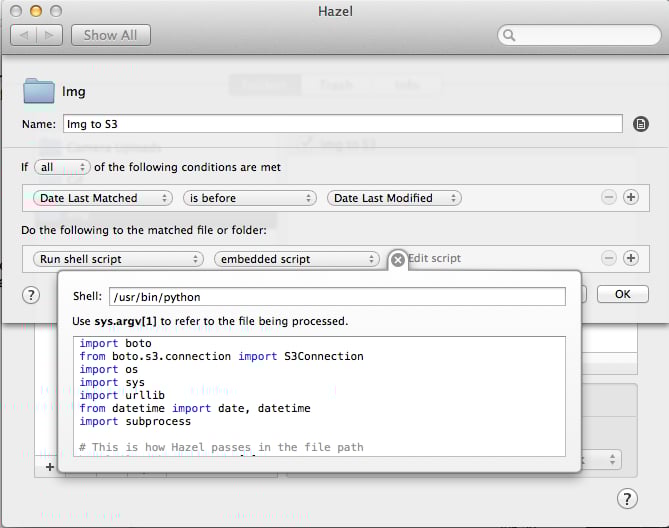
First, we need to set up Hazel to watch a folder and upload any new files to your S3 bucket. The Macdrifter article Upload to Amazon S3 from Dropbox using Hazel is extremely helpful for this. I basically copied that script with some minor adjustments. Here’s what it looks like:

Hazel upload to Amazon S3

Note that you have to change the type of shell script you run to /usr/bin/python. The script I use looks as follows (again, see the Macdrifter article for the whole story):

import boto
from boto.s3.connection import S3Connection
import os
import sys
import urllib
from datetime import date, datetime
import subprocess

# This is how Hazel passes in the file path
hazelFilePath = sys.argv[1]

# Obviously, you'll need your own keys
aws_key = 'YOUR_KEY'
aws_secret = 'YOUR_SECRET'

# This is where I store my log file for these links. It's a Dropbox file in my NVAlt notes folder
logFilePath = "/Users/~YOUR_COMPUTER_NAME/Dropbox/Notational/Link_Log.txt"
nowTime = str(datetime.now())

# Method to add to clipboard
def setClipboardData(data):
    p = subprocess.Popen(['pbcopy'], stdin=subprocess.PIPE)
    p.stdin.write(data)
    p.stdin.close()
    retcode = p.wait()

# This is the method that does all of the uploading and writing to the log file.
# The method is generic enough to work with any S3 bucket that is passed.
def uploadToS3(localFilePath, S3Bucket):
  fileName = os.path.basename(localFilePath)

# Determine the current month and year to create the upload path
    today = date.today()
    datePath = today.strftime("/%Y/%m/")

# Create the URL for the image (Add your own path here)
    imageLink = 'https://cdn.elezea.com/images/'+urllib.quote(fileName)

# Connect to S3
    s3 = S3Connection(aws_key, aws_secret)
   bucket = s3.get_bucket(S3Bucket)
   key = bucket.new_key('images/'+fileName)
   key.set_contents_from_filename(localFilePath)
   key.set_acl('public-read')
   logfile = open(logFilePath, "a")

try:
       # %% encode the file name and append the URL to the log file
       logfile.write(nowTime+'  '+imageLink+'n')
      setClipboardData(imageLink)
   finally:
      logfile.close()

Here’s what the script does in my case: Whenever I add a new file to the Img folder in Dropbox, it uploads the file to S3, copies the URL to the clipboard, and also adds that URL to a Link_Log text file in my nvALT folder for later access if needed (or if I add multiple images in one go).

Step 2: Set up TextExpander shortcuts

Once the image is added to S3, the rest is handled with TextExpander. When I want to add an image to a blog post I type:

,img

That expands to:

<p><img style="display: block; margin-left: auto; margin-right: auto;" title="%fill:image title%" src="%|%fill:image source%" border="0" alt="%fill:image title%" /></p>

It asks me to give the image an alt tag, and then it places the cursor where I’m going to add the source file. Since the source URL is already in my clipboard, I then just ⌘-V and I’m all set.

They call it magic

That’s it. It might seem like a lot of work, but now that everything is set up my workflow is extremely simple:

  1. Add new image to the Img folder
  2. Type the TextExpander shortcut and paste the Image URL where I want the image to appear

I think it’s going to save me at least as much time this year as it took to write this blog post.

Oh. Wait.


  1. It also gives me an opportunity to pretend I’m Dr. Drang, but I digress. 

Just another distributed team workflow with Trello and InVision

Working with people can be hard. Designing with people can be even harder. Designing with people who are not in the same location can be almost impossible. There’s no perfect solution for working in distributed teams, but if there’s one tool that seems to get our community further than most, it’s Trello. I’ve seen some really great Trello workflow posts over the past few months:

We have a distributed team across Portland, OR and Dallas, TX, and we use a workflow similar to the ones above, but different enough to make me think it might be worth sharing.

As background, we have a team of 5 UX Designers who split their time across 3 main products as well as our internal Pattern Library. Each product has a Design Lead (this role can rotate), and we define the Lead’s responsibilities as follows:

  • Understanding and documenting user needs, business goals, and technical constraints before any design work starts.
  • Being the single point of contact for any design questions by Product Managers or the rest of the business.
  • Making sure Trello is updated with latest priorities, due dates, and artifacts.
  • Making tie-breaker design decisions as needed and required if there are design disagreements and we can’t reach consensus.
  • Designing interactions and screens, and/or implement those designs in the pattern library, and distribute the workload to other designers as needed and capacity allows.
  • Explaining and defending design decisions, even at 8:30am before having a cup of coffee.

Granted, that last requirement is a bit harsh, but we set high standards for ourselves here.

Anyway. Our week starts on Thursday mornings with a Design Pipeline meeting where we go through our upcoming tasks as a team, give each other design feedback, and play with the animations in Google Hangouts. Here is a typical Thursday morning view — Trello on the left, Google Hangouts on the right:
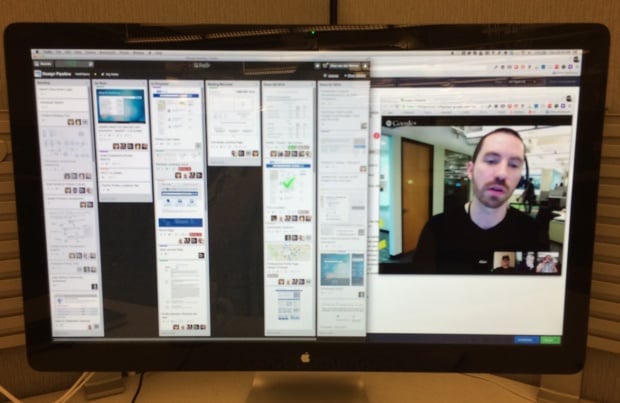
Trello workflow

Each Design Lead comes to this meeting with an understanding of their Product Manager’s main priorities so that we can discuss how to divide up the work. As you can see above our Trello board has 6 columns:

  • Backlog: Work that’s coming down the road, prioritized every week by the Design Lead after talking to their Product Manager.
  • Up Next: What we’re going to work on next once current tasks are complete. We use our Pipeline meeting to pull cards out of the Backlog and into the Up Next column.
  • In Progress: In typical Kanban fashion we try to limit work-in-progress, so for a card to be in this column it really has to be in progress. During our Thursday meeting we have an opportunity to give feedback and help each other out on any questions we might have.
  • Waiting/Blocked: If something can’t move forward it can’t just sit in In Progress gathering dust — we have to move it into this column. This gives me an opportunity to know where I need to get involved to unblock things if necessary.
  • Done (current quarter) and Done (previous quarter): We keep two quarters of completed cards in the history, and archive further back. If everything goes into one big Done column it just becomes really unwieldy.

A couple of other random points:

  • We use Trello’s color labels to indicate who’s responsible for each card, since it’s not possible to assign a single point of contact to a Trello card (unless you remove the watchers, which kind of defeats the point of, you know, collaboration software).
  • We all dial into Google Hangouts separately from our desks. I find that if you have two rooms and a single dial-in it’s easy to get distracted or for side discussion to start happening. This approach puts everyone on the same playing field, and as an added bonus we can all update Trello together.

During the week we use Trello as a running News Feed of what’s happening on each of our tasks, but sometimes that’s not enough. For ad hoc design feedback during the week we using InVision, a tool I dearly love, and not just because they sent me this nice coaster in the mail (thanks guys!):

InVision is more of an internal scratchpad — a safe place where we can work together as a team and ask each other tough questions about our designs. In contrast, Trello is the paper of record for each of our revisions that we share with anyone who’s interested. It works well for us to separate those spaces out.

The combination of Trello, InVision, and Google Hangouts don’t make up for in-person time (I hope for at least some of us to be in the same space every couple of months), but it sure makes it easier than email and Lync, which is THE BIGGEST PILE OF CRAP SOFTWARE EVER CREATED.

The kicker is that our organization is finally moving to JIRA and Confluence, so we’re currently messing around with Kanban boards in JIRA to replace the Trello bit of this workflow. If we ever figure that out, I’ll write another post about. But for now, this is how we work. I’d love to see how you do it. Write a post, send it to me, and I’ll link to it here.


Maybe we don't appreciate the Internet as much as we should

Ian Bogost wrote a pretty controversial viewpoint on the Net Neutrality fight. He asks, What Do We Save When We Save the Internet? In short, he thinks it might be time to blow the whole thing up and start over, because we haven’t been very responsible with it:

Another day’s work lost to the vapors of reloads, updates, clicks, and comments. Realizing that you are hyperemployed by the cloud, that you are its unpaid intern. Wondering what you’d have accomplished if you had done anything else whatsoever. Knowing that tomorrow will be no different.

Harsh words, but worth a read even just to think about how we spend our time online. Perhaps we have grown a little bit entitled about our access to a medium that we’re mostly using for messaging and the weather, as opposed to improving people’s lives?

What motivates us

Managers, take note:

Employees are vastly more satisfied and productive, it turns out, when four of their core needs are met: physical, through opportunities to regularly renew and recharge at work; emotional, by feeling valued and appreciated for their contributions; mental, when they have the opportunity to focus in an absorbed way on their most important tasks and define when and where they get their work done; and spiritual, by doing more of what they do best and enjoy most, and by feeling connected to a higher purpose at work.

This isn’t rocket science, but an important reminder. It’s similar to Jocelyn Glei’s conclusion in What Motivates Us To Do Great Work?:

For creative thinkers, [author Daniel] Pink identifies three key motivators: autonomy (self-directed work), mastery (getting better at stuff), and purpose (serving a greater vision). All three are intrinsic motivators. Even a purpose, which can seem like an external motivator, will be internalized if you truly believe in it. […]

As creative thinkers, we want to make progress, and we want to move big ideas forward. So, it’s no surprise that the best motivator is being empowered to take action.

The stress of collaboration software

Jason Green writes about The Promise, Progress, And Pain Of Collaboration Software:

Given the explosion of communication, conversations can take place simultaneously over several competing channels, creating confusion and inefficiency by requiring multiple changes in context. In addition, the ability to access prior content easily and seamlessly across all these communication channels becomes more challenging.

Between email, Trello, Slack, and InVision, we’re definitely feeling this pain as well. App Fatigue, indeed.

It's ok to take a break from work email

We all know how destructive interruptions at work are, and how a constant pressure to always be online increases stress levels exponentially. The thing is, we can fix this problem. Clive Thompson asks Are You Checking Work Email in Bed? At the Dinner Table? On Vacation? and reports on a recent study to measure the effects of changing that behavior:

[Harvard professor Leslie] Perlow suggested they carve out periods of “predictable time off”—evening and weekend periods where team members would be out of bounds. Nobody was allowed to ping them. The rule would be strictly enforced, to ensure they could actually be free of that floating “What if someone’s contacting me?” feeling.

The results were immediate and powerful. The employees exhibited significantly lower stress levels. Time off actually rejuvenated them: More than half said they were excited to get to work in the morning, nearly double the number who said so before the policy change. And the proportion of consultants who said they were satisfied with their jobs leaped from 49 percent to 72 percent. Most remarkably, their weekly work hours actually shrank by 11 percent—without any loss in productivity. “What happens when you constrain time?” Lovich asks. “The low-value stuff goes away,” but the crucial work still gets done.

More of this in our workplaces, please.

Silence!

I had a particularly noisy weekend, so I’ve been thinking about silence quite a bit. This morning I came across Chloe Schama’s How Silence Became a Luxury Product, and it really resonated with me:

Unwanted noise is perhaps the most irksome form of sensory assault. A bothersome sight? Close your eyes or turn the other way — eyesores are, generally, immobile. An annoying taste? Spit it out. (Why was it in your mouth?) Sound, on the other hand, is ambient, elusive, enveloping. Even the softest drone can echo cacophonously if it worms itself into your head. Ulysses was not seduced by the sight of the sirens. Poe’s telltale heart does not torment with its smell. “Noise is the most impertinent of all forms of interruption,” groused the nineteenth-century German philosopher Arthur Schopenhauer. “It is not only an interruption, but also a disruption of thought.”

The article goes on to explain how silence has become a commodity — one that people are willing to pay a lot of money for. I found the article through Atossa Araxia Abrahamian’s Enjoy the Silence, a great piece on the proliferation of noise-canceling headphones:

I also discovered that an artificially imposed lack of noise can make perfectly normal sounds—the hum of a fan, or a colleague’s phone conversation—feel like an assault on the senses. The quiet becomes habit-forming, and I’m not entirely convinced that that’s desirable. What good is it to live in the world if we just choose to ignore it?

The articles reminded me of Jeremy Mesiano-Crookston’s exploration of imposed silence in How Silence Works: Emailed Conversations With Four Trappist Monks. Here is how one monk answered the question What do you feel like silence adds to your actions?:

The silence does make me aware of my inner workings — what we call in the monastery, “self-knowledge.” I can’t pretend that I’m always a nice guy, always patient, always calm and receptive. I have to admit that I can be abrupt, cold to offenders, or would often prefer efficiency to the messiness of other people’s moods. Silence seems to keep me from idealizing myself.

Since we’re on the topic of silence we might as well look back to Pope Benedict XVI’s thoughts about it in his message for World Communications Day back in 2012:

Silence is an integral element of communication; in its absence, words rich in content cannot exist. In silence, we are better able to listen to and understand ourselves; ideas come to birth and acquire depth; we understand with greater clarity what it is we want to say and what we expect from others; and we choose how to express ourselves. By remaining silent we allow the other person to speak, to express him or herself; and we avoid being tied simply to our own words and ideas without them being adequately tested. In this way, space is created for mutual listening, and deeper human relationships become possible.

Speed-reading and comprehension

In the excellent Reading to Have Read Ian Bogost sums up why I’m not a fan of Spritz, a speed-reading app that’s been making the rounds:

In today’s attention economy, reading materials (we call it “content” now) have ceased to be created and disseminated for understanding. Instead, they exist first (and primarily) for mere encounter. This condition doesn’t necessarily signal the degradation of reading; it also arises from the surplus of content we are invited and even expected to read. But it’s a Sisyphean1 task. We can no longer reasonably hope to read all our emails, let alone our friends’ Facebook updates or tweets or blog posts, let alone the hundreds of daily articles and listicles and quizzes and the like. Longreads may offer stories that are best enjoyed away from your desk, but what good are such moments when the #longreads queue is so full? Like books bought to be shelved, articles are saved for a later that never comes.

The core issue with Spritz (and speed-reading in general) as a way of dealing with this kind of overload is this:

But can you really read a novel in 90 minutes with full comprehension? Well, like most things that seem too good to be true, the answer unfortunately is no. The research in the 1970s showed convincingly that although people can read using rapid serial visual presentation (RSVP) at normal reading rates, comprehension and memory for text falls as RSVP speeds increase, and the problem gets worse for paragraphs compared to single sentences. One of the biggest problems is that there just isn’t enough time to put the meaning together and store it in memory (what psychologists call “consolidation”).


  1. That’s the dude who was punished for chronic deceitfulness by being compelled to roll an immense boulder up a hill, only to watch it roll back down, and to repeat this action forever. 

Always choose meaning over recognition

I’ve been thinking about this whole “being online” thing quite a bit over the past week or so, so James Shelley’s The Overinflated Currency of Personal Brands struck quite a chord:

What happens when the fame contagion infects an entire society? [American historian Daniel Boorstin] speculated that “The quest for celebrity, the pressure for well-knownness, everywhere makes the worker overshadow the work.” Increasingly we will go about our lives and work not actually concerned with the living and working itself, but with being known for our lives and work. Our lives and work become nothing but source material for the promotion of our personalities. Ultimately, achievement and accomplishment come to mean nothing, if they are not mechanisms for propagating our individual cult stories.

I see this more and more online, and it’s a worrisome trend — this tendency to measure the value of our work by the number of people who see it and comment on it. Our search for meaningful work should always outweigh our search for recognition. This idea of individual stories and meaning remind me of Donald Miller’s words in one of my favorite books, A Million Miles in a Thousand Years:

If [it’s true about] a good story being a condensed version of life — that is, if story is just life without the meaningless scenes — I wondered if life could be lived more like a good story in the first place. I wondered if a person could plan a story for his life and live it intentionally.

Planning a good story for our lives has nothing to do with “well-knownness” and everything to do with the amount of meaning we pack into each day. I know I’m being a bit sentimental today, but it’s because our family is on the verge of a very big change, and much of it is driven by a renewed appreciation for living life with greater intention. Over the past few years I’ve seen my decisions increasingly being influenced by a desire for my daughters to one day say to their friends, “My Dad wasn’t afraid to take risks.” So that’s what we’re doing…