Menu

Posts tagged “productivity”

How not to run a remote team

In their article 5 Best Practices for Running a Successful Remote Team, “Sparky” writes:

All team members should have their working hours posted publicly, so colleagues know when they’re “on the clock,” so to speak. If you have a hybrid environment where some people are remote and others aren’t, this will help alleviate pressure on the remote employees to feel like they always have to be available. […]

It’s also a good idea to schedule daily syncs with remote people, as well as weekly feedback sessions where you can dive deeper into anything that needs a course correction.

I’m excited about this awful advice because I get to tell you one of my favorite Wildbit stories.

I joined Wildbit a week before our yearly in-person retreat. It was a little daunting but really exciting to meet everyone I would be working with mostly remotely. Anyway, one of our team sessions was a discussion about the tools we use, and specifically Slack. Up to that point we had this unwritten convention where everyone would say “Hi!” and “Bye!” in the #general room when they come and go. Remote workers went a bit further with messages like “Stepping away to make coffee!” During our discussion it became clear that no one — no one — liked this. It caused noise, didn’t add any value, and just felt like a chore.

At that point I spoke up and mentioned that I think the reason why remote folks tend to tell everyone when we’re getting coffee or lunch is that we don’t want it to look like we’re slacking off. I said something to the effect of, “I don’t want everyone to think I went to a movie in the middle of the day, or something!” The answer I got to that statement was not what I expected. Someone said, “Well, what’s wrong with that? Maybe you needed to go to a movie to clear your head so you can come back later, refreshed and ready to go!”. If I recall correctly, my response to this was, “Uh, this thing where you guys all trust each other? It’s really weird…”

We all had a good laugh together, but I learned pretty quickly that this is just how the company works. The two things that make Wildbit’s remote culture different are:

  1. We all implicitly trust each other.
  2. We optimize for asynchronous communication.

We do this because we learned something that should be painfully obvious. When people have the freedom to work when they are feeling their best, they do their best work, and they enjoy the work more.

So anyway, back to “Sparky”. I don’t want to tell people how to live their lives, but that advice really is terrible. It’s the type of advice you give when you believe the purpose of remote work is to replicate an office. Once you realize that the purpose of remote work is to enable everyone to do their best work, everything changes.

I guess my one piece of advice for remote cultures is this: try trusting each other first. Imagine what your work environment would look like if every employee is trustworthy. And if that’s too difficult to imagine, maybe ask why you’re not able to trust your employees.

Remote product management: challenges and opportunities

Even though more and more companies are getting comfortable with remote work, the field of product management still seems to push back against this trend quite forcefully. There is a general sense that product managers can’t do the things they need to do unless they are physically located with their teams. This has some ironic consequences, such as that Slack — a company that builds a tool “where work happens” — doesn’t hire remote employees.

I confess that at first I was skeptical as well. But as we started to work together and make progress at Postmark, my skepticism fell away. I do believe it’s harder to make the product management role work remotely than some other roles like customer success or development. But it is possible, and I believe that companies need to start being more open to hiring remote product managers.

We often hear about the drawbacks of remote work, but it’s important to remember that there are certain things that remote work is naturally better suited for than on-premise work. Most importantly, remote work makes it much easier to develop and instill a rhythm of collaboration and focused time for a team. This rhythm will be different for every team, but I like to think of it as a wave. Here’s one example of what a cycle of private and public work could look like in a team:
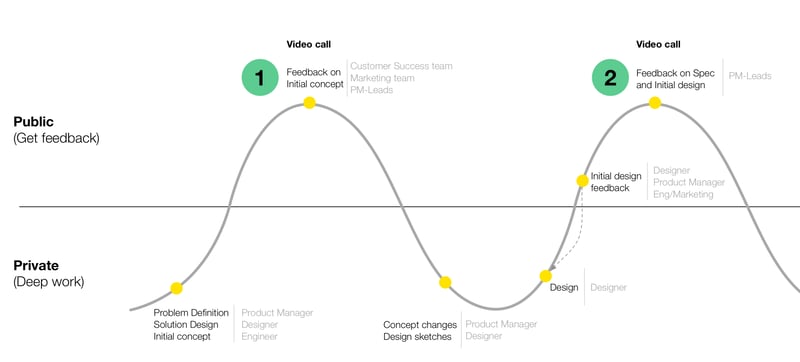
Wave

Because it’s easier to shut down distractions as a remote worker, the deep work part of that cycle can be immensely efficient and dramatically increase both the speed and quality of work that gets done.

But of course, we can’t ignore the parts of remote work that are challenging and need to be figured out. So in this post I want to share a few lessons I’ve learned over the past 2 years that have helped me to overcome some of the more severe challenges to being an effective remote product manager.

In-person time is still important (but maybe not for the reason we think)

I joined Wildbit at the right time: one week before our yearly in-person company retreat. That gave me an opportunity to meet everyone in person, work together, and most importantly, have meals together. Once you’ve eaten a meal with someone, they’re not an anonymous “colleague” any more. Which means that when conflict arises (and of course it will), you’re way more likely to work through it kindly and respectfully. It’s very difficult to be mad at someone you’ve broken bread with.

The point is that in-person time is extremely important for remote teams. But you don’t need it every day, and the reason you need it is not to get more work done. The reason you need it is to sustain the human relationships that will enable you to get more work done.

When I spend time with our team in person, yes we spend quite a bit of time working together in meetings. But the biggest value for me is the lunches, the coffee chats, and the after-work catch-ups. That’s where we begin to see each other as whole people, and it’s at the core of our ability to work together and grow together.

This is certainly true for the whole team, but it’s especially true as a product manager, where your ability to do your job lives and dies with your ability to have good relationships with the team.

Love your tools (and be prepared to do a bit more of the heavy lifting)

One of our principles at Wildbit is that we optimize for asynchronous communication. We don’t hate meetings. We just value focused work extremely highly, so whenever we can we try to protect that work by giving each person the opportunity to work on something when it’s best for their schedule.

To make this work, you need tools. And those tools have to be light-weight and not a pain to use. Sure, we use Slack (although we’re trying to wean ourselves off it), but most of our collaboration work happens in Dropbox Paper and Basecamp. Those tools are designed for the type of collaboration and asynchronous communication that feels good. It can’t be overstated how important it is for remote teams to love their collaboration tools. If everyone hates the tools, the work will find a way to not get done. You’ll end up blaming “remote culture” and hire an onsite product manager, when the problem lies with crappy tools instead.

The catch is that these tools are just like comments on the internet: if you want them to be useful, you need to be prepared to spend quite a bit of time managing the process and the flow of information. As product manager a big part of my role has become making sure the right people know about things, and the wrong people don’t get distracted by things they don’t need to be involved in. This needs time and care, and doesn’t just happen automatically. The good news is this will still take way less time than “back-to-back meetings” every day…

Make prioritization and planning a team effort (and embrace the benefits of that)

Prioritization and planning of work is difficult under the most ideal circumstances. When you’re working on a remote team, the challenges are even bigger. This is where a combination of the right tools and some deliberate time management can make all the difference. The thing is, we know we do better work when all of our team’s perspectives are taken into consideration — not just in terms of the details of a project, but also what we should work on.

As product manager my role in the prioritization and project planning process is way more traffic controller than it is decider. We use our asynchronous tools to discuss ideas, post and gather feedback on initial drafts of plans, and occasionally even make radical changes to a plan as we learn more from customers and everyone on the team. My one goal is to keep the conversation going. It can be a little chaotic at the start, but I always feel like we end up in a better place than if we used a more traditional prioritization process.


Being a remote product manager is not without its challenges. It can be difficult to get the whole team aligned around a common vision, and you’re not always going to be able to get your questions answered right at the moment you want it. But if you can find a way to focus on and nurture the benefits that are unique to remote work, the challenges tend do get pushed to the background.

To put it another way, I understand why people think that product management isn’t a role that can be done remotely. There’s a lot of team communication involved, and of course that can be challenging over electronic channels. But with a slight shift in the lens you view product management through, those challenges fade away as the benefits of deliberate focused work and carefully considered collaboration come to fruition. I’ll say this: it’s totally worth it.
How businesses have learned to exploit our curiosity

Don Norman attempts to explain Why bad technology dominates our lives:

Curiosity is, on the whole, a virtue. We have evolved to be curious. Our nervous system is especially sensitive to change, and changes in the environment attract attention. But the technology-centered view labels this natural, creative trait as a liability: Curiosity is renamed as distraction. A human virtue is now turned into a liability.

Worse, many businesses have learned to exploit our curiosity. The continual bombardment of tantalizing tidbits of information deliberately designed to grab our attention away from other, potentially more valuable activities are distractions that can lead to accidents, injury, and interpersonal problems. What kind of business exploits curiosity for its own ends? Almost any business that discovers there are profits to be made by continually engaging people’s curiosity, hopes, and interests. For example gambling, computer games, social networks, and even television series that can go on and on, week after week, year after year, trapping their viewers into addiction.

We talk a lot about “personal responsibility” and how it’s up to each person to make good choices about how they spend their time. That is true as far as it goes, but it brushes over the incredibly strong forces of persuasion theory and how easily humans are manipulated. “Personal responsibility” doesn’t give us a hall pass to exploit the human brain’s weaknesses.

Easier blog post image management with Dropshare and Amazon S3

I’m always on the lookout for faster ways to upload and insert images into blog posts. It’s the part of the blogging workflow that I dislike the most. Up to now I’ve used a pretty convoluted combination of Amazon S3 buckets and Transmit. But over the weekend, while moving hosting providers1, I finally came up with a really simple image upload workflow that I thought I’d share in case it helps anyone else.

This workflow lets you drag and drop an image to a menu bar icon on your Mac, and then immediately paste a secure, custom domain URL for that image wherever you need it.


Step 1 - Create S3 bucket

Create an Amazon S3 bucket for your image uploads. It doesn’t matter what you name the bucket, but do not add a . to the name. This creates some weird SSL certificate errors later in the process that you don’t want to deal with.

Also make sure you set the bucket to be publicly accessible via the Permissions tab, otherwise you’ll get read errors for your files.

Step 2 - Create CloudFront distribution

Create an Amazon CloudFront distribution for the S3 bucket you just created, so that you can use a custom URL for your images, and make use of Amazon’s Content Delivery Network (CDN) capabilities.

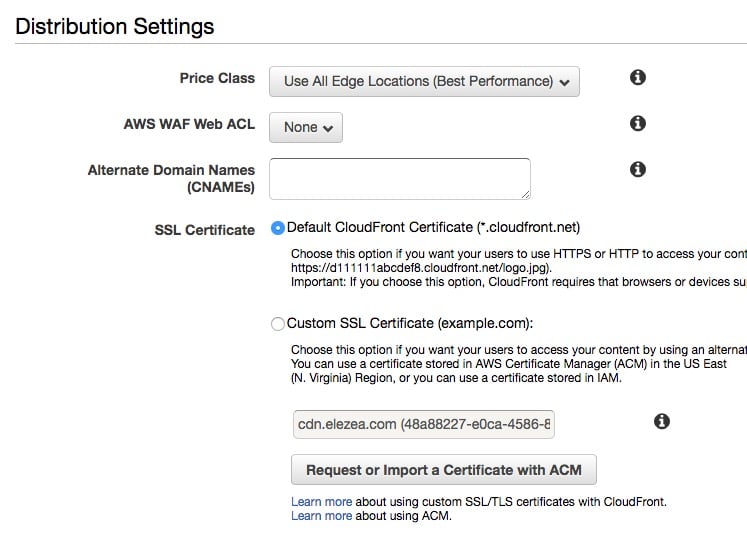
When you go through the flow of adding a distribution for your S3 bucket, leave the “Distribution Settings” section blank at first — we’ll come back to that.

CloudFront settings

Step 3 - Add custom domain for your images

Back on the main Distributions screen, note the CloudFront domain name that was created for your bucket. It’s going to be in the format ***************.cloudfront.net. Go to your DNS provider and add a CNAME for the custom domain you want to use for your images.

In my case, cdn.elezea.com points to my CloudFront distribution at d26fqxuc6*****.cloudfront.net, which in turn links to the S3 bucket I set up earlier.

Step 4 - Add SSL certificate to CloudFront distribution

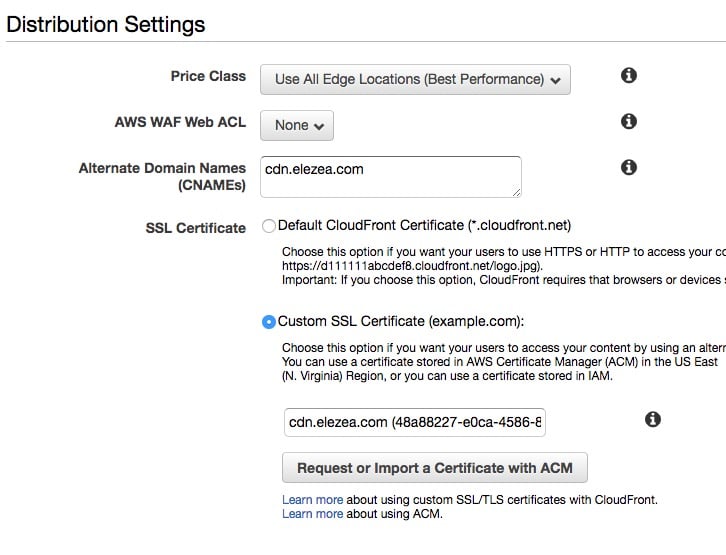
Now go back to your Distribution Settings in CloudFront. Add your CNAME information, and then click the button to “Request or Import a Certificate with ACM”.

This will take you through the process of generating a free SSL cert to be used with your CloudFront distribution. This is essential if you serve your site over https. If you don’t do this, your images will be served over http and you will get “mixed content” warnings when you embed images in your site.

Change your settings to “Custom SSL Certificate”, and you’re good to go.

CloudFront settings

Interlude - take a breath

If you’ve successfully completed these steps, here’s where you’ll be. Whenever you upload an image to your S3 bucket, you will be able to serve that image via your custom URL over https, and as an added bonus, you’ll be using Amazon’s CDN for super fast delivery.

Now we need to figure out the fastest way to get images into that bucket of yours.


Step 5 - Download and set up Dropshare

There are many sophisticated ways to manage your S3 buckets. But when it comes to uploading an image and getting a URL for it, I haven’t found anything that’s simpler than Dropshare.

In short, Dropshare allows you to establish connections to all your S3 buckets. It lets you upload files by dragging them to the Dropshare menu bar icon, and then the URL for that image is automatically copied to your clipboard. So to add an image to this blog post, for example, I just drag the image to the menu bar icon, then come back to where I’m writing and ⌘-V to insert the link. It couldn’t be easier.

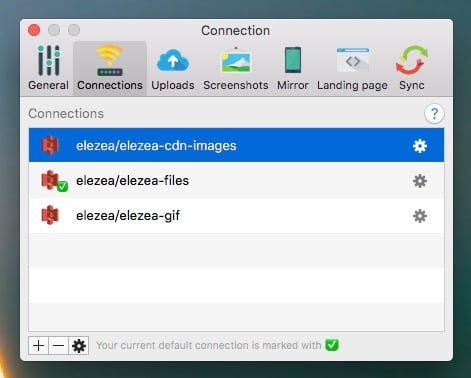
I have a bunch of S3 buckets linked up in Dropshare:

Dropshare

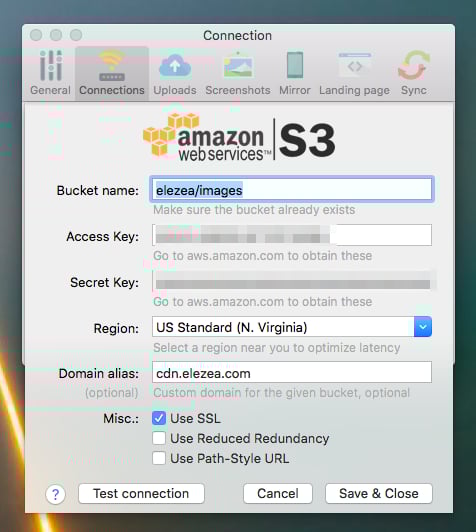
In the case of the bucket I use for this site, note that I entered the bucket name, the domain alias (the CNAME you added earlier), and that I have the “Use SSL” box checked:

Drophsare

This makes the workflow for adding images an absolute breeze. Drag and paste. That’s it.

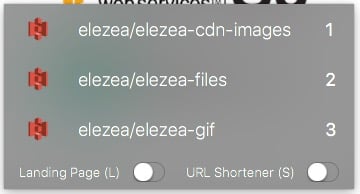
When you upload an image, Dropshare lets you choose the bucket you want to upload to, as well as if you want to add a landing page and/or use a URL shortener (which I usually don’t, but it’s nice to have the option).

Drophsare

Dropshare is useful for other things too. I have a keyboard shortcut that takes a screen shot, automatically uploads it to an S3 bucket, and copies the URL to the clipboard. That’s great for sharing screen shots in Slack, for example.


I’m not sure how many people have this need to shave a few minutes off their image workflow. But I hope this post is useful for the few of you who do obsess about things like this, like I do. And please let me know if you think this flow can be improved even more!


  1. I’m now with DreamHost and much happier. 

Craig Mod on the revival of print and why it’s important to go offline

Oh boy, where to begin with Craig Mod’s interview with Offscreen Magazine. I’ve been following Craig’s work for a long time, so I have an undeniable bias towards everything he does. But some of the things he says in this interview touched a deep nerve for me, as it relates to a lot of what I’ve been thinking about lately.

It’s a long interview, and you should absolutely take the time to read it all. I’ll just post a couple of my favorite quotes here.


On the revival of print and other analog technologies:

I think books are the perfect disconnected objects. They require no energy. They offer a fully immersive, quiet experience for hours or days. The medium dissolves but never becomes translucent. It’s quiet, but present. An exceptional technology.

When you sit down with a book, you understand the parameters of engagement. You know how long the book is. The book isn’t changing as you read it. It’s a solid, immutable thing. You and the book are on equal terms in many ways, as least from a physics point of view. You know what’s going to happen, and the book abides by its implicit contract, which is to be a book.

However, in digital-land many spaces (apps, games) quickly turn into slithering creatures beneath your feet. You never know where you stand. Their worlds are optimized to pull you back in for one more minute, one more click. Over and over. Cascades of chemical reactions in your noggin’ tell you to keep going, just one more hit; I feel this persona of the addict very strongly when I am online or using certain apps or devices.


On your life’s work and what moves you:

Does affecting one hundred lives turn you on? A thousand? A million? A billion? Why? What does it mean to have a positive impact on a life? How intimate does that connection need to be? Understanding your scale — the scale that moves you — is critical to understanding with whom and how you should work, how you should live.


On always being online:

The default expectation today is “always available.” The systems we created are so frictionless that we haven’t noticed how insidiously over-engaged we are. Step by step we’re optimizing ourselves to “maximum” productivity without defining or thinking about “productivity” on a human scale. The digital world abstracts. One could argue most problems contemporary society faces are problems of over-abstraction. As an employer with a global workforce, you have no idea where your employees might be or what they might be doing, so you expect them to answer immediately. The concept of downtime is elusive.


And finally, on “edges”, a topic he’s written about a lot:

Edges ground us. Without clear edges we don’t feel like we’re in control.

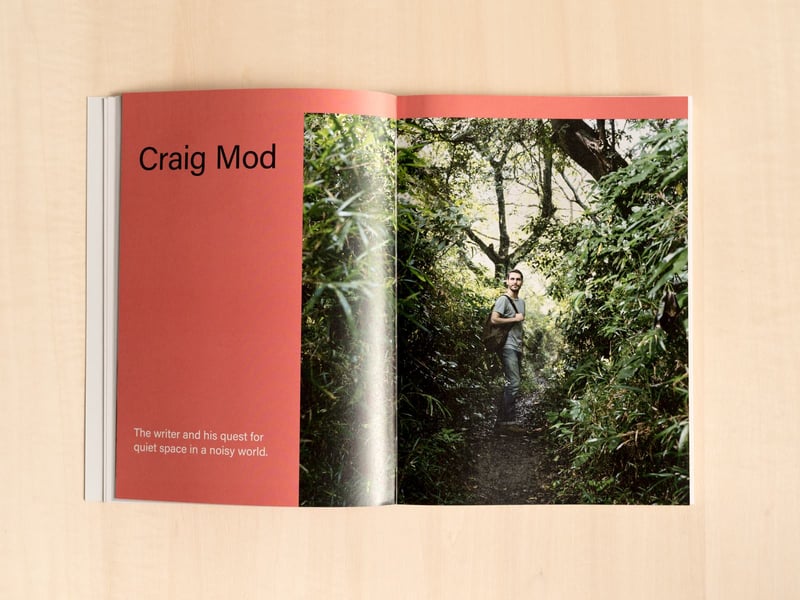
Craig Mod - Offscreen Magazine Interview

When life becomes too “easy”

In The Tyranny of Convenience Tim Wu argues that life has become… well, too easy:

But we err in presuming convenience is always good, for it has a complex relationship with other ideals that we hold dear. Though understood and promoted as an instrument of liberation, convenience has a dark side. With its promise of smooth, effortless efficiency, it threatens to erase the sort of struggles and challenges that help give meaning to life. Created to free us, it can become a constraint on what we are willing to do, and thus in a subtle way it can enslave us.

It would be perverse to embrace inconvenience as a general rule. But when we let convenience decide everything, we surrender too much.

And then there’s this kicker, which I keep coming back to in my mind:

An unwelcome consequence of living in a world where everything is “easy” is that the only skill that matters is the ability to multitask. At the extreme, we don’t actually do anything; we only arrange what will be done, which is a flimsy basis for a life.

Unrelated, I’m getting pretty close to perfecting my To Do system through a combination of OmniFocus and Field Notes. Nope, definitely not related at all.

The three kinds of distance in remote collaboration, and where to focus

Erica Dhawan and Tomas Chamorro-Premuzic have some good suggestions in their article How to Collaborate Effectively If Your Team Is Remote. I found this part particularly interesting:

First, consider that there are three kinds of distance in remote collaboration: physical (place and time), operational (team size, bandwidth and skill levels) and affinity (values, trust, and interdependency). The best way for managers to drive team performance is by focusing on reducing affinity distance. Try switching most remote communication to regular video calls, which are a much better vehicle for establishing rapport and creating empathy than either e-mails or voice calls. And design virtual team-building rituals that give people the opportunity to interact regularly and experience their collaboration skills in action.

Focusing on “affinity distance” rings true for me. You can survive a long time with physical and operational distance if your team trusts each other and share certain values.

At Wildbit we use Zoom for video calls because it’s the only video conferencing software we’ve been able to find that lets us see the whole team’s faces on the screen at the same time. It’s much better than using Google Hangouts or any of the other apps that prioritize only the person who’s speaking. There are lots of way to reduce “affinity distance”, but having everyone (whether they’re remote or in the office) take video calls from their desks — and looking each other in the eyes on those calls — has had a surprisingly large positive impact.

Using mind mapping to clarify your job and bring order to task-switching chaos

In a recent blog post about our 4-day work week experiment at Wildbit, Natalie (our CEO) wrote about some things we’re doing to focus our jobs a bit better. The example she used in that post is the exercise I went through to clarify my role as product manager, so I thought it would be interesting to talk about that process a little bit more.

If you’re in a position where you’re a little unsure about the focus of your role, or what exactly you should be working on day-to-day, you might find the process I describe here useful to help you figure it all out.

What exactly would you say you do here?

Even though no one can quite agree on how to define the role of the product manager (but you should totally read my book about that), I think we’re all in agreement that it requires lots of different kinds of tasks—which results in lots of context switching. This means that focus is a constant struggle for PMs. Yes, this is true for many roles, but it is especially true for PMs since the ability to switch between different tasks is so central to what we do to help keep things moving.

The issue is not just that switching contexts all the time is hard, it’s also that knowing what to switch to next can be such a challenge. PM minds are in a constant state of prioritization and reprioritization.

It’s with this as background that Natalie and I had a very long 1:1 a few months ago as we realized I’d drifted away slightly from what my core focus at Postmark needs to be. As we got our development process nailed down, that part of the business needed less involvement from me so I started to spend more time on things like metrics frameworks and improving our prioritization methods. Because that’s just what PMs do—we look for things to fix, and then we jump in.

I had a huge realization that I was starting to spend time on the wrong things when Natalie said to me,

Rian, stop trying to turn us into a big company.

That is arguably the most important thing she has ever told me. Because that is exactly the path I was inadvertently going down. Process improvements aren’t bad, but at that time it was not what the team needed. So we got to work to find out what our team needs in our context and our culture.

Mapping a chaotic role into submission

Natalie encouraged me to go through an exercise she has gone through before. It involves creating a detailed mind map of all the things you do during a particular week, and then using that to identify and prioritize your focus areas. I jumped into MindNode, and after a couple of weeks of working on it with Natalie, we came up with the following map of what my focus areas should be:

Mind mapping your focus areas

It looks all neat and sensible now, but it’s worth mentioning that the process was messy for a quite a while. My natural propensity for order made me want to start at the left with the big buckets of my role, and then expand to the right into more and more detail. In practice it didn’t work like that at all. I ended up starting with cataloging some of the mid-level tasks I spend my time on (such as Regular customer calls and Prioritization). With those things as a starting point I then branched out—sometimes to the right (Customer calls leads to defining that we should talk about Pain points), and sometimes to the left (Prioritization leads back to a larger Planning bucket).

I also ended up deleting a bunch of stuff on the far right during my discussions with Natalie. Specifically, we started to see where I was doing too much of the things that the marketing team was doing already. Once we had a visual picture it was easy to see where I need to scale back, and which areas need more definition.

Bringing order to day-to-day tasks

Once this was done, as I stared at the map for a while, I wondered if I could somehow use it to make my days a feel a little less arbitrary. So I took it one step further and simplified my role as a progression from Listen to Think to Act:

Mind mapping your focus areas

This model now helps me prioritize my days when it comes down to deciding what to work on. If I’m in Listen mode I’m more likely to spend most of the day on calls and discussions with the team and customers. Other days are primarily focused on Act so I tend to spend a bunch of time in JIRA or Basecamp creating the content we need on projects.

This has helped a lot with the scattered feeling I often got when switching contexts too much. I still switch between tasks, but keeping it in the same “family” helps so much with focus and productivity.

In summary—I think you should do this

Creating this mind map has been an eye-opening experience for me. It not only helped me to clarify what I should work on (and when), it also constantly ensures that Natalie and I are on the same page about what I should be spending my time on. This is especially important as a remote employee where we don’t catch up all the time about what I spend my time on.

Natalie and I look at my focus areas together and discuss any changes we might need to make. But other than that, I feel confident that I’m doing the stuff that’s most important for our team, our customers, and the business. I like that feeling a lot.

When video games > work

The Economist has an in-depth and very interesting feature about people1 who forego regular employment to live with their parents and play video games instead. The kicker that Escape to another world closes with is quite something…

A life spent buried in video games, scraping by on meagre pay from irregular work or dependent on others, might seem empty and sad. Whether it is emptier and sadder than one spent buried in finance, accumulating points during long hours at the office while neglecting other aspects of life, is a matter of perspective. But what does seem clear is that the choices we make in life are shaped by the options available to us. A society that dislikes the idea of young men gaming their days away should perhaps invest in more dynamic difficulty adjustment in real life. And a society which regards such adjustments as fundamentally unfair should be more tolerant of those who choose to spend their time in an alternate reality, enjoying the distractions and the succour it provides to those who feel that the outside world is more rigged than the game.


  1. Well, young men… 

Doing research when you have no time or money

In How to get the most value out of remote user research (without breaking the bank) I write about our research process at Postmark. I know a lot has been written about research, so why add more words? The main thing I wanted to discuss is how we designed a process within a pretty impossible-sounding constraint:

Improve our products iteratively through research without slowing down our development process or increasing our stress levels at work.

So the post goes over the different things we put in place to try to do that. Check it out!