Menu

Posts tagged “mobile”

RIM's petty diversion marketing

RIM Admits it is Behind Australia’s ‘Wake Up’ Campaign:

Those assembled [in front of the Apple store] chanted “wake up” and held placards decorated with the same message, while some protesters dressed as sheep, in another dig at Apple’s popular products and cult following.

I don’t understand why companies think that ridiculing Apple users is a better strategy than making good products. It’s what happens when you believe Marketing > Product.

Design revolution: identifying areas where new interaction paradigms are essential

The Chronicle of Higher Education has a long but interesting review of Thomas Kuhn’s The Structure of Scientific Revolutions. Entitled Shift Happens, the article goes through all the misinterpretations of Kuhn’s work, as well as some of the major criticisms his ideas have received over the years. I found this part particularly interesting:

Scientific revolutions, according to [Kuhn’s book], don’t occur when an apple happens to find the head of a genius, or when enough facts have slowly painted a new picture. Rather, in yet another of Kuhn’s inversions, new paradigms emerge to explain the accumulation of anomalies: findings that do not make sense within the current paradigm. For example, if your paradigm tells you that fire consists of the release of phlogiston embedded in flammable materials, then the fact that some metals gain weight when burned is an anomaly. When a new paradigm is conceived that makes sense of the anomalies, science is in for a revolutionary shift.

There is a definite parallel with design work here. We often try to shift users to a new interaction paradigm because we think it works better. That’s fine, and can be successful - tab-based browsing comes to mind. But these are incremental changes/improvements, and they happen whenever designers approach an existing problem in a new way. They’re worthy pursuits, but rarely essential for an application to still fulfill its purpose.

By contrast some interaction changes are absolutely essential, and we need to keep our eyes open to recognize those elusive circumstances. Essential interaction changes need to happen when existing paradigms can’t cope any more, and new ones are needed. For example, clicking with a mouse isn’t a thing on touch devices, so that particular interaction became an anomaly that couldn’t be “explained” by existing paradigms any more. Therefore we are legitimately creating new paradigms for mobile design to accommodate the change from mouse to touch. We’re still navigating our way through this change, as apps like Path and Clear emerge to challenge our views on what we consider good design.

We often spend our time trying to improve existing designs, and we need to do that. But there is always the danger of hitting a local maximum - “a point [where] you’ve hit the limit of the current design”. To fight this danger, let’s remember that our energy is sometimes best spent identifying areas where existing paradigms are bursting at the seams in their ability to accommodate the design status quo. That’s where the opportunities for design revolution truly lie.

Why people are so upset about the Facebook/Instagram deal

Paul Ford wrote the best article I’ve seen so far on the Facebook/Instagram deal. When Your Favorite App Sells Out includes gems like this:

Unfortunately everything about Facebook defies logic. In terms of user experience, Facebook is like an NYPD police van crashing into an IKEA, forever ”” a chaotic mess of products designed to burrow into every facet of your life. The company is also technologically weird. For example, much of the code that runs the site is written in a horrible computer language called PHP, which stands for nothing you care about. Millions of websites are built with PHP, because it works and it’s cheap to run, but PHP is a programming language like scrapple is a meat. Imagine eating two pounds of scrapple every day for the rest of your life ”” that’s what Facebook does, programming-wise. Which is just to say that Facebook has its own way of doing things that looks very suspect from the outside world ”” but man, does it work.

Anyway, he goes on to explain why he thinks people are so upset about the deal. Just go ahead and read the thing - it’s worth it.

Apple's share of the Flashback trojan blame

Ok, so this has to change:

The vulnerability in Java that Flashback exploits was patched in February by Oracle. But Apple waited nearly two months to update OS X with that patched version.

This is the single biggest security issue for Macs. OS X includes a number of software components from third-party vendors and the Open Source software community, and Apple has a terrible track record in updating those components. When a vulnerability becomes publicly known because it’s been patched on another platform, but it isn’t patched on another, the bad guys have a straight-line roadmap to compromising that unpatched system.

It’s a fair, well-written article about the virus. Worth reading.

Why I'm sticking with Instapaper

Readability recently released their new iOS app to lots of positive reviews and public declarations about “finally” being able to switch from Instapaper. For all I know Readability is a superior product, but I haven’t even considered moving away from Instapaper. I have no desire to investigate the new app. So either I’m crazy, or it’s indicative of a shift in how we view software - a shift towards the human connection that underlies everything we do online. Let me explain.

I’ve been using Instapaper for a long time, the last few months as a paid subscriber. But that shouldn’t actually count for anything. The switching costs for “Read Later” apps are low. It might be uncomfortable to have two distinct reading lists for a week or so, but after one list dies down and the other one picks up, everything would go back to normal. In most cases you can import your data into a new service, so you don’t have to lose any historical data. So if switching costs are low, and Readability could very well be a better app, why am I not interested?

My loyalty comes from the fact that I’m unable to separate Instapaper from its creator, Marco Arment.

Marco does something really smart that gives him a big advantage over the makers of other, similar apps: he makes himself extremely visible. But even more importantly, he does so as himself, with his own personality, as opposed to some tightly controlled and measured “social media brand engagement” thing.

His blog is required reading on all things from tech to coffee to headphones. I hear his complaints every week on the Build & Analyze podcast with Dan Benjamin. So, yes, it feels like I know Marco (don’t be creepy). Sure, I disagree with his opinion on cars, and I feel like he’s a little bit harsh on Nest. But that’s part of what makes Instapaper a unique app. Its creator is a real guy I can relate to, albeit in a sometimes frustrating way because his opinions are SO WRONG SOMETIMES.

Instapaper is one of only a few apps I can think of where I know the developer’s name, and actually know a little bit about them based on their online presence. Pinboard is another one. So is nvALT. But those are exceptions; in the majority of cases I don’t know who the developers of the apps I love and use every day are. I’ve now come to realize that it’s no coincidence that I have no intention of switching away from any of the apps I mentioned above. But if a better RSS reader than Reeder were to come along, I would most certainly investigate.

If there’s a point to this story, it’s this. We’re entering an era where software is personal. By now we’ve all gotten over the initial shock of how the Internet can remove geographical barriers and turn us into one big happy, arguing family. We’re coming to terms with the fact that the Internet is people all the way down[1]. So now we can start to figure out what that actually means. I think it means that we’re going to pay increasingly more attention to the people who make the things we use, and their personalities will become inseparable from their work. Loyalty will come from our relationships with people, not things.

Which is why I’m sticking with Instapaper.


  1. Frank Chimero in Issue #1 of The Manual

It's about the thing you build, not the technology you use

James Hague in Don’t Fall in Love With Your Technology:

Don’t fall in love with your technology the way some Forth and Linux advocates have. If it gives you an edge, if it lets you get things done faster, then by all means use it. Use it to build what you’ve always wanted to build, then fall in love with that.

I know I’m in danger of that with iOS, Mac OS X, and my new-found love affair with text files and Markdown. Hoping that knowing I have a problem is indeed half the battle.

Clear: doing for To Do lists what Dropbox did for file syncing

I can only imagine the miles and miles of chaotic complexity that designers and developers had to wade through to arrive at the simplicity of Clear - a new To Do list app for the iPhone. As I started playing with the app, Rebekah Cox’s definition of design kept popping into my head:

Design is a set of decisions about a product. It’s not an interface or an aesthetic, it’s not a brand or a color. Design is the actual decisions.

And the decisions that Clear made are as close to perfect as I’ve ever seen. I can picture the endless, difficult meetings and arguments that must have happened to decide what features to include in the app. Should we have Projects and Contexts? No. How about Due Dates and Filters? Nope. Well, why not!? Because Clear is a prioritized list of tasks that is fast and easy to edit. That’s it. Nothing less, nothing more.

It reminds me of the Quora thread on why Dropbox became so popular:

“But,” you may ask, “so much more you could do! What about task management, calendaring, customized dashboards, virtual white boarding. More than just folders and files!”

No, shut up. People don’t use that crap. They just want a folder. A folder that syncs.

But let me stop gushing for a minute and step back a bit. Clear (which is getting quite a bit of attention) is absolutely fantastic as a way to view and prioritize a simple list of tasks, but it’s not a replacement for hardcore task management systems. Omnifocus will remain the application I use for all my work projects, and it’s always open on my Mac and iPad during the work day. But Omnifocus is hopeless overkill for simple tasks like “Make a car appointment” or “Get coffee at the store”. And that is the gap that Clear fills so effectively.

Clear is focused on two things that make it vastly superior to other similar apps:

  • Speed. It’s really fast. When it starts up you can instantly start typing. This is crucial to quickly capture that all-important thing you don’t want to forget. I still die a little bit inside every time I see the “Optimizing database” message while I wait for Omnifocus to start up.
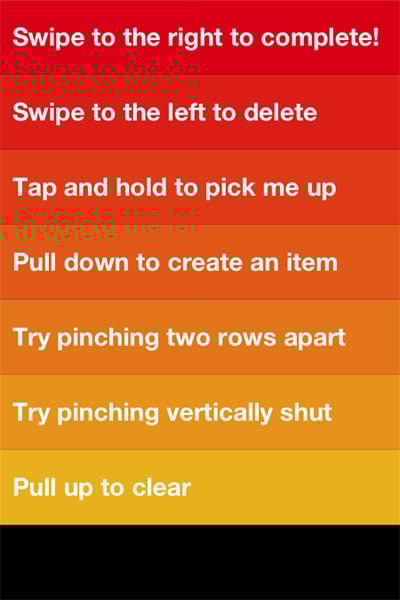
  • Effortless editing. It’s completely gesture-based - no chrome, no fluff, no fancy visual design. You tap, you type, you swipe, you close. These gestures are easy to learn and intuitive:

clear-1.jpg

Francisco Inchauste calls Clearan app for the future”, and I completely agree. It feels different, but it feels right. And despite its (appropriate) lack of visual extravagance, it has an attention to detail that reminds of the meticulous design of Path. For example, when you create a new list and there are no to do items in it yet, you get a random quote about getting things done:

clear-2.jpg

I’m trying hard to find something negative to say about Clear, because every app has room for improvement. But at the moment my judgment is slightly clouded by how impressed I am with this team. It’s so hard to resist the temptation to build an app that tries to solve every problem for every person in the world. These guys walked through that fire and emerged on the other side probably bruised and battered, but also with a flawless app for listing tasks and editing them quickly. Want more in your To Do list app? Shut up and go buy Omnifocus.

Twitter's Creative Director and musician Seal discuss Twitter's iPhone app design

Last night Seal (@Seal) tweeted about his displeasure with the latest Twitter iPhone app. Doug Bowman (@stop), Creative Director at Twitter, asked him to elaborate:

@Seal I’m listening if you have feedback (about Twitter’s design).

— Doug Bowman (@stop) December 29, 2011

What followed is one of those exchanges that make me absolutely love the Internet. A world-famous musician has a conversation about an iPhone app with a world-famous designer, and we get to sit in on it. I think my favorite part of the conversation is Seal’s honest apology:

@stop Thank you. Redownloaded Official Twitter app and a public apology is in order. It’s great now that I understand it. I was wrong.

— Seal (@Seal) December 30, 2011

I can’t quite put my finger on why I find this random chat so great. Maybe it’s because it shows the power of Twitter to reduce degrees of separation to zero in a matter of minutes. Maybe it’s the fact that I can sit in Cape Town, South Africa, and listen to two people who I admire a great deal have a respectful disagreement in real time. Or maybe it’s because I keep thinking about the bizarre exhilaration Doug must have felt, defending an app he worked on with a musician he’s a fan of.

Whatever the reason might be, it’s just really cool. Unfortunately Twitter still isn’t great at showing us conversations (apparently that’s being worked on), but luckily Aaron Swartz built a tool to help us with that. I’m posting a screenshot of the conversation below, but you can also view it here.

seal-stop-twitter-conversation.jpg

Software version numbers: a neglected opportunity to improve customer experience

I love opening the App Store to see what updates are available for my iOS apps. Sometimes I forget to go there for a week or so and as the loading spinner comes up I play a little guessing game - will there be four updates? Seven? Double figures!?

Yes, I know I need to get out more. But I do believe my irrational excitement about something so inane points to an underutilized product marketing opportunity: Software version numbers as part of a delightful customer experience.

Before SaaS and the ease of over-the-air updates, version numbers made sense. In most cases v2.0 came after v1.0, and it was followed by v3.0, or maybe v2.1 for a non-significant update. Companies like Microsoft went a little more granular, but that was usually the exception. 1985-1992 saw the release of Windows 1.01 through 3.1, with only a few point releases in between[1].

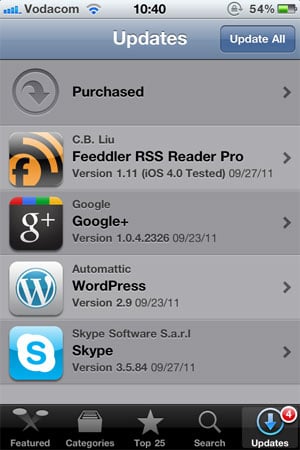
These days, with updates and releases coming with much more frequency than it used to, it’s not uncommon to see an update screen like this one:
versions-ios-updates.jpg

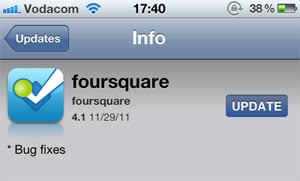
Since there is no common standard for version numbers, it’s not easy to tell which of these updates are significant without going into the release notes for each one. I can guess that Google+ 1.0.4.2326 and Skype 3.5.84 are bug fix releases, but I can’t tell for sure. I have a feeling that Wordpress 2.9 is a fairly big release, but is it in the same order of magnitude as Feeddler 1.11? No idea. Especially since sometimes a seemingly big point release turns out to be pretty unexciting:
versions-foursquare-fixes.jpg

Jeff Atwood is full of praise for the virtues of continuous software updates, and I agree with him. In The Infinite Version he explains how he stopped caring about version numbers after an experience with Google Chrome:

Chrome’s version number has been changing so rapidly lately that every time someone opens a Chrome bug on a Stack Exchange site, I have to check my version against theirs just to make sure we’re still talking about the same software. And once - I swear I am not making this up - the version incremented while I was checking the version.

From a software development perspective frequent software updates are great - you’re able to iterate rapidly and respond to bugs quickly. However, I think this continuing disregard for sensible version numbers is a mistake. We are missing out on an important part of the customer experience: that excited feeling that goes along with getting something new. For paid apps especially, giving users new features “for free” has the potential to delight them and build long-term loyalty. But how will they easily know that they’re getting something new without the visual cues of well-defined version numbers?

There is probably no easy fix for this. We can’t just send the Internet a memo that this is now how we’re doing things. But I hope that software developers will at least start seeing version numbers as part of their product marketing efforts. It would also be helpful to adopt a simple, rough guide to version numbers:

  • x.0 for major redesigns or a re-imagining of the application (such as Path 2.0 and Instapaper 4.0)
  • x.y for the addition of significant new features
  • x.y.z for bug fixes and minor improvements

If we don’t go deeper than three levels (even if z is a four-digit number) and all developers adopt this basic taxonomy, users will eventually start recognizing the pattern. This will give them the necessary cues to understand and appreciate app updates. They’ll know to click through and read the release notes for x.0 and x.y release, but that it’s probably not necessary to bother with x.y.z releases.

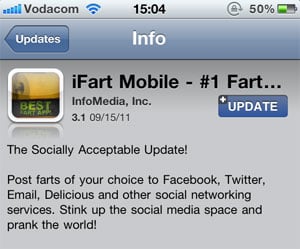
This naturally leads into a discussion about the importance of writing good release notes to go along with a consistent version number strategy, but that’s beyond the scope of this article. I’ll just leave you with an example of an app that sees release notes as part of their”¦ um”¦ “brand experience”?
versions-ifart.jpg


  1. Of course, after 1995 all hell broke loose. Wikipedia lists monstrosities such as Windows 95 USB Supplement to OSR2, Windows XP Professional x64 Edition, and Windows Server 2008 R2 for Itanium-based Systems. ↩
The difference between Apple and Microsoft: product before profit

I’m a little late to this article that made the rounds last week, but I finally read The inside story of how Microsoft killed its Courier tablet. It’s a bit scattered and sometimes hard to follow the narrative (probably because it was split into two pieces), but it’s still a very interesting story and worth reading. For one, if Microsoft found a way to keep J Allard around, things might have turned out differently for them. He seems like exactly the kind of person they needed to deliver real product innovation in the mobile computing space.

The most interesting part for me is how the article shines a light on the differences between Microsoft and Apple’s approaches to product development. Here’s Jay Green in the CNET article about the Courier tablet:

Courier’s death also offers a detailed look into Microsoft’s Darwinian approach to product development and the balancing act between protecting its old product franchises and creating new ones. The company, with 90,000 employees, has plenty of brilliant minds that can come up with revolutionary approaches to computing. But sometimes, their creativity is stalled by process, subsumed in other products, or even sacrificed to protect the company’s Windows and Office empires.

Microsoft has a fear of not doing anything that could cannibalize their cash cows (Windows and Office), even if that means they have to do things that don’t create value for users. It’s an organization that’s optimized for profit, not product. Contrast that with Apple’s approach:

Apple hasn’t optimized its organization to maximize profit. Instead, it has made the creation of value for customers its priority. When you do this, the fear of cannibalization or disruption of one’s self just melts away. In fact, when your mission is based around creating customer value, around creating great products, cannibalization and disruption aren’t “bad things” to be avoided. They’re things you actually strive for ”” because they let you improve the outcome for your customer.

Kyle Baxter adds the following perspective on an approach that places product before profit:

[N]ot only does focusing on the product make for better products, but it completely changes the corporate, business and organizational decisions you make, too. If you are focused on maximizing profit (in the short or long-term), you end up making choices that inhibit great products and great success at best, and destroy your ability to succeed at worst.

The Courier project should serve as a cautionary tale about what happens when the fear of losing profit gets in the way of developing a potentially great product. A product that could have resulted in a very different tablet landscape than the one we have today.
