Menu

Posts tagged “apple”

From iMessage to product management

Paul Ford wrote a great post about the significance of the blue/green bubbles in the Messages app on iOS. From It’s Kind of Cheesy Being Green:

This spontaneous anti-green-bubble brigade is an interesting example of how sometimes very subtle product decisions in technology influence the way culture works. Apple uses a soothing, on-brand blue for messages in its own texting platform, and a green akin to that of the Android robot logo for people texting from outside its ecosystem. […]

There are all sorts of reasons for them to use different colors. (iMessage texts are seen as data, not charged on a per-text basis, and so the different colors allow people to register how much a given conversation will cost—useful!) However, one result of that decision is that a goofy class war is playing out over digital bubble colors. Their decision has observable social consequences.

This then turns into a post about product management, in a way that only Ford can do. Great stuff.

Why Apple has a successful design culture

I’m not a big fan of these types of articles, but I did like Mark Kawano’s point about what makes Apple a successful design organization in 4 Myths About Apple Design, From An Ex-Apple Designer:

It’s actually the engineering culture, and the way the organization is structured to appreciate and support design. Everybody there is thinking about UX and design, not just the designers. And that’s what makes everything about the product so much better … much more than any individual designer or design team.

If everyone cares about design, the usual mantra that “UX is 50% design, 50% politics” turns into a much more manageable ratio.

Using Mail.app as a replacement for Outlook for Mac

The biggest problem that many Mac users struggle with is that we work for organizations that use Exchange for email and calendar management. This means that, in most cases, we have to use Outlook for Mac if we want the majority of basic tasks to work. It’s an application that is so ugly and bug-ridden that most people look like this every time they open it:

Outlook

The problem is that traditionally it’s been pretty difficult to make OS X’s Mail.app play well enough with Exchange to be a viable replacement. For my personal use case there were a few things that always held me back:

  • The default view settings are not conducive to effectively manage a lot of email.
  • No keyboard shortcuts to move messages into folders.
  • All other email programs display the default system font when it receives an email generated in Mail.app — in Office for Windows this is Times New Roman.

I think I’ve finally addressed these issues enough to make Mail.app my primary mail application and ditch the horrors of Outlook. But you’ll need a few settings and plugins to get that done.

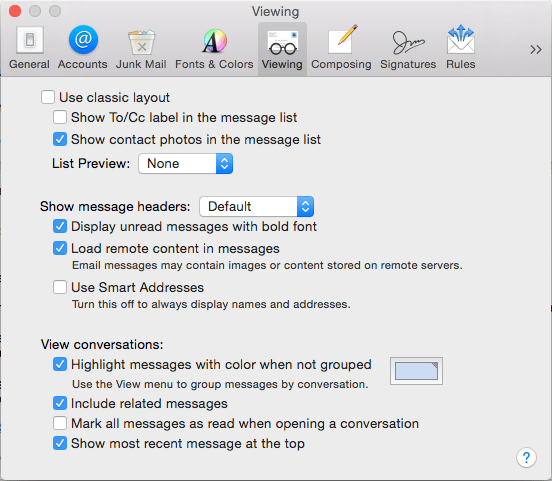
View options

I like the simple, friendly list view that these options give me. Try it out:

View options

Shortcuts for moving messages

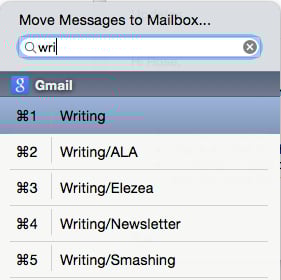
Mail Act-On 3 is an essential extension. It does a bunch of different things, but for the best feature is that you can map a key to moving messages to a different folder (I use “v” to match Gmail’s shortcuts), and then use type-ahead to pick the right folder:

Move messages

Changing the default font

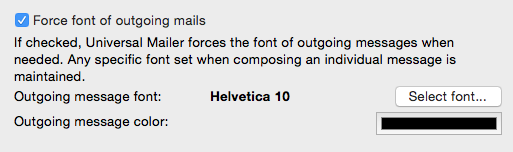
Universal Mailer is another powerful plugin that just makes Mail.app work better, but its best features is that you can set a system font that is respected by other email programs:

Force font

Unexpected bonus features

Switching to mail brings a bunch of great things with it that you don’t get in Outlook:

  • Smart folders that can bring a bunch of different emails together based on specific criteria you set.
  • Great integration with iOS, since it takes advantage of handoff.
  • Fast email that’s not ugly.

All I’m saying is, give it a try. Your eyes will thank you.

[Sponsor] Photo Book Flip: your iPad photos in a beautiful book

My thanks again to Photo Book Flip for sponsoring the site again this week. Try it out!

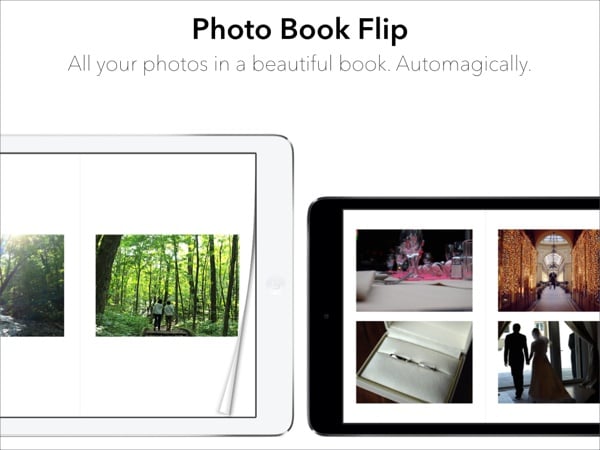
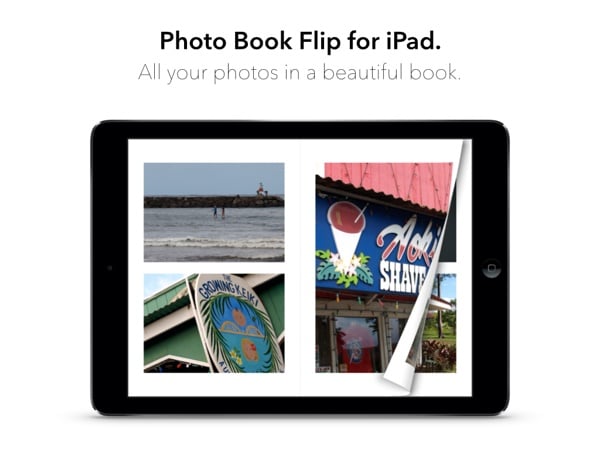
Photo Book Flip instantly turns the photos on your iPad into a beautiful photo book with a single tap. Unlike most photo apps that only let you browse photos one at a time, Photo Book Flip lets you flip through your photos in variety of layouts, so you can enjoy them in a delightful and different way.

How is Photo Book Flip different?

Photo Book Flip is not your ordinary photo book creator app. Every time you choose a set of photos, the app intelligently lays out photos into minimalist templates inspired by photo-centric magazines like Kinfolk. So every time you create a photo book, it’s going to be a different experience even with the same set of photos.

Photo Book Flip also works nicely with Apple’s Photo Stream. This means all the photos you take on your iPhone, you can use Photo Book Flip on your iPad to make them into a photo book with just a tap.

Lastly, we think the best part of Photo Book Flip is that it takes the hassle out of creating beautiful photo books for you to enjoy.

A sneak peak at what’s coming up.

We are hard at work polishing and making this app better. There are lots more features to come and here’s a preview:

  • Sharing features: Email, tweet, or post to Facebook individual photos as well as pages in your photo books.
  • Full screen photos: Tap on any photo to see it in full screen view.
  • More templates: We’re gradually adding more templates for more layout variations.
  • Flickr and Facebook Support: The feature we’re excited about the most! Create photo books from photos in your Facebook and Flickr account.

As you can see, lots of exciting features are coming to Photo Book Flip! Find it on the App Store and make sure to sign up for updates on our website.

Photo Book Flip

Sponsorship via Syndicate Ads

[Sponsor] Photo Book Flip for iPad

A big thanks to Photo Book Flip for sponsoring Elezea this week!

Six months ago I was reading Kinfolk, a culture and lifestyle magazine with lots of beautiful photos. Flipping through it was a really delightful experience. Then it came to me, what if I could flip through my own photos as if they were a beautiful photo magazine, say on my iPad? And even better, what if I didn’t have to organize and layout the photos?

And that was the beginning of Photo Book Flip. After five months of design and development, the app has finally come to life.

Photo Book Flip instantly turns the photos on your iPad into a beautiful digital photo book with a single tap. Inspired by photo-centric magazines like Kinfolk and beautiful cookbooks like Mast Brothers Chocolate and Blue Bottle Craft of Coffee, the page layout features a minimalist design to spotlight your moments. And just like the iBooks app, as you flip each page, you’ll also see what’s behind the page as if it was a real book.

We think Photo Book Flip lets you experience your photos in a delightful and different way. Like what physical photo albums do, we created this app to celebrate the wonderful memories and moments in everyone’s life.

Find it on the App Store at a limited-time introductory price of $0.99 and learn more on our website. We think you’re going to like it. Please check it out, and let us know how we can make it better.

Photo Book Flip

Sponsored via Syndicate Ads

The screen isn't going away, and that's ok

Robert McGinley Myers wrote a good post called Misunderstood or Double-edged? about the new Apple holiday ad. He starts off with familiar arguments about faces stuck in phones and blah blah blah — but wait, don’t roll your eyes because of yet another “technology is bad” post. It doesn’t end like you think it will:

That screen is not going away anytime soon, but we don’t have to be passive viewers of it, merely consuming and feeling vaguely guilty about what we consume from it. There’s immense creative power behind the screen. Instead of worrying about it, lamenting it, and disparaging it, we should focus on learning how best to use it — to gather, understand, shape, and share the information around us.

Agreed.

[Sponsor] Voila - Ultimate Screen Capture Solution for your Mac

Thanks to Voila for sponsoring Elezea’s RSS feed this week!

As a Mac user, you know how crucial it is to have a simple and robust Screen Capture Tool in your arsenal. Voila is the most powerful screen capturing software available for your Mac, that not just lets you capture or record content, but also share across seamlessly.

Voila is the perfect screen recorder for your Mac. You can easily make high quality product demos, DIY app simulations, and tutorials. Create interactive content by recording your Mac screen along with audio and all your click streams. Complete by annotating your screenshots with professional tools and value added features. Record like a pro and publish your final project to FTP/SFTP, Tumblr, Dropbox, Evernote and YouTube with Voila.

Made for Mavericks, Voila is simple and intuitive. With Voila, keep your captures organized, within your reach and enjoy a boost in productivity.

Try Voila today. Download Free Trial.

Voila

Sponsorship by The Syndicate.

The positive side of skeuomorphism

From Jared Sinclair’s excellent “Form Follows Function” Is More Complicated Than iOS 7 Thinks, in which he explains why some of the skeuomorphic elements of iOS 1-6 were actually useful:

On iOS, putting function before form is not as simple as paring down icons to a strict grid and color palette. There are functions beyond literal communication that iOS designers must balance. Making icons warm and inviting serves many deeper purposes. It builds your confidence in the device. It makes you feel in control. It sets your mind and thumbs at ease. It communicates through feeling and memory, and when done well, resonates with human experience in a way that PCs never could.

There have been a few other defences of appropriate skeuomorphic elements recently. From Kevin Suttle’s Frame of Reference:

There has been quite a bit of confusion over what skeuomorphism is. Many define it as “creating digital products or interfaces that resemble their physical counterparts”. The goal of skeuomorphic style was to leverage our pre-existing affordances and lend a healthy amount of familiarity and confidence to digital interfaces.

And from Dan Wineman’s must-read Look, and Feel:

Affordances are the baby to skeuomorphism’s bathwater. When they engage our instincts just right, they create an emotional bond, and the unfamiliar becomes inviting. Without them, it’s just pictures under glass. It makes no difference how flat, how deep, how minimal, or how ornate the look-and-feel is if it can’t show us, when we look, how to feel.

So, as it turns out, good design is (still) all about affordance.

[Sponsor] Meet Techi: All the tech news in one place

A big thanks to Techi.com for sponsoring Elezea’s RSS feed this week!

Techi.com is a site dedicated to all things tech. From updates on Sony’s PS4 to reports on Google’s latest acquisition; whether you’re looking for the latest Apple product or looking for views on mobile web, Techi is the site to visit.

Techi.com’s news is sourced from thousands of sites from across the Internet, then curated by an editorial team with their finger constantly on the pulse of the industry’s most vital developments. You also get a quick summary of the news so you save time and read only what interests you most.

In addition to the best news curated from across the Web, Techi.com also offers exclusive original articles and stories featured in the Drudge Report, Reddit, NYTimes, Google news, and many more.

You don’t even have to visit daily. Just sign up for the daily newsletter and get the latest tech news direct to your inbox --- with no fuss whatsoever --- in time for that commute or mid-day coffee.

Don’t spend your morning sifting through RSS feeds looking for the hot news. Go for the instant solution: get it all from Techi.com in less time than it takes to make your coffee.

Sponsorship by The Syndicate.

The trouble with Microsoft

John Gruber in Thoughts and Observations Regarding This Week’s Apple Event Introducing the iPad Air and Retina iPad Mini:

This puts Microsoft in a tight spot. Apple gives away software for free in exchange for your buying their hardware. This is not charity. It’s also in marked contrast to Google, who gives away software for free in exchange for selling your attention (and personal information) to advertisers. Apple and Google are squeezing Microsoft from both sides, and the result is that less and less perceived value in the industry resides solely in software. You can make money selling hardware (like Apple) or make money selling ads (like Google), but given the popularity of Apple’s hardware and Google’s apps and services, it’s getting harder for Microsoft to make money by selling software.

John Moltz in Rudderless Microsoft:

I don’t think Microsoft is going anywhere. I mean that in two ways: 1) I mean they’re not going away and 2) right now they’re not going where the puck is going. They’re sailing somewhat aimlessly though increasingly margin-less waters. And the degree to which Microsoft’s investors, boosters and followers are OK with that is rather baffling.

It’s hard to write about Microsoft. If you think they’re doing great things you get ridicule from the Apple side. If you think they’re headed for disaster you’re labeled as a brainwashed fanboy. As with most things, the truth is more likely somewhere in the middle. But even the most die-hard Microsoft fan has to admit that Microsoft has been painted into a corner:

  • By making OS X 10.9 and its core apps free, Apple is creating an expectation that all operating systems should be free. It doesn’t matter that fewer computers run OS X — it’s about the precedent and how that affects consumer expectations.
  • By making services like Gmail and Docs “free”1, and by continuing to reduce the feature set gaps between those services and Microsoft Office, Google is forcing users to ask tough questions about the software they’re using, and why they’re paying so much for it. When authors like Charles Stross start taking on industry conventions by writing Why Microsoft Word must Die, you need to realise that your product is walking very close to the edge of a tipping point.

And yet, Microsoft appears to be doubling down on what are their two biggest strategic mistakes.

First, they’re not owning the whole hardware/software supply chain. Reading Gartner’s advice to Apple in 2006 is almost funny now in how wrong it ended up being:

Increasing component costs and pressure to cut its prices mean Apple’s best bet for long-term success is to quit the hardware business and license the Mac to Dell, analyst firm Gartner claimed on Tuesday.

The point is simple: if Microsoft can’t make money on PC hardware (which they can’t), they need to make money on the software. But that gets very hard when the “free” options become more and more appealing. Yes, most organizations still rely on Exchange for their mail and calendars. But how long can that last when employees all switch to Gmail and can’t shut up about how horrible Outlook is? RIM thought they had the enterprise market locked up because they controlled IT managers. How did that work out for them once employees starting rushing the IT castle, demanding support for their iPhones?

Second, Microsoft is sticking with their “You don’t have to compromise!” philosophy. Does Surface run a a desktop OS, or a tablet OS? Neither, and both! And that is a huge problem. By not making “compromises” they’re actually compromising way too much. Perhaps Doug Bowman summed it up best:

@gruber On the C word. Someone recently put it to me that all design is a series of compromises; but good design finds the right ones.

— Doug Bowman (@stop) February 6, 2013

Trying to use a desktop OS on a tablet isn’t “no compromise”, it’s utter frustration, and it doesn’t look like Microsoft is planning to stop doing that any time soon. From Engadget’s Microsoft Surface Pro 2 review:

As a tablet, the Surface Pro has made fewer strides. And that’s a shame, since the Pro is, at its heart, a tablet. […] The new Pro is much improved, but it’s still at its best in notebook mode. Indeed, whoever buys this needs to want a tablet and laptop in more or less equal measure. Because if what you really want is a laptop you can occasionally use as a tablet, you’re still better off with a convertible Ultrabook.

This inability to compromise has always been a problem for Microsoft. Back in 2006 Microsoft gave us a look at the most-used features in Word 2003, and it includes this paragrah:

Beyond the top 10 commands or so, however, the curve flattens out considerably. The percentage difference in usage between the #100 command (“Accept Change”) and the #400 command (“Reset Picture”) is about the same in difference between #1 and #11 (“Change Font Size”) This is what makes creating the new UI challenging — people really do use a lot of the breadth of Office and beyond the top 10 commands there are a lot of different ways of using the product.

Apple would look at that data and say, “let’s cut the bottom 200 commands.” Microsoft looked at it and said, “We’re going to need a bigger ribbon.”2

In short, what Microsoft needs most now is a leader who knows how to make the right compromises. It needs someone who can figure out how to bring the success of the Xbox integrated business (oh look, they make the hardware and the software for that!) to the rest of the company.

Update: As the honorable Mr. Maughan points out, this relates nicely to his post Compromise and glorified ignorance.


  1. The usual “If you’re not buying the product, you are the product” disclaimer applies. 

  2. For another example, see Improvements in Windows Explorer