Menu

Posts tagged “user research”

Apple and Faster Horses

The Harvard Business Review says they have proof that Henry Ford never said “If I had asked people what they wanted, they would have said faster horses.” It’s an interesting piece, but it’s the conclusion I want to quote here:

The real lesson learned was not that Ford’s failure was one of not listening to his customers, but of his refusal to continuously test his vision against reality, which led to the Ford Motor Company’s failure of continuous innovation, resulting in a catastrophic loss of market share from which it never recovered.

Translation: regardless of where your innovative ideas come from, make sure you test those ideas with users and learn from their feedback.

The iPhone might have been one man’s vision, but the way users interacted with the first generation iPhone paved the way for the iPad and the iPhone 4. They tested their vision with a real product, and then learned from it.

Content Designed to Manipulate Users

Back in 2004 Adam Greenfield wrote down some ethical guidelines for user experience in ubiquitous-computing settings. He starts off as follows:

Principle 1: Default to harmlessness. Ubiquitous systems must default to a mode that ensures their users’ physical, psychic and financial safety.

That might sound a little overly dramatic, but as we’ll soon see, it’s a very important principle for a designer to keep top-of-mind. Adam goes on to say this:

Principle 5. Be deniable. Ubiquitous systems must offer users the ability to opt out, always and at any point. As an absolute ethical imperative, users must be afforded the ability to make their own meaningful decisions regarding their exposure to ubiquitous perception, the types and channels of information such exposure will necessary convey, and the agencies receiving and capable of acting on such conveyance. Critical to this is the ability to simply say “no,” with no penalty other than the inability to make use of whatever benefits the ubiquitous system offers its users.

Now. Think about those principles, and then have a look at the newsletter preferences page for eBucks:

eBucks Newsletter Preferences

The text in the opt-out line reads:

I’m not concerned with my eBucks balance and I don’t think I should be the first to know about all the latest news.

It’s an interesting content approach taken by eBucks, and one I would argue violates both principles I quote above. They are basically making you feel out of touch (“be deniable”) and a little bit stupid (“default to harmlessness”) if you don’t subscribe to their newsletter. Are they also implying that you won’t be able to view your balance if you don’t subscribe? Probably not, but it can be interpreted that way.

Fast forward a few years after Adam’s article, and we now even have a name for this type of tactic. It’s a classic example of persuasion design:

Persuasion design doesn’t share User-Centered Design’s ethical neutrality. Instead, it makes an implicit but undeniable judgment that certain behaviours are preferable to others.

Persuasion design prioritises business goals above those of the user, and its values are irreconcilable with empathy, the central value of User Experience.

This is just one example, but you can see it everywhere. It might seem innocent at first, but it’s such a slippery slope to the evil of dark patterns. We need to consider the implications very carefully before we employ such techniques.

Hierarchy and Aesthetics: Separating Science from Art in Visual Design

In this post I argue that we need to communicate the differences between the science and art of Visual Design better to help change the common perception by stakeholders and clients that user experience is purely subjective.

One of the most difficult aspects of visual design is finding the right science:art ratio to accomplish user goals. I’ve always subscribed to what Tim van Damme calls the mathematics of design. You start with the science:

If art is about talking and expressing yourself, interface design is about listening and disappearing into the background. You listen to the content and its context, and take it from there, one step at a time. Don’t worry about the looks, just start with the variables. 1 + 1 + 1 + ”¦ Baby steps, over and over again until what you have on your screen feels right.

And then you mix in art where appropriate:

But sometimes, even 1 + 1 is too much to handle, and you need to clear your head. This is where art comes into play, in the broadest meaning of the word: Paintings, illustrations, architecture, human beings, even nature is art. They won’t help you decide whether you should draw a 1 or 1.5 pixel highlight, but allow you to take a step back and just decide on what’s more suitable or pick one and move on.

Of course, this is not a serial process. Great designers are able to design within that delicate balance between science and art, and find the right ratio as they’re doing it. And even though it’s not easy, I do feel that most designers inherently get this - that visual design is science and art combined in different levels based on the needs of the user and the application.

What’s even harder is explaining this to stakeholders and clients in a convincing way. Over the past week I’ve seen so many comments about how “UX is subjective” and “standards always change” that it got me thinking about a possible solution to this problem. I haven’t figured it out, but I’d like to write down some initial thoughts for discussion.

The problem with Visual Design

I think as a UX community we’ve done a good job of splitting out the different elements of UX Design. Stakeholders and clients are slowly starting to understand the difference between Information Architecture, Content Strategy, Interaction Design, etc. And most people also now understand that those functions are not just gut feel or whatever is the trend of the day. We’ve done a decent job of showing the evidence behind the decisions we make - thanks in large part to the results of user experience research methods like ethnography and usability studies.

But Visual Design is the odd one out in this equation. It walks the line between science and art so tightly that most stakeholders and clients only see the art part. So they look at a design, make a gut call, and think that it’s all just whatever style the designer fancied on that particular day. Sure, some of it is our own fault, and many designs don’t have enough science at all. As Zeldman pointed out:

When Style is a fetish, sites confuse visitors, hurting users and the companies that paid for the sites. When designers don’t start by asking who will use the site, and what they will use it for, we get meaningless eye candy that gives beauty a bad name ”” at least, in some circles. Not enough designers are working in that vast middle ground between eye candy and hardcore usability where most of the web must be built.

We have to find a better way forward.

Breaking down the elements of Visual Design

So how do we fix this? One way is to provide a much clearer distinction between the different aspects of visual design. I’m not saying we should split the job title into two functions, I’m saying we should be more explicit about the goals and outcomes of visual design. And it needs to be simple, so it can’t be too detailed. I’m not 100% sure how to do that yet, but here is one suggestion:

  • Hierarchy Design could refer to decisions made during the design process that sets the appropriate visual hierarchy based on the scientific principles of visual perception (such as contrast, grouping, balance, symmetry, etc.). See Designing for the Mind as an example.
  • Aesthetic Design could refer to decisions made during the design process to help the design fit the brand promise and elicit an appropriate emotional response (such as choice of color, typography, button styling, etc.). See In Defense of Eye Candy for more.

Now, as I already mentioned, there is a lot of overlap between these activities, and you can’t have one kind of visual design without the other. But there has to be a way for us to talk to our stakeholders and clients about the visual layer of design that is not based on style preference but on “hardcore usability” as Zeldman puts it.

As we continue to grow and define the different elements of user experience I believe that Visual Design has the most baggage to overcome simply because of the history of web design and its initial focus on what’s pretty vs. what works. What works is not subjective, and we need to communicate that effectively to our stakeholders and clients. It’s not their fault for not “getting it”, it’s our fault for not explaining it properly. Let’s change that.

Proving the value of user experience design to organizations and clients

This is a question that doesn’t seem to go away: “How do I convince my company that good design is worth investing in?” It’s frustrating to work in an industry where you have to spend so much time showing the value of what you do.

At first I placed all the blame on (big) companies who are too cheap to pay for good design because they don’t think it’s necessary. But then I started to wonder… maybe some of it is our own fault? Maybe we just haven’t yet proven, within our industry and the companies we work at, that good design will result in positive ROI?

If I remember one thing from Marketing 101, it’s this obvious (but often forgotten) truth: Businesses exist to make money. Companies work so hard to make us happy for one reason only: so that we will buy more of their stuff. This seems obvious, but it’s important to remember. Because when you talk to the management teams of your organization/clients, telling them how beautiful their site will be once you’re done with it is just not going to cut it.

To prove the value of user experience design, you have to prove that by investing in it, the business will make more money. It’s as simple as that. Well, the concept is simple. The execution is… complicated. In this post I’d like to propose some ways to help us prove the value of design, so that we can spend more of our time building great experiences and less time telling people why they should build great experiences.

Design = Money

Proving that good design will make your organization/client more money is not something you can apply a formula to and do overnight. It involves some hard work and clever thinking (time well spent) to figure out what works best for the context you’re designing in. In some cases, like designing a Checkout process, it is relatively easy to define success metrics, benchmark, and show that a redesign resulted in more money - because checkout is where the money is.

In other cases, for flows that are further removed from direct revenue generation, it can be much harder to find the money link. In those cases, a conversion model is often the right way to go:

In most online user flows you can make a strong case that an improved conversion rate (or reduced drop-off rate) will result in increased revenue. Once that link is made, what remains is to prove that an improved user experience results in improved conversion rates. But there are immediately two challenges with this approach:

  1. How do you buy the time you need to prove that UX works?
  2. How do you find the right conversion rate model to link UX to conversion rates (and ultimately revenue)

So let’s dive into that.

Buying time to do the right thing

Getting an organization or client to invest in UX can be quite tricky in the beginning. Without real data, it’s hard to show the value. But without the time to do the process right, it’s hard to get real data. And so the vicious circle continues.

One way to buy some time is to show case studies where an investment in UX design has resulted in significant revenue lifts. One of these case studies is Jared Spool’s The $300 Million Button, where a simple design change resulted in an enormous revenue lift. Spool writes:

When the team contacted us, they’d already pretty much decided what the problem was and how they were going to fix it, even though they had never watched any shoppers make purchases. And they were dead wrong. Not only was their fix not going to help, our research showed that it was going to increase abandonment.

Two weeks of usability testing on the live site (and on competitors’ sites), followed by two weeks of iterative paper prototype testing produced a streamlined checkout process, which, once implemented, showed a dramatic increase in revenues. It’s amazing what you’ll learn when you actually watch your users.

Obviously not all UX changes are going to have this much of an impact. But sharing cases like this with senior management or clients should help in making the case for investing in a proper user-centered design process. I know this is easier said than done, but mountains can be moved with some solid data and stubborn persistance.

So, let’s assume you’ve shown that a good UX can increase revenue quite significantly. How do you go about proving it for one of your own projects?

The three A’s

One of the marketing principles that are quite useful for user experience design is looking at the source of revenue as coming from one or more of three sources:

  • Acquisition. Getting new users to sign up for your site/service
  • Activation. Getting those new users to make their first purchase
  • Activity. Getting those first-time purchasers to come back for more

If you can tie a UX project to one or more of these sources of revenue by showing that you increased conversion rates in those areas, you’ll have what you need. You’d have shown that design=money. Here are some hypothetical examples:

  • A registration flow redesign can be shown to improve conversion from sign-up landing page to signed-up users. This ties into Acquisition.
  • Improvements to a search results page can be shown to improve conversions from search —> items placed in a shopping cart. This ties into Activation and Activity.
  • Home page layout and content changes can be shown to improve click-through rates on merchandising offers specific to new users. This ties into Activation.

And this list can go on and on. It won’t always be easy, but every UX project should be measurable in terms of its impact on the business, and tying it to one of the three A’s is a good structured way of anchoring all design changes in business goals (and ultimately, revenue).

Define your success metrics, benchmark those metrics before any changes are made, and then measure the (hopefully improved) increase in metrics.

In summary

As designers, we need to assume some of the blame of working in an industry that often has to fight very hard for appropriate resources to do our jobs. We need to understand why businesses exist, and follow a strategic approach to proving the ROI of design:

  • Show historical case studies to buy some time and resources to follow a proper UX design process on one or more of your projects.
  • Start on a project where changes can be measured by an improvement in one of the three A’s of revenue generation: Acquisition, Activation, or Activity
  • Benchmark well before the start of the project, follow through on the UX design commitment, and measure your results - see this post on Six Revisions for some tips on which measurement tools to use. (What to do if the results are negative is a topic for a whole different post).

There is no perfect way to prove the ROI on design - this is just one proposal. Another side that I didn’t explore in this post is the many ways that UX can result in cost/resource savings. That’s deliberate since I wanted to focus specifically on the positive side of the revenue equation (for a discussion of some of the savings benefits of UX, see this great video by Susan Weinschenk from HFI).

I’d love to hear your thoughts on this important issue. How else can we prove the value of design?

The KFM Website Redesign Project, or What's Wrong With Our Industry

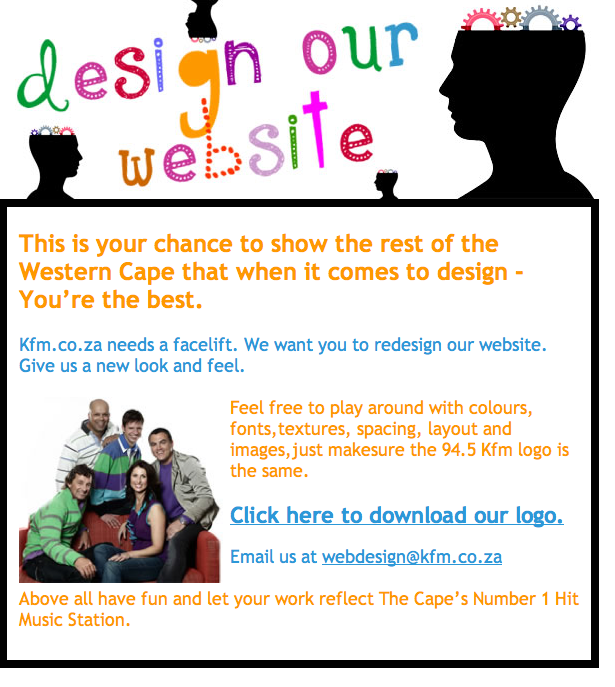
I just found out about the redesign “project” (not sure what to call it) that South African radio station KFM is kicking off (thanks for the heads-up @1rene, @kerry_anne, @allankent, @wendyrobb, and many others). Here is the ad for it:

I’ll stay away from the cheap shots you could take on the ad itself, because granted, they’re admitting they need a designer. Instead, I’d like to focus on two major problems with the idea itself, and what that means for the web design industry.

1. Design is not “colours, fonts, textures, spacing, layout and images”

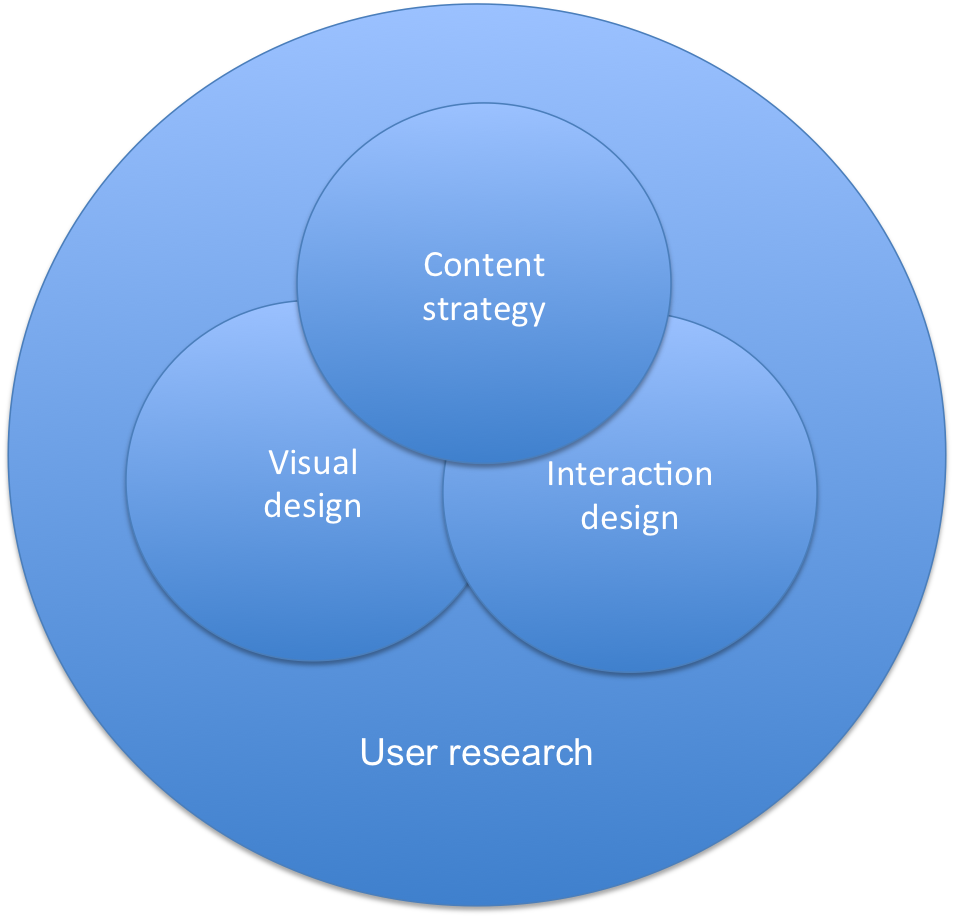
It’s really shocking that we still need to have this conversation in 2011, but guys, what you’re asking for is Visual Design. What you should be asking for is User Experience Design, which is made up of so much more than what you’re asking for:

There is no space or time to go into it here, but the point is that you need a User Experience designer to help you understand these elements, and not just give you a pretty design that doesn’t meet user needs.

  • User research helps you uncover user needs and expectations for the site.
  • Content strategy helps you define the voice and tone of your site, and writes content that meets the needs of your target visitors.
  • Interaction design helps you design an information architecture and a flow through the site that lets users accomplish their goals in the most efficient way possible.
  • Visual design provides the appropriate visual language to guide users along this ideal path that you define (and, fine, it also makes it pretty).

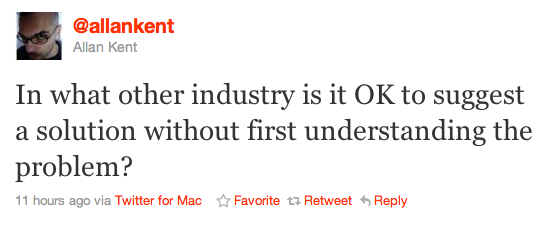
I think @allankent summed up my feelings about this issue the best:

Please KFM (and everyone else thinking about a redesign): don’t just make your site pretty. Make it something that allows your visitors to find the content they’re looking for, and enjoy it while they’re there.

2. “If you’re good at something, never do it for free.”

The second problem with this project is almost worse than the first. And that is the expectation that a designer should give up his or her time for free to work on this. Just, you know, for love of the game. The Joker’s words in The Dark Knight bears repeating:

If you’re good at something, never do it for free

If KFM is serious about a site redesign, they’ll pay for a proper redesign project, not ask people to give away their skills for free. Good design is hard, and if you paid the price it takes to become good at it, you should be compensated for your time. After GAP asked designers to redesign their logo for free a few months ago, Mike Monteiro wrote a great post on this that you must read. In Dear Gap, I have your new logo, he says:

Man, that stuff took time. A lot of time actually. And a tremendous amount of effort, as well as expertise. Expertise that came from a combination of training, which I had to pay tuition for, and experience. I’m good at this because I’ve done it a lot. Sure, ther’s some natural talent there, but by and large I’ve gotten good at my job the same way every other worker has. By experience, by focused effort and by learning from my mistakes.

So as much as I’d like to just show you the greatest logo I’ve ever made for anyone (“¦and trust me, if Paul Rand himself saw it, he would realize he was merely the Pippen to my Jordan.) I’d like to be properly compensated for it. Because I put a lot of time and effort into it. And it’s how I earn my living.

And that time and effort was used to make sure I delivered something that actually met your needs and objectives. You guys have numbers to meet. And plans for the future based on meeting those numbers. So do I.

And for the sake of full disclosure I should let you know that I’ve also frequently shopped at your stores. You sell good stuff. But never in my experience has any of your employees offered me a free pair of pants because the ones I was wearing looked bad. I wouldn’t expect them to. Their job is to sell me clothes.

My job is to sell design.

To designers: please, please don’t cheapen our industry by doing something you’re good at without compensation.

And to KFM: please don’t ask people do this work for free. I’m really happy you want to redesign your site, but you should pay UX professionals to help you do it. I guarantee you will be happy with the result.

If we’re going to move this industry forward in South Africa, we’ll need to start being serious about what design really means. And that means putting money behind the education and employment of user experience professionals.

Best practices for user onboarding on mobile touchscreen applications

As the UX field grows and more companies start taking user-centered design seriously, we need to start thinking about how we’re going to rescue all those stray sheep of the UX world — those areas that are getting left behind because we’re (understandably) focusing on the obvious, most important things. Two of these “stray sheep” issues come to mind immediately.

One is bad error messages, which is the subject of a whole other rant, so I won’t go into that now (I’ve started a Flickr group to collect examples - come join and contribute!). The second is user onboarding, which Whitney Hess defines as follows:

Onboarding is the process by which you can help users overcome the cold-start problem””a blank profile, an unfamiliar interface, a general feeling of “what the heck do I do next?”

And that’s what I’d like to address in this post.

The importance of user onboarding

When Jakob Nielsen wrote his 10 Heuristics for User Interface Design in 1990, he devoted one of his rules of thumb to user assistance and help documentation:

Even though it is better if the system can be used without documentation, it may be necessary to provide help and documentation. Any such information should be easy to search, focused on the user’s task, list concrete steps to be carried out, and not be too large.

Yes, first prize is to have a system that doesn’t require onboarding or documentation. But that’s not always possible, especially in the fairly new field of mobile design. So, if you need to provide onboarding help, what’s the best way to do it?  A List Apart recently published an excellent article (Good Help is Hard to Find) on how to write good Help content, with specific reference to the importance of context:

Help content can be rendered in many ways, but if possible, embedding it directly within the feature it serves is almost always the best choice. When help is offered in context, affordance is high: That is, the help is obvious to the user. Even better, context-based help is the least disruptive to workflow, as it doesn’t require the reader to view a separate page.

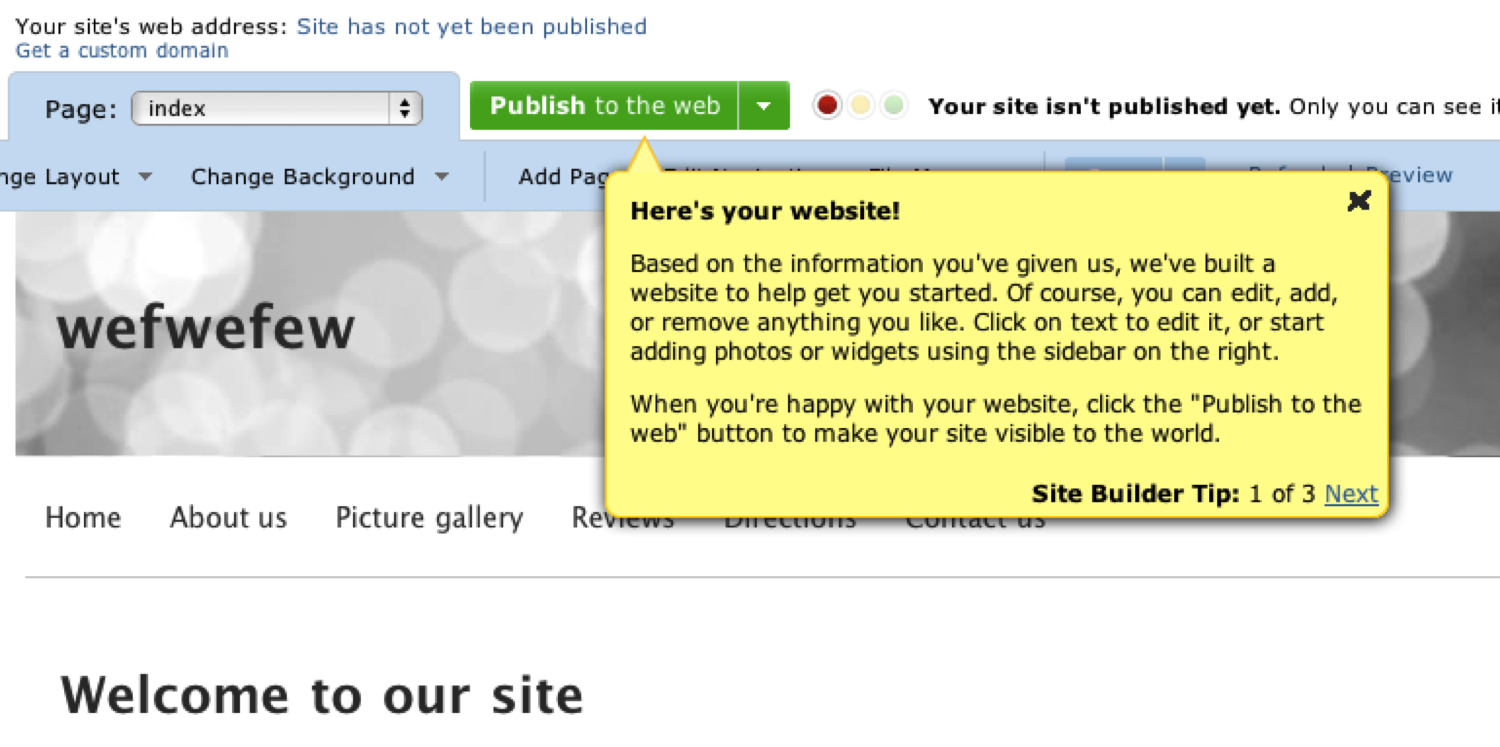
To name one example of contextual onboarding: when you first sign up for an account on website builder Yola.com, you see this screen, which provides tips on how to get started:
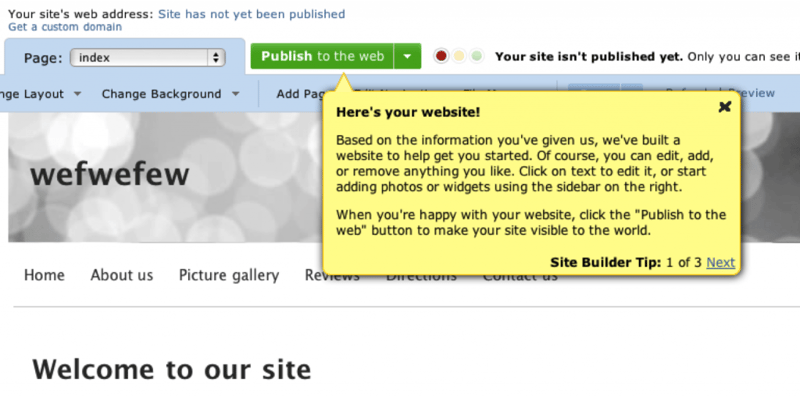
You can write whole books on good and bad implementations of user onboarding in web apps (The Baymard Institute recently posted 3 Examples of Inline Help, which is well worth reviewing). But I want to focus specifically on how user onboarding should be applied to mobile touchscreen applications, because we don’t yet have best practices for that.

Here are some best practice guidelines I’d like to propose for onboarding users on these devices:

1. Don’t show all the information at startup

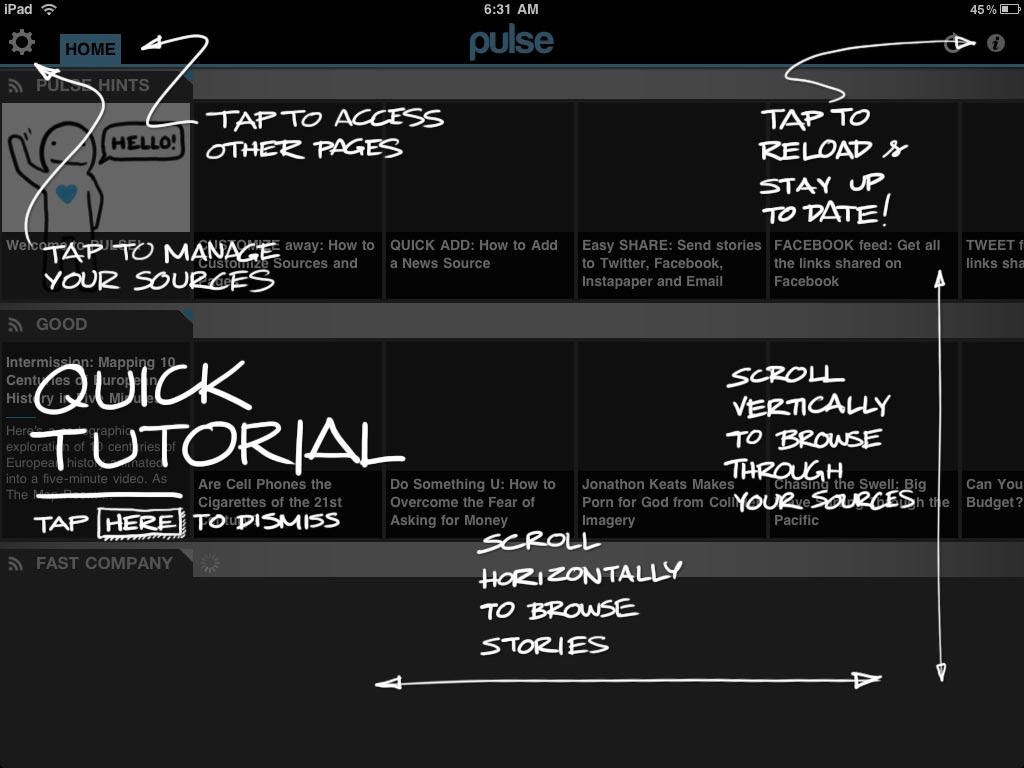
When you first start up the magazine app Pulse, you get this screen:
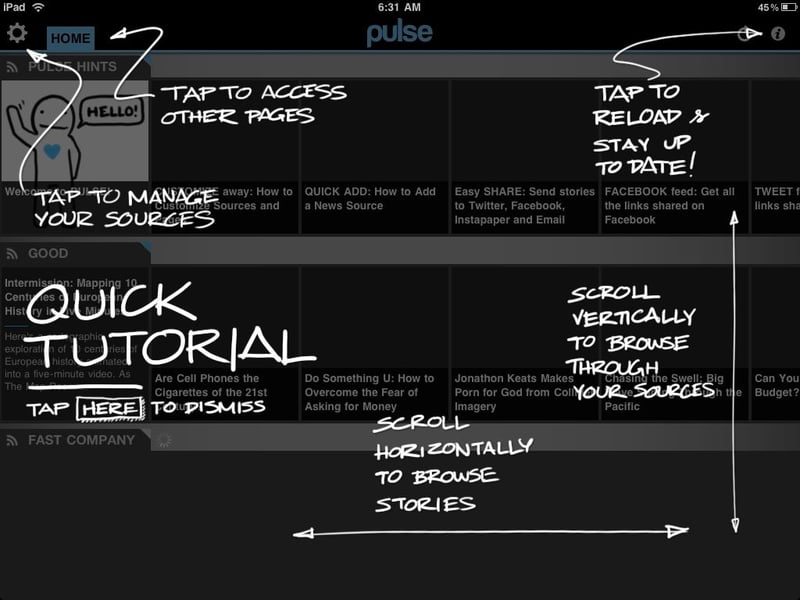
It’s certainly different - fun and quirky. But it’s also overwhelming and too much, too soon. I haven’t started using the app yet. In fact, when I installed it I wasn’t even sure what it does - is it an RSS reader or a news feed from predetermined sources? Or something completely different? I can’t do a tutorial on something I don’t understand yet.

So, guideline #1: make sure that users have familiarized themselves enough with your app to have the correct mental model before you start teaching them how to use it.

2. Show one (or only a few) tips at a time

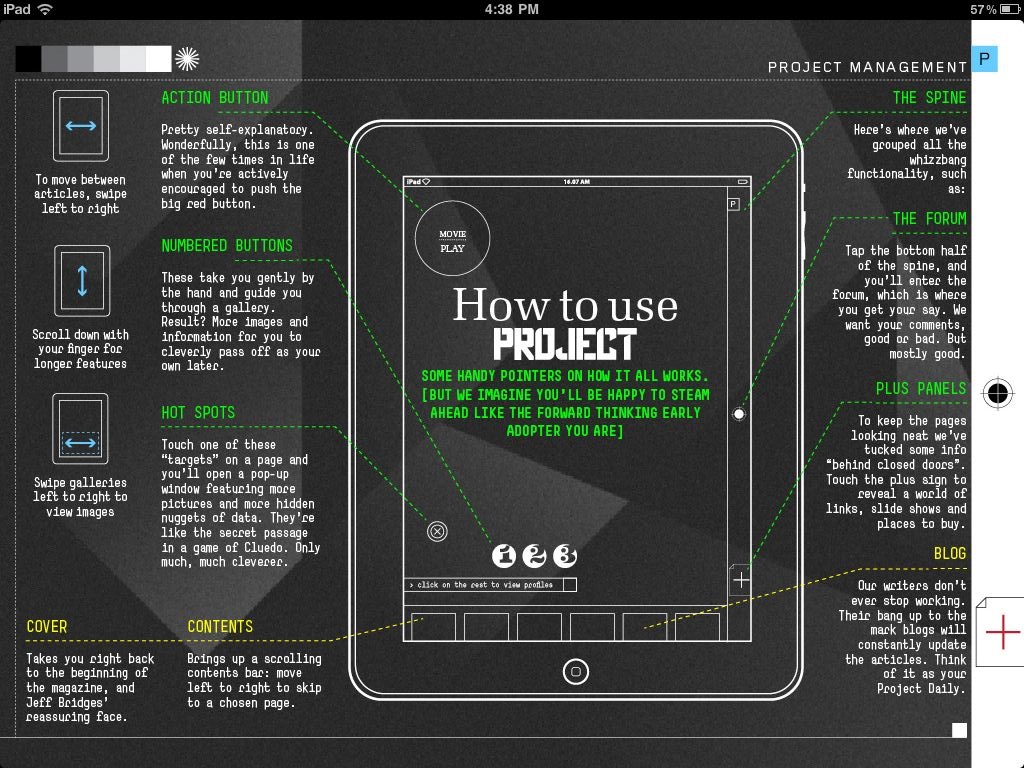
Project is another magazine app that’s getting a lot of press at the moment. Project adheres to rule #1 by getting you a few pages into the experience first before showing you the ins and outs of the app itself. But then you get to this page:
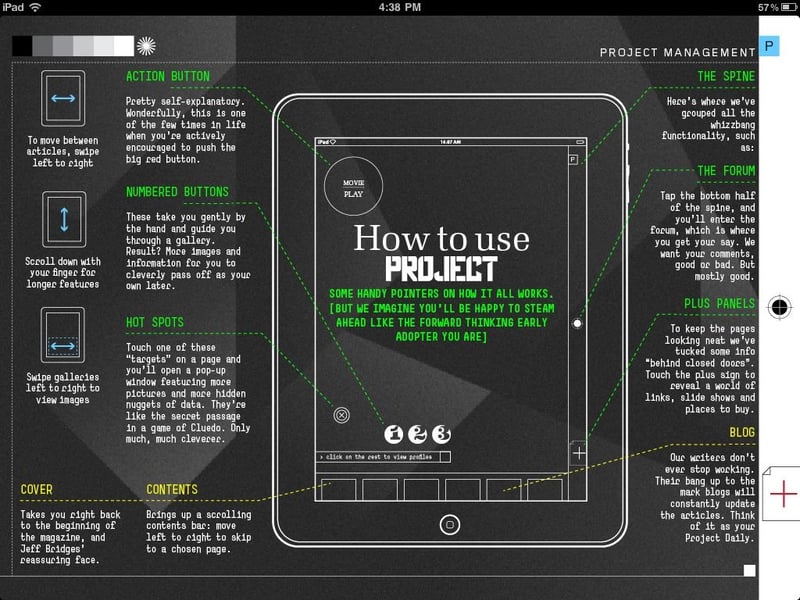
That is just way too overwhelming. Ignore, for the moment, the heavy visual design that makes this so hard to read. Even if this was designed in a clearer way, there is still too much information on the page, too many things to try to absorb and commit to memory. Speaking of Nielsen, remember this heuristic:

Recognition rather than recall: Minimize the user’s memory load by making objects, actions, and options visible. The user should not have to remember information from one part of the dialogue to another. Instructions for use of the system should be visible or easily retrievable whenever appropriate

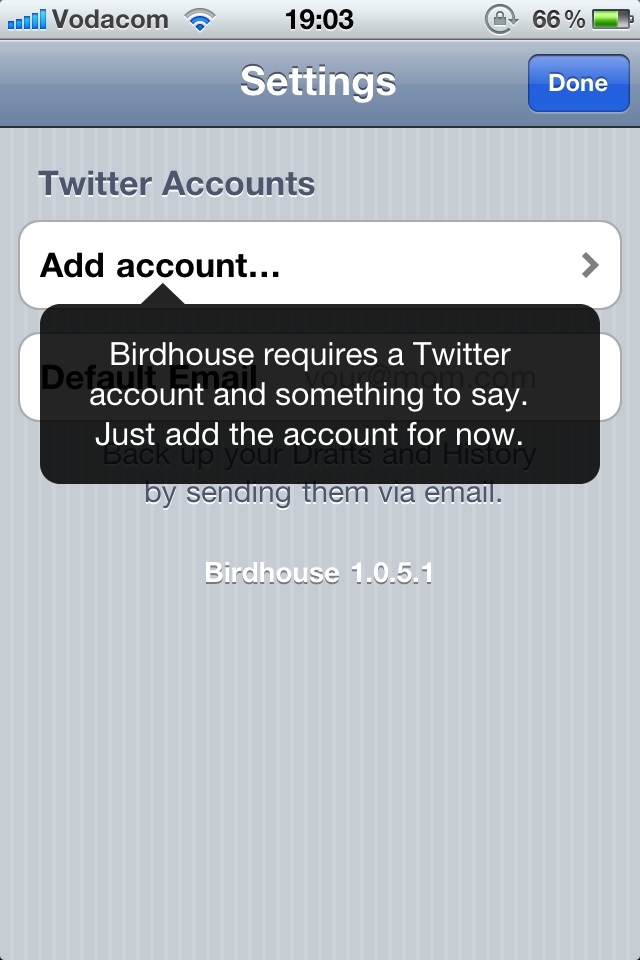
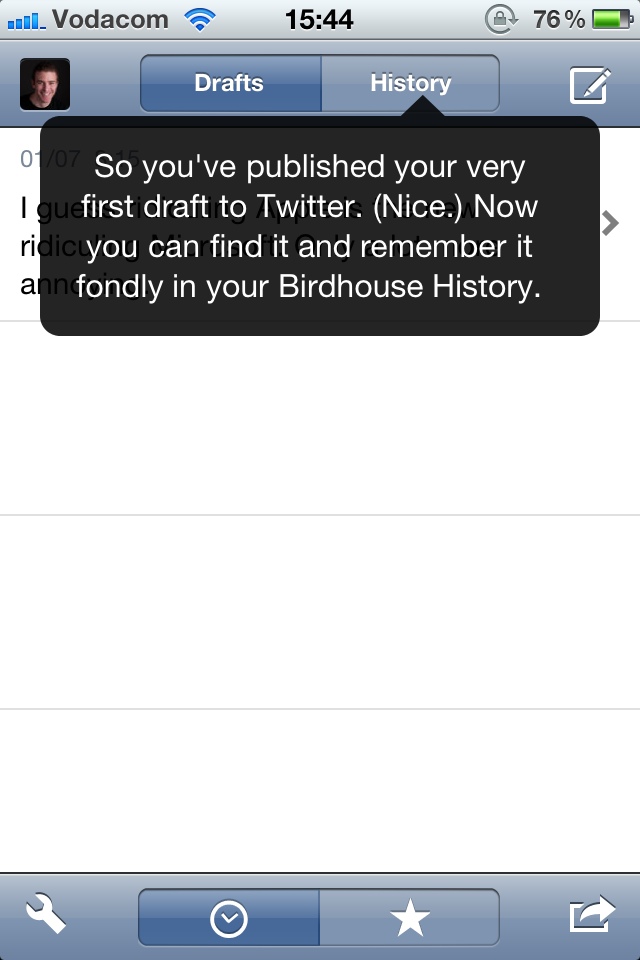
This page increases cognitive load significantly, and requires the user to remember too much. And this brings us to guideline #2: Show users only the information they need to take the immediate next step(s) for using the application. Consider, for example, two screens from the iPhone app Birdhouse:
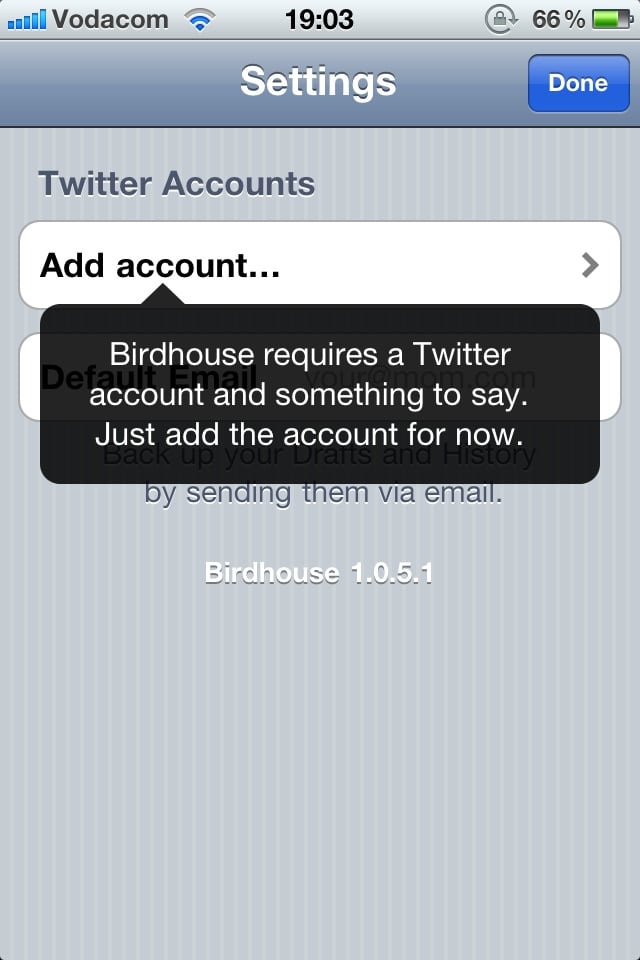
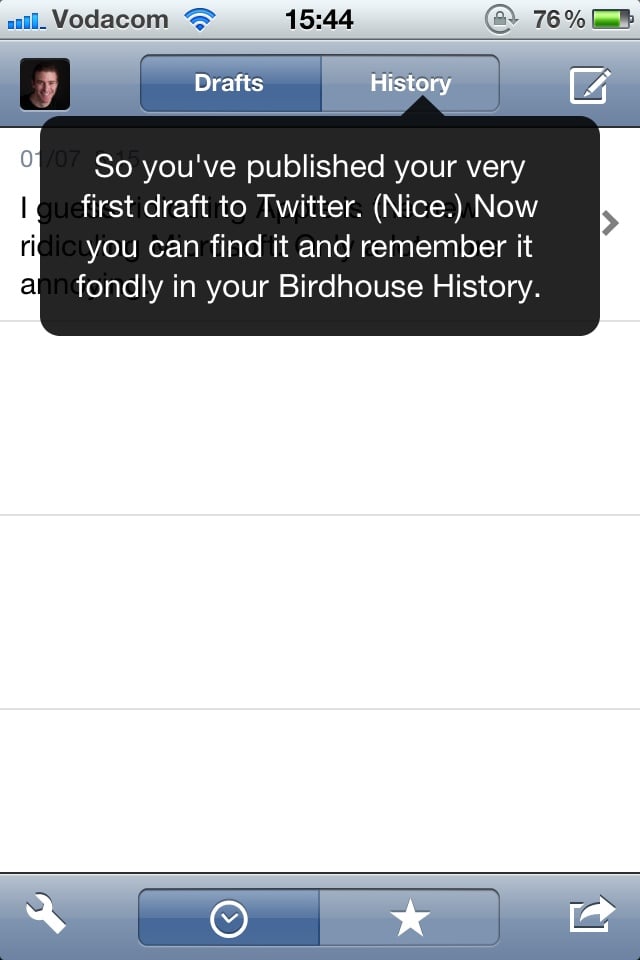
It follows guideline #1 by telling you what you’re going to use the app for, and it follows guideline #2 by telling you one thing you need to know to use the app, at the exact time you need it. The first screen lets you know what information is needed to use the app. The second screen tells you how the “History” function works, at the moment you might want to start using it (after you’ve published your first tweet).

3. Always keep the app’s context visible

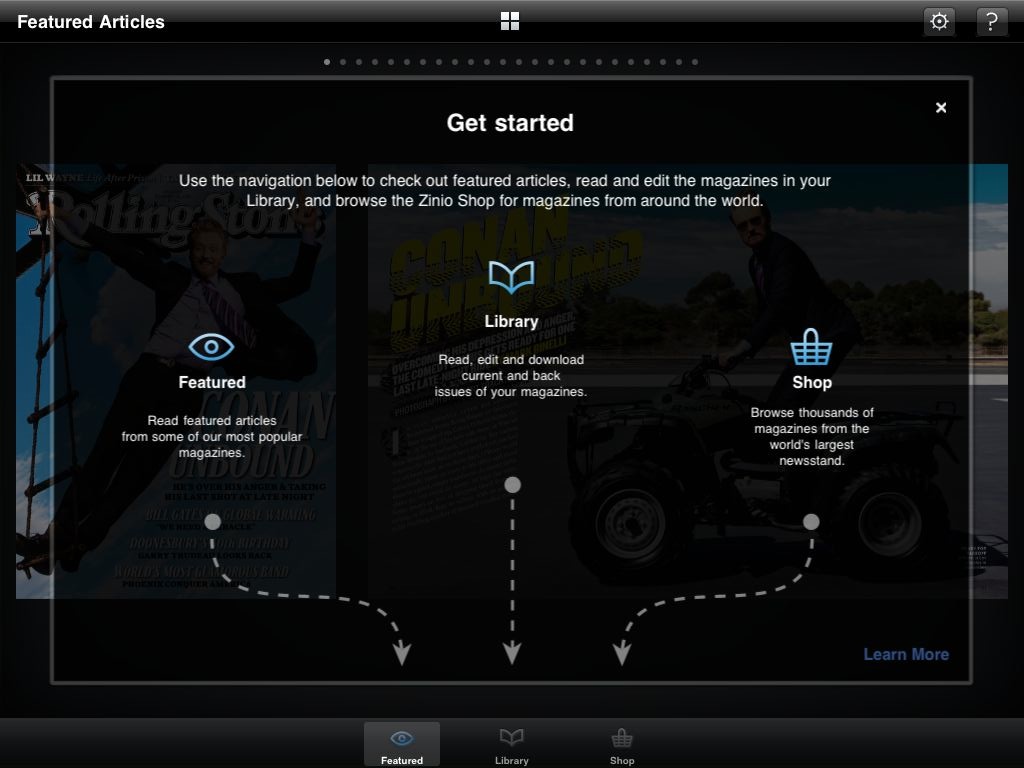
Yet another magazine app, Zinio, does their user onboarding this way:
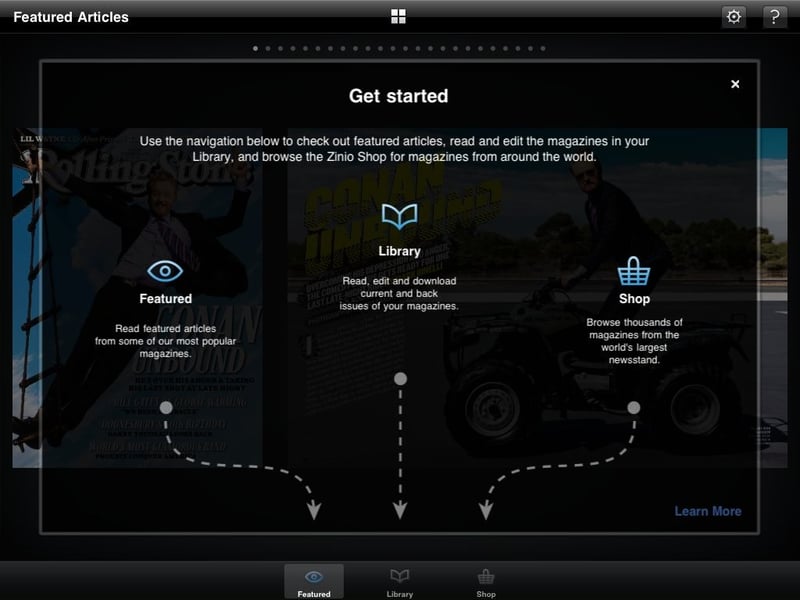
Even though it could be simplified, this is a pretty good way to get users started. It explains what each of the areas of the app are, and it uses arrows to keep the context of the app visible, so that you know where to find the areas you’re looking for. Guideline #3: Make sure users have a clear link between the information you give them and how to access/use that information in their everyday use of the app.

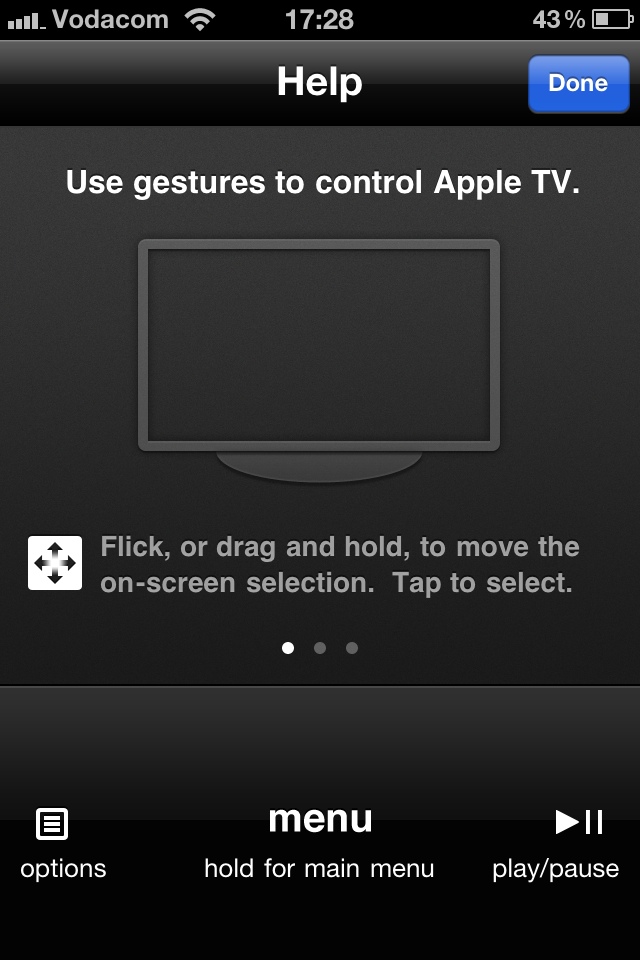
Another good example of this is the Apple remote app for the iPhone. When you tap the Help icon, the interface stays the same, but some additional information is overlayed across the screen to show you what each of the areas are for:
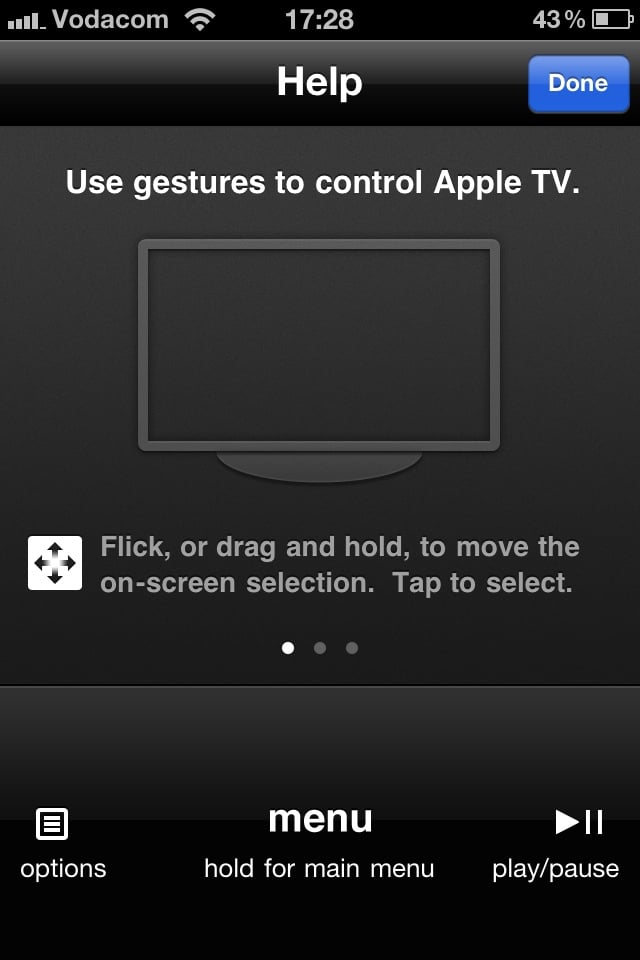
Summary

In this post I proposed some guidelines for onboarding users on apps for mobile touchscreen devices:

  1. Make sure that users have familiarized themselves enough with your app to have the correct mental model before you start teaching them how to use it.
  2. Show users only the information they need to take the immediate next step(s) for using the application.
  3. Make sure users have a clear link between the information you give them and how to access/use that information in their everyday use of the app.

This is certainly just a start, so I’d love to hear more suggestions — how can we quickly and effectively onboard users on mobile applications?


How to measure the effectiveness of web content

Content strategy is starting to get its much-deserved time in the spotlight as part of the user experience design family.  As basic examples of confusing/bizarre content like this one and this one show, getting serious about content is way overdue.  But I’m a little worried that we haven’t seen much talk on how to measure the effectiveness of web content.  It is unfortunate that in some companies it is still a struggle to sell the benefits of UX design, but it is the reality, so we have to deal with it.

Selling content strategy to clients and stakeholders is, of course, not the only reason why measuring its effectiveness is important. It is also essential as part of the whole design process:

  • How do we select the best content if we have a variety of different alternatives, each with its own group of supporters who want to get it on the site right away?
  • Since the voice of a web site can be such an abstract, arbitrary decision sometimes, how can we apply methodologically robust research methods to help make these decisions?
  • How do we know that the content we wrote made a difference on the site?

So that is what this post is about — a proposal for how to measure the effectiveness of web content.

What makes content effective?

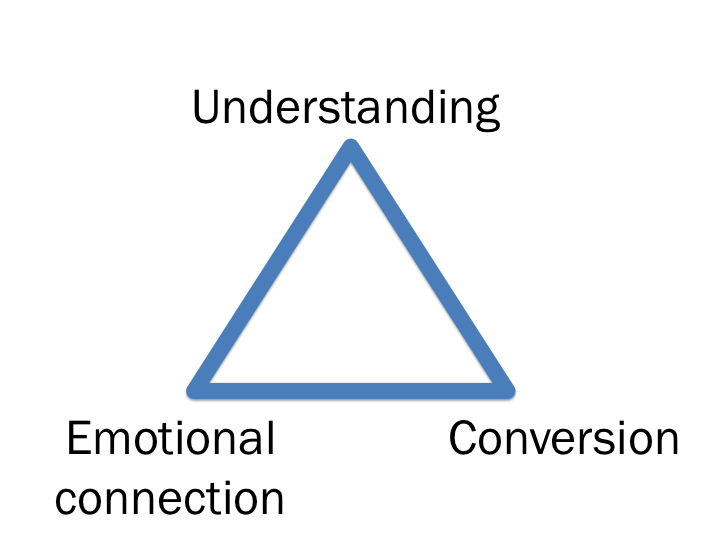
First, I would define “effectiveness” in this context as the optimization of the following three concepts:

  • Do users understand what you are trying to tell them and what action they should take to be successful in their task?
  • Are you invoking the desired emotions with your content?
  • Does the proposed content result in higher conversion rates than other alternatives?

It’s so important to combine the user perception data (the first two concepts) with business metrics (the third concept).  From my experience the only way for user experience designers to affect change is if we can show the positive impact these changes have on engagement/revenue metrics.

Measuring content effectiveness

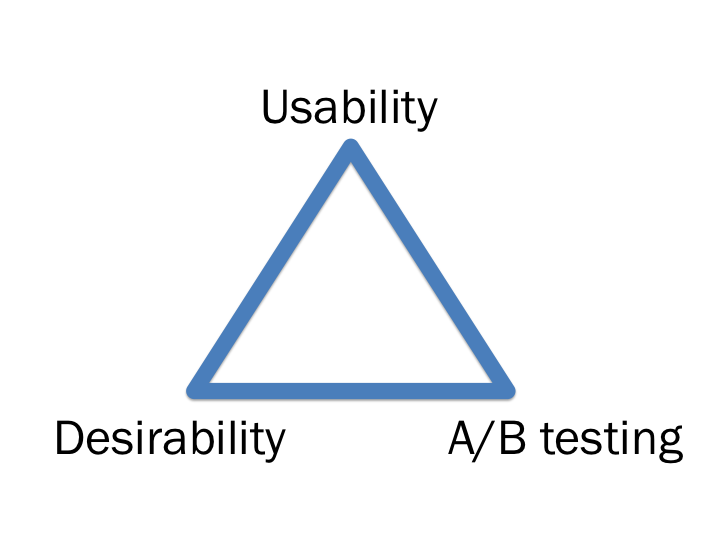
My proposal is to map each of the three concepts to a research methodology that is specifically designed to get the needed information:

Each of the three methodologies can be used to measure the effectiveness of different versions of the same content before it goes live, as well as measure what difference it makes once it is live.  This is also a really nice way to progressively reduce the number of alternatives down to the best solution.

I’ve written about usability testing and A/B testing before so I’m not going to go into more detail on that, but I do want to spend a little time on Desirability testing since it’s a method I really like, and I think it’s not used enough to measure design/content effectiveness.

Desirability testing

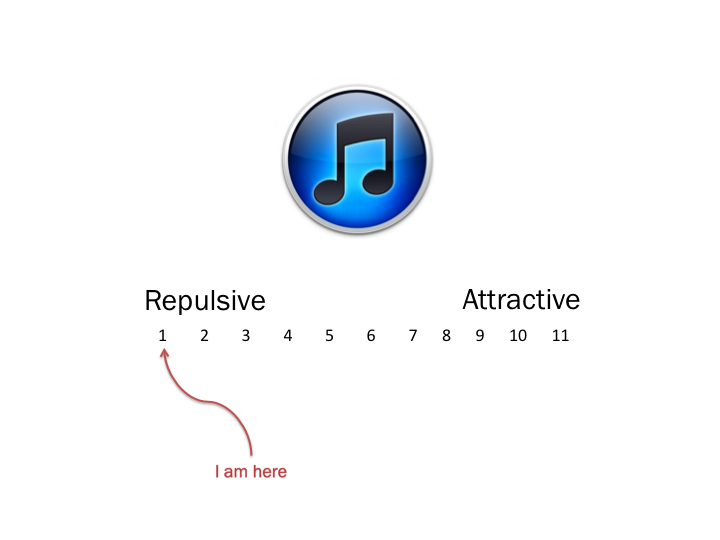
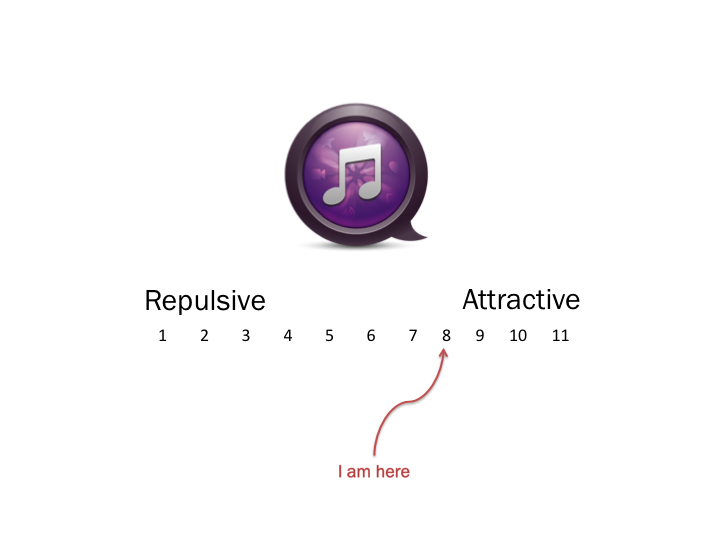
In desirability testing, a survey is sent to a large number of users where they are asked to rate one of the proposed design/content alternatives using a semantic differential scale.  The survey is done as a between-subjects experiment, meaning each user sees only one of the proposed designs, so that they are not influenced but the other design alternatives.  The analysis then clearly shows differences in the emotional desirability of the proposed  alternatives.

So, for example, you could show one group a design and ask them how they feel about it:

And then show a different group another image and ask them the same question:

When you then compare the averages of the different groups, you’re able to make an accurate relative comparison between the two designs.

Putting it all together

In summary then, to apply all of this to measuring the effectiveness of content:

  • Usability testing. Start with several different version of the content (~10), along with the current version (if it exists).  Ask users in a lab setting what they understand the content to mean, and any other thoughts they have on the way it sounds.  This should help narrow down the alternatives to 4-6 possibilities.
  • Desirability testing.  Use the Desirability method in a large sample online survey as a between-subjects experimental design.  In the survey, ask users to rate the content on different brand and design attributes.  This way you can determine what emotional response the content elicits from users.  You’d also be able to ask users which version of the content they’d prefer, and why.  This method has the added benefit of large numbers to give you confidence in the statistical significance of the results.
  • A/B testing.  Once you’ve narrowed the alternatives down to two or three, live A/B testing can help you determine which of the alternatives perform better from a revenue or engagement perspective, by looking at differences that can be attributed purely to content changes.  This obviously works easiest when the content is directly related to a revenue-generating task, like the call to action on a checkout page, for example.  But it’s not just about revenue — there are great ways to measure metrics of engagement with the page, which is just as powerful.

Now, I can see a few issues that make this a pretty difficult task, and it’s the reason why the above three methods should not be used in isolation.  In combination, they help tell the whole story.

  • It is difficult to know what users really read on a page.  In the first two methods you pretty much have to show people what to read — that doesn’t happen when they visit your site organically with no one looking over their shoulder.  This is why A/B testing is so important as it gives you a sense of how behavior will change based on content.
  • It is difficult to isolate the effect of content changes from the other influencing factors on a page.  This is the really difficult part.  How do you know that conversion/engagement improved because of the content and not of some other factor on the page, like visual design changes?  That is why it is important to keep the rest of the page exactly the same, and also why usability and desirability testing is important to bring out the perceptual data from users.
  • [Update] This method doesn’t scale well. When you are doing a major redesign or re-write, you can’t do this for every single change (as Eric Reis points out in the comments of this post).  The method is mostly suited for microcopy and incremental improvements once the base content has been written.

And the biggest problem is of course that this is an idealistic approach.  Finding the resources/time/money to do this for every content change is obviously not feasible.  But for high-value landing pages, in-line help, etc. this approach could be well worth the investment.

This is also by no means the only way to measure content effectiveness, but I think it’s a good approach that balances methodological rigor with the dangers of not overdoing it.  I’d be curious if anyone has any thoughts or ideas on how to improve on this proposal.

PS. Last week I discussed this topic at the first Cape Town Content Strategy meetup.  I uploaded the slides here, and you should join the Cape Town group here.

A few thoughts on effective icon design

Earlier this week I was struggling, as usual, to navigate my way around our Web Analytics provider, Omniture (SiteCatalyst in particular).  Specifically, I once again had to hover over every single icon in one of the views to figure out what they mean.  I was looking for a specific menu item called “Add Metrics,” which ended up not being an icon at all, but rather a text link.

Anyway, in frustration I tweeted this screen shot, and implied that if your icons require users to hover over them to figure out what they mean, you’re dong it wrong:

To their credit and my surprise, quite a few people at Omniture follow mentions of the company on Twitter, so pretty soon I got this comment on the post from one of the Product Managers at Ominture:

Hi Rian - this is great feedback you have given us. We are taking steps to address your specific point in an upcoming release of SiteCatalyst. The icons will be clearer, and tool tips will not be necessary.

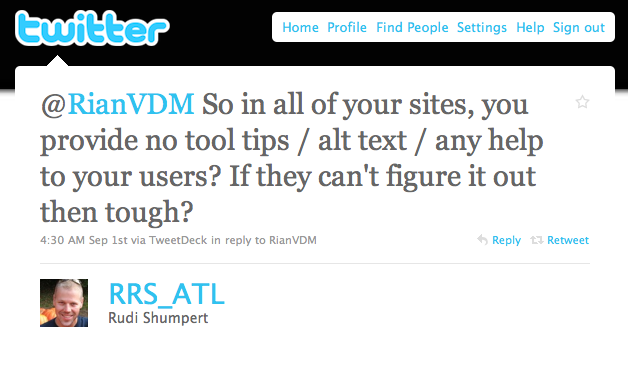
But not everyone was happy.  I also received this reply from @RRS_ATL:

We moved the conversation to email, and Rudi is a really nice guy — we had a very healthy debate about the issue.  I wanted to spend a little time here to summarize my thoughts on this particular issue and icon design in general.

First, let me say that I am not against tool tips and alt text when they provide additional context for text where space is limited, or more information about an element on the page. My specific issue with the Omniture icons is that they are not easily recognizable and mapped to what they actually do.  That breaks an essential UI rule which states there needs to be a match between the system and the real world:

The system should speak the users’ language, with words, phrases and concepts familiar to the user, rather than system-oriented terms. Follow real-world conventions, making information appear in a natural and logical order. (from Nielsen’s 10 Usability Heuristics)

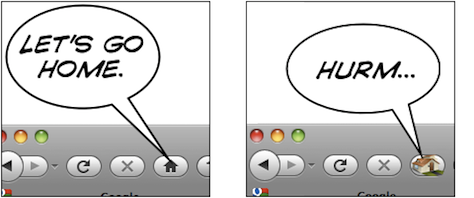
For example, as you can see in the photo above, the Omniture icon for “link to this report”  has a chart and an arrow in it - that’s simply not intuitive enough.

What I am proposing in the Omniture case is one of two solutions:

  1. Redesign the icons to be more intuitive (which, from the PM’s comment on my post, is what they’re doing), or
  2. Turn them into text links (because what’s the use of icons if you have to use text to explain them?)

Icon design is hard, and I think it defeats the purpose if your icons are not easily understandable.  In a great post on UX Magazine called Realism in UI design they discuss this issue in depth, and explain why it is so hard to get right:

People are confused by symbols if they have too many or too few details. They will recognize UI elements which are somewhere in the middle.

The trick is to figure out which details help users identify the UI element, and which details distract from its intended meaning. Some details help users figure out what they’re looking at and how they can interact with it; other details distract from the idea you’re trying to convey. They turn your interface element from a concept into a specific thing. Thus, if an interface element is too distinct from its real-life counterpart, it becomes too hard to recognize. On the other hand, if it is too realistic, people are unable to figure out that you’re trying to communicate an idea, and what idea that might be.

This only scratches the surface of icon design, so for more interesting reading on the topic, see:

To summarize, I stand by my view that if you have to hover over every single icon to see what it means, you either have to design better icons, or just use text.  But I’m open to counter-arguments for sure… What do you think?

How to ensure that product requirements are informed by user needs (Product Management series, Part 2)

I recently started a series on software development and the role of the Product Manager.  If you haven’t already done so, it might be a good idea to read Part 1 (Overview) before continuing.  In this post I’d like to write about the first step in the development process, namely Product Requirements, and the various sources of input that go into deciding what to build and how to improve your product.

As I started writing I realized the topic is just too big for one post, so I’m going to split it up into a few different posts:

  • Part 2 (this post) will be about user needs as an input to product requirements.
  • Part 3 will be about business needs and technology needs as inputs to product requirements.
  • Part 4 will be about  the PM’s role in the Product Requirements phase.

Even though the focus here is not on what kind of product/service your company should develop and sell, I do want to briefly mention product/market fit, because it is probably the most important aspect to figure out to be a successful business.  No one talks about this better than Marc Andreesen, so I wanted to quote from one of his (now deleted) blog posts:

The quality of a startup’s product can be defined as how impressive the product is to one customer or user who actually uses it: How easy is the product to use? How feature rich is it? How fast is it? How extensible is it? How polished is it? How many (or rather, how few) bugs does it have?

The size of a startup’s market is the the number, and growth rate, of those customers or users for that product.

The only thing that matters is getting to product/market fit.  Product/market fit means being in a good market with a product that can satisfy that market.

With product/market fit figured out (no easy task), and a workable product to start with, it’s time to get serious about building and improving the product — and that’s the stage where this post starts.  At the heart of a good product roadmap stands a Product Manager that is able to strike a balance between user needs, business needs, and technology needs.  So let’s look at each of those in detail, starting with user needs.

User needs

Identifying user needs is at the core of a user-centered design process, and it involves gathering feedback from the users of your product through a variety of methods to uncover unmet needs and opportunities for improvements.  This is called user experience research (UER), and there are plenty of resources available on the topic, so I’m just going to provide an overview here.

First, it’s important to mention the fundamental difference between market research and user experience research:

  • Market research seeks to understand the needs of the market in general, and is generally more focused on areas like market fit, brand perception, advertising and pricing research, and ways to uncover perceptions of the company and its products.
  • In contrast, user experience research focuses on users’ interaction with the product.  It relies heavily on observational techniques, since users are notoriously bad at describing their experiences or predicting their behavior.

There are many ways to classify different UER methodologies, but my preference is for a classification that lines up the different methods with the outcomes required by different phases of the product development process.  In that approach, there are three classes:

1. Strategic research

Strategic research is done with the goal of coming up with new product ideas and business opportunities, or preliminary design explorations during the product discovery phase to  help with the brainstorming of design solutions.  Here are some of the methods that fall into this class:

  • Ethnography.  A technique long used in Anthropology that has only recently found its way into the toolkit for research on interactive products.  It involves going to users’ homes or offices, and observing how they use your products in their natural environment.  It allows the researcher to see users in action where they feel most comfortable.  Ethnography is all about observing and listening.  It is generally not task-based like usability studies, but follows a loose interview script with the goal of uncovering needs and insights that users are unable to articulate.  I have an extreme positive bias towards ethnographic research, especially in contrast to focus groups (of which I’m not a fan at all, but that’s a subject for a different post).  I have seen first-hand how ethnography sparks innovation when it shows how users make up their own workarounds for the limitations of software, which in turn reveals opportunities for product improvements.  When it comes to exploratory methods to help with product strategy and roadmaps, there simple is nothing better than a good ethnography study.
  • Participatory design.  Another favorite, this technique brings users together to solve design problems in a way that would make sense to them.  The purpose is not to take users’ designs and implement them, but to find out which elements and activities are most important to them.  My preference is to do this in diads, where 2 users work together on a design.  This forces both participants to be active, and you learn as much from their conversation with each other as with the designs they put together.  The usual process is to provide users with a blank page or basic framework, cut-outs of various elements that could go on a page, and watch and listen as they make trade-offs and design decisions on what should go on the page based on how they would use the product.  This technique especially helps guide interaction design because it gives a glimpse into users’ process as they go through the site.
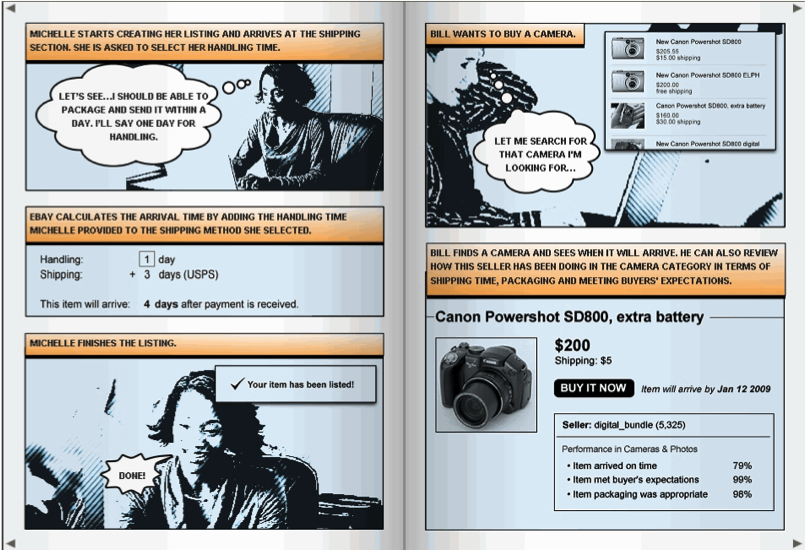
  • Concept testing.  This is a good way to gather feedback on an approach before wireframes or mockups are created.  Storyboards/comics are great artifacts to use for this kind of testing, since it takes design out of the process, and gathers feedback from users on the process you intend to design.  Although mostly done in-person with 6-8 users, there are also great tools for large-scale concept testing, like Invoke.  Below is an example of a storyboard one of our researchers at eBay used during early concept testing for one of our products:

Further reading on strategic research:

2. Design research

Design research includes most of the methods that are associated with traditional user experience research.  Its role is to improve and refine existing designs in various levels of fidelity.  Some of the methods include:

  • Usability testing.  This is, of course, the most well-known UER method, and what most people default to for any kind of design feedback.  Task-based usability testing in a lab is a fantastic tool, but it has become a little bit too much of a “when all you have is a hammer…” method.  Usability testing should be used to uncover usability problems with a proposed interaction design.  It should not be used for feedback on visuals, finding out which design users prefer, or uncovering new product ideas.  There are other techniques that are much better suited to that task.  Usability testing involves 1-on-1 sessions with users where the researcher observes them as they perform assigned tasks.  This kind of direct observation is a great way to understand what users would actually do on the site (as opposed to what they say they would do), as well as to uncover the reasons why they do what they do.
  • RITE testing.  Rapid Iterative Testing & Evaluation (RITE) is a very specific form of usability testing, but I wanted to call it out because it is my preferred way of testing.  It involves a day or two of focused usability testing, followed by a design cycle where the feedback is immediately injected into the design before the next round of testing.  Doing several of these cycles quickly means your outcome isn’t a bloated Powerpoint deck with a bunch of recommendations; your outcome is a better design that incorporated user feedback in real time.  As the debate continues on how UX can be more involved in Agile development, this technique should become increasingly important since it fits in perfectly with the Agile mindset.
  • Desirability studies.  Invented by researchers at Microsoft (yes, really - see this Word article where they outline the approach), this has become another favorite technique for me if I want feedback on the visual aspects of a site (not so much interaction), and specifically which visual approach users like more when there is more than one alternative.  It involves a survey to a large number of users where they are asked to rate one of the proposed design alternatives using a semantic differential scale.  The survey is done as a between-subjects experiment, meaning each user sees only one of the proposed designs, so that they are not influenced but the other design alternatives.  The analysis then clearly shows differences in the visual desirability of the proposed design alternatives.

Further reading on design research:

3. Assessment research

Often neglected, the role of assessment research is to measure the impact design decisions have made, and to evaluate success and continued areas that need improvement.  This requires larger sample sizes to ensure the ability to compare before/after metrics with statistical significance, so these methods are mainly quantitative in nature.  Methods include:

  • Product surveys.  Everyone hates surveys, but it remains an effective way to assess how design changes are affecting user perceptions of the site. Different from most market research surveys you receive (and delete) in your inbox, these surveys deal specifically with user perceptions of the interaction and design.  It’s not always effective as standalone research studies since there is so much bias in surveys with their <5% response rates, but if you can run surveys over time, and control the sample so that the bias remains the same, it can be a very good tool to ascertain the success of your design changes.
  • Online user experience assessments.  Another favorite, tools like Keynote allows you to gather real-time click-through data as well as subjective user feedback.  It uses a proxy or a browser download to give users tasks on a site, and ask them questions about the experience while their activity is being tracked.  This often produces a mountain of data, which can be quite overwhelming and not always effectively used if there is not enough time/resources available to analyze the data.
  • Analytics.  Web analytics need no introduction, but there are several tools specifically aimed at user experience, with my favorite being Razorfish’s Advanced Optimization tool for web forms.  By placing a small piece of JS on form pages, it gives you a mountain of data on how users interact with forms, including what error messages they receive, how much time they spend in each field, the last field they were on before closing the form, scrolling data, and the list goes on.  It’s a great way to improve form conversion.  I honestly don’t know why they don’t market this thing more.

So that’s an overview of user research methods — there are many more, but I wanted to focus on the ones I’ve found especially useful in my own work.  The real power of user research starts to happen when you combine methods and triangulate results to come up with a product strategy that takes a variety of quantitative and qualitative insights into consideration.  If you’re interested to learn more about this, Using Multiple Data Sources and Insights to Aid Design is a good post on the topic.

There are so many resources available on user research — your best bet to stay on top of the latest happenings in the field is to subscribe to UX Booth and UX Matters.

In part 2b, I’ll talk about the other two inputs to Product Requirements: Business Needs and Technology Needs.  I’ll also discuss how all of this fits into creating Product Requirements, and what the Product Manager’s role is in all of it.  Stay tuned!

Tech4Africa panel: How we redesigned Payfine.co.za

This week I was in Johannesburg for the debut of Tech4Africa, a conference about web technology in the African context. It was a fantastic experience, an opportunity to learn from and meet some great people, and I will most certainly be back next year (but hey, Gareth, let’s move it to Cape Town next year!). Yes, there were the usual small conference hiccups, but nothing that can overshadow the importance and significance of this event.

The mere fact that we were able to listen to speakers like Clay Shirky, Andy Budd, and John Resig, as well as some top South African thinkers & doers, and discuss with them the uniquely challenging opportunities that exist here in Africa, made this conference a winner. The content was mostly great, but the conference was more than that — it was about being inspired and energized about being in this industry, at this time, in Africa. You should follow Tech4Africa and its head organizer, Gareth Knight, for updates on the conference. And no matter where you live, you should attend next year. This event is here to stay.

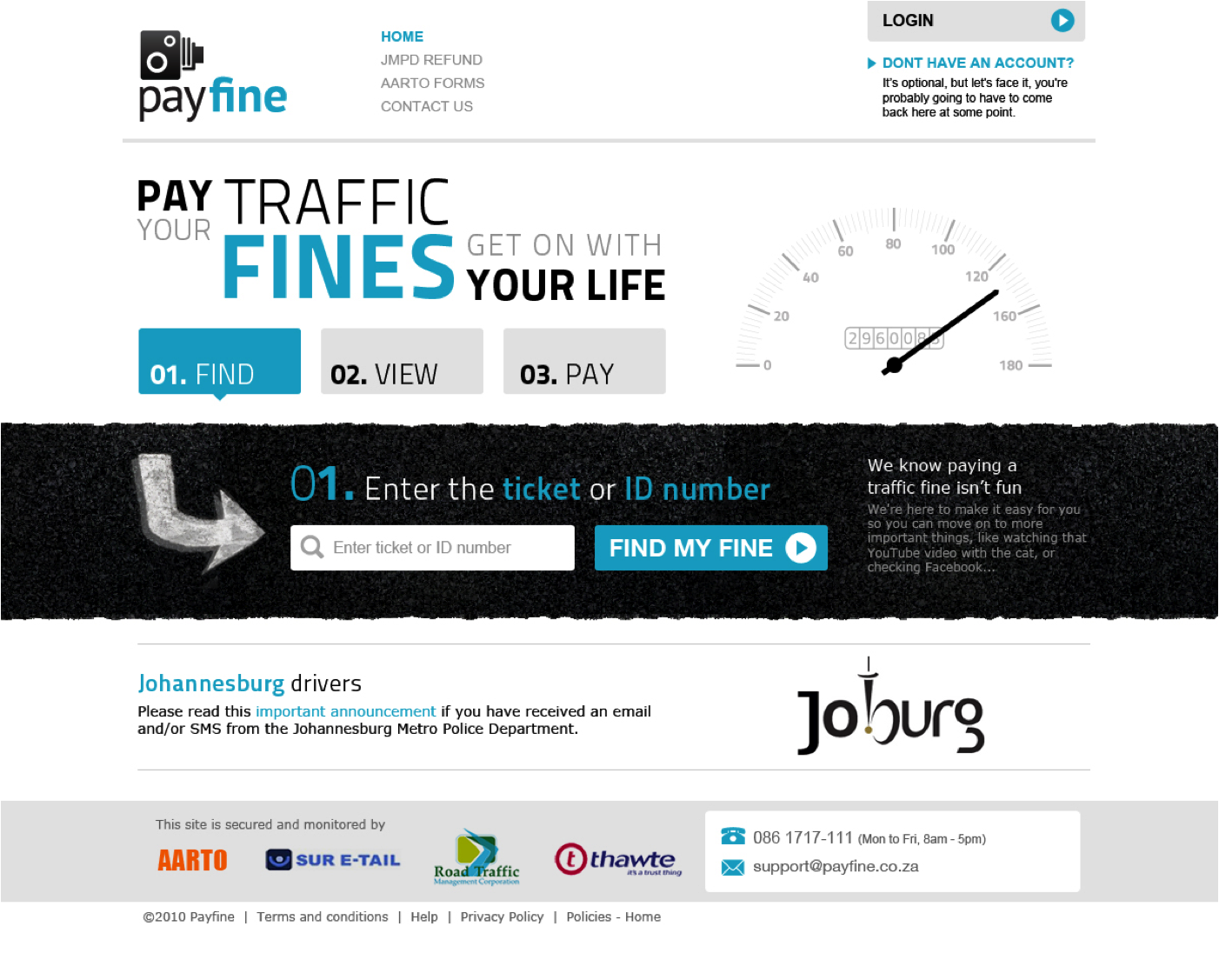
I also had the great opportunity to speak on a web design panel with Allan Kent, Basheera Khan, and Mike Lewis. We took a User-Centered Design (UCD) approach to redesigning Payfine.co.za, a web site that allows South Africans to pay the many traffic fines they get every… well… every month or so.

We’ve never met each other before the conference, and we were all in different locations. So, since we had to do this remotely and in our limited spare time, we broke the process up into three distinct user experience elements and each took responsibility for one of the tasks: content strategy (me), interaction design (Bash), and visual design (Mike). We collaborated a lot along the way, but we decided to each lead the creation of one piece of the puzzle, and then put it all together in a coherent story (this was Allan’s job!).

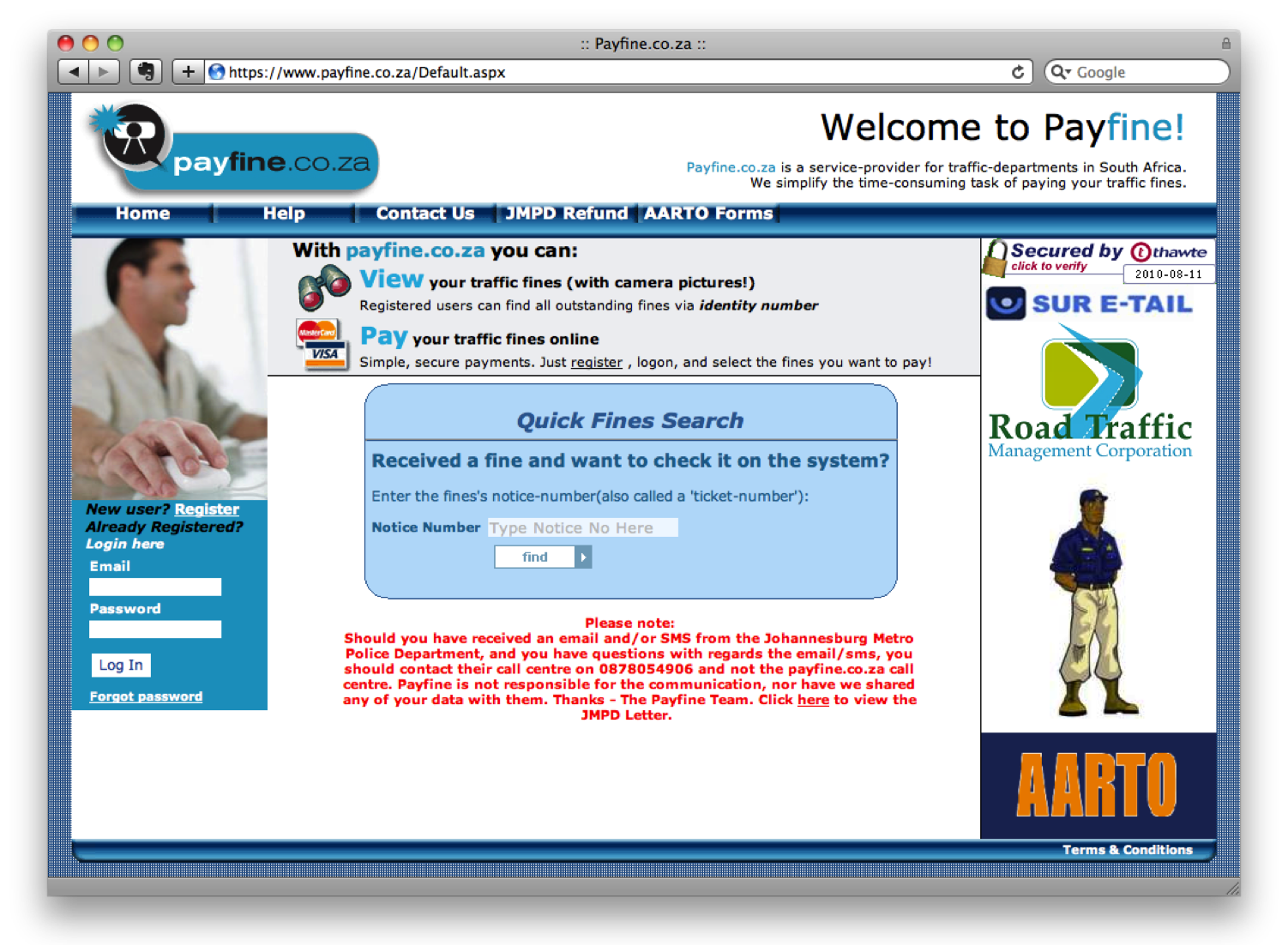
The end result? Well, you should judge for yourself. Here is what Payfine currently looks like:

And this is the proposed redesign:

The one thought I want to pull out above the rest about this process, is that UCD is not rocket science. It’s not easy, but it’s not rocket science. There is a process, and there are rules (they can be broken, but they help focus the design process).

But. It does require a mind shift (I hate that word — can anyone suggest something different?) in the African web space — a realization that the interfaces we currently have on our banking sites, our e-commerce sites — even our entertainment sites — are simply not good enough. And it requires a commitment by those companies to invest in the user experience of their sites, because it will have a positive effect on the business.

Below are the slides we went through during our session, which I amended to make it a little bit easier to read without the voice-over we provided. We’re all happy to answer any follow-up comments or questions on this, so please let us know if you have any. And I really want to thank the rest of the team — this has been a great experience — let’s do it again!

How we redesigned Payfine.co.za - Tech4Africa