Menu

Posts tagged “user research”

Don't believe the rumors: User Experience Design is alive and well

I’ve never seen an industry as intent on un-defining itself as the field of User Experience Design. There’s a long list of articles proclaiming the death of this term that most us identify with at the moment. Just in the last few weeks we saw articles like User Experience Design is Dead; Long Live User Experience and Can We Drop the Term UX Design Already?.

I understand and appreciate the arguments these designers and writers are trying to make, but as someone who teaches introductory courses on User Experience Design, this plead to call ourselves something else (or nothing at all) is problematic. To people new to the industry, the term User Experience Design makes sense once the basic elements are explained to them. Even with all the arguments against it, many of us don’t have the luxury to wait around until we come up with a better way to describe what we do. So I’m going to go the other way and do something decidedly uncool: I’m going to spend time defining User Experience Design.

This short post is my simplified definition of User Experience Design, meant as an introduction to those who come to it from other areas of expertise. It’s not exhaustive by any means, but I find it useful in getting people into the flow of what we do, and interested to learn more. That said, I’d love to hear from you if you think I’m missing something, so please send me a tweet or an email if you have something to add - or, of course, write a response on your own site so we can all share in the discussion.

So, here we go.

User Experience Design, defined

User Experience Designers solve problems by uncovering user needs and helping to create products that meet those needs. If you break it down to its most basic level, Design is a set of decisions about a product.

The diagram below shows the primary elements that make up the process of User Experience Design.
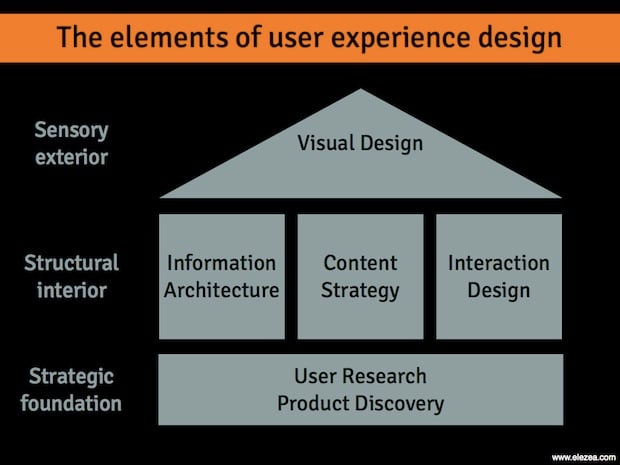
The elements of User Experience Design

Strategic foundation

To provide a solid strategic foundation, User Research is a set of methodologies focused on users’ interaction with a product. Through mainly observational, task-based techniques, user needs and usability issues with a product or idea are uncovered.

Product Discovery uses the learnings from User Research, among other things, to ensure the right product is being built for the right users. By framing the problem, exploring multiple solutions, and then prioritizing and planning for the implementation of the best solutions, Product Discovery lays down the guiding principles for the product that is being built.

Structural interior

The inner workings of a product usually has three main components.

Information Architecture maps out the paths between the different pieces of information on a site. We usually associate Information Architecture with site navigation, but below the surface there are activities such as information organization, information relationship building, and customer journey mapping that form the backbone of a usable product.

Content Strategy plans for the creation, delivery, and governance of content. This doesn’t mean that we should always have content ready before we design, but we should at least know how the content will be structured. If done right, this usually includes a non-dickish SEO strategy.

Interaction Design defines the structure and behaviors of interactive products and services, and user interactions with those products and services. The outputs of Interaction Design are artifacts like flow diagrams, wireframes, and prototypes. Interaction Design is mostly concerned with layout, structure, and flow; not typography, colors, and aesthetics.

Sensory Exterior

Once the structure and flow of the product has been defined (and even while that’s still happening), we get to work on the part that most people associate with the word “Design”.

Visual Design is the art and profession of selecting and arranging visual elements — such as typography, images, symbols, and colors — to convey a message to an audience. The goals of visual design are to set the visual hierarchy of a page or flow, and elicit appropriate emotional responses about the product.

The Complexity at the Other Side

Once we understand the basic concepts of User Experience Design, the journey can start. True User Experience is more than the sum of these parts. It’s a “seamless merging of the services of multiple disciplines, including engineering, marketing, graphical and industrial design, and interface design” (from the NN Group definition) to provide efficient and enjoyable experiences to users. This takes time, continuous practice, and an understanding that we’ll never know everything there is to know about Design. But keeping these basic elements in mind ensures that we never think of Design as just eye-candy, or something we tack on to the end of a development process. Without these building blocks, the house collapses.

World IA Day: A lack of UX purpose (and what we can do about it)

I flew up to Joburg this weekend to speak at one of the World IA Day events that were happening in 14 cities around the world. The bulk of the talk was about Customer Journey Maps, and specifically how we used the technique to help us prioritize our roadmap at kalahari.com. In this summary post I want to focus primarily on the topic I started the talk with. It’s about a particular gap I see in current UX work, and how Information Architecture is uniquely positioned to bridge this gap.

In 1955 David Ogilvey wrote a letter about his copywriting habits, and among other things, said the following about campaign work:

I write out a definition of the problem and a statement of the purpose which I wish the campaign to achieve. Then I go no further until the statement and its principles have been accepted by the client.

It seems that ther’s unfortunately plenty of UX work out there that jumps straight into wireframes without first understanding the design problem, as well as the purpose of the solution. Purpose - the reason for which something is done or created - often appears to be missing (*cough* Color.com *cough*). And this is where I believe Information Architecture can come to the rescue.

There are plenty of definitions of IA to choose from, but I like this one in particular by Peter Morville:

I’m an information architect. I map paths and places across physical, digital, and cognitive spaces. #ias10 #iasw

”” Peter Morville (@morville) April 15, 2010

I like it because it brings into focus the idea that at its core, Information Architecture is about a unique way of seeing the world. A way that is essential to build successful user experiences.

I love the example Dan Klyn’s uses in Information Architecture is a Way of Seeing. You have to read the whole thing to appreciate it fully, but in short, he tells a story about having to deal with some pretty severe back pain recently. After visiting an MD who only gave him a prescription for Vicodin and some exercises that didn’t help at all, he ended up at a Chiropractor who was able to sort out the problem in just a few days (after taking an X-ray to help diagnose the problem). When asked why the MD didn’t originally take an X-ray to get to the root of the problem, the Chiropractor replied that it wouldn’t have mattered if she did:

Even if the MD had taken an X-Ray, she would not have seen what I saw. Show us each the same image and we see different stuff.

It’s this different way of seeing that makes the IA profession so crucial right now. IAs specialize in looking at a vast amount of information and making sense of it in a way that is credible, consumable, and relevant to users (and the business). Where most of us only see Navigation, they know that part is just the tip of the iceberg. Underneath it lie activities like Information organization, Information relationships, and IA research that all work together to give IAs their unique view of the world.

Within this large toolset that IAs have to choose from to do their work, Customer Journey Maps stand out as the one technique that can be most effective to bring purpose back to our UX work. As UX Matters defines it:

Customer journey maps are documents that visually illustrate an individual customer’s needs, the series of interactions that are necessary to fulfill those needs, and the resulting emotional states a customer experiences throughout the process.

These maps are important as a way to find UX purpose because it accomplishes the following goals:

  • It provides a common understanding within an organization about customer needs, product strategy, and business goals - i.e., the product’s reason to exist.
  • It’s an excellent product prioritization tool.
  • It’s a guiding light for design, always bringing the project and the process back to the customer journey and the purpose of the product.

There are many different ways to approach these maps, but I find the Adaptive Path way the most effective. It places a strong focus on user research, and forces you to think about the implications of the journey map, and how it can integrate with and guide the design process.

So, that was my story at the conference. Thanks to everyone who came out! Here are the slides from my talk:

The value of Very Small Data

Alan Mitchell on the problems with Big Data and the value of what he calls Very Small Data:

So there are two classes of data which help solve different types of problem. Big Data is statistical and deals with general trends and patterns; Very Small Data is specific and deals with getting things done: gathering the information needed to make a decision, to make an arrangement, or to get some administrative chore done. Because it’s Very Small and rather mundane and specific, it doesn’t seem as glamorous and important as Big Data. But it is.

He goes on to discuss four major problems with Big Data, and the enormous opportunities that exist in the area of Very Small Data. It’s an essay well worth your time.

Security, passwords, and the messiness of everyday experiences

I enjoyed On Culture and Interaction Design, an interview with anthropologist Genevieve Bell. In one section she discusses how we often design systems based on a cultural ideal, but in practice it ends up solving the wrong problem. She uses the example of security:

We design systems to keep systems safe and people write their passwords on bits of paper stuck to their systems. So, is it that people don’t care about security or is that the security we are designing is securing the wrong things? Or, are they just securing them in the wrong ways? Clearly we know that people care about the security of their homes, their possessions, their digital selves, but they adopt a range of patterns for doing it that are incredibly messy, complicated, and contradictory.

Passwords ensure that unauthorized people don’t get access to a system. But the mere fact that tools like 1Password exist to remove the need to remember passwords should tell us that we’re doing it wrong. Current password systems solve the problem from the wrong perspective: the system, not the user.

The problem runs even deeper. We’re not only solving the problem from the wrong perspective, we’re also introducing unnecessary complexity because of the way these systems are implemented. From a great post on the AgileBits blog:

Security systems (well, the good ones anyway) are designed by people who fully understand the reasons behind the rules. The problem is that they try to design things for people like themselves””people who thoroughly understand the reasons. Thus we are left with products that only work well for people who have a deep understanding of the system and its components.

This is why people have weak passwords and write them down on pieces of paper everywhere. It’s why the experience is complex and messy, and why we have to spend so much time building “Forgot password” flows when we could be spending that time making the core experience of our products better.

So what’s the alternative? I have a huge appreciation for the role that anthropology can play in the design of products and experiences - which is what Genevieve advocates in her interview as well. Ethnography (often called Contextual Inquiry in the user-centered design world) is the single best way to uncover unmet needs and make sure we are solving the right problems for our users.

In Ethnography in Industry, Victoria Bellotti defines ethnography as “a holistic, in-person, and qualitative approach to the study of human behavior and interaction in natural settings.” By using this method to understand the culture and real needs of personal security, we should be able to design a user-centered solution to protecting digital information. One that isn’t stuck in the downward spiral of designer myopia we often encounter in proposed solutions to complex problems.

Security is an impossible industry to reinvent, you say? Maybe. But the problem does remind me of something Matt Legend Gemmell says about innovation in his excellent post Copycats:

The lesson of the technology industry in the past five years is that really successful products dare to NOT copy. They’re pure, in that they’re actually designed from first principles - they’re based on the problem and the constraints, without being viewed through the lens of someon’s existing attempt. You know, the kind of thing you actually wanted to work on when you got your degree and were still unsullied by the lazy, corporate machine.

So who wants to take a crack at it?

"You keep using that word. I do not think it means what you think it means."

Here’s another great example of how differently designers and users see the world. When we hear the word “clutter”, we think of visual noise. But Jared Spool explains what users mean when they say that word:

Over the years, w’ve learned that users have a different meaning of “clutter” than the designers do. It’s not the visual design the users are reacting to. It’s the actual content. Clutter is what happens when we fill a page with things the user doesn’t care about. Replace the useless stuff with links, copy, and content the users really want, and the page suddenly becomes uncluttered.

Here’s the kicker - their redesign was actually more cluttered, but users didn’t care:

We put the old and new pages side-by-side. The new page definitely had more text, less whitespace, and more dense information design. Yet, when we asked the users to tell us which one was more cluttered, they were unamimous: the old design was the cluttered design.

It’s another reminder (sorry, yawn) about the importance of Content First. I keep coming back to Jeffrey Zeldman’s classic essay Style vs. Design:

Most of all, I worry about web users. Because, after ten-plus years of commercial web development, they still have a tough time finding what they’re looking for, and they still wonder why it’s so damned unpleasant to read text on the web ”” which is what most of them do when they’re online.

Slides: An introduction to user experience design

One of the talks I do at speaking events is a general introduction to the elements of user experience design. The slides are always evolving so I’ve been hesitant to upload the presentation to Slideshare since it will be outdated pretty much immediately. It’s also a presentation that relies heavily on the voice-over - it’s not really something you can just read from front to back.

Having said that, I think it’s time to put at least a version of the presentation online, with a bunch of disclaimers about how this is a simplified view of what UX is, that it requires explanation in a lot of areas, and that it’s definitely not exhaustive or the only way to think about UX. Here’s the summary:

In this talk I give an overview of the elements of User Experience Design, and more importantly, why you should care about it. The goal is to provide some baseline knowledge of the user-centered design process to equip anyone to take those skills back to their daily work and start applying it immediately. I discuss user experience research, content strategy, interaction design, and visual design, and how those elements work together to build great experiences.

So, here you go. I hope you find it useful.

How to frame a UX project

Kelly Sutton provides a great reminder of what design thinking is all about in Your idea is terrible, a post about startups and the current obsession with “social layers”:

The problems that your project solves shouldn’t start with “Wouldn’t it be nice if”¦” Instead, they should always be phrased, “X sucks because Y and Z.” You may not even have a solution. Technology may not even be the right solution. But please stop adding social layers to social layers and raising 5 million dollarbucks.

Every UX project should be framed in the same way.

Don’t start with “What would happen if we move this button over here?” Instead, start with “Our checkout process sucks because our research shows that users are not seeing the ‘Pay now’ button.”

Paving the cowpaths: using architecture concepts to improve online user experience

I’m becoming increasingly fascinated with the parallels between architecture and web design. Dan Lockton recently published Architecture, urbanism, design and behaviour: a brief review - it’s an extract from his PhD thesis where he discusses how architecture can be used to influence behavior. It’s a long article, but well worth your time - I highly recommend it.

It’s full of architecture concepts that can be applied to designing for the web, but I want to discuss one in particular - the idea of “paving the cowpaths”:

One emergent behaviour-related concept arising from architecture and planning which has also found application in human-computer interaction is the idea of desire lines, desire paths or cowpaths. The usual current use of the term [”¦] is to describe paths worn by pedestrians across spaces such as parks, between buildings or to avoid obstacles ”” “the foot-worn paths that sometimes appear in a landscape over time” (Mathes, 2004) and which become self-reinforcing as subsequent generations of pedestrians follow what becomes an obvious path. [”¦]

[T]here is potential for observing the formation of desire lines and then ‘codifying’ them in order to provide paths that users actually need, rather than what is assumed they will need. In human-computer interaction, this principle has become known as “Pave the cowpaths” ”” “look where the paths are already being formed by behavior and then formalize them, rather than creating some kind of idealized path structure that ignores history and tradition and human nature and geometry and ergonomics and common sense” (Crumlish & Malone, 2009).

Particularly with websites, analytics software can take the place of the worn grass, and in the process reveal extra data such as demographic information about users, and more about their actual desires or intention in engaging in the process. [”¦] This allows clustering of behaviour paths and even investigation of users’ mental models of site structure. [”¦]

From the point of view of influencing behaviour rather than simply reflecting it, the principle of paving the cowpaths could be applied strategically: identify the desire lines and paths of particular users ”” perhaps a group which is already performing the desired behaviour ”” and then, by formalising this, making it easier or more salient or in some way obviously normative, encourage other users to follow suit.

This is such an interesting perspective on user-centred design. We all know that we need to design for real user needs, and not what we think they want, but it’s often so hard to do all our design work from that perspective. That’s where real-world analogies like this can be extremely helpful.

By starting a redesign project with an explicit goal to “pave the cowpaths” we’re always pulled back into that frame of mind. The same questions will keep jumping into our minds:

  • Do we have analytics to back up this behavior?
  • Are we sure this is what users naturally do on the site?
  • We know most users click on this navigation element to get things done - how do we make that behavior easier for them?

One real-world example we can look at is the recent announcement about upcoming changes to Windows Explorer. The team made a big deal about their data-driven approach to the design:

Over the years, Explorer has grown to support a number of different scenarios, many unrelated to file management ”“ launching programs, viewing photos, playing videos, and playing music, to name just a few. We wanted to know which of these capabilities customers were really using. Using telemetry data, we were able to answer the question of how the broadest set of customers use Explorer in aggregate.

The resulting design leverages this data in a very real way:

The Home tab is the heart of our new, much more streamlined Explorer experience. The commands that make up 84% of what customers do in Explorer are now all available on this one tab.

You can make a strong argument that by following this approach Microsoft is paving the cowpaths they discovered. But let’s look at a sentence I left out of the original quote from Dan Lockton’s article:

The counter-argument is that blindly paving cowpaths can enshrine inefficient behaviours in the longer-term, locking users and organisations into particular ways of doing things which were never optimal in the first place (Arace, 2006).

This brings a very interesting perspective to the design. Are the most frequently used commands in Windows Explorer really the most effective way to accomplish user goals? Was there an opportunity to drastically reduce and combine certain paths to simplify the interface?

It’s certainly not easy to figure out how to balance paving existing paths vs. using that data to design systems that guide users to more efficient ways of doing things[1]. But it brings me back to the main point: an analogy like this forces us to think hard about these questions and at least make informed decisions about the design.

The alternative is to just let it happen and possibly get caught with a blind spot we didn’t even know existed.


  1. This is where qualitative user research methods like ethnography and usability testing can be extremely beneficial, but that’s a topic for another article.↩

A Fresh Look At Usability Heuristics

Alex Faaborg for UX Magazine in Debating the Fundamentals: The geographic, temporal and political nature of usability heuristics:

On the surface, usability heuristics provide a simple checklist for making any interface perfect. But what is fascinating about them is the extent to which all of the heuristics are actually in direct opposition to each other, the extent to which they are geographic and temporal, and the extent to which they expose the designer’s underlying political views (at least in the domain of things digital). Usability heuristics present a zero-sum game with inherent tradeoffs, and it is simply impossible to achieve all of the heuristics simultaneously.

This is the best UX article I’ve read in a while. Like most UX designers I live and breathe the usability heuristics, and have always been reasonably comfortable with the tradeoffs, but this article perfectly articulates the complex interplay at work.

But it’s not just a theoretical exploration, I really appreciate the thought put into the practical approach to managing these complexities:

Novice designers memorize the list of usability heuristics and try to employ them in their work. As a more experienced designer, you may have already seen a deeper dynamic at play here. Instead of using heuristics as a simple checklist, try placing pairs of the heuristics against one another in a spider graph.  Achieving every ideal isn’t possible because the pairs exist in direct opposition. Realizing this, the challenge shifts to shaping a design that captures as much surface area as it can, given all the opposing forces.

This is one of those “I wish I wrote that” articles.

Hot Shots, Shoelaces, and Designing for Ordinary People

There’s a scene in Hot Shots! Part Deux (shut up, we all have our guilty pleasures) where Charlie Sheen’s character (Topper Harley) rescues Rowan Atkinson’s character (Dexter Hayman) from prison. The conversation goes something like this:

Topper: Dexter, I’m here to rescue you. Dexter: You don’t understand. I can’t walk. Topper: Why? Dexter: They tied my shoelaces together. Topper: Bastards!

The joke is funny, of course, (shut up, it is funny!) because of the ridiculous nature of the claim that tying someone’s shoelaces together can somehow stop them from walking around. We look at the situation from the outside and think they’re idiots - don’t they realize they can just untie Dexter’s shoelaces?

I often think of this scene when I hear designers defend their decisions by insisting that users will “figure it out”. I hear statements like “it’s not our fault that they can’t use this feature”, and I think about users with their shoelaces tied together, unable to move. We look at them with pity in our eyes - if they could only see the obvious and untie the knot, they would have no trouble using the site.

You Are Not The User

But of course, that’s not how it works. We think users are stuck because they aren’t untying their shoelaces, while they’re actually knee deep in the cement of poor usability we put them in. We can make T-Shirts that say “I am not the user” and wear them all day long, but somehow we still manage to find a way to blame them when something goes wrong. Not cool.

We will never be able to design web sites that don’t confuse users unless we observe them using our sites, and fix the issues that uncovers. We cannot think like our users - as designers we are simply too close to the product, and way too proficient in all things web. It reminds me of something Douglas Adams once said:

A common mistake that people make when trying to design something completely foolproof is to underestimate the ingenuity of complete fools.

There is a great post on the Agile Bits blog that talks about the difficulties of designing security systems. In one part they discuss the problem of designing for users and sum up the issue perfectly:

Security systems (well, the good ones anyway) are designed by people who fully understand the reasons behind the rules. The problem is that they try to design things for people like themselves ”” people who thoroughly understand the reasons. Thus we are left with products that only work well for people who have a deep understanding of the system and its components.

Stepping Into Their Shoes

We have to be able to step out of this cocoon of deep understanding, and the only way to do that is to regularly observe users as they make their way through our applications. Whether you take your laptop to a coffee shop and ask random people to give you a few minutes of their time, or set up full-scale usability tests, the payoff of uncovering usability issues on your application is so worth the time. What’s the upside, you ask? Matt Gemmel sums it up really well:

The biggest (and most lucrative) set of customers is ordinary people, without a computing degree or specialist knowledge. These are people with no interest in specific technologies, but only in how easily they can finish today’s tasks without reading the manual. Apple caters to that market; companies who loudly proclaim their device supports CSS3 and MPEG4 and SDHC don’t even understand that it exists.

If we can get into the heads of those ordinary people who use our products every day we’ll be able to meet their needs so much better. I agree with Jeff Gothelf on this one: test everything, regardless of its polish or fidelity:

Increasing your time with customers throughout the design and build process improves the outcome of your project by continually nudging the interface in a more appropriate direction. As an added side benefit, you also begin to build a user-centric culture within the company if it didn’t already exist ”“ a huge plus.

I’ll end with the words of Jeffrey Zeldman in Style versus design, because it articulates so well why this is such an important issue:

Not enough designers are working in that vast middle ground between eye candy and hardcore usability where most of the web must be built.

Most of all, I worry about web users. Because, after ten-plus years of commercial web development, they still have a tough time finding what they’re looking for, and they still wonder why it’s so damned unpleasant to read text on the web ”” which is what most of them do when they’re online.

Let’s realize that the problem is a little more complex than untying shoelaces. Better yet, let’s realize it’s our problem if users get stuck, not theirs. And best of all, let’s allow them to help us fix it.