Menu

Posts tagged “user research”

The importance of user experience design specialists

Abby Covert wrote a very important article on the just-relaunched Boxes and Arrows. I know we’re all pretty tired of the “What is UX?” debate, but A Perfection of Means and a Confusion of Aims addresses the damage that the umbrella term “user experience design” is doing to specialist UX functions. Some key passages (but you really should read the whole thing):

I am afraid that there is a shortage of specialist jobs, and it isn’t because those specialities aren’t needed. I believe it is because the value of those specialities, and the impact of not considering each carefully, is in too many cases not clearly called out to our clients and partners. […]

In my experience when “UX” is the term sold-in, the resulting project plans are less likely to reflect the points at which various specialities will be relied upon to progress the team. Often prescribing a stacked to the gills list of tasks reduced to the nebulous “Design the User Experience” on the Gantt chart. The makers of these types of plans leave it to “UX Designers” to divide the time they have amongst the various specialities of a “UX” and arrange their time against it. […]

The worst case scenarios result in teams jumping right to wireframes, prototypes and documentation. I see far too many UX designers that have become wireframe machines.

This is, by and large, an agency problem (but you see it in some internal design teams too). As agencies start to see the value of selling “this UX thing” more and more, many put out unicorn job specs that aim to find some generic skill combination that can be sold to clients as user experience work. And I’ve talked to several people who fell into the trap of these jobs, only to find that their new realities consist of making wireframes and getting dirty looks because their colleagues feel they’re just slowing down the design process.

I have nothing against wireframes — in fact, I remain a huge proponent despite some recent calls to move away from it. It’s not the focus of this post, but I still find huge value in wireframes (particularly HTML prototypes) to (1) work through the complexities of finding elegant solutions to difficult interaction problems, and (2) get early user feedback before moving into high-fidelity design and development. But the point of all this is that wireframes are not the end goal of user experience design, they’re part of the process. A process that involves research, information architecture, customer journey maps, content strategy, and all the other specialities Abby points to in her post.

And that’s where I’m 100% in agreement with Abby. That we have generalised User Experience Design to a black box process that makes it very hard to convince clients (and some agencies!) that the specialist functions that go into designing holistic experiences for people are absolutely essential. We need agencies to:

  • Understand the different specialities that make up the User Experience Design process (I’ve taken a crack at a model here),
  • Hire specifically for some sensible combination of those skills, and
  • Educate clients on the value that each of those specialities can add to make their products successful.

Yes, UX unicorns do exist, I won’t dispute it. But they’re few and far between. The rest of us need to know that there is value in becoming really good at our chosen specialities, and we need to be confident that we can sell those skills to our clients.

So, I’m not arguing that we should throw away the title of UX Designer, as some have suggested. I’m saying that we have a responsibility to know that the field is made up of many specialities, and if we ignore those we do ourselves, our industry, and our clients a huge disservice.
User centered design in emerging markets

Niti Bhan does strategic design planning and concept development in emerging markets like India and some African countries. She begins her article Developing a user centered methodology for emerging markets and the bottom of the pyramid by discussing what happens when companies in the developed world try to introduce products in lower-income markets:

So the value propositions of the products, services, and programs introduced for lower income markets—particularly in the developing world—are still based on elements of the value system prevalent in global consumer culture. There is a gap here, and it’s most obvious in the marketing messages, advertising and communications which tend to emphasize product benefits or value that may not be relevant—much less contextually appropriate—to the BoP [Bottom of the Pyramid] customer’s life. When the value proposition of the seller has little or no resonance with the value system of the target market, it will most likely be ignored.

Even more interesting, she questions the value of using a standard user-centered design (UCD) methodology in these markets. Her point is that it’s not just products that need to be tailored specifically for these markets, the methodology we use to identify user needs should be different as well:

UCD has emerged from the same operating environment as that of the majority of the producers and most certainly has been part of, if not partially the creator of, the global mainstream consumer culture in which we’re all immersed. Therein lies the rub. The process is not divorced from its context and thus, we found, it needed to be far more flexible as it evolved and was adapted to the challenge of conducting exploratory user research in slums and villages and townships across the developing world. For the human centered designer, more likely to have been trained in the heart of the most sophisticated consumer markets in the world, there were additional challenges when considering the new and emerging consumer markets at the BoP.

I see this in our work at Flow as well. We constantly have to adjust how we do usability testing or contextual interviews to make sure participants are comfortable enough for us to uncover their real needs/issues. Niti’s work looks fascinating, so I definitely recommend reading her post and checking out some of her other writing as well.

The narrowing gap between humans and computers

In Bridging the gap between humans and computers Heather Kelly takes a look at some recent ethnographic research on our relationship with technology. It’s full of interesting stories like this one:

In one experiment, Ju’s group rigged automatic doors to open in different ways: Some would open slowly, then pause before fully opening; others would immediately jerk all the way open. The people walking by the doors assigned them different levels of intelligence, and thought the doors that opened in two steps just seemed smarter.

It turned out that adding the pause gave illusion of forethought, even though it was just an extra programming step. People thought the door was more intelligent because it appeared to think before carrying out an action.

One of my favorite books on this topic is Sherry Turkle’s Alone Together: Why We Expect More from Technology and Less from Each Other. The first half of the book is all about our relationship with high tech “things” — what we find creepy vs. comforting, how different cultures behave differently, etc. Highly recommended.

Airbnb's data-driven design success

Cliff Kuang wrote an interesting article about design at Airbnb called How Airbnb Evolved To Focus On Social Rather Than Searches:

For a couple years, registered Airbnb users have been able to star the properties they browse, and save them to a list. But Gebbia’s team wondered whether just a few tweaks here and there could change engagement, so they changed that star to a heart. To their surprise, engagement went up by a whopping 30%. The star, they realized, was a generic web shorthand and a utilitarian symbol that didn’t carry much weight. The heart, by contrast, was aspirational.

Cliff goes further to explain how Airbnb followed the data clues to understand exactly why the heart performed better, and then used those insights to make some very successful design changes. The data is there, we just have to measure, listen, and respond.

(link via @iamFinch)

Small but significant usability sins that websites should never commit

I spent the past two days running usability tests on websites that sell financial products like life cover, funeral policies, and annuities. The target market is lower-income users who access the Internet at least once a day on a desktop at home or work, or on their phones. They are, for the most part, tech literate, and very used to finding their way around the Internet. I wanted to document some of the more general findings while we’re knee-deep in analysis and everything is still fresh.

What follows is a list of interaction design elements that I believe should never, ever be used on a website. They might seem like small issues, but I’ve seen time and again how small things add up, and eventually end with frustrated users who abandon a site altogether. Also, if you’re tempted to think that your users are different and somehow more sophisticated than the ones we tested, please consider the growing digital usability divide.

So, here it is — an incomplete, top-of-mind list of usability sins your website should never commit, based on data gathered through in-person usability testing:

  • Don’t use an asterisk (*) to mark required form fields — especially if there is no explanation of what the asterisk means. Most users do not understand this at all. Instead, state that all fields are required unless indicated otherwise, and then mark optional fields with the word (optional). By the way, Luke agrees with me on this one.
  • Don’t open links in new browser tabs. Tabbed browsing is for advanced users. If you open a page in a new tab, most users will get lost, start clicking the back button, and then not understand why they can’t get back to where they started. Remember that they’re not focused on the chrome when they click a link, they’re focused on where they’re clicking. So it’s very easy to miss the fact that a new tab has opened.
  • Don’t have an FAQ page. Most users don’t know what FAQ stands for, and besides, it’s bad practice to answer questions outside the context people want to ask them in. Figure out where in the process each question in your FAQ might come up, and provide the answer right there within the flow. Don’t expect people to click to a different page to find the information they need.
  • Don’t use PDFs at all (unless you’re explicitly stating that it’s a downloadable research paper or something). Many users have no idea what a PDF is, and can’t even tell when they’ve clicked on one. There’s no reason to have your rates/menus/timetables as a PDF as opposed to standard text. This was a recurring theme, but one user in particular clicked on a PDF, didn’t realize it, and continued interacting with it as if they were still on the website.
  • Don’t give table rows highlighting mouse-overs if the rows aren’t clickable. This confuses users. Any mouse-over movement gives users a trigger that they can click on the thing. Don’t think they’ll look at the cursor and distinguish between an arrow and a hand — most don’t look past the hover effect.

This is obviously a fairly random list of UI transgressions, but I feel like we talk about the big issues so often that we tend to skim over the smaller ones that can really add up. If you were observing the usability tests we ran this week, you would have felt the same way I did when you saw person after person struggling with the most standard of UI conventions. Let’s just not do these things, for the love of the web and everyone who uses it.

Managing user expectations in responsive design

I can’t shake this nagging feeling that we’re changing our focus from “mobile context” to screen-size thinking and responsive design so quickly that our users won’t know what hit them. Although I fully agree with articles like Mobile Context Revisited and Design Process In The Responsive Age, I think there is a missing step we haven’t explored enough: how to change the mental models of users who have become used to separate sites on their mobile phones and desktop computers. Let me illustrate with an example.

During usability testing last week I noticed an interesting trend. It was dormant the whole time, but I just couldn’t put my finger on it until one participant explicitly articulated the problem. I asked her if she has ever visited the e-commerce site we were about to use. She told me that she’s never gone there on her desktop, but that she has browsed the mobile version of the site on her BlackBerry1. So far, so good.

But then she mentioned that when she found a product that she liked, she decided to switch from the mobile version (.mobi) of the site to the desktop version (.com) — while still on her phone — to try to buy it. Her reason? She assumed that the desktop version of the site will have more information about the product than the mobile site has.

The rest of the story gets even bleaker. She tried to force the .com version of the site, but her BlackBerry couldn’t handle it — she tried multiple times and it just kept hanging. So she gave up and never went to the site again.

The experience highlights a few assumptions made by this participant:

  • She assumed that the site will have separate mobile and desktop versions.
  • She assumed that these two versions will have different information on them.
  • She assumed that it is up to her to decide which version will best suit our needs.

Can we blame her for these assumptions? Isn’t this how we trained her to think about mobile sites vs. desktop sites? We kept building sites with reduced feature sets on mobile phones because we didn’t want to overwhelm users. We taught users that mobile sites are inferior versions of their desktop counterparts, and now we have to live with the consequences.

Now, fast forward to the future we’re all driving towards: fully responsive sites that don’t abridge content, but adjust to the screen sizes they are being served to. Considering this participant’s assumptions, you can imagine how confusing a site like that would be to her. She’ll wonder where the mobile site has gone. She’ll wonder what content she’s missing. She might try to enter .mobi and not know why the thing keeps going back to .com. She (and millions like her) has never heard the term “responsive design”, and couldn’t care less about it. We’ve cemented users’ mental models over the past few years of mobile-specific sites, and it’s going to take time to change that.

So, what can we do? When we build responsive sites, we need to communicate to users that they don’t have to worry about finding the mobile site any more — everything they need is right there. This can be as simple as a message on the home page, or relevant microcopy at key stages of the journey, like on a product page.

I’m not trying to stand in the way of responsive design or screen-size thinking over mobile context thinking. But I am arguing that most normal users will be confused by this trend, and we need to manage that. Because we don’t want incorrect user assumptions to cause lower-converting sites that end up killing organizations’ commitment to responsive design.


  1. Nope, I’m not misremembering what phone she used. 

Obox and the power of usability testing

One of the hardest things we have to do as a User Experience Design agency is to sell usability testing to clients. The concerns are usually some combination of the following:

But we keep at it, because we know that if we’re successful in our efforts to convince clients to try it just once, we’ll never have to sell it to them again. It’s a methodology that completely sells itself. Once a client sees real users struggle with their product, they immediately become believers and staunch evangelists of usability testing.

The situation was a little different for a recent project we worked on with Obox, creators of premium WordPress themes. They came to us already sold on the benefits of usability testing, they just needed our help with research design and execution, and to work with them on some of the design recommendations based on the data we collect.

Yesterday, CEO and co-founder David Perel did a write-up of the project where he explained the process and the changes they’ve made. It’s great to see such an open discussion about how they are implementing their relentless pursuit of delivering value to their users. And even though they already understood the value of usability testing going into the project, I still loved this sentence from The User Experience Experiment:

The bottom line is it doesn’t matter how good looking your site is. Watching a layman use your product will blow your mind. You cannot even begin to imagine how your users interact with it.

If that’s how they reacted, just imagine the power such a revelation can have on people who don’t believe in the method. David also says this in his post:

We’ve been so taken aback by what we learned that when we looked for new office space, the most important requirement was that it had an extra room for user testing.

I know this means that they won’t need to hire us again, but I don’t care. That type of full-scale adoption of user-centered design makes me infinitely happy.

Be sure to read the full post, it’s a great case study.

Facebook marketing: where community is more important than product

Craig Mod wrote a very interesting essay about community and content for Contents Magazine. In Our New Shrines he talks about building a community first, before deciding what you’re going to do with them. It’s a contentious topic, but it’s worth entertaining Craig’s argument:

There is a reality those of us long steeped in the web are reticent to admit: for many, Facebook is the internet. More than Tumblr. More than wordpress.com. More than Twitter. For a certain person, a very commonly found person, Facebook is a Yahoo! portal, personalized Google news, Gmail, Flickr, iPhoto, and Xbox. If you look closely, companies don’t post URLs to their home pages, they post URLs to their Facebook pages.

We facilitate lots of usability tests here at Flow. I’ve asked the question “So, what do you do when go online?” enough times to know exactly what the answer will be. It is always, without fail, a variation of “Well, I Facebook, of course… A little bit of email… Some Google… Umm, well, mostly Facebook.”

This might change, but I completely agree that for most people, Facebook is the Internet at the moment. I personally don’t like Craig’s proposal of building a community around something vapid before you decide what product/service you want to provide to them. I think it’s a dangerous game. But denying the short-term effectiveness of such a strategy would be naive. For better or worse, this is the attention economy we live in. For now.

Product discovery: a better way to build products that people love

One of the questions that really interests me is why certain digital products succeed and others fail — even if they look great and are easy to use. What can we learn from the failures to ensure that there are less of them? Is there a process that can help increase the likelihood of success?

The answer to these questions is the focus of my first article for A List Apart, entitled Usable yet Useless: Why Every Business Needs Product Discovery. From the intro:

All around us we see beautiful, empty monuments erected not for their users, but for the people who built them—and the VCs who are scouting them. Even sites and apps that go beyond beauty to usability often fail because they can’t find a big enough market.

Why can’t some interactive products find enough users to be sustainable? Why are there so many failed startups, despite a renewed focus on design? Most importantly, what can we do about it?

It was an absolute pleasure to work with the ALA team. I especially want to thank Sara Boettcher for being such a tough, gracious, and encouraging editor. I learned so much through this process — lessons I’ll take with me in my all my writing going forward.

So if these are questions you struggle with as well, have a look at the article. My hope is that we’ll see more businesses trying out the Product Discovery process as a way to build products that people love.

Love your job (a picture is worth a thousand words)

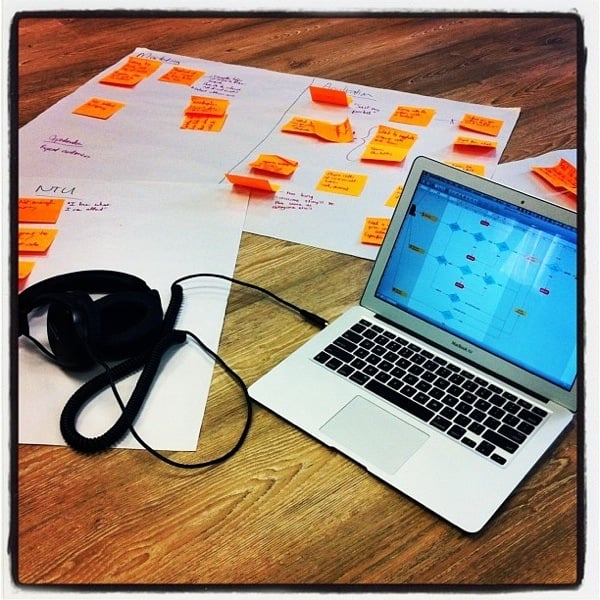
I can’t quite figure out why, but I really like this photo I took in our office earlier this week. I just think it’s such a great summary of everything I love about doing user experience work.

I spent the afternoon sitting on the floor, surrounded by sticky notes, drawing out insights that are based on data we collected from in-person usability testing and customer interviews. And I got to do it while listening to stuff like this.

I guess I’m just really grateful that we get to be in the business of understanding human behavior, and using those insights to make things that people care about. We might not always succeed, but the journey sure is gratifying.

Happy Friday, everyone.

Love

(If you’re wondering, those are Sennheiser HD 380 headphones. Highly recommended.)