Menu

Posts tagged “user experience”

Automated empathy in healthcare

This is an interesting story on the topic of algorithmic empathy1. In Hospitals Employ Email ‘Empathy’ To Help Doctors And Patients Keep In Touch Barbara Feder Ostrov discusses a program that sends patients automated emails to ask them how they’re doing:

Doctors can send daily emails with information timed to milestones in surgery prep and recovery and ask patients or caregivers for feedback on specific issues patients may face during recovery.

The doctors may write their own email scripts, as Newport Orthopedics’ physicians did, or use the company’s suggested content. An online dashboard helps doctors and administrators keep track of which patients are doing well and who might need more follow-up care. Patients can also communicate with office staff about medications and office visits. Their responses to daily emails can trigger a call from the doctor’s office.

A patient might see this message: “How are you? Let me know so I can make sure you’re okay. I have four questions for you today.”

The program has had some promising results, but I’d be interested to know if patients are aware that the messages are automated. To put it another way, is it ethical for doctors to send automated, health-related messages that look like they’re individually crafted?


  1. See Personal AI assistants: the battle and the war

Effective onboarding through human connection

Jeremy Keith writes about the onboarding process of the site The Session in his post Words of welcome. He shows a series of screen shots of simple messages that teaches users how to be good citizens on the site. Keith closes with this:

No intricate JavaScript; no smooth animations; just some words on a screen encouraging a human connection.

Design words to live by.

Don't shame users into reading your stuff

No thanks

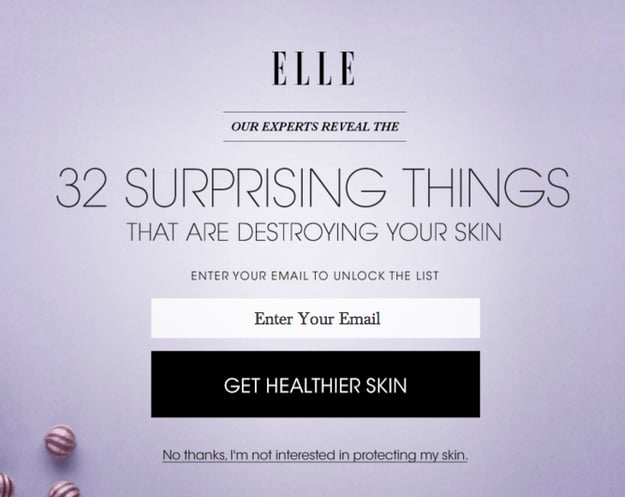
Katie Notopoulos writes about an extremely annoying marketing trend in Guilt And Shame As A UI Design Element—opt-out messages that make you feel bad about opting out:

The worst shame offender of all, however, is quickly becoming the mailing list opt-out guilt trip. When visiting a website, a pop-up implores you to sign up for their fantastic mailing list. The only way to get rid of this list is to click on the fine print at the bottom. But too often, this doesn’t merely say “Opt out” or “No thanks.”

No. It forces you to click a statement acknowledging you are a terrible, deplorable, disgusting human being.

It is not just enough that you don’t want to subscribe to the mailing list about political news. You must admit that “no, I DON’T care about being well-informed and reading great journalism.”

Personal AI assistants: the battle and the war

A friend once told me that for him, one of the weirdest moments as a parent was the realization that their kids have a relationship with each other, not just with him. That conversation always stuck with me, and when our own daughters started to have a bond with each other that’s completely separate from their bond with us, I understood what he meant. It’s just something that is, for some reason, very difficult to wrap one’s head around—these people you made, suddenly having lives apart from you. Today I’m thinking of that conversation again, but in a very different context—personal AI assistants, and what that means for how we design their interfaces.

But before I get there, let me take a step back and recap some of the recent conversations about personal AI. In The internet bundle is already here Dieter Bohn writes that AI personal assistants are a threat to net neutrality:

The bundle is already here, it came from places we haven’t been watching closely enough, and it has many names. There’s more than enough doomsaying about the issues related to Instant Articles, Internet.org, and Binge On. Instead, I’d like to take a minute to doomsay what could become the other opponents to the kind of free, transparent, and open internet we all want: Siri, Cortana, Alexa, Facebook M, and Google Now.

These intelligent assistants are great. I use them every day and expect I will continue to use them for, well, ever. But there’s a problem that’s built into them: they only seem to work with certain parts of the web and — here’s the real rub — certain apps.

Mark Wilson makes a similar argument in Why Every Gadget You Own Suddenly Wants To Talk To You, and then takes the argument further to imagine what happens when you have a bunch of non-neutral devices in your home:

But the problem with a scenario in which you can talk to anything is that you’re no longer talking to one thing. Only so many ears can live in one room. If I muse aloud that I need more shampoo in the shower, what hears me? Is it my iPhone sitting at the sink? Alexa networked in my apartment? Some new smart water nozzle from Kohler? […]

As consumers, we’re caught in the middle of the convenience. Do we choose to side with Siri, Alexa, or Cortana, and talk only to her, despite looming bias and the risk of growing dependent on a single voice—a voice that could take advantage of us? Or do we side with a free market that gives a voice to every stupid overzealous object in our lives, however confusing that may be, in a world where ordering milk becomes a bidding war on a commodities training floor?

Which future do you root for? They both sound horrible.

All of this is part of a big “the conversation is the interface” trend we’ve been seeing a lot of recently (see The search for the killer bot and 2016 will be the year of conversational commerce). From a design perspective the main challenge we seem to be thinking about is how to give these AI assistants the right personality (see The Next Phase Of UX: Designing Chatbot Personalities and The New Intimacy Economy). But I wonder if that’s the wrong AI design focus. I wonder if we should rather spend our time encouraging design for what Alan Cooper calls The Edges:

The difficulty in making these systems work smoothly comes from their edges, not from their centers. Each vendor builds a reliable and effective product, and through diligent testing assures that they meet high standards of performance. The only place where those standards fall is at the edges, where the maker is unsure of the requirements.

The edges are the interfaces with entities outside their control, outside their offices. Out there they are a little unsure of what they have to do and what forces affect them. Inside the company’s four walls they know exactly what they’re making, how it should behave, and what it should do. But for the entities outside those four walls, some measure of haziness creeps in, notably, the user.

Applied to AI assistants (and back to my parenting story), this means we need to start thinking about not just how humans interact with Siri and Alexa, but how Siri and Alexa interact with each other. There is, of course, a huge disconnect here between user needs and business goals. It would be very beneficial for users if different AI assistants could interact with each other, but that doesn’t help companies to strengthen their silos.

The trouble is that if we don’t figure out how to do this (and do it profitably), we might lose more than the battle of whose personal assistant wins. We might lose the war of personal AI getting any significant user adoption.

How to decide on prototyping fidelity

Ryan Singer shares some tips about prototyping tradeoffs in The Fidelity Curve: How to weigh the costs and benefits of creating UI mockups:

The purpose of making sketches and mockups before coding is to gain confidence in what we plan to do. I’m trying to remove risk from the decision to build something by somehow “previewing” it in a cheaper form. There’s a trade-off here. The higher the fidelity of the mockup, the more confidence it gives me. But the longer it takes to create that mockup, the more time I’ve wasted on an intermediate step before building the real thing.

I like to look at that trade-off economically. Each method reduces risk by letting me preview the outcome at lower fidelity, at the cost of time spent on it. The cost/benefit of each type of mockup is going to vary depending on the fidelity of the simulation and the work involved in building the real thing.

He goes on to provide some solid guidelines for when to go with paper & pencil vs. interactive or higher fidelity mock-ups.

Designing cities for citizens of all ages

Dominic Basulto wrote an excellent summary of a recent McGraw Hill Financial Global Institute report called What the world’s best cities will look like in 2030. The main point the report makes is that people in cities are aging, and we’re not really paying attention to that. There are, however, several things we can do to make sure that older people can live comfortably in our cities:

First, the city of the future should have the infrastructure and transportation links to address the needs of citizens of all generations. Second, each city should build new housing options to enable older citizens to “age in place.” Thirdly, each city should include access to community health programs with innovative medical technology for seniors. And finally, the city of the future should have plenty of opportunities for continuing work, education, arts and recreation for all ages.

This reminds me of an attempted joke I made the other day about the font size in Facebook Messenger1:

You’ll get old too, young designer. And when you can’t read your own product any more I’ll laugh so hard my teeth with fall out.

— Rian Van Der Merwe (@RianVDM) August 31, 2015

From cities to software, the evidence is all around us that if there’s one thing we desperately need to build more inclusive products, it’s a more diverse workforce. It’s very hard for us to design for people and situations that we have no experience with. We need to make sure our workplaces are more diverse, and then we need to go out and understand our users.


  1. I’m ridiculously embarrassed about that typo. 

How to deal with difficult stakeholders

Daniel Zacarias has some tips for How to Deal with “Sinatra” Stakeholders—those people (usually HiPPOs1) who only want to design and build things their way. At the end he makes an important point:

These stakeholder attitudes don’t come out of the blue or from malfeasance. They result from misalignment and even when you can’t change your entire organization, you can definitely affect change around your product.

This is something I constantly have to remind myself about. If someone isn’t buying into our vision or “getting” the design, it’s not their fault. It’s ours. It is our responsibility to bring people along on the journey. We can’t blame them if they come into a project context-less and then ask difficult questions.


  1. Highest Paid Person’s Opinion 

The convergence of Product Management and User Experience Design

Melissa Perri in Changing the Conversation about Product Management vs. UX:

Product Management with no User Experience Design creates functional products that don’t make users excited. User Experience Design with no Product Management produces delightful products that don’t become businesses.

I have a few quibbles with this article (including the idea that the role of UX is to make users excited…), but I like this quote because it ties in with a common theme I write about: the importance of combining both user needs with business goals to create successful products.

Service design for airport restrooms

The Transportation Research Board (TSB) recently published a 100-page PDF called Guidebook for Airport Terminal Restroom Planning and Design. If I know anything about the readers of this site, it’s that this is the kind of stuff we live for. Service design for airport toilets? Sign us up!

Ian Bogost provides a handy summary of this delightful document in The Airport Restroom of the Future:

The TSB report ends with an appendix on the “Airport Restroom of the Future.” After a surprisingly detailed history of public toilets, the TSB concludes that gender-neutral restrooms would offer travelers the most relief. Not only would they better address evolving gender identity norms, but they would also reduce congestion, maintenance, and accessibility by foregoing the barriers that help create the constriction of today’s restrooms. The TSB’s mockup puts individual sink basins in stalls to avoid flow to a common sink area, and adds a spacious waiting area flanked by two “art vitrines.”

I doubt airports care much about this, but it’s at least nice to see the TSB investing in this kind of service design research.

Utility is more important than usability

I’ve long held Jakob Nielsen’s Useful = usability + utility formula in high regard. The Introduction to Usability article it comes from is still one of the best intros to user experience I’ve seen. That said, I’ve recently started to wonder about the ideal ratios on the right side of the equation. What combination of usability and utility results in the most useful product? Is it a 50/50 split? 70% usability, 30% utility? It’s a purely academic exercise because there’s no way to prove any of it, but it did lead me to a theory:

I believe that utility (whether a product provides the features users need) is initially more important than usability (how easy & pleasant these features are to use) in product design.

Let me say right up front that I’m not saying usability isn’t important. I’m just saying that when it comes to a product being used extensively (and payed for) by users, it is more important to get the utility right from the start. Users will struggle through bad usability (up to a point), but they won’t use a wonderfully usable product that doesn’t serve a real need (see Path).

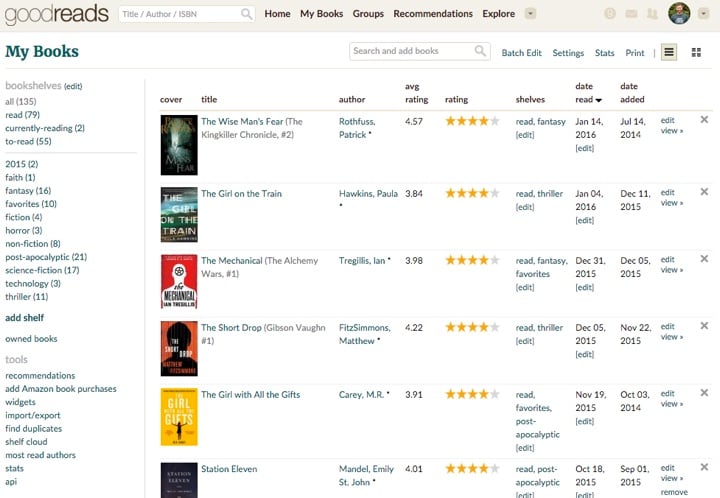
I’ll give two personal examples to back up this view1. My favorite social network at the moment is Goodreads. The site is slow, the UI is confusing, and the mobile apps make me feel completely lost, and yet I keep coming back to it. Because Goodreads is extremely good at what it does: helping me find books I’d enjoy, and letting me share good books with friends.
Goodreads

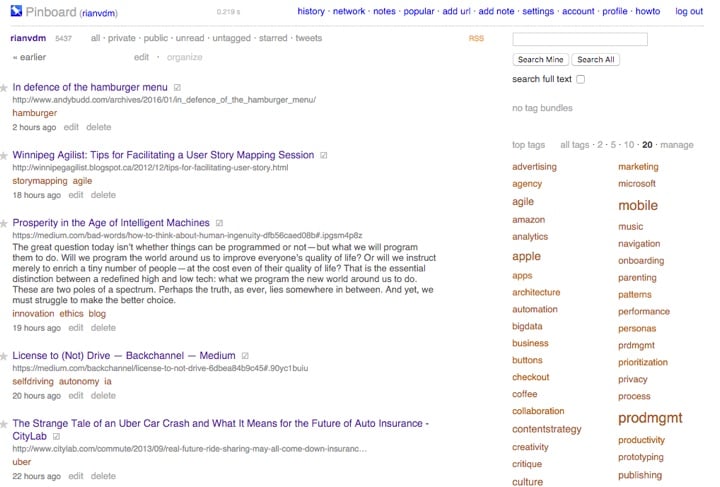
The second example is Pinboard. If I could take only one website with me to a deserted island it would be Pinboard. I use it more than any other online service. It helps me save, categorize, and find all the useful articles I’ve read over the 5 years I’ve been using it. The UI has tons of little weird quirks, and it’s very much barebones. But that doesn’t matter. It’s indispensable to me, so I care very little about its usability.
Pinboard

These two examples lead me to a second theory:

The more utility a product has, the less its usability matters.

I like Goodreads, but at some point if the usability becomes too frustrating, I’ll just leave. For Pinboard, on the other hand, I’ll walk through usability hell and back just to keep using it. It’s that essential to my work.

I’ve said this a few times in this article, but let me reiterate: I’m not, for a second, saying that usability isn’t important. I’m proposing that if you have a product that has insane levels of utility, its usability becomes a secondary factor in its success. To put it another way, the ROI on increasing utility is probably much higher than the ROI on improving usability.

The moral of the story is this: first find an idea that people can’t live without, then make it a beautiful, usable product. It’s very difficult to do it the other way around.


If you liked this article, you can sign up to get an email every Friday with all new posts that appeared on the site that week. You can, of course, unsubscribe at any time.

#mc_embed_signup{background:#fff; clear:left; font:14px Helvetica,Arial,sans-serif; } /* Add your own MailChimp form style overrides in your site stylesheet or in this style block. We recommend moving this block and the preceding CSS link to the HEAD of your HTML file. */


  1. That’s how science works, right?