Menu

Posts tagged “user experience”

Where have all the Information Architects gone?

Lis Hubert wrote a thought-provoking piece for UX Magazine called The De-Evolution of UX Design. The link-bait title put me off a bit, but I’m glad I stuck with it. It’s a well-written article that you won’t be ambivalent about - you’ll either agree strongly, or disagree strongly. In essence, Hubert laments the decline of the Information Architecture function in UX:

It’s been seven years since I took that first step into IA, and, sadly, it seems that the practice of understanding and prioritizing information before designing the interface has been abandoned. And because of that, we are facing a huge problem in the world of UX, which is, simply put, that we are devolving.

She goes over the problems of skipping the IA phase, and then offers some solutions. Her point is in line with the thoughts I shared in my World IA Day talk called A lack of UX purpose (and what we can do about it):

It seems that ther’s unfortunately plenty of UX work out there that jumps straight into wireframes without first understanding the design problem, as well as the purpose of the solution. Purpose ”“ the reason for which something is done or created ”“ often appears to be missing. And this is where I believe Information Architecture can come to the rescue.

So, needless to say, I’m in the strongly agree camp on Hubert’s article. But maybe you won’t be, so definitely give it a read.

The ultimate product question: How do you know what's important?

Ryan Singer wrote a very clear and succinct definition of Product Management in Advice for product managers:

“Managing the product” means deciding what we do to the product and then making it happen.

When you unpack that, it involves strategy (what is important to do?), resources (how much time can we spend on it?), managing development (what do we need to build in order to do it?), managing experience (how will it look and work, how does it integrate into what we already have?). And all of it with regard to the bottom line of the business. Given a strategy, resources we have, a user experience bar to uphold ”” given all that, what can we do and why is it worth doing?

It’s a great primer for anyone who wants to understand what PM’s do - especially for people who are considering making a career change to Product Management. There’s one part I’d like to unpack a little more, and that is prioritization. Ryan touches on it as follows in a section entitled “Deciding what to do”:

I try to lead every decision with user experience. What is the user-facing situation we want to change? Or if the motivation isn’t because of a user benefit, but a pure business reason ”” what is the impact on the user, and how can we align incentives so this at minimum makes sense to the user? This is critical.

He advocates for “leading with design”, which is a sentiment I wholeheartedly agree with. But how does this work in practice, particularly in large organizations with a variety of product lines and a gazillion stakeholders? We’ve spent a lot of time trying out different ways to solve the problem of prioritization, so I naturally gravitated towards that section in Ryan’s piece, and hoped for a little more detail. Ryan, if you’re listening - I’d love to see a follow-up post where you explain your process a bit more.

This is important because I believe the hardest part of a Product Manager’s job is answering the strategy question that Ryan uses in his definition: What is important to do? Once you know what to do, the how isn’t necessarily easy, but you’ve at least started the race and you know what you’re running towards. You’ll work with developers to understand technical requirements. You’ll work with designers and guide them through a user-centered design process. Running the race is the fun part. Deciding which race to run is the excruciating part, and it makes or breaks a product.

How others prioritize

There are many established processes for product prioritization, and we’ve tried most of them on the various teams I’ve worked with. I’m particularly interested in methods that can be used on an ongoing (daily/weekly) basis - not ones that are used every few months for long-term planning. The KJ-Method has a lot going for it:

The KJ-Method is a fascinating mix of independent brainstorming, group dynamics, and democracy. It allows a team to be creative and critical in a productive manner, where strong personalities and politics play second fiddle to the independent perspectives and experience of the team.

Jared Spool claims that he can do this process in under an hour with a team, but my theory is that he can only do that because he is superhuman. I find the 8-step process a little too heavy and time-intensive for day-to-day use. It’s great for longer-term strategic planning though.

The Kano Model is another great technique for prioritization:

The easiest way to think of the model is on a two-dimensional grid.

The horizontal axis represents the investment the organization makes. As investment increases, the organization spends more resources on improving the quality or adding new capabilities.

The vertical dimension represents the satisfaction of the user, moving from an extreme negative of frustration to an extreme positive of delight.

As much as I like this model, it suffers the same downside as the KJ-method - it’s too time-intensive for ongoing prioritization. And then there is Amazon’s approach, which is based on the following principle:

Prioritize themes, not projects - Create a list of themes for your product or business. Examples might be customer acquisition, activation, retention, avg revenue per user, avg visits per user, etc. Pick ~3 that are the most important for your product given its stage.

The gist is that they prioritize based on a project’s potential impact vs. cost:

Look for the projects with the greatest projected impact with the least cost, and do these ones first, quickly. Then move on to the next projects, or the next phases of the early projects that had a greater than expected impact.

How we prioritize

I’ve found a stripped-down version of the Amazon method most effective and realistic in our organization. As much as I agree with the principles of each of the three approaches mentioned above, they tend to be unrealistic in the context of ongoing prioritization. So here is the extremely simple process we’ve used on an ongoing basis, with good results:

  1. Have a white board with a permanent two-by-two matrix on it. The horizontal axis represents Business impact (which includes user needs and technical considerations), and the vertical axis represents Level of effort to implement (which includes people and their time commitment).
  2. Write product requests and ideas on sticky notes as they come up, have a quick discussion with relevant people to ascertain business value and level of effort, and then put the sticky note on the two-by-two matrix.
  3. Write prioritization numbers next to each of the features/themes, starting with those that have the highest business value. I like a 70/30 split between high effort / low effort features, but that’s a theory for a different post.
  4. Every week or so, check your roadmap to make sure you’re still working on the right things, and make adustments as needed.
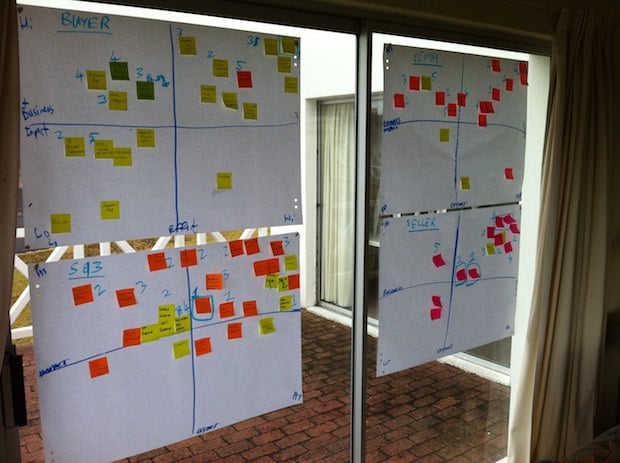
Product prioritization

It’s a simple method, and it’s far from perfect. But it has a few things going for it:

  • It’s detailed enough to ensure constant prioritization based on what’s important.
  • It’s light enough to make it practical for everyday use.

PM’s should spend most of their time managing experience and managing development - two of the activities Ryan points out in his post. I’m sure they don’t skip over the prioritization part at 37signals, but I wanted to give some more context around that because it’s something I struggle with a lot, and I guess I hope I’m not alone. Actually, I know I’m not alone. If we all knew what was important to work on, there would be no failed products.
How to build products that have clear user benefits: begin at the end

Jake Knapp writes that you can build better products by designing the marketing first:

Okay, let’s pretend I grab you and stuff you in a DeLorean. We time travel a few weeks into the future. Your latest project has just been released.

Imagine you can see the launch page. It has a nice simple headline explaining the appeal of your product, with a couple of secondary call-outs. You print the screen, hop back in the DeLorean, and return to the present.

With this glimpse of the future in hand, your team will be better at focusing on the core of the product. If it’s on the launch page, double down! If it isn’t, think hard before spending any time on it.

That reminds me of a similar technique used by Amazon called “working backwards”. It’s outlined in this Quora thread:

For new initiatives a product manager typically starts by writing an internal press release announcing the finished product. The target audience for the press release is the new/updated product’s customers, which can be retail customers or internal users of a tool or technology. Internal press releases are centered around the customer problem, how current solutions (internal or external) fail, and how the new product will blow away existing solutions.

Once the project moves into development, the press release can be used as a touchstone; a guiding light. The product team can ask themselves, “Are we building what is in the press release?” If they find they’re spending time building things that aren’t in the press release (overbuilding), they need to ask themselves why.

These are both great techniques to prevent scope creep and ensure that you’re building products that have clear user benefits.

Never stop searching

This is a great interview with The Bad Plus. They talk about Jazz and finding your voice, but it’s this part on humility that stood out for me:

I prefer to think that it’s possible to always sort of double-check yourself and be like, “Is this really the right thing?” and be searching.  The classic jazz example is John Coltrane: consummate musician, but really never stopped searching. I don’t think he ever believed the hype about himself.  He could’ve been like, “Man, I got it, I’m great.”  But that’s not the feeling you get. Coltrane was incomparably great, but he was also just humbly trying to figure it out.

This should always be our attitude when we design as well. If we think that we’ve figured out how people use computers, or exactly how human psychology works, or that we can design the perfect, seamless experience - then we tend to start designing for ourselves at the expense of our users. Never stop searching.

See also: Humble Design.

Embedding User Experience Design in large organizations: issues and recommendations

As part of the inaugural “Great IxDA Debate” at Interaction 12Jeff Gothelf was asked to defend the position “Interaction design is not a respected design discipline”. He made the following point in his opening remarks:

Most of our employers still see us as wireframe monkeys and pixel pushers. They see us as annotators and documenters ”“ not as problem-solvers and product designers. They evaluate us based on our portfolios of decontextualized wireframes asking not how we solved the problem or what the outcome was but instead wondering what tool we used to create the straight lines in our wireframe decks.

I agree with Jeff that there are some major barriers to getting User Experience fully embedded specifically in large organizations. I think the core problem is that most large companies still don’t see Product (the site or app) as a “profitability lever” that can be pulled. Instead, they focus on two things that have stood the test of time through years and years of MBA classes: Marketing and Pricing. These levers usually result in immediate returns, and they are easy to quantify and measure over time.

For Marketing (including SEO and PPC) the equation usually looks this: More money invested = More traffic = Increased revenue.

For Pricing, it looks like this: Lower prices = Increased sales = Increased revenue (albeit at lower margins).

But Product lacks the immediacy and simple quantifiability that make the other levers so enticing. One version of the Product equation could look like this: Investment in UX = Increased conversion and/or better experiences = Long-term effect on loyalty, trust, and profitability. That doesn’t quite roll off the tongue the same way “MO’ MONEY, MO’ TRAFFIC!” does.

The consequence of UX not being seen as an essential profitability lever is that it’s rarely adequately represented in the upper echelons of large organizations. It’s mostly seen as an auxiliary function down in the trenches as opposed to a core foundation of the business.

I also agree with Jeff that we are partly to blame for this situation:

The fact that those within the profession struggle to unify around a name for our profession hurts our credibility.

Yup. I’ve never seen an industry so intent on undefining itself (like here, here, and here). But I digress…

The fact that our leaders cannot identify in concise and consistent terminologies what it is that we do, hinders our progress into the mainstream of the corporate world. The fact that we, as practitioners, fail to consistently and convincingly describe what we do and the impact we have on our teams, products and companies, speaks volumes towards the progress we still have to make to get the respect we deserve and that is afforded to all these other professions.

So how do we begin to solve this problem? We do it by ensuring the work we do is credible, consumable, and relevant:

  • Credible: Use solid methodologies, accurate measurement, and success metrics that are clearly defined and agreed upon upfront.
  • Consumable: Tell the story really well to business stakeholders, using plain language to explain our process and its benefits, as well as the business results.
  • Relevant: Forget about squirrel projects for a while, and focus on things that are important to the business, like Checkout or Landing page optimization.

We should apply UX principles to our internal clients too. We know that organizational leaders are measured by (and therefore focused on) business results. So we need to not only design our Products to accomplish that, but we also need to design our deliverables in a way that shows the value of UX in clear and irrefutable ways. That’s how we get more CPO’s and CXO’s in large organizations.

And for the love of all that is holy, can we please just pick a name for ourselves and stick with it? I know there’s plenty wrong with the term User Experience Designer, but it’s the most recognizable thing we’ve got. It’s akin to attempts to replace the save icon - yes, it might not be appropriate any more, but why break users’ mental models about something that is so instantly recognizable?

Clutter is an information problem, not a design problem

Scrivs brings up an interesting point about cluttered design in Why Are We Scared to Design Less?:

Will larger companies ever get on board and understand that adding more doesn’t produce better results? I don’t think the issue is that managers and executives think that more information is needed on pages, I think the issue is that the information isn’t designed well enough so that it doesn’t require a million images or words to get across.

I agree, and it goes back to a point a made a few weeks ago about a lack of Information Architecture in many UX projects.

Smashing Magazine, and the community that sustains me

In what still feels like a dream that I’ll someday wake up from, I’ve been extremely privileged to become a contributor to Smashing Magazine. I haven’t written about it here before because I’m not really a fan of meta posts, and like I said, I’m still waiting to wake up and discover that it’s not real. But I do want to express a few thoughts on the experience so far, and acknowledge some of the people who make the magazine happen behind the scenes.

The opportunity to write for Smashing Magazine fell in my lap out of nowhere. One of my favorite designers and writers, Francisco Inchauste, contacted me out of the blue after reading some of my articles here on Elezea, and asked if I’d be interested in contributing to a new UX area on Smashing that he was starting up. I tried to play it cool, but really, how is that even a question? Of course I jumped on the opportunity, and so far it’s been a fantastic learning experience.

I am extremely impressed by the editing process at Smashing Magazine. It not only results in great content on the site, but it provides extremely valuable feedback to writers to help us get better at it. The first step is usually a discussion between Francisco and I about the idea for the article, followed by 2-3 drafts that he gives feedback on. Once Francisco is happy with the draft, each article goes through two blind reviews by people in the industry who are usually experts in the topic you’re writing about.

The feedback that comes from Francisco and the team of reviewers is always smart and constructive, and results in better articles across the board. To be honest, I feel like I get more out of the process than Smashing does. I get to hone my writing skills - all they’re getting is an article! But hey, as long as they’re ok with that deal, I’ll take it.

So, on to a brief summary of what I’ve written about so far, and some of the things I’ve been thinking about for the future. In my first two articles (part 1, part 2) I talked about the organizational challenges of doing user experience in large organizations, and how we can work better together. In The Data-Pixel Approach To Improving User Experience I shifted gears and applied some of Edward Tufte’s data visualization principles to web design.

I am currently very interested in the connection between architecture and web design. I’m trying to read up on architecture as much as I can, and I continue to be struck by the similarities between the history of architecture and the current arc of web design. In Designer Myopia: How To Stop Designing For Ourselves I tried to scratch the surface of that, but there’s still so much more to be said. I really believe that the history of architecture can tell us a lot about the future of web design, and I hope to explore some of that in upcoming articles.

My next article cued for publishing is also the first one inspired by my 2-year old daughter, so I’m particularly excited about seeing that one come out. I want to thank Francisco, Vitaly, and the entire Smashing Magazine team for giving me the opportunity to write for such a great publication, and making me feel part of the Design community that sustains me every day.

Clear: doing for To Do lists what Dropbox did for file syncing

I can only imagine the miles and miles of chaotic complexity that designers and developers had to wade through to arrive at the simplicity of Clear - a new To Do list app for the iPhone. As I started playing with the app, Rebekah Cox’s definition of design kept popping into my head:

Design is a set of decisions about a product. It’s not an interface or an aesthetic, it’s not a brand or a color. Design is the actual decisions.

And the decisions that Clear made are as close to perfect as I’ve ever seen. I can picture the endless, difficult meetings and arguments that must have happened to decide what features to include in the app. Should we have Projects and Contexts? No. How about Due Dates and Filters? Nope. Well, why not!? Because Clear is a prioritized list of tasks that is fast and easy to edit. That’s it. Nothing less, nothing more.

It reminds me of the Quora thread on why Dropbox became so popular:

“But,” you may ask, “so much more you could do! What about task management, calendaring, customized dashboards, virtual white boarding. More than just folders and files!”

No, shut up. People don’t use that crap. They just want a folder. A folder that syncs.

But let me stop gushing for a minute and step back a bit. Clear (which is getting quite a bit of attention) is absolutely fantastic as a way to view and prioritize a simple list of tasks, but it’s not a replacement for hardcore task management systems. Omnifocus will remain the application I use for all my work projects, and it’s always open on my Mac and iPad during the work day. But Omnifocus is hopeless overkill for simple tasks like “Make a car appointment” or “Get coffee at the store”. And that is the gap that Clear fills so effectively.

Clear is focused on two things that make it vastly superior to other similar apps:

  • Speed. It’s really fast. When it starts up you can instantly start typing. This is crucial to quickly capture that all-important thing you don’t want to forget. I still die a little bit inside every time I see the “Optimizing database” message while I wait for Omnifocus to start up.
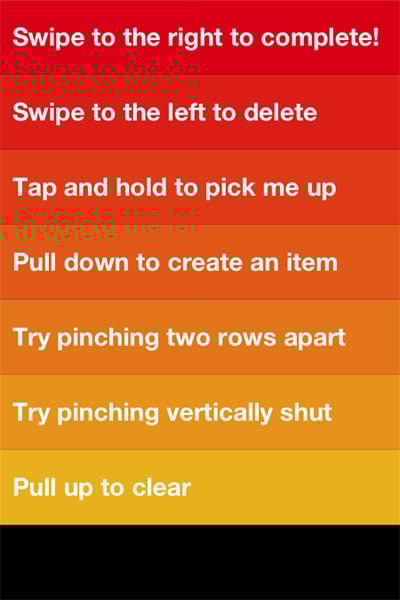
  • Effortless editing. It’s completely gesture-based - no chrome, no fluff, no fancy visual design. You tap, you type, you swipe, you close. These gestures are easy to learn and intuitive:

clear-1.jpg

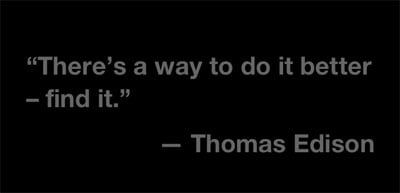
Francisco Inchauste calls Clearan app for the future”, and I completely agree. It feels different, but it feels right. And despite its (appropriate) lack of visual extravagance, it has an attention to detail that reminds of the meticulous design of Path. For example, when you create a new list and there are no to do items in it yet, you get a random quote about getting things done:

clear-2.jpg

I’m trying hard to find something negative to say about Clear, because every app has room for improvement. But at the moment my judgment is slightly clouded by how impressed I am with this team. It’s so hard to resist the temptation to build an app that tries to solve every problem for every person in the world. These guys walked through that fire and emerged on the other side probably bruised and battered, but also with a flawless app for listing tasks and editing them quickly. Want more in your To Do list app? Shut up and go buy Omnifocus.

World IA Day: A lack of UX purpose (and what we can do about it)

I flew up to Joburg this weekend to speak at one of the World IA Day events that were happening in 14 cities around the world. The bulk of the talk was about Customer Journey Maps, and specifically how we used the technique to help us prioritize our roadmap at kalahari.com. In this summary post I want to focus primarily on the topic I started the talk with. It’s about a particular gap I see in current UX work, and how Information Architecture is uniquely positioned to bridge this gap.

In 1955 David Ogilvey wrote a letter about his copywriting habits, and among other things, said the following about campaign work:

I write out a definition of the problem and a statement of the purpose which I wish the campaign to achieve. Then I go no further until the statement and its principles have been accepted by the client.

It seems that ther’s unfortunately plenty of UX work out there that jumps straight into wireframes without first understanding the design problem, as well as the purpose of the solution. Purpose - the reason for which something is done or created - often appears to be missing (*cough* Color.com *cough*). And this is where I believe Information Architecture can come to the rescue.

There are plenty of definitions of IA to choose from, but I like this one in particular by Peter Morville:

I’m an information architect. I map paths and places across physical, digital, and cognitive spaces. #ias10 #iasw

”” Peter Morville (@morville) April 15, 2010

I like it because it brings into focus the idea that at its core, Information Architecture is about a unique way of seeing the world. A way that is essential to build successful user experiences.

I love the example Dan Klyn’s uses in Information Architecture is a Way of Seeing. You have to read the whole thing to appreciate it fully, but in short, he tells a story about having to deal with some pretty severe back pain recently. After visiting an MD who only gave him a prescription for Vicodin and some exercises that didn’t help at all, he ended up at a Chiropractor who was able to sort out the problem in just a few days (after taking an X-ray to help diagnose the problem). When asked why the MD didn’t originally take an X-ray to get to the root of the problem, the Chiropractor replied that it wouldn’t have mattered if she did:

Even if the MD had taken an X-Ray, she would not have seen what I saw. Show us each the same image and we see different stuff.

It’s this different way of seeing that makes the IA profession so crucial right now. IAs specialize in looking at a vast amount of information and making sense of it in a way that is credible, consumable, and relevant to users (and the business). Where most of us only see Navigation, they know that part is just the tip of the iceberg. Underneath it lie activities like Information organization, Information relationships, and IA research that all work together to give IAs their unique view of the world.

Within this large toolset that IAs have to choose from to do their work, Customer Journey Maps stand out as the one technique that can be most effective to bring purpose back to our UX work. As UX Matters defines it:

Customer journey maps are documents that visually illustrate an individual customer’s needs, the series of interactions that are necessary to fulfill those needs, and the resulting emotional states a customer experiences throughout the process.

These maps are important as a way to find UX purpose because it accomplishes the following goals:

  • It provides a common understanding within an organization about customer needs, product strategy, and business goals - i.e., the product’s reason to exist.
  • It’s an excellent product prioritization tool.
  • It’s a guiding light for design, always bringing the project and the process back to the customer journey and the purpose of the product.

There are many different ways to approach these maps, but I find the Adaptive Path way the most effective. It places a strong focus on user research, and forces you to think about the implications of the journey map, and how it can integrate with and guide the design process.

So, that was my story at the conference. Thanks to everyone who came out! Here are the slides from my talk:

You cannot design without content (structure)

Mark Boulton wrote a fantastic piece called Structure First. Content Always. He makes a strong case that it’s unrealistic (and just plain wrong) to require content to be written before design happens:

Let’s be really clear about this. It is unrealistic to write your content ”“ or ask your client to write the content ”“ before you design it. Most of the time. Content needs to be structured and structuring alters your content, designing alters content. It’s not “˜content then design’, or “˜content or design’. It’s “˜content and design’.

I often utter the phrase “you cannot design without content”, but in practice I still fall back on old habits when push comes to shove and content simply isn’t available. Mark provides a great solution in his post as he explains what content structure is all about, and how it fits into the design process.