Menu

Posts tagged “user experience”

Design isn't just surface work

Speaking of Frank Chimero, his Q&A on the Readmill Blog is really good:

A dull ache of sadness and disappointment works through me when I see design portrayed as surface work, or when I see a lot of time and money funneled into empty solutions to fake problems. It feels like squandered potential. Fruit rotted on the branch. I believe that design, at its best, can act as life-enhancement. We can make and use this stuff to help all of us live well, and I’d like to see us live up to those expectations across the board, my own work included.

When design mistakes are fatal (and what we can learn from them)

The article Air France Flight 447: “Damn it, we’re going to crash” is long and fascinating. But most of all, it’s frightening. It paints a vivid picture of what happened the night of June 1st 2009, when Air France Flight 447 from Rio de Janeiro to Paris went missing. The plane was eventually found days later - all 228 passengers and crew died in the crash.

For me, the biggest take-away from the article is that sometimes bad design can cost lives. Much of the article is about the design flaws in Airbus planes that resulted in multiple - and eventually fatal - human errors by the pilots. The details are important so you should definitely read the whole article, but two main design issues are discussed.

First, there is a lack of information given to pilots:

In the next 40 seconds AF447 fell 3,000 feet, losing more and more speed as the angle of attack increased to 40 degrees. The wings were now like bulldozer blades against the sky. Bonin failed to grasp this fact, and though angle of attack readings are sent to onboard computers, there are no displays in modern jets to convey this critical information to the crews. One of the provisional recommendations of the BEA inquiry has been to challenge this absence.

Second, there is a lack of visual feedback on the particular kind of steering that’s used on all Airbus planes. Because of the way the so-called “fly-by-wire” steering method is implemented on the Airbus, it’s very difficult for pilots to see what their colleagues are doing, and therefore almost impossible to spot human error:

The American manufacturer [Boeing] was concerned about [the Airbus] side sticks’ lack of visual and physical feedback. Indeed, it is hard to believe AF447 would have fallen from the sky if it had been a Boeing. Had a traditional yoke been installed on Flight AF447, Robert would surely have realised that his junior colleague had the lever pulled back and mostly kept it there. When Dubois returned to the cockpit he would have seen that Bonin was pulling up the nose.

As I read through this article I was immediately reminded of Nielsen’s first usability heuristic:

Visibility of system status

The system should always keep users informed about what is going on, through appropriate feedback within reasonable time.

Both of the main issues that resulted in the crash of Flight AF447 could have been avoided by following the simple guidelines of system status visibility. It’s what makes this already horrifying event even worse.

As web designers we are extremely lucky - our design mistakes don’t endanger lives. But even though we don’t make daily life-or-death decisions in our profession, we should still pay extra attention to this first, and arguably most important, rule of UI design: always make sure users know where they are, and that they have the information they need to make their next decision. This is one of those simple design rules that seems obvious when it’s followed, but results in major abandonment when it’s broken.

When a user gives an input we have to acknowledge receipt of that input. This input is usually in the form of a click or a touch. It’s the user’s way of starting a conversation, so don’t be rude - talk back. These buttons below, designed by Alex Maughan for kalahari.com, is a good example of appropriate feedback:

kalahari buttons

As soon as the user clicks the “Add to basket” button, the animated spinner and text give an indication that something is happening. Or consider this idea for a new kind of signup flow outlined on the 37signals blog:

You could preview the workflow steps that come after the signup so it’s clear how much of a gap there is between signing up and getting value out of the product.

This approach gives users comfort, because they know what’s going to happen next. They have all the information they need, so there’s no need to panic and abandon the flow. (You can click through to the original post for a sketch of this idea)

This principle isn’t new or complicated. But reading about the Air France tragedy reminded me again that we sometimes skip over the basics to implement the fancy. So here’s an idea: pick your favorite “get the basics right” sports cliché and put it on the wall so you can see it whenever you’re designing (you know, like catches win matches or something). Or just get straight to the point and write, “Appropriate feedback makes for happy users”.

Why chairs suck

Against Chairs is a simply delightful article:

I hate to piss on the party, but chairs suck. All of them. No designer has ever made a good chair, because it is impossible. Some are better than others, but all are bad. Not only are chairs a health hazard, they also have a problematic history that has inextricably tied them to our culture of status-obsessed individualism. Worse still, w’ve become dependent on them and it’s not clear that w’ll ever be free.

It also boasts one of the better opening lines I’ve seen in a while. I won’t spoil it for you.

Do you want critique, or a hug?

Jon Kolko gives some great advice on design critiques. I particularly enjoyed this part:

A “bad critique” is one of the most valuable things a designer can receive, because it short-circuits the expert blind spot and helps you see things in new and unique ways, and it does it quickly. But sometimes in the design process, you don’t actually want feedback at all: you want affirmation, and you want someone to celebrate your work so you feel good. Learning to understand the difference is critical, because if you ask for critique, people will give you critique. But if you ask people to tell you the three best parts of your design, they’ll probably do it. As Adam Connor offered in his IA Summit talk, “Don’t ask for critique if you only want validation. If you want a hug, just ask.”

Speaking of critiques, this is my preferred process to get the most value out of them.

The complex process of simplicity

Francisco Inchauste unpacks the difficult process of designing simple products in Simplicity Isn’t Simple. He explains that simplicity isn’t just something you start tacking on towards the end of a project:

It still amazes me how many people ask for simplicity but don’t realize this phase of the design has passed when they’ve already listed out what they want it to do, or in the case of a Website, tell you what needs to be on the homepage.

True simplicity starts at conception. It’s infused into the being of the creators, and by proxy, in the soul of every product they design.

He also outlines some practical strategies for creating simple products.

Design revolution: identifying areas where new interaction paradigms are essential

The Chronicle of Higher Education has a long but interesting review of Thomas Kuhn’s The Structure of Scientific Revolutions. Entitled Shift Happens, the article goes through all the misinterpretations of Kuhn’s work, as well as some of the major criticisms his ideas have received over the years. I found this part particularly interesting:

Scientific revolutions, according to [Kuhn’s book], don’t occur when an apple happens to find the head of a genius, or when enough facts have slowly painted a new picture. Rather, in yet another of Kuhn’s inversions, new paradigms emerge to explain the accumulation of anomalies: findings that do not make sense within the current paradigm. For example, if your paradigm tells you that fire consists of the release of phlogiston embedded in flammable materials, then the fact that some metals gain weight when burned is an anomaly. When a new paradigm is conceived that makes sense of the anomalies, science is in for a revolutionary shift.

There is a definite parallel with design work here. We often try to shift users to a new interaction paradigm because we think it works better. That’s fine, and can be successful - tab-based browsing comes to mind. But these are incremental changes/improvements, and they happen whenever designers approach an existing problem in a new way. They’re worthy pursuits, but rarely essential for an application to still fulfill its purpose.

By contrast some interaction changes are absolutely essential, and we need to keep our eyes open to recognize those elusive circumstances. Essential interaction changes need to happen when existing paradigms can’t cope any more, and new ones are needed. For example, clicking with a mouse isn’t a thing on touch devices, so that particular interaction became an anomaly that couldn’t be “explained” by existing paradigms any more. Therefore we are legitimately creating new paradigms for mobile design to accommodate the change from mouse to touch. We’re still navigating our way through this change, as apps like Path and Clear emerge to challenge our views on what we consider good design.

We often spend our time trying to improve existing designs, and we need to do that. But there is always the danger of hitting a local maximum - “a point [where] you’ve hit the limit of the current design”. To fight this danger, let’s remember that our energy is sometimes best spent identifying areas where existing paradigms are bursting at the seams in their ability to accommodate the design status quo. That’s where the opportunities for design revolution truly lie.

Skeuomorphism has a place? Say it ain't so!

I really want to disagree with Tobias Ahlin’s defense of skeuomorphism, but he does actually have a point in Skeuomorphism & Storytelling:

Skeuomorphism is about communicating and reinforcing feelings ”“ getting an application to become a memorable experience, not just a tool. It’s about communicating the purpose of a UI, not only the functions it enables.

He gives some good examples of appropriate (and inappropriate) uses.

Digitial artifices on electronic representations of paper

Matt Gemmell posted some interesting reflections on the difficulties of translating paper-based media to digital devices. It includes another reason (not that we need any more reasons, mind you) why skeuomorphic design practices are so problematic. From Augmented Paper:

It’s so easy to saturate electronic representations of paper with what I call “digital artifice”; the gratuitous and ultimately heavy and objectionable skeuomorphisms and decorations that betray a simplistic thinking process: let’s just make this look the same. That’s a damaging frame of mind, because it enforces a false dichotomy between the real and the virtual. Software should be an enhancement, not a replication.

The real reason websites have to get better

Jon Mitchell in Websites Have to Get Better:

Read-later apps are competition for noisy, ad-ridden websites. They represent a simple fact: Users hate our sites.

Websites should think of Instapaper as competition. People are spending their reader-experience (RX?) dollars elsewhere, period. They don’t want to pay publisher sites with impressions on ads they don’t value, so they pay Marco Arment for a better reading experience. If publishers want to get those RX dollars, they have to deliver a great experience Instapaper can’t provide. It’s pure and simple competition.

I agree with the conclusion that web sites have to provide better reading experiences. But I don’t agree with the causal relationship being drawn with Read Later apps.

First, the main purpose of Read Later apps is revealed right there in the name: they’re for reading things”¦ later. So even though some people probably use the Instapaper web view to read articles immediately without ads, my guess is that most people use it to save articles for later reading.

What the DVR does for TV shows, Instapaper does for articles. And just like with a DVR, you get to skip the ads - but that’s just a wonderful, added bonus. The real benefit is having a place to store and watch/read all the things you want to get to without being bound to the time and place where you first discovered it. This means that if major ad-supported sites start to provide better reading experiences, I won’t suddenly stop using Instapaper. The need to save articles for later reading would remain. This brings me to my second point.

The reason web sites have to provide a better reading experience is not because Read Later apps are their competition, but because it’s the right thing to do. It’s how you show that you value and respect your readers.

Don't believe the rumors: User Experience Design is alive and well

I’ve never seen an industry as intent on un-defining itself as the field of User Experience Design. There’s a long list of articles proclaiming the death of this term that most us identify with at the moment. Just in the last few weeks we saw articles like User Experience Design is Dead; Long Live User Experience and Can We Drop the Term UX Design Already?.

I understand and appreciate the arguments these designers and writers are trying to make, but as someone who teaches introductory courses on User Experience Design, this plead to call ourselves something else (or nothing at all) is problematic. To people new to the industry, the term User Experience Design makes sense once the basic elements are explained to them. Even with all the arguments against it, many of us don’t have the luxury to wait around until we come up with a better way to describe what we do. So I’m going to go the other way and do something decidedly uncool: I’m going to spend time defining User Experience Design.

This short post is my simplified definition of User Experience Design, meant as an introduction to those who come to it from other areas of expertise. It’s not exhaustive by any means, but I find it useful in getting people into the flow of what we do, and interested to learn more. That said, I’d love to hear from you if you think I’m missing something, so please send me a tweet or an email if you have something to add - or, of course, write a response on your own site so we can all share in the discussion.

So, here we go.

User Experience Design, defined

User Experience Designers solve problems by uncovering user needs and helping to create products that meet those needs. If you break it down to its most basic level, Design is a set of decisions about a product.

The diagram below shows the primary elements that make up the process of User Experience Design.
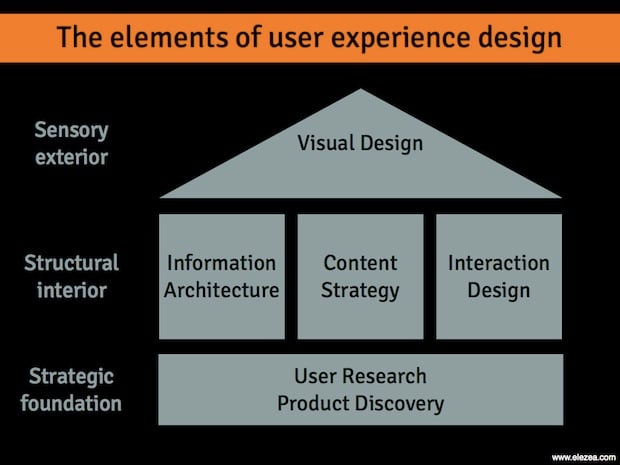
The elements of User Experience Design

Strategic foundation

To provide a solid strategic foundation, User Research is a set of methodologies focused on users’ interaction with a product. Through mainly observational, task-based techniques, user needs and usability issues with a product or idea are uncovered.

Product Discovery uses the learnings from User Research, among other things, to ensure the right product is being built for the right users. By framing the problem, exploring multiple solutions, and then prioritizing and planning for the implementation of the best solutions, Product Discovery lays down the guiding principles for the product that is being built.

Structural interior

The inner workings of a product usually has three main components.

Information Architecture maps out the paths between the different pieces of information on a site. We usually associate Information Architecture with site navigation, but below the surface there are activities such as information organization, information relationship building, and customer journey mapping that form the backbone of a usable product.

Content Strategy plans for the creation, delivery, and governance of content. This doesn’t mean that we should always have content ready before we design, but we should at least know how the content will be structured. If done right, this usually includes a non-dickish SEO strategy.

Interaction Design defines the structure and behaviors of interactive products and services, and user interactions with those products and services. The outputs of Interaction Design are artifacts like flow diagrams, wireframes, and prototypes. Interaction Design is mostly concerned with layout, structure, and flow; not typography, colors, and aesthetics.

Sensory Exterior

Once the structure and flow of the product has been defined (and even while that’s still happening), we get to work on the part that most people associate with the word “Design”.

Visual Design is the art and profession of selecting and arranging visual elements — such as typography, images, symbols, and colors — to convey a message to an audience. The goals of visual design are to set the visual hierarchy of a page or flow, and elicit appropriate emotional responses about the product.

The Complexity at the Other Side

Once we understand the basic concepts of User Experience Design, the journey can start. True User Experience is more than the sum of these parts. It’s a “seamless merging of the services of multiple disciplines, including engineering, marketing, graphical and industrial design, and interface design” (from the NN Group definition) to provide efficient and enjoyable experiences to users. This takes time, continuous practice, and an understanding that we’ll never know everything there is to know about Design. But keeping these basic elements in mind ensures that we never think of Design as just eye-candy, or something we tack on to the end of a development process. Without these building blocks, the house collapses.