Menu

Posts tagged “user experience”

Should designers learn to code? Who cares, as long as they always remain curious.

Tucked away among the usual arguments for and against designers being able to code, Mandy Brown makes an interesting observation in Specialist or Generalist?, a roundtable discussion on the issue:

You do not need to be proficient in practices other than your own; but you ought to be curious. Curious enough to ask questions, to read about things, to get your hands dirty. It’s lack of curiosity about other disciplines that is deadly, not lack of skill.

This is a statement worth digging into, because curiosity is one of the most important characteristics of a good designer (well, of anyone, really). Sara Wachter-Boettcher explains the reason really well in her piece On Content and Curiosity:

Curiosity keeps us hungry. It leads us to tackle new challenges when the easy questions have all been answered. It makes us wonder how things could be better””even when they are, if w’d just pause to admit it, pretty damn good already.

There is a very legitimate counter-argument to being incurably curious, though. We might gain such shallow knowledge about so many different things that we end up unable to form or articulate opinions on anything because we just don’t know enough about a specific topic.

This is the core of the “specialist” argument, and it’s articulated very well in Stop Trying To Be Diverse, an interesting post about photographers on the Musea blog. The author tells the story of a particular photographer who spent his entire life shooting black-and-white portraits of people against a white or grey background. Boring, right? Well…

We don’t want to restrict ourselves to something like that because we feel that we will get bored. However, boredom is a great thing! What actually occurs is, boredom forces us to be more creative if we can push through it. Our work will improve if we find different ways to solve the same problem over and over, instead of switching between 10 independent problems. Avedon forced himself to come up with something new every time his subject stepped in front of his white seamless background. He had to find something unique about each individual, otherwise he would fail. The difference in his work came from what his subjects brought to the image, not by some new Photoshop filter or fancy off-camera lighting technique he used.

I’ll illustrate this with a story about my own online behavior. The other night I went online to do something (who knows what it was), and an hour later I found myself reading an article about a guy who feels that Louis C.K. was stupid because he made “only” $1 million from his standup comedy experiment. The person claimed that he could have helped Louis C.K. make $5 MILLION!!! I got to end of the article and all I could think was, “Why do I read this crap?” Well, I read it because my curiosity sometimes overcomes my importance filter. And getting that balance right is what we all need to make this curiosity thing work for good, not evil.

So, how do we arrive at (and maintain) this balance? How do we remain curious, and still manage to temper our gluttonous, Internet-fed thirst for All Things, All The Time? The core of the solution lies in learning what to cull from our lives, and what to surrender instead. In The Sad, Beautiful Fact That We’re All Going To Miss Almost Everything, Linda Holmes describes the two concepts as follows:

Culling is the choosing you do for yourself. It’s the sorting of what’s worth your time and what’s not worth your time. It’s saying, “I deem Keeping Up With The Kardashians a poor use of my time, and therefore, I choose not to watch it.” It’s saying, “I read the last Jonathan Franzen book and fell asleep six times, so I’m not going to read this one.”

Surrender, on the other hand, is the realization that you do not have time for everything that would be worth the time you invested in it if you had the time. Surrender is the moment when you say, “I bet every single one of those 1,000 books I’m supposed to read before I die is very, very good, but I cannot read them all, and they will have to go on the list of things I didn’t get to.”

We constantly need to learn how to make better decisions about culling and surrendering. For example, I should have culled that Louis C.K. article. And at some point I need to choose to surrender all the UX articles in my Instapaper queue and just freakin’ fire up Balsamiq.

Should designers learn to code? It depends entirely on each designer’s ability to decide if it’s a skill that should be learned or surrendered in the bigger picture of meeting his or her ultimate life/career goals. Put another way, there is no right answer, as long as the designer is at the very least curious enough to know how development works, and at best has made a conscious decision either to surrender the skill or dive in and learn it.

22seven: an observation, a complaint, and a suggestion

Yesterday saw the Beta launch of a new Mint.com-type startup in South Africa called 22seven. They’re essentially aiming to give people better insight into the money they spend, and help them make better decisions about that. Or to put it in their own words:

We use smart information-gathering technology so our users can see all their financial stuff in one place. W’ve applied insights from behavioural economics so our users can better understand the way they think. And by employing principles of play, our users become more engaged, and more willingly engaged, with their money.

It didn’t take long for the banks to start freaking out about the security implications of giving your banking credentials to a third party, but there have also been some defenses of the safety of the service. Instead of rehashing those arguments, I’d like to make three quick comments about the new service.

An observation

I’ve been watching this unfold with fascination over the last 24 hours. Everyone who attended the launch event in Johannesburg seemed really impressed, but it didn’t take long for some (legitimate) concerns to arise as people started trying out the service:

My mom told me never to accept sweets from strangers and to give out my pin number… So… Yeah… Sorry 22seven…

”” Cathryn Reece (@CathrynR) January 26, 2012

That’s a sentiment I agree with, but things started to go downhill a bit from there as the tweets became more and more negative. We’re a finicky bunch of complainers, aren’t we! But as I caught myself just in time before getting sucked into the negativity vortex, a phrase jumped into my head: Schlep Blindess. As in - these guys don’t have it. In Paul Graham’s excellent essay he describes schlep blindness as the inability to identify hard problems to solve:

The most dangerous thing about our dislike of schleps is that much of it is unconscious. Your unconscious won’t even let you see ideas that involve painful schleps. That’s schlep blindness.

He ends his essay by explaining how to avoid schlep blindness:

Some ideas so obviously entail alarming schleps that anyone can see them. How do you see ideas like that? The trick I recommend is to take yourself out of the picture. Instead of asking “what problem should I solve?” ask “what problem do I wish someone else would solve for me?”

And that’s why I admire the creators of 22seven. They’re working on a problem we all want solved, but most of us are too scared to work on. And for doing that, they deserve enormous credit.

A complaint

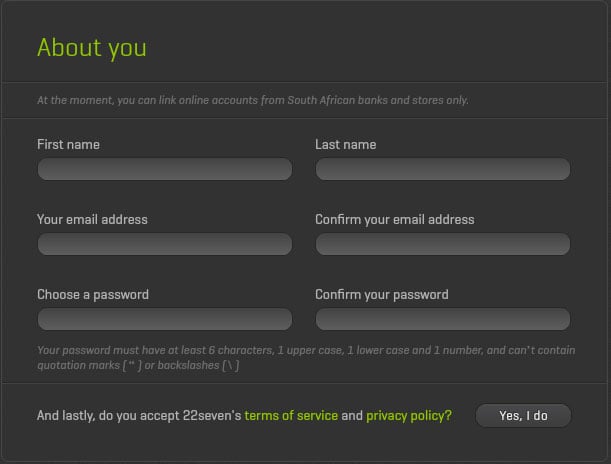
Speaking of finicky complainers, can I be one of those for a minute? Ok, cool. Obviously my first instinct was to scrutinize the design of the site, and even though there’s a lot to like about it, I have to mention a couple of things that I believe are not implemented correctly from a UX Design perspective.

First, forcing someone to wait for a Flash (!!) animation/introduction to load when they click “Register” is just not a good thing. Users don’t have patience for that stuff. If I ask for a registration form, my expectation is to see a registration form immediately. But my main beef is with the registration form itself:

22seven-registration.jpg

Here are some of the issues:

  • The text has very low contrast with the background which makes it difficult to read. Come on, everyone - join the contrast rebellion!
  • We know that it’s bad to use multi-column layouts in forms.
  • Speaking of contrast, what stands out are the phrases “About you”, “terms of service”, and “privacy policy”, while the primary call to action (“Yes, I do”) is a grey button on a dark grey background.
  • While I’m nitpicking, if the button says “Yes, I do”, shouldn’t the title be “About me”?

We just don’t have to re-invent forms any more. The hard work has been done for us - we know how forms should be designed. And I don’t want to get into the Flash debate again, but why build this thing on a waning technology when you can build a responsive HTML web app that works on all devices?

A suggestion

Lastly, I’d like to offer a suggestion. If it is indeed true that 22seven has not met with South African banks yet, that’s a situation that should be rectified soon. In fact, my suggestion is that 22seven meets with one bank and work with them on an API solution that will allow them to access users’ banking information without having to store their credentials at a 3rd party. That’s what OAuth is for. And based on everything we know about Michael Jordaan (the CEO of FNB), wouldn’t FNB be the perfect bank to partner with on this? Once they’re on board, and FNB’s handsome and smart clients start using the service, the other banks are sure to follow.

I’d like to end where I began - on a positive note. I’m truly grateful that 22seven is tackling the banking/money management problem in South Africa in a very real and committed way. I think they vastly underestimated the backlash they would get from users when they’re suddenly asked for their online banking credentials (otherwise the web site would have been littered with trust-building explanations and images). But that’s a fixable problem, and so is my UX nitpicking - they’re not difficult issues to address.

So despite my complaining, I’m extremely excited about 22seven, and I’m rooting for them to succeed. I hope you’ll join me.

Good design practice: agree on the problem before tackling the solution

In 1955 David Ogilvy wrote a fascinating letter about his habits as a copywriter. One of his points jumped out at me:

I write out a definition of the problem and a statement of the purpose which I wish the campaign to achieve. Then I go no further until the statement and its principles have been accepted by the client.

This is applicable to design projects as well. If clients (internal or external) ask us for some quick wireframes, it is our responsibility as user experience designers to push back and make sure everyone agrees on the problem and the goals of the project first - before the design cycle starts. It sounds so obvious, but I see people falling into this trap all the time.

The product discovery process can take months, weeks, or even a few hours if there are tight deadlines. But it cannot take zero hours - that’s a recipe for disaster.

Mark Twain's excellent 19th century guidelines for writing on the web

We just don’t rant like we used to. Sure, there have been some good ones recently, but we have lost the art of being angry and highbrow at the same time - a skill that gives the rant a deliciously icy, brutal feel. For example, when you read something like Mark Twain’s 1895 rant about the rules of fiction, the current crop of angry that comes across our Twitter feeds feels a bit Mickey Mouse.

One of Mr. Twain’s specific complaints in the aforementioned rant is about the rules of good dialogue in fiction. As I read through it, I realized it provides a scarily perfect contrast to the language used on many web sites today:

[When] the personages of a tale deal in conversation, the talk shall sound like human talk, and be talk such as human beings would be likely to talk in the given circumstances, and have a discoverable meaning, also a discoverable purpose, and a show of relevancy, and remain in the neighborhood of the subject at hand, and be interesting to the reader, and help out the tale, and stop when the people cannot think of anything more to say. But this requirement has been ignored from the beginning of the “Deerslayer” tale to the end of it.

That’s unfortunately not what most of the web sounds like - but this paragraph from 1895 contains some of the best guidelines we have for effective web writing. Web site and application copy should:

  • Not sound robotic.
  • Use words that two people would use in everyday conversation.
  • Not be gibberish words strung together to sound fancy, but mean something to normal people.
  • Not just exist to fill up space, but have an identifiable purpose for being on that page and in that context.
  • Be relevant to the flow the user is currently in.
  • Be interesting and help tell the story.

It would seem that Mark Twain was one of our first (and best) web Content Strategists.

The elusive goal of lasting beauty in web design

A few months ago Nilay Patel did a good interview with Tony Fadell, the creator of the Nest thermostat. From Inside the Nest on The Verge:

Fadell looks out at the Manhattan skyline and says that he always wanted to be an architect; that buildings stay beautiful forever but digital devices are quickly obsolete. “You look at hardware or software five years later? They’re crap. You would never use them again. People use architecture all the time.”

His voice rises. “What is our form of architecture? What is the thing that lasts of beauty?”

I’ve been thinking about this for a while now, and the reason I can’t get the interview out of my head is that I just can’t think of a good answer to Fadell’s question.

In web design, what is the thing that lasts of beauty?

Aesthetics and beauty in web design is so subjective, so polarizing, that I wonder if anything lasts of beauty in what we do. As one example among many, the current trend set by Path and Feedly seems to capture everyone’s imaginations. Beautiful, high-quality, full-screen photography with functional interactions and copy elegantly embedded:

feedly-home.jpg

I also find these sites beautiful - and functional. But will it last? 2010 and most of 2011 were mostly about minimalism, and now the pendelum seems to be swinging towards a more emotive aesthetic again. That’s fine because our field is fluid and dynamic, and unlike buildings, things change very rapidly in what we do.

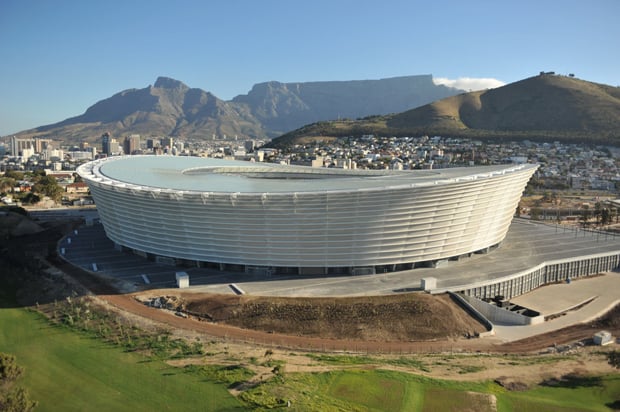
But I do wonder: where are our timeless stadiums?

cape-town-stadium.jpg

In a recent article on Russian architecture Dmitry Fadeyev describes metro stations in Moscow and ends with the following remark:

What’s interesting about this type of architecture is that its aim goes far beyond that of creating a functional underground system. Its aim is to promote a political ideal, and it does it through beauty by enriching lives of the people who get to experience it. The question here isn’t: how do we solve the problem of creating a metro station in an efficient manner - instead the question is: how do we create a station that elevates people’s mood and inspires their lives. This architecture isn’t there just to help you live - it makes life worth living.

Maybe that’s why I think it’s important to talk about lasting beauty in web design. I wonder what would happen if we felt the weight of responsibility a little more when we’re designing. What if we go into each project as if the design will be around for 100 years or more? Would we make it fit into the web environment better, aim to give it a timeless aesthetic, and spend more time considering the consequences of our design decisions? Would we try to design something that “makes life worth living”?


Update 1/10/02: Francisco Inchauste wrote a great comment on Google+. Instead of summarizing it, I’ll post it here in its entirety. His point about content being that thing that lasts of beauty is particularly interesting. Francisco writes:

Our raw material doesn’t have a cost. You can cut up pixels and add to them. You can only cut a stone or wood once. Then it’s in a final form. We never find a final form for our digital goods, because by nature they are in a state of flux. The real beauty could be the changing connections of nodes that make up our Web.

_The lens (browsers/devices) to view that work is always different and also evolving everyday. I think that’s why people have landed on content as the focus again. The content can evolve in presentation, but at the core is still the same content. So, maybe the goal of lasting beauty is in content, instead?
_

Twitter's Creative Director and musician Seal discuss Twitter's iPhone app design

Last night Seal (@Seal) tweeted about his displeasure with the latest Twitter iPhone app. Doug Bowman (@stop), Creative Director at Twitter, asked him to elaborate:

@Seal I’m listening if you have feedback (about Twitter’s design).

— Doug Bowman (@stop) December 29, 2011

What followed is one of those exchanges that make me absolutely love the Internet. A world-famous musician has a conversation about an iPhone app with a world-famous designer, and we get to sit in on it. I think my favorite part of the conversation is Seal’s honest apology:

@stop Thank you. Redownloaded Official Twitter app and a public apology is in order. It’s great now that I understand it. I was wrong.

— Seal (@Seal) December 30, 2011

I can’t quite put my finger on why I find this random chat so great. Maybe it’s because it shows the power of Twitter to reduce degrees of separation to zero in a matter of minutes. Maybe it’s the fact that I can sit in Cape Town, South Africa, and listen to two people who I admire a great deal have a respectful disagreement in real time. Or maybe it’s because I keep thinking about the bizarre exhilaration Doug must have felt, defending an app he worked on with a musician he’s a fan of.

Whatever the reason might be, it’s just really cool. Unfortunately Twitter still isn’t great at showing us conversations (apparently that’s being worked on), but luckily Aaron Swartz built a tool to help us with that. I’m posting a screenshot of the conversation below, but you can also view it here.

seal-stop-twitter-conversation.jpg

On Amazon, Apple, and common excuses for bad usability

Jakob Nielsen explains why saying “but it’s cheap!” is not a good excuse for the Kindle Fire’s bad user interface design:

The difference between user interface design and hardware specs is that better usability is derived from one-time expenses for user studies, design iterations, and coding - whereas beefier hardware (say, adding a camera) is a repeated expense for each additional unit manufactured.

This means that even cheap devices can have great usability because the cost of better research and design is amortized across millions of devices. This is why usability has stupendously high ROI for any big project.

I also like John Gruber’s take on the hardware/software distinction:

[T]hat’s the advantage of software over hardware. You can omit an essential feature and then hustle to get it into your first major update. Good luck adding volume buttons to your Kindle Fire.

Does this mean it’s ok for the first version of the Kindle Fire to have a low-quality UX? Here’s Nielsen again:

I understand why Amazon might want to ship a poor product in late November rather than a good product in February: they want to catch the holiday shopping season. Whether the extra sales are worth the brand damage from a low-quality user experience is difficult to judge.

Amazon has a history of doing this kind of thing. The first Kindle eReader was not a great product, and it didn’t get good reviews. But they kept at it and turned it into something truly great.

This points to one of the main differences between Apple and Amazon. Apple waits until an experience is as close to perfect as possible before they ship. Amazon gets something out there as soon as possible, but then - and this is important - they don’t just move on. They keep working at the product until it reaches an experience they’re happy with.

Both companies are very successful despite their different philosophies on when to ship a product. It proves that we should get over this idea that everyone should just copy everything Apple does. There’s more than one successful business strategy.

I’m sure the Kindle Fire will follow the same trajectory as the original Kindle eReader and become a great device. Eventually. Still, let’s not kid ourselves - the current one isn’t great.

Glitz vs. Plumbing: why I also quit Delicious and switched to Pinboard

Sometimes, you don’t need glitz; you need plumbing.

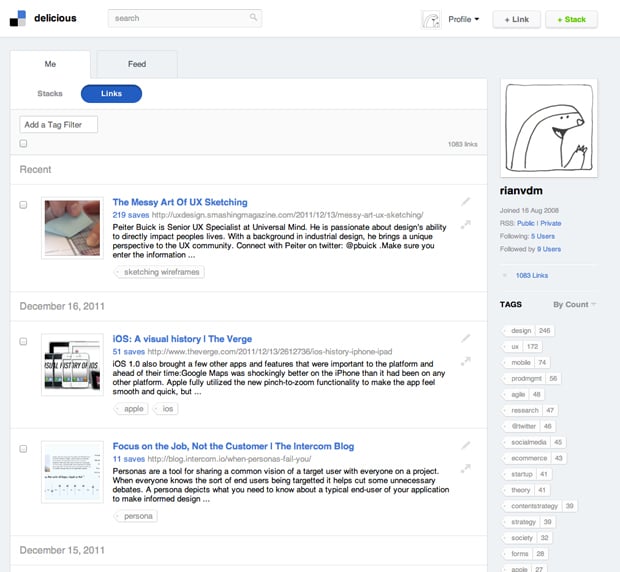
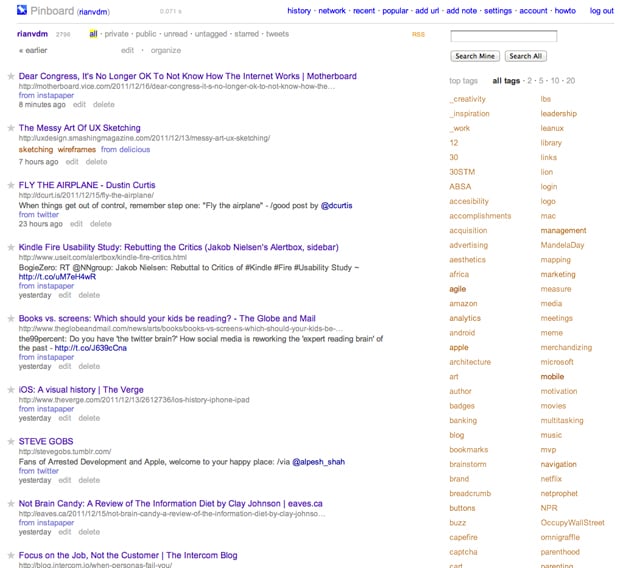
That’s Charles Arthur in Goodbye Delicious, hello Pinboard, explaining why The Guardian is dumping Delicious as their social bookmarking service. Let me ask you a question. Which of the following two screen shots is prettier?

Delicious:

delicious-screenshot.jpg

Pinboard:

pinboard-screenshot.jpg

Delicious, right? Now let me ask you another question. Which site is more useful as a social bookmarking site? It’s ok, I’ll answer for you: it’s Pinboard.

Pinboard’s aesthetic[1] is fairly bland, but the  sparse, table-like layout is the best way to organize the vast amount of information you collect on the Internet. The aesthetic fits the purpose of the app. But wait, there’s more. It lets you import from Twitter, Instapaper, and Google Reader (well, back in the day when Google Reader still supported public sharing). It has browser bookmarklets that work effortlessly. It integrates smoothly with a variety of RSS Readers. Sorry for the cliché, but it just works.

Meanwhile, Delicious has become slow, it has constant availability issues, and the aesthetic keeps getting more extravagant. This actually reduces its utility by obscuring the app’s core features. Social bookmarking is about two things - tagging the things you’re saving, and searching for those thing later on. That’s it. The new Delicious owners are apparently trying to turn it into something more, but whatever that something more is, I’m not buying.

Anyway, back to glitz and plumbing. As I’ve mentioned before, great aesthetic design builds trust, increases engagement, and elicits the appropriate emotional responses to a brand. But glitz is something else. Glitz is about making things shiny without asking what the thing should look like to fulfill its primary purpose.

Social bookmarking is Internet plumbing, not glitz. I now use Pinboard, and highly recommend it.


  1. Time for the obligatory disclaimer. Yes, Design is about problem solving, and it includes elements such as User Research, Interaction Design, Content Strategy, Visual Design, etc. Here I am referring only to the aesthetic layer of the Visual Design component. ↩

Case study: the user experience of kalahari.com, one year later

When I arrived at kalahari.com in December 2010 the site hasn’t seen any significant UI improvements during the 10+ years of its existence. My job description was pretty straightforward: do something about that.

In this post I’d like to talk about the work our team did over the past 12 months to get where we are today. When I look at the site now I still see so much wrong with it - there are way too many things that we still need to fix. So this isn’t an attempt to hold up our work as some kind of standard. I’m doing this in the interest of sharing our methods and lessons learned with the larger design community. I’ve learned so much from others who have shared their stories that it seems only fair that I do the same. So here’s our journey so far.

Making sense of the landscape

Here’s what kalahari.com looked like on December 1, 2010:
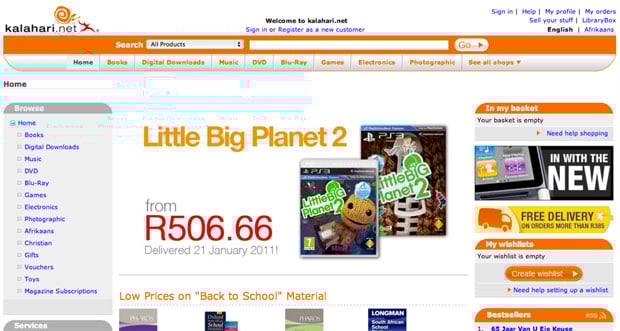
Kalahari.com home page - old

If you stepped through the site back then you probably would have felt as overwhelmed as I did. Where do we start? What order should we do things in? After the first few days of having too much coffee and talking to people all over the organization I realized that we had two primary challenges:

  • No formal prioritization or product development process. It was the same situation I’ve seen many times before. Requirements went straight from “The Business” to developers. That kicked off an endless back and forth about what was needed, with only a cursory nod to Design. The “First In First Out” approach to prioritization was also quite common. The result was, well, not ideal. We needed to fix this.
  • No formal user experience design. This was no surprise, and it was the reason I took the job in the first place. There was no user research, no content strategy, no interaction design, and no visual design beyond marketing and merchandizing materials. This is the part that really excited me: the opportunity to introduce User Experience Design into an organization that was (to their enormous credit) hungry for it but didn’t know where to start.

So we immediately got to work on both those problems.

Hello, I’m a Product Manager

Introducing a Product Management layer into an organization that’s used to working without it is tricky. If you do it wrong it can become a political nightmare and end up ruining your chances of shipping anything good. You might have the best of intentions, but there is always the danger that the only thing people will think when they look at a Product Manager is, “Hey, I used to be responsible for that, jackass!”

We certainly didn’t make this transition perfectly, but I believe the key is to make sure that you talk to as many people as possible about what their organizational issues are, and how they think it can be done better. You have to take the time to explain the benefits of having a Product Team that takes responsible for strategy, vision, and execution of a product (and takes the fall if it fails). And then, most importantly, you have to make the development process fair[1].

We now have a team of Product Managers who are responsible for delivering measurable business results through product solutions that meet both market needs and company goals. They work closely with their teams to develop the strategy and vision for their products. They ensure that designers and developers are included throughout the process. And most importantly: they make sure we ship.

The Intergalactic Product Force

One concept we introduced that I think is worth talking about is the Product Council[2] - a formalized way to deal with prioritization.

The Product Council is made up of the heads (VPs) of every department in the organization: Engineering, Marketing, Support, Category, etc. We have a weekly meeting where we discuss the current product roadmap and priorities. We ask ourselves, Are we still working on the most important things? If something more important comes up, we prioritize it higher in the roadmap, and something else shifts down. If w’re happy with the direction, we do nothing. If a new opportunity arises we ask ourselves, Is this more important than what w’re working on right now? Or is this something we should work on next? If so, what moves down in the priority list?

From here, I communicate any changes to the Product Team, and we discuss this to make sure no one missed anything. But then — and this is important — the Product Manager has complete autonomy and ownership over the implementation of his or her roadmap. The Product Council sets the priorities (with input from all parts of the organization), but the Product Managers work with their development teams (and others) to set the timeline, the implementation details, the design, everything.

Ther’s more to it, but in the interest of brevity I’ll stop there. This process has three main advantages:

  • It gives the management team complete transparency into what the Product team is working on, and it allows for anyone to make the case for a change in priorities. Why this kind of transparency is so essential is a subject for a different blog post, but in short, it takes away a vast majority of the politics you see in many organizations, and it frees up the teams to do what they do best — execute.
  • It prevents scope creep. Nothing can go on the roadmap without something else moving out or down. As anyone who ever worked at a large organization knows, this is an absolutely critical part of a successful development cycle.
  • It gives the Product Manager and their teams what they need to be successful: direction and autonomy. As Jocelyn Glei says: “Give your team members what they need to thrive, and then get out of the way.”

Hello, I’m a User Experience Designer

I knew that we needed to build a great team if we were going to follow a user-centered approach to identifying and addressing the main issues on the kalahari.com site. But building a team takes time and money, and it’s hard to justify a large headcount request before you’ve proven that you can have a real impact on the business.

So we started small. I fulfilled the UX Design role, and we hired one visual designer since that was the primary need at that stage. Then we got stuck in. On a site of this size, and with the pressure we had to make improvements quickly, we decided on a dual approach:

  • Make some initial and obvious changes to the visual design to improve hierarchy and the general aesthetic.
  • At the same time, work on a long-term UX strategy to address some of the more fundamental user experience issues on the site.

The goal was to show quickly that we know what we are doing, and then use those successes to build out the team further and attack the areas where we can have the biggest effect on conversion rates.

Building a roadmap

We started this process with a small team of three Product Managers and two Designers, so we didn’t initially have the luxury of user research and a long period of product discovery to build out a roadmap. Instead, we went offsite for a day and built a customer experience map for our different user journeys. It was a great way to focus on what the core experience is that we need to improve.

We also went a bit further. Based on a heuristic evaluation of the site we annotated each of the steps in the user journey with obvious improvements we could make. This gave us a flexible framework for the year, and guided our roadmap throughout.
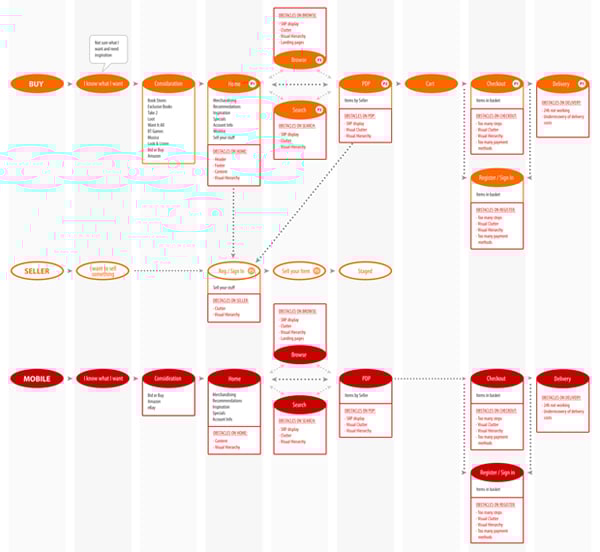
Kalahari customer journey

We decided early on to realign, not redesign. Our approach was to make relentless incremental progress as opposed to doing a 6-9 month project with a big bang release[3]. Our goal was to release every 3-4 weeks, depending on the size of the project.

In our first two releases we took care of some basics. I won’t bore you with the whole list, but here are the highlights:

  • Released a new header and footer.
  • Shifted from heavy reliance on orange to a more muted color scheme that allows products to draw more attention.
  • Removed several links in the header and footer that didn’t get much use.
  • Increased the visual hierarchy of Search.
  • Decreased the visual hierarchy of several non-important features.
  • Introduced a formal button strategy (primary=orange, secondary=silver).
  • Moved from liquid width to a 960px 16-column fixed width design (including the ability to do single-column or two-column designs - every page used to be three columns).
  • Started to separate CSS from HTML (better late than never, right?).
  • Started to build a UI component library.
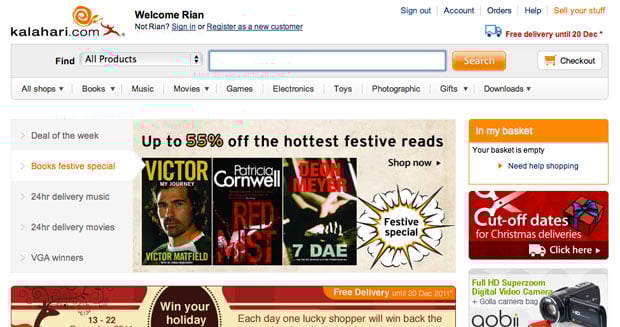
Kalahari new home page

These changes had exactly the desired effect. User response was immediate and universally positive. In combination with some good specials, traffic started to increase. And most importantly: we were able to start growing our team to add designers, a researcher, and a front-end developer. Game on.

We spent the rest of the year systematically working through our customer experience map, starting with the most important areas where improved UX can have the biggest effects (Registration, Checkout, Product Details Page, etc.). Our process grew organically and ended up hitting a good stride towards the middle of the year:

  • Define the area we’re working on, and define what success looks like (what are the metrics we’re trying to improve?).
  • Work in small teams of PM’s, Designers, and Developers to sketch out new flows and develop wireframes.
  • Test wireframes with users, utilizing the RITE method so that the outcome is improved designs, not PowerPoint decks with recommendations.
  • Refine the designs as they evolve into high-fidelity visual designs (with more user testing as required), and deliver high quality HTML and CSS as the final output.

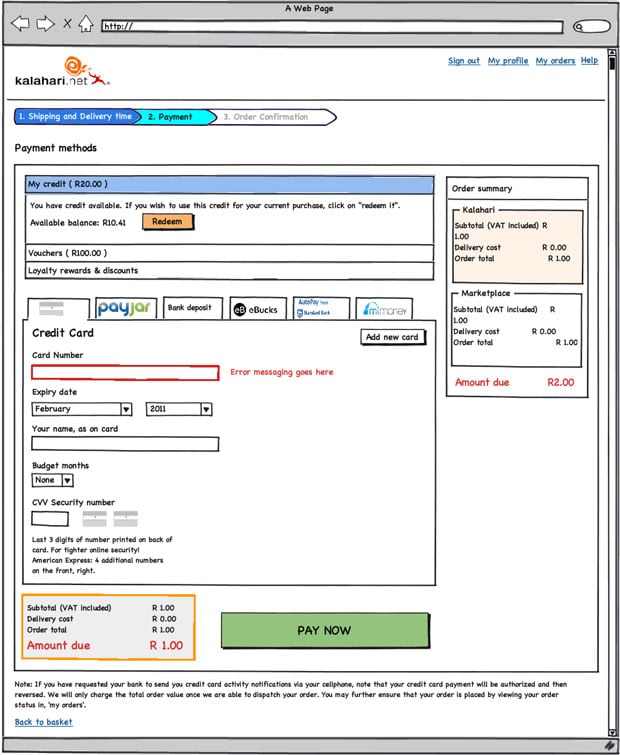
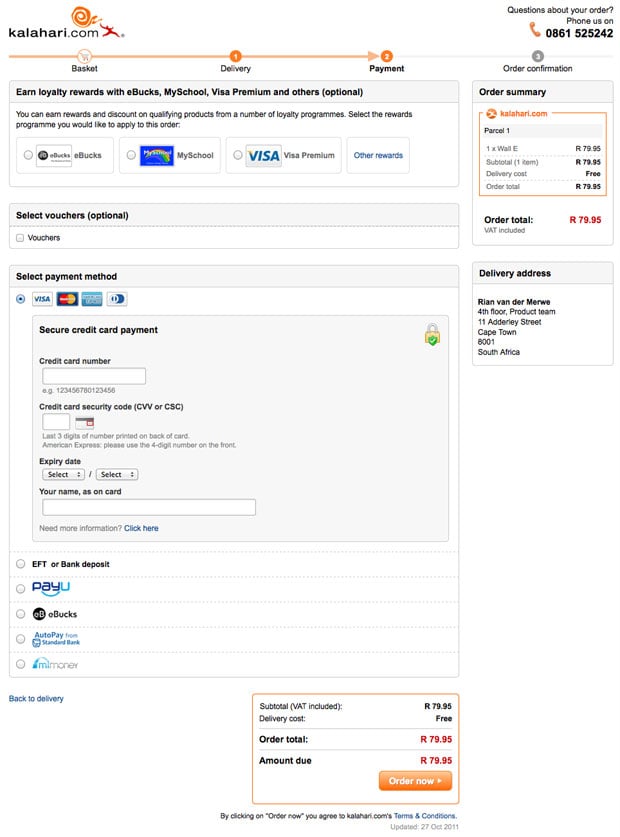
The outcome is a site that is drastically different from where we were a year ago, with real improvements in the success metrics we set for ourselves (% conversion on registration, checkout, and other flows). The changes include not just the main site, but also a brand new mobile-optimized version, as well as some significant changes to our Marketplace for 3rd party sellers. Here’s just one sample of our Checkout redesign, including one of the initial wireframes[4].

Old Checkout:
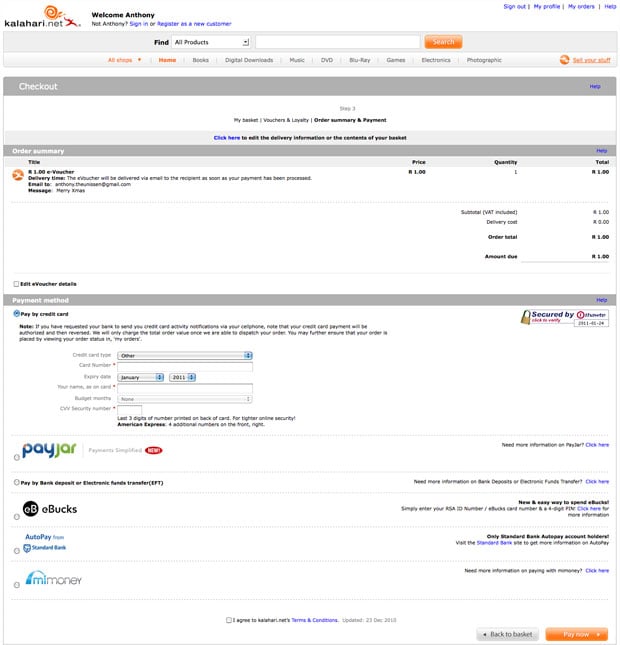
Checkout old

New Checkout:

Initial wireframe:

Checkout wireframe

Final design:

Kalahari new checkout

Three more things

My biggest regret about this year is that we couldn’t do more. We made some great improvements to the site, but it is still so far from where it needs to be. And I know everyone on the team feels this way. We set out to build a culture of quality above all else, and it physically hurts when you have to make compromises and do something that’s counter to that culture. Before you jump in and say that there’s never an excuse to compromise, let me remind you of something Erin Kissane said in What I Learned About the Web in 2011:

If a single idea has followed me around this year, from politics to art and work to friendships, it’s been this one: “it’s more complicated than that.”

It’s centrally important to seek simplicity, and especially to avoid making things hard to use or understand. But if we want to make things that are usefully simple without being truncated or simplistic, we have to recognize and respect complexity — both in the design problems we address, and in the way we do our work.

So, yes, I agree with you - you should never compromise on quality. But it’s complicated. You sometimes run into technical and business complexities that force you to say, “We’ll have to do this later.” It sucks, but that’s life.

I’m exiting this year with three major takeaways - lessons learned and re-learned through our successes and failures:

  • Love your developers. Too many companies see their developers as “resources” whose only reason for existence is to make The Codes. When you pull developers into product planning and design, everything changes. You build better products, and everyone has more fun.
  • User Experience Design is a real thing. I saw way too many dismissive comments about UX this year. If you do it right, it will improve conversion rates and/or make more money. If you don’t believe me, come sign an NDA and I’ll show you our metrics.
  • Culture is everything. In one story out of the Steve Jobs biography, Bud Tribble (one of the Macintosh team members) is quoted as saying, “Hey, if w’re going to make things in our lives, we might as well make them beautiful.” You need a team that has a relentless focus on quality. A team that cares enough to fight for moving that button 3px to the left. It’s the only way to find real meaning in your work.

We have a lot of work to do on our site (sorry, did I mention that already?). But I’m happy that we’ve been able to introduce a fair and effective product development process into the organization. We made user experience an intricate part of how we build product. And we now have a 14-person team of brilliant and dedicated Product Managers and User Experience Designers who care deeply about the product.

It was a good year.


  1. I wrote more about this in The most important characteristic of a good Product Manager  â†©
  2. No one liked my “Intergalactic Product Force” suggestion â†©
  3. I wrote more about this for Smashing Magazine in The Data-Pixel Approach To Improving User Experience  â†©
  4. I’ll spend some time over the break putting together some more before-and-after shots, including stories about the process we followed (if anyone is interested) ↩

Software version numbers: a neglected opportunity to improve customer experience

I love opening the App Store to see what updates are available for my iOS apps. Sometimes I forget to go there for a week or so and as the loading spinner comes up I play a little guessing game - will there be four updates? Seven? Double figures!?

Yes, I know I need to get out more. But I do believe my irrational excitement about something so inane points to an underutilized product marketing opportunity: Software version numbers as part of a delightful customer experience.

Before SaaS and the ease of over-the-air updates, version numbers made sense. In most cases v2.0 came after v1.0, and it was followed by v3.0, or maybe v2.1 for a non-significant update. Companies like Microsoft went a little more granular, but that was usually the exception. 1985-1992 saw the release of Windows 1.01 through 3.1, with only a few point releases in between[1].

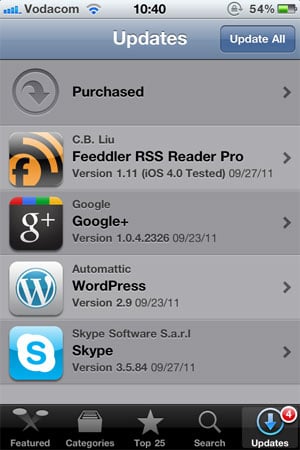
These days, with updates and releases coming with much more frequency than it used to, it’s not uncommon to see an update screen like this one:

versions-ios-updates.jpg

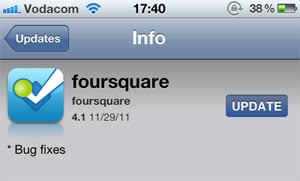
Since there is no common standard for version numbers, it’s not easy to tell which of these updates are significant without going into the release notes for each one. I can guess that Google+ 1.0.4.2326 and Skype 3.5.84 are bug fix releases, but I can’t tell for sure. I have a feeling that Wordpress 2.9 is a fairly big release, but is it in the same order of magnitude as Feeddler 1.11? No idea. Especially since sometimes a seemingly big point release turns out to be pretty unexciting:

versions-foursquare-fixes.jpg

Jeff Atwood is full of praise for the virtues of continuous software updates, and I agree with him. In The Infinite Version he explains how he stopped caring about version numbers after an experience with Google Chrome:

Chrome’s version number has been changing so rapidly lately that every time someone opens a Chrome bug on a Stack Exchange site, I have to check my version against theirs just to make sure we’re still talking about the same software. And once - I swear I am not making this up - the version incremented while I was checking the version.

From a software development perspective frequent software updates are great - you’re able to iterate rapidly and respond to bugs quickly. However, I think this continuing disregard for sensible version numbers is a mistake. We are missing out on an important part of the customer experience: that excited feeling that goes along with getting something new. For paid apps especially, giving users new features “for free” has the potential to delight them and build long-term loyalty. But how will they easily know that they’re getting something new without the visual cues of well-defined version numbers?

There is probably no easy fix for this. We can’t just send the Internet a memo that this is now how we’re doing things. But I hope that software developers will at least start seeing version numbers as part of their product marketing efforts. It would also be helpful to adopt a simple, rough guide to version numbers:

  • x.0 for major redesigns or a re-imagining of the application (such as Path 2.0 and Instapaper 4.0)
  • x.y for the addition of significant new features
  • x.y.z for bug fixes and minor improvements

If we don’t go deeper than three levels (even if z is a four-digit number) and all developers adopt this basic taxonomy, users will eventually start recognizing the pattern. This will give them the necessary cues to understand and appreciate app updates. They’ll know to click through and read the release notes for x.0 and x.y release, but that it’s probably not necessary to bother with x.y.z releases.

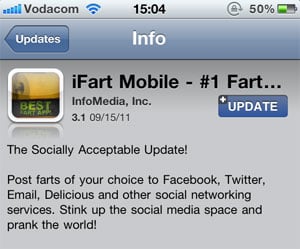
This naturally leads into a discussion about the importance of writing good release notes to go along with a consistent version number strategy, but that’s beyond the scope of this article. I’ll just leave you with an example of an app that sees release notes as part of their”¦ um”¦ “brand experience”?

versions-ifart.jpg


  1. Of course, after 1995 all hell broke loose. Wikipedia lists monstrosities such as Windows 95 USB Supplement to OSR2, Windows XP Professional x64 Edition, and Windows Server 2008 R2 for Itanium-based Systems. ↩