Menu

Posts tagged “productivity”

Embracing boredom

In Alone Together: Why We Expect More from Technology and Less from Each Other Sherry Turkle tells a story about having dinner in Paris with her daughter, Rebecca. While they are eating, Rebecca gets a call from a friend in Boston, asking if sh’s available for lunch. Rebecca simply answers that it won’t be possible, but that Friday could work. She doesn’t even tell her friend that sh’s currently in Paris. Sherry has mixed feelings about this:

I was wistful, worried that Rebecca was missing an experience I cherished in my youth: an undiluted Paris. My Paris came with the thrill of disconnection from everything I knew. My daughter’s Paris did not include this displacement.

I told me wife this story later that evening, and we started talking about our own tumultuous 30-day backpacking trip through Europe at a time when our relationship was”¦ well, let’s just say it was on less stable ground than it is now (remind me to tell you how we broke up on top of the Eiffel tower and got back together in Venice).

We talked about the truth in Sherry’s words - how being so utterly disconnected from the rest of the world played a big role in our ability to immerse ourselves in the newness and strangeness of the culture around us. We were only able to check email about once every 3-4 days. I can’t even imagine how I’d be able to go that long without email now, but back then it wasn’t a big deal. Less email = more time for walking through the streets of a new city.

Fast forward to today, and I am incredibly fortunate to travel for business reasonably often, but I must admit that it doesn’t fill me with the same excitement as that Europe backbacking trip did. And I think that’s partly because the constant connection means that I’m not really immersed in another culture, I’m just working from a different office.

Shelly comes to the following conclusion after her trip to Paris with her daughter:

Adolescents have always balanced connection and disconnection; we need to acknowledge the familiarity of our needs and the novelty of our circumstances. The Internet is more than old wine in new bottles; now we can always be elsewhere.

And that is perhaps the real issue here. If the Internet lets us be elsewhere any time we want, what point is there in physically moving ourselves across the world any more? Especially if we use the Internet to bring ourselves back to where we came from the minute we get there?

Alain de Botton recently tweeted:

The problem with the net: it prevents us from boredom and all its many advantages.

One of those advantages is the ability to sit in a restaurant in Paris and truly take it in without wondering what everyone else is up to. Even just sitting in your own back yard without wondering what everyone else is up to would probably already be a huge step in the right direction. Oh, the thinks you could think.

Her’s to being bored.

In defense of RSS

There was plenty of chatter about RSS over the weekend, mainly because of this “you’re doing it wrong” article on Ars Technica.

Most of the responses I’ve seen are strong defenses of RSS, and I’m happy about that. There has been so much talk about Twitter replacing RSS that I’ve been wondering if anyone else still uses it as much as I do. In fact, because of the iPad and apps like Reeder, my RSS usage is at an all-time high.

Marco Arment argues for a combined Twitter/RSS setup:

I can follow tons of low-traffic sites and keep my reading list more diverse than if I relied only on social links, but other people ensure that I never miss anything great on the high-volume sites.

Ben Brooks has a different use case (more similar to mine) - he subscribes to lots of feeds, but he doesn’t allow the unread count to bother him. He makes a good point about not blaming RSS if you feel overwhelmed:

A tool is a tool. Should I get mad at my car because there are thousands of miles of road I haven’t driven yet to drive? No. If you don’t like RSS don’t use it. If you want to use it but don’t want to have thousands of items, then use it like Marco does. Or use it like I do and check the feeds more often.

But of course, no discussion on RSS is complete until its creator weighs in. Dave Winer blames feed readers (like Google Reader) and their insistence on showing you how many unread items you have, and asks us to separate that from the technology itself:

If you miss five days of reading the news because you were on vacation (good for you!) the newspaper you read the first day back isn’t five times as thick as the normal day’s paper. And it doesn’t have your name on the cover saying “Joe you haven’t read 1,942,279 articles since this paper started.” It doesn’t put you on the hook for reading everything anyone has ever written. The paper doesn’t care, so why does your RSS reader?

These guys all make a very good case for RSS so I’m not going to say too much more about it. I do want to add something I haven’t seen mentioned before though: using folders in your RSS reader to help manage the deluge of information. Here is a screenshot of my folder structure in Reeder:

RSS folders

I have a certain set of blogs that I tag as favorites, and those are the ones I read first. If ther’s time I move on to the others.

Note that I have a folder called “Large tech blogs”. The usual suspects are in there: TechCrunch, Mashable, Ars Technica, Wired… These blogs post a lot, so when the unread numbers get out of control I typically just scan some headlines and then mark all as read. With the big blogs I know that if something is really important, Twitter will tell me.

RSS will remain an important part of my workflow, and since I turn dock unread badges off, I don’t feel like my app of choice is silently judging me.

Setting up folders and actively managing your RSS feeds is hard work. But the payoff is huge for me - I can quickly get a broad overview of what’s going on in the industry without having to rely on the fleeting nature of a tweet coming across my timeline.

I’m a die-hard fan.

(By the way, if you’re interested in following my shared items, you can do so here)

Work hard; be good to your mother

When I lived in Australia there was an ad for Pizza Hut that ran about 5 times a day for over a month. It featured Dougie the delivery guy — always on time, always courteous, always immaculately dressed. As he hands over the pizza and gets his money, he asks, “So… how’s about a tip?”

The customer thinks for a bit, starts closing the door, and then says: “Work hard; be good to your mother.”

No, you’re right, it’s not a very funny ad. Nevertheless the words have stuck in my head for over a decade now. Because I realise that in life, as in business, these might be the only two non-negotiable rules we all need to adhere to in order to be successful at what we do. Work hard. Be good to your mother.

Work hard

I recently made the mistake of using the hasthag #leadership in a tweet. I immediately got 5 auto-follows, and they all fit the same profile:

  • Their bios all had some version of the term “leadership coach” in it.
  • They all had more than 20,000 followers, and they followed almost exactly the same number of people themselves. (This is, of course, because they auto-follow everyone who mentions the word “leadership”, and automatically unfollows that person if they don’t follow back in about 3-4 days)
  • They all tweet excessively, usually through API’s that generate random “inspirational” quotes every few minutes.

They basically automated their social media presence, and fine, that works for them. But that doesn’t inspire me. Mitch Joel says the following in a brilliant post called Wanting Something:

In the end, the majority of the answer is not about the talent or the ability to pull a thought together, it’s about the commitment. The blank screen does not care… it’s agnostic. If you write, good for you. If you don’t, good for you. That being said, if you keep at it… If you use these platforms to think deeply about what you’re about and why you think your industry is the way it is, then slowly over time you’ll find your groove and your talent will shine.

Sadly, most people want it fast and easy. That’s good news for those who are truly committed to it, because they’re the ones who actually get what they want.

Or, as Dave Duarte says in The Ultimate Social Media Strategy is Not Having One:

Ultimately, social media is not just a set of technologies to be mastered, it is a cultural reality to be engaged with. It promises to expose the corrupt and reveal the extraordinary, and if nothing else it is guaranteed to keep us on our toes. It is chaotic, unpredictable, and uncontrollable. So the best social media strategy, then, is not a strategy at all, it is to be purposeful, ethical, and transparent and let our communications and behaviours flow from that.

Those are the people I admire, and the ones I want to follow on Twitter and in life. The ones who show up every day, work hard to get better at what they do, and don’t look for shortcuts.

Be good to your mother

Well, not just your mother, but everyone around you. Be nice. There really is no excuse to be rude to people on Twitter or elsewhere on the web. But of course, you only have to spend 2 minutes reading comments on YouTube to give up the dream of a civil Internet forever.

In a great post on commenters online, Dmitri Fadeyev quotes the following Thomas More passage from Utopia:

Ther’s a rule in the Council that no resolution can be debated on the day that it’s first proposed. All discussion is postponed until the next well-attended meeting. Otherwise someon’s liable to say the first thing that comes into his head, and then start thinking up arguments to justify what he has said, instead of trying to decide what’s best for the community. That type of person is quite prepared to sacrifice the public to his own prestige, just because absurd as it may sound, h’s ashamed to admit that his first idea might have been wrong””when his first idea should have been to think before he spoke.

If only we could follow this rule before we reply/comment, the web would be such a nice neighborhood. Sure, it would probably be less interesting as well. And maybe I’m getting old, but I’d actually prefer nice at this point.

By the way, this doesn’t mean we shouldn’t criticize where it’s appropriate. It just means we should be respectful when we do it. As Mike Monteiro says in Giving Better Design Feedback:

Good feedback is not synonymous with positive feedback. If something isn’t working for you, tell the design team as early as possible. Will they be hurt? Not if they are professionals. A good designer will argue for their solution, and then will know when to let go.

By all means, be respectful, but don’t hold back in order to spare an individual’s feelings. Taking criticism is part of the job description. The sooner they know, the sooner they can explore other paths.

So make this your motto for a week or two, and seek out those who do the same. Who knows, maybe a nice Internet is out there after all.

On the creative process, getting started, and chasing Flow.

Last week I delivered a new talk at a Cape Town SPIN meeting (the Software Process Improvement Network). While I was preparing for it I thought of a working title for my next talk:

A talk about preparing a presentation for a talk about preparing a presentation for a talk.

You see, I have a love/hate relationship with new talks. I love delivering a new talk, and I love getting feedback on what worked and what didn’t. I love making it better. And I hate pretty much every moment leading up to delivering it.

But this is, of course, the problem with the creative process.  It’s blood, sweat, and tears, most of the way. Rands recently wrote a post entitled A Hard Thing is Done by Figuring Out How to Start. He writes:

Those who do not understand creativity think it has a well-defined and measurable on/off switch, when in reality it’s a walking dial with many labels. One label reads “Morose and apathetic” and another reads “Unexpectedly totally cranking it out”. This dial sports shy, mischievous feet - yes, feet - that allow it to simply walk away the moment you aren’t paying attention, and each time it walks away, it finds a new place to hide.

I’ve spent a good portion of my life wondering where that damned dial is hiding.

He goes on to explain how random moments of discovery and seemingly useless tangents are all part of the preparation process, and that we shouldn’t be so hard on ourselves when we’re struggling to get started. He closes with this:

W’re addicted to quick fixes, top ten lists, and four-hour work weeks, but the truth is - if it wasn’t hard, everyone would be doing it and a hard thing is never done by reading a list or a book or an article about doing it. A hard thing is done by figuring out how to start.

You’ve been spending a lot of time thinking the result is what matters. You have a bright and shiny goal in mind that is distracting you with its awesomeness. It is this allure of awesomeness that is the continued reason why you keep searching around your house looking for that mischievous walking dial.

My guarantee is that what is going to make this bright and shiny thing awesome isn’t finishing. It’s all the little, unexpected details you discover trying to start. It’s all the small pieces of unexplainable execution that will not only make it yours, but also continue to teach you how you get things done. And when you’re done, you’ll discover finishing, while cathartic, is just a good reason to go start something else.

I’ve absolutely found that to be true. My basic process for preparing a new talk is as follows:

  • First, I spend weeks researching and saving articles to Delicious.
  • Then I live in FreeMind for a few days, building the outline of the talk.
  • I then proceed to tell myself I’m ready to roll, so I  spend another week or more getting all those thoughts onto slides.
  • This is followed by several nights of bad sleep as I start seeing the holes in my thinking, and struggle to find the right words/pictures/length/style/order.
  • And then, suddenly and without fail, about two nights before the talk, I hit Flow. That “mental state of operation in which a person in an activity is fully immersed in a feeling of energized focus, full involvement, and success in the process of the activity.” Things suddenly fit, I spend 10 minutes re-ordering slides and it suddenly all makes sense. From that point on, the process is an absolute joy.

Why is Flow so hard to find? Or is it meant to be hard to find, because the creative process requires struggle as its fuel?

Whatever the reason, Rands helped me relax a little bit and panic less during the beginning phases of the creative process. Because all those starts, stops, and anxiety eventually come together to collide in the ultimate high that happens when things just… flow.

The potential and dangers of 'squirrel projects'

In one of his characteristically brilliant essays, Paul Graham recently wrote:

I think most people have one top idea in their mind at any given time. That’s the idea their thoughts will drift toward when they’re allowed to drift freely. And this idea will thus tend to get all the benefit of that type of thinking, while others are starved of it. Which means it’s a disaster to let the wrong idea become the top one in your mind.

The importance of focus in a startup, or any other business for that matter, is such a basic principle that no one disagrees with it, but it is still such a difficult thing to get right.  One of the reasons is that you don’t want to stifle innovation, and some of the best ideas can come from a completely random project you went off to do in your spare time.

Whatever your feelings are about side projects that take you off your main focus, it is important to recognize them for what they are: distractions.  This doesn’t necessarily mean it’s bad, but let’s call it what it is — these projects distract you from your “top idea.”

For the products I’m responsible for at Yola, we have name for such distractions.  We call them “squirrel projects.”  If you’ve seen the movie Up, you’ll probably immediately know what I’m talking about.  If not, here’s a refresher:

I don’t think “squirrel projects” need more definition than that video…  So, when one of your team members go off on a sometimes-random-but-always-guaranteed-to-be-cool tangent, it’s important to do two things:

  • Call it out as a squirrel project
  • Determine whether or not it’s a squirrel worth hunting

Figuring out if it’s a squirrel worth hunting depends mainly on:

  • The timing of the project
  • The potential value of the idea

I’d say that 2 days before release day is a pretty bad time to go squirrel hunting.  But what if you’re in the beginning of a sprint and something great comes along?  Adjust.  Reprioritize. Throw some things on the backlog, and make room.  Because sometimes, it’s worth it.

It’s also important to note that “value” doesn’t necessarily mean immediate ROI.  There are different ways to get value out of a squirrel project.  Sometimes it’s the potential for revenue down the road.  Sometimes it’s the time spent now on automation tasks that will save you a bunch of time later.  And sometimes, it’s just plain cool (two words and a hint for something you should try on Yola: Konami Code).

Squirrel projects aren’t bad.  But they can be devastating to your focus and momentum if they happen at the wrong time, and/or they have no potential for value.  So go hunt the good ones, and let the bad ones go.

6 tips for better collaboration among distributed teams

I recently realized that you don’t hear the word “globalization” all that often any more.  And I think it’s because globalization has moved from being a buzz word to a reality that is just part of the way we do business now, making it unnecessary to give it a fancy name.  As we become more comfortable with managing companies and projects across multiple locations, it’s easy to assume that geography does not matter any more.  And certainly the technology is there to support the around-the-clock collaboration that is so valuable when you work across time zones.  With cloud computing now a reality, and plenty of collaboration applications to choose from, working together has never been more efficient.

But I believe geography does still matter, and can result in decreased efficiency if not managed correctly.  The difficulty with working across multiple locations is not technology limitations, it’s human nature.  We tend to not trust what we can’t see, and that’s a problem if developers, product managers, and marketing folks sit in different offices and different time zones.  Once different work philosophies come out and you’re not able to talk about it, things can escalate out of control and make for really bad relationships if conversations happen intra-office but not inter-office.

This is not an insurmountable problem though.  Here are some things I believe can help distributed teams run smoothly.  Please also add your tips and ideas in the comments section!

1. Meet in person. Now.

People get along so much better once they’ve shared a meal together.  This is just a fact of human nature — we thrive on in-person social interaction (yes, even us introverts).  If you have distributed teams, it is imperative that they meet each other in person as soon as they start working together.

If a trip can be planned during a major software release — even better.  Nothing binds people together like the stress and exhilaration of getting a new product out in the wild.  Work hard, but also make time to go have dinner together.  You’ll find that after the initial trip, you’re able to understand each other a lot better over IM/phone calls.  I do think it’s worth getting teams together at least once a year, but even if it’s just once at the beginning of the relationship, it will go a long way to improve working relationships.  So go ahead, spend the money on that trip.  It’s worth it.

2. Be respectful of time zones.

10am in San Francisco is 8pm in Cape Town.  Not a great time to have a meeting… Now, it won’t always be possible to line up time zones, but at the very least it’s important to trade off meeting times.  Don’t make the guy in the smaller office always dial in at 9pm.  Alternate between meeting times to give everyone a chance to have a life outside of work.  Try to have all night-time calls on one or two nights, not spread out across the week.  It’s the little things that count.

3. Use the right technology.

When it comes to collaboration across teams, there is no excuse for inefficiency.  We use the following applications, and I can highly recommend all of them:

4. Keep it human

One of the most important aspects of team dynamics — and especially distributed team dynamics — is not losing your sense of humor.  Even when things get really stressful, keeping funny alive is essential because it reminds you that there are real people on the other side of the phone line/email address.  And, of course, it relieves stress.

I’ll give an example from a project I recently worked on with a developer team in our Cape Town office.  They built an environment for us to test the new product flows, and the screens can live either in a website or a pop-up window.  The normal (boring) thing to do would be to put a link there that says “Open in pop-up” when you want to test the pop-up dialog version of the flow.  Instead, the developers called the link “Pop that collar,” and the following image appeared when you hovered over the link:

Now, I don’t know if they did this to amuse me or themselves, or a little but of both.  But for some reason the joke doesn’t get tired for me, and it made working on the project so much more enjoyable.  Always bring the funny on your projects.

5. Trust each other

A recent article called Forced compliance is an obstruction to discipline really got me thinking about trust within teams — especially distributed teams.  I agree with the author on how damaging it can be if team members don’t trust each other:

A forced compliance style of governance is a lot about trying to compensate for lack of trust and admitting that we are more likely to fail than succeed. On the other hand, discipline is not pain, suffering and anguish. It’s only sadistic if you implement discipline for nothing.

We need to trust our team members — they are (usually) smart people who do the things they do for a reason.  It doesn’t mean you don’t have tough conversations when someone makes a mistake.  But making a mistake doesn’t make you untrustworthy — who among us would be able to meet that bar of excellence anyway?  Ask questions before you judge…

6. Don’t stop talking, especially when you disagree

The book Crucial Conversations: Tools for Talking When Stakes are High is a must-read book about having those tough conversations when things do go wrong, or when disagreements arise.  At the heart of the book are tools to ensure that everyone on the team gets listened to, and that no discussions happen behind peoples’ backs.  I much rather prefer an open dialogue about a product disagreement, than having to find out 3 months after launch that someone on the team didn’t like the way we did things.  As Product Managers, our role is to gather information from a variety of sources and channel that into the best possible ideas and products.  How can we do that if we don’t listen to everyone?

I often remind myself that as Product Managers, we are not judged by the number of times we ask for input, or how often we change direction based on new and relevant information.  We are judged by the success of the live Product.  So why would we not want to hear everyone’s ideas upfront so that we can launch the best possible experience?

So these are a few principles I try my best to apply when working with teams on different continents.  But I have hardly figured it out, and we’re basically making this up as we go along.  I’d love to know your thoughts and ideas: how can distributed teams work better together?

7 Essential Productivity Tools for Product Managers

As Product Managers our job is to gather information from a variety of different sources, make sense of it all, and then turn it into cohesive product visions and execution plans that end up growing the business exponentially (yes, we’re superheroes).  And we wouldn’t do it if we didn’t already love bringing order to chaos.  But sometimes we need a little help.  Below is a collection of software (mostly Mac-based) that I have found essential in my day-to-day PM work and helps me to always have a handle on what is going on in my projects.

I have broken these down into three categories:

  • Tools for project management. These are the programs that are always open on my Mac.  It starts with a high-level overview of all projects, and progressively gets into more detail and specifics.  I can’t imagine staying on top of all my parallel tasks without these.
  • Tools for wireframing. No designer wants a PM to tell them what a design should look like — and for good reason: it’s not our job.  But sometimes you want to put some of your design thoughts on paper, without being too prescriptive on the execution.  These tools help you do that.
  • Tools for collaboration. These are the tools that increase productivity by freeing documents from your hard drive and putting them in the cloud so you can work on them in collaboration with other stakeholders.

Tools for project management

1. OmniPlan ($150 from The Omni Group)

OmniPlan is the Mac version of Microsoft Project, except that it’s a lot faster to use so you don’t end of abandoning it in the middle of every project because of sheer frustration.  It lets you easily add projects and tasks, track progress, and add specific notes about each action if you need a little more detail.

2. OmniFocus ($80 from The Omni Group)

Describing OmniFocus as a fancy To-Do list (which it is) would be doing it a huge disservice.  It was designed from the ground up to make it easy to input thoughts very quickly (into the “Inbox” area), and then you can separate those thoughts into Goals vs. Tasks.  The tasks are then easily separated into Projects (which work like folders) and Contexts (which work more like tagging).  It is easy to switch views between Projects, Contexts, Flagged items, Urgent items, etc.  I basically start and end every day with OmniFocus.

One of the other huge advantages of using OmniFocus is the iPhone app.  It’s expensive ($20), but well worth it.  One complaint I do have is that it’s not as easy to sync as it should be, which is disappointing.  The only free way to sync OmniFocus Mac with the iPhone App is through sharing on a Wi-Fi network.  There is no central database that syncs automatically between devices.  But this is my only gripe with it.  As long as you have your iPhone on and connected to the same wireless network as the Mac, it works like a charm and cross-syncs beautifully.

3. Evernote (free for a basic account)

I was resistant to using Evernote at first, because I really didn’t know what I would use it for.  Now I’m not sure how I ever got anything done without it.  This is the ultimate cloud application.  It syncs seamlessly between the web site, other computers where you have it installed, and the iPhone app.

Yes, I know, it’s just software for taking notes.  But I use it in so many ways.   Meeting notes, web clippings (get the Firefox plugin!), photos of whiteboard drawings… the list goes on and on.  And the fact that it immediately syncs with your account means that your notes are accessible on all your devices, which really helps when you eventually sit down at your desk and have to make sense of all the stuff you put in there during the day.  Also, the price is right!

Tools for wireframing

4. OmniGraffle Pro ($200 from The Omni Group)

This is the Mac’s answer to Visio (except, you know, better again).  Whenever I start working on a new project, OmniGraffle is my tool of choice to diagram the existing flow and any proposed changes.  I also use this to provide a more visual representation of any data that we have on any of the flows/pages - analytics, CS, user research, etc.  This really helps to get all stakeholders on the same page so you can solve for the right problems.

5. Balsamiq Mockups ($79 for desktop version)

As I mentioned at the start of this post, PMs need to be careful about producing mockups.  But that’s what makes Balsamiq such a perfect piece of software.  It is an easy-to-use, low fidelity mockup and wireframing tool that allows you to get ideas on paper without any visual design elements.  This allows you and the designers to get on the same page without stepping on each others’ toes.  Here is a demo from YouTube:

<

p align=“center”>

Tools for collaboration

6. Google Docs (free)

I have been Microsoft Office free for a while now, and I haven’t missed any part of it.  Google Docs allow you to be truly collaborative on your documents.  You can start a document and other stakeholders can add to it, comment on it, change it, and it’s all saved in real-time.  One of the best features is that multiple users can edit at the same time.  This means that, for example, PMs, designers, and engineers can work on the same document, and come out of a meeting with a finalized spec.

One drawback is that there is very limited version control in Google Docs, so that would be the only word of caution - use file names wisely to provide your own form of version control.

7. Dropbox (free for 2GB of storage)

I haven’t met anyone who has used Dropbox and didn’t fall in love with it.  Dropbox is how you would design file storage if the personal computer didn’t start out with hard drives.  It allows you to store your files in the cloud and access it from any computer — and from your iPhone with the free app.

The iPhone app needs some improvement, particularly to allow you to add folders as favorites for offline viewing, but that is a small complaint.  Dropbox basically means that you can work from anywhere.

Now go and be productive

So that’s my list.  I’d love to hear what other PMs are using to stay on top of their projects, and what your experiences have been with using the software in this post.  Let’s go be (organized) superheroes now…

Email is dead. Long live email.

There has been growing discontent with email over the past year or so, but it appears that many people’s hatred for this particular form of communication has now finally started to boil over.  Several articles and blog posts over the past few weeks lamented the death and/or evilness of email in no uncertain terms.  In this post I go into a few highlights from said email hatemail, followed by some thoughts on why we shouldn’t be so fast to close down our email accounts.

The problem with email is…

First, a disclosure.  The excerpts below are just that: excerpts.  While I attempt to keep the context and the original intentions of the authors intact, I encourage you to read all these articles in their entirety.  They’re not only thoughtful and well-written, but they also lay a solid foundation for what I think is a very worthy and much-needed debate.

In the article Why Email No Longer Rules”¦, the Wall Street Journal announces that email is king no more:

But email was better suited to the way we used to use the Internet””logging off and on, checking our messages in bursts. Now, we are always connected, whether we are sitting at a desk or on a mobile phone. The always-on connection, in turn, has created a host of new ways to communicate that are much faster than email, and more fun.

Caught up in Google Wave frenzy, Techcrunch laments the following in Google Wave And The Dawn Of Passive-Aggressive Communication:

Google Wave is not just a service, it is perhaps the most complete example yet of a desire to shift the way we communicate once again.  For many of us, email is simply not cutting it the way that it used to. It’s a sedentary beast in a fast-moving web. It uses old principles for management, and this is leading to overload.

Sticking with Techcrunch, in Relevance Over Time, Nik Cubrilovic argues that email sacrifices relevance in order to present items in a chronological order:

Chronological order needs to be abandoned in favor of relevance. Without relevance, our ability to manage large sets of information is inefficient. The technology for relevance exist today, for eg. spam filters are able to tell us what we definitely don’t want to read. Real world information retrieval and organization is based on relevance, either what somebody else believes is relevant to us, or what we decide is relevant. Newspaper stories are not laid out in the order that events took place and libraries do not catalog their books in the order they were published.

Jeff Atwood, in a post entitled Email: The Variable Reinforcement Machine, explains why he think email kills productivity:

Oh, sure, we delude ourselves into thinking we’re being extra-productive by obsessively checking and responding to our email, but in reality we’re attending too frequently to our own desire for gratification and sabotaging our own productivity in the process.

Why email is essential in business communication

After reading each of these articles, the same question kept coming to mind: How do these authors use email? They certainly don’t use it the same way I do.  Because I simply cannot imagine replacing email with Twitter and Facebook - and even Google Wave.  As far as I can tell, here are the major complaints about email:

  1. Email is not real-time enough. I don’t understand this complaint at all.  How is Twitter more real-time than either sitting at your desk with your email client open, or checking your BlackBerry for new messages?  Yes, Google Wave lets you see people type in real-time, but do we really need that?
  2. Email is not dynamic enough. I don’t want email to be dynamic.  Email is a way to communicate static thoughts.  Tools like Google Docs, Dropbox, and Versionshelf are there for collaboration.  But email is a linear record of events and discussions, which is essential if we want to preserve any kind of sanity in business communication.
  3. Email is chronological, not relevant. This complaint perplexes me the most.  If email isn’t relevant, you may want to write different emails, or just spend a little time setting up a few filters to get rid of Hilton HHonors statements and other useless newsletters.  Chronology brings order.  Even though the most important things might not be at the top of your inbox,  timestamp is an important element in helping us separate the urgent from the important.
  4. Email reduces productivity. More than being on Twitter all day reduces productivity?  I’d like to see how productive people are who do business in 140 characters.

In short, I’m just not ready to give up email.  It serves as a very effective To Do list for me.  It allows for accurate and extensive documentation when needed, as well as quick decision-making with a variety of stakeholders.  Long live email.

How to increase the value you get out of social media

A common complaint about social networks is that they insulate us by only showing us information we’re already likely to agree with. This solidifies our existing confirmation biases and makes us less likely to see the value of other viewpoints. It’s a legitimate concern, but we only have ourselves to blame. The problem is that if we don’t follow enough people from different types of networks, we’re always going to see the same type of information over and over.  And in this fundamental point also lies the best way to get the biggest benefit from social media.  So stick with me as we discuss some sociology theory, which I promise will lead to some practical implications in the end.

First, a little background on Structural Hole Theory.

Structural Holes Defined

Ronald Burt’s theory of “structural holes’ is an important extension of social network theory, which argues that networks provide two types of benefits: information benefits and control benefits.

  • Information benefits refer to who knows about relevant information and how fast they find out about it. Actors with strong networks will generally know more about relevant subjects, and they will also know about it faster. According to Burt (1992), “players with a network optimally structured to provide these benefits enjoy higher rates of return to their investments, because such players know about, and have a hand in, more rewarding opportunities”.
  • Control benefits refer to the advantages of being an important player in a well-connected network. In a large network, central players have more bargaining power than other players, which also means that they can, to a large extent, control many of the information flows within the network.

People with a lot of followers on social media have a high degree of Control benefits — they are often extremely influential in their fields, and in unique positions to have control over certain conversations on the web. But being an influencer doesn’t guarantee that you will have strong Information benefits , because you tend to get the same news over and over again if you don’t do a bit of work on expanding your network in a very deliberate way.

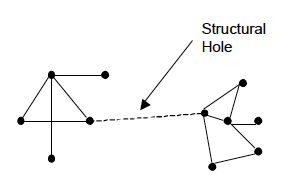
Burt’s theory of structural holes aims to enhance both these benefits to their full potential. A structural hole is “a separation between non-redundant contacts” (Burt, 1992). The holes between non-redundant contacts provide opportunities that can enhance both the control benefits and the information benefits of networks. The figure below shows a graphical representation of this definition.

The concept of non-redundant contacts is extremely important, and refers to contacts who give you access to networks you aren’t already part of. Now let’s look at how Mr. Scoble can increase the Information benefits he gets from Twitter.

Optimizing the benefits of networks

There are several ways to optimize structural holes in a network to ensure maximum information benefits:

  • The size of the network. The size of a network determines the amount of information that is shared within the network. A person has a much better chance to receive timely, relevant information in a big network than in a small one. The size of the network is, however, not dependant merely on the number of actors in the network, but the number of non-redundant actors. In other words, it’s not just about how many people you follow on Twitter, it’s also who you follow.  Pretty straight-forward, but let’s continue.
  • Efficient networks. Efficiency in a network is concerned with maximizing the number of non-redundant contacts in a network in order to maximize the number of structural holes per actor in the network. It is possible to eliminate redundant contacts by linking only with a primary actor in each redundant cluster. This saves time and effort that would normally have been spent on maintaining redundant contacts.  What this basically means is that if you follow people who all follow each other, your network isn’t very efficient and you need to get rid of some people.
  • Effective networks. Effectiveness in a network is concerned with “distinguishing primary from secondary contacts in order to focus resources on preserving primary contacts” (Burt, 1992:21). Building an effective network means building relationships with actors that lead to the maximum number of other secondary actors, while still being non-redundant.  This means that if 10 people give you access to the same network of information, only follow the most important one — their voice will be clearer and not drowned out by the others.
  • Weak ties. In his 1973 paper entitled “The strength of weak ties”, Mark Granovetter (Granovetter, 1973) developed his theory of weak ties. The theory states that because a person with strong ties in a network more or less knows what the other people in the network know (e.g. in close friendships or a board of directors), the effective spread of information relies on the weak ties between people in separate networks. “Weak ties are essential to the flow of information that integrates otherwise disconnected social clusters into a broader society” (Burt, 1992). This basically means that to get more out of Twitter, you need to figure out where your network is weak, and then follow those people who give you access to additional clusters. Building and maintaining weak ties over large structural holes enhances information benefits and creates even more efficient and effective networks.

So here’s the bottom line: to achieve networks rich in information benefits it is necessary to build large networks with non-redundant contacts and many weak ties over structural holes. Some of these information benefits are:

  • More contacts are included in the network, which implies that you have access to a larger volume of information.
  • Non-redundant contacts ensure that this vast amount of information is diverse and independent.
  • Linking with the primary actor in a cluster implies a connection with the central player in that cluster. This ensures that you will be one of the first people to be informed when new information becomes available.

How to get the most out of social media

If we apply these theories to Twitter and other social media networks, we quickly realize it is not the sheer number of “friends” in your network that count, it is the diversity of the people in your network that is most important. If you only have links to people in your immediate group of friends or colleagues, it will be difficult to get new information, since everyone will pretty much know the same things. This is not to say that you have to start following all those random spammers on Twitter, but it does mean that people with who you have “weak ties” will often provide you with new information and therefore more benefits than your “strong ties”.

So here’s how to make sure you get the most out of social media:

  • Identify the information networks you want to have access to (for me, it’s information about user experience design and product management).
  • Go through your following list and see where the overlap is — if there is a lot of resharing going on of the same people, follow the person who gets reshared the most.  This will reduce your Twitter stream but still get you the information you need (and faster than before).
  • Once you’ve reduced your following list, make your network as large as possible with the “weak ties” who will give you access to all the information you need.

These theories show that we can reduce the number of people we follow while actually getting more Information benefits from social media. We will get new information faster, we will get it only once or twice, and the information we get will be more diverse.

References

Burt, Ronald S. (1992). Structural Holes: The Social Structure of Competition. Cambridge: Harvard University Press. Granovetter, M. S. (1973). “The Strength of Weak Ties.” American Journal of Sociology 78: 1360-1380.