Menu

Posts tagged “product discovery”

An agency workflow for Responsive Web Design

I’ve been thinking about workflows for Responsive Web Design quite a bit, particularly since it’s now become our default approach on every new project (similar to Cloud Four’s recent change of heart). I’ve been especially influenced by two recent articles on the topic, namely Dennis Kardys’s A More Flexible Workflow, and Viljami Salminen’s Responsive workflow.

I struggled a bit to make their approaches fit into how we worked, so I decided to expand on what they’ve done and draw something that reflects a bit more accurately how we are incorporating Responsive Web Design into a user-centered workflow within an agency model. It’s not perfect by any means, but here’s what I came up with:
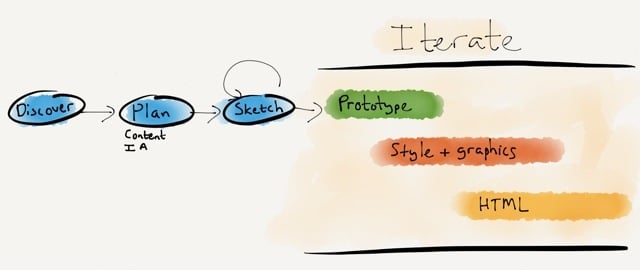
Responsive design workflow

The goals of this approach is to stay grounded in two core principles:

  • Content first. We need to stop thinking about content in terms of layout, and plan content independent of design.
  • Mobile first. We need to stop the focus on device thinking, and assume a multi-device world where we work on style direction independent of layout.

I’ll briefly go through each step in the diagram and how it helps us to accomplish these goals.

During Discovery we do our research to uncover user needs, develop personas, and create the user journey map that becomes our product strategy (see my article Usable yet Useless: Why Every Business Needs Product Discovery in A List Apart).

In the Planning phase we evolve the user journey map into a content plan and Information Architecture document (see my post on this topic). Once we have our scaffolding in place, we start the design process.

We rarely do static wireframes any more (Cennydd Bowles explains why), but we do a lot of Sketching. The benefits of sketching have been proven time and time again (see, for example, How Diagrams Solve Problems and The importance of sketching in product design). What I like most about the sketching process is how it allows the team to try multiple solutions to a problem, before settling on one or two ideas to iterate further (see Jon Kolko’s Iteration and Variation). I like using Zurb’s responsive sketch sheets as templates because they keep us focused on a multi-device approach.

Once we’ve gone through the sketching phase with clients, and we know what approach we’d like to pursue, we start Prototyping. We mainly use Axure, but there are multiple solutions out there to suit a variety of approaches. Axure isn’t natively responsive (yet), so we’ve been building two prototypes on our projects: starting Mobile first, and then moving on to Desktop. This isn’t ideal, but it works for our current purposes. We have a strong focus on user testing, so we test these prototypes in our usability lab, and iterate the design based on the findings.

Towards the end of the Prototyping process we start working on Style Tiles so we can have a discussion about graphics with clients without focusing on layout and flow issues. We’ve seen huge success with this approach. Once clients are comfortable with the visual direction, the focus can return to discussing how the UI will help them meet their business goals and user needs. It also makes the move from prototype to graphic design much smoother.

Although I won’t say that we’re completely post-PSD, we definitely don’t create the entire site in Photoshop. Since we have an interactive prototype and strong style guides, we generally only create about 6 or so pages in Photoshop, so clients can get a good feel for the direction.

At this point we also start working on Front-end Development. We build the framework using the prototype and style tiles, and pick up speed as the graphic design gets finalized. We don’t use boilerplate frameworks like Foundation and Bootstrap for production code. On this point we stand with Aaron Gustafson:

I find Foundation, Bootstrap, and similar frameworks interesting from an educational standpoint, but I would never use one when building a production site. For prototyping a concept, sure, but to take one of these into production you need to be rigorous in your removal of unused CSS and JavaScript or you end up creating a heavy, slow experience for your users.

An important point on the last three phases: as the diagram points out, these are all very much iterative phases. We make changes all the time based on user feedback, and discussions between designers, developers, and the client. I think we can all agree that responsive design is messy, and we just need to get comfortable with a certain amount of ambiguity during design and development. That’s ok, as long as we’re prepared for it.

It’s been an enormous learning process — and we’re still figuring out the best ways to make Responsive Web Design our default approach. But we’re committed to it, because we believe in content parity, and we’re convinced that responsive design is the approach that will get us there. Some things we’ve learned along the way:

  • You can’t wing content choreography. We can’t just make our front-end developers figure out what happens at each breakpoint. This is something we have to plan together to consider all the goals and constraints of the project. Breakpoint graphs are particularly helpful in this step (see Stephen Hay’s Responsive Design Workflow).
  • Optimize for touch, support keyboard actions. Josh Clark points out that “every desktop UI should be designed for touch now.” He’s right. The lines are getting blurrier and blurrier between what is considered “desktop” and “mobile”, so we should just assume everything is a touch screen, and make controls easy to discover and manipulate.
  • The benefits go beyond mobile. Going mobile first helps us create better desktop sites as well, because we remain focused on meeting core user needs and ensuring there is an easy and discoverable path through the flows. There is no room for cruft on smaller screens, and that makes our desktop designs better as well.
  • It’s hard, but it’s worth it. As Ben Callahan points out in The Responsive Dip, “The fact that we don’t know how to do something today doesn’t mean we shouldn’t strive to do it tomorrow.” This is an amazing time. We get to be part of shaping the future of the web, because no one has it all figured out at the moment. I don’t know about you, but I want to be part of that, no matter how hard it is.

We have much maturing to do, but I’m excited about the progress we’ve made in shifting our entire process towards building responsive sites. Every project runs just a little bit smoother, and that’s encouraging. So my only advice to those standing on the edge of responsive design is this: jump in. The water is cold, but refreshing. And you’ll feel great when you get to the other side of the river.
Breaking Development: Prototyping Style

I’m attending the Breaking Development conference in San Diego this week, and will be posting my notes from a few of the talks here.

Ben Callahan did a great talk on design workflows called Prototyping Style. He discussed the problems with linear workflows before giving some great tips on a new way of collaborative working specifically suited for responsive design.

  • We used to have a very linear workflow, which went something like this:
    • Content
    • UX
    • Design
    • Front-end development
    • Back-end development
    • Launch
  • The problem with linear workflows is that decisions are being made in each step, before we have all the data
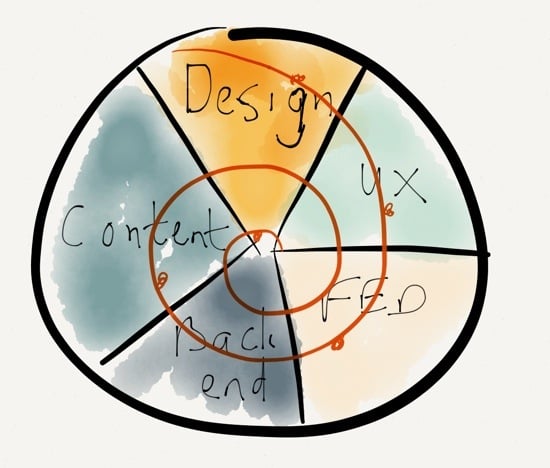
  • We need to invite others into the process, and work towards a “1 Deliverable” workflow

The “1 Deliverable” workflow looks like this (excuse my quick Paper drawing…):

1 Deliverable

The benefits of a “1 Deliverable” workflow:

  • It’s centered on iteration
  • It requires collaboration
  • It results in natural decisions (waiting for the last responsible moment to make decisions, once all the right data is available)
  • Watch out, it sometimes conflicts with organizational structure
  • It requires the right team — no room for superstar egos

So how do we advance the Design phase through a “1 Deliverable” workflow? 3 stages of design:

  • Establish the aesthetic
  • Solve the problem
  • Refine the solution

Establish the aesthetic

  • Do style comparisons with clients, to get a sense of what they’re looking for
    • Light vs. Dark
    • Flat vs. Textures
    • Illustration vs. Photography
  • Move from Style Tiles to Style Prototypes:
    • It shows more accurately what it will look like in the browser
    • It sparks conversations about browser support
    • It’s very easy to make quick changes with CSS
  • Use tools you are comfortable with to establish the aesthetic

Solve the problem

Refine the solution

  • Don’t use static design tools to refine the solution
  • Instead of static design handoffs, consider Design Pairing
  • Continuously get feedback and input on design direction
    • Set office up to create collaborative conversations
    • TVs with Apple TV connections so that anyone can throw up their designs onto any of the screens to discuss
  • Important: you need to be conscious of the switching point between solving and refining, so that design doesn’t continue ad in finitum

Ben ended his talk with a story about Miles Davis and the making of the album Kind of Blue, and what the album can teach us about collaboration. I really liked this because it’s something I’ve written about before as well, in A story about Miles Davis and the nature of true genius.

I really appreciated the practical nature of this talk. There were lots of ideas to take back and use in my everyday design work.

The 9x effect in product development

This widely linked post from Benedict Evens definitely deserves all the attention it’s been getting. In Glass, Home and solipsism Benedict talks about the fallacy of thinking that customers care as much about your product as you do1:

You can think of people as users or customers — but they’re not yours. They don’t belong to you, and they may barely even care that you exist.

A little bit earlier he discusses Google Glass and says this:

If everyone you know owns a Tesla and is deeply engrossed in new technology, then the idea that there might be social problems with Glass doesn’t come up — everyone’s too busy saying ‘AWESOME!’

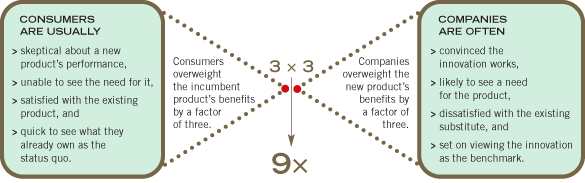
This reminded me of what John T. Gourville calls “The 9x Effect” in Eager Sellers and Stony Buyers: Understanding the Psychology of New-Product Adoption (you have to register for a free HBR account to view the article):

There’s a fundamental problem for companies that want consumers to embrace innovations: While developers are already sold on their products and see them as essential, consumers are reluctant to part with what they have. This conflict results in a mismatch of nine to one between what innovators believe consumers want and what consumers truly desire.

This image from the article explains the concept well:

The 9x effect

This might explain why products like Color, Facebook Home, and Google Glass appear destined not to do very well in the general market.


  1. I’ve written about the same thing before in What users really care about

Client collaboration in UX consulting

Baruch Sachs makes some good points in Part 1 of a series called Practicing Great UX Consulting:

You are not there to educate people. You are there to advise your client and guide the creation of an amazing user experience. You are the expert; that’s why they brought you in. Collaboration and openness are key here. People need to feel invested, not put upon.

I agree that collaboration is key — the problem comes when collaboration gets confused with consensus. Consensus cultures often produce watered down, unexciting products. Products where endless rounds of give-and-take have worn down the original idea to a shadow of what it once was. Consensus cultures also wear down the teams working on the product, because no one really gets what they want, they just get some of it.

Collaboration is different. In collaboration cultures people understand that even though everyone gets a voice, not everyone gets to decide. People are able to voice their opinions, argue passionately for how they believe things should be done, and try to negotiate compromises. But it certainly doesn’t mean that everyone has to agree with every decision. And that’s why the client/agency trust relationship is so crucial.

One great collaboration technique that works well with clients is called Design Studio. Jared Spool has a great write-up of how to conduct a Design Studio worskhop, and it’s also worth reading Paul Boag’s thoughts in Never wireframe alone.

Why you shouldn't use introductory tours in apps

Luke Wroblewski explains why those overlay introductory “tour” screens you often see in apps is such a bad idea in Designing for real world mobile use:

These issues stem from the fact that introductory tours show up before you ever get a chance to use an application. Most people are eager to jump right in and as a result, they skip reading the manual. The ones that do read haven’t seen the interface yet so they don’t have any sense of where and how the tips they’re learning will apply.

I completely agree, and have written about this before in Best practices for user onboarding on mobile touchscreen applications, where I give three guidelines for app onboarding:

  • Make sure that users have familiarized themselves enough with your app to have the correct mental model before you start teaching them how to use it.
  • Show users only the information they need to take the immediate next step(s) for using the application.
  • Make sure users have a clear link between the information you give them and how to access/use that information in their everyday use of the app.

Improve prioritized feature lists by adding more dimensions

Ken Norton wrote a really nice post about the problem with prioritized feature lists in product development, using his team’s early work on Google Docs as an example. Specifically, here is the problem he highlights in Babe Ruth and Feature Lists (Why Prioritized Feature Lists Can Be Poisonous):

Our wish list approach also created false equivalence. There was a huge chasm between what #1 meant to us and what it meant to our users. For us, it was first amongst equals. To them it was a painful tumor overdue for removal.

Orders of magnitude separated #1 from the rest of the list. That urgency didn’t come through until we got a bunch of them in the room and let them vent.

It’s worth reading the whole post before continuing, because the context is important. Ken highlights a really important point about prioritised feature lists — they are too one-dimensional to give you enough confidence about the product development decisions you’re making. That’s why it’s so important to plot priorities on multiple dimensions to aid in decision-making.

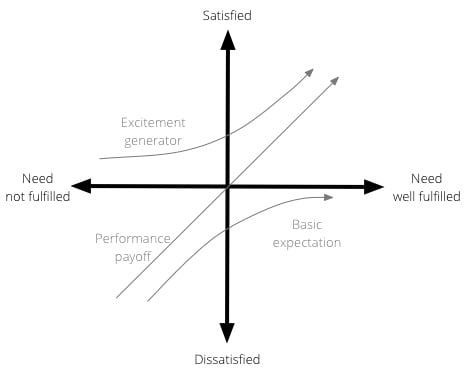
The method that springs to mind immediately in the case of the Google Docs example is something I’ve written about before, the Kano model. Ken explains that even though they saw text formatting within Google Docs as an important feature to work on, users saw it as a major frustration, and a fundamental bug that needed to be fixed.

Plotting their list of features using the Kano model could have highlighted this disconnect earlier in the process. To recap, the Kano model, developed in the 1980s by Professor Noriaki Kano for the Japanese automotive industry, is a helpful method to prioritise product features by plotting them on the following 2-dimensional scale:

  • How well a particular user need is being fulfilled by a feature
  • What level of satisfaction the feature will give users

The model is generally used to classify features into three groups:

  • Excitement generators. Delightful, unexpected features that make a product both useful and usable.
  • Performance payoffs. Features that continue to increase satisfaction as improvements are made.
  • Basic expectations. Features that users expect as a given — if these aren’t available in a product, you’re in trouble.

Here is a visual representation of the Kano model:

The Kano Model

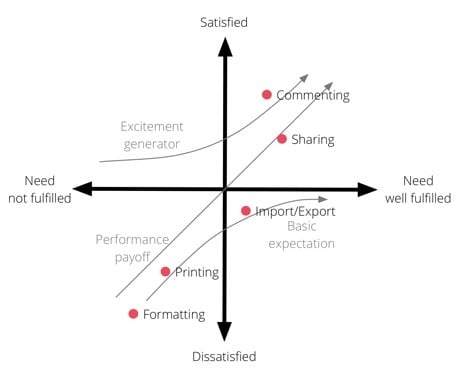
Now, let’s take Ken’s original list of prioritised features and plot them on the Kano model. Obviously I don’t have the background that the team would have had, so this is just a guess to illustrate the point:

Kano model for Google Docs

With these added dimensions (and let’s assume there are 10 or more features on this graph), Product Managers can begin to make plans for what they need to work on by always keeping a balance between Basic expectations, Excitement generators, and Performance payoff features.

Now, I’m sure we could quibble about where exactly each feature should be plotted, but it’s immediately clear from this example that Formatting is a Basic expectation that needs to be very well met for Google Docs to get even close to parity with other word processors. That’s where they needed to start, and only once the basic expectations were met, should they have moved on to adding additional features to Formatting. At the same time, working on features like improved Sharing and Commenting would also have shown users that the product continues to get better over time (while generating some much-needed excitement).

So, with that said, I’d like to add a bit of a “yes, and” to Ken’s post. Yes, prioritized feature lists can poisonous, and one way to make sure that doesn’t happen is to add additional dimensions to the list to improve the accuracy of the decision-making. The Kano model is one approach, and I also discuss a couple more in The ultimate product question: How do you know what’s important?

Demo Mode vs. Reality Mode in product development

Rebekah Cox wrote a great post discussing the difference between product Demo Modes (in-store displays, on-stage demos that work without a glitch, picture-perfect product intros) and what she calls Reality Mode:

Reality mode takes time, iteration, data and user research. It takes honestly using what you’ve created and putting it through its paces. It takes asking yourself “is it useful?” and honestly answering. The result may not align with conventional wisdom, you may have to sacrifice that clever hook everyone comments about (but is ultimately useless or worse) and the demo may be boring or nonexistent. But by using your product in the real world and thinking about its true utility and value, you may end up with an enduring product where people are delighted through consistently delivered value instead of just a cool demo.

It reminds me of Marco Arment’s assessment that Facebook Home is “designed for optimal input and failed to consider real-world usage.” This is a very real problem in product development. It takes courage to look your darling project in the eye, find it wanting, and admit to it.

More on the wireframe debate

In a recent interview with Intercom, Joshua Porter expands on his “Wireframes are dead, dead, dead!” tweet from a while ago:

I think you can capture almost everything you need to capture in a pretty detailed sketch. Not a high fidelity sketch by any means. Not the ones where you use five different kinds of markers and you shade everything or whatever. The purpose of sketching is to communicate the major ideas, like, “What’s going to be on the page? What are the objects on the page? What are the things you can do to those objects?” […]

On the other hand if you want to actually test something, you need a prototype that someone can test. So, I would actually say that the role of the product designer is working with stakeholders to come up with those sketches, and then going right from that sketch all the way through to prototyping. That usually means high fidelity mockups that can be clickable or lightweight HTML prototypes that are clickable and usable.

This is the workflow we’ve adopted at Flow as well. We sketch different interface ideas (variation), and then move to prototyping in Axure when it’s time to test and improve a specific idea (iteration). There’s not much room for static wireframes in that workflow. But it is an ideal workflow, and not every project is ideal. As I’ve mentioned before:

Lacking budget, flat wireframes for quick iteration is better than doing no iteration at all. We can’t be so idealistic that we’re not willing to scale down our processes when we need to.

So as long as we’re willing to admit that one size doesn’t fit all, I’m all for advocating an ideal approach that degrades gracefully under non-ideal circumstances.

Also see Wireframes: A good communication tool, a poor design tool by Dan Ritzenthaler.

Combining Big Data with Small Data for a more complete picture

Kate Crawford wrote a very good critique of Big Data methods in The Hidden Biases in Big Data:

Data and data sets are not objective; they are creations of human design. We give numbers their voice, draw inferences from them, and define their meaning through our interpretations. Hidden biases in both the collection and analysis stages present considerable risks, and are as important to the big-data equation as the numbers themselves.

Kate uses some interesting examples from Hurrican Sandy and the City of Boston to make her argument, and ends with the conclusion that is a common plea among qualitative researchers:

We know that data insights can be found at multiple levels of granularity, and by combining methods such as ethnography with analytics, or conducting semi-structured interviews paired with information retrieval techniques, we can add depth to the data we collect. We get a much richer sense of the world when we ask people the why and the how not just the “how many”.

Accuracy vs. precision in the context of product decisions

Kenton Kivestu defines the difference between accuracy and precision, and then discusses what it means in the context of product decisions:

There is a significant opportunity cost in consistently prioritizing precision over accuracy. Accuracy is about launching what the market needs, precision is about optimizing and delivering relentlessly on it. Unless you’ve nailed the former, material effort on the latter is going to be wasted because you’re optimizing something too far from the true north (the accurate goal) you should be pursuing.

This is an important point. Any call for data-driven design (in the quantitative, 41 shades of blue sense of the word) needs to come with a disclaimer that it’s an extremely useful approach to get closer to the middle of a target (precision), but it’s useless if you’re shooting at the wrong thing (accuracy).

(link via @ixhd)