Menu

Posts tagged “product discovery”

Book review: Lean UX — Applying Lean Principles to Improve User Experience

Lean UX cover

Our beloved industry is pretty wary of buzz words. And by “our industry” I mean User Experience Designers — although we can’t even agree on what to call ourselves, so that’s another problem, I guess. Anyway. Debates over terms like skeuomorphism, flat design, and “No UI” have given us a strong skepticism for fancy words. That’s mostly refreshing, but it can also be a handicap if we end up dismissing valuable ideas because we don’t like the terms that describe those ideas.

I would argue that the term Lean UX fits into this last category. It’s easy to dismiss as just another bandwagon fad, but now that I’ve read through Jeff Gothelf and Josh Seiden’s Lean UX: Applying Lean Principles to Improve User Experience I believe that it’s a valuable framework to help us understand where the UX industry is headed — and how to do our jobs better.

Whether you want to call the theory and techniques discussed in this book “Lean” or just “How we work” doesn’t matter as much, in my opinion. What is important is that we understand the benefits of moving towards a more iterative, outcomes-based design approach, while letting go of some our reliance on classic design deliverables. In the introduction to the book, the authors sum up the main reason for this proposed change in design approach:

But the fault is not with the designers, or the engineers, or even the executives. The problem is the systems we use to build companies. We are still building linear organizations in a world that demands constant change. We are still building silos in a world that demands thorough collaboration. And we are still investing in analysis, arguing over specifications, and efficiently producing deliverables in a world that demands continuous experimentation in order to achieve continuous innovation.

The book then describes how to build better products through real collaboration. I say real because Jeff and Josh don’t just say, “you should work together!” They detail a number of practical techniques for working together better, as well as case studies to show how it works in real-world situations. And underlying all of this are the three principles of what they define as Lean UX:

  • Removing waste from the design process to move away from heavily documented handoffs to a process that creates only the design artifacts needed to move the team’s learning forward.
  • Improving the efficiency of the “system” of designers, developers, product managers, quality assurance engineers, marketers, and others in a transparent, cross-functional collaboration that brings nondesigners into the design process.
  • Shifting mindsets away from relying on “hero designers” to divine the best solution from a single point of view, in favor of using rapid experimentation and measurement to learn quickly how well (or not) ideas meet the company’s goals.

Some UX designers will read this book and say that this is how they’ve always worked. That might be true — it’s true for our agency as well, to some extent. But I still found it extremely helpful to have a concrete framework for the work we do, combined with solid reasoning about the benefits of this approach. I also picked up some great execution ideas for techniques we use already — like persona templates and design studio facilitation.

The only part of the book that might be a bit controversial is the discussion of how Lean UX fits into Agile development. Jeff and Josh argue that the long-accepted idea of Sprint 0 or Staggered Sprints (making sure that design is always a sprint ahead of development) doesn’t work long-term:

However, this model works best as a transition. It is not where you want your team to end up. Here’s why: it becomes very easy to create a situation in which the entire team is never working on the same thing at the same time. You never realize the benefits of cross-functional collaboration because the different disciplines are focused on different things. Without that collaboration, you don’t build shared understanding, so you end up relying heavily on documentation and handoffs for communication.

They propose a very interesting alternative that makes a lot of sense (I won’t spoil it for you), but some of the concerns I’ve raised before about Agile UX remains. I’m not sure if any Agile UX techniques allow for enough leeway to test/research different variations of a product idea, or if it just streamlines the iteration process to get you to a local maximum faster.

In summary, Lean UX is a great overview of what an effective UX process should look like. There’s a good balance between theory, practical advice, and case studies. This makes it a valuable resource for those new to the field, but it also gives experienced UX practitioners a framework to structure and communicate the work they do every day. Highly recommended.
Buy Lean UX on Amazon.

Research process: note-taking for one

The ideal situation for any qualitative research project is for the facilitator to rely on someone else to take notes. That way the facilitator can focus all their attention on the participant. This holds true for contextual inquiries, in-depth interviews (IDIs), as well as usability tests. However, sometimes it’s just not possible to have a separate note-taker on a project. In those cases the interviewer has to take their own notes — but that can be distracting and terribly inefficient.

So, what’s the best way to be your own note-taker?

I’ve seen interviewers taking their own notes in a variety of ways, but the inherent flaws in each approach has always made me uncomfortable. Some interviewers use their laptops to make notes while the interview is going on. This is very efficient (there’s no transcribing afterwards), but the clicking of the keyboard can be distracting and off-putting to the participant.

Others print out their interview scripts, and leave blank spaces for writing notes about each question. The problem here is that scripts are fluid. You sometimes skip over questions, while other times you go off on an important tangent that isn’t covered in the script. So you tend to end up with empty spaces and cramped notes, all spanning multiple pages. Not ideal.

I am currently working on a project to make it easier for talk radio producers to do their jobs. As a first phase we’re doing a bunch of IDIs with producers — and I have to take my own notes. So I decided to try a new approach, and I like it so far.

I started the project with a long, free-form interview with one of the project leads to develop a generic user journey for producers. I looked for common elements that remain constant regardless of the process each producer might use to perform their tasks, and used that to build a basic journey model for talk radio production. It’s not a full-on journey map, just a list of steps that all producers have to complete when they put on a show.

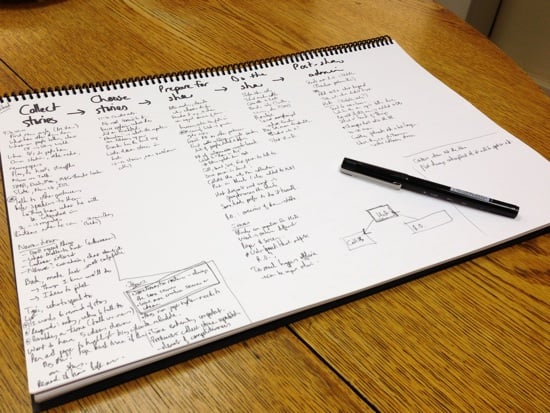
I then created an A3 sheet (6.5 x 11.7 in) for each interview, consisting of the participant’s name, time slot, and the headings for each of the steps in the journey. While conducting the interview I filled out any insights that came out for each of the steps — as we worked our way through the script. Here’s an example of what a sheet looked like after an interview:

Note taking for one

I discovered that this approach has several advantages over other note-taking methods I’ve tried:

  • It’s script-agnostic. The interview questions address each of the steps in the journey, but I don’t have to stick to it religiously — it’s ok to jump around and make notes in a different column if needed.
  • Everything is on one page. This not only makes note-taking more efficient, but it’s also going to make the analysis phase easier. I’ll be able to lay out the sheets on a table and see all the data in one place as I start the affinity diagram process.
  • It makes me a better listener. I was worried that the note-taking would be distracting to participants, but I found the opposite to be true. By taking notes while we talk (and looking them in the eyes when I’m not writing), participants could tell that I’m really listening to them — not just pretending. And this made for much better interviews.

I’m sure this method of note-taking isn’t perfect, but I’m quite happy with how it turned out. Please let me know if you have any suggestions to improved this process — or if you have a different method that works well for you.

Flexibility and feedback during the design process

In A More Flexible Workflow Dennis Kardys describes an all-too-familiar design process problem in agencies:

In theory the design assembly line made us extremely efficient. Design documents were handed off like batons from one team member to the next as projects moved through stages. The reality however, is that projects would often get held up as clients mulled over wireframes or fought for consensus within their organization. […] In a nutshell, there was too much talking and too little testing.

Dennis goes on to describe how they’ve successfully changed their workflow to incorporate interactive prototypes and frequent customer feedback. These aren’t new ideas, of course, but it’s great to see it from an agency perspective, where these flexible workflows can be much harder to implement.

Sticking with the design process theme, Tuhin Kumar wrote a good post about matching the type of critique a project requires to the design phase that project is currently in. From Feedback & Fidelity in Design:

Momentum is one of the best things for any product design process. It helps you from straying around the wrong path, or losing your core vision, or trying to solve too many things in the first release. […] Asking the wrong questions at the wrong fidelity or giving the wrong feedback kills momentum like nothing else.

Tuhin defines some different phases of the design process, and recommends the right questions to ask during each. Both these articles give some great tips to improve your design workflow.

Complexity and technology-driven innovation

In The Guardian Tom Meltzer asks, Are our household appliances getting too complicated? Despite violating Betteridge’s law of headlines he makes some good points:

“The innovation is obviously being driven by manufacturers’ desire to add value and to differentiate themselves,” says analyst Neil Mason, head of retail research at market research company Mintel. “But from a consumer’s point of view, what they want is convenience and simplicity. When you run into trouble is when you add all these extra functions and consumers just get perplexed as to how to actually use them.”

He cites some classic examples of technology-driven innovation — asking “What more can we do with this technology?” as opposed to “What goals do our customers want to accomplish with our product?”

Design process: optimize for the scarcest resource

In his thoughts on design process Kevin Anderson quotes a very interesting paragraph from Fred Brooks’s book The Design of Design:

The critical thing about the design process is to identify your scarcest resource. Despite what you may think, that very often is not money. For example, in a NASA moon shot, money is abundant but lightness is scarce; every ounce of weight requires tons of material below. On the design of a beach vacation home, the limitation may be your ocean-front footage. You have to make sure your whole team understands what scarce resource you’re optimizing.

I’ve been thinking about this in the context of web design over the past couple of days. What is the scarcest resource in web design projects — assuming it’s not money? I’d say that in most cases, the user’s attention is the scarcest resource online. There are just so many distractions, interruptions, and other things vying for attention (I mean, there are goat videos to watch, after all). What does this mean for the design process? Here are some examples:

  • On e-commerce product pages users want to know if this is the product they’re looking for. The design process should optimise for information about the product, price, and availability (delivery details).
  • For registration and checkout flows users just want to get through the process with as little friction as possible. The design process should aim to minimise the number of form fields that has to be filled out, and to remove as much clutter as possible to eliminate distractions.
  • For content-heavy sites, users want to know if it’s worth spending time on a article. So the design process should focus on surfacing the right content to help them quickly make a decision to stay or click away. The Great Discontent does a great job at this — each interview engages readers immediately, and gives them a lot of summary information right at the beginning of the article.

The examples above are pretty obvious, but each design problem will have its own unique set of challenges, so I think this should be an important part of any process. When starting a new project, try to work with the team to agree on what the user’s scarcest resources are, and how you plan to optimize for that.

(link via @retinart)

What a Product Manager should focus on in the first 90 days

Arriving at a company as a new (or sometimes, the first) Product Manager can be daunting. Product Management is usually introduced in an organization once there is a such a high level of internal enthusiasm and chaos that the leaders aren’t sure how to handle it any more. And then everyone looks to the Product Manager — you — to “manage stuff”.

It’s easy to get overwhelmed by how much there is to do when you step into a stressful role like Product Management. So here are some recommendations on how to spend your first 3 months at a new company.

First 30 days: Understand the product, the market, and the company culture

The goal of the Product Manager is “to deliver measurable business results through product solutions that meet both market needs and company goals”. With that in mind, spend the first 30 days learning and understanding:

  • The product. What does the company sell? What does the product do? How does it work? What is the value proposition? What problems does it solve for customers? What features does it have? What kind of bugs does it have? What are the main usability issues?
  • The market. Who currently uses the product? What are they like? What are their characteristics? What do they like and not like about the product? Who is the target market? Are there personas for each different type of person in the target market? What are macro and micro market needs addressed by the product? Who are the competitors?
  • The current product/market fit. Are you in a good market with a product that can satisfy the market? What are the gaps that you need to close between what the product does, and what the market needs, to ensure a better fit?
  • The company culture. Talk to as many people as possible in the organization — from marketing to finance to design to engineering — to understand how things work. What do people like about the product development process? What do they hate? Do designers feel like they have enough time to do their work? Do developers have what they need to program effectively?
  • Ensure the PM role is properly understood. For a Product Manager to be effective, the organization needs to understand that PMs should have autonomy over the products they manage. Executive buy-in is a prerequisite for success, so make sure that it’s well understood that even though everyone gets a voice, not everyone gets to decide. As Seth Godin once said, “Nothing is what happens when everyone has to agree.”

Next 30 days: Develop a strategic product plan

Based on what you learn in the first 30 days, start the product planning phase:

  • Run a Product Discovery workshop to start identifying user needs, business needs, and technical needs, and to create a problem frame diagram.
  • Develop personas and user journeys, and start brainstorming ideas for product development with the team.
  • Work with the team to prioritise ideas and start building a roadmap for development. Consider methods like the KJ-technique or the Kano model as a way to formalize prioritization efforts.
  • Identify success measures — define how you’ll know if what you’re doing is having the desired impact. The 3 A’s (Acquisition, Activation, Activity) are always a good start.
  • Put the appropriate processes in place to ensure effective product development lifecycles. This means knowing what kind of requirements and specifications developers need to start working, how research and design fits into the process, where marketing becomes involved, how QA should work, etc. You can only do this once you understand the current culture, and what the strategic plan will be going forward.

All of the above goes into a document called the strategic product plan. Among other things, this plan includes statements about the product’s value proposition, who the market is (customer profiles), how you plan to achieve product/market fit (the business opportunity, pricing, distribution), what the priorities are, a first stab at the roadmap, and proposed success measures.

Next 30 days: Start executing on the strategic product plan

Now that the plan and the initial roadmap are in place, start the product execution phase:

  • Start with a reasonably small requirement with clear and easily measurable success metrics. Work with the team to get it done right.
  • Measure, and show the success of the process. Use this to build trust and continue to ship improvements (and even better products).
  • Assess the situation, and use customer and business feedback to adjust priorities (and the roadmap) as needed. Flexibility is key.
  • Keep going. Repeat any of the initial steps as needed.
  • Have fun while you’re doing all of this.

The life of a Product Manager has an exhausting, exhilarating rhythm that is beyond the scope of this article. But spending your first 3 months systematically moving from product planning to product execution will not only give you a solid foundation from which to improve the product, but also ensure that you hit the ground running by shipping the right improvements as early as possible.

I posted an earlier version of this article as an answer on Quora.

The role of intentionality in good design

Julie Zhuo discusses some characteristics of bad designers in 7 Reasons to No-Hire a Product Designer (Part I). This point stood out for me:

Look for hints of random decision making. Good designers do not do things randomly, or for the hell of it, or just because it seemed cool.

This ties in well with Rebekah Cox’s definition of Design in her Web2.0 Expo Presentation:

Design is a set of decisions about a product. It’s not an interface or an aesthetic, it’s not a brand or a color. Design is the actual decisions.

The thing is, if you don’t follow a rigorous design process that identifies user needs, explores different solutions, iterates collaboratively, etc., you’re still making decisions about the product. You’re still designing. But your sins of omission will result in implicit, subconscious decisions that have a high likelihood of being wrong. This is why what Julie calls intentionality in her post is so important. Design decisions should always be deliberate and defendable, not random and accidental.

Startups, failure, and focusing on customer problems

Peter Matthaei wrote down some thoughts on failure, startups, and product development in ALL THE USE CASES. He makes some good points, like this one:

Every great company started by being great at solving just a single problem. Quite often, a very humble one. But they solved that one problem incredibly well, picked up momentum, and with large doses of relentless ambition, good timing, vision and luck kept on going.

Dropbox is, of course, the poster child for this line of thinking. One of my favorite Quora answers is still Michael Wolfe’s response to Why is Dropbox more popular than other programs with similar functionality?:

“But,” you may ask, “so much more you could do! What about task management, calendaring, customized dashboards, virtual white boarding. More than just folders and files!”

No, shut up. People don’t use that crap. They just want a folder. A folder that syncs.

I would add that I think the problem with most startups is not necessarily that they’re trying to solve too many problems; it’s that they’re trying to provide solutions to problems that don’t exist. I love this quote from Pragmatic Marketing in their post Who Needs Product Management?:

It is vastly easier to identify market problems and solve them with technology than it is to find buyers for your existing technology.

My thesis continues to be that the single biggest cause of startup failure is focusing on finding buyers for cool technology, as opposed to identifying (and fully understanding) market problems first.

The problem with Facebook's Graph Search

Steve Cheney wrote an excellent analysis of Facebook’s new search tool in Graph Search’s Dirty Promise and the Con of the Facebook “Like”. The problem? Most “Likes” on Facebook are bought by ad agencies, not earned organically. The result:

One direct effect of all this passive liking is an ugly messy data set with a bunch of implicit signals… that are wrong. What happens when your girlfriend types in “restaurants in San Francisco” into graph search and P.F. Chang’s gets spit out because it’s the most-liked restaurant.  Was a bad Chinese chain the kind of serendipity you were looking for on your date? Didn’t think so. 

I also like Ariel Seidman’s take on the challenges Graph Search will need to overcome in Can we make that search box bigger?:

Consumers think in terms of I got a job to do. What product will I hire to do this job? For restaurant searches I hire Yelp. I need a flight to Chicago I hire kayak. I need to start looking for jobs I’ll hit LinkedIn or Indeed. Each of these have their own experience, community, privacy expectations, and detailed data. As BranchOut has shown people do not want Facebook to be the place to manage their professional life, they have hired a different product for that job.

I know I tend to be too skeptical about this kind of stuff, but Graph Search just strikes me as another solution in search of a problem that doesn’t exist.

Designers should be in a constant state of observation

I really enjoyed Sarah Doody’s article in UX Magazine called The Flâneur Approach to User Experience Design. Flâneur is a French word that means “to stroll.” Sarah explains:

The flâneur’s mind is always in a state of observation. He or she connects the dots through each experience and encounter that comes his or her way. The flâneur is in constant awe of his surroundings. In the article “In Search Of Serendipity” for The Economist’s Intelligent Life Magazine, Ian Leslie writes that a flâneur is someone who “wanders the streets with purpose, but without a map.”

In the world of product design and start ups, there’s growing pressure to focus prematurely on the solution, to connect the dots backward instead of forward, to design the system before you’ve addressed the story. But, as user experience designers, we know that our greatest purpose is to develop the most intimate understanding of the people we design for and the problems they’re facing. To do this, we must be flâneurs.

It’s really worth reading the whole article to see more of Sarah’s conclusions and advice.