Menu

Posts tagged “design”

Our (current) design process

Design process

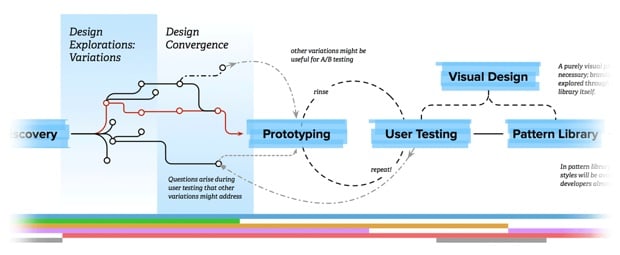
Allan White describes Our Product Design Process:

Our design process at HealthSparq is — just like everyone else’s — itself a work in process. We have ongoing debates about the tools and techniques we use to execute on each phase. Parts of our process (for example, a new pattern library that integrates directly with our apps) are being rebuilt and aren’t fully useful yet. It was very constructive to have this discussion, and to have a framework to build upon moving forward.

I’m posting this here because we started a design and development blog where we plan to share some of the things we learn as we go, and I think this one is particularly useful since it includes (what I think is) a really great visual of the design process we agreed on as a team. Head on over and check it out…

Agile & UX, still not sitting in a tree

I like the work Growing Agile does, so I clicked on Karen Greeves’s Agile & UX: What’s wrong with working one sprint ahead? with great interest. I’ve been struggling with this issue myself, but I’ve just never come across a better way to integrate UX and Agile, so I was very interested in their viewpoint. The post definitely got me thinking, but I have some issues with their objections. In the interest of letting you in on the thought process, I’m going to take some lines from the post and explain why I don’t agree1. Let’s start with their main concern with UX working one sprint ahead:

The main issue with this is one of focus. If the UX designers work one sprint ahead of the rest of the team, then the UX designers and the team actually never work on the same stuff at the same time. This means they are never focused on the same thing.

This is (partially) true, but isn’t it also true for individual developers on the team? They’ll be working on different stories. That’s the reason we have standup meetings: to make sure that those individual tasks work together to finish the whole.

I say it’s only partially true, because people can focus on more than one thing… So while the UX team is working on the next sprint, they can still be available to help with changes and questions on the current implementation work.

It doesn’t make sense to have the same standup meeting because you aren’t working on the same stuff.

Again, very few people are working on the same stuff. And this is actually an opportunity for the UX team to highlight any issues they have that developers can help them with.

It’s harder to help each other out because you are focused on finishing different stuff.

I don’t really get this point — we should be able to shift focus, and helping each other in different contexts often produce better results. Isn’t that the principle that code reviews are based on as well?

The people working ahead consider their deliverable some interim artefact, not working software, so there is a handover of both knowledge and responsibility.

In our context the UX team’s deliverable is working software in the pattern library, which uses the same frameworks and environment as our front-end developers, so that they can keep going seamlessly. So it’s possible to solve this problem.

People don’t see themselves as part of the same team, so you end up having a UX team and a dev team. This inhibits collaboration and communication.

I don’t agree with this point, either. We’re always going to have different skills on teams. Product Owners have different skills than the development team too. In fact, I think it can increase collaboration if developers are asked to provide input while the UX team is working on an upcoming feature.

The people working behind aren’t involved in the decision making that happened without them and as a result they don’t understand the reasons for certain design choices, this often leads to assumptions, and rework.

This doesn’t have to be the case. We have developers involved from Product Discovery all the way through prototyping, testing, and final specifications.

I’m not advocating writing code before an UX work has taken place. I’m saying the whole team should be involved in that work. Obviously the UX designer(s) take the lead here, but everyone on the team needs to see users use their product and understand the user journey map.

Ok, on this we agree!

In each sprint the whole team should set aside time to look at UX designs for the next sprint, as well as usability testing whatever has been completed.

I agree with this, and it’s how we work. But where I’m confused is that this still means that the UX team is working one sprint ahead of development — they’re working on “UX designs for the next sprint.” The only difference from how it’s usually done when UX and Agile works together, is that it formalizes the time that developers spend on being involved in the UX process.

If I understood that correctly, then it turns out we agree after all, and maybe this post wasn’t necessary…


  1. This is an important discussion, and I think they add valuable points to it, so please don’t see this as some kind of takedown attempt. I know (and like) Karen and Sam, but I also believe in public, respectful disagreement. So that’s my disclaimer! 

Narrative mapping for UX design

I really like the James Buckhouse explains in is article Story Map:

Halfway between a storyboard and a treasure map, it bundles the value and functional flow of your product with the delight people might feel at each step in your product. It sketches the UX flow without locking it down, and it delivers the gist of an idea and the emotional gestalt without prematurely belaboring the details.

A story map depicts how your product works and why it matters—but crucially—it does not explicitly spell out the final design, UI or in-the-weeds UX logic. It does, however, hold the product vision and works as a rubric against which the team can make better and faster decisions.

The article has some great examples worth looking at. As a big customer journey mapping fan, this is definitely something I want to try out.

I have one quibble though, and that’s with the name… “Story mapping” is already a very well established process in Agile development. Here are just a few articles about it:

Semantics are important, so my suggestion would be to simply use a synonym:

@buckhouse Maybe just use a synonym and go with “narrative mapping”?

— Rian van der Merwe (@RianVDM) August 2, 2014

Graphic design is still a thing

Trevor Connolly breaks down the myth that the Post-PSD Era means that graphic designers will soon be out of a job if they don’t learn to code. From The Post PSD Era doesn’t want to kill designers:

Designers are more important in today’s digital world than ever. You are still responsible for creating flexible design systems and finding the styles that will connect with the user. Now you just have to do it faster. By ditching the PSD and streamlining the design process, you aren’t just providing the client the value of saved time, you are making yourself more valuable. And ultimately, the real goal of the Post PSD Era is about creating more value — for your customers, for your team, and for you.

The graphic designer’s outcomes are just different now, even if they still use Photoshop. Instead of producing pixel-perfect mockups, their time is spent creating visual inventories, style tiles, and other artifacts that are essential in an atomic design environment.

[Sponsor] Photo Book Flip: your iPad photos in a beautiful book

My thanks again to Photo Book Flip for sponsoring the site again this week. Try it out!

Photo Book Flip instantly turns the photos on your iPad into a beautiful photo book with a single tap. Unlike most photo apps that only let you browse photos one at a time, Photo Book Flip lets you flip through your photos in variety of layouts, so you can enjoy them in a delightful and different way.

How is Photo Book Flip different?

Photo Book Flip is not your ordinary photo book creator app. Every time you choose a set of photos, the app intelligently lays out photos into minimalist templates inspired by photo-centric magazines like Kinfolk. So every time you create a photo book, it’s going to be a different experience even with the same set of photos.

Photo Book Flip also works nicely with Apple’s Photo Stream. This means all the photos you take on your iPhone, you can use Photo Book Flip on your iPad to make them into a photo book with just a tap.

Lastly, we think the best part of Photo Book Flip is that it takes the hassle out of creating beautiful photo books for you to enjoy.

A sneak peak at what’s coming up.

We are hard at work polishing and making this app better. There are lots more features to come and here’s a preview:

  • Sharing features: Email, tweet, or post to Facebook individual photos as well as pages in your photo books.
  • Full screen photos: Tap on any photo to see it in full screen view.
  • More templates: We’re gradually adding more templates for more layout variations.
  • Flickr and Facebook Support: The feature we’re excited about the most! Create photo books from photos in your Facebook and Flickr account.

As you can see, lots of exciting features are coming to Photo Book Flip! Find it on the App Store and make sure to sign up for updates on our website.

Photo Book Flip

Sponsorship via Syndicate Ads

Topography and how we see the world

I don’t quite know how to describe Peter Richardson’s The Lay of the Land. It’s about topography, maps, and cartoons, but actually about how we see the world:

Eventually I escaped my fjord, but a few lessons of my youth have been repeatedly confirmed: topography is important, and there’s no faster way to make an impression than with a cartoon. And by “cartoon” I mean a simplification which exaggerates some details and omits others. You could also say “model,” but I like the connotations of “cartoon”; it retains a transgressive frisson that the word “model” doesn’t have, unless you’re in fashion. But anyway.

Great essay — a bit rambling, but in a way that keeps you engaged.

[Sponsor] Photo Book Flip for iPad

A big thanks to Photo Book Flip for sponsoring Elezea this week!

Six months ago I was reading Kinfolk, a culture and lifestyle magazine with lots of beautiful photos. Flipping through it was a really delightful experience. Then it came to me, what if I could flip through my own photos as if they were a beautiful photo magazine, say on my iPad? And even better, what if I didn’t have to organize and layout the photos?

And that was the beginning of Photo Book Flip. After five months of design and development, the app has finally come to life.

Photo Book Flip instantly turns the photos on your iPad into a beautiful digital photo book with a single tap. Inspired by photo-centric magazines like Kinfolk and beautiful cookbooks like Mast Brothers Chocolate and Blue Bottle Craft of Coffee, the page layout features a minimalist design to spotlight your moments. And just like the iBooks app, as you flip each page, you’ll also see what’s behind the page as if it was a real book.

We think Photo Book Flip lets you experience your photos in a delightful and different way. Like what physical photo albums do, we created this app to celebrate the wonderful memories and moments in everyone’s life.

Find it on the App Store at a limited-time introductory price of $0.99 and learn more on our website. We think you’re going to like it. Please check it out, and let us know how we can make it better.

Photo Book Flip

Sponsored via Syndicate Ads

Data and design

Cennydd Bowles writes about data-led design vs. idea-led design in Ideas and/or data:

Product design that’s driven entirely by data is horrible. It leads us down a familiar path: the 41 shades of blue, the death by 1000 cuts, the button whose only purpose is to make a metric arc upward. It’s soul-destroying for a designer. But its moderate counterpart, data-informed product design, is fine. It reduces risk, and encourages confidence and accountability.

Product design driven entirely by ideas is equally painful. The romantic notion of design genius and the Big Idea soon gets swamped by a culture of risk, favouritism, and blame. Idea-informed product design is fine. It provides agility, creativity, the power to see blindspots and seize opportunities.

Braden Kowitz makes a similar call for a middle-of-the-road approach in Should Tech Designers Go With Their Guts — Or the Data? For an extremely practical view of using data in design, check out Joshua Porter’s excellent talk from SXSW 2011 called Metrics Driven Design. And while we’re at it, here are a couple more recent posts about using data in the design process:

Just another distributed team workflow with Trello and InVision

Working with people can be hard. Designing with people can be even harder. Designing with people who are not in the same location can be almost impossible. There’s no perfect solution for working in distributed teams, but if there’s one tool that seems to get our community further than most, it’s Trello. I’ve seen some really great Trello workflow posts over the past few months:

We have a distributed team across Portland, OR and Dallas, TX, and we use a workflow similar to the ones above, but different enough to make me think it might be worth sharing.

As background, we have a team of 5 UX Designers who split their time across 3 main products as well as our internal Pattern Library. Each product has a Design Lead (this role can rotate), and we define the Lead’s responsibilities as follows:

  • Understanding and documenting user needs, business goals, and technical constraints before any design work starts.
  • Being the single point of contact for any design questions by Product Managers or the rest of the business.
  • Making sure Trello is updated with latest priorities, due dates, and artifacts.
  • Making tie-breaker design decisions as needed and required if there are design disagreements and we can’t reach consensus.
  • Designing interactions and screens, and/or implement those designs in the pattern library, and distribute the workload to other designers as needed and capacity allows.
  • Explaining and defending design decisions, even at 8:30am before having a cup of coffee.

Granted, that last requirement is a bit harsh, but we set high standards for ourselves here.

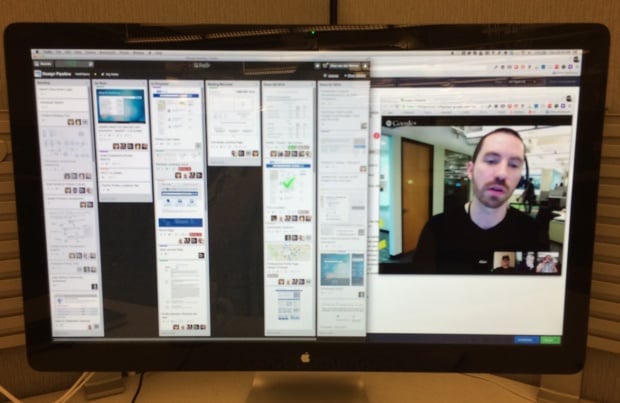
Anyway. Our week starts on Thursday mornings with a Design Pipeline meeting where we go through our upcoming tasks as a team, give each other design feedback, and play with the animations in Google Hangouts. Here is a typical Thursday morning view — Trello on the left, Google Hangouts on the right:

Trello workflow

Each Design Lead comes to this meeting with an understanding of their Product Manager’s main priorities so that we can discuss how to divide up the work. As you can see above our Trello board has 6 columns:

  • Backlog: Work that’s coming down the road, prioritized every week by the Design Lead after talking to their Product Manager.
  • Up Next: What we’re going to work on next once current tasks are complete. We use our Pipeline meeting to pull cards out of the Backlog and into the Up Next column.
  • In Progress: In typical Kanban fashion we try to limit work-in-progress, so for a card to be in this column it really has to be in progress. During our Thursday meeting we have an opportunity to give feedback and help each other out on any questions we might have.
  • Waiting/Blocked: If something can’t move forward it can’t just sit in In Progress gathering dust — we have to move it into this column. This gives me an opportunity to know where I need to get involved to unblock things if necessary.
  • Done (current quarter) and Done (previous quarter): We keep two quarters of completed cards in the history, and archive further back. If everything goes into one big Done column it just becomes really unwieldy.

A couple of other random points:

  • We use Trello’s color labels to indicate who’s responsible for each card, since it’s not possible to assign a single point of contact to a Trello card (unless you remove the watchers, which kind of defeats the point of, you know, collaboration software).
  • We all dial into Google Hangouts separately from our desks. I find that if you have two rooms and a single dial-in it’s easy to get distracted or for side discussion to start happening. This approach puts everyone on the same playing field, and as an added bonus we can all update Trello together.

During the week we use Trello as a running News Feed of what’s happening on each of our tasks, but sometimes that’s not enough. For ad hoc design feedback during the week we using InVision, a tool I dearly love, and not just because they sent me this nice coaster in the mail (thanks guys!):

InVision is more of an internal scratchpad — a safe place where we can work together as a team and ask each other tough questions about our designs. In contrast, Trello is the paper of record for each of our revisions that we share with anyone who’s interested. It works well for us to separate those spaces out.

The combination of Trello, InVision, and Google Hangouts don’t make up for in-person time (I hope for at least some of us to be in the same space every couple of months), but it sure makes it easier than email and Lync, which is THE BIGGEST PILE OF CRAP SOFTWARE EVER CREATED.

The kicker is that our organization is finally moving to JIRA and Confluence, so we’re currently messing around with Kanban boards in JIRA to replace the Trello bit of this workflow. If we ever figure that out, I’ll write another post about. But for now, this is how we work. I’d love to see how you do it. Write a post, send it to me, and I’ll link to it here.

Why hyperlinks are blue

I don’t quite get the style of John Herrman’s Internet, Why So Blue?1, but this bit about why hyperlinks started out blue is quite interesting:

The man who invented links2 was writing them to a grayscale screen. The first popular browser, Mosaic, later turned links blue because it was the darkest color available at the time that wasn’t black; they needed to stand out, but only just. Blue was the best alternative. Blue always survives the focus group. Blue wins the a/b test. Which is convenient, because blue is usually already there.


  1. It’s probably, once again, because I’m old

  2. AKA Sir Tim Berners-Lee.