Menu

Posts tagged “design”

Why Apple has a successful design culture

I’m not a big fan of these types of articles, but I did like Mark Kawano’s point about what makes Apple a successful design organization in 4 Myths About Apple Design, From An Ex-Apple Designer:

It’s actually the engineering culture, and the way the organization is structured to appreciate and support design. Everybody there is thinking about UX and design, not just the designers. And that’s what makes everything about the product so much better … much more than any individual designer or design team.

If everyone cares about design, the usual mantra that “UX is 50% design, 50% politics” turns into a much more manageable ratio.
Design and angry mobs

Paul Ford knocks it out of the park again in What I learned about hatred from my tiny daughter, an essay about collective anger on the internet:

When you aggregate enough people and get them to talk about design they become, basically, a single giant toddler.

Designing for behavior change

Dan Lockton’s As we may understand is unnecessarily long and rambling at times, but it’s still worth it for the very interesting views on the Internet of Things and designing for behavior change:

Many of the issues with the ‘behaviour change’ phenomenon can be characterised as deficiencies in inclusion: the extent to which people who are the ‘targets’ of the behaviour change are included in the design process for those ‘interventions’ (this terminology itself is inappropriate), and the extent to which the diversity and complexity of real people’s lives is reflected and accommodated in the measures proposed and implemented. This suggests that a more participatory process, one in which people co-create whatever it is that is intended to help them change behaviour, is preferable to a top-down approach. Designing with people, rather than for people.

Again, it comes down to understanding people and their needs before embarking on a design. I wonder if we’ll ever fully learn this lesson.

Also see:

Dark pattern: Walmart login

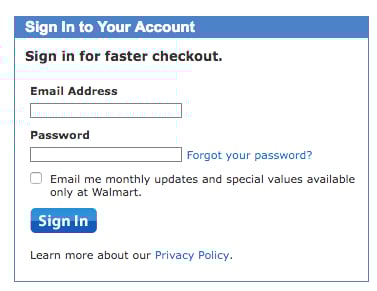
This is the login screen on Walmart.com:

Walmart login

It looks like any other login screen, with one difference. See that check box? What does that check box usually indicate?

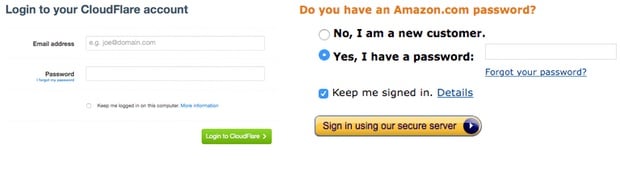
Yep. The standard pattern on the web is to use that space for the “Keep me signed in” check box on login screens. Here are a couple of examples I quickly went to:

Signing in

That Walmart interface was designed to trick people into signing up for marketing email, since most people will simply check the box without reading the text. We really need to stop with these dark patterns.

In defense of enterprise software

I like Jordan Koschei’s defense of enterprise software work in UX for the Enterprise. This is what I get to do every day at Jive:

As designers, we live to solve problems, and few problems are larger than those lurking in the inner depths of a global organizations. After all, Fortune 500s tend to have a “just get it done” attitude toward internal tools, resulting in user experiences that aren’t well designed or tested. By giving those tools the same attention to experience that you give consumer-facing products, you can improve the lives of your users and support the organization’s values and brand.

And this is so important — it’s why it’s essential to do research with end users:

A successful enterprise UX project considers the users’ needs, the clients’ goals, and the organization’s priorities. The best user experience sits at the intersection of these concerns.

Product design: a balance between vision, intuition, and data

I really liked this interview with Josh Porter where he talks mainly about good product design, and the importance of user feedback:

Good product design is the result of persistence as much as anything else. That’s why you hear companies like Airbnb and Evernote and others say that it can take years to figure out user onboarding or free trials or other sophisticated flows. It takes a lot of time to get your message right, get the user incentives right, get the interaction right, etc. It is easy to become impatient and throw out some great ideas prematurely.

And this:

The interplay between vision/intuition and data/feedback is that you need both. You need to be able to assess how you’re currently doing with data but also not let data stop you from taking risks with your product. Many teams become conservative over time as they rely more and more on data to make decisions. They ultimately become paralyzed and unable to build something really new.

Don't fear the empty space

Lukas Mathis writes about our fear of empty space in visual design in Horror Vacui:

There’s a concept in visual art called horror vacui, or «fear of empty spaces.» It’s the natural tendency of humans to fill empty spaces with stuff. Your new shelf has some empty panels? Put something in there! Your flat has an empty corner? Buy a chair! Or a plant! Something! Anything!

Humans have the same tendency when it comes to visual design. No empty space! Your screen has a few white pixels? What feature can we put there! Quick! Find something we can put there!

There’s a problem with that, though. Empty space is not useless.

He goes on to explain that “emptiness equates to prestige.” In short, don’t fear the empty space!

Content outlines as part of the prototyping process

Sophie Shepherd introduces some new deliverables in Rethinking Our Prototypical Process, including this one:

HTML prototypes have the potential to confuse some clients. In addressing feedback, I’ve answered questions like: Are we tied to this layout? (No.) Is this real content? (Ideally.) Is this what our website will look like? (Probably not.) The content outline strips any potentially distracting elements from the prototype: no layout, no typography, no links, no things remotely resembling design. It’s just a list of the content that will be on each page in order of its importance.

This deliverable, which she calls a “Content outline” or “Page description diagram”, seems like it fits well with my idea of Content slice diagrams. It’s great to see these new useful deliverables emerging — a sensible retreat from the “get out of the deliverables business” march of the past few years.

Single-purpose products

Craig Mod discusses single-purpose products in his product design essay There is much to learn from the paper towel:

All of these single-purpose tools or philosophies strive towards the same goal: whittle away the cruft around an idea to reveal its most base components, and in doing so, strengthen what is left.

The single-purpose lecture attendee is, in theory, a better student. The single-purpose-sized paper towel makes us happier, is gentler on the earth. Individual tools in unix are more efficient and easier to debug because of their specificity. Facebook Messenger on its own is easier to use to communicate without the deluge of Facebook notifications flying in our faces. And so on and so forth.

I’ve started using Craig’s solution for single-purpose Twitter notifications and single-purpose Facebook messages and it works really well.

Makers vs. Users

I really like Alex Maughan’s post In a word, Human. He discusses the dangerous gap between those who make software, and those who use it:

Successful user experiences happen when producer whims get sidelined, and primary focus is placed on that little bit of common sense shared by the majority of humans using your product or service. It’s when you empathetically put yourself in the most common psychological flow of a human using a piece of technology they know almost nothing about.

This is a topic I’m very passionate about, so I agree wholeheartedly with Alex.