Menu

Posts tagged “technology”

The Jevons Paradox and the Future of Knowledge Work

I keep thinking about this essay by Mike Fisher about what happens when automation makes work easier. His central argument challenges the assumption that’s baked into most AI-and-jobs discourse:

In every domain where automation becomes powerful, the pattern remains consistent. Human expertise becomes more valuable because the total volume of meaningful work increases. Early fears of automation nearly always assume a fixed amount of work being redistributed. But work is not fixed. Work expands when constraints are removed.

He anchors this on the Jevons Paradox—the 19th century observation that improved steam engine efficiency led to more coal consumption, not less. And then he traces the pattern through radiology, where the number of US radiologists grew from 30,723 in 2014 to 36,024 in 2023, despite Hinton’s 2016 prediction that deep learning would make them obsolete within five years.

He concludes:

AI will reshape the profession, but only in the sense that cars reshaped transportation or spreadsheets reshaped finance. Not by eliminating the field, but by expanding its scope. Not by reducing labor, but by elevating it. Not by shrinking opportunity, but by multiplying it. The world does not need fewer people who understand systems. It needs far more of them.

I find this framing useful because it shifts the question from “will AI take my job?” to “how will the work change as the volume increases?” That’s a much more interesting thing to figure out (which is also why I have been so focused on expanding my Product Second Brain).

Learning in the Age of AI

Scott H. Young has a thoughtful piece on what’s still worth learning in a world with AI. He cuts through both the panic and the hype to look at what the data actually shows. The biggest finding is probably not all that surprising: early-career workers in AI-exposed fields are getting hit hardest.

Another report from the Stanford Digital Economy Lab notes that early-career workers in AI-exposed fields (such as programming) have seen a relative decline in employment, even as employment among workers aged 30 years and older increased. This matches my intuition that AI coding agents can do a lot of junior developer tasks pretty well, but struggle to match the experience needed to tackle more serious work.

Young’s advice is to cultivate generalist skills. Not the content-free “critical thinking” kind, but genuinely transferable knowledge:

In an environment of change, it’s better to be the hardy dandelion rather than the hothouse orchid. Similarly, I expect with AI-induced change, people who have maintained diverse interests and skills will be best positioned to take advantage of the change, whereas extreme specialists will face a greater risk of extinction.

What's Actually Working with AI

Natalia Quintero wrote about what she’s learned from talking to more than 100 companies about AI implementation. This part about the problem with early adopters and isolated workflows stood out:

AI doesn’t spread like other software. Think about Asana. If one person decides to organize their team’s tasks there, everyone benefits automatically because the work is more organized, and someone on the team has taken responsibility for that organization. You don’t need to learn the tool to get value from your colleague using it. AI doesn’t work that way. If you develop workflows around how you work, that value doesn’t automatically translate to the rest of the company. Your prompts, your GPTs, your automations—they’re built around your context, your processes, and your way of thinking. They don’t transfer.

That’s the adoption problem in a nutshell. A power user’s AI setup is like their personal note-taking system—valuable for them but not portable. It explains why enterprise rollouts don’t work the way everyone expects.

The recruiting firm example is good: they trained 10 champions who built tools their peers wanted to use. One person automated scheduling coordination (saving 2–10 hours per task), and suddenly 30 others got curious. Peer-to-peer beats top-down mandates.

(If you’re curious about my setup, I wrote about it here)

Introducing TL;DL: AI-Powered Podcast Summaries

Do you ever listen to a podcast episode and wish you could have a summary you could reference later? Not the whole transcript or someone else’s review, just a concise breakdown of the key points in a format you can scan quickly when you need to remember what was covered. Well, that’s why I spent the weekend building TL;DL (Too Long; Didn’t Listen). It generates AI summaries from podcast episodes.

Beyond that, there were a few other podcast use cases I kept running into:

  • Catching up on episodes I missed. Sometimes a podcast gets 10 episodes ahead while life happens. A summary helps me decide which ones are worth going back to.
  • Getting a feel for a new podcast. Before committing to a full episode, I want to know if a new show covers topics in a way that works for how I think and learn.
  • Quick reference after listening. When I want to apply something from an episode—like a framework or technique—I don’t want to re-listen to an hour of audio to find the relevant 5 minutes.

So I built something for myself, and now I’m making it available to others.

How It Works

Registered users can submit an Apple Podcasts episode URL, choose a summary template, and the system does the rest. It transcribes the audio (using OpenAI Whisper), generates a summary (using GPT–5.2), and caches everything for a year.

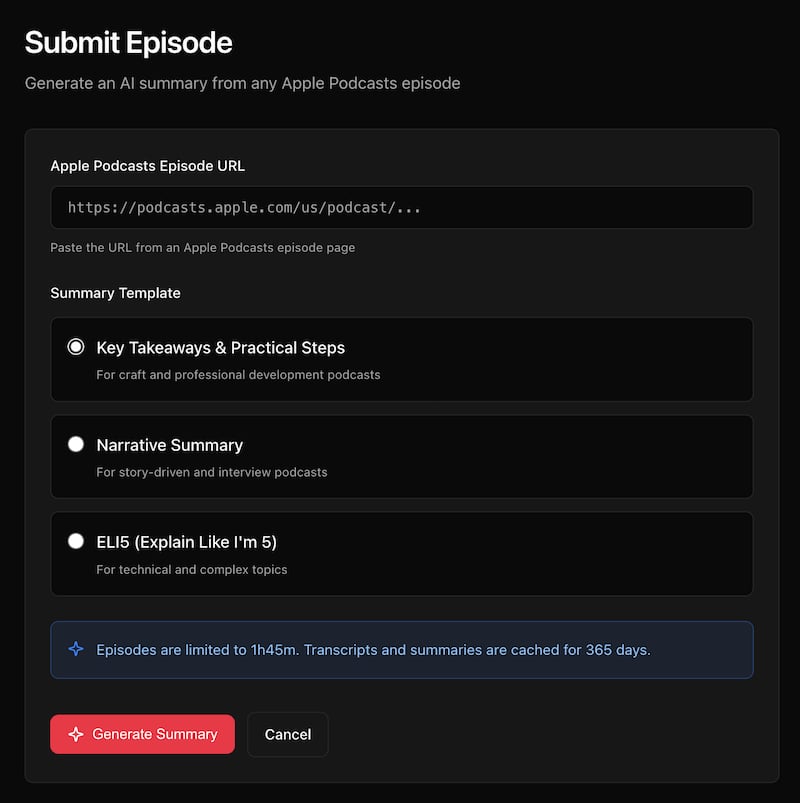
The TL;DL submission form with three template options

The three templates are designed for different types of content:

  • Key Takeaways & Practical Steps — This is the default, and it’s what I use most. The summary includes an overview, key insights, actionable steps, and notable quotes. Best for professional development and craft podcasts where you want to walk away with something to implement.
  • Narrative Summary — For story-driven content and interviews. Instead of bullet points, this generates flowing prose that captures the arc of the conversation, including key moments and themes.
  • ELI5 (Explain Like I’m 5) — For technical or complex topics. It breaks down dense material using everyday analogies and simple language.

The ELI5 Template Passed the Real Test

My wife is a therapist. She listens to highly technical psychology podcasts about things like Transference-Focused Psychotherapy and pathological narcissism. When I ran a recent episode she listed to through TL;DL, she was genuinely impressed by the “Key Takeaways” summary. It captured the clinical nuances accurately.

I, on the other hand, didn’t understand a word of it.

So I generated another summary using the “ELI5” template, and suddenly I could follow along. Concepts like devaluation got explained as “when a patient puts down the therapist, the therapy, or anything connected to it.” The technical frameworks became accessible. Here’s the episode page if you want to toggle between the two summaries yourself.

A Note about Podcast Creators and Attribution

Attribution matters to me. Every episode page prominently displays the podcast name, creator names, and both a “Listen on Apple Podcasts” link and a “Website” link to the official podcast website. My hope is that TL;DL helps expand a podcast’s audience by making the content more accessible. Summaries should bring people to a podcast, not replace the experience of listening—most podcasts have transcripts available already after all.

That said, if creators would rather not have their podcast processed, they can opt out and I’ll add their show to the blocklist.

The Technical Bits

For those interested in the stack: TL;DL runs entirely on Cloudflare’s edge platform. Cloudflare Workers handles the serverless compute, Workers KV stores the cached transcripts and summaries, and Cloudflare Queues manages the background job processing.

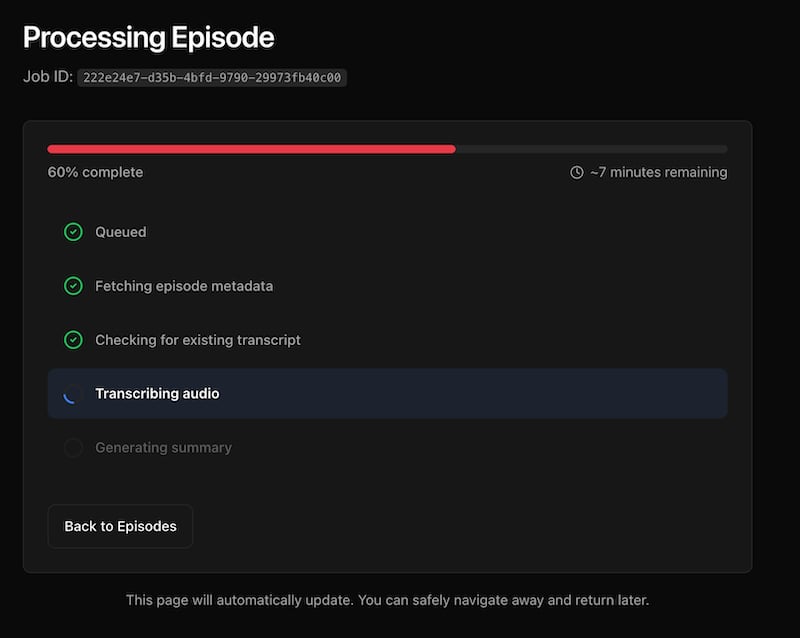
One interesting technical challenge was job status consistency. When you submit an episode, you want to see the status update in real-time as it progresses from “queued” to “transcribing” to “summarizing” to “completed.” Workers KV is eventually consistent, which meant status updates could lag by up to a minute. Users would refresh and still see “queued” even after the job was done.

I solved this with Durable Objects, Cloudflare’s strongly consistent coordination layer. The job status gets written to both the Durable Object (for immediate reads) and KV (for persistence and fallback). The UI now updates instantly.

Audio file handling for long episodes was another challenge. OpenAI Whisper has a 25MB file size limit. For podcasts that exceed this, I implemented MP3 frame-aware chunking—splitting the audio at frame boundaries so transcription can be stitched back together cleanly. The overlap handling ensures no words get lost between chunks.

What’s Next

Beyond solving my own problem, this was one of those projects where the building itself was the reward. The technical challenges were interesting, the product felt useful from day one, and I got to learn Durable Objects properly.

Submitting new episodes is currently invite-only while I iron out the rough edges. If you’re interested in access, reach out. For now, you can browse existing summaries to see how it works.

Building a music discovery app (and what I learned about Product)

I miss liner notes. In the age of infinite streaming and algorithmic playlists I find myself longing for the days when you’d flip open a CD case and actually read about the music you were listening to. Who produced this? What’s the story behind the album? Why does this track feel different from everything else they’ve made?

Spotify and Apple Music are great at giving you more music. They’re less good at helping you understand why you might love something, or what to explore next. So I built my own solution—and then rebuilt it twice.

The problem I was trying to solve

My relationship with Last.fm goes back to 2007. In case you’re not familiar, Last.fm is a service that “scrobbles” (tracks) everything you listen to, building a comprehensive history of your musical life. It’s become a wonderful archive of my taste evolution over nearly two decades.

Last.fm is great at telling you what you listened to. It’s less useful for helping you understand why you might love something, or what else you should explore. Spotify and Apple Music’s algorithmic playlists are fine, but they often feel like they’re optimizing for engagement rather than genuine discovery.

I wanted a tool that would:

  • Show me context about the artists and albums in my listening history
  • Help me discover music through similarity and connection, not just popularity metrics
  • Give me that “liner notes” depth I was craving
  • Work with my existing Last.fm data (18 years of listening history is a lot to throw away)

So I started building, first by copy-pasting from GPT–4 (the olden days!), and most recently with Antigravity + Claude Opus 4.5 (we’ve come a long way since 2023). Here’s where it all stands today…

Listen To More: three iterations and counting

Listen To More is the core project—a music discovery platform that combines real-time listening data with AI-powered insights.

The first version was simple: a personal dashboard that pulled my Last.fm data and displayed it nicely. Functional, but limited. The second version added some AI summaries using OpenAI’s API. Better, but still rough around the edges.

The current version—iteration three—is a complete rebuild focused on speed and multi-user support. What started as “a thing I made for myself” is now something anyone can use. Sign in with your Last.fm account, and you get:

  • Rich album and artist pages with AI-generated summaries, complete with source citations (so you know the AI isn’t just making things up)
  • Your personal stats showing recent listening activity, top artists and albums over different time periods.
  • Weekly insights powered by AI that analyze your 7-day listening patterns and suggest albums you might love
  • Cross-platform streaming links for every album—Spotify, Apple Music, and more
  • A Discord bot so you can share music discoveries with friends
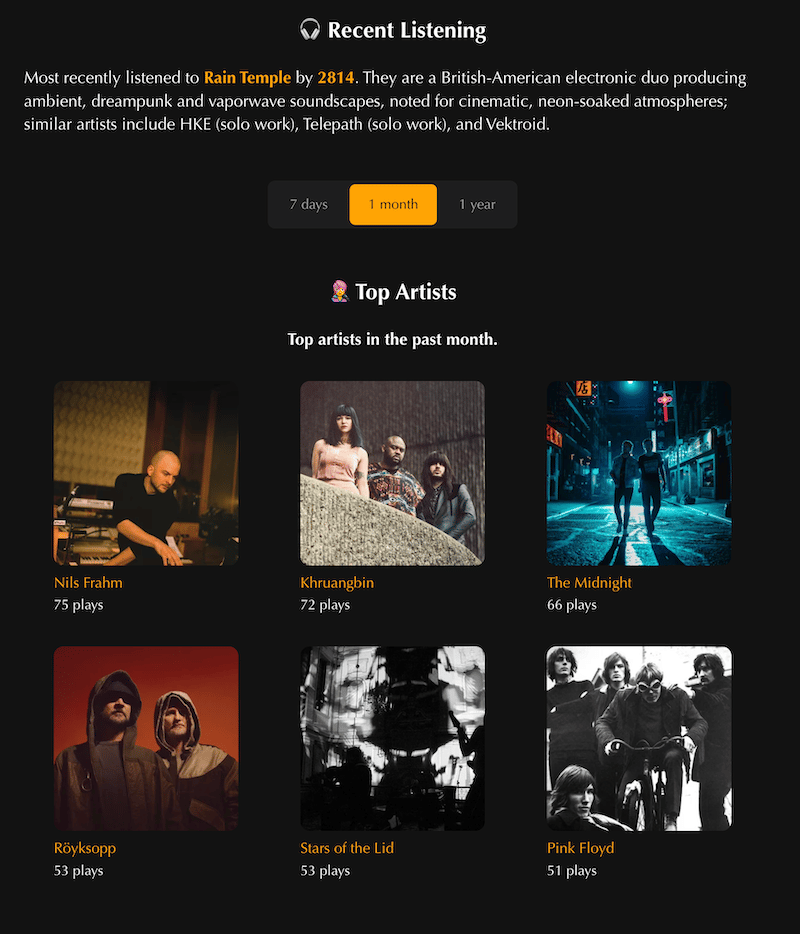
The tech stack is Hono on Cloudflare Workers, with D1 (SQLite) for the database and KV for caching. The whole thing is server-side rendered with vanilla JavaScript for progressive enhancement. Pages load in about 300ms, then AI summaries stream in asynchronously.

I chose this stack partly because I work at Cloudflare and wanted to understand our developer platform better. More on that later.

Extending the ecosystem with MCP servers

MCP stands for Model Context Protocol. In plain terms, it’s a standard that lets AI assistants (like Claude) connect to external data sources and tools. Think of it as giving an AI the ability to actually use personalized data rather than just answer questions based on pre-training.

I built two MCP servers to extend my music discovery ecosystem:

Last.fm MCP Server

Available at lastfm-mcp.com, this server lets AI assistants access your Last.fm listening data. Once connected, you can have conversations like:

  • “When did I start listening to Led Zeppelin?”
  • “What was I obsessed with in summer 2023?”
  • “Show me how my music taste has evolved over the years”

The AI can pull your actual scrobble data, analyze trends, and give you personalized insights. It supports temporal queries (looking at specific time periods), similar artists discovery, and comprehensive listening statistics.

Discogs MCP Server

This one connects to Discogs—the massive music database and marketplace that’s especially popular with vinyl collectors. If you have a Discogs collection, the MCP server lets AI assistants:

  • Search your collection with intelligent mood mapping (“find something mellow for a Sunday evening”)
  • Get context-aware recommendations based on what you own
  • Provide collection analytics and insights
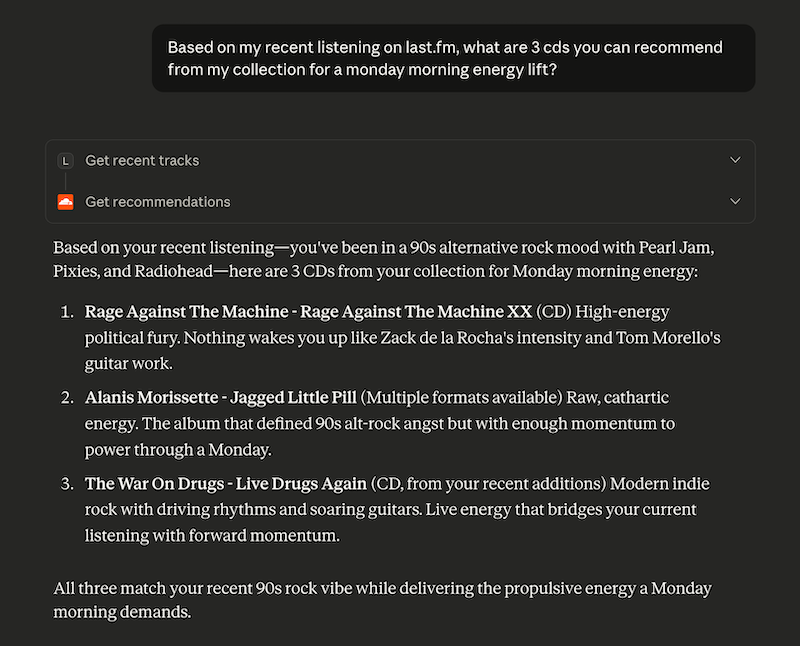
Both servers run on Cloudflare Workers and use OAuth for secure authentication. They’re open source if you want to poke around or deploy your own.

What I learned

I’m a Product Manager, not an engineer. But I’ve found that having more technical depth broadens the scope of things I am able to contextualize—and makes me more confident in my interactions with engineers. Here’s what building these projects reinforced for me:

  • Side projects are a low-stakes learning environment. When you’re building for yourself, there’s no pressure to ship by a deadline or meet someone else’s requirements. You can experiment, break things, and iterate freely. I tried approaches that would have been too risky to propose in a work context—some of them broke the site spectacularly, others worked beautifully.
  • There’s no substitute for using your own product. I use these tools every day. That constant exposure surfaces issues and opportunities that you’d never catch in a quarterly review or user interview. The feature prioritization becomes obvious when you’re feeling your own friction.
  • Building with your company’s tools is invaluable. I now have deep, practical knowledge of Cloudflare Workers, D1, KV, and the rest of our developer platform. When I’m talking to customers or evaluating feature requests, I’m drawing on real experience, not just documentation. I can empathize with the developer experience because I’ve lived it.
  • The fun matters. I keep coming back to these projects because I genuinely enjoy working on them. The satisfaction of solving a problem you personally care about is different from the satisfaction of shipping something at work. Both are valuable, but the former is what sustains a side project through the inevitable rough patches.

What’s next

I have a list of features I’d love to add—better recommendations, more sophisticated listening pattern analysis, maybe even integration with other music services. But I’m also learning to pace myself. These projects aren’t going anywhere, and part of the joy is the slow, steady improvement over time.

If you’re curious, you can check them out here:

And if you’re a PM thinking about starting a technical side project: do it. Pick something you personally care about, use tools you want to learn, and give yourself permission to build slowly. The lessons transfer in ways you won’t expect.
Where Do the Children Play?

Eli Stark-Elster has a piece that reframes the “kids and screens” debate in a way I haven’t seen before. The usual narrative blames addictive tech design, but he offers an alternative:

Why do our children spend more time in Fortnite than forests? Usually, we blame the change on tech companies. They make their platforms as addicting as possible, and the youth simply can’t resist — once a toddler locks eyes with an iPad, game over.

I want to suggest an alternative: digital space is the only place left where children can grow up without us.

The argument is that kids have always needed spaces away from adult supervision. We’ve just paved over the forests and creeks where they used to find it.

What makes this more than speculation is the research he cites: 72% of 8 to 12-year-olds say they’d rather spend time together in person, without screens. 61% wish they had more time to play with friends without adults around. The kids don’t actually want to be on screens all day. They’re looking for something we’ve taken away.

It seems like what they want is to wander together in a forest. But they can’t. So they boot up Fortnite or TikTok instead.

I’m still sitting with this one. It doesn’t let tech companies off the hook, but it does suggest that “just take away the iPad” isn’t addressing the real problem.

Building MCP servers in the real world

This has been my experience with MCP servers as well. As useful as I think my Last.fm MCP server is, I can’t see it every having more than a dozen users. But internal company servers are massively useful:

MCP is being used especially heavily by internal data and platform teams to give internal users access to systems. These are systems that these users perhaps already had access to, but it was either too complex or too broad, or needed a lot of documentation or special skills to use.

Wiki search is so much better now that I can use our internal MCP server for it via Windsurf.

Source: Building MCP servers in the real world

Measuring AI's Impact on Shipping Speed and Code Quality

Will Larson has a good post about how they’re adopting AI at his company. The process is interesting, but this is the part that jumped out at me:

My biggest fear for AI adoption is that they can focus on creating the impression of adopting AI, rather than focusing on creating additional productivity. Optics are a core part of any work, but almost all interesting work occurs where optics and reality intersect.

It’s really hard to figure out if AI tools are (1) helping teams ship faster (2) without sacrificing quality.

We’re working on figuring out this problem right now at Cloudflare. Our proposed approach sidesteps the problem of per-commit AI attribution (did Copilot write this line? did Claude?) by correlating team-level AI tool usage with team-level health metrics over time. If a team’s AI adoption increases by 30% and their change failure rate stays stable, that’s a useful signal. If AI usage spikes and incidents start trending up, that’s worth investigating.

The key insight is that you don’t need perfect attribution to get directionally useful data. Correlation isn’t causation, and teams adopting AI tools may already be more experimental or higher-performing. But at least you’re measuring something real instead of the something like “# of lines written by AI”, which leads straight to the Goodhart’s Law problem where metrics become targets.

New side project: Discord Stock & Crypto Bot

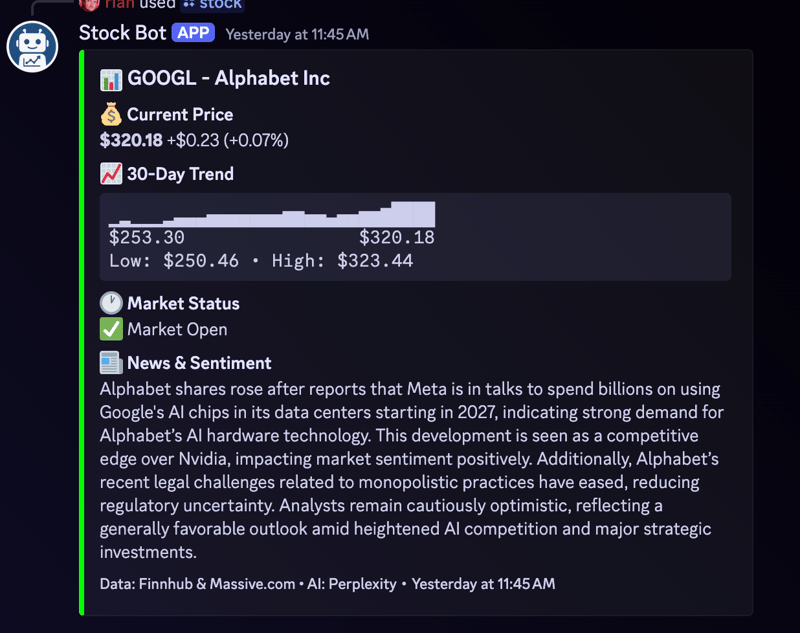
Not sure how many people would be interested in this, but it was fun to make so I thought I’d share. This is a Discord bot that provides real-time stock and cryptocurrency information, 30-day price trends, and AI-powered news summaries through slash commands. When you add the bot to Discord you can use the /stock and /crypto commands to get information like this:

Want to add it to your Discord server? Head over here!

Horrible edge cases to consider when dealing with music

Metadata is the hardest problem in software, and these examples prove my point. Don’t @ me!

My favourite: a band named brouillard, with a single member called brouillard, whose every single album is named brouillard, and of course, so is every single track.

Source: Horrible edge cases to consider when dealing with music