Do you ever listen to a podcast episode and wish you could have a summary you could reference later? Not the whole transcript or someone else’s review, just a concise breakdown of the key points in a format you can scan quickly when you need to remember what was covered. Well, that’s why I spent the weekend building TL;DL (Too Long; Didn’t Listen). It generates AI summaries from podcast episodes.
Beyond that, there were a few other podcast use cases I kept running into:
- Catching up on episodes I missed. Sometimes a podcast gets 10 episodes ahead while life happens. A summary helps me decide which ones are worth going back to.
- Getting a feel for a new podcast. Before committing to a full episode, I want to know if a new show covers topics in a way that works for how I think and learn.
- Quick reference after listening. When I want to apply something from an episode—like a framework or technique—I don’t want to re-listen to an hour of audio to find the relevant 5 minutes.
So I built something for myself, and now I’m making it available to others.
How It Works
Registered users can submit an Apple Podcasts episode URL, choose a summary template, and the system does the rest. It transcribes the audio (using OpenAI Whisper), generates a summary (using GPT–5.2), and caches everything for a year.
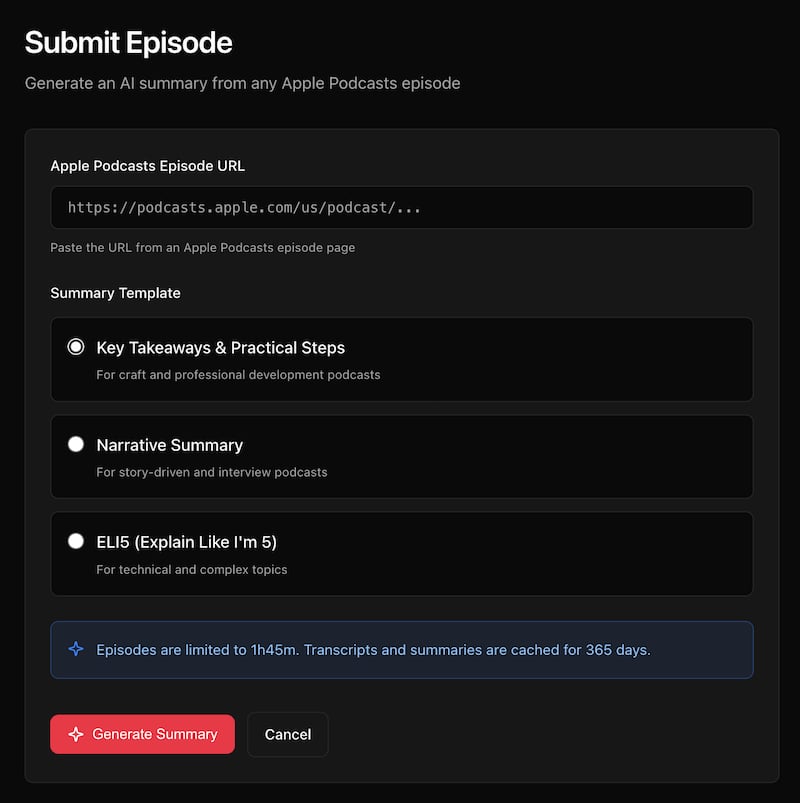
The three templates are designed for different types of content:
- Key Takeaways & Practical Steps — This is the default, and it’s what I use most. The summary includes an overview, key insights, actionable steps, and notable quotes. Best for professional development and craft podcasts where you want to walk away with something to implement.
- Narrative Summary — For story-driven content and interviews. Instead of bullet points, this generates flowing prose that captures the arc of the conversation, including key moments and themes.
- ELI5 (Explain Like I’m 5) — For technical or complex topics. It breaks down dense material using everyday analogies and simple language.
The ELI5 Template Passed the Real Test
My wife is a therapist. She listens to highly technical psychology podcasts about things like Transference-Focused Psychotherapy and pathological narcissism. When I ran a recent episode she listed to through TL;DL, she was genuinely impressed by the “Key Takeaways” summary. It captured the clinical nuances accurately.
I, on the other hand, didn’t understand a word of it.
So I generated another summary using the “ELI5” template, and suddenly I could follow along. Concepts like devaluation got explained as “when a patient puts down the therapist, the therapy, or anything connected to it.” The technical frameworks became accessible. Here’s the episode page if you want to toggle between the two summaries yourself.
A Note about Podcast Creators and Attribution
Attribution matters to me. Every episode page prominently displays the podcast name, creator names, and both a “Listen on Apple Podcasts” link and a “Website” link to the official podcast website. My hope is that TL;DL helps expand a podcast’s audience by making the content more accessible. Summaries should bring people to a podcast, not replace the experience of listening—most podcasts have transcripts available already after all.
That said, if creators would rather not have their podcast processed, they can opt out and I’ll add their show to the blocklist.
The Technical Bits
For those interested in the stack: TL;DL runs entirely on Cloudflare’s edge platform. Cloudflare Workers handles the serverless compute, Workers KV stores the cached transcripts and summaries, and Cloudflare Queues manages the background job processing.
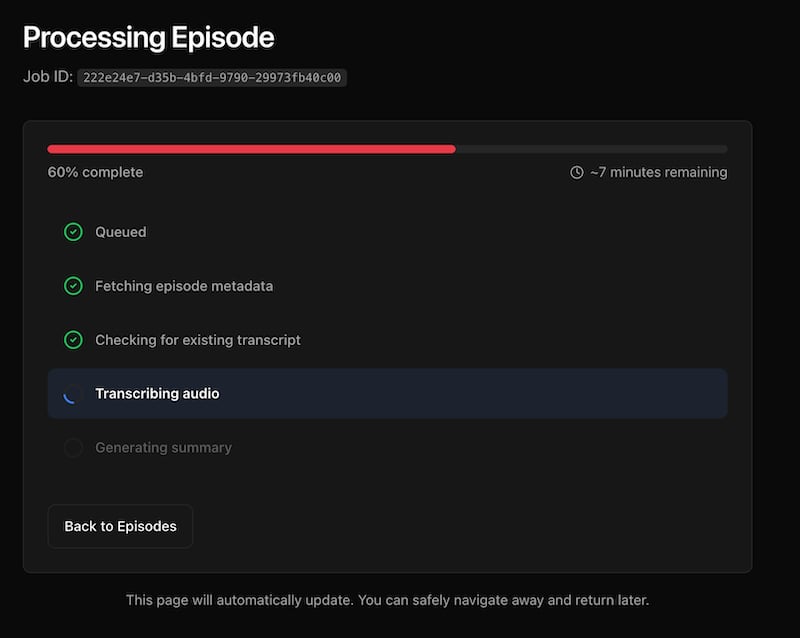
One interesting technical challenge was job status consistency. When you submit an episode, you want to see the status update in real-time as it progresses from “queued” to “transcribing” to “summarizing” to “completed.” Workers KV is eventually consistent, which meant status updates could lag by up to a minute. Users would refresh and still see “queued” even after the job was done.
I solved this with Durable Objects, Cloudflare’s strongly consistent coordination layer. The job status gets written to both the Durable Object (for immediate reads) and KV (for persistence and fallback). The UI now updates instantly.
Audio file handling for long episodes was another challenge. OpenAI Whisper has a 25MB file size limit. For podcasts that exceed this, I implemented MP3 frame-aware chunking—splitting the audio at frame boundaries so transcription can be stitched back together cleanly. The overlap handling ensures no words get lost between chunks.
What’s Next
Beyond solving my own problem, this was one of those projects where the building itself was the reward. The technical challenges were interesting, the product felt useful from day one, and I got to learn Durable Objects properly.
Submitting new episodes is currently invite-only while I iron out the rough edges. If you’re interested in access, reach out. For now, you can browse existing summaries to see how it works.